
WUSB6100M - Adaptateur Wi-Fi LINKSYS - Notice d'utilisation et mode d'emploi gratuit
Retrouvez gratuitement la notice de l'appareil WUSB6100M LINKSYS au format PDF.


| Type de produit | Adaptateur Wi-Fi USB |
| Marque | Linksys |
| Modèle | WUSB6100M |
| Normes Wi-Fi | 802.11a/b/g/n/ac |
| Interface | USB 2.0 |
| Antenne | 1 antenne interne double bande |
| Sécurité sans fil | WEP, WPA, WPA2 (Personnel et RADIUS), chiffrement jusqu'à 128 bits |
| Dimensions | 40,6 x 12 x 18 mm |
| Poids | 6,15 g |
| Alimentation | Via port USB de l'ordinateur |
| Systèmes d'exploitation compatibles | Windows 7 (32/64 bits), Windows 8.1 (32/64 bits), Windows 10 (32/64 bits) |
| Température de fonctionnement | 0 °C à 40 °C |
| Température de stockage | -20 °C à 60 °C |
| Humidité de fonctionnement | 10 % à 80 % (sans condensation) |
| Humidité de stockage | 5 % à 90 % (sans condensation) |
| LED de statut | Éteinte : non connecté ; Orange fixe : désactivé ; Blanc fixe : connecté ; Blanc clignotant : WPS en cours |
| Fonctionnalités principales | Connexion Wi-Fi AC600, compatibilité avec les réseaux Wi-Fi existants, prise en charge WPS |
| Entretien et nettoyage | Débrancher l'adaptateur avant de le nettoyer avec un chiffon doux et sec. Ne pas utiliser de produits liquides ou abrasifs. |
| Sécurité et réglementations | Certifications FCC, IC, CE, Wi-Fi (IEEE a/b/g/n/ac) |
| Pièces détachées et réparabilité | Pièces non disponibles séparément. En cas de panne, contacter le support Linksys. |
| Informations générales | Adaptateur micro USB, idéal pour les ordinateurs portables et de bureau sous Windows. |
FOIRE AUX QUESTIONS - WUSB6100M LINKSYS
Questions des utilisateurs sur WUSB6100M LINKSYS
0 question sur cet appareil. Repondez a celles que vous connaissez ou posez la votre.
Poser une nouvelle question sur cet appareil
Téléchargez la notice de votre Adaptateur Wi-Fi au format PDF gratuitement ! Retrouvez votre notice WUSB6100M - LINKSYS et reprennez votre appareil électronique en main. Sur cette page sont publiés tous les documents nécessaires à l'utilisation de votre appareil WUSB6100M de la marque LINKSYS.
MODE D'EMPLOI WUSB6100M LINKSYS
LINKSYS
User Guide
Max-Stream AC600 Wi-Fi Micro USB Adapter
WUSB6100M
Contents
Product Overview 3
Installation 4
Connect with Network Manager 4
Troubleshooting 5
Your computer does not recognize the adapter. 5
Your adapter's LED is orange. 5
Your computer cannot communicate with other computers on your Wi-Fi network.....5
Specifications 6
Linksys WUSB6100M 6
Environmental. 6
Product Overview
The USB6100M adapter upgrades Wi-Fi connectivity on your Windows-based desktop or laptop computer. To help protect your data and privacy, you can configure your home network and this adapter to use Wi-Fi Protected Access 2 (WPA2) encryption.
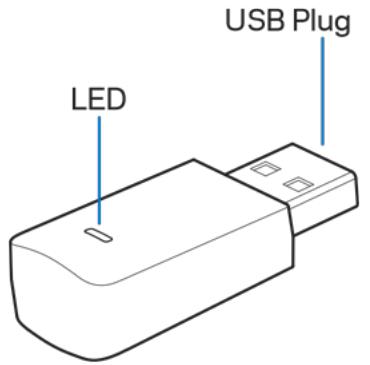
USB plug—Connect this end to any available USB port on your computer.
LED—Blinks during WPS and is solid when connected to a Wi-Fi network.
| LED Behavior | |
| Off | Not connected to a Wi-Fi network |
| Solid Orange | Disabled |
| Solid White | Connected to a Wi-Fi network |
| Blinking White | WPS in process |
Installation
- Insert the USB adapter into an open USB port on your computer.
- Watch your monitor/screen as the device automatically installs.
- Connect to your Wi-Fi network using your computer's network manager.
Note—If the adapter did not install automatically, use the provided CD or download and run the driver installation file available at linksys.com/support/wusb6100m.
Connect with Network Manager
Choose your operating system.
- Windows 10
- Windows 8.1
Windows 7
Windows 10
- Click the Wi-Fi network icon. The Network menu opens from the right side of the screen, showing you available Wi-Fi networks and your current connection status.
- Choose a network. If prompted, enter any additional required network information (such as password).
Windows 8.1
- Click Settings in the lower-right corner of the screen.
- Click the Wi-Fi network icon . The Network menu opens from the right side of the screen, showing you available Wi-Fi networks and your current connection status.
- Choose a network. If prompted, enter any additional required network information (such as password).
Windows 7
- Click the Wireless Network Configuration utility icon in the lower-right corner of the screen. A list of available Wi-Fi networks will appear.
- Choose a network and click Connect.
- If prompted to enter a network security key, type your password (security key) into the network security key field. Click OK.
Troubleshooting
Your computer does not recognize the adapter.
- Make sure that the adapter is properly inserted into your computer's USB port.
- Connect the adapter into a different USB port.
Your adapter's LED is orange.
- Your adapter has been disabled.
- Go to your computer's network settings page and make sure the adapter was installed.
- Enable the adapter.
Your computer cannot communicate with other computers on your Wi-Fi network.
- Make sure that the computers are powered on.
- Make sure that the adapter is configured with the same Wi-Fi network name and wireless security settings as the other computers on your Wi-Fi network.
Specifications
Linksys WUSB6100M
| Model Name | Max-Stream AC600 Wi-Fi Micro USB Adapter |
| Model Number | WUSB6100M |
| Standards | 802.11a, 802.11b, 802.11g, 802.11n, 802.11ac |
| Interface | USB 2.0 |
| LED | Connection Status |
| Antennas | 1 internal dual-band |
| Security Features | WEP, WPA and WPA2, Personal, WPA and WPA RADIUS |
| Security Key Bits | Up to 128-bit encryption |
| OS requirements | Windows 7, Windows 7 64-bit, Windows 8.1, Windows 8.1 64-bit, Windows 10 64-bit, Windows 10 32-bit |
Environmental
| Dimensions | 40.6mm x 12mm x 18mm |
| Unit Weight | 6.15g |
| Certifications | FCC, IC, CE, Wi-Fi (IEEE a/b/g/n/ac), Windows 7, Windows 8.1, Windows 10 |
| Operating Temp. | 32°F to 104°F (0°C to 40°C) |
| Storage Temp. | -4°F to 140°F (-20°C to 60°C) |
| Operating Humidity | 10% to 80% relative humidity, non-condensing |
| Storage Humidity | 5% to 90% non-condensing |
Specifications are subject to change without notice.
Notes:
For regulatory, warranty, and safety information, see the CD that came with your USB adapter or go to Linksys.com/support/wusb6100m.
Specifications are subject to change without notice.
Maximum performance derived from IEEE Standard 802.11 specifications. Actual performance can vary, including lower Wi-Fi network capacity, data throughput rate, range and coverage. Performance depends on many factors, conditions and variables, including distance from the access point, volume of network traffic, building materials and construction, operating system used, mix of wireless products used, interference and other adverse conditions.
BELKIN, LINKSYS and many product names and logos are trademarks of the Belkin group of companies. Third-party trademarks mentioned are the property of their respective owners. Licenses and notices for third party software used in this product may be viewed here: http://supportlinksys.com/en-us/licenses. Please contact http://supportlinksys.com/en-us/gplcodecenter for questions or GPL source code requests.
© 2016 Belkin International, Inc. and/or its affiliates. All rights reserved.
LNKPG-00305 Rev. A02
- LINKSYS
- Max-Stream AC600 Wi-Fi Micro USB Adapter
- Contents
- Product Overview
- Installation
- Connect with Network Manager
- Windows 10
- Windows 8.1
- Windows 7
- Troubleshooting
- Your computer does not recognize the adapter.
- Your adapter's LED is orange.
- Your computer cannot communicate with other computers on your Wi-Fi network.
- Specifications
- Linksys WUSB6100M
- Environmental
- Notes:
Marque : LINKSYS
Modèle : WUSB6100M
Catégorie : Adaptateur Wi-Fi