
Walkman WM-F2081 - Magnétophone à cassette SONY - Notice d'utilisation et mode d'emploi gratuit
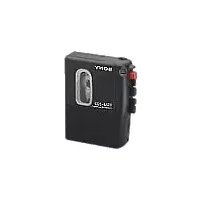
Retrouvez gratuitement la notice de l'appareil Walkman WM-F2081 SONY au format PDF.


| Type de produit | Magnétophone à cassette stéréo portable |
| Marque | Sony |
| Modèle | Walkman WM-F2081 |
| Dimensions (approximatives) | 120 x 80 x 30 mm |
| Poids (approximatif) | 200 g (sans piles) |
| Alimentation | 2 piles AA (LR6) ou adaptateur secteur (non fourni) |
| Fonctions principales | Lecture, enregistrement (micro intégré), avance/retour rapide, pause, arrêt, prise écouteurs stéréo |
| Contrôles | Touches mécaniques : play, record, stop/eject, fast forward, rewind, pause |
| Connectique | Prise écouteurs 3.5 mm, micro intégré, prise DC IN (adaptateur) |
| Autonomie (approximative) | Environ 10 heures avec piles alcalines |
| Entretien et nettoyage | Nettoyer les têtes et le cabestan avec un coton-tige imbibé d'alcool isopropylique |
| Sécurité | Ne pas exposer à l'humidité, utiliser uniquement des piles recommandées |
| Pièces détachées et réparabilité | Piles, écouteurs, adaptateur secteur ; réparation par un technicien qualifié |
| Informations générales | Appareil emblématique des années 1990, lecture et enregistrement de cassettes audio |
FOIRE AUX QUESTIONS - Walkman WM-F2081 SONY
Questions des utilisateurs sur Walkman WM-F2081 SONY
0 question sur cet appareil. Repondez a celles que vous connaissez ou posez la votre.
Poser une nouvelle question sur cet appareil
Téléchargez la notice de votre Magnétophone à cassette au format PDF gratuitement ! Retrouvez votre notice Walkman WM-F2081 - SONY et reprennez votre appareil électronique en main. Sur cette page sont publiés tous les documents nécessaires à l'utilisation de votre appareil Walkman WM-F2081 de la marque SONY.
MODE D'EMPLOI Walkman WM-F2081 SONY
SONY
3-751-399-23 (1)
Radio Cassette Player
WM-F2081
PRODUCTION OF LCL
METROPICAL TECHNOLOGY
11.2 LUT
Do not 1824
Operating Instructions
Before operating the unit, please read this manual thoroughly and retain it for future reference.
Owner's Record
The model number is located at the rear and the serial number is located inside the exercise holder.
Record the serial number in the space provided below. Refer to these numbers
whenever you call upon your Sony dealer regarding this product
Model No. WM-F2081 Serial No.
Sony Corporation ©1990 Period in Japan
WALKMAN
THELLIGIAN is a trademark of Sony Corporation.
Precautions
Handling your Walkman
• Operate the unit on 3 V DC.
For AC operation and car battery operation, use
accessories recommended for the unit. Do not use any other type
- Avoid exposure to temperature extremes, direct sunlight
moisture, sand, dust or mechanical shock. Never leave the nut in a car parked in the sun.
- If the unit has not been used for a long time set it in
playback mode for a few minutes before inserting a
censette
Tips on headphone listening
- Do not listen with headphones while driving, cycling, etc.
- Listen at a moderate volume to avoid damaging your ears.
and to avoid disturbing (those close in you)
Note on cassettes longer than 90 minutes
The use of cassettes longer than 90 minutes is not
recommended except for long continuous playback.
If you have any question or problem concerning your unit
that is not covered in this manual, please consult you!
nearest Sony dealer
INFORMATION
This equipment generates and uses radio frequency energy and if not installed and used properly, that is, in strict accordance with the manufacturer's instructions, may cause interference to radio and television reception. It has been type tested and found to comply with the limits for a Class B computing device in accordance with the specifications in Subpart J of Part 15 of FCC Rules, which are designed to provide reasonable protection against such interference in a residential installation. However, there is no guarantee that interference will not be taken into any other way. If equipment does cause interference to radio or television reception, which can be determined by turning the equipment off and on, the user is encouraged to try to correct the interference by one or more of the following measures:
Flexient the receiving antenna
Relocate the equipment with respect to the receiver
Move the equipment away from the receiver
Plug the equipment into a different outlet so that equipment and receiver are on different branch
apparent and accurs are on different branches
If necessary, the user should consult the dealer or an
experienced radio/television technician for additional
suggestions. The user may find the following booklet
(prepared by the Federal Communications Commission) helpful:
How to identify and Resolve Radio-TV Interference
Problems™. The booklet is available from the U.S.
Government Printing Office, Washington, DC 20402;
Stock No. 004-000-00345-4
Specifications
Radio section
FM 67.5 - 108 MHz
AM 530-1,710 kHz
step)
(31 - 1502 and step)
American
FM. Headphone cord
AM: Built-in latrine ba
Tape player section
response
43 - 14,000 H2 (Normal)
Borel, vol
40 - 18,000 Hz (COSMETAL)
Power 50A
10.50 4-12 m/s
[Non-Text]
Headfores (strain repair)
(二)交易对方介绍
leaf impedance 8 — 300Ω
Ромо: толдипленда
SUNDS
3VDC
Two M26 AA (Pio) Bannarot DC IN 3 V jack accents
Optional Sany EBP-500B
Battery case for use with si
D (R20) batteries
Optional Sony AC-22M phone
Adaptor for use on 120 V A 80 Hz
Optional Sony 300-70 car
battery cold for use with 12
CAN battery
Battery 91
Approve, 9 hours on tape
(1)基因通过控制 通过控制
playback and approx. 36 hours on FM video, using Fox
[Non-Text]
of the exception, using Sony ealing between AMD 76
Dimension
Aggre 07.0 × 1215 × 395m
广力云
(mVII)
[Non-Text]
(3M2 + 4I)0 = 10M0.5 inches
[Non-Text]
Net and, projecting parts as compute
Weight
Appara 265-9(93.07)
(1)
incl. batteries and bell clip
Accessory
supplied
(二)交易对方
Stereo headphones (1)
[Non-Text]
[1]
Design an
specifications subject to change
without no
- 本说明仅供参考。
Optional accessories
AC power
SCHRY AC-D2M
Battery ca
(EBP-5006)
Car better
card DOC-70
Note: Line
only the recommended AC power
adaptor
or battery cord manufactured by
Sony Pol
ty of the plugs of other
manulact
rs may do cl

Polarity of the Sony plug
Sony Service Center
| Name | Name | Mayer |
| Phone | Phone | B. 1046 |
| Email: Social Paper Form | Email: Social Paper Form | B. 1046 |
| Email: 432 PC | Email: 432 PC | B. 1046 |
| Email: 888-519-888 | Email: 888-519-888 | B. 1046 |
| Cableboard | Block Box 44 | New James |
| Phone: 10000000000000000000000000000000000000000000000000000000000000000000000000000000000000000000000000000 | Phone: 10000000000000000000000000000000000000000000000000000000000000000000000000000000000000000000000 | New James |
| Phone: 888-888-888 | Phone: 888-888-888 | B. 1046 |
| Email: 888-888-888 | Email: 888-888-888 | B. 1046 |
| Email: 888-888-888 | Email: 888-888-888 | B. 1046 |
| Phone: 100000000000000000000000000000000000000000000000000000000000000000000000000000000000000000000 | Phone: 1001111111111111111111111111111111111111111111111111111111111111111111111111111111111111111111111111111 | New James |
| Phone: 10011111111111111111111111111111111111111111111111111111111111111111111111111111111111111111111 | ||
| Phone: 100111111111111111111111111111111111111111111111111111111111111111111111111111111111111111111 | ||
| Phone: 100111111111111111111111111111111111111111111111111111111111111111111111111111111111111111111 | ||
| Phone: 100111111111111111111111111111111111111111111111111111111111111111111111111111111111111111111 | ||
| Phone: 1001111111111111111111111111111111111111111111111111111111111111111111111111111111111111111112 | ||
| Phone: 10011111111111111111111111111111111111111111111111111111111111111111111111111111111111111112 | ||
| Phone: 1088-888-888 | Phone: 888-888-888 | B. 1046 |
| Email: 888-888-888 | Email: 888-888-888 | B. 1046 |
| Email: 888-888-888 | Email: 888-828-888 | B. 1046 |
| Email: 888-888-888 | Email: 888-828-888 | B. 1046 |
| Email: 888-888-888 | Email: 888-828-888 | B. 1046 |
| Email: 988-888-888 | Email: 988-828-888 | B. 1046 |
| Email: 988-888-888 | Email: 988-828-888 | B. 1046 |
| Email: 988-888-888 | Email: 988-828-888 | B. 1046 |
Sore District Service Offices
| Mature Date | Central Date | Event Date |
| Sunny, White Company | 08/01/2017 | Sunday, Monday |
| Sunny, Black Company | Sunny Company | Sunday, Saturday Company |
| 21/25 October Smart Tour | 7/03/2019 Canadian Tour | 20th Floor 72# South |
| 11/26 March, 24, 2017 | Wed. 5, 19th St. | Wed. 5, 19th St. |
| 11/18 01-03-2018 | 11/03-04-2018 | 11/03-04-2018 |
| American Home | New London Street | New London Street |
| Sunny, Black Company | Sunny Company | Sunday, New City Company |
| 15/14 The Great Wall | 20/03/2019 London Street | 20th Floor, London |
| Sun, Dec 4, 2017 | Sunny 4th Ave., 20 00th St. | Wed. 20th St., London |
| 15/08-02-2017 | 11/03-04-2017 | 27th St., London |
| Southern Home | New London Street | New London Street |
| Sunny, Black Company | Sunny Company | Sunday, New City Company |
| 12/01 Broadway, 24th St. | 12/03/2019 London Street | 12/03/2019 London Street |
| Wed. 12, 19th St. | Wed. 12, 19th St. | Wed. 12, 19th St. |
| 11/02-02-2017 | 11/03-04-2017 | 11/03-04-2017 |
LIMITED WARRANTY
NOMA CORPORATIVA DE AMERICA / 2019. Levenza la product Freeze de los días
- In a period of 30 days from the terms of our years 2001, we can the other changes if one
20% of the total product is made by the commercial product which has 50% of the total product. This may be for all other charges
- In addition, S3M01-olig supply of re-charge mass to intake requirements for other gas and for a parcel of 1 year from the original date of accordance.
Labour and Party
to obtain necessary series during the initial 30-day period you must take the product, or better
The product price is \$2.50 per customer service rate.
During the environment of the secondary period, any defective part will be removed (i.e. in time, or
davonated pressed on a 50%7 service center. Labor for removal and installation is needed from over 50%7 enclosed within Tuesday or 50%7 service center or your residence
This was given, Auto on the 125% commercial damage and damage claim to the Bank of California.
Note in Section 3 of the project, following the provision, the amount of net cash is based on the Term of Drawn.
Proof of purchases in the level of a 100% ball in MACHINANCE WITH A confidence that the ball is a slight for the company's deal must be construed by other security investors.
Theorem 4.6.10. (A) By proof number of ()
NOTE OF REPLACEMENT AS PROCESSED UNDER THIS WARRANTY IS THE EXCLUSIVE NOTE
OF THE LICENSED COMPANY SHALL NOT BE LIKED FOR ANY DISCREPANCIAL TRANSITION. THIS DRAWINGS FOR EXCHANGE OF AND EXPRESS OR ANY OTHER INFORMATION THIS PROCESSED
DECENT TO THE (ITEM PROPOSED) BY APPLICABLE WORK AND BENEFIC WMARITY OF BENEFICAUTICAL OR IT -------- FOR A PARTICULAR ORDER ON THIS PRODUCT IS LIMITED
M. Calefina, 1974. (2005) No. 3-10
Some steps do not allow the exclusion of information on which a certain information is required. For example, there are no other information that can be applied to any way for the absence of information or otherwise was
the age of you is unknown if you stop up a women's contact with the baby transplantation
with the fact to the date of the application in this way, the information will be made for appls by us. This warranty goes out as follows legal rights and you may also have other rights
by your members, then, Deposition of Arizona has established the Lahore information
Items to apply you with product or service information.
201 9:30-8:30FF /16:45
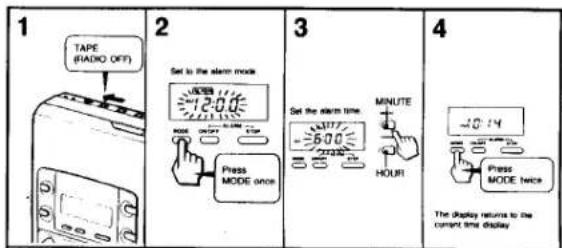
Clock Operation
HOW TO Use the MODE Button
You can change the operation mode in sequence by pressing the MODE button.

flowchart
graph TD
    A["Current time display ~300"] --> B["MODE"]
    B --> C["Alarm mode 600"]
    C --> D["MODE"]
    D --> E["Mode for current time setting ~300"]
    E --> F["MODE"]
    F --> G["The time display stops stopping"]
    G --> H["The time display stops stopping"]
    H --> I["The ALAM indicator appears"]
The alarm mode display and the display of the mode for current time setting will automatically return to the current time display after about 10 seconds.
Setting the Current Time

- If you keep pressing the HOUR and MINUTE buttons, the digits advance in sequence - The hour display does not advance even when the minute display returns to "00" after "59"
Setting the Alarm
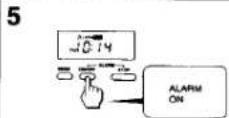
The ALARM and ON indicators appear on the display. Alarm setting is completed. The alarm will be heard at the time set.
- The ALARM and ON indicators appear on the display regardless of the current time once you see the alarm - The alarm will be heard from the inside of the unit. You also can hear if when using the headphones when you operate the tape or radio

- If you do not press the ALARM STOP button, the alarm will stop automatically after 10 minutes. - The preset alarm time cannot be canceled even if you press the ALARM STOP button.
Installing Batteries
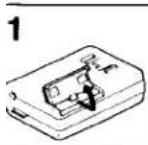

w to attach the battery compartment lid
the battery compartment lid is detached by an accidental sp, excessive force etc., attach it as illustrated in the mbered order.

Other Power Sources

Notes on batteries
- Remove the batteries when you will not use the unit for a long time to prevent damage from battery leakage and corrosion.
- The internal batteries are disconnected when you plug a cord into DC IN 3 V.
- When the batteries are run down, the DIR/BATT indicator glows faintly and the sound becomes unstable. Try a new set of batteries in this case.
- When you have installed batteries, you can see one battery slanting upward a little as illustrated below. This is not a problem and makes battery removal easy.

Radio Reception



On Operation
- When you press the TUNING + or - button for more than half a second, the automatic tuning begins, and then stops automatically when a station is received. - To stop automatic tuning, press the + or - button again.
- When scanning reaches the highest frequency of the band during automatic tuning, the display of the unit will return to the lowest frequency of the band and the unit will continue to scan.
- The STEREO indicator appears on the display when receiving a stereo broadcast.
Notes
- The automatic tuning function may occasionally miss the best setting for a radio station. If this happens, press the + or - button to adjust the tuning. - You should remove the cassette tape if it has a metallic cassette shell or labels. Such cassettes may cause interference or difficulty in tuning.
To Improve Receiving Condition
[Unreadable]
Tape Playback
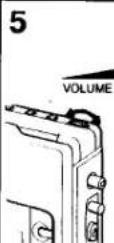
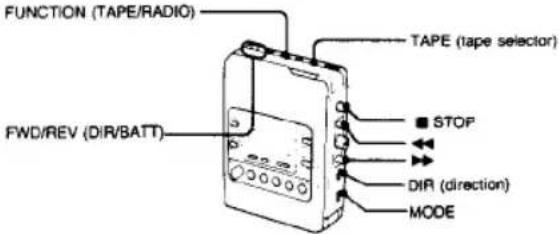
1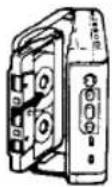 | 2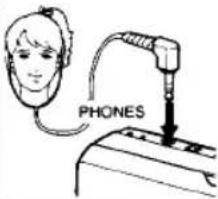 | 3 | 4VOLUME |
 |  | ||
Notes on playback
- At the end of the tape, ◀ PLAY will be released automatically in case that the MODE selector is set to ☐. After winding the tape with ◀ or ▶▶, you must press ■ STOP.
- Do not open the cassette holder while the tape is running.
• The DIR selector functions even in the stop mode.
- The sheet inside the cassette holder protects the mechanism when the unit is transported without a cassette inside. Remove the sheet before using the unit.
| On Tape Operation | |
| To listen to the other side of the cassette during playback | |
| To stop the tape | |
| To wind the tape rapidly | |
| To check the direction of the tape transportation | See FWD and REV indicators |
| On the cassette | |
| To play back both sides of the cassette onceIf you begin playback on the reverse side, the unit will shut off at the end of that side of the tape. | |
| To play back both sides of the cassette repeatedly |
| To Use According to Your Tape | |
| For normal (TYPE I) tapes | |
| For CrO2 (TYPE II) tapes or metal (TYPE IV) tapes | |
On Maintenance
• To enjoy optimum stereo sound, wipe the head, capstans and pinch-rollers with a cotton swab moistened with alcohol after every 10 hours of use.

natural_image
Illustration of a portable radio with a switch and a close-up of a test tube setup (no text or symbols)Using the Belt Clip

- Keep the plug of your headphones clean to obtain the optimum stereo sound. Wipe it with a dry, soft cloth.
- Do not use alcohol, benzine or thinner to clean the case.

Preset Tuning
You can preset up to 10 AM and/or FM stations. Preset a station while the MEMORY indicator blinks for 10 seconds.
Presetting the Stations

- To stop the presetting operation just after pressing the MEMORY button, press the button again. The MEMORY indicator goes off.
- To preset or to receive the station on buttons from six to ten, press the +5 button before pressing the buttons from one to five. The +5 indicator appears on the display and goes off after 5 seconds together with the MEMORY indicator.
Receiving the Preset Stations

To Change the AM Tuning Interval:
The AM tuning interval is factory preset to 9 kHz or 10 kHz in order to match the local frequency allocation system. If you use the receiver in an area where the frequency allocation system is based on another interval, change the position of the switch with a thin instrument as the illustration shows.
Note
If you change the interval, all preset stations, current time, and alarm time are canceled.
If the Display Shows Incorrect Information
When you use the unit for the first time or when you have left the unit without batteries for a long time, the display may show incorrect information or the preset stations may not be received correctly. If this happens, set the switch to the other position with a thin instrument, and reset the switch to the original position.

- SONY
- Operating Instructions
- Owner's Record
- Precautions
- INFORMATION
- Specifications
- LIMITED WARRANTY
- Clock Operation
- HOW TO Use the MODE Button
- Installing Batteries
- Radio Reception
- Tape Playback
- Notes on playback
- On Maintenance
- Using the Belt Clip
- Preset Tuning
- To Change the AM Tuning Interval:
- Note
- If the Display Shows Incorrect Information
Marque : SONY
Modèle : Walkman WM-F2081
Catégorie : Magnétophone à cassette