
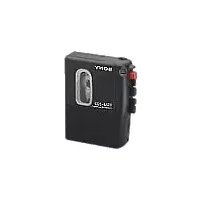
Walkman WM-SX34 - Magnétophone à cassette SONY - Notice d'utilisation et mode d'emploi gratuit
Retrouvez gratuitement la notice de l'appareil Walkman WM-SX34 SONY au format PDF.


| Type de produit | Magnétophone à cassette portable |
| Marque | Sony |
| Modèle | Walkman WM-SX34 |
| Dimensions (L x H x P) | 112 x 78 x 30 mm |
| Poids (sans piles) | 250 g |
| Alimentation | 2 piles AA (LR6) |
| Autonomie des piles | Environ 4 heures en lecture continue |
| Fonctions principales | Lecture, avance rapide, retour rapide, arrêt, pause, auto reverse |
| Connectique | Prise casque 3,5 mm, prise microphone externe (optionnelle) |
| Sortie casque | Puissance max 30 mW (par canal sous 32 ohms) |
| Rapport signal/bruit | 55 dB (avec Dolby B) |
| Réduction de bruit | Dolby B |
| Entretien et nettoyage | Nettoyer les têtes de lecture et le cabestan avec un coton-tige imbibé d'alcool isopropylique |
| Sécurité | Ne pas exposer à l'humidité, ne pas démonter, utiliser des piles recommandées |
| Pièces détachées et réparabilité | Courroie de transmission, têtes de lecture (disponibles chez revendeurs spécialisés) |
| Informations générales | Appareil stéréo, lecture de cassettes de type I, II, IV |
FOIRE AUX QUESTIONS - Walkman WM-SX34 SONY
Questions des utilisateurs sur Walkman WM-SX34 SONY
0 question sur cet appareil. Repondez a celles que vous connaissez ou posez la votre.
Poser une nouvelle question sur cet appareil
Téléchargez la notice de votre Magnétophone à cassette au format PDF gratuitement ! Retrouvez votre notice Walkman WM-SX34 - SONY et reprennez votre appareil électronique en main. Sur cette page sont publiés tous les documents nécessaires à l'utilisation de votre appareil Walkman WM-SX34 de la marque SONY.
MODE D'EMPLOI Walkman WM-SX34 SONY
SPORTS WALKMAN
Cassette Player
wm-SX34
Operating Instructions
WALKMAN is a trademark of Sony Corporation.
Sony Corporation © 1993
Printed in Taiwan R.O.C.
OWNER'S RECORD
The model number is located at the rear and the serial number is located inside the cassette holder. Record the serial number in the space provided below. Refer to them whenever you call upon your Sony dealer regarding this product.
Model No. WM-SX34
Serial No. ____
Features
AVLS (Automatic Volume Limiter System)
The AVLS selector allows you to limit the maximum volume of your Walkman personal stereo without degrading the sound quality.
- When the AVLS selector is set to either position 1 or 2 (around 95 dB and 85 dB, respectively), the volume will be kept at a moderate level without the degradation of the sound quality, even if you attempt to turn the volume up higher.
- When the AVLS selector is set to either position 1 or 2, the playback sound may be distorted or unstable according to the music (especially the bass boosted part). If this happens, turn down the volume.
- When the AVLS selector is set to OFF, you will be able to enjoy the full volume capability of your Walkman personal stereo.

Getting Started
Opening the Cassette Holder

natural_image
Diagram showing a device being processed into a closed case (no text or symbols present)Closing the Cassette Holder

natural_image
Diagram showing a device being attached to a larger device, with no visible text or symbols.If the cassette holder cannot be opened*
Open the rubber cap, then open the cassette holder. When the cassette holder opens, remember to close the rubber cap. (The Walkman is not water-resistant with the cassette holder open.)
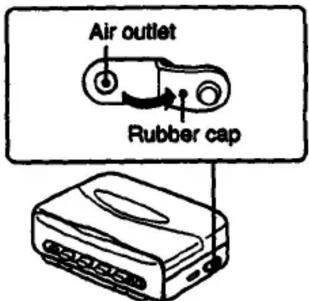
* Since the Walkman is airtight, you may not be able to open the cassette holder because of a sudden change in air pressure inside the Walkman which happens after being transported on a plane or moving from a warm place to a cold place.
Inserting Batteries
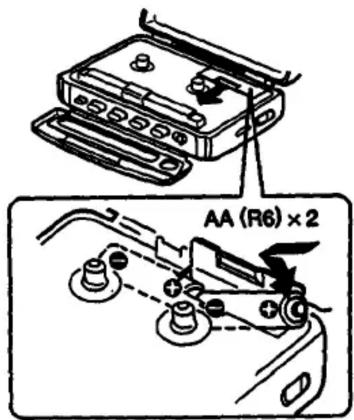
Insert two AA (R6) batteries in correct polarity.
Removing Batteries

natural_image
Mechanical assembly diagram showing a lever mechanism with pulleys and weights (no text or labels)Notes on batteries
- When you are not going to use your Walkman for a long time, remove the batteries to prevent damage from battery leakage and corrosion.
- When the batteries become weak, the BATT indicator will glow faintly and the sound will be distorted or unstable. In such a case, replace both batteries.

Using the Belt Clip
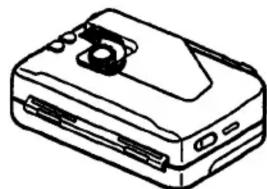
With the supplied belt clip, you can wear your Walkman on a belt for convenient use.
Removing the belt clip
natural_image
Line drawing of a rectangular electronic device with a speaker grille and ports (no text or symbols)Attaching the belt clip

natural_image
Diagram showing a device being inserted into a box, with no visible text or symbolsUsing the Hand Strap
With the supplied hand strap, you can carry your Walkman in your hand for convenient use.
Attaching the hand strap

natural_image
Diagram showing two connected electronic devices with wires, one being replaced by an arrow indicating transformation (no text or symbols present)
Removing the hand strap

natural_image
Line drawing of a mechanical device with a circular component and rectangular body (no text or symbols)Playing Cassettes
The following text is provided by the above section of the English text. The following section contains a series of words and punctuation, but no specific characters or punctuation can be extracted from this document.
quote non en [p#]

1 Insert a cassette.

natural_image
Line drawing of an open laptop case with internal compartments and a handle (no text or symbols)2 Set the TAPE selector to NORMAL or CrO2/METAL to match the tape type.

3 Press ◀ PLAY.

Operating the Cassette Player
| To stop | Press ■STOP. |
| To wind the tape | Press ▶▶ or ◀◀. |
| To change sides | Press ◀◀DIR. |
| To play both sides once | Set MODE to ⬇. |
| To play both sides repeatedly | Set MODE to ⭕. |
| To adjust the volume | Set the VOL control. |
Note on the tape transport direction
When the MODE selector is set to ☐, the tape transport direction changes automatically at the end of a cassette. If it does not change automatically, check to make sure the MODE selector is properly set (see above). If it still does not change, the batteries are weak. Replace them with a new set of batteries.
When the MODE selector is set to ⬆ and you press the ◀DIR button while playing the reverse side, the tape doesn't change direction. Instead, the tape stops.
Notes on playing cassettes
- Do not use cassettes longer than 90 minutes except for long continuous playback.
- If your Walkman has not been used for a long time, run the Walkman for a few minutes before inserting a cassette.
- Avoid winding the headphones cord around the Walkman. The buttons may be kept pressed, causing unnecessary battery usage.
Using MEGA BASS
Set the MEGA BASS selector to MID or MAX to produce deep and powerful sound.

When using MEGA BASS
If the AVLS selector is set to 1 or 2, the MEGA BASS effect is reduced.
Notes on Headphones
Concerning road safety
Do not use headphones while driving, cycling, or operating any motorized vehicle. It may create a traffic hazard and is illegal in many areas. It can also be potentially dangerous to play your headsets at high volume while walking, especially at pedestrian crossings. You should exercise extreme caution or discontinue use in potentially hazardous situations.
Preventing hearing damage
Avoid using headphones at high volume. Hearing experts advise against continuous, loud and extended play. If you experience a ringing in your ears, reduce volume or discontinue use.
Caring for others
Keep the volume at a moderate level. This will allow you to hear outside sounds and to be considerate to the people around you.
Taking Care of Your Walkman
- Before opening or closing the cassette holder, be sure to wipe off water, dust or sand on the exterior of the Walkman.
- Avoid exposing the Walkman to extreme temperatures, direct sunlight, moisture, sand, dust or mechanical shock. Never leave the Walkman in a car parked in the sun.
- Since water in the headphones jack may cause rust, cover it with the attached rubber cap when the headphones are not in use.
- The supplied headphones are not meant to be immersed in water or come in continuous contact with water. If they are accidentally dropped into water or get wet, dry them with a soft cloth. Never use an electric hair dryer.
- If the Walkman or the headphones are immersed in salt water, be sure to wash them in non-running fresh water. Never wash them under running water, and never use soap or detergent.
- Prolonged use may contaminate the tape head. If sound drop-out or excessive noise occurs, clean the head and tape path with alcohol.
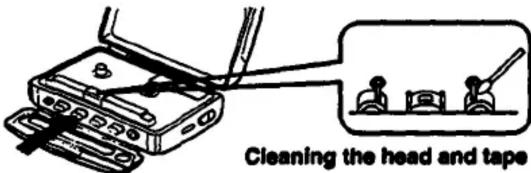
- Clean the headphones plug periodically for optimum sound.
- Do not use alcohol, benzine or thinner to clean the case.
About the rubber packing
- Any sand or dust on the rubber packing will prevent the cassette holder from closing tightly, and water may leak in. Brush off the dust once in a while.
- We recommend the packing to be changed every year. Replacement packing is available at an authorized Sony Service Facility.
If you have any question or problem concerning your Walkman, please consult your nearest Sony dealer.
Specifications
Power Requirements
3 V DC batteries AA (R6) × 2
Battery Life
| Battery | Playback |
| Sony Alkaline AM3 (N) | Approx. 7 hours |
| Sony SUM-3 (NS) | Approx. 3 hours |
Supplied Accessories
- Stereo headphones (1)
-Belt clip (1) - Hand strap (1)
- Strap loop (1)
Design and specifications are subject to change without notice.
LIMITED WARRANTY
SONY CORPORATION OF AMERICA ("SONY") warrants this product against defects in material or workmanship, as follows:
-
For a period of 90 days from the date of purchase, SONY will pay the labor charges of your SONY authorized service facility to repair the defective product. After this 90-day period, you must pay for all labor charges.
-
In addition, SONY will supply, at no charge, new or rebuilt replacements for defective parts for a period of 1 year from the original date of purchases.
Labor and Parts
To obtain warranty service during the initial 90-day period, you must take the product, or deliver the product prepaid, to a SONY authorized service facility.
Parts Only
During the remainder of the warranty period, any defective part will be replaced if it is taken, or delivered prepaid, to a SONY service center. Labor for removal and installation is available from your SONY authorized service facility or SONY service center, at your expense.
This warranty does not cover cosmetic damage, and damage due to acts of God, accident, misuse, abuse or negligence to the product, including the antenna. This warranty is valid only in the United States of America.
Proof of purchase in the form of a bill of sale or receipted invoice which is evidence that the unit is within the warranty period must be presented to obtain warranty service.
This warranty is valid only if the serial number appears on the product.
REPAIR OR REPLACEMENT AS PROVIDED UNDER THIS WARRANTY IS THE EXCLUSIVE REMEDY OF THE CONSUMER. SONY SHALL NOT BE LIABLE FOR ANY INCIDENTAL OR CONSEQUENTIAL DAMAGES FOR BREACH OF ANY EXPRESS OR IMPLIED WARRANTY ON THIS PRODUCT. EXCEPT TO THE EXTENT PROHIBITED BY APPUCABLE LAW, ANY IMPLIED WARRANTY OF MERCHANTABILITY OR FITNESS FOR A PARTICULAR PURPOSE ON THIS PRODUCT IS LIMITED IN DURATION TO THE DURATION OF THIS WARRANTY.
Some states do not allow the exclusion or limitation of incidental or consequential damages, or allow limitations on how long an implied warranty lasts, so the above limitations or exclusions may not apply to you. In addition, if you enter into a service contract with the Sony Partnership within 90 days of the date of sale, the limitation on how long an implied warranty lasts does not apply to you. This warranty gives you specific legal rights, and you may also have other rights which vary from state to state.
For your convenience, Sony Corporation of America has established the Customer Information Center to supply you with product or service information.
Important: If returning product for service, please see reverse side of this card for your nearest Sony Service Center.
SONY CUSTOMER INFORMATION CENTER
201-930-SONY (7669)
714-821-SONY (7669)
708-250-SONY (7669)
or write to:
Sony Customer Information Center
Sony Drive Mail Drop #T1-11
Park Ridge, NJ 07656
SONY CORPORATION OF AMERICA
Sony Drive, Park Ridge, New Jersey 07656
Sony Service Centers
| Arizona | Hawaii | Missouri |
| Phoenix2240 North Scottsdale RoadSunne, AZ 95291(603) 949-7699 | Honolulu50 Magnetoque StreetHonolulu, HI 96818(80th) 634-6612 | St. Louis12462 O Natural Grange RoadSaratson, MD 89044(314) 381-3201 |
| California | Stevia | New Jersey |
| Burbach Gas Angeles avenue4100 Riverside Drive, Suite A | Chicago1730 West Forterton, South 4 | Mohawk NY Matronation Area396 Route 17 South |
| Burbach, CA 91506(81th) 643-7999 | Riversport Shoeong CenterChampaign, IL 60014(312) 529-9585 | Mohawk, NJ 07430J2011 926-1665 |
| Greene Mean (Orange County avenue)2125 Grand Street SouthCosta Mesa, CA 92626(714) 949-4832 | Mills (Ohlugee NWA)7540 North Cathwell AvenueHon., IL 60648(70th) 647-2400 | UnionSandstone Shoeong CenterUS Highway 22 At Marta AvenueUnion, NJ 07003(2010) 667-9566 |
| San Bruno (San Francisco avenue)761 Commune PlazaSan Bruno, CA 84066(415) 871-2810 | Wilmington (Ohlugee SRL)6036-38 South East AvenueWilmington, IL 60569(70th) 669-0046 | Ohio |
| San Diego6976 Cornelia DriveSan Diego, CA 92123(81th) 279-2724 | KansasKansas City1712 West 95th StreetOxford ParkKC 96214(913) 666-2612 | Cleveland6130 York RoadFoma Hedges, OH 44130(216) 640-7669 |
| San Jose1398 Old Oakland RoadSan Jose, CA 99112(40th) 280-7689 | Pentanyville | |
| Colorado | Maryland (Washington DC) | Philadelphia681 Park AvenueKing of Punta, PA 18406(314) 794-9590 |
| DenverHaryana Plaza Center10740 East 8th AvenueAurora, CO 80014(303) 716-7689 | Washington DC300 Surveygate AvenueBoston, MD 30706(30th) 695-4818 | PittsburghWilmington Plaza10910 Perry Highway FL 1990Westford, PA 19590(413) 936-9466 |
| Florida | Massachusetts | Texas |
| Fort Lauderdale1980 North 31st CenturyHollywood, FL 33030(30th) 620-9600 | Boston280 University Avenue126 Whitney Industrial CenterWestwood, MA 02090(617) 228-6130 | Dallas401 Preston Valley Shoeong CenterDallas, TX 75230(214) 661-3537 |
| Georgia | Michigan | Houston7638 WhitemarHouston, TX 77083(713) 783-9761 |
| Atlanta120 Interstate North Portwark EastSuite 490(404) 953-5871 | Detroit43304 (Steven Mile RoadMon., IA 48090(213) 364-4044 | Washington |
| Atlanta, GA 301536(404) 953-5871 | Minnesota | Seattle623 RidgeSeattle, WA 98100(30th) 762-6900 |
| Minnesota4300 W. 36 Yr StreetSt. Louis Park, MN 95416(812) 520-8000 |
Sony District Service Offices
| Western Zone | Central Zone | Eastern Zone |
| Western District | Mid-West District | Western District |
| Sany Service Company | Sany Service Company | Sany Service Company |
| 2720 Boston Street South | 1300 N Arlington Heights Rd | 308 Route 17 South |
| Nestle Mines, CA 93628 | Rusella, IL 80445 | Mathews, IL 24300 |
| (714) 840-4838 | (708) 773-7898 | (201) 525-1916 |
| Northernstown District | East Central District | Mid-Atlanta District |
| Sany Service Company | Sany Service Company | Sany Service Company |
| 1358 Old Oakland Road | 28300 Town Center Area | 651 Park Avenue |
| San Jose, CA 85910 | Suite 300 Nova, MI 46060 | King of Project, FL 19406 |
| (406) 280-1878 | (313) 347-3291 | (218) 768-3845 |
| Southwestern District | Southwestern District | |
| Sany Service Company | Sany Service Company | |
| 3301 Premier Dr. Suite 100 | 120 intermsat North Parkway East | |
| avg. TX 75063 | Suite 414 | |
| (214) 950-5270 | Atlanta, GA 30339 | |
| (404) 963-5856 |
-
x
-
g--v:=j j==i,
- SPORTS WALKMAN
- OWNER'S RECORD
- Features
- AVLS (Automatic Volume Limiter System)
- Getting Started
- Inserting Batteries
- Removing Batteries
- Notes on batteries
- Using the Belt Clip
- Removing the belt clip
- Attaching the belt clip
- Using the Hand Strap
- Attaching the hand strap
- Removing the hand strap
- Playing Cassettes
- Notes on playing cassettes
- Using MEGA BASS
- When using MEGA BASS
- Notes on Headphones
- Concerning road safety
- Preventing hearing damage
- Caring for others
- Taking Care of Your Walkman
- About the rubber packing
- Specifications
- Power Requirements
- Supplied Accessories
- LIMITED WARRANTY
- Labor and Parts
- Parts Only
Marque : SONY
Modèle : Walkman WM-SX34
Catégorie : Magnétophone à cassette