
Walkman WM-SXF30 - Magnétophone à cassette SONY - Notice d'utilisation et mode d'emploi gratuit
Retrouvez gratuitement la notice de l'appareil Walkman WM-SXF30 SONY au format PDF.


| Marque | Sony |
| Modèle | Walkman WM-SXF30 |
| Type de produit | Magnétophone à cassette portable |
| Formats pris en charge | Cassette audio compacte (Type I, II, IV) |
| Dimensions (L x l x h) | 112 x 78 x 30 mm |
| Poids | 280 g (avec piles) |
| Alimentation | 2 piles AA (LR6) 1,5 V |
| Autonomie des piles | Environ 10 heures (lecture avec écouteurs) |
| Réponse en fréquence | 30 - 15 000 Hz (Type I) |
| Rapport signal/bruit | 58 dB (Dolby NR activé) |
| Fonctions principales | Lecture, enregistrement (micro intégré), avance/retour rapide, arrêt/éjection |
| Contrôle de lecture | Boutons mécaniques (lecture, pause, arrêt, avance, retour) |
| Réduction de bruit | Dolby B NR intégré |
| Sortie audio | Prise jack 3,5 mm pour écouteurs |
| Microphone | Micro électret intégré (enregistrement) |
| Affichage | Indicateur de niveau de piles (LED) |
| Boîtier | Plastique ABS |
| Entretien et nettoyage | Nettoyer les têtes de lecture/effacement avec un coton-tige imbibé d'alcool isopropylique (au moins une fois par mois en utilisation régulière) |
| Sécurité | Ne pas exposer à l'humidité ; retirer les piles en cas d'inutilisation prolongée ; utiliser uniquement des piles recommandées |
| Pièces détachées et réparabilité | Courroie de transmission (réf. Sony T-12), tête de lecture (réf. Sony RP-2A), piles : disponible en magasin ou chez Sony |
FOIRE AUX QUESTIONS - Walkman WM-SXF30 SONY
Questions des utilisateurs sur Walkman WM-SXF30 SONY
0 question sur cet appareil. Repondez a celles que vous connaissez ou posez la votre.
Poser une nouvelle question sur cet appareil
Téléchargez la notice de votre Magnétophone à cassette au format PDF gratuitement ! Retrouvez votre notice Walkman WM-SXF30 - SONY et reprennez votre appareil électronique en main. Sur cette page sont publiés tous les documents nécessaires à l'utilisation de votre appareil Walkman WM-SXF30 de la marque SONY.
MODE D'EMPLOI Walkman WM-SXF30 SONY
SONY
3-753-529-22 (1)
Radio Cassette Player
WM-SXF30
Operating Instructions
Before operating the unit, please read this manual thoroughly and retain it for future reference.
Sony Corporation ©1991 Printed in Taiwan R.O.C.

Owner's Record
The model number is located at the bottom and the serial number is located in the battery compartment.
Record the serial number in the space provided below.
Refer to these numbers whenever you call upon your Sony dealer regarding this product.
Model No. WM-SXF30 Serial No.
Notes on batteries
- Insert the batteries with correct polarity.
- When the unit is not to be used for a long period of time, remove the batteries to avoid the damage caused by battery leakage and corrosion.
- When the batteries become weak, the OPR/BATT indicator will glow faintly and playback sound will be distorted or unstable. In this case, replace both batteries with new ones.
Concerning the battery life, see "Specifications".
Handling your WALKMAN
- Do not drop nor give a shock to the unit. Doing so may cause malfunction of the unit.
- Do not leave the unit in a location near heat sources or in a place subject to direct sunlight or sand, excessive dust, moisture, rain, mechanical shock, or in a car with its windows closed.
- If the unit has not been used for a long period of time, set it in the playback mode and warm it up for a few minutes before inserting a cassette.
- Before opening or closing the cassette compartment lid, be sure to wipe off water, dust or sand on the exterior of the unit.
- Since water in the headphones jack may cause rust, cover it with the attached rubber cap when the headphones are not in use.
- If the unit or the headphones are immersed in salt water, be sure to wash them in still fresh water. Never wash them under running water, and never use soap or detergent.
- The supplied headphones are not meant to be immersed in water or come in continuous contact with water. If they are accidentally dropped into water or get wet, dry them with a soft cloth. Never use an electric hair dryer.
- The use of cassettes longer than 90 minutes is not recommended except for a long continuous playback.
Notes on headphones
- Road safety
Never use headphones while driving or cycling etc. It can be dangerous to turn up the volume too much even while walking. Doing so may hinder your hearing and can be hazardous especially at level crossings or pedestrian crossings.
• Preventing hearing damage
Avoid using headphones with the volume turned up for an extended period of time. Doing so can damage your hearing. It is advisable to keep the volume at a moderate level at all times.
• Caring for others
Remember not to disturb people around you with the sound leaking from your headphones.
Keep the volume level moderate even in noisy places so that you will be able to hear other people when they talk to you.
Cleaning
- Clean the tape head after every 10 hours of use to enjoy optimum stereo sound. Moisten a cotton swab or a soft cloth with alcohol and wipe the head, pinch-rollers and the capstans.
- Do not use alcohol, benzine, or thinner to clean the case.

About the rubber packing
- Any sand or dust on the rubber packing will prevent the cassette compartment lid from closing tightly, and water may leak in. Brush off the dust once in a while.
- We recommend the packing to be changed every year. Replacement packing is available at an authorized Sony Service Facility.
If you have any questions or problems concerning your unit, please consult your nearest Sony dealer.
Opening and Closing the Cassette Compartment Lid


If the cassette compartment lid cannot be opened*
Follow the steps in the illustration on the right.
When the cassette compartment lid opens, remember to close the rubber cap. (The unit is not water-resistant with the lid open.)
* Since the unit is airtight, you may not be able to open the lid because of a sudden change in air pressure inside the unit which happens after being transported on a plane or moving from a warm place to a cold place.

Installing the Batteries


natural_image
Simple line drawing of a mechanical clamp or bracket with two circular base components (no text or symbols)
Inserting a Cassette
Take up any slack in the tape before insertion.

natural_image
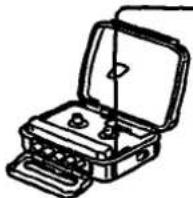
Line drawing of an open hard-shell toolbox with a lid (no text or symbols)Tape Playback See Visiting a Cassette,

2

natural_image
Line drawing of a mechanical device with a separate close-up view showing internal components (no text or symbols)3
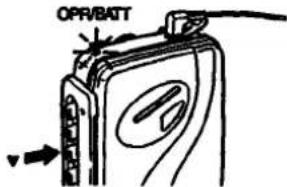
4
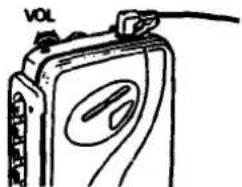
natural_image
Hand-drawn sketch of a portable electronic device with a label 'vol' on top (no other text or symbols)| To stop the tape | ■ |
| To wind the tape rapidly | 1/2 |
| To listen to the other side of the cassette | ◆ |
At the end of the tape
The tape does not stop at the end of the tape. This unit plays back the both sides of the cassette repeatedly. The locked ▲ or ▼ button must be released by pressing the ■ button.
TAPE selector
To get the best performance from your tape
| For normal tapes(TYPE I) | |
| For CrOe (TYPE II) ormetal (TYPE IV) tapes |
Radio Reception

2

natural_image
Line drawing of a portable electronic device with open case and stand (no text or symbols)-BAND selector
| For normal FM reception | |
| When a very strong FM station signal causes noise. The noise will be reduced. | |
| For AM reception |
3

4

To turn off the radio
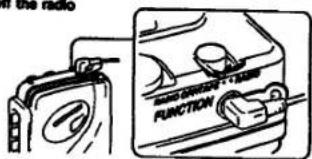
[Unreadable due to severe distortion]
FM Since the headphone cord serves as an FM antenna, extend it for better reception.

AM Since the reception is affected by the direction of the unit, rotate it horizontally for optimum reception.

Specifications
quency range
FM: 87.8 - 106 MHz
AM: 530-1.710 kHz
3 V DC, two size AA (R6) batteries
ver requirement
very life (hours)
| Items | Radio reception | Playback |
| my battery SUM-3 (NB) | approx. 13 | approx. 3 |
| my alkaline battery AMS (N) | approx. 30 | approx. 7 |
assiones supplied Stereo headphones (open-air type, 1) Belt clip (1)
- gn and specifications subject to change without notice.
Attaching the Belt Clip

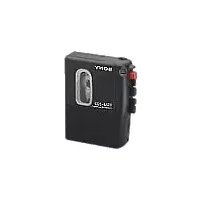
Marque : SONY
Modèle : Walkman WM-SXF30
Catégorie : Magnétophone à cassette