
WS4939 - Télécommande DSC - Notice d'utilisation et mode d'emploi gratuit
Retrouvez gratuitement la notice de l'appareil WS4939 DSC au format PDF.


| Type de produit | Télécommande sans fil |
| Marque | DSC |
| Modèle | WS4939 |
| Dimensions | 15 x 5 x 2 cm |
| Poids | 100 g (avec piles) |
| Alimentation | 2 piles AAA 1,5 V |
| Autonomie des piles | Environ 1 an (utilisation normale) |
| Fréquence radio | 433 MHz |
| Portée maximale | 100 m en champ libre |
| Nombre de canaux | 4 boutons programmables |
| Fonctions principales | Armement/désarmement, panique, activation partielle, contrôle de zone |
| Protocole de sécurité | Code roulant anti-rejeu (Keeloq) |
| Température de fonctionnement | -10°C à +50°C |
| Humidité | Jusqu'à 90% sans condensation |
| Matériau du boîtier | Plastique ABS |
| Couleur | Blanc |
| Entretien et nettoyage | Nettoyer avec un chiffon doux sec, éviter les solvants |
| Sécurité | Éviter les chocs et l'humidité, ne pas exposer au soleil prolongé |
| Pièces détachées disponibles | Piles, attaches murales (en option) |
| Réparabilité | Remplacement des piles par l'utilisateur ; autres réparations par un professionnel |
| Garantie | 2 ans (selon revendeur) |
| Informations générales | Livré avec notice d'utilisation en français |
FOIRE AUX QUESTIONS - WS4939 DSC
Questions des utilisateurs sur WS4939 DSC
0 question sur cet appareil. Repondez a celles que vous connaissez ou posez la votre.
Poser une nouvelle question sur cet appareil
Téléchargez la notice de votre Télécommande au format PDF gratuitement ! Retrouvez votre notice WS4939 - DSC et reprennez votre appareil électronique en main. Sur cette page sont publiés tous les documents nécessaires à l'utilisation de votre appareil WS4939 de la marque DSC.
MODE D'EMPLOI WS4939 DSC
Operating Instructions
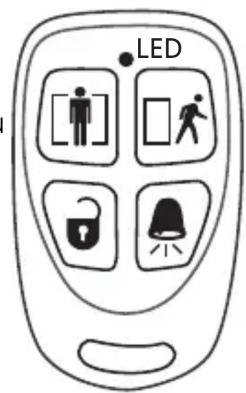
Congratulations on the purchase of the WS4939, DSC's newest 4 button wireless key. This key will allow you to arm and disarm, as well as other keypad functions with the convenience of wireless portability. Together with your installer, you can decide which functions you wish to have accessible from your portable key.
To activate, press and hold the appropriate button for approximately 1 second*. The LED located between buttons 1 and 2 will confirm that a signal has been sent to the control panel receiver.
\*False Alarm Prevention
By default, the 🔊 key is a panic key. It will require the user to press
and hold for approximately 3 seconds. This was designed to reduce the possibility of a false alarm
NOTE: Signals will not be received if the key is not within the range of the wireless receiver.
The default functions are as follows:

Stay Arming
Press this button to arm your system in the Stay mode. All perimeter zones will be armed, such as all window and door contacts, but the interior zones will remain inactive, allowing you to stay on the premises without setting off an alarm.

Away Arming
Press this button to arm your system in the Away mode. Both the interior and exterior zones will be armed, allowing you to exit the premises.

Disarm
Press this button to disarm your system. You do not have to enter your access code when you use the key to disarm the system.

Panic
Press this button to notify your central monitoring station of a situation requiring the police, such as a break-in.
Other options are available. Please discuss all WS4939 options with your installer in order to program the best possible combination to suit your needs. As well for your convenience an optional rubber button insert has been included.
Replacing the Batteries
Under normal conditions the batteries can last from 5 to 8 years. During each button press the key will send the status of its battery to the control panel receiver. If the battery is low the trouble light on the controls panel's keypad will turn ON.

To replace the battery, remove the top cover by inserting a coin into
the slot located on the bottom right corner and twist. Remove the screw at the center of the board to expose the batteries. Replace both batteries with Panasonic CR-2025 lithium batteries (see above diagram).
NOTE: The polarity of the battery must be observed, as shown in the diagram above. Improper handling of lithium batteries may result in heat generation, explosion or fire, which may lead to personal injuries.
WARNING: DANGER OF EXPLOSION IF BATTERIES ARE INSTALLED INCORRECTLY. REPLACE ONLY WITH THE SAME OR EQUIVALENT TYPE RECOMMENDED BY THE MANUFACTURER.
Keep away from small children. If Batteries are swallowed, promptly see a doctor. Do not try to recharge these batteries. Disposal of used batteries must be made in accordance with the waste recovery and recycling regulations in your area.
Note to Installer
Removing the 3-Second Delay on the Panic ( ) Key
Changing the programming will affect operation. This should be done by the installer.
- Press and hold all 4 buttons simultaneously until the LED begins to flash.
- Press the Away key ().
• These are toggle features, to return to default, repeat the steps above.
NOTE: Do not press any other button while in Programming mode.
NOTE: For UL Listed installations, the 'Arm/Disarm Bell Squawk' feature of the control panel must be enabled. The 3-second delay on the Panic key must not be disabled. The Bell Squawk must be heard from outside the premises. Refer to the control panel's Installation Manual for more information.
Belt Clip Assembly

natural_image
Technical line drawing of a mechanical device with two views: top shows internal components, bottom shows a pin-like structure (no text or symbols)Compatibility
The WS4939 is compatible with the following receivers: PC4164-433, PC5102-433, PC5132-433, RF5108-433, RF5501-433, NT9005 and the NT9010.
The WS4939 enrolls the same way as the WLS919, please refer to the receiver manual for details.
Limited Warranty
Digital Security Controls Ltd. warrants that for a period of 12 months from the date of purchase, the product shall be free of defects in materials and workmanship under normal use and that in fulfilment of any breach of such warranty, Digital Security Controls Ltd. shall, at its option, repair or replace the defective equipment upon return of the equipment to its repair depot. This warranty applies only to defects in parts and workmanship and not to damage incurred in shipping or handling, or damage due to causes beyond the control of Digital Security Controls Ltd. such as lightning, excessive voltage, mechanical shock, water damage, or damage arising out of abuse, alteration or improper application of the equipment.
The foregoing warranty shall apply only to the original buyer, and is and shall be in lieu of any and all other warranties, whether expressed or implied and of all other obligations or liabilities on the part of Digital Security Controls Ltd. Digital Security Controls Ltd. neither assumes responsibility for, nor authorizes any other person purporting to act on its behalf to modify or to change this warranty, nor to assume for it any other warranty or liability concerning this product.
In no event shall Digital Security Controls Ltd. be liable for any direct, indirect or consequential damages, loss of anticipated profits, loss of time or any other losses incurred by the buyer in connection with the purchase, installation or operation or failure of this product.
Warning: Digital Security Controls Ltd. recommends that the entire system be completely tested on a regular basis. However, despite frequent testing, and due to, but not limited to, criminal tampering or electrical disruption, it is possible for this product to fail to perform as expected.
Important Information: Changes or modifications not expressly approved by Digital Security Controls Ltd. could void the user's authority to operate this equipment.
FCC COMPLIANCE STATEMENT
CAUTION: Changes or modifications not expressly approved by Digital Security Controls Ltd. could void your authority to use this equipment.
This device complies with Part 15 of the FCC Rules. Operation is subject to the following two conditions: (1) This device may not cause harmful interference, and (2) this device must accept any interference received, including interference that may cause undesired operation.
IC: 160A-WS4939 The term ‘IC:’ before the radio certification number only signifies that Industry Canada technical specifications were met.

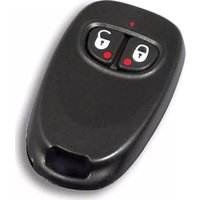

Marque : DSC
Modèle : WS4939
Catégorie : Télécommande