
E-66 - Clavier arrangeur ROLAND - Notice d'utilisation et mode d'emploi gratuit
Retrouvez gratuitement la notice de l'appareil E-66 ROLAND au format PDF.


| Type de produit | Clavier arrangeur intelligent |
| Marque | Roland |
| Modèle | E-66 |
| Nombre de touches | 76 touches (estimate) |
| Polyphonie maximale | 28 voix |
| Parties sonores | 16 parties |
| Styles d'accompagnement | Styles internes (rock, jazz, latino, etc.) et styles utilisateur |
| Effets | Réverbération (7 macros), Chorus (7 macros) |
| Conformité MIDI | GM/GS compatible, implémentation MIDI complète |
| Connectique MIDI | MIDI In, Out, Thru (estimate) |
| Fonctions d'accompagnement | Arranger avec sections Intro, Variation, Fill-in, Ending, Break |
| Banque de sons | Plus de 200 sons (GM/GS) et kits de batterie |
| Alimentation | Adaptateur secteur (ex.: 9V DC) |
| Dimensions approximatives | 1200 x 400 x 150 mm (estimation) |
| Poids approximatif | 15 kg (estimation) |
| Entretien et nettoyage | Utiliser un chiffon doux et sec. Éviter produits chimiques. |
| Précautions de sécurité | Ne pas exposer à l'humidité ou aux chocs. Débrancher en cas d'orage. |
| Pièces détachées et réparabilité | Contacter un centre agréé Roland. Pas de pièces disponibles en libre-service. |
| Informations générales | Manuel d'utilisation disponible au format PDF. Date de mise sur le marché : 1994. |
FOIRE AUX QUESTIONS - E-66 ROLAND
Questions des utilisateurs sur E-66 ROLAND
0 question sur cet appareil. Repondez a celles que vous connaissez ou posez la votre.
Poser une nouvelle question sur cet appareil
Téléchargez la notice de votre Clavier arrangeur au format PDF gratuitement ! Retrouvez votre notice E-66 - ROLAND et reprennez votre appareil électronique en main. Sur cette page sont publiés tous les documents nécessaires à l'utilisation de votre appareil E-66 de la marque ROLAND.
MODE D'EMPLOI E-66 ROLAND
E-66
INTELLIGENT SYNTHESIZER
MIDI implementation
ARRANGER SECTION
Receive data (Arranger Section)
- Channel Voice Messages -
Note off
Status Second Third
8nH kkH yyH
9nH kkH 00H
n=MIDI channel number: 0H-FH (ch.1-ch.16)
kk=Note number: 00H-7FH (0-127)
vv=Velocity: 00H-7FH (0-127)
*Ignored when "Midi Rx Channel = OFF" and the Note number is outside the "Limits".
*Velocity is ignored..
Note on
Status Second Third
9nH kkH yyH
n= MIDl channel number:0H-FH(ch.1-ch.16)
kk= Note number: 00H-7FH (0-127)
vv = Velocity: 01H-7FH (1-127)
*Ignored when "Midi Rx Channel = OFF" and the Note number is outside the "Limits".
■ Polyphonic key pressure
Status Second Third
AnH kKH vvH
n=MIDI channel number: 0H-FH (ch.1-ch.16)
kk=Note number: 00H-7FH (0-127)
vv=Value: 00H-7FH (0-127)
*Ignored when "Midi Rx Channel = OFF".
*Effect to the parameter set on "PAf controller function".
The default setting has no effect.
Control change
*Ignored when "Midi Rx Channel = OFF".
*The values set by Control change messages won't reset by receiving new Program change messages.
Bank select
Status Second Third
BnH 00H mmH
BnH 20H H
n=MIDI channel number: 0H-FH (ch.1-ch.16)
mm. ||=Bank number : 00H,00H - 7FH,7FH (bank1 - bank16384)
Default Value = 0000H (bank.1)
"Rx.Bank Select" is set to ON by "GS RESET". (Power-on default value is ON.)
*The LSB 7-bits are ignored (always regards as IIH = 00H ).
However, when sending Bank Select messages, you have to send both
of the MSB(mm) and LSB(ii) together.
*Bank select" is suspended until receiving "Program change".
To select a Tone of another bank, you have to send Bank select(mm,ll)
before sending the Program change.
*The "Variation number" of GS Format is defined as the decimal
The variation in the expression of the MSB value (Control change number 00H) of the Bank select.
Modulation
Status Second Third
BnH 01H vH
n=MIDI channel number: 0H-FH (ch.1-ch.16)
vv=Modulation depth : 00H - 7FH (0 - 127)
*Ignored when "Modulation Midi Rx Filter = OFF".
*Effect to the parameter set on "MOD controller function".
The default setting is pitch modulation depth.
Portamento time
Status Second Third
BnH 05H vvH
n=MIDI channel number: OH-FH (ch.1-ch.16)
v_V = Portamento time: 00H-7FH (0-127)
Default Value = 00H (0)
*The Portamento time value changes the rate of pitch change when Portamento is ON or when using portamento control messages.
Value 0 is the fastest.
Data entry
Status Second Third
BnH 06H mmH
BnH 26H II H
n=MIDL channel number: OH-FH (ch.1-ch.16)
mm.1l=Value of the parameter specified with RPN and/or NRPN
Volume
Status Second Third
BnH 07H vH
n=MIDI channel number: 0H-FH (ch.1-ch.16)
vv = Volume : 00H-7FH (0-127)
*Volume messages control the volume level of the specified channel (part).
Use Volume messages to control volume balance of each part.
*Ignored when "Volume Midi Rx Filter = OFF".
Panpot
Status Second Third
BnH 0AH
vH
n=MIDI channel number: 0H-FH (ch.1-ch.16)
vv=Panpot: 00H-40H7FH (Left-Center-Right)
*127 steps from Left to Center to Right.
*Within the Drum Part, the panpot provides overall control of a
stereophonic image
*Ignored when "Panpot Midi Rx Filter = OFF".
Expression
Status Second Third BnH 0BH vvH
n=MIDI channel number: 0H-FH (ch.1-ch.16)
vv=Expression: 00H-7FH (0-127)
Expression and Volume messages are cumulative, and the result will control the overall volume. Use Expression messages for expression pedal, or creating expressive effects, such as crescendo, decrescendo, while playing.
Ignored when "Expression Midi Rx Filter = OFF".
Hold1
Status Second Third BnH 40H vvH
n=MIDI channel number: 0H-FH (ch.1-ch.16)
vv=Control Value: 00H-7FH (0-127) 0-63=OFF,64-127=ON
*Ignored when "Sustain Midi Rx.Filter = OFF".
Portamento
Status Second Third BnH 41H vH
n=MIDI channel number: 0H-FH (ch.1-ch.16)
vv=Control Value: 00H-7FH (0-127) 0-63=OFF 64-127=ON
Sostenuto
Status Second Third BnH 42H vvH
n=MIDI channel number: 0H-FH (ch.1-ch.16)
yy=Control Value: 00H-7FH (0-127) 0-63=OFF 64-127=ON
Soft
Status Second Third BnH 43H vH
n=MIDI channel number: 0H-FH (ch.1-ch.16)
yy=Control Value: 00H-7FH (0-127)
Portamento Control
Status Second Third BnH 54H kkH
n=MIDI channel number: 0H-FH (ch.1-ch.16)
kk=source note number for pitch reference: 00H-7FH (0-127)
*When a Note On message is received after a Portamento Control message, the voice's pitch will glide from the pitch specified by the source note number of the Portamento Control message at the rate set by the portamento time controller (regardless portamento on/off.) If there is a currently sounding voice whose note number is coincident with the source note number, the voice's pitch will glide to the new Note On's pitch according to the portamento time without re-triggering (played in legato). Then no new voice should be assigned.
Example 1.
Effect3 depth(Chorus send level)
| On MIDI | Description | Result |
| 90 3C 40 | Note on C4 | C4 on |
| B0 54 3C | Portamento Control from C4 | no change (C4 voice still sounding) |
| 90 40 40 | Note on E4 | glide from C4 to E4 |
| 80 3C 40 | Note off C4 | no change |
| 80 40 40 | Note off E4 | E4 off |
| Example 2. | ||
| On MIDI | Description | Result |
| B0 54 3C | Portamento Control from C4 | no change |
| 90 40 40 | Note on E4 | E4 is played with glide from C4 to E4 |
| 80 40 40 | Note off E4 | E4 off |
Effect1 depth(Reverb send level)
Status Second Third BnH 5BH vH
n=MIDI channel number: 0H-FH (ch.1-ch.16)
yy=Reverb send level: 00H-7FH (0-127)
Effect1 depth messages control the Send Level of the specified channel (part) to the internal Reverb unit.
Ignored when "Reverb Depth Rx Filter = OFF".
Status Second Third BnH 5DH vH
n=MIDI channel number : 0H-FH (ch.1 - ch.16)
yy=Chorus send level : 00H-7FH (0 - 127)
Effect3 depth messages control the Send Level of the specified channel (part) to the internal Chorus unit.
Ignored when "Chorus Depth Midi Rx Filter = OFF".
Status Second Third
BnH 63H mmH
BnH 62H II H
n =MIDI channel number :0H - FH (ch.1 - ch.16)
mm =MSB of the NRPN
ll =LSB of the NRPN
Recognized when "Rx.NRPN = ON". "Rx.NRPN" is set ON by "GS RESET". The values set by NRPN won't reset by receiving new Program Change messages or Reset All Controllers.
NRPN
An NRPN (Non Registered Parameter Number) is an expanded control change message. Each function of an NRPN is described by the individual manufacturer. To use NRPN, set NRPN number (MSB/LSB) before sending data. Then send data by Data entry message(Control Change # 6/38). And then, it is recommended to send RPN null (RPN number = 7FH/7FH) to prevent the data from being unexpectedly change. For more explanation, refer to Chapter 4. Useful Information, Example of actual MIDI messages
You can change the following parameters by using NRPN.
NRPN MSB/LSB
| NRPN | Data entry MSB | Description | |
| MSB | LSB | ||
| 01H | 08H | mmH | Vibrato rate relative change on specified channel mm: 0EH-40H-72H (-50 - 0 - +50) |
| 01H | 09H | mmH | Vibrato depth relative change on specified channel mm: 0EH-40H-72H (-50 - 0 - +50) |
| 01H | 0AH | mmH | Vibrato delay relative change on specified channel mm: 0EH-40H-72H (-50 - 0 - +50) |
| 01H | 20H | mmH | TVF cutoff frequency relative change on specified channel mm: 0EH-40H-72H (-50 - 0 - +50) |
| 01H | 21H | mmH | TVF resonance relative change on specified channel mm: 0EH-40H-72H (-50 - 0 - +50) |
| 01H | 63H | mmH | TVF&TVA Env. Attack time relative change on specified channel mm: 0EH-40H-72H (-50 - 0 - +50) |
| 01H | 64H | mmH | TVF&TVA Env. Decay time relative change on specified channel mm: 0EH-40H-72H (-50 - 0 - +50) |
| 01H | 66H | mmH | TVF&TVA Env. Release time relative change on specified channel mm: 0EH-40H-72H (-50 - 0 - +50) |
| 18H | rrH | mmH | Pitch coarse of drum instrument |
| relative change on specified drum instrument rr: key number of drum instrument mm: 00H-40H-7FH (-64 - 0 - +63 semitone) | |||
| 1AH | rr H | mmH | TVA level of drum instrument absolute change on specified drum instrument rr: key number of drum instrument mm: 00H-7FH (zero - maximum) |
| 1CH | rr H | mmH | Panpot of drum instrument absolute change on specified drum instrument rr: key number of drum instrument mm: 00H,01H-40H-7FH (Random, Left-Center-Right) |
| 1DH | rr H | mmH | Reverb send level of drum instrument absolute change on specified drum instrument rr: key number of drum instrument mm: 00H-7FH (zero - maximum) |
| 1EH | rr H | mmH | Chorus send level of drum instrument absolute change on specified drum instrument rr: key number of drum instrument mm: 00H-7FH (zero - maximum) |
*Data entry LSB is ignored.
*The relative change means that the parameter value(e.g. -50 - 0 +50) will be added to the preset value.
*The absolute change means that the parameter value will be replaced by the received value.
*Ignored when "NRPN Midi Rx Filter = OFF".
RPN MSB/LSB
Status Second Third
BnH 65H mmH
BnH 64H 11H
n =MIDI channel number :0H -FH (ch.1 - ch.16)
mm =MSB of the RPN
=MSB of the RPN
*The values set by an RPN won't be reset by receiving new Program Change messages or Reset All Controllers.
RPN
An RPN (Registered Parameter Number) is an expanded control change message.
Each function of an RPN is described by the MIDI Standard.
To use RPN, set RPN number (MSB/LSB) before sending data. Then send data by Data entry message(Control Change # 6/38). And then, it is recommended to send RPN null (RPN number = 7FH/7FH) to prevent the data from being unexpectedly change. For more explanation, refer to Chapter 4. Useful Information, Example of actual MIDI messages
You can change the following parameters by using RPN.
| RPN MSB LSB | Data entry MSB LSB | Description | ||
| 00H | 00H | mmH | ---- | Pitch bend sensitivity mm: 00H-18H (0 - 24 semitone) Default value=02H (two semitones) I: ignored (value=00H) (Up to 2 octaves) |
| 00H | 01H | mmH | I H | Master fine tuning mm, I: 00 00H-40 00H-7F 7FH (-8192x100/8192 - 0 - +8191x100/8192 cents) |
| 00H | 02H | mmH | ---- | Master coarse tuning mm: 28H-40H-58H (-24 - 0 - +24 semitones) I: ignored (value=00H) |
| 7FH | 7FH | ---- | ---- | RPN null Return to disable condition. The parameter already set retains its value. mm,I: ignored. |
■ Program change
Status Second
CnH ppH
n=MIDI channel number: 0H-FH (ch.1-ch.16)
pp=Program number: 00H-7FH (prog.1-prog.128)
*The Tone of the voices already ON before receiving a program change message isn't affected.
The Tone will be changed by a new Not-on message after the program change is received.
*Ignored when "Program change Midi Rx Filter = OFF".
*In the drum part, Program change messages are ignored when the Bank is set at 129 - 16384 (ie. the value of the control change number 0 is not 00H).
Channel pressure
Status Second DnH vvH
n=MIDI channel number: 0H-FH (ch.1-ch.16)
vv=Value: 00H-7FH (0-127)
*Effect to the parameter set on "MOD controller function". The default setting has no effect.
Pitch bend change
Status Second Third EnH I H mmH
n=MIDI channel number: 0H-FH (ch.1-ch.16)
mm, l=Value: 0000H-4000H-7F7FH(-8192-0+8191)
*Effect to the parameter set on "MOD controller function". The default setting is pitch bend. -Ignored when "Pitch Bender Midi Rx Filter = OFF
Channel Mode Messages
All sounds off
Status Second Third BnH 78H 00H
n=MIDI channel number: 0H-FH (ch.1-ch.16)
*When "All sounds off" is received, all sounds on a specified channel turn off immediately. However, the state of channel messages does not change. You must not use "All sound off" message for "Note off".
Reset all controllers
Status Second Third BnH 79H 00H
n=MIDI channel number: 0H-FH (ch.1-ch.16)
*When "reset all controllers" is received, the controller value of specified channel return to the default at values as follows.
Controller Default Value
Pitch bend change % 0 (Center)
Modulation 0 (off)
Hold1 0 (off)
All notes off
Status Second Third BnH 7BH 00H
n=MIDI channel number: 0H-FH (ch.1-ch.16)
*When "All notes off" is received, all notes are turned off in the specified channel.
However, sound continues while hold1 and/or sostenuto is on.
OMNI OFF
Status Second Third
BnH 7CH 00H
n=MIID channel number : 0H - FH (ch.1 - ch.16)
*OMNI OFF is only recognized as "all notes off". Mode doesn't change.
OMNI ON
Status Second Third
BnH 7DH 00H
n=MIDI channel number: 0H-FH (ch.1-ch.16)
*OMNI ON is only recognized as "all notes off". Mode doesn't change (OMNI OFF remains).
■ MONO
Status Second Third
BnH 7EH mmH
n=MIIDI channel number : 0H - FH (ch.1 - ch.16)
mm=number of mono : 00H - 10H (0 - 16)
**MONO is recognized as "all sounds off". The specified channel turns to Mode4 (M=1), even if mm is not equal to 1 (mm is ignored).
POLY
Status Second Third
BnH 7FH 00H
n=MIDI channel number: 0H-FH (ch.1-ch.16)
*POLY is recognized as "all sounds off". The specified channel turns to Mode3.
System Real Time Message
Active sensing
Status
FEH
*Having received an "active sensing" message, E-66 expects to receive additional active sensing messages at 300ms intervals. If the interval is greater than 420ms, E-66 executes "All sounds off", "All notes off" and "Reset all controllers" and returns to normal operation. (Monitoring of active sensing messages will terminate.)
■ Sequencer start
Status
FAH
When "Sequencer start" is received the internal recorder and/or the internal arranger start according to the following table:
Exit GS mode
| SYNC MODE | ARRANGER | MIDI FILE PLAYER Record Off | MIDI FILE PLAYER Record On |
| internal | |||
| midi1 | start | start (record) | |
| midi2 | start (play) | start (record) | |
| auto1 | start | start (record) | |
| auto2 | start (play) | start (record) | |
| remote1 | start | start (record) | |
| remote 2 | start (play) | start (record) |
Sequencer stop
Status
FCH
When "Sequencer stop" is received the internal recorder and/or the internal arranger stop
Timing clock
Status
F8H
When "Timing clock" is received the internal recorder or the internal arranger are synchronized with an external clock according to the above table.
System Exclusive Message
Status
FOH
Data
iiH,ddH,...,eeH
Status
F7H
FOH:
System exclusive
ii=ID number : The ID number identifies the manufacturer of a MIDI device that triggers an exclusive message. Value 7EH and 7FH are reserved to use as universal messages which are used for extension of the MIDI Standard. 41H: Roland's Manufacturer-ID. 7EH: Universal Non-Realtime Message 7FH: Universal Realtime Message
dd....ee=data: 00H-7FH (0-127)
F7H: EOX (End of Exclusive/System common)
System Exclusive Messages of Mode Change
System Exclusive Messages of Mode Change are the messages used to initialize the internal parameters of the device to General MIDI mode or GS default mode. "GS reset" and "Exit GS mode" use a form of Roland Exclusive Message. "Turn General MIDI System On" and "Turn General MIDI System Off" use a form of Universal Non-real Time Message.
GS reset
Status Data Byte
FOH 41H,10H
2H, 12H, 40H, 00H, 7FH, 00H, 41H
Byte Description
FOH Exclusive status
41H ID number
10H Device ID
(Roland)
42H Model ID
/dev => 10H)
12H Comman
(GS)
40H Address
00H
7FH Address LSB
(GS reset)
00H Data
(End of exclusive)
41H Checksum
F7H EOX
Status
F7H
Upon receiving this message, all the internal parameters are set to the default settings of the GS Format. (Rx.NRPN SW will be turned ON by this message.)
It takes about 100 ms to execute this message.
Status
FOH 41H, 10H,
00H, 7FH, 7FH, 42H
Status
F7H
Byte Description
FOH Exclusive status
41H ID number
10H Device ID
(Roland)
42H Model ID
/dev => 10H)
12H Command
(GS)
40H Address
00H
7FH Address LSB
7FH Data
42H Checksum
F7H EOX
(Exit GS mode)
(End of exclusive)
Upon receiving this message, the unit changes from GS to E-66 default mode. It takes about 100 ms to execute this message.
Turn General MIDI System On
| Status | Data Byte | Status | |
| F0H | 7EH, 7FH, 09H, 01H | F7H | |
| Byte | Description | ||
| F0H | Exclusive status | ||
| 7EH | ID number | (Universal non-real time message) | |
| 7FH | ID of target device | (Broadcast) | |
| 09H | sub-ID#1 | (General MIDI message) | |
| 01H | sub-ID#2 | (General MIDI On) | |
| F7H | EOX | (End of exclusive) | |
Upon receiving this message, all the internal parameters are set to the default settings of General MIDI System Level 1.
It takes about 100 ms to execute this message.
Turn General MIDI System Off
| Status | Data Byte | Status | |
| F0H | 7EH, 7FH, 09H, 02H | F7H | |
| Byte | Description | ||
| F0H | Exclusive status | ||
| 7EH | ID number | (Universal non-real time message) | |
| 7FH | ID of target device | (Broadcast) | |
| 09H | sub-ID#1 | (General MIDI message) | |
| 02H | sub-ID#2 | (General MIDI Off) | |
| F7H | EOX | (End of exclusive) | |
Upon receiving this message, the unit changes from General MIDI mode to E-66 default mode.
It takes about 100 ms to execute this message.
Data Transfer
E-66 can transmit and receive the various parameters using System Exclusive messages of the following data format.
GS Common Exclusive messages use Model ID = 42H and Device ID = 17(10H)
Request data 1 RQ1
This message is sent out to request the remote device to send back the required data. It contains data for the address and size that specify designation and length, respectively.
On receiving a proper RQ1 message for the device, the device will transmit a "Data set 1 (DT1)" message, which contains the requested data. Otherwise, the device will not send anything.
| Status | Data Byte | Status | |
| F0H | 41H, 10H, 42H, 11H, aaH, bbH, ccH, ssH, ttH, uuH, sum | F7H | |
| Byte | Description | ||
| F0H | Exclusive status | ||
| 41H | Manufacturer's ID | (Roland) | |
| 10H | Device ID | (dev => 10H) | |
| 42H | Model ID | (GS) | |
| 11H | Command ID | (RQ1) | |
| aaH | Address MSB | ||
| bbH | : | ||
| ccH | Address LSB | ||
| ssH | Size MSB | ||
| ttH | : | ||
| uuH | Size LSB | ||
| sum | Checksum | ||
| F7H | EOX | (End of exclusive) | |
E-66 only recognizes the RQ1 messages whose address and size match the Parameter Address Map (Section 3).
The error checking process uses a Checksum. Refer to Section 4 to calculate a Checksum.
Data set 1 DT1
This message corresponds to the actual data transfer process.
On receiving a DT1 message, the device writes the data to internal memory according to the address.
| Status | Data Byte | Status |
| F0H | 41H, 10H, 42H, 12H, aaH, bbH, ccH, ddH, ... eeH, sum F7H | |
| Byte | Description | |
| F0H | Exclusive status | |
| 41H | Manufacturer's ID | (Roland) |
| 10H | Device ID | (dev => 10H) |
| 42H | Model ID | (GS) |
| 12H | Command ID | (DT1) |
| aaH | Address MSB | |
| bbH | : | |
| ccH | Address LSB | |
| ddH | Data | |
| : | : | |
| eeH | Data | |
| sum | Checksum | |
| F7H | EOX | (End of exclusive) |
E-66 only recognizes the DT1 messages whose address and size match the Parameter Address Map (Section 3).
To send large DT1 messages at a time, insert 40ms - intervals at least in between each packet.
*The error checking process uses a Checksum. Refer to Section 4 to calculate a Checksum.
Transmit data (Arranger Section)
- Channel Voice Messages -
Note off
Status Second Third 9nH kkH 00H
n=MIDI channel number: 0H-FH (ch.1-ch.16)
kk=Note number: 00H-7FH (0-127)
vv=Velocity: 00H-(0)
- The E-66 does not send this message if "Midi Tx Channel" = Off
Note on
Status Second Third 9nH kkH vvH
n=MIDI channel number: 0H-FH (ch.1-ch.16)
kk=Note number: 00H-7FH (0-127)
vv=Velocity: 01H-7FH (1-127)
- The E-66 does not send this message if "Midi Tx Channel" = Off
Control change
- The E-66 does not send this message if "Midi Tx Channel" = Off
Bank select
Status Second Third BnH 00H mmH BnH 20H I H
n=MIDI channel number: 0H-FH (ch.1-ch.16)
mm, I = Bank number: 00H,00H-7FH,7FH (bank1-bank16384)
Modulation
Status Second Third BnH 01H vvH
n=MIDI channel number: 0H-FH (ch.1-ch.16)
vv=Modulation depth: 00H-7FH (0-127)
*The E-66 does not send this message if "Modulation Midi Tx Filter = OFF".
Volume
Status Second Third
BnH 07H vH
n=MIDI channel number: 0H-FH (ch.1-ch.16)
v_V = Volume : 00H-7FH (0-127)
*The E-66 does not send this message if "Volume Midi Tx Filter = OFF".
Data entry
Status Second Third
BnH 06H mmH
BnH 26H iiH
n=MIDL channel number:0H-FH (ch.1-ch.16)
mm.ji=Value of the specified parameter with RPN and/or NRPN
Hold1
Status Second Third
BnH 40H vH
n=MIDI channel number: 0H-FH (ch.1-ch.16)
vv = Control Value: 00H-7FH (0-127) 0-63=OFF, 64-127=ON
*The E-66 does not send this message if "Sustain Midi Tx Filter = OFF".
■ Effect1 depth (Reverb send level)
Status Second Third
BnH 5BH vvH
n=MIDI channel number: 0H-FH (ch.1-ch.16)
vv = Reverb send level: 00H-7FH (0-127)
*Effect1 depth messages control the Send Level of the specified channel (part) to the internal Reverb unit.
*The E-66 does not send this message if "Reverb Depth Midi I x Filter = OFF".
■ Effect3 depth (Chorus send level)
Status Second Third
BnH 5DH vvH
n=MI DI channel number: 0H-FH(ch.1-ch.16)
v_w = Chorus send level: 00H-7FH (0-127)
*Effect3 depth messages control the Send Level of the specified channel (port) to the internal Chorus unit.
*The E-66 does not send this message if "Chorus Depth Midi Tx Filter = OFF".
■ Program change
Status Second
CnH ppH
n-MIDI channel number; OH-FH (ch.1-ch.16)
pp=Program number: 00H-7FH (prog.1-prog.128)
*The E-66 does not send this message if "Program Change Midi Tx Filter = OFF".
Pitch bend change
Status Second Third
EnH 11H mmH
n-MIDL channel number : OH - FH (ch.1 - ch.16)
mm.1|=Value:0000H-4000H-7F7FH(-8192-0+8191)
*The E-66 does not send this message if "Pitch Bender Midi Tx Filter = OFF".
System Realtime Message
Active sensing
Status
FEH
*Transmits at about 250ms intervals.
Sequencer start
Status
FAH
"Sequencer start" is transmitted if START/STOP button is pressed and the internal recorder/arranger is in STOP mode.(see note)
*The E-66 does not send this message if "Midi TX Str/Strp = OFF".
Sequencer stop
Status
FCH
"Sequencer stop" is transmitted if START/STOP button is pressed and the internal recorder/arranger is in START mode. (see note)
*The F-66 does not send this message if "Midi TX Str/Stp = OFF".
Timing clock
Status
F8H
"Timing clock" is always transmitted. (see note)
*The E-66 does not send this message if "Midi TX Clock = OFF".
System Exclusive Message
Data Transfer
E-66 transmits "Data set 1 (DT1)" message when receiving a proper
"Request Data 1(RQ1)" message. Refer to section 1(System Exclusive Message)
Data set 1
Status Data Byte Status
41H, 10H, (42H), 12H, aaH, bbH, ccH, ddH, ... eeH, sum F/H
Byte Description
FOH Exclusive status
41H Manufacturer's ID (Holand) (dev 10H )
10H Device ID (GS)
42H Model ID (DT1)
12H Command ID
Address MSRP
aaaH Address MSB
bbH Address
ccH Address LSB
ddH Data
,
eeH Data
sum Checksum
F7H EOX
(End of exclusive)
*F-66 only sends the DT1 messages whose address and size match the
Parameter Address Map (Section 3).
*If the data to send is a large data (more than 128 bytes), then the data
will be sent out in separate packets.
*Refer to Section 4 to calculate a Checksum.
Parameter address map (Model ID=42H)
This map indicates address, size, Data (range), Parameter, Description, and Default Value of parameters which can be transferred using "Request data 1 (RQ1)" and "Data set 1 (DT1)".
All the numbers of address, size, Data, and Default Value are indicated in 7-bit Hexadecimal-form.
Individual parameter
You can use individual parameter communication to send or request an individual parameter value.
One packet of System Exclusive messages "F0 .... F7" can only have one parameter (which may contain several bytes).
You cannot use any address having "#" for the top address in a System Exclusive message.
SYSTEM PARAMETERS
| Address(H) | SIZE(H) | Data(H) | Parameter | Description | Default value (H) |
| 40 00 00 | 00 00 04 | 0018 - 07E8 | MASTER TUNE | -100 0 - +100 0 [cent] | 00 04 00 00 |
| 40 00 01# | Use nibbled data. | ||||
| 40 00 02# | |||||
| 40 00 03# | |||||
| 40 00 7F | 00 00 01 | 00, 7F | MODE SET(Rx Only) | 00 = GS Reset127 = Exit GS |
Refer to "System Exclusive Messages of Mode Change" Page 6.
PATCH PARAMETERS
E-66 has 16 parts. The parameters of each part are called PATCH PARAMETERS. To send or request a PATCH PARAMETER, use not the part number (which is usually same as the MIDI channel number) but the BLOCK NUMBER in the message.
| * x...BLOCK NUMBER (0 - F), Part 1 (default MIDlch = 1) x=1 Acc 1 |
| Part 2 (default MIDlch = 2) x=2 Acc Bass |
| Part 3 (default MIDlch = 3) x=3 Acc 2 |
| Part 4 (default MIDlch = 4) x=4 Upper 1 |
| Part 5 (default MIDlch = 5) x=5 Acc 3 |
| Part 6 (default MIDlch = 6) x=6 Upper 2 |
| Part 7 (default MIDlch = 7) x=7 Acc 4 |
| Part 8 (default MIDlch = 8) x=8 Acc 5 |
| Part 9 (default MIDlch = 9) x=9 Acc 6 |
| Part 10 (default MIDlch =10) x=0 Acc Drums |
| Part 11 (default MIDlch =11) x=A Lower |
| Part 12 (default MIDlch =12) x=B Man Bass |
| Part 13 (default MIDlch =13) x=C Rx only 1 |
| Part 14 (default MIDlch =14) x=D Rx only 2 |
| Part 15 (default MIDlch =15) x=E Rx only 3 |
| Part 16 (default MIDlch =16) x=F Man Drums |
^* n...MIDI channel number (0 - F) of the BLOCK.
| Address(H) | SIZE(H) | Data(H) | Parameter | Description | Default value (H) | |
| 40 01 30 | 00 00 01 | 00 - 07 | REVERB MACRO | 00:Room 1 | 04 | (*) |
| 01: Room 2 | (*) | |||||
| 02: Room 3 | (*) | |||||
| 03: Hall 1 | (*) | |||||
| 04: Hall 2 | (*) | |||||
| 05: Plate | (*) | |||||
| 06: Delay | (*) | |||||
| 07: Panning Delay | (*) | |||||
| 40 01 33 | 00 00 01 | 00 - 7F | REVERB LEVEL | 40 | ||
| 40 01 34 | 00 00 01 | 00 - 7F | REVERB TIME | 40 | (*) | |
REVERB MACRO is a parameter used to select the preset type of the effect. When set to another REVERB MACRO, all other reverb parameters will reset to the values set for each type of REVERB MACRO.
| 40 01 38 | 00 00 01 | 00 - 07 | CHORUS MACRO | 00: Chorus 1 | 02 | (*) |
| 01: Chorus 2 | (*) | |||||
| 02: Chorus 3 | (*) | |||||
| 03: Chorus 4 | (*) | |||||
| 04: Feedback Chorus | (*) | |||||
| 05: Flanger | (*) | |||||
| 06: Short Delay | (*) | |||||
| 07: Short Delay(FB) | (*) | |||||
| 40 01 3A | 00 00 01 | 00 - 7F | CHORUS LEVEL | 40 | (*) | |
| 40 01 3D | 00 00 01 | 00 - 7F | CHORUS RATE | 03 | (*) |
CHORUS MACRO is a parameter used to select the preset type of effect. When set to another CHORUS MACRO, then all other chorus parameters will reset to the values set for each type of CHORUS MACRO.
| 40 1x 00 | 00 00 02 | 00 - 7F | TONE NUMBER | CC#00 VALUE | 00 |
| 40 1x 01# | 00 - 7F | P.C. VALUE | 00 | ||
| 40 1x 02 | 00 00 01 | 00 - 10 | Rx CHANNEL | 1 - 16,OFF | same as the Part# |
| 40 1x 03 | 00 00 01 | 00 - 01 | Rx PITCH BEND | OFF / ON | 01 |
| 40 1x 05 | 00 00 01 | 00 - 01 | Rx PROGRAM CHANGE OFF / ON | 01 | |
| 40 1x 0A | 00 00 01 | 00 - 01 | Rx. NRPN | OFF / ON | 00(01*) |
* Rx. NRPN is set to ON by "GS RESET".
| 40 1x 0B | 00 00 01 | 00 - 01 | Rx. MODULATION | OFF / ON | 01 | |
| 40 1x 0C | 00 00 01 | 00 - 01 | Rx. VOLUME | OFF / ON | 01 | |
| 40 1x 0D | 00 00 01 | 00 - 01 | Rx. PANPOT | OFF / ON | 01 | (*) |
| 40 1x 0E | 00 00 01 | 00 - 01 | Rx. EXPRESSION | OFF / ON | 01 | (*) |
| 40 1x 0F | 00 00 01 | 00 - 01 | Rx. HOLD1 | OFF / ON | 01 | |
| 40 1x 13 | 00 00 01 | 00 - 01 | MONO/POLY MODE | Mono / Poly (=Bn 7E 01 / Bn 7F 00) | 01 | (*) |
| 40 1x 16 | 00 00 01 | 28 - 58 | PITCH KEY SHIFT | -24 +24 [semitone] | 40 | (*) |
| 40 1x 17 | 00 00 02 | 08 - F8 | PITCH OFFSET FINE | -12.0 - +12.0 [Hz] Use nibblized data | 08 00 | (*) |
| 40 1x 18# | ||||||
| 40 1x 19 | 00 00 01 | 00 - 7F | PART LEVEL | 0 - 127 (=Bn 07 vv) | 64 | |
| 40 1x 1C | 00 00 01 | 00 - 7F | PART PANPOT | Random, 63(LEFT) +63(RIGHT) (=Bn OA vv, except random) | 40 | |
| 40 1x 21 | 00 00 01 | 00 - 7F | CHORUS SEND LLEVEL | 0 - 127 (=Bn 5D vv) | 00 | |
| 40 1x 22 | 00 00 01 | 00 - 7F | REVERB SEND LEVEL | 0 - 127 (=Bn 5B vv) | 28 | |
| 40 1x 30 | 00 00 01 | OE - 72 | TONE MODIFY 1 Vibrato rate | -50 +50 (=Bn 63 01 62 08 06 vv) | 40 | (*) |
| 40 1x 31 | 00 00 01 | OE - 72 | TONE MODIFY 2 Vibrato depth | -50 +50 (=Bn 63 01 62 09 06 vv) | 40 | (*) |
| 40 1x 32 | 00 00 01 | OE - 72 | TONE MODIFY 3 TVF cutoff freq | -50 +50 (=Bn 63 01 62 20 06 vv) | 40 | (*) |
| 40 1x 33 | 00 00 01 | OE - 72 | TONE MODIFY 4 TVF resonance | -50 +50 (=Bn 63 01 62 21 06 vv) | 40 | (*) |
| 40 1x 34 | 00 00 01 | OE - 72 | TONE MODIFY 5 TVF&TVA Env attack | -50 +50 (=Bn 63 01 62 63 06 vv) | 40 | (*) |
| 40 1x 35 | 00 00 01 | OE - 72 | TONE MODIFY 6 TVF&TVA Env decay | -50 +50 (=Bn 63 01 62 64 06 vv) | 40 | |
| 40 1x 36 | 00 00 01 | OE - 72 | TONE MODIFY 7 TVF&TVA Env release | -50 +50 (=Bn 63 01 62 66 06 vv) | 40 | (*) |
| 40 1x 37 | 00 00 01 | OE - 72 | TONE MODIFY 8 Vibrato delay | -50 +50 (=Bn 63 01 62 0A 06 vv) | 40 | (*) |
| 40 1x 40 | 00 00 0C | 00 - 7F | SCALE TUNING C | -64 +63 [cent] | 40 | |
| 40 1x 41# | 00 - 7F | SCALE TUNING C# | -64 +63 [cent] | 40 | ||
| 40 1x 42# | 00 - 7F | SCALE TUNING D | -64 +63 [cent] | 40 | ||
| 40 1x 43# | 00 - 7F | SCALE TUNING D# | -64 +63 [cent] | 40 | ||
| 40 1x 44# | 00 - 7F | SCALE TUNING E | -64 +63 [cent] | 40 | ||
| 40 1x 45# | 00 - 7F | SCALE TUNING F | -64 +63 [cent] | 40 | ||
| 40 1x 46# | 00 - 7F | SCALE TUNING F# | -64 +63 [cent] | 40 | ||
| 40 1x 47# | 00 - 7F | SCALE TUNING G | -64 +63 [cent] | 40 | ||
| 40 1x 48# | 00 - 7F | SCALE TUNING G# | -64 +63 [cent] | 40 | ||
| 40 1x 49# | 00 - 7F | SCALE TUNING A | -64 +63 [cent] | 40 | ||
| 40 1x 4A# | 00 - 7F | SCALE TUNING A# | -64 +63 [cent] | 40 | ||
| 40 1x 4B# | 00 - 7F | SCALE TUNING B | -64 +63 [cent] | 40 | ||
| 40 2x 10 | 00 00 01 | 40 - 58 | BEND PITCH CONTROL | 0 - 24 [semitone] | 42 |
(*) The parameter is not transmitted by E-66.
TONE PROGRAM CHANGE
A 'GM/GS' tone is selected by the message : BnH 00H mmH BnH 20H iiH CnH ppH n=MIDI channel number : 0H-FH(0-15) 0=ch.1 15=ch.16
| mmH | iiH | ppH | Sound Name |
| * piano | |||
| 00H | 00H | 00H | Piano 1 |
| 08H | 00H | 00H | Piano 1w |
| 10H | 00H | 00H | Piano 1d |
| 00H | 00H | 01H | Piano 2 |
| 08H | 00H | 01H | Piano 2w |
| 00H | 00H | 02H | Piano 3 |
| 08H | 00H | 02H | Piano 3w |
| 00H | 00H | 03H | Honky-tonk |
| 08H | 00H | 03H | Honky-tonk w |
| 00H | 00H | 04H | E.Piano 1 |
| 08H | 00H | 04H | Detuned EP 1 |
| 10H | 00H | 04H | E.Piano 1 v |
| 18H | 00H | 04H | 60's E.Piano |
| * | |||
| 00H | 00H | 05H | E.Piano 2 |
| 08H | 00H | 05H | Detuned EP 2 |
| 10H | 00H | 05H | E.Piano 2v |
| * | |||
| 00H | 00H | 06H | Harpsichord |
| 08H | 00H | 06H | Coupled Hps. |
| 10H | 00H | 06H | Harpsi.w |
| 18H | 00H | 06H | Harpsi.o |
| * | |||
| 00H | 00H | 07H | Clav. |
| * chromatic percussion | |||
| 00H | 00H | 08H | Celesta |
| * | |||
| 00H | 00H | 09H | Glockenspiel |
| * | |||
| 00H | 00H | 0AH | Music Box |
| * | |||
| 00H | 00H | 0BH | Vibraphone |
| 08H | 00H | 0BH | Vib w |
| * | |||
| 00H | 00H | 0CH | Marimba |
| 08H | 00H | 0CH | Marimba w |
| * | |||
| 00H | 00H | 0DH | Xylophone |
| * | |||
| 00H | 00H | 0EH | Tubular-bell |
| 08H | 00H | 0EH | Church Bell |
| 09H | 00H | 0EH | Carillon |
| * | |||
| 00H | 00H | 0FH | Santur |
| * | |||
| * organ | |||
| 00H | 00H | 10H | Organ 1 |
| 01H | 00H | 10H | Organ 101 |
| 08H | 00H | 10H | Detuned Or.1 |
| 09H | 00H | 10H | Organ 109 |
| 10H | 00H | 10H | 60's Organ 1 |
| 11H | 00H | 10H | 60's Organ 2 |
| 12H | 00H | 10H | 60's Organ 3 |
| 20H | 00H | 10H | Organ 4 |
| 21H | 00H | 10H | Even Bars |
| * | |||
| 00H | 00H | 11H | Organ 2 |
| 01H | 00H | 11H | Organ 201 |
| 08H | 00H | 11H | Detuned Or.2 |
| 20H | 00H | 11H | Organ 5 |
| * | |||
| 00H | 00H | 12H | Organ 3 |
| * | |||
| 00H | 00H | 13H | Church Org.1 |
| 08H | 00H | 13H | Church Org.2 |
| 10H | 00H | 13H | Church Org.3 |
| * | |||
| 00H | 00H | 14H | Reed Organ |
| * | |||
| 00H | 00H | 15H | Accordion Fr |
| 08H | 00H | 15H | Accordion It |
| * | |||
| 00H | 00H | 16H | Harmonica |
| 01H | 00H | 16H | Harmonica 2 |
| * | |||
| 00H | 00H | 17H | Bandoneon |
| * | |||
| guitar | |||
| 00H | 00H | 18H | Nylon-str.Gt |
| 08H | 00H | 18H | Ukulele |
| 10H | 00H | 18H | Nylon Gt.o |
| 20H | 00H | 18H | Nylon Gt.2 |
| 00H | 00H | 19H | Steel-str.Gt |
| 08H | 00H | 19H | 12-str.Gt |
| 09H | 00H | 19H | Nylon+Steel |
| 10H | 00H | 19H | Mandolin |
| 20H | 00H | 19H | Steel-strGT2 |
| 00H | 00H | 1AH | Jazz Gt. |
| 08H | 00H | 1AH | Hawaiian Gt. |
| 00H | 00H | 1BH | Clean Gt. |
| 08H | 00H | 1BH | Chorus Gt. |
| 00H | 00H | 1CH | Muted Gt. |
| 08H | 00H | 1CH | Funk Gt. |
| 10H | 00H | 1CH | Funk Gt.2 |
| 00H | 00H | 1DH | Overdrive Gt. |
| 00H | 00H | 1EH | DistortionGt. |
| 08H | 00H | 1EH | Feedback Gt. |
| 00H | 00H | 1FH | Gt.Harmonics |
| 08H | 00H | 1FH | Gt. Feedback |
| 10H | 00H | 1FH | Ac.Gt. Harmnx |
| * bass | |||
| 00H | 00H | 20H | Acoustic Bs. |
| 00H | 00H | 21H | Fingered Bs. |
| 00H | 00H | 22H | Picked Bs. |
| 00H | 00H | 23H | Fretless Bs. |
| 00H | 00H | 24H | Slap Bass 1 |
| 00H | 00H | 25H | Slap Bass 2 |
| 00H | 00H | 26H | Synth Bass 1 |
| 01H | 00H | 26H | SynthBass101 |
| 08H | 00H | 26H | Synth Bass 3 |
| 00H | 00H | 27H | Synth Bass 2 |
| 01H | 00H | 27H | SynthBass 201 |
| 08H | 00H | 27H | Synth Bass 4 |
| 10H | 00H | 27H | Rubber Bass |
| * strings & orchestral instruments | |||
| 00H | 00H | 28H | Violin |
| 08H | 00H | 28H | Slow Violin |
| 00H | 00H | 29H | Viola |
| 00H | 00H | 2AH | Cello |
| 00H | 00H | 2BH | Contrabass |
| 00H | 00H | 2CH | Tremolo Str |
| 00H | 00H | 2DH | PizzicatoStr |
| 00H | 00H | 2EH | Harp |
| 00H | 00H | 2FH | Timpani |
| * ensemble | |||
| 00H | 00H | 30H | Strings |
| 08H | 00H | 30H | Orchestra |
| 00H | 00H | 31H | Slow Strings |
| 00H | 00H | 32H | Syn Strings1 |
| 08H | 00H | 32H | Syn Strings3 |
| 00H | 00H | 33H | Syn Strings2 |
| 00H | 00H | 34H | Choir Aahs |
| 20H | 00H | 34H | Choir Aahs 2 |
| 00H | 00H | 35H | Voice Oohs |
| 00H | 00H | 36H | SynVox |
| 00H | 00H | 37H | OrchestraHit |
| * brass | |||
| 00H | 00H | 38H | Trumpet |
| 01H | 00H | 38H | Trumpet 2 |
| 00H | 00H | 39H | Trombone |
| 01H | 00H | 39H | Trombone 2 |
| 00H | 00H | 3AH | Tuba |
| 00H | 00H | 3BH | MutedTrumpet |
| 00H | 00H | 3CH | French Horn |
| 01H | 00H | 3CH | French Horn2 |
| 00H | 00H | 3DH | Brass 1 |
| 08H | 00H | 3DH | Brass 2 |
| 00H | 00H | 3EH | Synth Brass1 |
| 08H | 00H | 3EH | Synth Brass3 |
| 10H | 00H | 3EH | Analog Brass1 |
| 00H | 00H | 3FH | Synth Brass2 |
| 08H | 00H | 3FH | Synth Brass4 |
| 10H | 00H | 3FH | Analog Brass2 |
| * reed | |||
| 00H | 00H | 40H | Soprano Sax |
| 00H | 00H | 41H | Alto Sax |
| 08H | 00H | 41H | Sax 1 |
| 00H | 00H | 42H | Tenor Sax |
| 08H | 00H | 42H | Sax 2 |
| 00H | 00H | 43H | Baritone Sax |
| 00H | 00H | 44H | Oboe |
| 00H | 00H | 45H | English Horn |
| 00H | 00H | 46H | Bassoon |
| 00H | 00H | 47H | Clarinet |
| * pipe | |||
| 0H | 00H | 48H | Piccolo |
| 00H | 00H | 49H | Flute |
| 00H | 00H | 4AH | Recorder |
| 00H | 00H | 4BH | Pan Flute |
| 00H | 00H | 4CH | Bottle Blow |
| 00H | 00H | 4DH | Shakuhachi |
| 00H | 00H | 4EH | Whistle |
| 00H | 00H | 4FH | Ocarina |
| * synth lead | |||
| 00H | 00H | 50H | Square Wave |
| 01H | 00H | 50H | Square |
| 08H | 00H | 50H | Sine Wave |
| 00H | 00H | 51H | Saw Wave |
| 01H | 00H | 51H | Saw |
| 08H | 00H | 51H | Doctor Solo |
| 00H | 00H | 52H | Syn.Calliope |
| 00H | 00H | 53H | Chiffer Lead |
| 00H | 00H | 54H | Charang |
| 00H | 00H | 55H | Solo Vox |
| 00H | 00H | 56H | 5th Saw Wave |
| 00H | 00H | 57H | Bass & Lead |
| * synth pad | |||
| 00H | 00H | 58H | Fantasia |
| 00H | 00H | 59H | Warm Pad |
| 00H | 00H | 5AH | Polysynth |
| 00H | 00H | 5BH | Space Voice |
| 00H | 00H | 5CH | Bowed Glass |
| 00H | 00H | 5DH | Metal Pad |
| 00H | 00H | 5EH | Halo Pad |
| 00H | 00H | 5FH | Sweep Pad |
| * synth sfx | |||
| 00H | 00H | 60H | Ice Rain |
| 00H | 00H | 61H | Soundtrack |
| 00H | 00H | 62H | Crystal |
| 01H | 00H | 62H | Syn Mallet |
| 00H | 00H | 63H | Atmosphere |
| 00H | 00H | 64H | Brightness |
| 00H | 00H | 65H | Goblin |
| 00H | 00H | 66H | Echo Drops |
| 01H | 00H | 66H | Echo Bell |
| 02H | 00H | 66H | Echo Pan |
| 00H | 00H | 67H | Star Theme |
| * ethnic misc | |||
| 00H | 00H | 68H | Sitar |
| 01H | 00H | 68H | Sitar 2 |
| 00H | 00H | 69H | Banjo |
| 00H | 00H | 6AH | Shamisen |
| 00H | 00H | 6BH | Koto |
| 08H | 00H | 6BH | Taisho Koto |
| 00H | 00H | 6CH | Kalimba |
| 00H | 00H | 6DH | Bag Pipe |
| 00H | 00H | 6EH | Fiddle |
| 00H | 00H | 6FH | Shanai |
| * percussive | |||
| 00H | 00H | 70H | Tinkle Bell |
| 00H | 00H | 71H | Agogo |
| 00H | 00H | 72H | Steel Drums |
| 00H | 00H | 73H | Woodblock |
| 08H | 00H | 73H | Castanets |
| 00H | 00H | 74H | Taiko |
| 08H | 00H | 74H | Concert BD |
| 00H | 00H | 75H | Melo. Tom 1 |
| 08H | 00H | 75H | Melo. Tom 2 |
| 00H | 00H | 76H | Synth Drum |
| 08H | 00H | 76H | 808 Tom |
| 09H | 00H | 76H | Elec Perc |
| 00H | 00H | 77H | Reverse Cym. |
| * sfx | |||
| 00H | 00H | 78H | Gt.FretNoise |
| 01H | 00H | 78H | Gt.Cut Noise |
| 02H | 00H | 78H | String Slap |
| 00H | 00H | 79H | Breath Noise |
| 01H | 00H | 79H | FI.Key Click |
| 00H | 00H | 7AH | Seashore |
| 01H | 00H | 7AH | Rain |
| 02H | 00H | 7AH | Thunder |
| 03H | 00H | 7AH | Wind |
| 04H | 00H | 7AH | Stream |
| 05H | 00H | 7AH | Bubble |
| 00H | 00H | 7BH | Bird |
| 01H | 00H | 7BH | Dog |
| 02H | 00H | 7BH | Horse-Gallop |
| 03H | 00H | 7BH | Bird 2 |
| 00H | 00H | 7CH | Telephone 1 |
| 01H | 00H | 7CH | Telephone 2 |
| 02H | 00H | 7CH | DoorCreaking |
| 03H | 00H | 7CH | Door |
| 04H | 00H | 7CH | Scratch |
| 05H | 00H | 7CH | Windchime |
| 00H | 00H | 7DH | Helicopter |
| 01H | 00H | 7DH | Car-Engine |
| 02H | 00H | 7DH | Car-Stop |
| 03H | 00H | 7DH | Car-Pass |
| 04H | 00H | 7DH | Car-Crash |
| 05H | 00H | 7DH | Siren |
| 06H | 00H | 7DH | Train |
| 07H | 00H | 7DH | Jetplane |
| 08H | 00H | 7DH | Starship |
| 09H | 00H | 7DH | Burst Noise |
| 00H | 00H | 7EH | Applause |
| 01H | 00H | 7EH | Laughing |
| 02H | 00H | 7EH | Screaming |
| 03H | 00H | 7EH | Punch |
| 04H | 00H | 7EH | Heart Beat |
| 05H | 00H | 7EH | Footsteps |
| 00H | 00H | 7FH | Gun Shot |
| 01H | 00H | 7FH | Machine Gun |
| 02H | 00H | 7FH | Lasergun |
| 03H | 00H | 7FH | Explosion |
■ Drum set program change
A Drum set is selected by the message :BnH 00H mmH BnH 20H iiH CnH ppHn=MIDI channel number :0H-FH(0-15) 0=ch.1 15=ch.16
| mmH | iiH | ppH | Set name |
| 00H | 00H | 00H | Standard Set |
| 00H | 00H | 08H | Room set |
| 00H | 00H | 10H | Power set |
| 00H | 00H | 18H | Elec set |
| 00H | 00H | 19H | 808 Set |
| 00H | 00H | 20H | Jazz Set |
| 00H | 00H | 28H | Brush Set |
| 00H | 00H | 30H | Orch. Set |
| 00H | 00H | 38H | Sfx |
■ Style program change
A Style is selected by the message :BnH 00H mmH BnH 20H iiH CnH ppH n=MIDI channel number : 0H-FH(0-15) 0=ch.1 15=ch.16
| mmH | iiH | Description |
| 01H | 09H | 11 ROCK1 |
| 01H | 0AH | 12 ROCK2 |
| 21H | 02H | 13 RAP |
| 02H | 0DH | 14 HOUSE |
| 02H | 0EH | 15 TECHNO |
| 02H | 0FH | 16 DANCE |
| 03H | 06H | 17 FUNK1 |
| 03H | 07H | 18 FUNK2 |
| 06H | 09H | 21 8BEAT1 |
| 06H | 0AH | 22 8BEAT2 |
| 06H | 0BH | 23 8BEAT3 |
| 06H | 0CH | 24 8BEAT4 |
| 07H | 0AH | 25 16BEAT1 |
| 07H | 0BH | 26 16BEAT2 |
| 07H | 0CH | 27 16BEAT3 |
| 07H | 0DH | 28 16BEAT4 |
| 09H | 03H | 31 BOOGIE |
| 0AH | 0CH | 32 ROCK'N1 |
| 0AH | 0DH | 33 ROCK'N2 |
| 0AH | 0EH | 34 TWIST |
| 05H | 07H | 35 SL ROCK1 |
| 05H | 08H | 36 SL ROCK2 |
| 04H | 08H | 37 BALLAD1 |
| 04H | 09H | 38 BALLAD2 |
| 0DH | 05H | 41 SLSWING1 |
| 0DH | 06H | 42 SLSWING2 |
| 2CH | 03H | 43 BLUES |
| 0CH | 05H | -44 SWING |
| 0EH | 03H | 45 BIG BAND |
| 0FH | 03H | 46 SHUFFLE |
| 0BH | 03H | 47 DIXIE |
| 0BH | 04H | 48 CHARLEST |
| 16H | 07H | 51 BOSSA1 |
| 16H | 08H | 52 BOSSA2 |
| 16H | 09H | 53 LATIN |
| 18H | 03H | 54 CHACHA |
| 17H | 03H | 55 RHUMBA |
| 27H | 06H | 56 POPROCK |
| 27H | 07H | 57 BEGUINE |
| 1AH | 04H | 58 TANGO |
| 1BH | 06H | 61 SAMBA1 |
| 1BH | 07H | 62 SAMBA2 |
| 19H | 02H | 63 SALSA |
| 26H | 03H | 64 MAMBO1 |
| 26H | 04H | 65 MAMBO2 |
| 23H | 02H | 66 CALYPSO |
| 08H | 04H | 67 REGGAE |
| 1CH | 02H | 68 FUSION |
| 12H | 05H | 71 SL WALTZ |
| 11H | 0BH | 72 SW WALTZ |
| 11H | 0CH | 73 WALTZ |
| 14H | 05H | 74 MARCH |
| 22H | 03H | 75 FOXTROT |
| 13H | 06H | 76 POLKA |
| 15H | 02H | 77 BAROQUE |
| 10H | 05H | 78 COUNTRY |
| 78H | 00H | U1 User Style |
| 78H | 01H | U2 User Style |
| 78H | 02H | U3 User Style |
| 78H | 03H | U4 User Style |
| 78H | 04H | U5 User Style |
| 78H | 05H | U6 User Style |
| 78H | 06H | U7 User Style |
| 78H | 07H | U8 User Style |
Values of ppH
| ppH | Description |
| 00H | Original Basic |
| 01H | Original Advanced |
| 08H | Variation Basic |
| 09H | Variation Advanced |
| 40H | Intro Basic |
| 41H | Intro Advanced |
| 48H | Ending Basic |
| 49H | Ending Advanced |
| 58H | Fill in to Original Ba |
| 59H | Fill in to Original Ac |
| 60H | Fill in to Variation B |
| 61H | Fill in to Variation A |
| 70H | Break Mute |
| 50H | Fill in to Variation |
| 51H | Fill in to Original |
| 52H | Intro |
| 53H | Ending |
| 54H | Break Mute |
4 Useful Information
Decimal and Hexadecimal
It is common to use 7-bit Hexadecimal numbers in MIDI communication. The following is a conversion table between decimal numbers and 7-bit Hexadecimal numbers.
| Decimal | Hexa- decimal | Decimal | Hexa- decimal | Decimal | Hexa- decimal | Decimal | Hexa- decimal |
| 0 | 00H | 32 | 20H | 64 | 40H | 96 | 60H |
| 1 | 01H | 33 | 21H | 65 | 41H | 97 | 61H |
| 2 | 02H | 34 | 22H | 66 | 42H | 98 | 62H |
| 3 | 03H | 35 | 23H | 67 | 43H | 99 | 63H |
| 4 | 04H | 36 | 24H | 68 | 44H | 100 | 64H |
| 5 | 05H | 37 | 25H | 69 | 45H | 101 | 65H |
| 6 | 06H | 38 | 26H | 70 | 46H | 102 | 66H |
| 7 | 07H | 39 | 27H | 71 | 47H | 103 | 67H |
| 8 | 08H | 40 | 28H | 72 | 48H | 104 | 68H |
| 9 | 09H | 41 | 29H | 73 | 49H | 105 | 69H |
| 10 | 0AH | 42 | 2AH | 74 | 4AH | 106 | 6AH |
| 11 | 0BH | 43 | 2BH | 75 | 4BH | 107 | 6BH |
| 12 | 0CH | 44 | 2CH | 76 | 4CH | 108 | 6CH |
| 13 | 0DH | 45 | 2DH | 77 | 4DH | 109 | 6DH |
| 14 | 0EH | 46 | 2EH | 78 | 4EH | 110 | 6EH |
| 15 | 0FH | 47 | 2FH | 79 | 4FH | 111 | 6FH |
| 16 | 10H | 48 | 30H | 80 | 50H | 112 | 70H |
| 17 | 11H | 49 | 31H | 81 | 51H | 113 | 71H |
| 18 | 12H | 50 | 32H | 82 | 52H | 114 | 72H |
| 19 | 13H | 51 | 33H | 83 | 53H | 115 | 73H |
| 20 | 14H | 52 | 34H | 84 | 54H | 116 | 74H |
| 21 | 15H | 53 | 35H | 85 | 55H | 117 | 75H |
| 22 | 16H | 54 | 36H | 86 | 56H | 118 | 76H |
| 23 | 17H | 55 | 37H | 87 | 57H | 119 | 77H |
| 24 | 18H | 56 | 38H | 88 | 58H | 120 | 78H |
| 25 | 19H | 57 | 39H | 89 | 59H | 121 | 79H |
| 26 | 1AH | 58 | 3AH | 90 | 5AH | 122 | 7AH |
| 27 | 1BH | 59 | 3BH | 91 | 5BH | 123 | 7BH |
| 28 | 1CH | 60 | 3CH | 92 | 5CH | 124 | 7CH |
| 29 | 1DH | 61 | 3DH | 93 | 5DH | 125 | 7DH |
| 30 | 1EH | 62 | 3EH | 94 | 5EH | 126 | 7EH |
| 31 | 1FH | 63 | 3FH | 95 | 5FH | 127 | 7FH |
To indicate a decimal number for the MIDI channel, Bank number, and Program number, add one to the values in the table.
The resolution of 7-bit Hexadecimal numbers is 128. Use several bytes for values which require more resolution.
i.e. The number "ad bbH" in 7-bit Hexadecimal is "ad x 128 + bb" in Decimal form.
*A signed number (with a sign + / - ) is indicated as 00H = -64 40H = 0 7FH = +63 So the signed number "aaaH" in 7-bit Hexadecimal is "ad - 64" (ad is the decimal number of aaH). In case of two bytes, it is regarded as 00 00H = -8192 4000H = % 0 7F 7FH = +8191.
So the signed number "ad bbH" in 7-bit Hexadecimal is "ad bbH - 40'00H = ad x 128 + bb - 64 x 128", where, ad and bb is the decimal number of aaH and bbH respectively.
*The data indicated as "Nibbled" is a 4-bit Hexadecimal number. i.e. "0a 0bH" is "a x 16 + b".
(By using the table) 0AH = 10 , 03H = 3 , 09H = 9 , 0DH = 13 So, ((10 × 16 + 3) × 16 + 9) × 16 + 13 = 41885
Example of actual MIDI messages
"9n" is a status of a Note On message, and "n" is a MIDI channel number.
The second byte is the Note number, and the third is Velocity.
2H = 2,3EH = 62,5FH = 95 So, this is a Note On message of MIDI channel = 3 ,Note number 62(D4) and Velocity 95
"Cn" is a status of a Program change message, and "n" is a MIDI channel number. The second byte is a Program number.
EH=14,49H=73
So, this is a Program change message of MIDI channel=15, Program number=74 (Flute in GS).
"EnH" is a status of a Pitch bend change message, and "n" is a MIDI channel number.
The second byte (00H) is an LSB and the third (28H) is an MSB of a Pitch bend value (%signed).
The Pitch bend value is:
2800H-4000H=40x128+0-(64x128+0)=5120-8192=-3072
So, this is a Pitch bend change message of MIDI channel=11, Pitch bend value = -3072
If the Pitch bend sensitivity is set to 2 semitones, and the Pitch bend value -8192 (00 00H) is defined as -200 cents,
The actual pitch bend value of this message is :
200× (-3072) / (-8192) = -75 cent
"Bn" is a status of a Control change message, and "n" is a MIDI channel number. The second byte is a Control number and the third is the value.
This packet uses the running status rule, that is, when you send a series of messages with the same status, you can omit the following status bytes.
This message contains :
B3 6400 MIDI CH = 4 LSB of RPN parameter number : 00H
(B3) 6500 MIDI CH = 4 MSB of RPN parameter number : 00H
(B3) 06 0C MIDI CH = 4 MSB of Data entry : 0CH
(B3) 2600 MIDI CH = 4 LSB of Data entry : 00H
(B3) 647F MIDICH = 4 LSB of RPN parameter number : 7FH
(B3) 657F MIDI CH = 4 MSB of RPN parameter number : 7FH
This message string means 'send data "0C 00H" to RPN parameter number"00 00H", after that, set RPN parameter number to "7F 7F".
RPN parameter number "00 00H" is Pitch bend sensitivity and the unit of the MSB value is a semitone, so 0CH = 12 is a value to set the Pitch bend sensitivity = 12 semitones (one octave).
GS devices ignore the LSB value of Pitch bend sensitivity. However, you had better send both MSB and LSB(= 00H) to maintain data compatibility.
Once an RPN or NRPN number is set, all the Data entry messages sent after are effective.
Sometimes this rule may cause a problem if the MIDI data is played by a recorder and it is operated in fast forward or backward mode. It is recommended,
therefore, to set the RPN or NRPN number to 7F 7FH after sending the Data entry messages.
*To use running-status for several MIDI event like
There may be a recorder which can not handle such data correctly when it is operated in fast forward or backward. Putting the status byte for every event is the reliable way.
*The parameter number and the value of RPN or NRPN must be sent in correct order. As some recorders may send those recorded data in different order if an event is too close to another, it is recommended to place each event in a different tick. (1-CLK for TPQN=92, or 5-CLK for TPQN=480 is recommended).
The send order may be different as each recorder if the events are in the same clock in sequence data.
Checksum of Roland System Exclusive messages
Roland System Exclusive messages (RQ1 and DT1) have a Checksum at the end of the data (just before EOx) to be able to check for communication errors.
The Checksum is determined by values of address and data (or size) included in the message.
The error checking process employs a sum-check error detection. It provides binary bit figures whose lower 7 bits are zero when values for an address, data (or size) and the Checksum are summed.
One practical equation to determine Checksum is:
If the address is "ad bb ccH" and the data (or the size) is "dd ee ffH"
ad + bb + cc + dd + ee + ff = sum
sum / 128 = quotient / remainder
128 - remainder = checksum
According to the Parameter Address Map, the Address of REVERB MACRO is 40
01 30H, and the Value correspond to ROOM 3 is 02H.
So, the message should be :
F0 41 10 42 12 40 01 30 02 ?? F7
(1)Exclusive Status
(2)ID (Roland)
(3)Device ID (16)
(4) Model ID (GS)
(5)Command ID (DT1)
(6)End of Exclusive
(1)(2)(3)(4)(5) address data checksum (6)
The Checksum is:
40H + 01H + 30H + 02H = 64 + 1 + 48 + 2 = 115(sum)
115( _i = 1^n /128=0(quotient)/115(remainder)
```bash
checksum = 128 - 115(remainder) = 13 = 0DH
Therefore, the message to send is : F0 41 10 42 12 40 01 30 02 0D F7
Example 2. To request LEVEL of NOTE NUMBER 75(D#5; Claves) in DRUM:
MAP1
NOTE NUMBER 75(D#5) is 4BH in Hexadecimal.
The Address of "LEVEL OF NOTE NUMBER 75(D#5; Claves) in DRUM MAP 1 is
41 02 4BH, and the size is 00 00 01H. So, the message should be :
F04110421141024B000001??F7
(1)Exclusive Status
(2)ID (Roland)
(3)Device ID (16)
(4)Model ID (GS)
(5)Command ID (RQ1)
(6)End of Exclusive
(1)(2)(3)(4)(5) address size checksum (6)
The Checksum is :
41H + 02H + 4BH + 00H + 00H + 01H = 65 + 2 + 75 + 0 + 0 + 1 = 143( sim)
143(sum) / 128 = 1 (quotient) / 15 (remainder)
[ \text{checksum} = 128 - 15(\text{remainder}) = 113 = 71\text{H} ]
Therefore, the message to send is : F0 41 10 42 11 41 02 4B 00 00 01 71 F7
Example 3> Set "MASTER TUNE" to +23.4 cents by System Exclusive
The Address of "MASTER TUNE" is 40 00 00H, and the Size is 00 00 04H.
The Address of MRS LUTTEZ is:
The value of the
signed value (100%) (100%) % 0)
(00 04 00 00H (=1024) = %0).
(00 04 00 00H (=1024) = %0.58 (hexadecimal) > 04 EAH (=nibblized) => 00
+23.4[cents] = 234 + 1024 = 1258 ≡(hexadecimal) - > 0 < 1024 < 1024
04 0E 0AH
So, the message should be :
E0 41 10 42 12 41 00 00 00 04 0E 0A ??
F7 (1)Exclusive Status
(2)JD (Roland)
(3)Device ID (16)
(4)Model ID (GS)
(5)Command ID (DT1)
(6)End of Exclusive
(1)(2)(3)(4)(5) address data checksum (6)
The Checksum is :
41H + 00H + 00H + 00H + 04H + 0EH + 0AH = 65 + 0 + 0 + 0 + 4 + 14 + 10 = 35(dm)
93(sum) / 128 = 0 (quotient) / 93(remainder)
[ \text{checksum} = 128 - 93(\text{remainder}) = 35 = 23\text{H} ]
Therefore, the message to send is: F0 41 10 42 11 41 00 00 00 04 0E 0A 23 F7
MIDI IMPLEMENTATION CHART
[INTELLIGENT SYNTHESIZER]
(Arranger Section)
Date: January 1994
Model E-66
Version: 1.00
| FUNCTION | TRANSMITTED | RECOGNIZED | REMARKS | ||||
| Basic Channel | Default | 1-2-3-4-5-6-7-8-9-10-11-12-14-16 | 1-2-3-4-5-6-7-8-9-10-11-12-14-16 | 1 = Acc 1 10 = Acc Drums, Style Pg2 = Acc Bass 11 = Lower3 = Acc 2 12 = Man Bass4 = upper 1 13 = Rx 1, NTA15 = Acc 3 14 = Rx 2, Basic Midi Ch7 = Acc 4 15 = Rx 3, NTA 28 = Acc 5 16 = Man Drums09 = Acc 6 | |||
| Changed | 1-16, OFF | 1-16, OFF | |||||
| Mode | Default | Mode 3 | Mode 3 | ||||
| Messages | Mode 3********** | Mode 3, 4 (M=1) *2 | |||||
| Altered | ********** | ||||||
| Note Number: | True voice | 0-127********** | 0-127 *1 | ||||
| ********** | 0-127 | ||||||
| Velocity | Note ON | O | O | ||||
| Note OFF | X | X | |||||
| After Touch | Key's | X | O *1 | ||||
| Ch's | X | O *1 | |||||
| Pitch Bender | O *1 | O *1 | |||||
| Control Change | 0,32 | O *1 | O (MSB only) *1 | Bank select Modulation Portamento time Data entry Volume Panpot Expression Hold 1 Portamento Sostenuto Soft Portamento control Effect 1 depth Effect 3 depth NRPN LSB, MSB RPN LSB, MSB All sound off Reset all controllers | |||
| 1 | O *1 | O *1 | |||||
| 5 | X | O *1 | |||||
| 6,38 | O | O *1 | |||||
| 7 | O *1 | O *1 | |||||
| 10 | O *1 | O *1 | |||||
| 11 | O *1 | O *1 | |||||
| 64 | O *1 | O *1 | |||||
| 65 | O | O *1 | |||||
| 66 | X | O *1 | |||||
| 67 | X | O *1 | |||||
| 84 | X | O *1 | |||||
| 91 | O *1 | O (Reverb) *1 | |||||
| 93 | O *1 | O (Chorus) *1 | |||||
| 98,99 | O *1 | O *1 | |||||
| 100,101 | O | O *1 | |||||
| 120 | X | O | |||||
| 121 | X | O | |||||
| Prog change: | True # | O *1********** | O *1 | Prog. 1-128 | |||
| ********** | 0-127 | ||||||
| System Exclusive | O | O | |||||
| System Common: | Song Pos | X | X | ||||
| Song Sel | X | X | |||||
| Tune | X | X | |||||
| System Real Time: | Clock | O | O | ||||
| Commands | O | O | |||||
| Aux Messages: | Local ON/OFF | O | X O (123-125) | ||||
| All Notes OFF | X | O | |||||
| Active Sense | O | O | |||||
| Reset | X | X | |||||
| Notes *1 O X is selectable *2 Recognize as M=1 even if M%1 | |||||||
SOUND MODULE AND KEYBOARD SECTION, STANDARD MIDI FILE PLAYER

Receive data (Sound Module, Keyboard Section Standard Midi File Player)
- Channel Voice Messages
Note off
Status Second Third
8nH kkH vvH
9nH kkH 00H
n=MIDI channel number: 0H-FH (ch.1-ch.16)
kk=Note number: 00H-7FH (0-127)
vv = V eolocity: 00H-7FH (0-127)
Ignored when "Rx.Note message = OFF".
In the drum part, recognized when "Rx.Note off = ON" for each
instrument.
*Velocity is ignored.
Note on
Status Second Third
9nH kkH vvH
n= MIDL channel number:0H-FH (ch.1-ch.16)
kk= Note number: 00H-7FH (0-127)
v = Velocity: 01H-7FH (1-127)
Ignored when "Rx.Note message = OFF".
In the drum part, ignored when "Rx.Note on = OFF" for each instrument.
Polyphonic key pressure
Status Second Third
AnH kkH vvH
n=MIDI channel number: 0H-FH (ch.1-ch.16)
kk=Note number: 00H-7FH (0-127)
v = Value: 00H-7FH (0-127)
Ignored when "Rx.Polyphonic key pressure = OFF".
Effect to the parameter set on "PAf controller function".
The default setting has no effect.
Control change
*Ignored all control change messages other than channel mode messages when "Rx.Control change = OFF".
*The values set by Control change messages won't reset by receiving new Program change messages.
Bank select
Status Second Third
BnH 00H mmH
BnH 20H I H
n=MIDI channel number: 0H-FH (ch.1-ch.16)
mm, I = Bank number : 00H,00H - 7FH,7FH (bank1 - bank16384)
Default Value = 0000H (bank.1)
Ignored when "Rx.Bank Select = OFF".
"Rx.Bank Select" is set to ON by "GS RESET". (Power-on default value is ON.)
The LSB 7-bits are ignored (always regards as IIH=00H).
However, when sending Bank Select messages, you have to send both of the MSB(mm) and LSB(ll) together.
"Bank select" is suspended until receiving "Program change".
To select a Tone of another bank, you have to send Bank select(mm,ll) before sending the Program change.
*The "Variation number" of GS Format is defined as the decimal expression of the MSB value (Control change number 00H) of the Bank select.
Modulation
Status Second Third
BnH 01H vvH
n=MIDI channel number: 0H-FH (ch.1-ch.16)
vv=Modulation depth : 00H - 7FH (0 - 127)
Ignored when "Rx.Modulation = OFF".
Effect to the parameter set on "MOD controller function".
The default setting is pitch modulation depth.
Portamento time
Status Second Third
BnH 05H vvH
n=MIDI channel number: 0H-FH (ch.1-ch.16)
vv=Portamento time: 00H-7FH (0-127).
Default Value = 00H (0)
*The Portamento time value changes the rate of pitch change when
Portamento is ON or when using portamento control messages.
Value 0 is the fastest.
Data entry
Status Second Third
BnH 06H mmH
BnH 26H 11H
n=MIDI channel number: 0H-FH (ch.1-ch.16)
mm,II=Value of the parameter specified with RPN and/or NRPN
Volume
Status Second Third
BnH 07H vvH
n=MIDI channel number: 0H-FH (ch.1-ch.16)
vv=Volume: 00H-7FH (0-127)
Volume messages control the volume level of the specified channel (part).
Use Volume messages to control volume balance of each part.
Ignored when "Rx.Volume = OFF".
Panpot
Status Second Third
BnH 0AH vH
n=MIDI channel number: 0H-FH (ch.1-ch.16)
vv=Panpot: 00H-40H7FH (Left-Center-Right)
127 steps from Left to Center to Right.
Within the Drum Part, the panpot provides overall control of a stereophonic image.
*Ignored when "Rx.Panpot = OFF".
Expression
Status Second Third
BnH 0BH vvH
n=MI DI channel number: 0H-FH (ch.1-ch.16)
vv=Expression: 00H-7FH (0-127)
*Expression and Volume messages are cumulative, and the result will control the overall volume.
Use Expression messages for expression pedal, or creating expressive effects, such as crescendo, decrescendo, while playing.
*Ignored when "RxExpression = OFF".
Hold1
Status Second Third
BnH 40H vvH
n=MIDI channel number: 0H-FH (ch.1-ch.16)
vv=Control Value: 00H-7FH (0-127) 0-63=OFF, 64-127=ON
*Ignored when "Rx Hold1 = OFF".
Portamento
Status Second Third
BnH 41H vvH
n=MIDI channel number: 0H-FH (ch.1-ch.16)
vv=Control Value: 00H-7FH (0-127) 0-63=OFF, 64-127=ON
*Ignored when "Rx.Portamento = OFF".
Sostenuto
Status Second Third
BnH 42H vvH
n=MIDI channel number: 0H-FH (ch.1-ch.16)
vv=Control Value: 00H-7FH (0-127) 0-63=OFF, 64-127=ON
*Ignored when "Rx.Sostenuto = OFF".
Soft
Status Second Third
BnH 43H
n=MIDI channel number: 0H-FH (ch.1-ch.16)
vv=Control Value : 00H - 7FH (0 - 127)
*Ignored when "Rx.Soft = OFF".
Portamento Control
Status Second Third
BnH 54H
n=MIDI channel number : 0H - FH (ch.1 - ch.16)
kk=source note number for pitch reference: 00H - 7FH (0 - 127)
*When a Note On message is received after a Portamento Control message, the voice's pitch will glide from the pitch specified by the source note number of the Portamento Control message at the rate set by the portamento time controller (regardless portamento on/off.) If there is a currently sounding voice whose note number is coincident with the source note number, the voice's pitch will glide to the new Note On's pitch according to the portamento time without re-triggering (played in legato). Then no new voice should be assigned.
Example 1
| On MIDI | Description | Result |
| 90 3C 40 | Note on C4 | C4 on |
| B0 54 3C | Portamento Control from C4 | no change (C4 voice still sounding) |
| 90 40 40 | Note on E4 | glide from C4 to E4 |
| 80 3C 40 | Note off C4 | no change |
| 80 40 40 | Note off E4 | E4 off |
Example 2.
| On MIDI | Description | Result |
| B0 54 3C | Portamento Control from C4 | no change |
| 90 40 40 | Note on E4 | E4 is played with glide from C4 to E4 |
| 80 40 40 | Note off E4 | E4 off |
Effect1 depth(Reverb send level)
Status Second Third
BnH 5BH vvH
n=MIDI channel number: 0H-FH (ch.1-ch.16)
vv=Reverb send level : 00H - 7FH (0 - 127)
*Effect1 depth messages control the Send Level of the specified channel (part) to the internal Reverb unit.
Effect3 depth(Chorus send level)
Status Second Third
BnH 5DH vvH
n=MIDI channel number: 0H-FH (ch.1-ch.16)
vv=Chorus send level : 00H - 7FH (0 - 127)
*Effect3 depth messages control the Send Level of the specified channel (part) to the internal Chorus unit.
NRPN MSB/LSB
Status Second Third
BnH 63H mmH
BnH 62H I H
n =MIDI channel number :0H - FH (ch.1 - ch.16)
mm =MSB of the NRPN
11 =LSB of the NRPN
*Recognized when "Rx.NRPN = ON". "Rx.NRPN" is set ON by "GS
RESET".
*The values set by NRPN won't reset by receiving new Program Change messages or Reset All Controllers.
**NRPN**
An NRPN (Non Registered Parameter Number) is an expanded control change message.
Each function of an NRPN is described by the individual manufacturer. To use NRPN, set NRPN number (MSB/LSB) before sending data. Then send data by Data entry message (Control Change # 6/38).
And then, it is recommended to send RPN null (RPN number = 7FH/7FH) to prevent the data from being unexpectedly change. For more explanation, refer to Chapter 4. Useful Information, Example of actual MIDI messages
You can change the following parameters by using NRPN.
| NRPN | Data entry MSB | Description | |
| MSB | LSB | ||
| 01H | 08H | mmH | Vibrato rate relative change on specified channel mm: 0EH-40H-72H (-50 - 0 - +50) |
| 01H | 09H | mmH | Vibrato depth relative change on specified channel mm: 0EH-40H-72H (-50 - 0 - +50) |
| 01H | 0AH | mmH | Vibrato delay relative change on specified channel mm: 0EH-40H-72H (-50 - 0 - +50) |
| 01H | 20H | mmH | TVF cutoff frequency relative change on specified channel mm: 0EH-40H-72H (-50 - 0 - +50) |
| 01H | 21H | mmH | TVF resonance relative change on specified channel mm: 0EH-40H-72H (-50 - 0 - +50) |
| 01H | 63H | mmH | TVF&TVA Env. Attack time relative change on specified channel mm: 0EH-40H-72H (-50 - 0 - +50) |
| 01H | 64H | mmH | TVF&TVA Env. Decay time relative change on specified channel mm: 0EH-40H-72H (-50 - 0 - +50) |
| 01H | 66H | mmH | TVF&TVA Env. Release time relative change on specified channel mm: 0EH-40H-72H (-50 - 0 - +50) |
| 18H | rr H | mmH | Pitch coarse of drum instrument relative change on specified drum instrument rr: key number of drum instrument mm: 00H-40H-7FH (-64 - 0 - +63 semitone) |
| 1AH | rr H | mmH | TVA level of drum instrument absolute change on specified drum instrument rr: key number of drum instrument mm: 00H-7FH (zero - maximum) |
| 1CH | rr H | mmH | Panpot of drum instrument absolute change on specified drum instrument rr: key number of drum instrument mm: 00H,01H-40H-7FH (Random, Left-Center-Right) |
| 1DH | rr H | mmH | Reverb send level of drum instrument absolute change on specified drum instrument rr: key number of drum instrument mm: 00H-7FH (zero - maximum) |
| 1EH | rr H | mmH | Chorus send level of drum instrument absolute change on specified drum instrument rr: key number of drum instrument mm: 00H-7FH (zero - maximum) |
*Data entry LSB is ignored.
*The relative change means that the parameter value(e.g. -50 - 0 +50) will be added to the preset value.
*The absolute change means that the parameter value will be replaced by the received value.
RPN MSB/LSB
Status Second Third
BnH 65H mmH
BnH 64H 11H
n =MIDI channel number :0H -FH (ch.1 - ch.16)
mm =MSB of the RPN
=MSB of the RPN
*Ignored when "Rx.RPN = OFF".
*The values set by an RPN won't be reset by receiving new Program
Change messages or Reset All Controllers.
RPN
An RPN (Registered Parameter Number) is an expanded control change message.
Each function of an RPN is described by the MIDI Standard.
To use RPN, set RPN number (MSB/LSB) before sending data. Then send data by Data entry message(Control Change # 6/38). And then, it is recommended to send RPN null (RPN number = 7FH/7FH) to prevent the data from being unexpectedly change. For more explanation, refer to Chapter 4. Useful Information, Example of actual MIDI messages
You can change the following parameters by using RPN.
| RPN MSB LSB | Data entry MSB LSB | Description |
| 00H 00H | mmH --- | Pitch bend sensitivity mm: 00H-18H (0 - 24 semitone) Default value=02H (two semitones) I: ignored (value=00H) (Up to 2 octaves) |
| 00H 01H | mmH I I H | Master fine tuning mm, I: 00 00H-40 00H-7F 7FH (-8192x100/8192 - 0 - +8191x100/8192 cents) |
| 00H 02H | mmH --- | Master coarse tuning mm: 28H-40H-58H (-24 - 0 - +24 semitones) I: ignored (value=00H) |
| 7FH 7FH | ---- --- | RPN null Return to disable condition. The parameter already set retains its value. mm,I: ignored. |
Program change
Status Second
CnH ppH
n=MIDI channel number: 0H-FH (ch.1-ch.16)
pp=Program number: 00H-7FH (prog.1-prog.128)
*The Tone of the voices already ON before receiving a program change message isn't affected.
The Tone will be changed by a new Not-on message after the program change is received.
*Ignored when "Rx.Program change = OFF".
*In the drum part, Program change messages are ignored when the Bank is set at 129 - 16384 (ie. the value of the control change number 0 is not 00H).
Channel pressure
Status Second
DnH vvH
n=MIDI channel number: 0H-FH(ch.1-ch.16)
vv = Value: 00H-7FH (0-127)
*Effect to the parameter set on "MOD controller function".
The default setting has no effect
*Ignored when "Rx.Channel pressure = OFF".
Pitch bend change
Status Second Third
EnH ILH mmH
n=MIDI channel number: OH-FH (ch.1-ch.16)
mm, I=Value: 0000H-4000H-7F7FH(-8192-0+8191)
*Effect to the parameter set on "MOD controller function".
The default setting is pitch bend.
*Ignored when "Rx.Pitch bend change = OFF"
Channel Mode Messages
All sounds off
Status Second Third
BnH 78H 00H
n=MIDI channel number: 0H-FH (ch.1-ch.16)
*When "All sounds off" is received, all sounds on a specified channel turn off immediately.
However, the state of channel messages does not change. You must not use "All sound off" message for "Note off".
Reset all controllers
Status Second Third
BnH 79H 00H
n=MIDI channel number: 0H-FH (ch.1-ch.16)
*When "reset all controllers" is received, the controller value of specified channel returns to the default at values as follows.
Controller Default Value
Pitch bend change % 0 (Center)
Polyphonic key pressure 0(off)
Channel pressure 0(off)
Modulation 0(off)
Expression 127(maximum)
Hold1 0(off)
Portamento 0(off)
Sostenuto 0(off)
Soft 0(off)
RPN disabled. The parameter already set retains its old value.
NRPN disabled. The parameter already set retains its old value.
All notes off
Status Second Third
BnH 7BH 00H
n=MIDI channel number: 0H-FH (ch.1-ch.16)
*When "All notes off" is received, all notes are turned off in the specified channel.
However, sound continues while hold1 and/or sostenuto is on.
OMNI OFF
Status Second Third
BnH 7CH 00H
n=MIDI channel number: 0H-FH (ch.1-ch.16)
*OMNI OFF is only recognized as "all notes off". Mode doesn't change.
■ OMNI ON
Status Second Third
BnH 7DH 00H
n=MI DI channel number: 0H-FH (ch.1-ch.16)
*OMNI ON is only recognized as "all notes off". Mode doesn't change. (OMNI OFF remains).
■ MONO
Status Second Third
BnH 7EH mmH
n=MIDI channel number : 0H-FH(ch.1-ch.16)
mm=number of mono : 00H - 10H (0 - 16)
*MONO is recognized as "all sounds off". The specified channel turns to Mode4 (M=1), even if mm is not equal to 1 (mm is ignored).
POLY
Status Second Third
BnH 7FH 00H
n=MIDI channel number: 0H-FH (ch.1-ch.16)
*POLY is recognized as "all sounds off". The specified channel turns to Mode3.
System Real Time Message
Active sensing
Status
FEH
*Having received an "active sensing" message, GS expects to receive additional active sensing messages at 300ms intervals. If the interval is greater than 420ms, GS executes "All sounds off", "All notes off" and "Reset all controllers" and returns to normal operation. (Monitoring of active sensing messages will terminate.)
■ Sequencer start
Status
FAH
When "Sequencer start" is received the internal recorder starts.
Sequencer stop
Status
FCH
When "Sequencer stop" is received the internal recorder stops.
Timing clock
Status
F8H
When "Timing clock" is received the internal recorder is synchronized with an external clock.
note: This message is received when the parameter "Midi Rx Mode" is "MIDI2" or "AUTO2" if the Midi File Player is in Play and when the parameter "Midi Rx Mode" is not "Internal" if the Midi File Player is in Record.
System Exclusive Message
Status Data Status F0H iiH,ddH,...,eeH F7H
FOH: System exclusive
ii=ID number : The ID number identifies the manufacturer of a MIDI device that triggers an exclusive message. Value 7EH and 7FH are reserved to use as universal messages which are used for extension of the MIDI Standard. 41H: Roland's Manufacturer-ID. 7EH: Universal Non-Realtime Message 7FH:Universal Realtime Message
dd,ee=data: 00H-7FH (0-127)
F7H:EOX (End of Exclusive/System common)
System Exclusive Messages of Mode Change
System Exclusive Messages of Mode Change are the messages used to initialize the internal parameters of the device to General MIDI mode or GS default mode. "GS reset" and "Exit GS mode" use a form of Roland Exclusive Message. "Turn General MIDI System On" and "Turn General MIDI System Off" use a form of Universal Non-real Time Message.
GS reset
Status Data Byte
F0H 41H, 10H, 42H, 12H, 40H, 00H, 7FH, 00H, 41H Status
Byte Description
F0H Exclusive status
41H ID number (Roland)
10H Device ID (dev => 10H)
42H Model ID (GS)
12H Command ID (DT1)
40H Address MSB
00H :
7FH Address LSB
00H Data (GS reset)
41H Checksum
F7H EOx (End of exclusive)
Upon receiving this message, all the internal parameters are set to the default settings of the GS Format. (Rx.NRPN SW will be turned ON by this message.)
It takes about 100 ms to execute this message.
Exit GS mode
Status Data Byte F0H 41H, 10H, 42H, 12H, 40H, 00H, 7FH, 7FH, 42H
Status F7H
Byte Description
FOH Exclusive status
41H ID number (Roland)
10H Device ID (dev => 10H)
42H Model ID (GS)
12H Command ID (DT1)
40H Address MSB
00H
7FH Address LSB
7FH Data
42H Checksum
F7H
(Exit GS mode)
(End of exclusive)
*Upon receiving this message, the unit changes from GS to E-66 default mode.
*It takes about 100 ms to execute this message.
Turn General MIDI System On
Status Data Byte
FOH 7EH,7FH,09H,01H
Status
F7H
Byte Description
F0H Exclusive status
7EH ID number (Universal non-real time message)
7FH ID of target device (Broadcast)
09H sub-ID#1 (General MIDI message)
01H sub-ID#2 (General MIDI On)
F7H EOX (End of exclusive)
*Upon receiving this message, all the internal parameters are set to the default settings of General MIDI System Level 1.
*It takes about 100 ms to execute this message.
Turn General MIDI System Off
Status Data Byte
FOH 7EH, 7FH, 09H, 02H
Byte Description
FOH Exclusive status
7EH ID number (Universal non-real time message)
7FH ID of target device (Broadcast)
09H sub-ID#1 (General MIDI message)
02H sub-ID#2 (General MIDI Off)
F7H EOX (End of exclusive)
Upon receiving this message, the unit changes from General MIDI mode to E-66 default mode.
It takes about 100 ms to execute this message.
Data Transfer
E-66 can transmit and receive the various parameters using System Exclusive messages of the following data format.
GS Common Exclusive messages use Model ID = 42H and Device ID = 17(10H)
E-66 has a unique Exclusive communication function which has its own Model IDs in addition to the GS Common Exclusive messages.
■ Request data 1 RQ1
This message is sent out to request the remote device to send back the required data.
It contains data for the address and size that specify designation and length, respectively.
On receiving a proper RQ1 message for the device, the device will transmit a "Data set 1 (DT1)" message, which contains the requested data. Otherwise, the device will not send anything.
Status Data Byte
F0H 41H, 10H, 42H, 11H, aaH, bbH, ccH, ssH, ttH, uuH, sum F7H
Status
Byte Description
FOH Exclusive status
41H Manufacturer's ID(Roland)
10H Device ID (dev => 10H)
42H Model ID (GS)
11H Command ID (RQ1)
aaH Address MSB
bbH
ccH Address LSB
ssH Size MSB
H
uuH Size LSB
sum Checksum
F7H EOX
(End of exclusive)
*E-66 only recognizes the RQ1 messages whose address and size match the Parameter Address Map (Section 3).
*The error checking process uses a Checksum. Refer to Section 4 to calculate a Checksum.
Data set 1 DT1
This message corresponds to the actual data transfer process.
On receiving a DT1 message, the device writes the data to internal memory according to the address.
Status Data Byte
Status
FOH
41H, 10H, 42H, 12
aaaH, bbH, ccH, ddH, ... eeeH, sum F7H
Byte Description
FOH Exclusive status
41H Manufacturer's ID (Roland)
10H Device ID
/dev => 10H)
42H Model ID
(GS)
12H Command ID
(DT1)
aaH Address I
bbH
ccH Address LSB
ddH Data
:
eeH Data
sum Checksum
F7H EOX
(End of exclusive)
E-66 only recognizes the DT1 messages whose address and size match the Parameter Address Map (Section 3).
To send large DT1 messages at a time, insert 40ms - intervals at least in between each packet.
*The error checking process uses a Checksum. Refer to Section 4 to calculate a Checksum.
2T
Transmit Data
(Sound Module, Keyboard Section Standard Midi File Player)
- Channel Voice Message -
Note off
Status Second Third
9nH kkH 00H
n=MIDl channel number: 0H-FH (ch.1-ch.16)
kk=Note number: 00H-7FH (0-127)
vv = Vel o c i t y 00H (0)
Note on
Status Second Third
9nH kkH vvH
n=MIDI channel number: 0H-FH (ch.1-ch.16)
kk=Note number: 00H-7FH (0-127)
vv = Vel o c i t y 01H-7FH (1-127)
Control change
Bank select
Status
BnH
BnH
Second Third
00H mmH
20H 11H
n=MIDI channel number: 0H-FH (ch.1-ch.16)
mm,11=Bank number : 00H,00H-7FH,7FH (bank1 - bank16384)
Modulation
Status Second Third
BnH 01H vvH
n=MIDI channel number: 0H-FH (ch.1-ch.16)
vv=Modulation depth : 00H - 7FH (0 - 127)
Volume
Status Second Third
BnH 07H vvH
n=MIDI channel number: 0H-FH (ch.1-ch.16)
vv = V oH-7FH (0-127)
Panpot
Status Second Third
BnH 0AH vvH
n=MIDI channel number:0H-FH (ch.1-ch.16)
vv=Panpot:00H - 40H - 7FH (Left - Center - Right)
Hold1
Status Second Third
BnH 40H vvH
n=MIDI channel number: 0H-FH (ch.1-ch.16)
w_v = Control Value : 00H - 7FH (0 - 127) 0 - 63 = OFF,64 - 127 = ON
■ Effect1 depth (Reverb send level)
Status Second Third
BnH 5BH vH
n=MIDI channel number: 0H-FH (ch.1-ch.16)
v_w = Reverb send level: 00H-7FH (0-127)
*Effect1 depth messages control the Send Level of the specified channel (part) to the internal Reverb unit.
■ Effect3 depth (Chorus send level)
Status Second Third
BnH 5DH vvH
n=MIDI channel number: OH-FH (ch.1-ch.16)
vv = Ch orus send level: 00H-7FH (0 - 127)
*Effect3 depth messages control the Send Level of the specified channel (part) to the internal Chorus unit.
■ Program change
Status Second
CnH ppH
n=MIDI channel number: 0H-FH (ch.1-ch.16)
pp=Program number: 00H-7FH (prog.1-prog.128)
Pitch bend change
Status Second Third
EnH 11H mmH
n=MIDI channel number: OH-FH (ch.1-ch.16)
mm. | l=Value: 00 00H - 40 00H - 7F 7FH (-8192 - 0 - +8191)
Channel Mode Messages
■ MONO
Status Second Third
BnH 7EH mmH
n=MIDI channel number :OH-FH (ch.1-ch.16)
mm=number of mono :00H-10H(0-16)
*The specified channel turns to Mode4 (M=1).
POLY
Status Second Third
BnH 7FH 00H
:OH-FH(ch.1-ch.16)
n=MI[ channel number
*The specified channel turns to Mode3.
System Realtime Message
Active sensing
Status
FEH
*Transmits at about 250ms intervals.
Sequencer start
Status
FAH
*Transmitted if "Midi Tx Str/Stp" is On.
Sequencer stop
Status
FCH
*Transmitted if "Midi Tx Str/Stp" is On.
Timing clock
Status
F8H
*Transmitted if "Midi Tx Clock" is On.
System Exclusive Message
Data Transfer
E-66 transmits "Data set 1 (DT1)" message when receiving a proper "Request
Data 1(RQ1)"message. Refer to section 1(System Exclusive Message)
Data set 1
DT1 (12H)
Status
Data Byte
41H, 10H, 42H, 12H, aaH, bbH, ccH, ddH, ... eeH, sum
Status
F7H
Byte Description
FOH
Exclusive status
41H
Manufacturer's ID
10H
Device ID
42H
Model ID
12H
Command ID
aaH
Address MSB
bbH
Address
cH
Address LSB
ddH
Data
:
:
eeh
Data
sun
Checksum
F7H
EOX
(End of exclusive)
*E-66 only sends the DT1 messages whose address and size match the Parameter Address Map (Section 3).
*If the data to send is a large data (more than 128 bytes), then the data will be sent out in separate packets.
*Refer to Section 4 to calculate a Checksum.
Parameter address map (Model ID=42H)
This map indicates address, size, Data (range), Parameter, Description, and Default Value of parameters which can be transferred using "Request data 1 (RQ1)" and "Data set 1 (DT1)".
All the numbers of address, size, Data, and Default Value are indicated in 7-bit Hexadecimal-form.
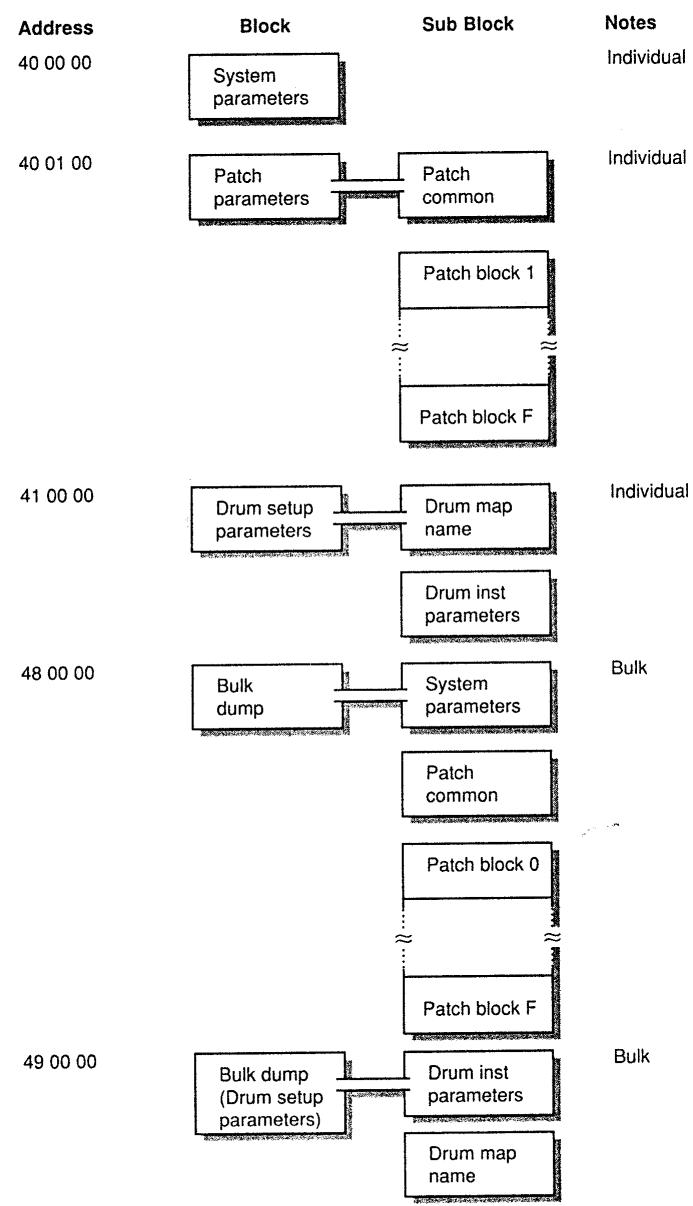
There are two types of GS Exclusive message. One is an individual parameter communication, the other is a bulk dump communication.
Individual parameter
You can use individual parameter communication to send or request an individual parameter value.
One packet of System Exclusive messages "F0 .... F7" can only have one parameter (which may contain several bytes).
You cannot use any address having "#" for the top address in a System Exclusive message.
SYSTEM PARAMETERS
| Address(H) | SIZE(H) | Data(H) | Parameter | Description | Default value (H) |
| 40 00 00 | 00 00 04 | 0018 - 07E8 | MASTER TUNE | -100 0 - +100.0 [cent] | 00 04 00 00 |
| 40 00 01# | Use nibbled data. | ||||
| 40 00 02# | |||||
| 40 00 03# | |||||
| 40 00 04 | 00 00 01 | 00 - 7F | MASTER VOLUME | 0 - 127 | 7F |
| 40 00 05 | 00 00 01 | 28-58 | MASTER KEY SHIFT | -24 - +24 semitones | 40 |
| 40 00 06 | 00 00 01 | 01 - 7F | MASTER PAN | 00 = GS Reset | 40 |
| 40 00 7F | 00 00 01 | 00, 7F | MODE SET (Rx Only) | 127 = Exit GS |
Refer to "System Exclusive Messages of Mode Change" Page 20.
PATCH PARAMETERS
E-66 has 16 parts. The parameters of each part are called PATCH PARAMETERS. To send or request a PATCH PARAMETER, use not the part number (which is usually same as the MIDI channel number) but the BLOCK NUMBER in the message.
*x...BLOCK NUMBER (0-F), Part 1(default MIDlch = 1) x = 1
Part 2 (default MIDlch = 2) x=2
:
Part 9 (default MIDIch = 9) x = 9
Part10(default MIDlch = 10) x=0
Part11(default MIDlch =11) x=A
Part12(default MIDlch = 12) x=B
:
Part16(defaultMIDlch=16) x=F
*n...MIDI channel number (0 - F) of the BLOCK.
| Address(H) | SIZE(H) | Data(H) | Parameter | Description | Default value (H) |
| 40 01 00 | 00 00 10 | 20-7F | PATCH NAME | 16 ASCII Characters | |
| 40 01 :# | |||||
| 40 01 OF# | |||||
| 40 01 10 | 00 00 10 | 00 - 18 | VOICE RESERVE | PART 10 (Drum Part) | 02 |
| 40 01 11# | PART 1 | 06 | |||
| 40 01 12# | PART 2 | 02 | |||
| 40 01 13# | PART 3 | 02 | |||
| 40 01 14# | PART 4 | 02 | |||
| 40 01 15# | PART 5 | 02 | |||
| 40 01 16# | PART 6 | 02 | |||
| 40 01 17# | PART 7 | 02 | |||
| 40 01 18# | PART 8 | 02 | |||
| 40 01 19# | PART 9 | 02 | |||
| 40 01 1A# | PART 11 | 00 | |||
| 40 01 :# | : | ||||
| 40 01 1F# | PART 16 | 00 |
The sum total of voices in the voice reserve function must be equal or less than the number of the maximum polyphony. The number of the maximum polyphony of E-66 is 28.
For the compatibility to other GS models, it is recommended to be equal or less than 24.
| 40 01 30 | 00 00 01 | 00 - 07 | REVERB MACRO | 00:Room 1 01: Room 2 02: Room 3 03: Hall 1 04: Hall 2 05: Plate 06: Delay 07: Panning Delay |
| 40 01 31 | 00 00 01 | 00 - 07 | REVERB CHARACTER | 04 |
| 40 01 32 | 00 00 01 | 00 - 07 | REVERB PRE-LPF | 00 |
| 40 01 33 | 00 00 01 | 00 - 7F | REVERB LEVEL | 40 |
| 40 01 34 | 00 00 01 | 00 - 7F | REVERB TIME | 40 |
| 40 01 35 | 00 00 01 | 00 - 7F | REVERB DELAY FEEDBACK | 00 |
| 40 01 36 | 00 00 01 | 00 - 7F | REVERB SEND LEVEL TO CHORUS | 00 |
REVERB MACRO is a parameter used to select the preset type of the effect. When set to another REVERB MACRO, all other reverb parameters will reset to the values set for each type of REVERB MACRO.
| 40 01 38 | 00 00 01 | 00 - 07 | CHORUS MACRO | 00: Chorus 1 01: Chorus 2 02: Chorus 3 03: Chorus 4 04: Feedback Chorus 05: Flanger 06: Short Delay 07: Short Delay(FB) | 02 |
| 40 01 39 | 00 00 01 | 00 - 07 | CHORUS PRE-LPF | 00 | |
| 40 01 3A | 00 00 01 | 00 - 7F | CHORUS LEVEL | 40 | |
| 40 01 3B | 00 00 01 | 00 - 7F | CHORUS FEEDBACK | 08 | |
| 40 01 3C | 00 00 01 | 00 - 7F | CHORUS DELAY | 50 | |
| 40 01 3D | 00 00 01 | 00 - 7F | CHORUS RATE | 03 | |
| 40 01 3E | 00 00 01 | 00 - 7F | CHORUS DEPTH | 13 | |
| 40 01 3F | 00 00 01 | 00 - 7F | CHORUS SEND LEVEL TO REVERB | 00 |
CHORUS MACRO is a parameter used to select the preset type of effect.
CHORUS MACRO is a parameter that can be used to change the parameters of a CHORUS macro. When set to another CHORUS MACRO, then all other chorus parameters will
When set to another CHORUS macro, reset to the values set for each type of CHORUS MACRO.
| 40 1x 00 | 00 00 02 | 00 - 7F | TONE NUMBER | CC#00 VALUE | 00 |
| 40 1x 01# | 00 - 7F | P.C. VALUE | 00 | ||
| 40 1x 02 | 00 00 01 | 00 - 10 | Rx CHANNEL | 1 - 16,OFF | same as the Part# |
| 40 1x 03 | 00 00 01 | 00 - 01 | Rx PITCH BEND | OFF / ON | 01 |
| 40 1x 04 | 00 00 01 | 00 - 01 | Rx. CH PRESSURE(CAI) | OFF / ON | 01 |
| 40 1x 05 | 00 00 01 | 00 - 01 | Rx PROGRAM CHANGE | OFF / ON | 01 |
| 40 1x 06 | 00 00 01 | 00 - 01 | Rx. CONTROL CHANGE | OFF / ON | 01 |
| 40 1x 07 | 00 00 01 | 00 - 01 | Rx. POLY PRESSURE(PAI) | OFF / ON | 01 |
| 40 1x 08 | 00 00 01 | 00 - 01 | Rx. NOTE MISMATCH | OFF / ON | 01 |
| 40 1x 09 | 00 00 01 | 00 - 01 | Rx. RPN | OFF / ON | 01 |
| 40 1x 0A | 00 00 01 | 00 - 01 | Rx. NRPN | OFF / ON | 00(01*) |
Rx. NRPN is set to ON by "GS RESET".
| 40 1x 0B | 00 00 01 | 00 - 01 | Rx MODULATION | OFF / ON | 01 |
| 40 1x 0C | 00 00 01 | 00 - 01 | Rx VOLUME | OFF / ON | 01 |
| 40 1x 0D | 00 00 01 | 00 - 01 | Rx PANPOT | OFF / ON | 01 |
| 40 1x 0E | 00 00 01 | 00 - 01 | Rx EXPRESSION | OFF / ON | 01 |
| 40 1x 0F | 00 00 01 | 00 - 01 | Rx HOLD1 | OFF / ON | 01 |
| 40 1x 10 | 00 00 01 | 00 - 01 | Rx PORTAMENTO | OFF / ON | 01 |
| 40 1x 11 | 00 00 01 | 00 - 01 | Rx SOSTENUTO | OFF / ON | 01 |
| 40 1x 12 | 00 00 01 | 00 - 01 | Rx SOFT | OFF / ON | 01 |
| 40 1x 13 | 00 00 01 | 00 - 01 | MONO/POLY MODE | Mono / Poly (=Bn 7E 01 / Bn 7F 00) | 01 |
| 40 1x 14 | 00 00 01 | 00 - 02 | ASSIGN MODE | 0 = SINGLE 1 =LIMITED-MULTI 2 = FULL-MULTI | 00 at x=0 01 at x%0 |
ASSIGN MODE is a parameter used to select the voice assign manner when "multiple Note Ons" occur (the same note number on the same channel at the same time).
The best assign modes ( SINGLE(0) for Drum part and LIMITED-MOELTR(1) for the other parts) are selected automatically, so you don't need reset this parameter.
| 40 1x 15 | 00 00 01 | 00 - 02 | USE FOR RHYTHM PART 0 = OFF 1 = MAP1 2 = MAP2 | 00 at x=0 01 at x=0 |
USE FOR RHYTHM PART is a parameter to define the part to be used as an ordinary part (0), as a drum part using DRUM MAP1(1), or a drum part using DRUM MAP2(2). The default is MAP1(1) for Part10 (MIDI CH-10,x=0), and all other parts are set to ordinary parts(OFF(0)).
| 40 1x 16 | 00 00 01 | 28 - 58 | PITCH KEY SHIFT | -24 +24 [semitone] | 40 |
| 40 1x 17 | 00 00 02 | 08 - F8 | PITCH OFFSET FINE | -12.0 +12.0 [Hz]08 Use nibbled data. | 00 |
| 40 1x 18# | |||||
| 40 1x 19 | 00 00 01 | 00 - 7F | PART LEVEL | 0 - 127 (=Bn 07 vv) | 64 |
| 40 1x 1A | 00 00 01 | 00 - 7F | VELOCITY SENSE DEPTH | 0 - 127 | 40 |
| 40 1x 1B | 00 00 01 | 00 - 7F | VELOCITY SENSE OFFSET | 0 - 127 | 40 |
| 40 1x 1C | 00 00 01 | 00 - 7F | PART PANPOT | Random, -63(LEFT) +63(RIGHT) (=Bn 0A vv, except random) | 40 |
| 40 1x 1D | 00 00 01 | 00 - 7F | KEY RANGE LOW | C-1 - G9 | 00 |
| 40 1x 1E | 00 00 01 | 00 - 7F | KEY RANGE HIGH | G-1 - G9 | 7F |
| 40 1x 1F | 00 00 01 | 00 - 5F | CC1 CONTROLLER NUMBER 0 - 95 | 10 | |
| 40 1x 20 | 00 00 01 | 00 - 5F | CC2 CONTROLLER NUMBER 0 - 95 | 11 | |
| 40 1x 21 | 00 00 01 | 00 - 7F | CHORUS SEND LEVEL (=Bn 5D vv) | 0 - 127 (=Bn 5B vv) | 00 |
| 40 1x 22 | 00 00 01 | 00 - 7F | REVERB SEND LEVEL | 0 - 127 (=Bn 5B vv) | 26 |
| 40 1x 23 | 00 00 01 | 00 - 01 | Rx Bank Select | OFF / ON | 0 |
Rx Bank Select is set to ON by power-on reset or by "GS RESET".
| 40 1x 30 | 00 00 01 | 0E - 72 | TONE MODIFY 1 Vibrato rate | -50 -- +50 (=Bn 63 01 62 08 06 vv) | 40 |
| 40 1x 31 | 00 00 01 | 0E - 72 | TONE MODIFY 2 Vibrato depth | -50 -- +50 (=Bn 63 01 62 09 06 vv) | 40 |
| 40 1x 32 | 00 00 01 | 0E - 72 | TONE MODIFY 3 | -50 + +50 | 40 |
| TVF cutoff freq. | (=Bn 63 01 62 20 06 vv) | ||||
| 40 1x 33 | 00 00 01 | 0E - 72 | TONE MODIFY 4 | -50 + +50 | 40 |
| TVF resonance | (=Bn 63 01 62 21 06 vv) | ||||
| 40 1x 34 | 00 00 01 | 0E - 72 | TONE MODIFY 5 | -50 + +50 | 40 |
| TVF&TVA Env attack | (=Bn 63 01 62 63 06 vv) | ||||
| 40 1x 35 | 00 00 01 | 0E - 72 | TONE MODIFY 6 | -50 + +50 | 40 |
| TVF&TVA Env decay | (=Bn 63 01 62 64 06 vv) | ||||
| 40 1x 36 | 00 00 01 | 0E - 72 | TONE MODIFY 7 | -50 + +50 | 40 |
| TVF&TVA Env release | (=Bn 63 01 62 66 06 vv) | ||||
| 40 1x 37 | 00 00 01 | 0E - 72 | TONE MODIFY 8 | -50 + +50 | 40 |
| Vibrato delay | (=Bn 63 01 62 0A 06 vv) | ||||
| 40 1x 40 | 00 00 0C | 00 - 7F | SCALE TUNING C | -64 + +63 [cent] | 40 |
| 40 1x 41# | 00 - 7F | SCALE TUNING C# | -64 + +63 [cent] | 40 | |
| 40 1x 42# | 00 - 7F | SCALE TUNING D | -64 + +63 [cent] | 40 | |
| 40 1x 43# | 00 - 7F | SCALE TUNING D# | -64 + +63 [cent] | 40 | |
| 40 1x 44# | 00 - 7F | SCALE TUNING E | -64 + +63 [cent] | 40 | |
| 40 1x 45# | 00 - 7F | SCALE TUNING F | -64 + +63 [cent] | 40 | |
| 40 1x 46# | 00 - 7F | SCALE TUNING F# | -64 + +63 [cent] | 40 | |
| 40 1x 47# | 00 - 7F | SCALE TUNING G | -64 + +63 [cent] | 40 | |
| 40 1x 48# | 00 - 7F | SCALE TUNING G# | -64 + +63 [cent] | 40 | |
| 40 1x 49# | 00 - 7F | SCALE TUNING A | -64 + +63 [cent] | 40 | |
| 40 1x 4A# | 00 - 7F | SCALE TUNING A# | -64 + +63 [cent] | 40 | |
| 40 1x 4B# | 00 - 7F | SCALE TUNING B | -64 + +63 [cent] | 40 | |
| 40 2x 00 | 00 00 01 | 28 - 58 | MOD PITCH CONTROL | -24 + +24 [semitone] | 40 |
| 40 2x 01 | 00 00 01 | 00 - 7F | MOD TVF CUTOFF CONTROL | -9600 + +9600 [cent] | 40 |
| 40 2x 02 | 00 00 01 | 00 - 7F | MOD AMPLITUDE CONTROL | -100.0 + +100.0 [%] | 40 |
| 40 2x 03 | 00 00 01 | 00 - 7F | MOD LFO1 RATE CONTROL | -10.0 + +10.0 [Hz] | 40 |
| 40 2x 04 | 00 00 01 | 00 - 7F | MOD LFO1 PITCH DEPTH | 0 - 2400 [cent] | 00 |
| 40 2x 05 | 00 00 01 | 00 - 7F | MOD LFO1 TVF DEPTH | 0 - 100.0 [%] | 00 |
| 40 2x 06 | 00 00 01 | 00 - 7F | MOD LFO1 TVA DEPTH | 0 - 100.0 [%] | 00 |
| 40 2x 07 | 00 00 01 | 00 - 7F | MOD LFO2 RATE CONTROL | -10.0 + +10.0 [Hz] | 40 |
| 40 2x 08 | 00 00 01 | 00 - 7F | MOD LFO2 PITCH DEPTH | 0 - 600 [cent] | 00 |
| 40 2x 09 | 00 00 01 | 00 - 7F | MOD LFO2 TVF DEPTH | 0 - 2400 [cent] | 00 |
| 40 2x 0A | 00 00 01 | 00 - 7F | MOD LFO2 TVA DEPTH | 0 - 100.0 [%] | 00 |
| 40 2x 10 | 00 00 01 | 40 - 58 | BEND PITCH CONTROL | 0 - 24 [semitone] | 42 |
| 40 2x 11 | 00 00 01 | 00 - 7F | BEND TVF CUTOFF CONTROL | -9600 + +9600 [cent] | 40 |
| 40 2x 12 | 00 00 01 | 00 - 7F | BEND AMPLITUDE CONTROL | -100.0 + +100.0 [%] | 40 |
| 40 2x 13 | 00 00 01 | 00 - 7F | BEND LFO1 RATE CONTROL | -10.0 + +10.0 [Hz] | 40 |
| 40 2x 14 | 00 00 01 | 00 - 7F | BEND LFO1 PITCH DEPTH | 0 - 2400 [cent] | 00 |
| 40 2x 15 | 00 00 01 | 00 - 7F | BEND LFO1 TVF DEPTH | 0 - 2400 [cent] | 00 |
| 40 2x 16 | 00 00 01 | 00 - 7F | BEND LFO1 TVA DEPTH | 0 - 100.0 [%] | 00 |
| 40 2x 17 | 00 00 01 | 00 - 7F | BEND LFO2 RATE CONTROL | -10.0 + +10.0 [Hz] | 40 |
| 40 2x 18 | 00 00 01 | 00 - 7F | BEND LFO2 PITCH DEPTH | 0 - 600 [cent] | 00 |
| 40 2x 19 | 00 00 01 | 00 - 7F | BEND LFO2 TVF DEPTH | 0 - 2400 [cent] | 00 |
| 40 2x 2A | 00 00 01 | 00 - 7F | BEND LFO2 TVA DEPTH | 0 - 100.0 [%] | 00 |
| 40 2x 20 | 00 00 01 | 28 - 58 | CAI PITCH CONTROL | -24 + +24 [semitone] | 40 |
| 40 2x 21 | 00 00 01 | 00 - 7F | CAI TVF CUTOFF CONTROL | -9600 + +9600 [cent] | 40 |
| 40 2x 22 | 00 00 01 | 00 - 7F | CAI AMPLITUDE CONTROL | -100.0 + +100.0 [%] | 40 |
| 40 2x 23 | 00 00 01 | 00 - 7F | CAI LFO1 RATE CONTROL | -10.0 + +10.0 [Hz] | 40 |
| 40 2x 24 | 00 00 01 | 00 - 7F | CAI LFO1 PITCH DEPTH | 0 - 2400 [cent] | 00 |
| 40 2x 25 | 00 00 01 | 00 - 7F | CAI LFO1 TVF DEPTH | 0 - 2400 [cent] | 00 |
| 40 2x 26 | 00 00 01 | 00 - 7F | CAI LFO1 TVA DEPTH | 0 - 100.0 [%] | 00 |
| 40 2x 27 | 00 00 01 | 00 - 7F | CAI LFO2 RATE CONTROL | -10.0 + +10.0 [Hz] | 40 |
| 40 2x 28 | 00 00 01 | 00 - 7F | CAI LFO2 PITCH DEPTH | 0 - 600 [cent] | 00 |
| 40 2x 29 | 00 00 01 | 00 - 7F | CAI LFO2 TVF DEPTH | 0 - 2400 [cent] | 00 |
| 40 2x 3A | 00 00 01 | 00 - 7F | CAI LFO2 TVA DEPTH | 0 - 100.0 [%] | 00 |
| 40 2x 30 | 00 00 01 | 28 - 58 | PAI PITCH CONTROL | -24 + +24 [semitone] | 40 |
| 40 2x 31 | 00 00 01 | 00 - 7F | PAI TVF CUTOFF CONTROL | -9600 + +9600 [cent] | 40 |
| 40 2x 32 | 00 00 01 | 00 - 7F | PAI AMPLITUDE CONTROL | -100.0 + +100.0 [%] | 40 |
| 40 2x 33 | 00 00 01 | 00 - 7F | PAI LFO1 RATE CONTROL | -10.0 + +10.0 [Hz] | 40 |
| 40 2x 34 | 00 00 01 | 00 - 7F | PAI LFO1 PITCH DEPTH | 0 - 600 [cent] | 00 |
| 40 2x 35 | 00 00 01 | 00 - 7F | PAI LFO1 TVF DEPTH | 0 - 2400 [cent] | 00 |
| 40 2x 36 | 00 00 01 | 00 - 7F | PAI LFO1 TVA DEPTH | 0 - 100.0 [%] | 00 |
| 40 2x 37 | 00 00 01 | 00 - 7F | PAI LFO2 RATE CONTROL | -10.0 + +10.0 [Hz] | 40 |
| 40 2x 38 | 00 00 01 | 00 - 7F | PAI LFO2 PITCH DEPTH | 0 - 600 [cent] | 00 |
| 40 2x 39 | 00 00 01 | 00 - 7F | PAI LFO2 TVF DEPTH | 0 - 2400 [cent] | 00 |
| 40 2x 4A | 00 00 01 | 00 - 7F | PAI LFO2 TVA DEPTH | 0 - 100.0 [%] | 00 |
| 40 2x 50 | 00 00 01 | 28 - 58 | CC1 PITCH CONTROL | -24 + +24 [semitone] | 40 |
| 40 2x 51 | 00 00 01 | 00 - 7F | CC1 TVF CUTOFF CONTROL | -9600 + +9600 [cent] | 40 |
| 40 2x 52 | 00 00 01 | 00 - 7F | CC1 AMPLITUDE CONTROL | -100.0 + +100.0 [%] | 40 |
| 40 2x 53 | 00 00 01 | 00 - 7F | CC2 LFO1 RATE CONTROL | -10.0 + +10.0 [Hz] | 40 |
| 40 2x 54 | 00 00 01 | 00 - 7F | CC2 LFO1 PITCH DEPTH | 0 - 600 [cent] | 00 |
| 40 2x 55 | 00 00 01 | 00 - 7F | CC2 LFO1 TVF DEPTH | 0 - 2400 [cent] | 00 |
| 40 2x 56 | 00 00 01 | 00 - 7F | CC2 LFO1 TVA DEPTH | 0 - 100.0 [%] | 00 |
| 40 2x 57 | 00 00 01 | 00 - 7F | CC2 LFO2 RATE CONTROL | -10.0 + +10.0 [Hz] | 40 |
| 40 2x 58 | 00 00 01 | 00 - 7F | CC2 LFO2 PITCH DEPTH | 0 - 600 [cent] | 00 |
| 40 2x 59 | 00 00 01 | 00 - 7F | CC2 LFO2 TVF DEPTH | 0 - 2400 [cent] | 00 |
| 40 2x 5A | 00 00 01 | 00 - 7F | CC2 LFO2 TVA DEPTH | 0 - 100.0 [%] | 00 |
*m:Map number (0 = MAP1, 1 = MAP2) *rr:drum part note number (OOH-7FH)
DRUM SETUP PARAMETERS
| Address(H) | SIZE(H) | Data(H) | Parameter | Description |
| 41 m0 00 :# 41 m0 0B# | 00 00 0C | 20 - 7F | DRUM MAP NAME | ASCII Character |
| 41 m1 rr | 00 00 01 | 00 - 7F | PLAY NOTE NUMBER | Pitch coarse |
| 41 m2 rr | 00 00 01 | 00 - 7F | LEVEL | TVA level (=Bn 63 1A 62 rr 06 vv) |
| 41 m3 rr | 00 00 01 | 00 - 7F | ASSIGN GROUP NUMBER | Non, 1 - 127 |
| 41 m4 rr | 00 00 01 | 00 - 7F | PANPOT | Random, -63(LEFT) - +63(RIGHT) (=Bn 63 1C 62 rr 06 vv) |
| 41 m5 rr | 00 00 01 | 00 - 7F | REVERB SEND LEVEL | 0.0 - 1.0 Multipicand of the part reverb depth (=Bn 63 1D 62 rr 06 vv) |
| 41 m6 rr | 00 00 01 | 00 - 7F | CHORUS SEND LEVEL | 0.0 - 1.0 Multipicand of the part chorus depth (=Bn 63 1E 62 rr 06 vv) |
| 41 m7 rr | 00 00 01 | 00 - 01 | Rx. NOTE OFF | OFF / ON |
| 41 m8 rr | 00 00 01 | 00 - 01 | Rx. NOTE ON | OFF / ON |
When you change Drum Sets, all values of the DRUM SETUP PARAMETERS will be initialized.
Bulk Dump
You can send or request bulk data which contains a large amount of parameter data by using Bulk Dump communication.
It is used for storing bulk data in a sequencer or a computer. To send or request bulk data, use the Address and Size indicated in the following map.
You cannot use any address having "#" for the top address in a System Exclusive message except the following case.
Messages which include large data (more than 128 bytes) are sent out in separate packets, then, the top address of the following messages may be the address marked "#".
To send several packets of large DT1 messages at a time, insert intervals of at least 40ms in between those packets.
All Parameters (System Parameters and all Patch Parameters)
| Address(H) | SIZE(H) | Description | Number of packets |
| 48 00 00 | 00 1D 10 | ||
| : # | ALL | 30 packets | |
| 48 1D 0F# | |||
| Parameters | |||
| Address(H) | SIZE(H) | Description | Number of packets |
| 48 00 00 | 00 00 10 | ||
| : # | SYSTEM PARAMETERS | 1 packet | |
| 48 00 0F# | |||
Patch Parameters
| Address(H) | SIZE(H) | Description | Number of packets |
| 48 00 10 | 00 01 00 | PATCH COMMON | 1 packet |
| : # | |||
| 48 01 OF# | |||
| 48 01 10 | 00 01 60 | BLOCK 0 | 2 packets |
| : # | |||
| 48 02 OF# | |||
| 48 02 70 | 00 01 60 | BLOCK 1 | 2 packets |
| : # | |||
| 48 04 4F# | |||
| 48 04 50 | 00 01 60 | BLOCK 2 | 2 packets |
| : # | |||
| 48 06 2F# | |||
| 48 06 30 | 00 01 60 | BLOCK 3 | 2 packets |
| : # | |||
| 48 08 OF# | |||
| 48 08 10 | 00 01 60 | BLOCK 4 | 2 packets |
| : # | |||
| 48 09 OF# |
| 48 09 70 | 00 01 60 | ||
| : # | BLOCK 5 | 2 packets | |
| 48 0B 4F# | |||
| 48 0B 50 | 00 01 60 | ||
| : # | BLOCK 6 | 2 packets | |
| 48 0D 2F# | |||
| 48 0D 30 | 00 01 60 | ||
| : # | BLOCK 7 | 2 packets | |
| 48 0F 0F# | |||
| 48 0F 10 | 00 01 60 | ||
| : # | BLOCK 8 | 2 packets | |
| 48 10 6F# | |||
| 48 10 70 | 00 01 60 | ||
| : # | BLOCK 9 | 2 packets | |
| 48 12 4F# | |||
| 48 12 50 | 00 01 60 | ||
| : # | BLOCK A | 2 packets | |
| 48 14 2F# | |||
| 48 14 30 | 00 01 60 | ||
| : # | BLOCK B | 2 packets | |
| 48 16 0F# | |||
| 48 16 10 | 00 01 60 | ||
| : # | BLOCK C | 2 packets | |
| 48 17 6F# | |||
| 48 17 70 | 00 01 60 | ||
| : # | BLOCK D | 2 packets | |
| 48 19 4F# | |||
| 48 19 50 | 00 01 60 | ||
| : # | BLOCK E | 2 packets | |
| 48 1B 2F# | |||
| 48 1B 30 | 00 01 60 | ||
| : # | BLOCK F | 2 packets | |
| 48 1D 0F# |
DRUM SETUP PARAMETERS
| Address(H) | SIZE(H) | Description | Number of packets |
| 49 m0 00 | 00 02 00 | ||
| 49 m1 7F | PLAY NOTE NUMBER | 2 packets | |
| 49 m2 00 | 00 02 00 | ||
| 49 m3 7F | LEVEL | 2 packets | |
| 49 m4 00 | 00 02 00 | ||
| 49 m5 7F | ASSIGN GROUP NUMBER | 2 packets | |
| 49 m6 00 | 00 02 00 | ||
| 49 m7 7F | PANPOT | 2 packets | |
| 49 m8 00 | 00 02 00 | ||
| 49 m9 7F | REVERB SEND LEVEL | 2 packets | |
| 49 mA 00 | 00 02 00 | ||
| 49 mB 7F | CHORUS SEND LEVEL | 2 packets | |
| 49 mC 00 | 00 02 00 | ||
| 49 mD 7F | Rx. NOTE ON/OFF | 2 packets | |
| 49 mE 00 | 00 00 18 | ||
| 49 mE 17 | DRUM MAP NAME | 1 packet |
4 Useful Information
Decimal and Hexadecimal
It is common to use 7-bit Hexadecimal numbers in MIDI communication. The following is a conversion table between decimal numbers and 7-bit Hexadecimal numbers.
| Decimal | Hexa- decimal | Decimal | Hexa- decimal | Decimal | Hexa- decimal | Decimal | Hexa- decimal |
| 0 | 00H | 32 | 20H | 64 | 40H | 96 | 60H |
| 1 | 01H | 33 | 21H | 65 | 41H | 97 | 61H |
| 2 | 02H | 34 | 22H | 66 | 42H | 98 | 62H |
| 3 | 03H | 35 | 23H | 67 | 43H | 99 | 63H |
| 4 | 04H | 36 | 24H | 68 | 44H | 100 | 64H |
| 5 | 05H | 37 | 25H | 69 | 45H | 101 | 65H |
| 6 | 06H | 38 | 26H | 70 | 46H | 102 | 66H |
| 7 | 07H | 39 | 27H | 71 | 47H | 103 | 67H |
| 8 | 08H | 40 | 28H | 72 | 48H | 104 | 68H |
| 9 | 09H | 41 | 29H | 73 | 49H | 105 | 69H |
| 10 | 0AH | 42 | 2AH | 74 | 4AH | 106 | 6AH |
| 11 | OBH | 43 | 2BH | 75 | 4BH | 107 | 6BH |
| 12 | OCH | 44 | 2CH | 76 | 4CH | 108 | 6CH |
| 13 | ODH | 45 | 2DH | 77 | 4DH | 109 | 6DH |
| 14 | OEH | 46 | 2EH | 78 | 4EH | 110 | 6EH |
| 15 | OFH | 47 | 2FH | 79 | 4FH | 111 | 6FH |
| 16 | 10H | 48 | 30H | 80 | 50H | 112 | 70H |
| 17 | 11H | 49 | 31H | 81 | 51H | 113 | 71H |
| 18 | 12H | 50 | 32H | 82 | 52H | 114 | 72H |
| 19 | 13H | 51 | 33H | 83 | 53H | 115 | 73H |
| 20 | 14H | 52 | 34H | 84 | 54H | 116 | 74H |
| 21 | 15H | 53 | 35H | 85 | 55H | 117 | 75H |
| 22 | 16H | 54 | 36H | 86 | 56H | 118 | 76H |
| 23 | 17H | 55 | 37H | 87 | 57H | 119 | 77H |
| 24 | 18H | 56 | 38H | 88 | 58H | 120 | 78H |
| 25 | 19H | 57 | 39H | 89 | 59H | 121 | 79H |
| 26 | 1AH | 58 | 3AH | 90 | 5AH | 122 | 7AH |
| 27 | 1BH | 59 | 3BH | 91 | 5BH | 123 | 7BH |
| 28 | 1CH | 60 | 3CH | 92 | 5CH | 124 | 7CH |
| 29 | 1DH | 61 | 3DH | 93 | 5DH | 125 | 7DH |
| 30 | 1EH | 62 | 3EH | 94 | 5EH | 126 | 7EH |
| 31 | 1FH | 63 | 3FH | 95 | 5FH | 127 | 7FH |
*To indicate a decimal number for the MIDI channel, Bank number, and Program number, add one to the values in the table.
*The resolution of 7-bit Hexadecimal numbers is 128. Use several bytes for values which require more resolution.
i.e. The number "ad bbH" in 7-bit Hexadecimal is "ad x 128 + bb" in Decimal form.
* A signed number (with a sign +/- ) is indicated as 00H = -64 , 40H = %0 , 7FH = +63
A signed number (with a sign 1 ) is called a signed prime number. So the signed number "aaaH" in 7-bit Hexadecimal is "ad - 64" (ad is the decimal number of aaH).
In case of two bytes, it is regarded as 00 00H = -8192, 40 00H = %0, 7F 7FH = +8191.
So the signed number "ad bbH" in 7-bit Hexadecimal is "ad bbH - 40 00H = ad x 128 + bb - 64 x 128", where, ad and bb is the decimal number of aaH and bbH respectively.
*The data indicated as "nibbled" is a 4-bit Hexadecimal number. i.e. "0a 0bH" is "a x 16 + b".
(By using the table) 12H = 18, 34H = 52 So, 18 × 128 + 52 = 2356
(By using the table) 0AH = 10 , 03H = 3 , 09H = 9 , 0DH = 13 So, ((10 × 16 + 3) × 16 + 9) × 16 + 13 = 41885
Example of actual MIDl messages
"9n" is a status of a Note On message, and "n" is a MIDI channel number.
The second byte is the Note number, and the third is Velocity.
2H = 2,3EH = 62,5FH = 95
So, this is a Note On message of MIDI channel=3, Note number=62(D4) and Velocity=95.
"Gn" is a status of a Program change message, and "n" is a MIDI channel number.
The second byte is a Program number.
EH=14.49H=73
So, this is a Program change message of MIDI channel=15, Program number=74 (Flute in GS).
"EnH" is a status of a Pitch bend change message, and "n" is a MIDI channel
number
The second byte (00H) is an LSB and the third (28H) is an MSB of a Pitch bend value (%signed).
The Pitch bend value is:
[ 2800H - 4000H = 40 \times 128 + 0 - (64 \times 128 + 0) = 5120 - 8192 = -3072 ]
So, this is a Pitch bend change message of MIDI channel=11,
Pitch bend value = -3072
If the Pitch bend sensitivity is set to 2 semitones, and the Pitch bend value -8192 (00 00H) is defined as -200 cents,
The actual pitch bend value of this message is: -200 x (-3072) / (-8192) = -75 cent
"Bn" is a status of a Control change message, and "n" is a MIDI channel number.
The second byte is a Control number and the third is the value.
This second byte is a running status rule, that is, when you send a series of messages with the same status, you can omit the following status bytes.
This message contains :
B3 6400 MIDICH=4 LSB of RPN parameter number :00H
(B3) 6500 MIDI CH = 4 MSB of RPN parameter number : 00H
(B3) 06 0C MIDI CH = 4 MSB of Data entry : 0CH
(B3) 2600 MIDICH = 4 LSB of Data entry :00H
(B3) 64.7E MIDLCH = 4 LSB of RPN parameter number : 7FH
(B3) 65.7F MIDI CH = 4 MSB of RPN parameter number : 7FH
This message string means 'send data "0C 00H" to RPN parameter number "00 00H", after that, set RPN parameter number to "7F 7F".
RPN parameter number "00 00H" is Pitch bend sensitivity and the unit of the MSB value is a semitone, so 0CH = 12 is a value to set the Pitch bend sensitivity = 12 semitones (one octave).
GS devices ignore the LSB value of Pitch bend sensitivity. However, you had better send both MSB and LSB(= 00H) to maintain data compatibility.
Once an RPN or NRPN number is set, all the Data entry messages sent after are effective.
Sometimes this rule may cause a problem if the MIDI data is played by a sequencer and it is operated in fast forward or backward mode. It is recommended, therefore, to set the RPN or NRPN number to 7F 7FH after sending the Data entry messages.
*To use running-status for several MIDI event like
There may be a sequencer which can not handle such data correctly when it is operated in fast forward or backward. Putting the status byte for every event is the reliable way.
*The parameter number and the value of RPN or NRPN must be sent in correct order. As some sequencers may send those recorded data in different order if an event is too close to another, it is recommended to place each event in a different tick. (1-CLK for TPQN=92, or 5-CLK for TPQN=480 is recommended.)
The send order may be different as each sequencer if the events are in the same clock in sequence data.
Checksum of Roland System Exclusive messages
- Checksum: The checksum is a function of the data and can be used to check for communication errors.
- Roland System Exclusive messages (RQ1 and DT1) have a Checksum at the end of the data (just before EOX) to be able to check for communication errors.
- The Checksum is determined by values of address and data (or size) included in the message.
The error checking process employs a sum-check error detection. It provides binary bit figures whose lower 7 bits are zero when values for an address, data (or size) and the Checksum are summed.
One practical equation to determine Checksum is:
If the address is "ad bb ccH" and the data (or the size) is "dd ee ffH"
ad + bb + cc + dd + ee + ff = sum
sum / 128 = quotient / remainder
128 - remainder = checksum
According to the Parameter Address Map, the Address of REVERB MACRO is 40 01 30H, and the Value correspond to ROOM 3 is 02H. So, the message should be :
| F0 41 10 42 12 40 01 30 02 | ?? | F7 |
| (1) (2) | (3) | (4) (5) address data checksum |
| (1)Exclusive Status | (4)Model ID (GS) |
| (2)ID (Roland) | (5)Command ID (DT1) |
| (3)Device ID (16) | (6)End of Exclusive |
The Checksum is: 40H + 01H + 30H + 02H = 64 + 1 + 48 + 2 = 115 (sum) 115 (sum) / 128 = 0 (quotient) / 115 (remainder) checksum = 128 - 115 (remainder) = 13 = 0DH
Therefore, the message to send is : F0 41 10 42 12 40 01 30 02 0D F7
NOTE NUMBER 75(D#5) is 4BH in Hexadecimal. The Address of "LEVEL of NOTE NUMBER 75(D#5; Claves) in DRUM MAP 1" is 41 02 4BH, and the size is 00 00 01H. So, the message should be :
| F0 41 10 42 11 41 02 4B 00 00 01 ?? F7 (1) (2) (3) (4) (5) address data checksum (6) |
| (1)Exclusive Status | (4)Model ID (GS) |
| (2)ID (Roland) | (5)Command ID (RQ1) |
| (3)Device ID (16) | (6)End of Exclusive |
The Checksum is:
41H + 02H + 4BH + 00H + 00H + 01H = 65 + 2 + 75 + 0 + 0 + 1 = 143(sum)
143(sum) / 128 = 1(quotient) / 15(remainder)
checksum = 128 - 15(remainder) = 113 = 71H
Therefore, the message to send is : F0 41 10 42 11 41 02 4B 00 00 01 71 F7
The Address of "MASTER TUNE" is 40 00 00H, and the Size is 00 00 04H.
The Value should be nibblized data whose resolution is 0.1 cents, and which is a signed value
(00 04 00 00H (= 1024) = %0).
+23.4[cents] = 234 + 1024 = 1258 = (hexadecimal) => 04 EAH = (nibblized) => 00
04 0E 0AH
So, the message should be:
| F0 41 10 42 12 41 00 00 00 04 0E 0A ?? F7 |
| (1) (2) (3) (4) (5) address data checksum (6) |
| (1)Exclusive Status | (4)Model ID (GS) |
| (2)ID (Roland) | (5)Command ID (DT1) |
| (3)Device ID (16) | (6)End of Exclusive |
The Checksum is:
41H + 00H + 00H + 00H + 04H + 0EH + 0AH = 65 + 0 + 0 + 0 + 4 + 14 + 10 = 93(sum)
93(sum) / 128 = 0(quotient) / 93(remainder)
checksum = 128 - 93(remainder) = 35 = 23H
Therefore, the message to send is : F0 41 10 42 11 41 00 00 00 04 OE 0A 23 F7
MIDI IMPLEMENTATION CHART
[INTELLIGENT SYNTHESIZER] Model E-66
(Sound Module & Keyboard Section, SMF Player)
Date: January 1994
Version: 1.00
| FUNCTION | TRANSMITTED | RECOGNIZED | REMARKS | |||
| Basic Channel | Default Changed | 41-16, OFF | 1-161-16, OFF | 4 = Upper 1 | ||
| Mode | Default Messages Altered | Mode 3 Mode 3********** | Mode 3Mode 3, 4 (M=1) | *2 | ||
| Note Number: | True voice | 0-127 *3********** | 0-1270-127 | |||
| Velocity | Note ON Note OFF | O X | O X | |||
| After Touch | Key's Ch's | X | O | *1 | ||
| X | O | *1 | ||||
| Pitch Bender | O | *3 | O | *1 | ||
| Control Change | 0,32156,38711646566678919398,99100,101120121 | O O X O O O X X X X X X X X X X X X X X X X X X X X X X X X X X X X X X X X X X X X X X X X X X X X X X X X X X X X X X X X X X X X X X X X X X X X X X X X X X X X X X X X X X X X X X X X X X X X X X X X X X X X | O (MSB only) O O O O O O O O O O O O O O O O O O O O O O O O O O O O O O O O O O O O O O O O O O O O O O O O O O O O O O O O O O O O O O O O O O O O O O O O O O O O O O O O O O O O O O O O O O O O O O O O O O O O | Bank select Modulation Portamento time Data entry Volume Panpot Expression Hold 1 Portamento Sostenuto Soft Portamento control Effect 1 depth Effect 3 depth NRPN LSB, MSB RPN LSB, MSB All sound off Reset all controllers | ||
| Prog change: | True # | O | *3********** | O | *1 | Prog. 1-128 |
| System Exclusive | O | O | ||||
| System : Song Pos : Song Sel Common : Tune | X X X X | X X X | ||||
| System : Clock Real Time : Commands | O O | O O | Midi File Record/Play Midi File Record/Play | |||
| Aux Messages : Active Sense : Reset | X X O X | X O (123-125) O X | ||||
| Notes | *1 O X is selectable*2 Recognize as M=1 even if M%1*3 O X is selectable, transmitted only when Upper or GM Melody Assign is not OFF | |||||
Mode 1: OMNI ON, POLY
Mode 3: OMNI OFF, POLY
Mode 2: OMNI ON, MONO
Mode 4: OMNI OFF, MONO
O: YES
X: NO