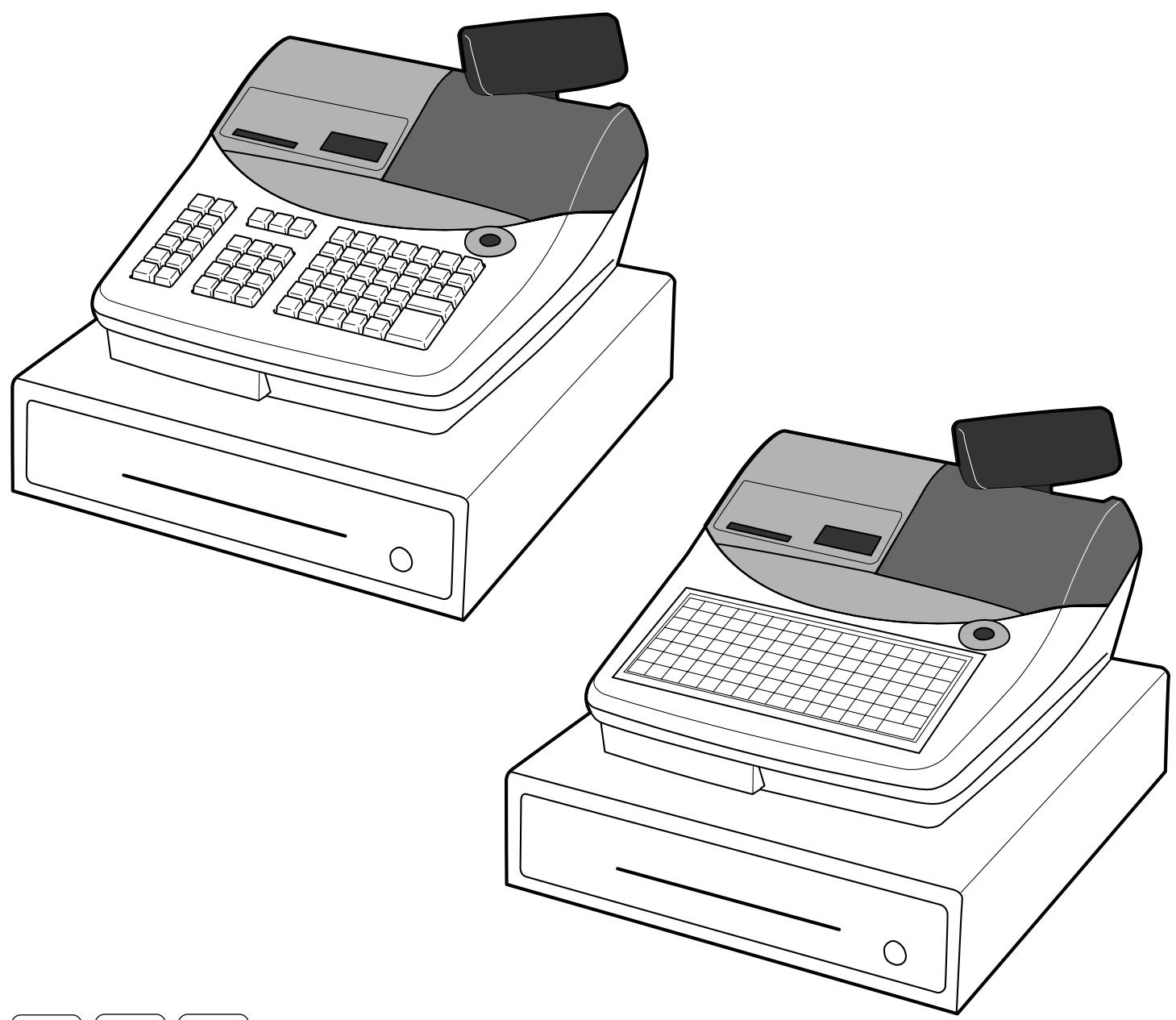
MODE D'EMPLOI TE-2400 CASIO
CAISSE ENREGISTREUSE ÉLECTRONIQUE
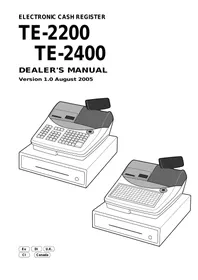
TE-2200 TE-2400
MANUEL DU REVENDEUR
Version 1.0 Août 2005
Eu Di U.K.
CI Canada
Ce manuel est destiné à servir de référence pour le système TE-2200 et TE-2400. Il fournit des détails permettant une compréhension complète des capacités du système, de son fonctionnement et de la manière dont il peut être utilisé pour résoudre de nombreux problèmes dans le point de vente.
Ce manuel se compose des chapitres suivants :
- Configuration matérielle (pour l'installation) Ce chapitre décrit le matériel de ces modèles et leurs systèmes réseau.
- IPL (chargement initial du programme) Ce chapitre décrit comment télécharger le programme d'application sur le terminal.
- Initialisation
Ce chapitre décrit comment configurer les périphériques et les terminaux.
- Programmation
Ce chapitre explique la procédure de programmation réelle et les fonctions.
- Mode gestionnaire
- Rapport X/Z
- Système d'application
- Conseils
- Annexe :
Historique d'impression
Version du manuel
Version 1.0 : août 2005
Version du logiciel
Version 1.0.0
Points révisés
Configuration du système 11
Configuration matérielle 11
Configuration générale 11
Schéma matériel 12
Affichage 13
Connecteurs d'entrée/sortie 13
Configuration en ligne.... 14
Ports périphériques et leurs dispositifs connectables 14
IPL (Chargement initial du programme)....15
Carte mémoire du terminal 15
Configuration du système et procédure 15
Via le port COM1 (pour recevoir les données IPL du PC).... 15
Via carte CF (pour envoyer les données IPL vers la carte CF)....16
Via carte CF (pour envoyer les données IPL à enregistrer) 16
Initialisation 17
Procédure d'initialisation de la machine 17
Opération d'effacement des drapeaux....19
Opération Init 2....19
Entrée en mode diagnostic 20
Mot de passe 20
Programmation (explication générale) 21
Sous-mode programme (mode P1 à P7) 21
Entrée dans le sous-mode programme 21
Allocation de fichiers (Programme 5) ......23
Programme d'allocation de fichiers 23
Procédure de programmation 23
Émission du rapport de lecture de programme en mode programme 5....27
Procédure d'émission 27
Exemple de rapport 27
Attribution des clés (Programme 4)....29
Attribution des clés programme 29
Procédure de programmation 29
Configuration de la disposition physique des clés 30
Émission du rapport de lecture du programme 4....32
Procédure d'émission 32
Exemple de rapport 32
Fonction des clés / caractéristiques de la machine (Programme 3)....33
Programme de contrôle général 33
Procédure de programmation 33
Données du programme (par code d'adresse) 33
Code d'adresse 01 (ordre de date / mot de passe) 33
Code d'adresse 02 (mot de passe) 33
Code d'adresse 03 (numéro consécutif) 33
Code d'adresse 04 (système fiscal, arrondi, etc.) 34
Code d'adresse 05 (contrôle d'impression pour reçu) 35
Code d'adresse 06 (contrôle de calcul et d'opération) 36
Code d'adresse 07 (changement de menu et de prix) 37
Code d'adresse 08 (contrôle d'impression pour rapport de total fixe) 38
Code d'adresse 09 (contrôle d'impression pour rapport de total fixe) 39
Code d'adresse 10 (contrôle d'impression pour montant imposable, minuterie de caisse) 40
Code d'adresse 13 (contrôle en ligne) 40
Code d'adresse 14 (contrôle de change de devise) 41
Code d'adresse 15 (contrôle d'impression pour rapports) 42
Code d'adresse 16 (contrôle d'impression pour total général) 43
Code d'adresse 17 (contrôle d'impression)....44
Code d'adresse 18 (contrôle d'impression pour reçu client et note) 45
Code d'adresse 19 (contrôle de commande) 45
Code d'adresse 21 (contrôle de message) 46
Code d'adresse 25 (condiment, etc.) 47
Code d'adresse 26 (suivi de chèque) 47
Code d'adresse 27 (contrôle de caissier) 47
Code d'adresse 28 (Euro) 48
Code d'adresse 29 (Euro) 48
Code d'adresse 30 (contrôle de l'imprimante thermique interne) 49
Code d'adresse 32 (maintenance directe PLU) 49
Code d'adresse 31 (scannage) 49
Code d'adresse 33 (maintenance PLU par lot) 50
Code d'adresse 34 (contrôle du rétroéclairage) 50
Code d'adresse 36 (mémorisation/rappel/numéro de nouveau chèque automatique)....51
Code d'adresse 37 (numéro de chèque) 51
Touche de département/touche PLU plate/programme PLU (programmation de fonctionnalités par lot) 52
Procédure de programmation 52
Données de programme 52
Département clé/clé PLU/programme PLU (programmation individuelle des fonctions) ..... 54
Procédure de programmation 54
Données de programme (par code d'adresse) 54
Programme des touches de transaction 57
Procédure de programmation 57
Données de programme 57
Programme caissier 80
Numéro secret, tiroir, programmation du numéro de chèque 80
Programmation du lien détail caissier 80
Autres programmes caissier 81
Autres programmes....83
Programmation de plage horaire 83
Programmation de plage de table 83
Programmation de table de taxe 84
Programmation de menu fixe 89
Programmation du rapport X/Z par lot 89
Programmation de l'agencement 90
Programmation du contrôle d'impression des chèques 90
Programmation du mix & match 91
Programmation du numéro d'employé 92
Programmation du planificateur 93
Programmation de la table de liaison des bouteilles 95
Programmation de la table des paramètres d'E/S 96
Programmation de la table de connexion des imprimantes 97
Programmation de la table des PLU non standard 98
Programmation de la maintenance des PLU par scan 99
Programmation de la maintenance par lot des PLU 99
Activation de la maintenance par lot des PLU 99
Programmation de la maintenance directe des PLU par scan 100
Programmation individuelle des PLU par scan 101
Programmation NLU en une touche 103
Émission du rapport de lecture du programme 3 mode....104
Procédure d'émission 104
Exemple de rapport 104
Caractère (Programme 2) ...... 105
Programmation des descripteurs 105
Procédure de programmation 105
Données de programmation 105
Descripteurs d'articles/clés de programmation.... 114
Procédure de programmation 114
Données de programmation 114
Programmation des descripteurs d'articles/clercs par plage 116
Procédure de programmation 116
Données du programme 116
Saisie des caractères 117
Clavier par caractère 117
Par code de caractère 119
Liste des codes de caractères 119
Édition des caractères 120
Correction d'un caractère venant d'être saisi 120
Correction et ajout d'un descripteur PLU déjà défini 120
Correction d'un descripteur de touche déjà défini 120
Correction d'un descripteur de message déjà défini 120
Émission du rapport de lecture de programme du mode programme 2....121
Procédure d'émission 121
Exemple de rapport 121
Prix unitaire/taux (Programme 1) 123
Réglage de la date/heure 123
Réglage de la date....123
Réglage de l'heure 123
Programme de prix unitaire....123
Procédure de programmation 123
Programme de taux 125
125
, , <Prime (%+), <Remise (%−), 125
Programme de montant....125
, , , , , 125
Programmation de maintenance directe du PLU par lecture 125
Émission du rapport de lecture du programme en mode 1....126
Procédure d'émission 126
Exemple de rapport 126
Lecture du programme (Programme 6) 127
Émission du rapport de lecture du programme 127
Procédure d'émission 127
Code du rapport 127
Rapport échantillon 128
Totalisateur fixe 128
Clé de transaction 128
PLU 129
Département 130
Groupe 130
Caissier 131
Ventes horaires 131
Scan PLU 131
Analyse de table 132
Total général 132
Contrôle général 132
Caractère spécial 132
En-tête de rapport 133
Table des taxes 133
Table des menus....133
Lot X/Z 133
Lien détail caissier 134
Message reçu 134
Approbation de chèque....134
Message imprimante ticket/externe 135
Table d'arrangement 135
Rappel de caractères 135
Table non-PLU 135
Contrôle d'impression de chèque 135
Mix & match 136
Employé 136
Planificateur 136
Table de liaison bouteille 136
NLU à une touche 137
Message d'aide 137
Tableau de connexion du terminal 137
Tableau de connexion de l'imprimante 137
Commande AT....138
Mot de passe en ligne 138
Tableau des paramètres d'E/S 138
Messages divers 138
Messages de guidage d'impression 138
Messages d'erreur 139
Messages de guidage d'enregistrement 139
Messages de guidage X/Z 139
Messages de guidage de programme 139
Programme automatique et utilitaires système (Programme 7)....141
Programmation automatique 141
Fonctions de programmation automatique....141
Opération d'auto-programmation 144
Autres utilitaires 145
Opérations du gérant 149
Mode de contrôle du gérant (mode X1) 149
Entrée dans le mode de contrôle du gérant 149
Affectation des tiroirs-caisses pour chaque employé....149
Maintenance des quantités en stock (PLU/PLU simple/PLU code-barres) 150
Pour ajouter à la quantité réelle en stock d'un PLU/PLU simple/PLU code-barres 150
Pour soustraire de la quantité réelle en stock d'un PLU/PLU simple/PLU code-barres 150
Pour saisir la nouvelle quantité en stock d'un PLU/PLU simple 151
Affectation des employés 151
Pour lier les touches/touches de fonction des employés aux tampons d'interruption 151
Pour lier les codes secrets des employés aux tampons d'interruption 151
Pour lier les numéros d'employés aux touches de numéros d'employés 151
Programmation pour l'euro 152
Programmation pour la GST australienne 154
Programmation des articles en mode programme 1 154
Pour entrer dans le mode programme 1 ....154
Pour sortir du mode programme 1 ....154
Émission du rapport de lecture/réinitialisation 155
Préparation à l'émission du rapport 155
Déclaration de monnaie 155
Mot de passe (mode X2/Z2) 155
Émission du rapport de lecture/réinitialisation 155
Programmabilité 156
Procédure d'émission 156
Exemple de rapport 160
Rapport financier 160
Rapport individuel article/clé 160
Rapport de total fixe 161
Rapport de clé de transaction 162
Rapport PLU 163
Rapport de stock PLU 164
Rapport par département....165
Rapport par groupe 166
Rapport par caissier 167
Rapport des ventes horaires....168
Rapport mensuel....168
Rapport d'analyse de table 169
Rapport des chèques ouverts 169
Rapport de scan PLU 170
Rapport de scan de stock PLU 172
Rapport mix & match....172
Rapport de temps et présence 173
Réinitialisation des fichiers 173
Systèmes d'application 175
Lecture de codes PLU 175
Configuration du système de lecture de codes PLU 175
Installation 175
Système de codes-barres 175
Maintenance des PLU 176
Enregistrement des PLU par lecture 177
Remise mix & match....179
Système de suivi des chèques....180
Configuration du système 180
Impression sur les imprimantes externes 181
Configuration du système d'imprimantes externes 181
Système de sauvegarde 181
Options de contrôle d'impression pour les commandes 182
Temps et présence 182
Conseils 183
Commande future 183
Utilisation 183
Préparation 183
Sur place/à emporter 183
Exécution automatique du passage à l'euro par arrangement et planificateur ...... 184
Annexe : Méthode de calcul .... 185
Fichier total fixe....185
Annexe : Tables de codes de police 187
Jeu de polices standard (par défaut) 187
Multilingue + Euro (page de code Windows 858) 187
Jeu de polices spécial 188
Slave (page de code Windows 852) 188
Grec 188
Cyrillique (page de code Windows 866) 189
Baltic 189
Arabic....190
Annexe : Configuration des périphériques 191
UP-360....191
SP-1300 191
Quick scan 6000....192
Fichier totalisateur fixe 193
Totalisateur fixe (journalier)....193
Totalisateur fixe (périodique/consolidation) 193
Fichier des clés de transaction 194
Clé de transaction (journalière)....194
Clé de transaction (périodique/consolidation) 194
Fichier PLU 194
PLU (journalier) 194
PLU (périodique/consolidation) 194
Fichier département 195
Département (quotidien) 195
Département (périodique/consolidation) 195
Fichier groupe 195
Groupe (quotidien) 195
Groupe (périodique/consolidation) 195
Fichier caissier....196
Caissier (programmation) 196
Détail caissier (quotidien, périodique/consolidation) 196
Lien détail caissier (programme)....196
Fichier ventes horaires 197
Ventes horaires (quotidien) 197
Ventes horaires (périodique/consolidation) 197
Fichier ventes mensuelles 197
Ventes mensuelles (quotidien, périodique/consolidation) 197
Analyse des fichiers PLU 198
Analyse du fichier PLU (quotidien) 198
Fichier de table non PLU (programme) 198
Maintenance par lots du fichier PLU (programme)....198
Maintenance directe du fichier PLU (programme) 198
Fichier de table NLU à une touche....199
Fichier de table Mix & match 199
Fichier de table Mix & match (quotidien) 199
Fichier de table Mix & match (périodique/consolidation)....199
Fichier de table de liaison bouteille 199
Fichier de table de liaison bouteille (programme) 199
Fichier d'analyse de table 200
Analyse de table (quotidien) 200
Analyse de table (périodique/consolidation) 200
Fichier de pointage et d'absence....200
Pointage et absence (quotidien) 200
Fichier des employés 200
Fichier des totaux généraux 201
Totaux généraux (quotidien) 201
Totaux généraux (consolidation)....201
Fichier de contrôle général 201
Contrôle général 201
Fichier des caractères spéciaux 202
Caractères spéciaux 202
Fichier d'en-tête de rapport 202
En-tête de rapport 202
Fichier de table d'impôts 202
Table d'impôts 202
Fichier de table de menus définis 202
Menu de la table....202
Fichier de lot X/Z 203
Lot X/Z 203
Fichier de messages de reçu 203
Message de reçu 203
Fichier de messages de validation de chèque 203
Message de validation de chèque 203
Fichier de messages de reçu/ imprimante externe 203
Message de reçu/ imprimante externe 203
Fichier d'arrangement 204
Fichier d'arrangement 204
Fichier de rappel de caractères 204
Rappel de caractères 204
Fichier d'impression de chèques 204
Impression de chèques....204
Fichier planificateur 204
Planificateur 204
Fichiers système 205
Fichier de table de touches de caractères ....205
Fichier de table de touches 206
Fichier de table de connexion de terminal 207
Table de connexion d'imprimante 207
Fichier de date de début d'opération 207
Fichier de code d'initialisation 207
Fichier de commandes AT 208
Fichier de mot de passe en ligne 208
Fichier de table de paramètres d'E/S 208
Fichier de journal des erreurs système 208
Fichiers d'images graphiques....208
Fichier de logo graphique 208
Fichier graphique du logo (pour imprimante externe) 208
Fichier d'impression du filigrane 208
Fichiers de messages d'orientation 209
Fichier de messages d'erreur....209
Fichier de messages divers 213
Fichier de messages d'orientation d'impression 214
Fichier de messages d'orientation X/Z 216
Fichier de messages d'orientation de programme 218
Fichier de messages d'orientation d'enregistrement 221
Fichier de messages d'aide 222
Annexe : Obligatoire 227
Annexe : Code d'erreur....229
Index 233
Configuration du système
Configuration matérielle
Configuration générale
① Écran opérateur ② Écran client (écran pop-up) ③ Clavier à touches (TE-2200) ④ Clavier tactile (TE-2400) ⑤ Capot du logement pour carte CF ⑥ Capot de l'imprimante ⑦ Interrupteur de mode ⑧ Capot des connecteurs (côté opposé)
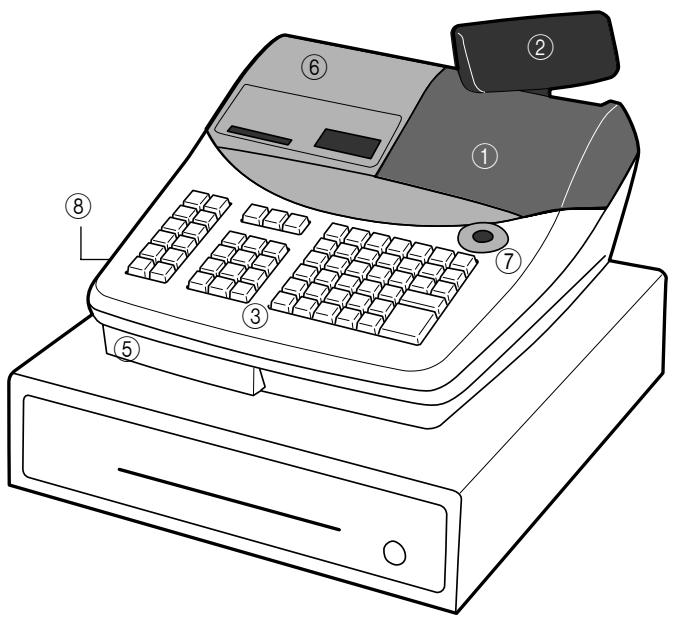
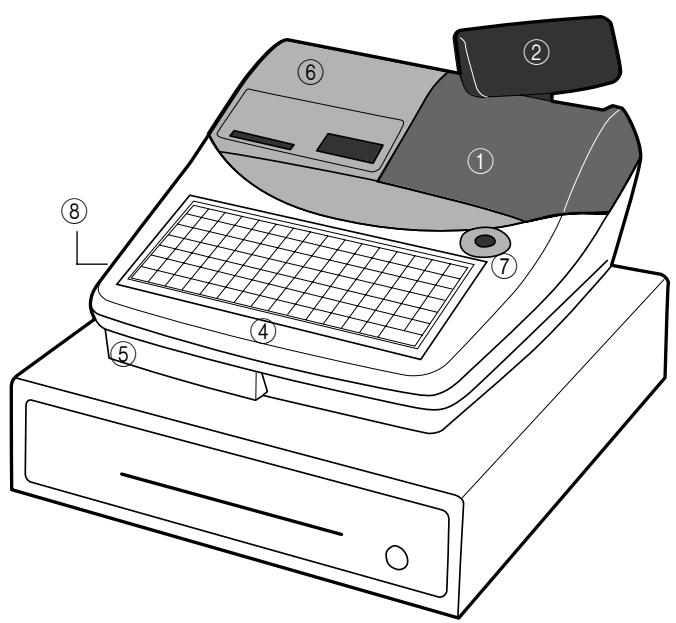
Schéma matériel![graph TD A["Main Display"] --> B["Journal printer"] B --> C["Receipt printer"] C --> D["Keyboard"] D --> E["Power supply"] E --> F["CF card"] F --> G["External printer UP-360"] G --> H["PRT-CB-8A-8B"] H --> I["Slip printer SP-1300"] I --> J["PRT-CB-8C"] J --> K["MODEM or PC"] K --> L["Multi drawer k…](/content/2025/01/129610/images/1ea9370b51a7940ccb55576153571e4bb66797b18871d0e92929ad2ea737b51d.jpg)
Remarque : Les périphériques ombrés et les lignes pointillées indiquent des périphériques en option.
Affichage
Contrôle du contraste (sauf pour le modèle américain)
![graph TD A["RECEIPT ON/OFF"] --> B["DATE/TIME"] B --> C["HELP"] C --> D["LIGHT"] D --> E["DARK"]](/content/2025/01/129610/images/ce20604d5197545bce963824dd00fefdab813d72ad0d37ca1fe57cb6d695d4f7.jpg)
CONTRASTE
Connecteurs d'entrée/sortie
Les ports COM sont situés dans le capot des connecteurs du côté gauche.
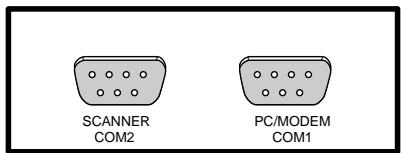
Configuration en ligne
Ports périphériques et périphériques connectables
| Model | Device | Drawer port | COM port |
| COM1 | COM2 |
| TE-2200TE-2400 | MODEM/PC | | √ | |
| External printer(Max. 2 printers) | | √ | √ |
| Slip printer | | | √ |
| Scanner | | | √ |
| Drawer | 1 (Max 2) | | |
√ : peut se connecter
Liste des périphériques/câbles disponibles
| External printer: | UP-360 |
| Printer cable: | PRT-CB-8A(3m) or PRT-CB-8B(5m) |
| Slip printer: | SP-1300 |
| Printer cable: | PRT-CB-8C |
| Power supply: | AD31U or AD31E |
| Scanner (Hand-held): | HHS-15 |
| Scanner (LASER): | PSC Quick Scan 6000 |
| Scanner (Fixed) | PSC HS1250 |
| MODEM: | US Robotics 56K V.92 External Faxmodem/56K Faxmodem (U.S. only) |
| PC cable: | PRL-CB-2 |
Après connexion des périphériques, la programmation de la table des paramètres d'E/S et de la table de connexion de l'imprimante est nécessaire.
![graph TD A["START"] --> B["Connect Modem or PC?"] B -->|No| C["Connect it to COM1 port."] B -->|Yes| D["Connect a scanner?"] D -->|No| E["Connect it to COM2 port."] D -->|Yes| F["Connect external printer(s)?"] F -->|No| G["Connect a slip printer?"] F -->|Yes| H["Connect it to free COM1 or COM2 port.…](/content/2025/01/129610/images/2f2f09d85438508feda61bc4add0fef3290c5a188f0447ba60c36d2cb22fec4f.jpg)
IPL (Chargement initial du programme)
L'IPL doit être effectué avant l'initialisation lorsque le programme d'application a été modifié.
Carte mémoire du terminal
Les programmes d'application sont téléchargés depuis le PC (via le port COM)/autre terminal (via ligne ou port COM)/carte CF vers la mémoire flash interne.
| CF cardbackup dataprogram data |
| RAMtotalizer/counter,work area |
| Flash memoryApplication program |
| ROMbios, program loader some diagnosis |
IPL
Programme d'application
Configuration système et procédure
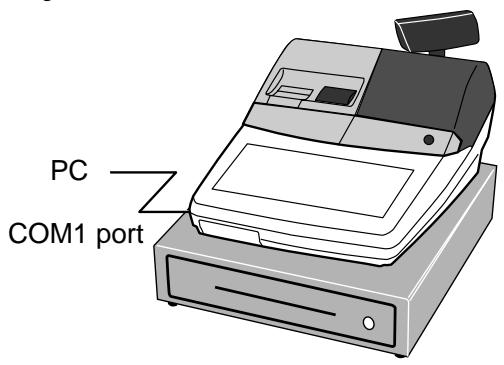
Via le port COM1 (pour recevoir les données IPL du PC)
Opération
- Mettez le commutateur de mode sur la position OFF.
- Tout en maintenant enfoncé, tournez le commutateur de mode sur la position PGM.
- Relâchez après que le registre affiche "INIT".
- Saisissez "44449999" et appuyez sur .
- Saisissez "0" (vitesse de communication : 38400 bps) et appuyez sur .
- Démarrer le programme IPL du PC.
Via carte CF (pour envoyer les données IPL vers la carte CF)
Opération
- Mettre l'interrupteur de mode sur la position OFF.
- Ouvrir le couvercle du logement de la carte CF et insérer la carte CF correctement.
(Veuillez vérifier que la carte CF est vide. Reportez-vous à la section « Utilitaire système dans PGM7 ».)
- Tourner l'interrupteur de mode sur la position PGM.
- Saisir "7" et appuyer sur .
- Saisir "170" et appuyer sur .
- Saisir "49" et appuyer sur .
(En cas d'abandon, appuyer sur au lieu de .)
- Éteindre la caisse et retirer la carte CF.
Via carte CF (pour envoyer les données IPL à la caisse)
Opération
- Mettre l'interrupteur de mode sur la position OFF.
- Ouvrez le volet du logement pour carte CF et insérez-y la carte CF en toute sécurité.
- Tout en maintenant enfoncé, tournez le commutateur de mode sur la position PGM.
- Relâchez après que la caisse enregistreuse affiche « INIT ».
- Saisissez « 44449999 » et appuyez sur .
- Saisissez « 20 » et appuyez sur .
Carte CF
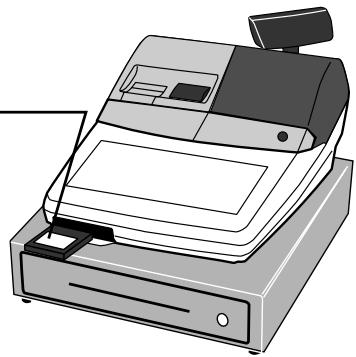
Ne retirez jamais la carte CF pendant l'IPL.
Initialisation
Procédure d'initialisation de la machine
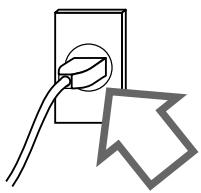
- Branchez le cordon d'alimentation sur une prise secteur.
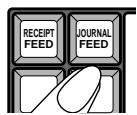
- Maintenez enfoncé.
- Tournez le commutateur de mode sur la position PGM.
- Relâchez .
Vous devriez voir « 0000000000 » sur l'écran.
Si les dix zéros ne s'affichent pas ou si un autre caractère s'affiche, mettez immédiatement le commutateur de mode sur OFF et recommencez la procédure depuis le début.
- Saisissez le code programme à 11 chiffres indiqué sur la feuille de travail.
- Appuyez pour enregistrer le code programme.
(Attendez que deux bips retentissent.)
- Appuyez pour enregistrer le code programme.
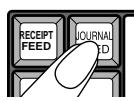
![graph TD A["REG1"] --> B["X1"] C["REG2"] --> B D["Z1"] --> E["X2/Z2"] F["OFF"] --> G["PGM"] H["RF"] --> G G --> I["->"] style A fill:#f9f,stroke:#333 style C fill:#f9f,stroke:#333 style D fill:#f9f,stroke:#333 style E fill:#f9f,stroke:#333 style F fill:#f9f,stroke:#333 style G fill:#ccf,stroke:#333…](/content/2025/01/129610/images/9bd4766dca82b506b1958416204ebcff6194123ed1b353256d89e7c0519c2f27.jpg)
D11D10D9D8 D3D2D1\ TOTAL
Reportez-vous à la feuille de travail (Initialisation)
Feuille de travail (Initialisation)
| Description | Choice | Program code |
| Print password of PGM mode, when flag clear operation is performed. | Yes = 0No = 4 | [A000] |
| Password in PGM3 ~ 7 mode | Significant numbers | 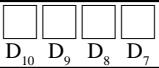 |
| Messages and descriptors are written in English = 0, French = 1, Spanish = 2, German = 4 | Significant number |  |
| Model for U.S. or Canada (Date order: month/day/year) = 2, Other area (0,0,0, Date order: day/month/year) = 1, Other area (0, Date order: day/month/year) = 3 | Significant number | [6K22] |
| Fixed value: TE-2200: 25 TE-2400: 04 | Significant numbers | [07CD] |
| Use1 clerk switch (clerk push switch)/2 Clerk secret number key * | a | 1 = 02 = 1 |  |
| Initialization pattern:1 For scanning/2 For check tracking | b | 1 = 02 = 2 |
| Use Euro only. | No = 0Yes = 1 | [C25T] |
* Lorsque vous sélectionnez cette option « Utiliser la touche de code secret du caissier », et que votre caisse ne possède pas cette touche sur le clavier par défaut, assurez-vous de l'affecter (touche de numéro secret du caissier) juste après l'initialisation.
(Ne pas mettre sur OFF avant d'avoir affecté cette touche.)
Remarque :
Veuillez vérifier sur le reçu après l'opération d'initialisation (initialisation de la machine, opération d'effacement des drapeaux et init2) que le numéro de machine est imprimé correctement.
Si des codes d'erreur sont imprimés, vérifiez le matériel et réessayez l'opération.
| P01 03-04-2004 11:58C01 MC#01 000001 | Mode symbol/date/time |
| Clerk descriptor/Mc-No./consecutive No. |
| INIT(C) 2005 by CASIOCOMPUTER CO.,LTD.All rights reserved. | INIT symbol |
| Copyright |
| TE-2200/2400 STD | Model name |
| VER. :nnnnLABEL :nnnnnn | ROM version |
| ROM label |
| VER. :nnnnLABEL :nnnnnnINIT. :nnnnnnnnnnnnnn0002-98 2000: | ROM version |
| ROM label |
| Initialization code |
| I/O parameter table record No./error code |
Opération d'effacement des drapeaux
- Branchez le cordon d'alimentation sur une prise secteur.
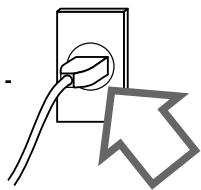
- Maintenez enfoncé .
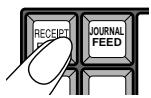
- Tournez le commutateur de mode sur la position PGM.
![graph TD A["REG1"] --> B["OFF"] C["REG2"] --> D["X1"] E["Z1"] --> F["X2/Z2"] G["RF"] --> H["PGM"] style A fill:#f9f,stroke:#333 style B fill:#ccf,stroke:#333 style C fill:#cfc,stroke:#333 style D fill:#fcc,stroke:#333 style E fill:#cff,stroke:#333 style F fill:#ffc,stroke:#333 style G fill:#fcc,stro…](/content/2025/01/129610/images/7bed1b3480b372cefe07260d261e54c8ee61e5ba69871e8c6ff7f49c5a32a064.jpg)
- Relâchez.
Vous devriez voir « FFFFFFFF » sur l'écran.
Si 10 F ne sont pas affichés ou si un autre caractère est affiché, mettez immédiatement l'interrupteur de mode sur OFF et recommencez depuis le début de cette procédure.
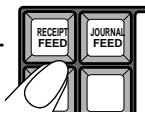
- Appuyez pour terminer.
Après la fin de l'effacement du drapeau, un reçu est émis.
Remarque : Après l'effacement du drapeau, le caissier 1 est attribué automatiquement. Ne programmez donc pas le caissier 1 comme non attribuable ou non opérationnel en mode PGM.
Opération Init 2
- Branchez le cordon d'alimentation sur une prise secteur.
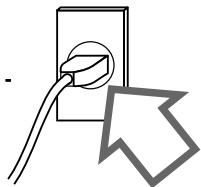
- Maintenez enfoncé.
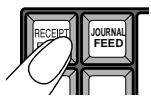
- Tournez l'interrupteur de mode sur la position PGM.
![graph TD A["REG1"] --> B["OFF"] C["REG2"] --> D["X1"] E["Z1"] --> F["X2/Z2"] G["RF"] --> H["PGM"] I["Off"] --> J["Central Y-shaped structure"] style A fill:#f9f,stroke:#333 style C fill:#f9f,stroke:#333 style E fill:#f9f,stroke:#333 style G fill:#f9f,stroke:#333 style I fill:#f9f,stroke:#333 style J…](/content/2025/01/129610/images/1b05af0de008c92e8c47f512e3a665e698f5ed9a16f7652abb83310a09849777.jpg)
- Relâchez.
Vous devriez voir « FFFFFFFF » sur l'écran.
Si 10 F ne sont pas affichés ou si un autre caractère est affiché, mettez immédiatement l'interrupteur de mode sur OFF et recommencez depuis le début de cette procédure.
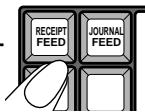
- Entrez « 8888888888 » et appuyez pour terminer.
Après la fin, un reçu est émis.
Entrée en mode diagnostic
- Branchez le cordon d'alimentation sur une prise secteur.
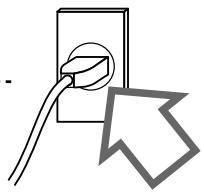
- Maintenez enfoncé .
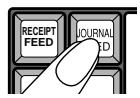
- Tournez le commutateur de mode sur la position PGM.
![graph TD A["REG1"] --> B["OFF"] C["REG2"] --> D["X1"] E["Z1"] --> F["X2/Z2"] G["RF"] --> H["PGM"] style A fill:#f9f,stroke:#333 style B fill:#ccf,stroke:#333 style C fill:#cfc,stroke:#333 style D fill:#fcc,stroke:#333 style E fill:#cff,stroke:#333 style F fill:#ffc,stroke:#333 style G fill:#cfc,stro…](/content/2025/01/129610/images/cba6e02475bc74e25aa121a14a0b4686803d9c3789a2d8a5a3eb1af289d4e310.jpg)
- Relâchez .
- Saisissez « 99990000 » et appuyez sur pour entrer dans le diagnostic.
Mot de passe
Pendant l'opération d'initialisation, vous pouvez programmer le mot de passe pour PGM 3 à 7. S'il est défini, à chaque fois que vous entrez dans le mode PGM 3 à 7, vous devez saisir ce mot de passe selon la procédure suivante.
- Appuyez sur <#-1> (normalement ).
- Saisissez le mot de passe.
- Appuyez sur <#-2> (normalement ).
Sinon, vous ne pouvez rien faire dans le mode PGM 3 à 7.
Programmation (explication générale)
Sous-mode de programmation (mode P1 à P7)
Le mode programme contient sept sous-modes listés ci-dessous. Lorsque vous passez le commutateur de mode sur PGM, le registre est toujours en mode PGM 1. Pour utiliser un autre mode, saisissez le numéro de sous-mode (2 à 7) et appuyez sur .
- PGM1 : prix unitaire, taux, date, heure, maintenance des prix unitaires PLU par lecture
- PGM2 : descripteur, nom, message
- PGM3 : caractéristiques de la machine (fonctions générales, caissier, etc.), caractéristiques des touches (département, transaction), maintenance PLU par lecture
- PGM4 : affectation des touches
- PGM5 : affectation des fichiers
- PGM6 : lecture des programmes
- PGM7 : auto-programmation, utilitaires système
Entrée dans le sous-mode de programmation
Procédure (pour les modes PGM 1, 2)![graph TD A["PGM\nMode switch"] --> B["1"] B --> C["CA/AMT/TEND"] C --> D["□ □ □ □"] D --> E["SUB TOTAL"] E --> F["PGM1"] A --> G["2"] G --> H["CA/AMT/TEND"] H --> I["□ □ □ □"] I --> J["SUB TOTAL"] J --> K["PGM2"]](/content/2025/01/129610/images/bb60a61028d38aed0b0170f9436df688e535c26b53ecbbc40388d3c02d09ff3a.jpg)
- Saisissez le mot de passe pour les modes PGM 1 et 2. Si la caisse n'a pas de mot de passe pour ces modes, il n'est pas nécessaire de le saisir.
- Appuyez sur . Une erreur se produit si vous essayez d'entrer dans le mode PGM1 ou 2 sans saisir de mot de passe (lorsqu'un mot de passe est programmé), ou si le mot de passe saisi ne correspond pas à celui programmé pour la caisse.
Pour éviter les répétitions, l'opération ci-dessus est abrégée comme suit pour toutes les autres procédures de ce manuel.
Ce mot de passe est défini par le code d'adresse 02 du programme de fonctions générales.
Procédure (pour les modes PGM 3 à 7)![graph LR A["PGM\nMode switch"] --> B["3 ~ 7\nSUB TOTAL"] B --> C["CA/AMT/TEND\npassword (4-digit)"] C --> D["SUB TOTAL"] D --> E["PGM 3 ~ 7"]](/content/2025/01/129610/images/4940fd8df1b807f7f9b990fb1797856ca25fc14448a45b2df95d38a1d982d27b.jpg)
- Saisissez le mot de passe pour les modes PGM 3 à 7. Si la caisse n'a pas de mot de passe pour ces modes, il n'est pas nécessaire de le saisir.
- Appuyez sur . Une erreur se produit si vous essayez d'entrer en mode PGM 3 \~ 7 sans saisir de mot de passe (lorsqu'un mot de passe est programmé), ou si le mot de passe saisi ne correspond pas à celui programmé pour la caisse.
Pour éviter les répétitions, l'opération ci-dessus est abrégée comme suit pour toutes les autres procédures de ce manuel.
Ce mot de passe est défini lors de l'opération d'initialisation.
Allocation de fichiers (Programme 5)
Programme d'allocation de fichiers
Procédure de programmation
![graph LR A["PGM\nMode switch"] --> B["5"] B --> C{SUB TOTAL} C --> D[" "] C --> E[" "] C --> F[" "] C --> G[" "] D --> H[" "] E --> I[" "] F --> J[" "] G --> K["CA/AMT/TEND"] K --> L["SUB TOTAL"] style A fill:#f9f,stroke:#333 style L fill:#ccf,stroke:#333](/content/2025/01/129610/images/a7e3707fbf8001ea43e0ad289a0fee1a14bff739f865ff225c5e5a13c1517b9e.jpg)
Code d'attribution de fichier (voir ci-dessous.) Numéro de fichier (voir pages suivantes.)
| File attribution code | daily sales | Periodic 1 | Periodic 2 | Consolidation file |
| Daily sales | Periodic 1 | Periodic 2 |
| 0 | √ | | | | | |
| 1 | √ | √ | | | | |
| 2 | √ | √ | √ | | | |
| 3 | √ | | | √ | | |
| 4 | √ | √ | | √ | √ | |
| 5 | √ | √ | √ | √ | √ | √ |
Liste des numéros de fichiers
| File No. | File description | Record length | Max No. of records | Description | Attribu-tion | Allocat-able | Default Rec. No. |
| System files | | | | | | |
| 088 | Auto-program work | 6 | 1 | | Work | No | 1 |
| 089 | Consecutive number work | 6 | 1 | | Work | No | 1 |
| 091 | Terminal connection table | 12 | 1 | | Program | Yes | 32 |
| 093 | Printer connection table | 5 | 7 | | Program | Yes | 3 |
| 094 | Start date | 4 | 1 | | Buffer | No | 1 |
| 095 | Initialize code | 7 | 1 | | Program | No | 1 |
| 096 | AT command | 62 | 2 | | Program | Yes | 2 |
| 097 | Online password | 8 | 1 | | Program | Yes | 1 |
| 098 | I/O parameter table | 4 | 2 | | Program | No | 4 |
| 099 | System error log | 11 | 99 | | Buffer | Yes | 99 |
| Function and total files | | | | | | |
| 001 | Fixed totalizer | 22 | 99 | | Pgm/Sale | No | 99 |
| --- | (periodic total 1) | 10 | 99 | | Sales | Yes | 99 |
| --- | (periodic total 2) | 10 | 99 | | Sales | Yes | 0 |
| --- | (daily consolidation) | 10 | 99 | | Sales | Yes | 0 |
| --- | (periodic 1 consolidation) | 10 | 99 | | Sales | Yes | 0 |
| --- | (periodic 2 consolidation) | 10 | 99 | | Sales | Yes | 0 |
| 002 | Transaction key | 35 | 999 | | Pgm/Sale | Yes | 30 |
| --- | (periodic total 1) | 10 | 999 | | Sales | Yes | 30 |
| --- | (periodic total 2) | 10 | 999 | | Sales | Yes | 0 |
| --- | (daily consolidation) | 10 | 999 | | Sales | Yes | 0 |
| --- | (periodic 1 consolidation) | 10 | 999 | | Sales | Yes | 0 |
| --- | (periodic 2 consolidation) | 10 | 999 | | Sales | Yes | 0 |
| 004 | PLU | 73 | *A | | Pgm/Sale | Yes | 216 |
| --- | (periodic total 1) | 30 | *A | | Sales | Yes | 0 |
| --- | (periodic total 2) | 30 | *A | | Sales | Yes | 0 |
| --- | (daily consolidation) | 30 | *A | | Sales | Yes | 0 |
| --- | (periodic 1 consolidation) | 30 | *A | | Sales | Yes | 0 |
| --- | (periodic 2 consolidation) | 30 | *A | | Sales | Yes | 0 |
| 005 | Department | 59 | 99 | | Pgm/Sale | Yes | 30 |
| --- | (periodic total 1) | 25 | 99 | | Sales | Yes | 30 |
| --- | (periodic total 2) | 25 | 99 | | Sales | Yes | 0 |
| --- | (daily consolidation) | 25 | 99 | | Sales | Yes | 0 |
| --- | (periodic 1 consolidation) | 25 | 99 | | Sales | Yes | 0 |
| --- | (periodic 2 consolidation) | 25 | 99 | | Sales | Yes | 0 |
| 006 | Group | 22 | 99 | | Pgm/Sale | Yes | 10 |
| --- | (periodic total 1) | 10 | 99 | | Sales | Yes | 0 |
| --- | (periodic total 2) | 10 | 99 | | Sales | Yes | 0 |
| --- | (daily consolidation) | 10 | 99 | | Sales | Yes | 0 |
| --- | (periodic 1 consolidation) | 10 | 99 | | Sales | Yes | 0 |
| --- | (periodic 2 consolidation) | 10 | 99 | | Sales | Yes | 0 |
| 009 | Hourly sales | 24 | 99 | | Pgm/Sale | Yes | 24 |
| --- | (periodic total 1) | 20 | 99 | | Sales | Yes | 0 |
| --- | (periodic total 2) | 20 | 99 | | Sales | Yes | 0 |
| --- | (daily consolidation) | 20 | 99 | | Sales | Yes | 0 |
| --- | (periodic 1 consolidation) | 20 | 99 | | Sales | Yes | 0 |
| --- | (periodic 2 consolidation) | 20 | 99 | | Sales | Yes | 0 |
*A : Dépend du modèle
| File No. | File description | Record length | Max No. of records | Description | Attribu-tion | Allocat-able | Default Rec. No. |
| 010 | Monthly sales | 20 | 31 | | Pgm/Sale | Yes | 31 |
| --- | (periodic total 1) | 20 | 31 | | Sales | Yes | 0 |
| --- | (periodic total 2) | 20 | 31 | | Sales | Yes | 0 |
| --- | (daily consolidation) | 20 | 31 | | Sales | Yes | 0 |
| --- | (periodic 1 consolidation) | 20 | 31 | | Sales | Yes | 0 |
| --- | (periodic 2 consolidation) | 20 | 31 | | Sales | Yes | 0 |
| 018 | Table analysis | 28 | 99 | | Pgm/Sale | Yes | 0 |
| --- | (periodic total 1) | 10 | 99 | | Sales | Yes | 0 |
| --- | (periodic total 2) | 10 | 99 | | Sales | Yes | 0 |
| --- | (daily consolidation) | 10 | 99 | | Sales | Yes | 0 |
| --- | (periodic 1 consolidation) | 10 | 99 | | Sales | Yes | 0 |
| --- | (periodic 2 consolidation) | 10 | 99 | | Sales | Yes | 0 |
| 020 | Grand total | 20 | 3 | | Pgm/Sale | Yes | 3 |
| --- | (daily consolidation) | 8 | 3 | | Sales | Yes | 3 |
| Check files | | | | | | |
| 015 | Check index | 255 | 200 | | Buffer | Yes | (60)*B |
| 056 | Separate check buffer | 100 | 1500 | | Buffer | Yes | (80)*B |
| 060 | Check detail | 100 | 9999 | | Buffer | Yes | (900)*B |
| Clerk files | | | | | | |
| 007 | Clerk | 38 | 99 | | Program | Yes | 15 |
| 030 | Clerk detail link | 9 | 200 | | Program | Yes | 10 |
| 011 | Clerk detail | 10 | 99 × 99 | | Sales | Yes | 150 |
| --- | (periodic total 1) | 10 | 99 × 99 | | Sales | Yes | 150 |
| --- | (periodic total 2) | 10 | 99 × 99 | | Sales | Yes | 0 |
| --- | (daily consolidation) | 10 | 99 × 99 | | Sales | Yes | 0 |
| --- | (periodic 1 consolidation) | 10 | 99 × 99 | | Sales | Yes | 0 |
| --- | (periodic 2 consolidation) | 10 | 99 × 99 | | Sales | Yes | 0 |
| Time and attendance files | | | | | | |
| 019 | Time and attendance | 16 | 999 | | Sales | Yes | 0 |
| 061 | Employee | 17 | 99 | | Program | Yes | 10 |
| Scanning PLU files | | | | | | |
| 016 | Scanning PLU | 58 | *A | | Pgm/Sale | Yes | (<-)*C |
| 040 | Non PLU table | 8 | 100 | | Program | Yes | (10)*C |
| 051 | Mix & match table | 30 | 99 | | Pgm/Sale | Yes | 0 |
| --- | (periodic total 1) | 10 | 99 | | Sales | Yes | 0 |
| --- | (periodic total 2) | 10 | 99 | | Sales | Yes | 0 |
| --- | (daily consolidation) | 10 | 99 | | Sales | Yes | 0 |
| --- | (periodic 1 consolidation) | 10 | 9 | | Sales | Yes | 0 |
| --- | (periodic 2 consolidation) | 10 | 99 | | Sales | Yes | 0 |
| 070 | Batch maintenance PLU | 42 | 1000 | | Program | Yes | (100)*C |
| 071 | Direct maintenance PLU | 42 | 1000 | | Program | Yes | (50)*C |
| 076 | Scanning PLU index | 2 | S-PLU + 2 | | Buffer | Automatic | (5002)*C |
| 077 | One touch NLU table | 7 | 999 | | Program | Yes | (10)*C |
| Arrangement file | | | | | | |
| 038 | Arrangement table | 11 | 9999 | | Program | Yes | 0 |
*A : Dépend du modèle.
*B : Allouer si vous sélectionnez l'initialisation « modèle de suivi de chèque » (reportez-vous à la page 24 de ce manuel).
*C : Allouer si vous sélectionnez l'initialisation « modèle de numérisation » (reportez-vous à la page 24 de ce manuel).
| File No. | File description | Record length | Max No. of records | Description | Attribu-tion | Allocat-able | Default Rec. No. |
| Program / message / buffer files | | | | | | |
| 022 | General control | 5 | 37 | | Program | No | 37 |
| 023 | Special character | 16 | 42 | | Program | No | 42 |
| 024 | Report header | 12 | 25 | | Program | No | 26 |
| 025 | Tax table | 74 | 10 | | Program | Yes | 4 |
| 028 | Set menu table | 60 | 999 | | Program | Yes | (10)*B |
| 029 | Batch X/Z | 24 | 10 | | Program | Yes | 4 |
| 032 | Receipt message | 24 | 42 | | Program | Yes | 4 |
| 033 | Check endorse message | 40 | 4 | | Program | Yes | 0 |
| 034 | Slip/external printer message | 40 | 42 | | Program | Yes | 0 |
| 036 | Registration buffer | 100 | 1200 | | Buffer | Yes | 80 |
| 039 | Character recall | 40 | 999 | | Program | Yes | 10 |
| 041 | Check print | 3 | 9 | | Program | Yes | 0 |
| 046 | Character key table | 6 | *E | | Program | No | *E |
| 047 | Graphic logo | 48 | 168 | | Program | Yes | 168 |
| 049 | Print buffer (for external printer) | 50 | 600 | | Buffer | Yes | 0 |
| 062 | Scheduler | 22 | 99 | | Program | Yes | 0 |
| 065 | Order character | 12 | 99 | | Program | Yes | 0 |
| 067 | Graphic logo (for external printer) | 48 | 168 | | Program | Yes | 0 |
| 068 | Watermark print | 48 | 168 | | Program | Yes | 0 |
| 073 | Bottle link table | 4 | 999 | | Program | Yes | 0 |
| 074 | Key table | 24 | *F | | Program | No | 150 |
| 078 | Miscellaneous message | 16 | 52 | *D | Program | Yes | 0 |
| 079 | Printing guidance message | 24 | 68 | *D | Program | Yes | 0 |
| 080 | Error message | 16 | 191 | *D | Program | Yes | 0 |
| 081 | Registration guidance message | 16 | 11 | *D | Program | Yes | 0 |
| 082 | X/Z guidance message | 16 | 38 | *D | Program | Yes | 0 |
| 083 | Program guidance message | 16 | 92 | *D | Program | Yes | 0 |
| 085 | Help message | 24 | 199 | *D | Program | Yes | 0 |
| 086 | Slip print buffer | 40 | 500 | | Buffer | Yes | 0 |
*A : Dépend du modèle. *B : Allouer si vous sélectionnez l'initialisation « modèle de suivi de chèque » (reportez-vous à la page 24 de ce manuel). *C : Allouer si vous sélectionnez l'initialisation « modèle de numérisation » (reportez-vous à la page 24 de ce manuel). *D : Allouer ces fichiers si vous souhaitez modifier le message par défaut. *E : 67 pour TE-2200, 77 pour TE-2400Eu, 70 pour TE-2400US. *F : 84 pour TE-2200, 112 pour TE-2400.
Émission du rapport de lecture du programme du mode 5
Procédure d'émission
![graph LR A["PGM\nMode switch"] --> B["5"] B --> C["SUB TOTAL"] C --> D["SUB TOTAL"]](/content/2025/01/129610/images/bf4db41dd05ad08abfda3f5411b68262f44e1c18b08ad9fd5d157c41c7fb6273.jpg)
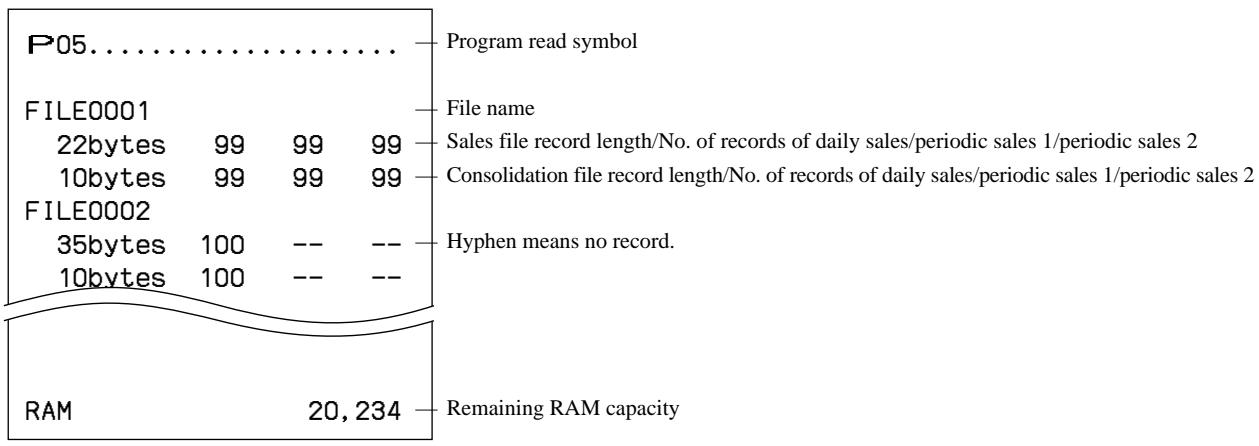
Rapport d'échantillon
Attribution des clés (Programme 4)
Programme d'attribution des clés
Procédure de programmation
En appuyant sur la touche appropriée![graph TD A["PGM\nMode switch"] --> B["4\nSUB TOTAL"] B --> C["Menu sheet number\n0 0 0 0\nSUB TOTAL"] C --> D{See Menu sheet No. section} D --> E["To other key"] E --> F["Set the same function\n#-nn\nSUB TOTAL"] F --> G["Appropriate key\n(white key on the next page)"] G --> H["Function code\nRecord…](/content/2025/01/129610/images/a632c26d2ce2bfee77c3bb7483a9c215c70ef160a53cfae719d01b6a13255d86.jpg)
En saisissant le code de clé physique![graph TD A["PGM\nMode switch"] --> B["4"] B --> C["Sub TOTAL"] C --> D["Menu sheet number"] D --> E["Physical key code\n(see the next page.)"] E --> F["Sub TOTAL"] F --> G["Sub TOTAL"] G --> H["CA/AMT/TEND"] H --> I["Sub TOTAL"] I --> J["Function code"] J --> K["Record No. (department/transaction)"]…](/content/2025/01/129610/images/eb4e7ac0d4bb3eb2784cffeac967f08c1331b89472a7f9f39cbdcdc8c1be4621.jpg)
Numéro de feuille de menu
| Menu sheet number | Description (for transaction key) | Description (for Dept/flat-PLU) |
| 0 or skip entering | Set a function to the 1st ~ 6th menu sheets. | Set a function to the programmed menu sheet. |
| 1 | Set a function to the 1st menu sheet. | Set a function to the 1st menu sheet. |
| 2 | Set a function to the 2nd menu sheet. | Set a function to the 2nd menu sheet. |
| 3 | Set a function to the 3rd menu sheet. | Set a function to the 3rd menu sheet. |
| 4 | Set a function to the 4th menu sheet. | Set a function to the 4th menu sheet. |
| 5 | Set a function to the 5th menu sheet. | Set a function to the 5th menu sheet. |
| 6 | Set a function to the 6th menu sheet. | Set a function to the 6th menu sheet. |
Configuration de la disposition des clés physiques
TE-2200
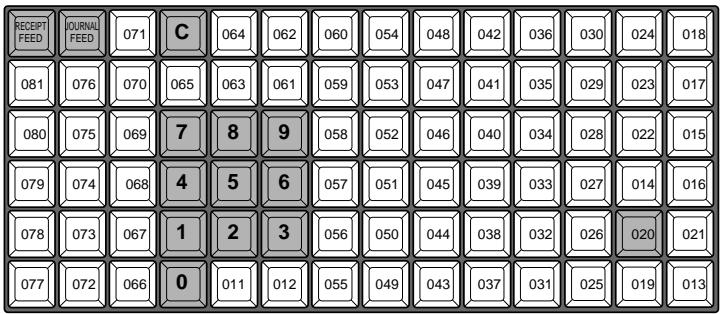
TE-2400 pour l'UE
| 038 | 045 | 052 | 059 | 066 | 073 | 080 | 087 | 094 | 101 | 108 | 031 | 029 | 026 | RECEIPT FEED | JOURNAL FEED |
| 037 | 044 | 051 | 058 | 065 | 072 | 079 | 086 | 093 | 100 | 107 | 030 | 028 | 025 | 023 | 019 |
| 036 | 043 | 050 | 057 | 064 | 071 | 078 | 085 | 092 | 099 | 106 | C | 027 | 024 | 022 | 018 |
| 035 | 042 | 049 | 056 | 063 | 070 | 077 | 084 | 091 | 098 | 105 | 7 | 8 | 9 | 021 | 017 |
| 034 | 041 | 048 | 055 | 062 | 069 | 076 | 083 | 090 | 097 | 104 | 4 | 5 | 6 | 020 | 015 |
| 033 | 040 | 047 | 054 | 061 | 068 | 075 | 082 | 089 | 096 | 103 | 1 | 2 | 3 | 014 | 016 |
| 032 | 039 | 046 | 053 | 060 | 067 | 074 | 081 | 088 | 095 | 102 | 0 | 011 | 012 | 013 |
TE-2400 pour les États-Unis
| 045 | 052 | 059 | 066 | 073 | 080 | 087 | 094 | 101 | 108 | 038 | 036 | 033 | 030 | RECEIPT FEED | JOURNAL FEED |
| 044 | 051 | 058 | 065 | 072 | 079 | 086 | 093 | 100 | 107 | 037 | 035 | 032 | 029 | 023 | 019 |
| 043 | 050 | 057 | 064 | 071 | 078 | 085 | 092 | 099 | 106 | C | 027 | 031 | 028 | 022 | 018 |
| 042 | 049 | 056 | 063 | 070 | 077 | 084 | 091 | 098 | 105 | 7 | 8 | 9 | 027 | 021 | 017 |
| 041 | 048 | 055 | 062 | 069 | 076 | 083 | 090 | 097 | 104 | 4 | 5 | 6 | 026 | 020 | 015 |
| 040 | 047 | 054 | 061 | 068 | 075 | 082 | 089 | 096 | 103 | 1 | 2 | 3 | 025 | 014 | 016 |
| 039 | 046 | 053 | 060 | 067 | 074 | 081 | 088 | 095 | 102 | 0 | 011 | 012 | 024 | 013 |
La touche ombrée ne peut pas être programmée avec d'autres fonctions.
Les fonctions <00>, <000> et <.> ne sont attribuées qu'aux touches <#011> ou <#012>.
Liste des codes de fonction
| Function | Code | Initial character |
| Add check | 094 | ADD CHK |
| Arrangement | 044 | ARG |
| | |
| Bill copy | 047 | BILL |
| Bottle return | 053 | BR |
| Cancel | 236 | CANCEL |
| Cash amount tendered | 001 | CASH |
| Charge | 002 | CHARGE |
| Check endorsement | 039 | CK.E |
| Check print | 012 | CHKP |
| Check tender | 003 | CHECK |
| Clerk number | 072 | CLK# |
| Clock-in/out | 108 | CLOCK-IN/OUT |
| Coupon | 023 | COUPON |
| Coupon 2 | 036 | CPN2 |
| Credit | 004 | CREDIT |
| Cube | 090 | XXX |
| Currency exchange | 045 | CE |
| Customer number | 043 | CT |
| Date/Time | 101 | DATE/TIME |
| Decimal point | 098 | . |
| Declaration | 061 | DECLA |
| Department | nn051 | DEPTnn |
| Deposit | 025 | DEPOSIT |
| Discount | 028 | % |
| Eat-in | 128 | EAT-IN |
| EBT tender | 007 | EBTTD |
| Enter | 105 | ENT |
| Error correct | 034 | CORR |
| Flat PLU * | nnnn063 | PLUnnnn |
| Food stamp status shift | 059 | F/S |
| Food stamp subtotal | 081 | FSST |
| Food stamp tender | 005 | FSTD |
| Help | 141 | HELP |
| Ketten Bon | 113 | X/KETTEN |
| Loan | 019 | LOAN |
| Lock out unused key | 000 | |
| Manual tax | 032 | TAX |
| Media change | 118 | MEDIA CHG |
| Menu shift | 064 | MENU |
| Merchandise subtotal | 080 | MDST |
| Minus | 027 | - |
| Multiplication/Date/Time | 082 | X |
| Multiplication | 100 | X |
| New balance | 006 | NB |
| New check | 091 | NEW CHK |
| New/old check | 093 | NEW/OLD |
| No sale | 042 | NS |
| Non-add | 040 | # |
| Non-add/No sale | 041 | #/NS |
| Function | Code | Initial character |
| Normal receipt | 016 | NRMRCT |
| OBR | 103 | OBR |
| Old check | 092 | OLD CHK |
| One touch NLU | 138 | NLU |
| Open | 067 | OPEN |
| Open2 | 068 | OPEN2 |
| Open check | 117 | OPEN CHK |
| Operator read/reset | 073 | OPE X/Z |
| Paid out | 021 | PD |
| Pick up | 022 | P. UP |
| Plus | 029 | + |
| PLU | 048 | PLU# |
| Previous balance | 026 | PB |
| Previous balance subtotal | 079 | PBST |
| Premium | 030 | %+ |
| Price | 049 | PRC |
| Price change | 104 | PRC CHG |
| Price inquiry | 008 | PRCINQ |
| Price shift | 069 | PRICE SHIFT |
| Quantity/for | 083 | QT |
| Rate tax | 031 | TAX |
| Recall | 131 | RECALL |
| Receipt | 038 | RCT |
| Receipt on/off | 076 | RCT ON/OFF |
| Received on account | 020 | RC |
| Red price | 060 | RED |
| Refund | 033 | RF |
| Review | 071 | REVIEW |
| Separate check | 095 | SEP CHK |
| Slip back feed/release | 054 | SB/R |
| Slip feed/release | 056 | SF/R |
| Slip print | 055 | SLIP |
| Square | 084 | XX |
| Stock inquiry | 009 | STKINQ |
| Store | 130 | STORE |
| Subtotal | 075 | SUBTOTAL |
| Table number | 058 | TBL# |
| Takeout | 129 | TAKE-OUT |
| Tax exempt | 062 | EXEMPT |
| Tax status shift | 057 | T/S |
| Taxable amount subtotal | 077 | TAST |
| Text print | 011 | PRT |
| Text recall | 010 | CHAR |
| Three zero | 097 | OOO |
| Tip | 015 | TIP |
| Tray total | 074 | TRAY TL |
| Two zero | 096 | OO |
| Validation | 037 | VLD |
| VAT | 046 | VAT |
| Void | 035 | VOID |
* Ces fonctions ne peuvent pas être attribuées sur TE-2200.
Émission du rapport de lecture du programme 4 mode
Procédure d'émission
![graph LR A["PGM\nMode switch"] --> B["4"] B --> C["SUB TOTAL"] C --> D["SUB TOTAL"]](/content/2025/01/129610/images/9ce412367a14d65b24546c5525bd63f6fcc8023ef6f1c487717330e409e0b1d1.jpg)
Exemple de rapport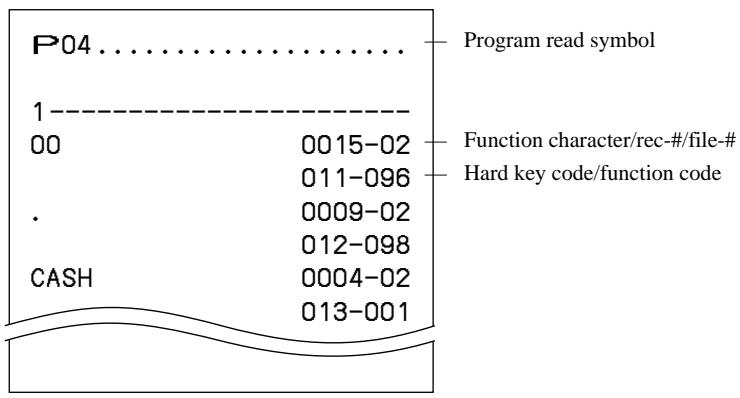
Fonction clé / caractéristique de la machine (Programme 3)
Programme de contrôle général
Procédure de programmation
![graph LR A["PGM\nMode switch"] --> B["3 SUB TOTAL"] B --> C["Address code\n(2 digits)"] C --> D["2 2 SUB TOTAL"] D --> E["Program data\n(Max. 10 digits)"] E --> F["CA/AMT/TEND"] F --> G["SUB TOTAL"]](/content/2025/01/129610/images/83ac9f71eaa06a115887f22ddd5bb86dcc59b30295ffa6978d5eb9754f0a1c1a.jpg)
Données du programme (par code d'adresse)
Code d'adresse 01 (ordre de date / mot de passe)
| Description | Choice | Program code | Initial value |
| Date orderYear/Month/Day = 0, 1Day/Month/Year = 2, Month/Day/Year = 3 | Significant number (0 ~ 3) | D10 | Dependent upon initialization code |
| Monetary mode = 0, = 1, = 2, = 3 | Significant number (0 ~ 3) | D9 | Dependent upon initialization code |
| Password in Manager mode | | D8 D7 D6 D5 | 0 0 0 0 0 0 0 0 0 0 0 0 0 4 D3 D2 D1 |
| Password in X2/Z2 mode | | D4 D3 D2 D1 | 0 0 0 0 0 0 0 0 0 0 0 0 |
Code d'adresse 02 (mot de passe)
| Description | Choice | Program code | Initial value |
| Password in PGM1/PGM2 mode | Significant numbers | |c|c & & \\ D10 & D9 & D8 & D7 | |c|c 0 & 0 & 0 & 0 \\ D10 & D9 & D8 & D7 |
| Always “00” | | |c 0 & 0 \\ D6 & D5 | |c 0 & 0 \\ D6 & D5 |
| Always “0000” | | |c|c 0 & 0 & 0 \\ D4 & D3 & D2 & D1 | |c|c 0 & 0 & 0 \\ D4 & D3 & D2 & D1 |
Code d'adresse 03 (numéro consécutif)
| Description | Choice | Program code | Initial value |
| Reset consecutive number after daily fixed total reset report is issued. | Yes = 1No = 0 | \8 | \8 |
| Always “0” | | \7 | \7 |
| Consecutive number set value.It starts “set value + 1.” | | \6D5D4D3D2D1 | \6D5D4D3D2D1 |
Code d'adresse 04 (système fiscal, arrondi, etc.)
| Description | Choice | Program code | Initial value |
| Apply rounding for registration.No rounding = 0, IF1 = 1, IF2 = 2, Danish = 3, Norwegian = 4,Singaporean = 5, Finnish = 6, Australian = 7, South Africa = 8 | Significant number (0 ~ 8) | D10 | D10 |
| Tax systemSingle tax system (1 ~ 10) = 0, U.S. tax system = 1Canadian tax system = 2, Singaporean tax system = 3 | Significant number (0 ~ 3) | D9 | (EX-U.S.) (U.S.) D9 |
| Receipt issuance:Controlled by receipt on/off switch/key = 0Always on (issue) = 1, Always off (not issue) = 2 | Significant number (0 ~ 2) | D8 | D8 |
| Allow amount tender in RF/REG– mode operation. | a | Yes = 0No = 2 | (a+b) D7 | (a+b) D7 |
| Cash drawer opening:1Immediately when the transaction is finalized.2After validation compulsory is released. | b | 1= 02= 4 |
| Food stamp system (in case of D9 = 1)Payable = 0, Illinois rule = 1, New Jersey rule = 2 | Significant number (0 ~ 2) | D6 | D6 |
| Tax exempt quantity of donuts tax. (in case of D9 = 2)0 ~ 9 (“0” means “No donuts tax”). | Significant number (0 ~ 9) |
| Rounding of results produced by departments, PLUs and scanning PLUsprogrammed with package prices and package quantities | Round off = 0Cut off = 1Round up = 2 | D5 | D5 |
| High amount limit specification for cash in drawer amount.(Sentinel function) | Maximum value (0 ~ 9) | D4 D3 | D4 D3 |
| Number of zeros (0 ~ 9) |
| Always “00” | | D2 D1 | D2 D1 |
Arrondi
| IF 1 rounding | Australian rounding |
| Last 1 digit of subtotal | Result | Last 1 digit of subtotal/cash change | Result |
| 0 ~ 2 | 0 | 0 ~ 2 | 0 |
| 3 ~ 7 | 5 | 3 ~ 7 | 5 |
| 8 ~ 9 | 10 | 8 ~ 9 | 10 |
| IF 2 rounding | | |
| Last 1 digit of subtotal | Result | Norwegian rounding |
| 0 ~ 4 | 0 | Last 1 digit of subtotal | Result |
| 5 ~ 9 | 10 | 00 ~ 24 | 0 |
| Singaporean rounding | 25 ~ 74 | 50 |
| Last 1 digit of item, %+, %- registration | Result | 75 ~ 99 | 100 |
| 0 ~ 2 | 0 | Finnish rounding |
| 3 ~ 7 | 5 | Last 1 digit of subtotal/cash change | Result |
| 8 ~ 9 | 10 | 0 ~ 2 | 0 |
| Danish rounding | 3 ~ 7 | 5 |
| Last 1 digit of subtotal/change | Result | 8 ~ 9 | 10 |
| 00 ~ 12 | 00 | South Africa rounding |
| 13 ~ 37 | 25 | Last 1 digit of subtotal | Result |
| 38 ~ 62 | 50 | 0 ~ 4 | 0 |
| 63 ~ 87 | 75 | 5 ~ 9 | 5 |
| 88 ~ 99 | 100 | | |
Code d'adresse 05 (contrôle d'impression pour reçu)
| Description | Choice | Program code | Initial value |
| Print total line during finalization. | a | Yes = 0No = 1 |  |  |
| Time system:1 24 hour system, 2 12 hour system | b | 1 = 02 = 2 |
| Feed one line after issuing receipt. | c | No = 0Yes = 4 |
| Print consecutive number by double sized letter (up to 3 digits). | a | No = 0Yes = 1 |  |  |
| Buffered receipt print *1 | b | No = 0Yes = 2 |
| Skip item lines on journal. (journal skip) | a | No = 0Yes = 1 |  |  |
| Breakdown set menu printing on receipt, post receipt, guest receipt. | b | No = 0Yes = 4 |
| Always “000” | | 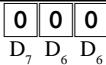 | 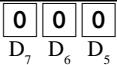 |
| Print number of item sold. | a | No = 0Yes = 1 |  | 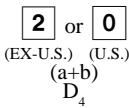 |
| Print tax symbols. | b | Yes = 0No = 2 |
| Ignore receipt/journal paper end (not effective for external printer). | Yes = 0No = 1 | [TXH0] | [CZXH] |
| Print multiplication or item consolidation in one line. | Yes = 0No = 4 | [4389] |  |
| Print C operation. | a | No = 0Yes = 1 |  |  |
| Print number of customers on header. | b | Yes = 0No = 2 |
| Print PLU number on receipt. | c | No = 0Yes = 4 |
*1 : Sélectionnez "Oui" si vous souhaitez imprimer des reçus avec filigrane.
Code d'adresse 06 (contrôle de calcul et d'opération)
| Description | Choice | Program code | Initial value |
| Follow the taxable status and commission status of previous item when +/- operation is performed. | a | Yes = 0No = 1 |  |  |
| Force to register rate tax before finalization. | b | No = 0Yes = 2 |
| Force a money declaration by#,NS,#NSbefore read/reset operation. | c | No = 0Yes = 4 |
| Force to pressSUBTOTALbefore finalization | a | No = 0Yes = 1 |  |  |
| Allow credit balance while finalization. | b | Yes = 0No = 2 |
| Allow multiple refund/register minus operation. | c | Yes = 0No = 4 |
| Affect the result of +/-, %+/%-, mix & match to the item. (Net totalling) | a | No = 0Yes = 1 |  | [GBX6] |
| Include add-on/add-in tax in net total | b | Yes = 0No = 2 |
| Include commission in net total. | a | Yes = 0No = 2 |  |  |
| Treatment of department key numeric inputs:1Treat as amount override2Treat as quantity extensions | b | 1=02=4 |
| Clear the key buffer when a receipt is issued. (REG1/2 only) | a | No = 0Yes = 1 |  |  |
| Sounds key catch tone. | b | Yes = 0No = 2 |
| Allow to issue post receipt, even if the original one is issued. | c | No = 0Yes = 4 |
| Allow program 1 programming in the manager control mode (X1 mode). | a | No = 0Yes = 1 |  | [8KOK] |
| Display “seconds” during time display. | b | No = 0Yes = 2 |
| Connect slit drawer. | c | No = 0Yes = 4 |
| RF mode status | a | RF = 0REG- = 1 |  |  |
| Prohibit registration when the stock quantity becomes negative. | b | No = 0Yes = 2 |
| Alert when the stock quantity becomes under minimum stock quantity. | c | No = 0Yes = 4 |
| Affect to stock quantity even if the refund operation. | a | No = 0Yes = 1 |  |  |
| Treatment of flat-PLU/One touch NLU key numeric inputs:1Treat as amount override (effective for flat-PLU only)2Treat as quantity extensions | b | 1=02=2 |
| Allow one registration of +/-, %+/%- per one transaction. | c | No = 0Yes = 4 |
| Rounding on the least significant digit of %+/%- registration:0~2→0,3~7→5,8~9→10 | a | No = 0Yes = 1 |  |  |
| Display separator. | b | Yes = 0No = 2 |
| Allow numeric entry while compulsory drawer opening. | a | Yes = 0No = 2 |  | [YCBZ] |
| PLU numbering: 1By memory No. (sequential), 2By random code | b | 1=02=4 |
Code d'adresse 07 (menu et décalage de prix)
| Description | Choice | Program code | Initial value |
| Maintenance of last menu shift:1 Do not maintain2 Until next menu shift specification3 Within this transaction | 1 = 02 = 13 = 2 |  | [60X3] |
| Maintenance of last price shift:1 Do not maintain2 Until next price shift specification3 Within this transaction | 1 = 02 = 13 = 2 |  |  |
| Always “0” | |  | [CWWW] |
| Sheet number of the parent menu sheet | Significant number (1 ~ 6) | [27AT] | [YGTW] |
| Summed up menu sheet 1 to parent menu sheet. | a | No = 0Yes = 1 | (ε [O26H] c) |  |
| Summed up menu sheet 2 to parent menu sheet. | b | No = 0Yes = 2 |
| Summed up menu sheet 3 to parent menu sheet. | c | No = 0Yes = 4 |
| Summed up menu sheet 4 to parent menu sheet. | a | No = 0Yes = 1 |  | [CAK0] |
| Summed up menu sheet 5 to parent menu sheet. | b | No = 0Yes = 2 |
| Summed up menu sheet 6 to parent menu sheet. | c | No = 0Yes = 4 | - | - |
| Always “0” | | [W370] |  |
| Reset child menu sheets with parent menu sheet together. | Yes = 0No = 1 |  |  |
Ce programme n'est pas efficace pour TE-2200.
Code d'adresse 08 (contrôle d'impression pour rapport de total fixe)
| Description | Choice | Program code | Initial value |
| Print gross sales total on fixed total report (GROSS) | a | Yes = 0No = 1 |  |  |
| Print net sales total on fixed total report (NET) | b | Yes = 0No = 2 |
| Print cash in drawer total on fixed total report (CAID) | c | Yes = 0No = 4 |
| Print difference between money declaration and cash in drawer total on fixed total report (CATL, CA+, CA−) (Skip these lines, if “CAID” is set to skip.) | a | Yes = 0No = 1 |  |  |
| Print charge in drawer total on fixed total report (CHID) | b | Yes = 0No = 2 |
| Print difference between money declaration and charge in drawer total on fixed total report (CHTL, CH+, CH−) (Skip these lines, if “CHID” is set to skip.) | c | Yes = 0No = 4 |
| Print check in drawer total on fixed total report (CKID) | a | Yes = 0No = 1 |  |  |
| Print difference between money declaration and check in drawer total on fixed total report (CKTL, CK+, CK−) (Skip these lines, if “CKID” is set to skip.) | b | Yes = 0No = 2 |
| Print credit in drawer total on fixed total report (CRID(1)~(4)) | c | Yes = 0No = 4 |
| Print difference between money declaration and credit in drawer total on fixed total report (CRTL, CR+, CR−) (Skip these lines, if “CRID” is set to skip.) | a | Yes = 0No = 1 |  |  |
| Print food stamp in drawer total on fixed total report (FSID) | b | Yes = 0No = 2 |
| Print food stamp cash change total on fixed total report (FSCACG) | c | Yes = 0No = 4 |
| Print EBT in drawer total on fixed total report (EBTTL) | a | Yes = 0No = 1 |  |  |
| Print EBT cash change total on fixed total report (EBTCACG) | b | Yes = 0No = 2 |
| Print RF mode total on fixed total report (RF) | c | Yes = 0No = 4 |
| Print the net number of customers on fixed total report (CUST) | a | Yes = 0No = 1 |  |  |
| Print the average sales per customer on fixed total report (AVER) | b | Yes = 0No = 2 |
| Print check cashing handling fee total on fixed total report (FEE) | a | Yes = 0No = 1 |  |  |
| Print temporary finalize service charge total on fixed total report (+) | b | Yes = 0No = 2 |
| Not used | c | (Always “4”) |
| Print commission 1 total on fixed total report (C-1) | a | Yes = 0No = 1 |  |  |
| Print commission 2 total on fixed total report (C-2) | b | Yes = 0No = 2 |
| Print foreign currency cash in drawer and check in drawer totals on fixed total report (CECA1~4, CECK1~4) | c | Yes = 0No = 4 |
| Print,%,<%->and mix & match operation net total on fixed total report (DC) | a | Yes = 0No = 1 |  |  |
| Printandoperation net total on fixed total report (REF) | b | Yes = 0No = 2 |
| Print total number ofoperation net total on fixed total report (CLEAR) | c | Yes = 0No = 4 |
| Print nontaxable totals on fixed total report (NON TAX) | a | Yes = 0No = 1 |  | 1 ulia)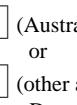 3 area) D1 3 area) D1 |
| Print rounding totals on fixed total report (ROUND) | b | Yes = 0No = 2 |
| Print cancellation total on fixed total report (CANCEL) | c | Yes = 0No = 4 |
Code d'adresse 09 (contrôle d'impression pour rapport de total fixe)
| Description | Choice | Program code | Initial value |
| Print taxable amount 1 total on fixed total report (TA1) | a | Yes = 0No = 1 |  |  |
| Print tax 1 total on fixed total report (TX1) | b | Yes = 0No = 2 |
| Print tax exempt 1 total on fixed total report (EX1) | c | Yes = 0No = 4 |
| Print taxable amount 2 total on fixed total report (TA2) | a | Yes = 0No = 1 |  | 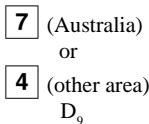 |
| Print tax 2 total on fixed total report (TX2) | b | Yes = 0No = 2 |
| Print tax exempt 2 total on fixed total report (EX2) | c | Yes = 0No = 4 |
| Print taxable amount 3 total on fixed total report (TA3) | a | Yes = 0No = 1 |  |  |
| Print tax 3 total on fixed total report (TX3) | b | Yes = 0No = 2 |
| Print tax exempt 3 total on fixed total report (EX3) | c | Yes = 0No = 4 |
| Print taxable amount 4 total on fixed total report (TA4) | a | Yes = 0No = 1 |  |  |
| Print tax 4 total on fixed total report (TX4) | b | Yes = 0No = 2 |
| Print tax exempt 4 total on fixed total report (EX4) | c | Yes = 0No = 4 |
| Print taxable amount 5 total on fixed total report (TA5) | a | Yes = 0No = 1 |  |  |
| Print tax 5 total on fixed total report (TX5) | b | Yes = 0No = 2 |
| Print tax exempt 5 total on fixed total report (EX5) | c | Yes = 0No = 4 |
| Print taxable amount 6 total on fixed total report (TA6) | a | Yes = 0No = 1 |  |  |
| Print tax 6 total on fixed total report (TX6) | b | Yes = 0No = 2 |
| Print tax exempt 6 total on fixed total report (EX6) | c | Yes = 0No = 4 |
| Print taxable amount 7 total on fixed total report (TA7) | a | Yes = 0No = 1 |  |  |
| Print tax 7 total on fixed total report (TX7) | b | Yes = 0No = 2 |
| Print tax exempt 7 total on fixed total report (EX7) | c | Yes = 0No = 4 |
| Print taxable amount 8 total on fixed total report (TA8) | a | Yes = 0No = 1 |  |  |
| Print tax 8 total on fixed total report (TX8) | b | Yes = 0No = 2 |
| Print tax exempt 8 total on fixed total report (EX8) | c | Yes = 0No = 4 |
| Print taxable amount 9 total on fixed total report (TA9) | a | Yes = 0No = 1 |  |  |
| Print tax 9 total on fixed total report (TX9) | b | Yes = 0No = 2 |
| Print tax exempt 9 total on fixed total report (EX9) | c | Yes = 0No = 4 |
| Print taxable amount 10 total on fixed total report (TA10) | a | Yes = 0No = 1 |  |  |
| Print tax 10 total on fixed total report (TX10) | b | Yes = 0No = 2 |
| Print tax exempt 10 total on fixed total report (EX10) | c | Yes = 0No = 4 |
Code d'adresse 10 (contrôle d'impression pour montant imposable, minuterie de caisse)
| Description | Choice | Program code | Initial value |
| Print taxable amount 1 on receipt/journal. | a | Yes = 0No = 1 |  |  |
| Print taxable amount 2 on receipt/journal. | b | Yes = 0No = 2 |
| Print taxable amount 3 on receipt/journal. | c | Yes = 0No = 4 |
| Print taxable amount 4 on receipt/journal. | a | Yes = 0No = 1 |  |  |
| Print taxable amount 5 on receipt/journal. | b | Yes = 0No = 2 |
| Print taxable amount 6 on receipt/journal. | c | Yes = 0No = 4 |
| Print taxable amount 7 on receipt/journal. | a | Yes = 0No = 1 |  |  |
| Print taxable amount 8 on receipt/journal. | b | Yes = 0No = 2 |
| Print taxable amount 9 on receipt/journal. | c | Yes = 0No = 4 |
| Print taxable amount 10 on receipt/journal. | Yes = 0No = 1 |  |  |
| Always “0” | | U \\ D6 | O \\ D6 |
| Prohibit registrations,1 while all drawers are opened. 2 while clerk's own drawer is opened. | a | 1 = 02 = 1 |  |  |
| Ignore compulsory drawer sensor. | b | No = 0Yes = 2 |
| Till timer (00 ~ 59 minutes) | Significant numbers |  |  |
| Till timer (00 ~ 59 seconds) | Significant numbers |  | O \\ D2 O \\ D1 |
Code d'adresse 13 (contrôle en ligne)
| Description | Choice | Program code | Initial value |
| Issue reset report at satellites during Z consolidation. * (for in/online master/satellite) | a | No = 0Yes = 2 |  |  |
| Add daily total data to consolidation file when reset operation has been performed. (for inline master/satellite) | b | Yes = 0No = 4 |
| Prohibit operation when data exists in the consolidation file. | No = 0Yes = 1 |  |  |
| Always “000” | | 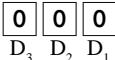 | 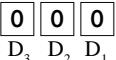 |
* Cette option est effective lorsque la consolidation est activée par commande de travail.
Code d'adresse 14 (contrôle de change de devise)
| Description | Choice | Program code | Initial value |
| Monetary mode of CECA1 and CECK1 in fixed total report: | Significant number (0 ~ 9) |  | 0 \8 |
| Decimal for CECA1 and CECK1 in fixed total report:1 Period = 0, 2 Comma = 1 | a | 1 = 02 = 1 |  | 0(a+b) D7 |
| Separator for CECA1 and CECK1 in fixed total report:1 Comma = 0, 2 Period = 1 | b | 1 = 02 = 4 |
| Monetary mode of CECA2 and CECK2 in fixed total report: | Significant number (0 ~ 9) |  | 0 \6 |
| Decimal for CECA2 and CECK2 in fixed total report:1 Period = 0, 2 Comma = 1 | a | 1 = 02 = 1 |  | 0(a+b) D5 |
| Separator for CECA2 and CECK2 in fixed total report:1 Comma = 0, 2 Period = 1 | b | 1 = 02 = 4 |
| Monetary mode of CECA3 and CECK3 in fixed total report: | Significant number (0 ~ 9) |  | 0 \4 |
| Decimal for CECA3 and CECK3 in fixed total report:1 Period = 0, 2 Comma = 1 | a | 1 = 02 = 1 |  | 0(a+b) D3 |
| Separator for CECA3 and CECK3 in fixed total report:1 Comma = 0, 2 Period = 1 | b | 1 = 02 = 4 |
| Monetary mode of CECA4 and CECK4 in fixed total report: | Significant number (0 ~ 9) |  | 0 \2 |
| Decimal for CECA4 and CECK4 in fixed total report:1 Period = 0, 2 Comma = 1 | a | 1 = 02 = 1 |  | 0(a+b) D1 |
| Separator for CECA4 and CECK4 in fixed total report:1 Comma = 0, 2 Period = 1 | b | 1 = 02 = 4 |
Code d'adresse 15 (contrôle d'impression pour rapports)
| Description | Choice | Program code | Initial value |
| Zero skip department report. | a | Yes = 0No = 1 | (GYBX) D10 D10 |  [82TD] [82TD] |
| Zero skip clerk report. | b | Yes = 0No = 2 |
| Zero skip transaction report. | a | Yes = 0No = 1 | (GGZ3)[XACB]D9 |   [WTO] [WTO] |
| Zero skip PLU report. | b | Yes = 0No = 2 |
| Zero skip hourly report. | c | Yes = 0No = 4 |
| Zero skip group report. | a | Yes = 0No = 1 | (XYGG)D8 | [HYWS][WTO][WTO] |
| Zero skip monthly report. | b | Yes = 0No = 2 |
| Zero skip table analysis report. | c | Yes = 0No = 4 |
| Skip a not clocked out employee on the time & attendance report. | a | Yes = 0No = 2 |  D7 D7 | [XXXX][WTO][WTO] |
| Zero skip mix & match report. | b | Yes = 0No = 4 |
| Prohibit issuing “OPEN CHECK Z” report. | a | No = 0Yes = 1 |  D6 D6 | [S4AH][WTO][WTO] |
| Prohibit issuing “Daily Z” report, if opened check exists. | b | No = 0Yes = 2 |
| Skip the non-programmed record of scanning PLU saving data to CF card | c | Yes = 0No = 4 |
| Exclude the record No. field from scanning PLU saving data to CF card | a | Yes = 0No = 1 | [6280]D5 |  [WTO][WTO] [WTO][WTO] |
| Open cash drawer when the financial or fixed total report is issued. | b | Yes = 0No = 2 |
| Print PLU number on the PLU report. | c | No = 0Yes = 4 |
| Print sales ratio. | a | No = 0Yes = 1 | [XW02]D4 | [WTO][WTO] |
| Issue double Z report. | b | No = 0Yes = 2 |
| Print the recalculate amount of taxable amount and tax amount of single tax. | c | No = 0Yes = 4 |
| Print average sales in the monthly report. | a | Yes = 0No = 1 | D3 |  [WTO][WTO] [WTO][WTO] |
| Contents of double Z report:1: Fixed total report only, 2: Batch report ** Fixed total should be included in this batch. | b | 1 = 02 = 2 |
| Reset actual stock quantity after PLU reset report issuance by batch X/Z. | c | No = 0Yes = 4 |
| Print reset counter. | a | Yes = 0No = 1 | [382H]D2 | [WTO][WTO] |
| Print item discount totalizer. | b | No = 0Yes = 2 |
| Print order of PLU report:1 Memory No. (sequential), 2 = Random code | c | 1 = 02 = 4 |
| With character of X/Z data stored to CF card | a | No = 0Yes = 1 | D1 | [WTO][WTO] |
| With random code of X/Z data stored to CF card | b | No = 0Yes = 2 |
| With OBR code of X/Z data stored to CF card | c | No = 0Yes = 4 |
Code d'adresse 16 (contrôle d'impression pour total général)
| Description | Choice | Program code | Initial value |
| Contents of the periodic 1 total:• Normal registration only = 0• Training registration only = 1• Both normal registration and training registration = 2 | Significant number (0 ~ 2) | [XDBH] |  |
| Contents of the periodic 2 total:• Normal registration only = 0• Training registration only = 1• Both normal registration and training registration = 2 | Significant number (0 ~ 2) |  | [80GA] |
| Journal printing of the periodic 1 report | a | Yes = 0No = 1 | ( [500H] ) | ( [282E] ) |
| Journal printing of the periodic 2 report | b | Yes = 0No = 2 |
| Print consecutive number range of the day on daily fixed total report. | No = 0Yes = 1 |  | [3WZH] |
| Always “0000” | | 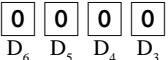 | 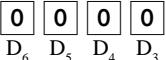 |
| Print grand total 1 on periodic 1/periodic 2 reset report. | a | Yes = 0No = 1 |  | [XSG4] |
| Print grand total 2 on periodic 1/periodic 2 reset report. | b | Yes = 0No = 2 |
| Print grand total 3 on periodic 1/periodic 2 reset report. | c | Yes = 0No = 4 |
| Print grand total 1 on daily sales reset report. | a | Yes = 0No = 1 | [2X40] |  |
| Print grand total 2 on daily sales reset report. | b | Yes = 0No = 2 |
| Print grand total 3 on daily sales reset report. | c | Yes = 0No = 4 |
Code d'adresse 17 (contrôle d'impression)
| Description | Choice | Program code | Initial value |
| Money declaration compulsory (cash) in REG/RF mode | a | No = 0Yes = 1 |  |  |
| Money declaration compulsory (charge) in REG/RF mode | b | No = 0Yes = 2 |
| Money declaration compulsory (check) in REG/RF mode | c | No = 0Yes = 4 |
| Money declaration compulsory (credit) in REG/RF mode | No = 0Yes = 1 |  |  |
| Always “0” | | [Z897] |  |
| Commission:1 Taxable amount × commission rate2 (Taxable amount + VAT) × commission rate | a | 1 = 02 = 1 |  |  |
| Whenever pressing,or,the amount registered is proportioned among all taxable amounts. | b | No = 0Yes = 2 |
| Rounding of commission:Round off = 0, Cut off = 1, Round up = 2 | Significant number (0 ~ 2) |  | [WXAB] |
| Append two zeros in unit price programming. | a | No = 0Yes = 1 |  |  |
| Print normal price and the difference between the normal price and the reduced price on receipt. | b | No = 0Yes = 2 |
| Print date on receipt. | a | Yes = 0No = 1 |  |  |
| Print date on journal. | b | Yes = 0No = 2 |
| Print consecutive number on receipt/journal. | c | Yes = 0No = 4 |
| Print time on receipt. | a | Yes = 0No = 1 |  |  |
| Print time on journal. | b | Yes = 0No = 2 |
| Merge the same department/PLU/scanning PLU registration on buffered receipt and post receipt. (Item consolidation) | c | No = 0Yes = 4 |
| Always “00” | |  |  |
Code d'adresse 18 (contrôle d'impression pour reçu client et bordereau)
| Description | Choice | Program code | Initial value |
| Maximum printing lines of slip (00 ~ 99) | Significant numbers |  |  |
| Slip printing speed:“Maximum printing lines of slip” is necessary, if you select “High”. | a | Low = 0High = 2 |  |  |
| Classify registered item by group on slip & guest receipt. | b | No = 0Yes = 4 |
| Always “0” | |  |  |
| Print date on slip & guest receipt. | a | Yes = 0No = 1 |  |  |
| Print time on slip & guest receipt. | b | Yes = 0No = 2 |
| Print:1 Total only, 2 Detail when D6 = 4 (item consolidated) | c | 1 = 02 = 4 |
| Slip print range:1 At the top of the transaction, 2 This receipt | a | 1 = 02 = 1 |  |  |
| Enable slip auto line find. | b | No = 0Yes = 2 |
| Merge the same department/PLU/scanning PLU registration on slip & guest receipt. (Item consolidation) | c | No = 0Yes = 4 |
| Slip auto feed lines (00 ~ 99) | Significant numbers |  |  |
Code d'adresse 19 (contrôle de commande)
| Description | Choice | Program code | Initial value |
| Print order with order character. | a | No = 0Yes = 1 |  |  |
| Print order with amount. | b | No = 0Yes = 2 |
| Alert when the order printer 1 goes down.If “No”, backup processing is performed.) | a | Yes = 0No = 1 |  |  |
| Alert when the order printer 2 goes down.(If “No”, backup processing is performed.) | b | Yes = 0No = 2 |
| Breakdown set menu printing on order. | c | No = 0Yes = 4 |
| Print double-height characters in UP-360/(internal R/J printer).(not only for order, but also effective for receipt) | No = 0Yes = 1 |  |  |
| Show guidance for backup print of order. (when it is backed up from R/J) | No = 0Yes = 1 | ☐ | 0 |
| Always “0” | |  -5 -5 |  5 5 |
| Cut order. | a | No = 0Yes = 2 |  |  |
| Print dashed lines (hyphens). | b | No = 0Yes = 4 |
| Print orders even if training clerk is registered items. | a | No = 0Yes = 2 | [DSZ4]- |  |
| Merge the same department/PLU/scanning PLU registration on order receipt.(Item consolidation) | b | No = 0Yes = 4 |
| Number of feed lines before order printing (0 ~ 9) | Significant number |  | [KGBZ] |
| Number of feed lines after order printing (0 ~ 9) | Significant number |  - - |  |
Code d'adresse 21 (contrôle de message)
| Description | Choice | Program code | Initial value |
| Print graphic type logo.(If select “No”, character type logo is printed.) | a | No = 0Yes = 2 | [42ZS]  | [GYDS]  |
| Print watermark on receipt. | b | No = 0Yes = 4 |
| Print commercial message on slip/guest receipt. | a | No = 0Yes = 1 |    | [06AA]  |
| Print bottom message on slip/guest receipt. | b | No = 0Yes = 2 |
| Print intermediate message on slip/guest receipt. | c | No = 0Yes = 4 |
| Print bill top message. | a | No = 0Yes = 1 |   [WTZS] [WTZS] |    |
| Print bill copy message. | b | No = 0Yes = 2 |
| Print bill bottom message. | c | No = 0Yes = 4 |
| Always “0” | | [604T] |   |
| Print commercial message on receipts in REG/RF mode. | a | No = 0Yes = 1 |    |   |
| Print bottom message on receipts in REG/RF mode. | b | No = 0Yes = 2 |
| Print commercial message on journal in REG/RF mode. | c | No = 0Yes = 4 |
| Print bottom message on journal in REG/RF mode. | a | No = 0Yes = 1 |  [W4KK] [W4KK] |   |
| Print commercial message on receipts in X/Z mode. | b | No = 0Yes = 2 |
| Print bottom message on receipts in X/Z mode. | c | No = 0Yes = 4 |
| Print commercial message on journal in X/Z mode. | a | No = 0Yes = 1 |   |  [444W] [444W] |
| Print bottom message on journal in X/Z mode. | b | No = 0Yes = 2 |
| Print commercial message on receipt in PGM mode. | c | No = 0Yes = 4 |
| Print bottom message on receipt in PGM mode. | a | No = 0Yes = 1 | [45ZZ] |  [5KZZ] [5KZZ] |
| Print commercial message on journal in PGM mode. | b | No = 0Yes = 2 |
| Print bottom message on journal in PGM mode. | c | No = 0Yes = 4 |
| Print commercial message on FC or AUTO-PGM receipts. | a | No = 0Yes = 1 |  [CD8Z] [CD8Z] |    |
| Print bottom message on FC or AUTO-PGM receipts. | b | No = 0Yes = 2 |
| Print commercial message on FC or AUTO-PGM journal. | c | No = 0Yes = 4 |
| Print bottom message on FC or AUTO-PGM journal. | a | No = 0Yes = 1 |   [7DTV] [7DTV] |   [WWKH] [WWKH] |
| Print Australian GST MOF message. | b | No = 0Yes = 4 |
Code d'adresse 25 (condiment, etc.)
| Description | Choice | Program code | Initial value |
| Enable to register a non-department link PLU. | Yes = 0No = 1 | D4 | 0 D4 |
| Subtotal display:1 Both “rounded” and “not rounded” subtotal2 Only “not rounded” subtotal(This option is effective for selecting Eu/Aus rounding specification only.) | 1 = 12 = 0 | D3 | 1 (Australia)or 0 (other area) D3 |
| Previous item void:1 By using; ordinary procedure2 By using | 1 = 02 = 1 | D2 | 1 D2 |
| Restrict (to 0 or 5) on the last one digit for amount tender. | a | No = 0Yes = 1 | (a+b+c) D1 | 4 (Australia)or 0 (other area) D1 |
| Obey registration quantities of child PLU to its parent PLU. | b | Yes = 0No = 2 |
| Restriction (to 0 or 5) on the last one digit for,,,, money declaration amount (byor). | c | No = 0Yes = 4 |
Code d'adresse 26 (suivi de chèque)
| Description | Choice | Program code | Initial value |
| Check tracking method:1 Check No., 2 Table No. | a | 1 = 02 = 1 | (a+b)D6 | 0(a+b)D6 |
| Maximum digit of check number:1 6-digit, 2 12-digit(If you use “table analysis” or “table range”, select 1.) | b | 1 = 02 = 4 |
| Tax calculation by new balance(Calculation result is not saved into totalizer.) | No = 0Yes = 1 | D5 | 0D5 |
| Enable to performduring check tracking/clerk interrupt. | a | No = 0Yes = 1 | (a+b)D4 | 0(a+b)D4 |
| Print previous balance amount, when registration begins 0 with old check. | b | Yes = 0No = 2 |
| Always “000” | | 000D3 D2 D1 | 000D3 D2 D1 |
Code d'adresse 27 (contrôle du caissier)
| Description | Choice | Program code | Initial value |
| Enable clerk/cashier interrupt. | a | No = 0Yes = 1 |  (a+b)D10 (a+b)D10 | 0(a+b)D10 |
| Print of clerk/cashier's name on receipt following sign back on at D10= 1.(enable clerk/cashier interrupt) | b | No = 0Yes = 4 |
| Always “0000000” | | 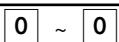 D9~ D3 D9~ D3 | 0 ~ 0D9~ D3 |
| Auto sign-off timer. (in second) (“00” means no auto sign-off.) | Significant numbers |  D2D1 D2D1 | 0 0D2D1 |
Code d'adresse 28 (Euro)
| Description | Choice | Program code | Initial value |
| Define Euro as the main currency. | Yes = 0No = 1 | [268Z] | 0\10 |
| Select rounding option:Round off = 0, Cut off = 1, Round up = 2 | Significant number (0 ~ 2) | [YOZX] | 0\9 |
| Exchange rate (within 6-digits) | Significant numbers | [4DA0] | [AYOC] |
| Decimal point position of exchange rate:Integer only = 01st decimal place = 1, 2nd decimal place = 2, 3rd decimal place = 3,4th decimal place = 4, 5th decimal place = 5, 6th decimal place = 6Example: (D8 ~ D2)1 Euro = 1.977 DM; Set “0019773”1 Euro = 1957.77319 Lit; Set “1957772” | Significant number (0 ~ 6) |  |  |
| Always “0” | | [88BD] |  |
Code d'adresse 29 (Euro)
| Description | Choice | Program code | Initial value |
| Monetary mode of sub currency: = 0, = 1, = 2, = 3 | Significant number (0 ~ 3) | | |
| Apply rounding for sub currency. *No rounding = 0, IF1 = 1, IF2 = 2, Danish = 3, Norwegian = 4, Finnish = 6Australia = 7, South Africa = 8 | Significant number (0 ~ 8) | | |
| Cash drawer number of sub currency: 0 ~ 2("0" means main drawer.) | Significant number (0 ~ 2) | | |
| Print tendered amount in sub currency converted to main currency. | a | No = 0Yes = 1 |  |  |
| Selection of the currency of subtotal printout:1 Main currency only, 2 Main and sub currency | b | 1 = 02 = 2 |
| Print total in sub currency by double sized letter. | c | No = 0Yes = 4 |
| Selection of the currency of change:1 Main currency, 2 Sub currency | a | 1 = 02 = 1 |  |  |
| Print the cash in drawer of sub currency on fixed total reports.(If the cash in drawer of main currency is skipped, this line is also skipped.) | b | No = 0Yes = 2 |
| Display symbol of sub currency:1 E (Euro), 2 L (Local) | c | 1 = 02 = 4 |
| The currency to restrict (to 00, 25, 50, 75) on last two digits for amount tendered: 1 Main currency, 2 Sub currency(It is necessary to set this restriction tokey.) | a | 1 = 02 = 1 |  |  |
| Print rounding total of sub currency on fixed totalier report. | b | No = 0Yes = 2 |
| Last 1 digit for sub currency monetary entries to 0 or 5. | c | No = 0Yes = 4 |
| Selection of the change amount printout:1 Main and sub currency, 2 Dependent upon D6 - a of this worksheet | a | [YT93] |  |  |
| Calculation method of change amount in sub currency:1 Convert the change amount in main currency into sub currency.2 Subtract the equivalent value of subtotal amount in sub currency fromthe equivalent value of the tendered amount in sub currency. | b |  |
| Always “000” | | | |
* Se référer à la programmation du code d'adresse 04.
Code d'adresse 30 (contrôle de l'imprimante thermique interne)
| Description | Choice | Program code | Initial value |
| Journal compressed print (print by half height characters) | No = 0Yes = 1 | | |
| Always “000” | | | |
Code d'adresse 31 (numérisation)
| Description | Choice | Program code | Initial value |
| The oldest item is deleted if the scanning PLU file becomes full.(If “No” is selected, alert only.) | Yes = 0No = 1 | \8 | \8 |
| Print consolidated scanning PLU reset report. (only for master) * | a | No = 0Yes = 1 | \\(a+b)\7 | \\(a+b)\7 |
| Print report before scanning PLU Z consolidation. * | b | No = 0Yes = 4 |
| Print scanning PLU code on receipt. | a | No = 0Yes = 1 | \\(a+b+c)\6 | \\(a+b+c)\6 |
| Print scanning PLU code on journal. | b | No = 0Yes = 2 |
| Print scanning PLU code on report. | c | No = 0Yes = 4 |
| Always “00” | | \5 D4 | \5 D4 |
| Inactive days:(If a scanning PLU did not move during these days period, this item will be printed on the Inactive scanning PLU report.) | Significant numbers(000 ~ 999) | \3 D2 D1 | \3 D2 D1 |
* Ces options sont également efficaces lorsque la consolidation est activée par commande de travail.
Code d'adresse 32 (maintenance directe des PLU)
| Description | Choice | Program code | Initial value |
| Skip the unit price field programming of direct maintenance PLU file in PGM 1 mode. | a | No = 0Yes = 1 |    |    |
| Skip the link field programming of direct maintenance PLU file in PGM 1 mode. | b | No = 0Yes = 2 |
| Always “000” | | [28D2]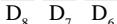 | 0  D8 D8  |
| Skip the optimum stock field programming of direct maintenance PLU file in PGM 3 mode. | No = 0Yes = 4 |   |  D5 D5 |
| Skip the unit price field programming of direct maintenance PLU file in PGM 3 mode. | a | No = 0Yes = 1 |    |    |
| Skip the link field programming of direct maintenance PLU file in PGM 3 mode. | b | No = 0Yes = 2 |
| Skip the character field programming of direct maintenance PLU file in PGM 3 mode. | c | No = 0Yes = 4 |
| Skip the status field programming of direct maintenance PLU file in PGM 3 mode. | a | No = 0Yes = 1 | [4T35]  |   |
| Skip the bottle link field programming of direct maintenance PLU file in PGM 3 mode. | b | No = 0Yes = 2 |
| Skip the mix & match field programming of direct maintenance PLU file in PGM 3 mode. | c | No = 0Yes = 4 |
| Always “00” | |   | [D2G3] |
Code d'adresse 33 (maintenance par lots des PLU)
| Description | Choice | Program code | Initial value |
| Skip the record No. designation of batch maintenance PLU file. | a | No = 0Yes = 1 |  |  |
 |  |
| Skip the optimum stock field programming of batch maintenance PLU file. | b | No = 0Yes = 4 |  |  |
| Skip the unit price field programming of batch maintenance PLU file. | a | No = 0Yes = 1 | [AA07] |  |
| Skip the link field programming of batch maintenance PLU file. | b | No = 0Yes = 2 |  |  |
| Skip the character field programming of batch maintenance PLU file. | c | No = 0Yes = 4 |
| Skip the status field programming of batch maintenance PLU file. | a | No = 0Yes = 1 | [X58H] |  |
| Skip the bottle link field programming of batch maintenance PLU file. | b | No = 0Yes = 2 |  |  |
| Skip the mix & match field programming of batch maintenance PLU file. | c | No = 0Yes = 4 |
| Always “000” | | [70Y6] | 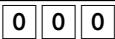 |
| [CBT7] | 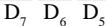 |
| Always “00” | | [2ZZD7] |  |
 |  |
| Always “00” | |  | [8733] |
 |  |
Code d'adresse 34 (contrôle du rétroéclairage)
| Description | Choice | Program code | Initial value |
| Backlight | Available = 0Not available = 1 | | |
| Always “0” | | | |
| Backlight off timer (01 ~ 59 min. “00” means always on.) | Significant numbers | | |
* Ce programme n'est efficace que pour l'Eu.
Code d'adresse 36 (stockage/rappel/numéro de ticket automatique)
| Description | Choice | Program code | Initial value |
| Reset the store/recall/auto new check starting number after open check reset report | No = 0Yes = 1 | | 0\9 |
| Store/recall/auto new check starting number (0000 = 0001) * | Significant numbers(0000 ~ 9999) | 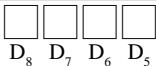 | 0 & 0 & 0 & 0\8 & D7 & D6 & D5 |
| Store/recall/auto new check ending number (0000 = 9999) * | Significant numbers(0000 ~ 9999) | 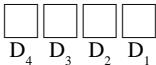 | 0 & 0 & 0 & 0\4 & D3 & D2 & D1 |
* Le numéro de départ doit être inférieur au numéro de fin. * Si le numéro de départ est supérieur au numéro de fin, l'erreur E056 se produit.
Code d'adresse 37 (numéro de ticket)
| Description | Choice | Program code | Initial value |
| Auto check starting number (0000 = 0001) * | Significant numbers(0000 ~ 9999) | 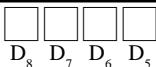 | 0 & 0 & 0 & 0 \\ D8 & D7 & D6 & D5 |
| Auto check ending number (0000 = 9999) * | Significant numbers(0000 ~ 9999) | 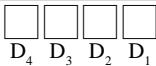 | 0 & 0 & 0 & 0 \\ D4 & D3 & D2 & D1 |
* Le numéro de départ doit être inférieur au numéro de fin. * Si le numéro de départ est supérieur au numéro de fin, l'erreur E056 se produit.
Touche département/clé PLU plate/clé PLU (programmation par lot des fonctions)
Procédure de programmation![graph TD A["Department/flat-PLU key"] --> B["3 SUB TOTAL"] B --> C["MENU SHIFT"] C --> D["Program data (12 digits)"] D --> E["☐ ~ ☐"] E --> F["Program data (12 digits)"] F --> G["FLAT-PLU"] G --> H["SUB TOTAL"] I["PLU"] --> J["3 SUB TOTAL"] J --> K["PLU No. (Rec No. 4 digits) (Random code 6 digits)"…](/content/2025/01/129610/images/c4fa3deb3ffbada4c66aaa95842d066b99d9372adada7aab9283a54b1c51c54d.jpg)
Données de programme
| Description | Choice | Program code | Initial value |
| Single item control:Normal receipt = 0, Single item receipt = 3 | Significant number | D12 | 0 D12 |
| Price change registration is enable.(Only effective for scanning PLU linked to this department) | a | No = 0Yes = 1 | (a+b+c) D11 | 0 (a+b+c) D11 |
| Multiplication registration is enable.(Only effective for scanning PLU linked to this department) | b | No = 0Yes = 2 |
| Compulsory input unit price manually.(Only effective for scanning PLU linked to this department) | c | No = 0Yes = 4 |
| Normal/condiment/preparation (Not for department)Normal item = 0, Condiment = 1, Preparation = 2 | Significant number | D10 | 0 D10 |
| Disable operation in RF/REG– mode. | a | No = 0Yes = 1 | (a+b+c) D9 | 0 (a+b+c) D9 |
| Disable operation in REG 2 mode. | b | No = 0Yes = 2 |
| Disable operation in REG 1 mode. | c | No = 0Yes = 4 |
| Taxable status:See the next page. | | D8 D7 | 0 D8 D7 |
| Enable 0 unit price. | a | No = 0Yes = 1 | (a+b+c) D6 | 0 (a+b+c) D6 |
| Enable negative price. | b | No = 0Yes = 2 |
| Hash | c | No = 0Yes = 4 |
| Always “0” | | D5 | 0 D5 |
| Low digit limitation (LDL) for manually entered unit price. | Significant number | D4 | 0 D4 |
| Multiple validation:(If “No”, validation is allowed only one time.) | a | Yes = 0No = 1 | (a+b+c) D3 | 0 (a+b+c) D3 |
| Print difference between the normal price and reduced price. | b | No = 0Yes = 2 |
| Open PLU (only for PLU) | c | No = 0Yes = 4 |
| Commission 1 | a | No = 0Yes = 1 | (a+b+c) D2 | 0 (a+b+c) D2 |
| Commission 2 | b | No = 0Yes = 2 |
| Prepared tax status (Canadian tax) | c | Yes = 0No = 4 |
| Compulsory number of condiment/preparation PLU input. | Significant number (0 ~ 8) | D1 | 0 D1 |
Statut de taxation
pour les États-Unis/Singapour
| Food stamp (for Singapore, always “0”) | No = 0Yes = 1 | [228W] |
| Taxable 1 status | a | No = 0Yes = 1 | (a [w672] c) |
| Taxable 2 status | b | No = 0Yes = 2 |
| Taxable 3 status | c | No = 0Yes = 4 |
pour le Canada
| Donuts status | No = 0Yes = 1 | |
| Non tax = 0 | Taxable 3 = 3 | Taxable 1 & 3 = 6 | Significant number | |
| Taxable 1 = 1 | Taxable 4 = 4 | Taxable 1 & 4 = 7 |
| Taxable 2 = 2 | Taxable 1 & 2 = 5 | |
pour les autres zones
| Non tax = 0 | Taxable 4 = 4 | Taxable 8 = 8 | Significant numbers |  |
| Taxable 1 = 1 | Taxable 5 = 5 | Taxable 9 = 9 |
| Taxable 2 = 2 | Taxable 6 = 6 | Taxable 10 = 10 |
| Taxable 3 = 3 | Taxable 7 = 7 | |
Touche département/clé PLU plate/clé PLU (programmation individuelle des fonctions)
Procédure de programmation
Touche département/PLU plate![graph LR A["PGM\nMode switch"] --> B["3\nSUB TOTAL"] B --> C["Address code"] C --> D["6\nSUB TOTAL"] D --> E["6\nProgram data"] E --> F["To another department/flat-PLU key\nSame program\nDepartment\nFlat-PLU"] F --> G["SUB TOTAL"]](/content/2025/01/129610/images/1795b9eab6f0c073dc057a69ef460b5a34aabd19438ff75237e2cce4b8f57606.jpg)
![graph LR A["PLU\nPGM\nMode switch"] --> B["3 SUB TOTAL"] B --> C["Address code"] C --> D["6 6 SUB TOTAL"] D --> E["PLU No. PLU"] E --> F["Program data"] F --> G["CA/AMT/TEND"] G --> H["SUB TOTAL"] I["To a new (not sequential) PLU\nDifferent program to the next PLU\nSame program"] --> E I --> F](/content/2025/01/129610/images/0345a7be839b06aea8bea802c40d56332228fff36fda8168a31f1217e15caa4d.jpg)
Plage (département/PLU/PLU plate)![graph TD A["PGM Mode switch"] --> B["3 SUB TOTAL"] B --> C["9 9 0 0 0 0"] C --> D{Department = 05 PLU/flat-PLU = 04} D --> E["SUB TOTAL"] E --> F["6 6"] F --> G["SUB TOTAL"] G --> H["Address code"] H --> I["Start rec#"] I --> J["Start rec# ~"] J --> K["CA/AMT/TEND"] K --> L["End rec#"] L --> M["CA/A…](/content/2025/01/129610/images/5c828240462172e17a53b16e3d40918b4bb343ba23e00ca3a00205dd683af1fc.jpg)
Données de programme (par code d'adresse)
Code d'adresse 11 (liaison)
| Description | Choice | Program code |
| Link group record number: (00 ~ 99) | Significant numbers | |c & \\ D4 & D3 |
| Link department record number: (00 ~ 99)(only for PLU) | Significant numbers | |c & \\ D2 & D1 |
Code d'adresse 12 (code aléatoire)
| Description | Choice | Program code |
| PLU random code (only for PLU) | Significant numbers | 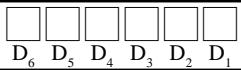 |
| Description | Choice | Program code |
| Set menu table/bottle link table record number (only for PLU) | Significant numbers | 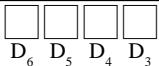 |
| Set menu table/bottle link table file number (only for PLU)File number: set menu table = 28, bottle link table = 73 | Significant numbers |  |
Code adresse 14 (stock)
| Description | Choice | Program code |
| Optimum stock quantity (0.001 ~ 99.999)Enter without decimal point. (only for PLU) | Significant numbers | 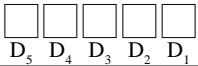 |
Code adresse 15 (limite de montant élevé)
| Description | Choice | Program code |
| High amount limit for entering unit price manually. | Significant numbers | 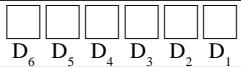 |
Code adresse 16 (contrôle des commandes)
| Description | Choice | Program code |
| Order character record number (00 ~ 99) | Significant numbers |  |
| Printing color of order: | Normal = 0Reverse = 1 | [8x77] |
| Print order to “Order 1 (printer connection table)” printer. | a | No = 0Yes = 1 |  |
| Print order to “Order 2 (printer connection table)” printer. | b | No = 0Yes = 2 |
| Print order to “Order 3 (printer connection table)” printer. | c | No = 0Yes = 4 |
| Always “00” | | [x277] |
Code adresse 17 (contrôle des reçus de bon)
| Description | Choice | Program code |
| Number of Bon receipts (1 ~ 9)(If “0”, no Bon is issued.) | Significant number | D1 |
Autre code adresse
| Address code | Description | Choice | Program code |
| 18 | Single item control:Normal receipt = 0, Single item receipt = 3 | Significant number | [G2YS] |
| 19 | Price change registration is enable.(Only effective for scanning PLU linked to this department) | a | No = 0Yes = 1 |  |
| Multiplication registration is enable.(Only effective for scanning PLU linked to this department) | b | No = 0Yes = 2 |
| Compulsory input unit price manually.(Only effective for scanning PLU linked to this department) | c | No = 0Yes = 4 |
| 01 | Normal/condiment/preparationNormal item = 0, Condiment = 1, Preparation = 2 | Significant number | [CT63] |
| 02 | Disable operation in RF/REG-mode. | a | No = 0Yes = 1 |  |
| Disable operation in REG 2 mode. | b | No = 0Yes = 2 |
| Disable operation in REG 1 mode. | c | No = 0Yes = 4 |
| 03 | Taxable status:See the status table of the batch feature programming section. | Significant numbers |  |
| 05 | Enable 0 unit price. | a | No = 0Yes = 1 |  |
| Enable negative price. | b | No = 0Yes = 2 |
| Hash | c | No = 0Yes = 4 |
| 07 | Low digit limitation (LDL) for manually entered unit price. | Significant number | [DSYZ] |
| 04 | Multiple validation:(If “No”, validation is allowed only one time.) | a | Yes = 0No = 1 | |
| Print difference between the normal price and reduced price. | b | No = 0Yes = 2 |
| Open PLU (Only for PLU) | c | No = 0Yes = 4 |
| 09 | Commission 1 | a | No = 0Yes = 1 | 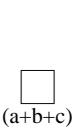 |
| Commission 2 | b | No = 0Yes = 2 |
| Prepared tax status (Canadian tax) | c | Yes = 0No = 4 |
| 10 | Compulsory number of condiment/preparation PLU input. | Significant number (0 ~ 8) |  |
Programme de clé de transaction
Procédure de programmation
![graph LR A["PGM\nMode switch"] --> B["3\nSUB TOTAL"] B --> C{Sub Total} C --> D["Program data"] D --> E["Transaction key"] E --> F["SUB TOTAL"] G["To another transaction key"] --> E](/content/2025/01/129610/images/b5f21003de095be4f705ae525282912762a06792c4efe542a687b7f9a31f2f39.jpg)
Données de programme
| Description | Choice | Program code |
| Restriction (to 0, 5) on last digit for amount tendered. (Only effective foror) | No = 0Yes = 1 |  |
| Allowable number of validation printing (“0” means no limitation) *1 *2 *3 *4 *5 | Significant number (0 ~ 9) | [SDHA] |
| Force validation operation. *1 *2 *3 *4 *5 | a | No = 0Yes = 1 |  |
| Restriction (to 00, 25, 50, 75) on last two digits for amount tendered (Only forin Danish rounding) *5 | b | No = 0Yes = 4 | [4058] |
| Disable operation in RF/REG- mode. *1 *4 *5 | a | No = 0Yes = 1 |  (a c) (a c) |
| Disable operation in REG2 mode. *1 *4 *5 | b | No = 0Yes = 2 |
| Disable operation in REG1 mode. *1 *4 *5 | c | No = 0Yes = 4 |  |
| Force batch slip printing. *1 *2 *4 | a | No = 0Yes = 1 | [5607] (a_c) |
| Force check endorsement printing (Only for). *3 *4 *5 | b | No = 0Yes = 2 |
| Force check printing (Only for). *3 *4 *5 | c | No = 0Yes = 4 |
| Prohibit entry of a partial payment | a | No = 0Yes = 1 |  (a c) (a c) |
| Prohibit the entry of the amount tendered. | b | No = 0Yes = 2 |
| Force entry of the amount tendered. | c | No = 0Yes = 4 |
| Print VAT breakdown. *1 *2 *4 | a | No = 0Yes = 1 | [40W7] (a_c) |
| Check cashing commission (Only for) *31 Use an amount 2 Use a rate | b | Amount = 0Rate = 2 |
| Validation amount *3 *41 Print subtotal amount 2 Print amount tendered | c | Subtotal = 0Tender = 4 |
| Perform Finnish rounding. | No = 0Yes = 4 | [TBK6] |
| High amount limit specification for subtotal and tendering amounts. *3 | Maximum value (0 ~ 9) | XCD03D [27SK] |
| Number of zeros (0 ~ 9) |
| High amount limit specification for change amount due. | Maximum value (0 ~ 9) | X40SGD [10CK] |
| Number of zeros (0 ~ 9) |
*1 Ces options sont également valables pour Auto Cash. *2 Ces options sont également valables pour Single item. *3 Ces options sont également valables pour l'encaissement de chèques. *4 Ces options sont également valables pour le change de devises (y compris le paiement partiel). *5 Ces options sont également valables pour le change de média (y compris le paiement partiel).
| Description | Choice | Program code |
| Restriction (to 0, 5) on last digit for amount tendered. | No = 0Yes = 1 | [WWHT] |
| Allowable number of validation printing (“0” means no limitation) *1 | Significant number(0 ~ 9) | [HK-AT] |
| Force validation operation. *1 | No = 0Yes = 1 | [AHSH] |
| Disable operation in RF/REG– mode. *1 | a | No = 0Yes = 1 |  |
| Disable operation in REG2 mode. *1 | b | No = 0Yes = 2 |
| Disable operation in REG1 mode. *1 | c | No = 0Yes = 4 |
| Force batch slip printing. | No = 0Yes = 1 | [TBXB] |
| Prohibit entry of a partial payment | a | No = 0Yes = 1 |  |
| Prohibit the entry of the amount tendered. | b | No = 0Yes = 2 |
| Force entry of the amount tendered. | c | No = 0Yes = 4 |
| Print VAT breakdown. | a | No = 0Yes = 1 | ([Z075]) |
| Validation amount1 Print subtotal amount 2 Print amount tendered | b | Subtotal = 0Tender = 4 |
| Perform Finnish rounding. | No = 0Yes = 4 |  |
| High amount limit specification for subtotal and tendering amounts. | Maximum value(0 ~ 9) |  |
| Number of zeros(0 ~ 9) |
| Always “0” | | [VDDF] |
| Specify credit in drawer total in the fixed totalizer. *1 | Significant number(0 ~ 4) | [ZCCTH] |
*1 Ces options sont également valables pour le change de média (y compris le paiement partiel).
| Description | Choice | Program code |
| Allowable number of validation printing (“0” means no limitation) | Significant number(0 ~ 9) | \\ D11 |
| Force validation operation. | No = 0Yes = 1 | \\ D10 |
| Disable operation in RF/REG– mode. | a | No = 0Yes = 1 | \\ (a+b+c) \\ D9 |
| Disable operation in REG2 mode. | b | No = 0Yes = 2 |
| Disable operation in REG1 mode. | c | No = 0Yes = 4 |
| Force batch slip printing. | a | No = 0Yes = 1 | \\ (a+b) \\ D8 |
| Prohibit over tendering. (only for) | b | No = 0Yes = 4 |
| Always “0” | | \\ D7 |
| Print VAT breakdown. | a | No = 0Yes = 1 | \\ (a+b) \\ D6 |
| Validation amount1 Print subtotal amount 2 Print amount tendered | b | Subtotal = 0Tender = 4 |
| Always “0” | | \\ D5 |
| High amount limit specification for subtotal and tendering amounts. | Maximum value(0 ~ 9) | \\ D4 D3 |
| Number of zeros(0 ~ 9) |
| Always “00” | | \\ D2 D1 |
| Description | Choice | Program code |
| Allowable number of validation printing (“0” means no limitation) | Significant number(0 ~ 9) | D11 |
| Force validation operation. | a | No = 0Yes = 1 | (a+b) D10 |
| Cancel the transaction if no item is registered. | b | No = 0Yes = 4 |
| Disable operation in RF/REG– mode. | a | No = 0Yes = 1 | (a+b+c) D9 |
| Disable operation in REG2 mode. | b | No = 0Yes = 2 |
| Disable operation in REG1 mode. | c | No = 0Yes = 4 |
| Force batch slip printing. | a | No = 0Yes = 1 | (a+b) D8 |
| Open drawer when the key is pressed. | b | No = 0Yes = 2 |
| No receipt is issued. | c | No = 0Yes = 4 |
| Function after normal (not in check tracking) registration:Operation error = 0, Auto Cash = 1, New balance = 2 | Significantnumber | D7 |
| Print VAT breakdown. | a | No = 0Yes = 1 | (a+b) D6 |
| Service charge1 Use an amount 2 Use a rate | b | Amount = 0Rate = 2 |
| Always “00000” | | 0 0 0 0 0 D5 D4 D3 D2 D1 |
| Description | Choice | Program code |
| Disable operation in RF/REG– mode. | a | No = 0Yes = 1 | |
| Disable operation in REG2 mode. | b | No = 0Yes = 2 |
| Disable operation in REG1 mode. | c | No = 0Yes = 4 |
| Always “0” | | [82X4] |
| Disable to change mode switch after registration.(only effective for) | a | No = 0Yes = 1 |  |
| Print characters on receipt, guest receipt, or slip. | b | Yes = 0No = 2 |
| Always “0000” | | 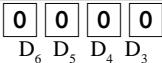 |
| Always “00” | |  |
| Description | Choice | Program code |
| Multiple validation(If “No”, only one validation printing is possible.) | Yes = 0No = 4 | |
| Always “0” | | |
| Disable operation in RF/REG- mode. | a | No = 0Yes = 1 | |
| Disable operation in REG2 mode. | b | No = 0Yes = 2 |
| Disable operation in REG1 mode. | c | No = 0Yes = 4 |
| Always “00000” | | [2564] |
| High digit limitation (HDL) for manually entered unit price (“9” means NOT allow manual entry) | Significant number | |
| Always “00” | | |
| Description | Choice | Program code |
| Restriction (to 0, 5) on last digit for amount tendered. | No = 0Yes = 1 | [8066] |
| Allowable number of validation printing (“0” means no limitation) | Significant number(0 ~ 9) | [K0XZ] |
| Force validation operation. (only effective after receipt issuance) | No = 0Yes = 1 |  |
| Disable operation in RF/REG- mode. | a | No = 0Yes = 1 |  |
| Disable operation in REG2 mode. | b | No = 0Yes = 2 |
| Disable operation in REG1 mode. | c | No = 0Yes = 4 |
| Always “0000” | | 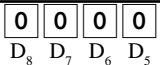 |
| High amount limit specification for entering amounts | Maximum value(0 ~ 9) |  |
| Number of zeros(0 ~ 9) |
| Always “00” | |  |
| Description | Choice | Program code |
| Allowable number of validation printing (“0” means no limitation) | Significant number (0 ~ 9) | |  |
| Force validation operation. | No = 0Yes = 1 | |  |
| Disable operation in RF/REG- mode. | a | No = 0Yes = 1 |  |
| Disable operation in REG2 mode. | b | No = 0Yes = 2 |
| Disable operation in REG1 mode. | c | No = 0Yes = 4 |
| Always “0000” | | 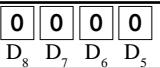 |
| High amount limit specification for entering amounts | Maximum value (0 ~ 9) |  |
| Number of zeros (0 ~ 9) |
| Always “00” | | | [644X] |
Ces options programmables ne sont pas effectives pour la fonction Euro.
<+ (PLUS)>, <- (MOINS)>,
| Description | Choice | Program code |
| Multiple validation (If “No”, only one validation printing is possible.) | Yes = 0No = 4 | [GA-4T] |
| Always “0” | | [TTAA] |
| Disable operation in RF/REG– mode. | a | No = 0Yes = 1 |  |
| Disable operation in REG2 mode. | b | No = 0Yes = 2 |
| Disable operation in REG1 mode. | c | No = 0Yes = 4 |
| Taxable status:See below. | |  |
| Allow credit balance. (−, CPN only) | No = 0Yes = 1 | [77HW] |
| Always “0” | | [S3AK] |
| Allow key operation after<SUBTOTAL>. | a | Yes = 0No = 1 | [X5Y6] |
| Allow key operation after item registration. | b | Yes = 0No = 4 |  |
| High digit limitation (HDL) for manually entered unit price (“9” means NOT allow manual entry.) | Significant number | [SCMH] |
| Commission 1 | a | No = 0Yes = 1 |  |
| Commission 2 | b | No = 0Yes = 2 |
| Prepared tax status (Canadian tax) | c | Yes = 0No = 4 |
| Always “0” | | [7948X] |
Statut de taxation
pour les États-Unis/Singapour
| Food stamp (for Singapore, always “0”) | No = 0Yes = 1 | |
| Taxable 1 status | a | No = 0Yes = 1 | (a- ) ) |
| Taxable 2 status | b | No = 0Yes = 2 |
| Taxable 3 status | c | No = 0Yes = 4 |
pour le Canada
| Donuts status ( D8D7 = "99" means donuts and all taxable.) | No = 0Yes = 1 | |
| Non tax = 0 | Taxable 3 = 3 | Taxable 1 & 3 = 6 | Significant number | |
| Taxable 1 = 1 | Taxable 4 = 4 | Taxable 1 & 4 = 7 |
| Taxable 2 = 2 | Taxable 1 & 2 = 5 | |
pour les autres zones
| Non tax = 0 | Taxable 4 = 4 | Taxable 8 = 8 | Significant numbers | \\ D°[73-64] |
| Taxable 1 = 1 | Taxable 5 = 5 | Taxable 9 = 9 |
| Taxable 2 = 2 | Taxable 6 = 6 | Taxable 10 = 10 |
| Taxable 3 = 3 | Taxable 7 = 7 | All taxable = 99 |
| Description | Choice | Program code |
| Restriction (to 0, 5) on last digit for amount tendered. | No = 0Yes = 1 | [0TA3] |
| Always “0” | | [T4BA] |
| Force validation operation.(only effective after receipt issuance) | a | No = 0Yes = 1 |  |
| Multiple validation (If “No,” only one validation is possible.) | b | No = 0Yes = 4 |
| Disable operation in RF/REG– mode. | a | No = 0Yes = 1 |  |
| Disable operation in REG2 mode. | b | No = 0Yes = 2 |
| Disable operation in REG1 mode. | c | No = 0Yes = 4 |
| Always “0” | |  |
| Key attribution | DEPO+ = 0DEPO– = 1 | [2W28] |
| Open cash drawer. | No = 0Yes = 2 | [6A27] |
| Media definition:Cash = 0, Charge = 1, Check = 2,Credit 1 = 3, Credit 2 = 4, Credit 3 = 5, Credit 4 = 6 | Significant number | [7DW] |
| High amount limit specification for entering amounts | Maximum value(0 ~ 9) |  |
| Number of zeros(0 ~ 9) |
| Always “00” | |  |
| Description | Choice | Program code |
| Multiple validation (If “No”, only one validation printing is possible.) | Yes = 0No = 4 |  D11 D11 |
| Always “0” | |   |
| Disable operation in RF/REG-mode. | a | No = 0Yes = 1 |   D9 D9 |
| Disable operation in REG2 mode. | b | No = 0Yes = 2 |
| Disable operation in REG1 mode. | c | No = 0Yes = 4 |
| Taxable status:See below. | |  [ZZTH] [ZZTH] |
| Key attribution | a | PB+ = 0PB- = 1 |    |
| Print when registered. | b | Yes = 0No = 4 |
| Always “00” | |   |
| High digit limitation (HDL) for manually entered unit price(“9” means NOT allow manual entry.) | Significant number | [S3KT][A44X] |
| Prepared tax status (Canadian tax) | Yes = 0No = 4 | [08BX] |
| Always “0” | |   |
Statut de taxation pour les États-Unis/Singapour
| Food stamp (for Singapore, always “0”) | No = 0Yes = 1 | |
| Taxable 1 status | a | No = 0Yes = 1 | [SZSK][RCW2] |
| Taxable 2 status | b | No = 0Yes = 2 |
| Taxable 3 status | c | No = 0Yes = 4 |
pour le Canada
| Donuts status (D8D7="99" means donuts and all taxable.) | No = 0Yes = 1 | |
| Non tax = 0 | Taxable 3 = 3 | Taxable 1 & 3 = 6 | Significant number | |
| Taxable 1 = 1 | Taxable 4 = 4 | Taxable 1 & 4 = 7 | |
| Taxable 2 = 2 | Taxable 1 & 2 = 5 | | |
pour les autres zones
| Non tax = 0 | Taxable 4 = 4 | Taxable 8 = 8 | Significant numbers |  |
| Taxable 1 = 1 | Taxable 5 = 5 | Taxable 9 = 9 |
| Taxable 2 = 2 | Taxable 6 = 6 | Taxable 10 = 10 |  7 7 |
| Taxable 3 = 3 | Taxable 7 = 7 | All taxable = 99 |
,
| Description | Choice | Program code |
| Multiple validation(If “No”, only one validation printing is possible.) | Yes = 0No = 4 | D11 |
| Always “0” | | D10 |
| Disable operation in RF/REG– mode. | a | No = 0Yes = 1 | (a+b+c) D9 |
| Disable operation in REG2 mode. | b | No = 0Yes = 2 |
| Disable operation in REG1 mode. | c | No = 0Yes = 4 |
| Taxable status:See below. | | D8 D7 |
| Prohibit manual rate override. | No = 0Yes = 2 | D6 |
| Rounding:Round off = 0, cut off = 1, round up = 2 | Significant number | D5 |
| Allow key operation after. | a | Yes = 0No = 1 | (a+b) D4 |
| Allow key operation after item registration. | b | Yes = 0No = 4 |
| Always “0” | | D3 |
| Commission 1 | a | No = 0Yes = 1 | (a+b+c) D2 |
| Commission 2 | b | No = 0Yes = 2 |
| Prepared tax status (Canadian tax) | c | Yes = 0No = 4 |
| Always “0” | | D1 |
Statut de taxation
pour les États-Unis/Singapour
| Food stamp (for Singapore, always “0”) | No = 0Yes = 1 | D8 |
| Taxable 1 status | a | No = 0Yes = 1 | (a+b+c) D7 |
| Taxable 2 status | b | No = 0Yes = 2 |
| Taxable 3 status | c | No = 0Yes = 4 |
pour le Canada
| Donuts status ( D8D7 = "99" means donuts and all taxable.) | No = 0Yes = 1 | D8 |
| Non tax = 0 | Taxable 3 = 3 | Taxable 1 & 3 = 6 | Significant number | D7 |
| Taxable 1 = 1 | Taxable 4 = 4 | Taxable 1 & 4 = 7 |
| Taxable 2 = 2 | Taxable 1 & 2 = 5 | |
pour les autres zones
| Non tax = 0 | Taxable 4 = 4 | Taxable 8 = 8 | Significant numbers | D8 D7 |
| Taxable 1 = 1 | Taxable 5 = 5 | Taxable 9 = 9 |
| Taxable 2 = 2 | Taxable 6 = 6 | Taxable 10 = 10 |
| Taxable 3 = 3 | Taxable 7 = 7 | All taxable = 99 |
| Description | Choice | Program code |
| Disable operation in RF/REG-mode. | a | No = 0Yes = 1 |  |
| Disable operation in REG2 mode. | b | No = 0Yes = 2 |
| Disable operation in REG1 mode. | c | No = 0Yes = 4 |
| Always “00” | |  |
| Prohibit manual entry. | No = 0Yes = 2 | [SHBX] |
| Rounding:Round off = 0, cut off = 1, round up = 2 | Significant number | [22A5] |
| Always “0000” | | 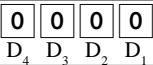 |
| Description | Choice | Program code |
| Multiple validation(If “No”, only one validation printing is possible.) | Yes = 0No = 4 |  |
| Always “0” | | [8326] |
| Disable operation in RF/REG– mode. | a | No = 0Yes = 1 |  |
| Disable operation in REG2 mode. | b | No = 0Yes = 2 |
| Disable operation in REG1 mode. | c | No = 0Yes = 4 |
| Always “00000” | | 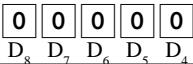 |
| High digit limitation (HDL) for manually entered unit price (“9” means NOT allow manual entry.) | Significant number | [S44T] |
| Always “00” | | [S85K] |
| Description | Choice | Program code |
| Disable operation in RF/REG-mode. | a | No = 0Yes = 1 |  |
| Disable operation in REG2 mode. | b | No = 0Yes = 2 |
| Disable operation in REG1 mode. | c | No = 0Yes = 4 |
| Always “0000000” | | 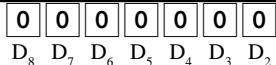 |
| A range of cancellation:1 Complete cancellation/2 Current receipt only | 2 = 01 = 1 | |
Ces options programmables ne sont pas effectives pour la fonction de correction d'erreur.
| Description | Choice | Program code |
| Disable operation in RF/REG-mode. | a | No = 0Yes = 1 |  :) :) |
| Disable operation in REG2 mode. | b | No = 0Yes = 2 |
| Disable operation in REG1 mode. | c | No = 0Yes = 4 |
| Always “0000000” | | 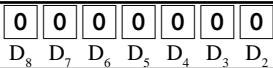 |
| A range of item correction:1 From the beginning of this transaction2 Current receipt only | a | 2 = 01 = 1 |  |
| Affect stock quantity | b | Yes = 0No = 2 |
| Description | Choice | Program code |
| Maximum number of post receipts (0 ~ 9) (“0” means 1 post receipt.) | Significant number |  |
| Always “00” | | [30Y2] |
| Disable operation in RF/REG- mode. | a | No = 0Yes = 1 |  |
| Disable operation in REG2 mode. | b | No = 0Yes = 2 |
| Disable operation in REG1 mode. | c | No = 0Yes = 4 |
| Always “0” | | [KAZ3] |
| Print current time on guest receipt. | No = 0Yes = 4 | [ZBH] |
| Clear finalized check. | Yes = 0No = 1 | [XHFC] |
| Always “0” | |  |
| Print journal when receipt is issued by. | No = 0Yes = 1 |  |
| Receipt is issued by:•“Receipt 1 (printer connection table)” = 0•“Receipt 2 (printer connection table)” = 1•“Receipt 3 (printer connection table)” = 2 | Significant number |  |
| Line number of guest bottom message (00 ~ 10): (“00” means no bottom message.) | Significant numbers |  |
| Description | Choice | Program code |
| Disable operation in RF/REG-mode. | a | No = 0Yes = 1 |  |
| Disable operation in REG2 mode. | b | No = 0Yes = 2 |
| Disable operation in REG1 mode. | c | No = 0Yes = 4 |
| Always “0” | |  |
| Line number of auto-back feed before printing (0 ~ 9) | Significant number |  |
| Always “000000” | | 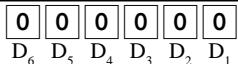 |
,
| Description | Choice | Program code |
| Disable operation in RF/REG– mode. | a | No = 0Yes = 1 |  |
| Disable operation in REG2 mode. | b | No = 0Yes = 2 |
| Disable operation in REG1 mode. | c | No = 0Yes = 4 |
| Always “0” | |  |
| Allow mode change or clerk change after non-add registration as first transaction.(only for non-add function) | Yes = 0No = 1 |  |
| Always “0000” | | 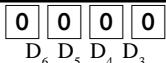 |
| Always “00” | |  |
| Description | Choice | Program code |
| Disable operation in RF/REG-mode. | a | No = 0Yes = 1 |  |
| Disable operation in REG2 mode. | b | No = 0Yes = 2 |
| Disable operation in REG1 mode. | c | No = 0Yes = 4 |
| Always “0” | |  |
| Input method:Allow replacement = 0, Prohibit replacement = 1, Add enter value = 2 | Significant number | [TG27] |
| Always “000000” | | 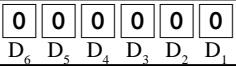 |
| Description | Choice | Program code |
| Secret code (0000 ~ 9999) | Significant numbers | 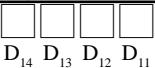 |
| Enable operation in X1 mode. | a | Yes = 0No = 1 |  |
| Enable operation in Z1 mode. | b | Yes = 0No = 2 |
| Enable operation in X2/Z2 mode. | c | Yes = 0No = 4 |
| Enable operation in RF/REG- mode. | a | Yes = 0No = 1 |  |
| Enable operation in REG2 mode. | b | Yes = 0No = 2 |
| Enable operation in REG1 mode. | c | Yes = 0No = 4 |
| Always “0” | | 0\8 |
| Treat numeric entry as arrange table number | No = 0Yes = 1 | \7 |
| Arrangement table link number | Significant numbers | 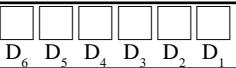 |
| Description | Choice | Program code |
| Disable operation in RF/REG-mode. | a | No = 0Yes = 1 |  |
| Disable operation in REG2 mode. | b | No = 0Yes = 2 |
| Disable operation in REG1 mode. | c | No = 0Yes = 4 |
| Always “0” | |  |
| Define amount symbol. (0, 1 ~ 4)(“0” means local currency symbol.) | Significant number | D7 |
| Define foreign currency totalizer. (0, 1 ~ 4)(“0” treats as “1”.) | Significant number |  |
| Rounding:Round off = 0, cut off = 1, round up = 2 | Significant number | Dx |
| Always “0” | |  -4 -4 |
| Monetary mode (0 ~ 9): = 2, = 1, = 0, = 3 | Significant number | [WTX] |
| Monetary symbol for decimal | a | Decimal = 0Comma = 1 | [742C] |
| Monetary symbol for separator | b | Comma = 0Decimal = 4 |
| Assigning drawer number: 0 ~ 2(“0” means drawer 1.) | Significant number (0 ~ 2) | [22HK5] |
| Description | Choice | Program code |
| Disable operation in RF/REG-mode. | a | No = 0Yes = 1 |  |
| Disable operation in REG2 mode. | b | No = 0Yes = 2 |
| Disable operation in REG1 mode. | c | No = 0Yes = 4 |
| Always “00000” | | 0 0 0 0 0D8 D7 D6 D5 D4 |
| Receipt is issued by:•“Receipt 1 (printer connection table)” = 0•“Receipt 2 (printer connection table)” = 1•“Receipt 3 (printer connection table)” = 2 | Significant number | (TTZW) |
| Always “00” | | (T4TZ) |
| Description | Choice | Program code |
| Disable operation in RF/REG-mode. | a | No = 0Yes = 1 | (a+b+c)D9 |
| Disable operation in REG2 mode. | b | No = 0Yes = 2 |
| Disable operation in REG1 mode. | c | No = 0Yes = 4 |
| Always “0” | | 0D8 |
| Force slip batch printing from the beginning of the transaction.If “No”, controlled by general function.) | a | No = 0Yes = 1 | (a+b)D7 |
| Print issuing time(only effective when slip is printed from the beginning of the transaction). | b | No = 0Yes = 4 |
| Clear finalized check. | Yes = 0No = 1 | D6 |
| Always “0” | | 0D5 |
| Print journal when slip is printed. | No = 0Yes = 1 | D4 |
| Always “000” | | 000D3 D2 D1 |
,
| Description | Choice | Program code |
| Maintain of tax shift:1 Do not maintain.2 Until next tax shift specification. | 1 = 02 = 1 | [5YS2] |
| Disable operation in RF/REG-mode. | a | No = 0Yes = 1 |  |
| Disable operation in REG2 mode. | b | No = 0Yes = 2 |
| Disable operation in REG1 mode. | c | No = 0Yes = 4 |
| Taxable status (00, 01 ~ 10)(“00” means taxable 1.) | Significant numbers | D8 D7 |
| Always “000000” | | [BAKG] |
| Description | Choice | Program code |
| Disable operation in RF/REG- mode. | a | No = 0Yes = 1 |  |
| Disable operation in REG2 mode. | b | No = 0Yes = 2 |
| Disable operation in REG1 mode. | c | No = 0Yes = 4 |
• États-Unis, Singapour :
| Exempt tax 1 | a | Yes = 0No = 1 | [26C0] |
| Exempt tax 2 | b | Yes = 0No = 2 |
| Exempt tax 3 | c | Yes = 0No = 4 | (a+b+c)D7 |
| Not exempt donuts tax = 0Exempt donuts tax 1 = 1 | Significant number | [VHKW] D8 |
| Exempt all (tax 1 ~ 4) = 0Exempt tax 1 = 1, Exempt tax 2 = 2, Exempt tax 3 = 3,Exempt tax 4 = 4, Exempt tax 1 & 2 = 5,Exempt tax 1 & 3 = 6, Exempt tax 1 & 4 = 7 | Significant number | [5628] |
| Exempt all (tax 1 ~ 10) = 00 | Significant numbers |  |
| Exempt tax 1 = 01, | Exempt tax 2 = 02, | Exempt tax 3 = 03, |
| Exempt tax 4 = 04, | Exempt tax 5 = 05, | Exempt tax 6 = 06, |
| Exempt tax 7 = 07, | Exempt tax 8 = 08, | Exempt tax 9 = 09, |
| Exempt tax 10 = 10 | | |
| Exempt add-in tax from subtotal amount. | No = 0Yes = 1 | |
| Always “00000” | | |