
TP-463 - Lecteur/enregistreur de cd DAEWOO - Notice d'utilisation et mode d'emploi gratuit
Retrouvez gratuitement la notice de l'appareil TP-463 DAEWOO au format PDF.


| Type de produit | Lecteur/enregistreur de CD |
| Marque | Daewoo |
| Modèle | TP-463 |
| Dimensions (L x H x P) | 430 x 95 x 280 mm |
| Poids | 3,2 kg |
| Alimentation | 220-240V, 50Hz |
| Consommation électrique | 15 W |
| Formats de CD compatibles | CD-Audio, CD-R, CD-RW |
| Fonctions de lecture | Lecture, pause, arrêt, piste suivante/précédente, répétition, programmation |
| Fonction d'enregistrement | Enregistrement sur CD-R/RW à partir de sources externes (AUX, micro intégré) |
| Entrées | Entrée audio analogique (RCA), entrée micro (jack 3,5 mm) |
| Sorties | Sortie audio analogique (RCA), sortie casque (jack 3,5 mm) |
| Affichage | Écran LCD à segments |
| Télécommande | Oui, incluse |
| Entretien et nettoyage | Dépoussiérer avec un chiffon doux et sec. Nettoyer la lentille du laser avec un kit de nettoyage adapté. |
| Sécurité | Ne pas exposer à l'humidité, ne pas regarder le faisceau laser. |
| Période de garantie | 2 ans (hors pièces d'usure) |
| Nombre de touches | Environ 20 touches sur la face avant |
| Indice de réparabilité | 6/10 (pièces détachées disponibles) |
FOIRE AUX QUESTIONS - TP-463 DAEWOO
Questions des utilisateurs sur TP-463 DAEWOO
0 question sur cet appareil. Repondez a celles que vous connaissez ou posez la votre.
Poser une nouvelle question sur cet appareil
Téléchargez la notice de votre Lecteur/enregistreur de cd au format PDF gratuitement ! Retrouvez votre notice TP-463 - DAEWOO et reprennez votre appareil électronique en main. Sur cette page sont publiés tous les documents nécessaires à l'utilisation de votre appareil TP-463 de la marque DAEWOO.
MODE D'EMPLOI TP-463 DAEWOO
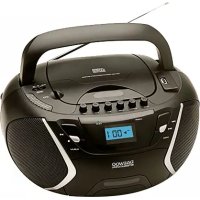
PORTABLE CD PLAYER WITH CASSETTE RECORDER
TP-463

INSTRUCTION MANUAL
HELPLINE NUMBER: 0870 100 2525
CAUTION
RISK OF ELECTRIC SHOCK DO NOT OPEN

WARNING : SHOCK HAZARD-DO NOT OPEN
This marking is located on the rear of the unit

The lighting flash with arrowhead symbol, within an equilateral triangle, is intended to alert the user to the presence of uninsulated dangerous voltage within the products enclosure that may be of sufficient magnitude to constitute a risk of electric shock to persons.

The exclamation point within an equilateral triangle, is intended to alert the user to the presence of important operating and maintenance (servicing) instructions in the literature accompanying the appliance.
The following lab le has been affixed to the unit, listing the proper procedure for working with the laser beam.
- THIS LABEL IS ATTACHED TO THE PLACE AS ILLUSTRATED TO INFORM THAT THE APPARATUS CONTAINS A LASER COMPONENT.
- THE WARNING LABEL INFORMING OF RADIATION IS PLACED INSIDE THE UNIT. AS SHOWN IN THE ILLUSTRATION. TO WARN AGAINST FURTHER MEASURES ON THE UNIT. THE EQUIPMENT CONTAINS A LASER RADIATING LASER RAYS ACCORDING THE LIMIT OF LASER PRODUCT OF CLASS 1.
1
CLASS 1 LASER PRODUCT
DANGER : INVISIBLE LASER RADIATION WHEN OPEN AND INTERLOCKS DEFEATED, AVOID EXPOSURE TO BEAM
2

SAFETY INSTRUCTIONS
- READ INSTRUCTIONS-All the safety and operating instructions should be read before the appliance is operated.
- RETAIN INSTRUCTIONS-The safety and operating instruction should be retained for future reference.
- HEED WARNINGS-All warnings on the appliance and in the operating instructions should be adhered to.
- FOLLOW INSTRUCTIONS-All operating instructions should be followed.
- WATER AND MOISTURE-The appliance should not be used near water, for example, near a bathtub, washbowl, kitchen sink, laundrytub, swimming pool or in a wet basement
- VENTILATION-The appliance should be situated so that its location or position does not interfere with its proper ventilation. For example, the appliance should not be situated on a bed, sofa, rug or similar surface that may block the ventilation openings, placed in a built-in installation, such as a bookcase or cabinet that may impede the flow of air through the ventilation openings.
- HEAT-The appliance should be situated away from heat sources such as radiators, stoves, or other appliances (including amplifiers) that produce heat.
- POWER SOURCE-The appliance should be connected to a power supply only of the type described in the operating instructions or as marked on the appliance.
- POWER CORD PROTECTION-Power supply cords should be routed so that they are not likely to be walked on or pinched by items placed upon or against them.
- POWER LINES-An out door antenna should be located away from power lines.
-
NON-USE PERIODS-The power cord of the appliance should be unplugged from the outlet when the appliance is to be left un-used for a long period of time.
-
OBJECT and LIQUID ENTRY-Care should be taken so that objects do not fall and liquids are not spilled into the enclosure through openings.
- DAMAGE REQUIRING SERVICE-The appliance should be serviced by qualified service personnel when :
A. The power-supply cord or plug has been damaged.
B. Objects have fallen into, or liquid has been spilled into the appliance enclosure.
C. The appliance has been exposed to rain.
D. The appliance has been dropped, or the enclosure damaged.
E. The appliance does not appear to operate normally or exhibits a marked change in performance.
- SERVICING-The user should not attempt to service the appliance beyond that described in the user operating instructions. All other servicing should be referred to qualified service personnel.
- ATTENTION-While this cassette deck offers a recording facility, the manufacturer wishes to point out that recording copyright material requires prior consent from the copyright owners.
NOTES:
1) It is preferred to retain CD inside the unit even when it is not in use. This prevents dust accumulation on optical lens.
2) Dirty or scratched CD may cause a skipping problem. Clean or replace the CD.
3) If an error display or malfunction occurs, disconnect the AC cord and remove all the batteries. Then turn the power back on.
BEFORE OPERATION
NOTES-CONCERNING COMPACT DISCS.
Since dirty, damaged or warped discs may damage the unit, care should be taken of the followings items:
- a. Usable compact discs
Use only compact disc with the mark shown below.
b. CD compact disc only with digital audio signals.

Disposal of Used Electrical & Electronic Equipment
The meaning of the symbol on the product, its accessory or packaging indicates that this product shall not be treated as household waste. Please, dispose of this equipment at your applicable collection point for the recycling of electrical & electronic equipments waste. In the European Union and Other European countries which there are separate collection systems for used electrical and electronic product. By ensuring the correct disposal of this product, you will help prevent potentially hazardous to the environment and to human health, which could otherwise be caused by unsuitable waste handling of this product. The recycling of materials will help conserve natural resources. Please do not therefore dispose of your old electrical and electronic equipment with your household waste. For more detailed information about recycling of this product, please contact your local city office, your household waste disposal service or the shop where you purchased the product.

LOCATION OF CONTROLS
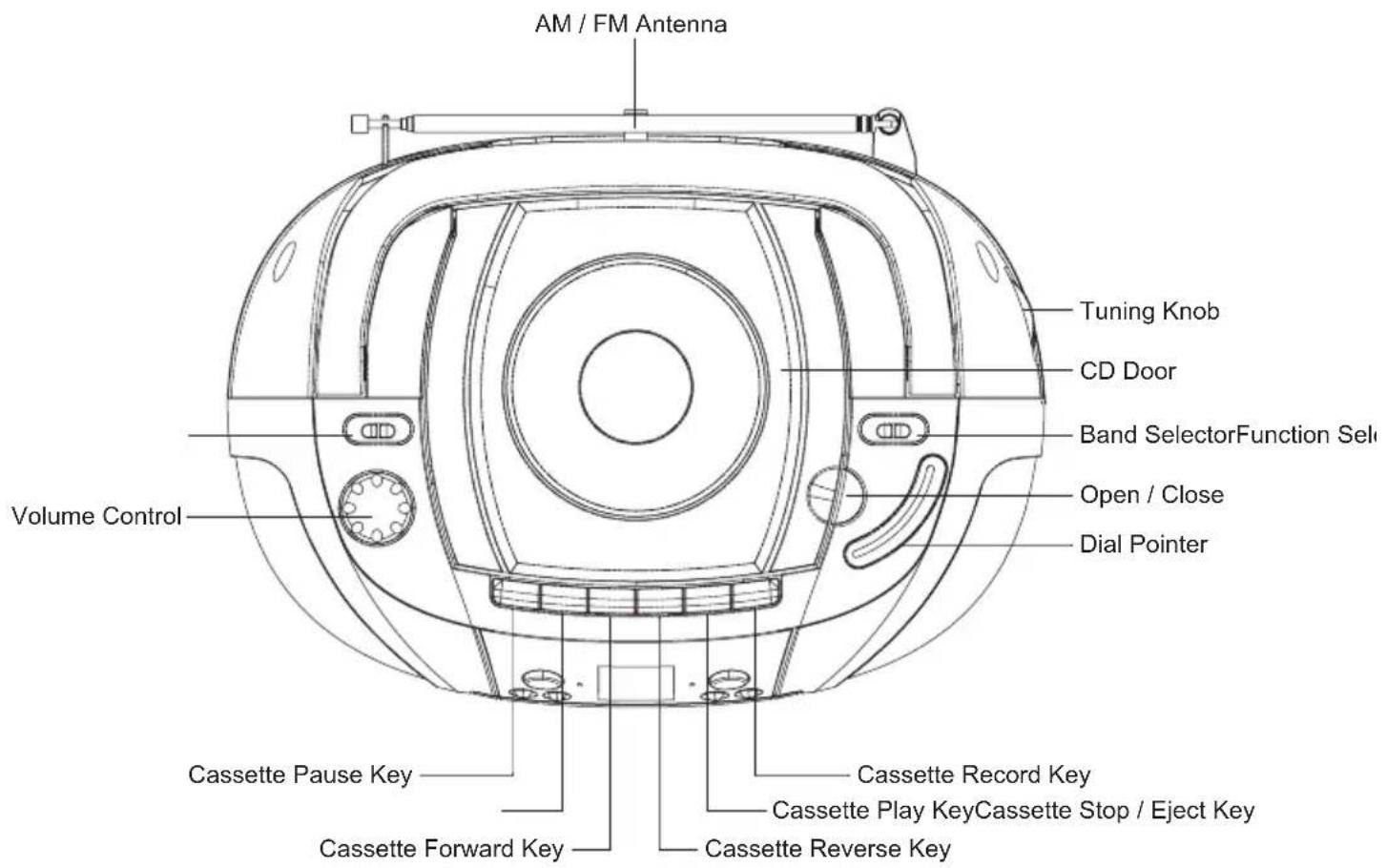
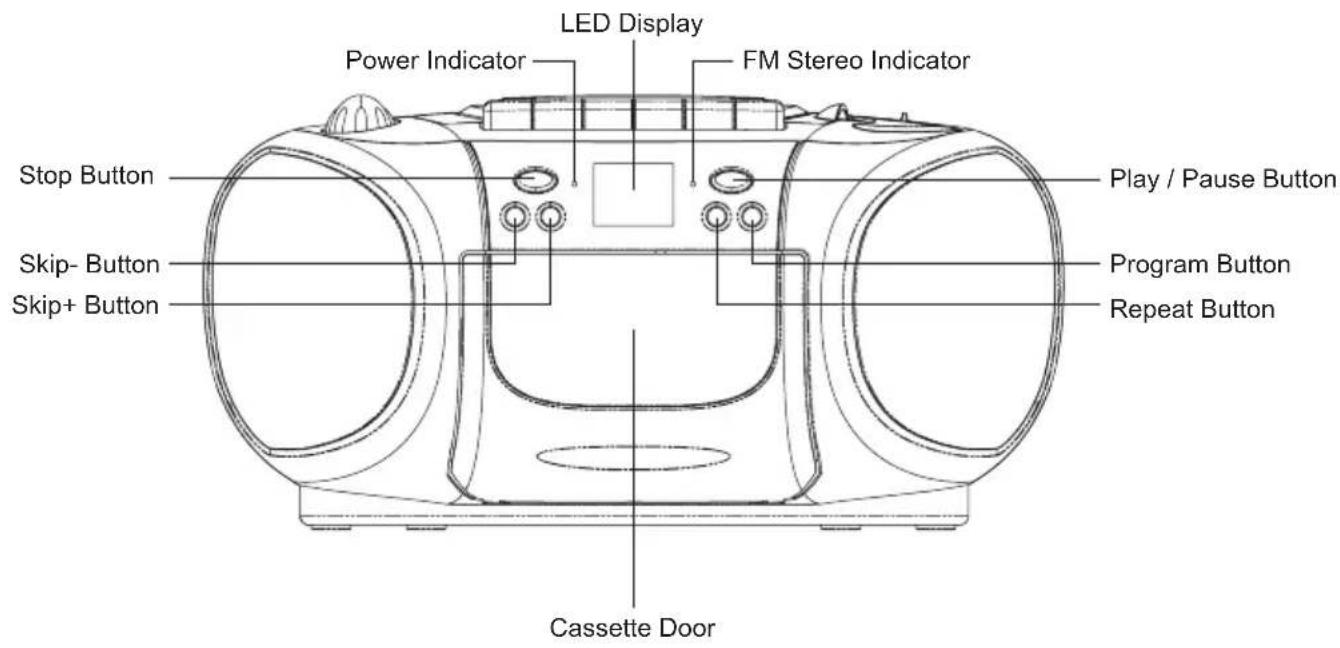
LOCATION OF CONTROLS

POWER SOURCES
AC POWER
You can power your portable system by plugging the detachable AC power cord into the AC inlet on the back of the unit and into a wall AC power outlet. Check that the rated voltage of your unit matches your local voltage. Make sure that the AC power cord is fully inserted into the unit.
BATTERY POWER
Insert 6“C” size batteries in the Battery Compartment. Be sure that the batteries are inserted correctly to avoid damage to the unit. Always remove the batteries when unit will not be used for a long period of time, as this will cause leakage to the batteries and subsequently damage to your set.

Insert 6"C" size batteries into battery compartment
LISTENING TO RADIO
OPERATION
- SET THE FUNCTION SELECTOR TO "RADIO" POSITION.
- SELECT THE DESIRED RADIO FREQUENCY BAND WITH BAND SELECTOR.
- TURN THE TUNING CONTROL TO SET THE DIAL POINTER TO THE STATION FREQUENCY AS DESIRED.
- ADJUST VOLUME CONTROLS FOR THE DESIRED VOLUME LEVEL.
FM & FM-STEREO RECEPTION
- SET THE BAND SELECTOR AT "FM" POSITION. PROGRAMS ARE RECEIVED IN MONO MODE. IN PARTICULAR WHEN STEREO SIGNALS ARE WEAK. IT IS PREFERABLE TO RECEIVE THE PROGRAM IN MONO.
- SET THE BAND SELECTOR AT "FM ST." POSITION FOR RECEIVING STEREO PROGRAMS. THE STEREO INDICATOR LIGHTS UP TO SHOW FM STEREO PROGRAM.
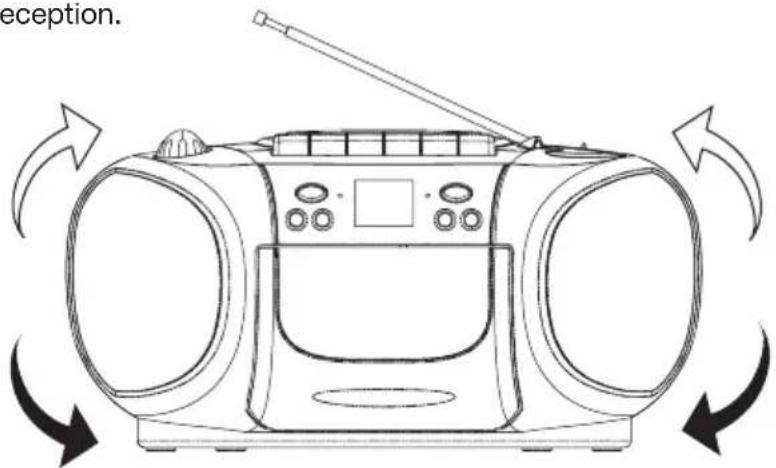
FOR BETTER RECEPTION
A. Extend the rod antenna for better reception.

B. Repositioning the unit to get better AM reception.
CD OPERATION
PLAYING COMPACT DISC
- GETTING START
- SET THE FUNCTION SELECTOR TO "CD" POSITION. OPEN THE CD COMPARTMENT WITH THE OPEN HANDLE. PUT A CD INTO THE COMPARTMENT AND CLOSE THE CD DOOR.
- FOCUS SEARCH IS PERFORMED IF DISC IS INSIDE. TOTAL NO. OF TRACKS IS READ.
Repeat 1/Repeat all Indication
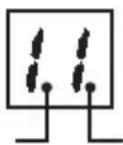
Play / Pause Indication
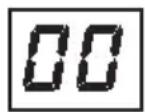
- PLAY/PAUSE MODE

- IF PLAY/PAUSE BUTTON IS PRESSED DURING STOP MODE, THE FIRST TRACK WILL BE PLAYED AND THE PLAY/PAUSE LED WILL BE TURNED ON.
- IF PLAY/PAUSE BUTTON IS PRESSED DURING PLAY MODE, THE PLAYER WILL GO TO PAUSE MODE AND THE PLAY/PAUSE LED AND THE TRACK NUMBER WILL BE FLASHING.
- STOP MODE

- IF STOP BUTTON IS PRESSED DURING PLAY OR PAUSE MODE. THE PLAYER WILL GO TO STOP MODE AND DISPLAY TOTAL NUMBER OF TRACKS INDICATOR LED IS TURNED OFF.

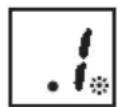
- SKIP MODE
(SKIP UP ▶▶| / SKIP DOWN ◀◀)
- DURING PLAY OR PAUSE MODE. IF SKIP UP BUTTON IS PRESSED IT WILL GO TO THE NEXT TRACK AND DISPLAY THE TRACK NO. AND THEN CONTINUE THE PLAY OR PAUSE MODE.
- DURING PLAY OR PAUSE MODE, IF BACK BUTTON IS PRESSED IT WILL O BACK TO THE BEGINNING OF THE CURRENT TRACK AND CONTINUE THE PLAY OR PAUSE MODE.
- IF YOU PRESS BACK BUTTON AGAIN IT WILL GO TO THE PREVIOUS TRACK AND WILL CONTINUE THE PLAY OR PAUSE MODE.
- REPEAT MODE
PRESS THE REPEAT BUTTON BEFORE OR DURING PLAY, A SINGLE TRACK OR ALL THE TRACK CAN BE REPEATED.
EACH PRESS CONTROLS THE REPEAT MODE AS FOLLOWS:
(1) REPEAT 1 → (2) REPEAT ALL → (3) REPEAT OFF
THE REPEAT INDICATOR IS FLASHING
THE REPEAT INDICATOR IS STEADILY ON

CD PROGRAMMING
UP TO 20 TRACKS CAN BE PROGRAMMED FOR DISC PLAY IN ANY ORDER.
TO PROGRAM
1) SET IN CD MODE.
2) PRESS THE PROGRAM BUTTON, DISPL AY WILL SHOW 01 AND FLASH.
3) SELECT A DESIRED TRACK BY USING THE SKIP BUTTONS.
4) PRESS THE PROGRAM BUTTON TO ENTER THE TRACK INTO SETTING.
5) LED DISPL AY CHANGES TO 02.
6) REPE AT 3\~5, UP TO 20 TRACKS.
TO COMPLETE PROGRAMMING AND START PLAY
PRESS PLAY BUTTON, PROGRAM PLAY STARTS AUTOMATICALLY.
TO TERMINATE PROGRAMMING
1) PRESS THE STOP BUTTON TWICE TO CANCEL PROGRAM.
TAPE OPERATION
GENERAL OPERATION
| STOP / EJECT KEY | PRESS TO STOP ALL DECK OPERATIONS. PRESS AGAIN TO OPEN THE CASSETTE DOORS. |
| FAST FORWARD KEY & FAST REWIND KEY | PRESS TO START RAPID TAPE WINDING IN EITHER FORWARD OR REVERSE DIRECTION. PRESS STOP / EJECT KEYS WHEN THE CASSETTE SPOOLS STOP TURNING. |
| PLAY KEY | PRESS TO START PLAYING TAPE. |
| PAUSE KEY | PRESS TO STOP TAPE OPERATION TEMPORARILY. PRESS AGAIN TO RESUME TAPE OPERATION. |
| RECORD KEY | PRESS THE RECORD KEY TOGETHER WITH PLAY KEY TO START RECORDING. |
PLAYBACK
- SET THE FUNCTION SELECTOR TO TAPE POSITION.
- PUT IN YOUR CASSETTE TAPE.
- PRESS PLAY KEY TO ACTIVATE PLAYBACK.
- ADJUST THE VOLUME CONTROL TO THE DESIRED LEVEL.
- USE PAUSE KEY WHEN YOU WANT TO STOP PLAYBACK TEMPORARILY.
- PRESS STOP / EJECT KEY WHEN FINISHED.
RECORDING
RECORDING FROM RADIO
- SET IN TUNER MODE.
- TUNE IN YOUR STATION AND PUT IN YOUR CASSETTE TAPE. PRESS RECORD KEY AND THE PLAY KEY OF DECK AT THE SAME TIME TO START RECORDING.
- PRESS STOP / EJECT KEY WHEN FINISHED.
RECORDING FROM CD
- SET IN CD MODE.
- SELECT THE REQUIRED TRACKS TO BE RECORDED. INSERT A CASSETTE INTO THE CASSETTE DECK AND PRESS RECORD KEY.
- PRESS STOP / EJECT KEY WHEN FINISHED.
SPECIFICATIONS
GENERAL
Power Supply: 230V\~50Hz
Power Consumption: 12Watt
Output Power(RMS): 1.2W x 2
Terminal impedance: Speaker 8ohms, Phones 32ohms
Unit Dimensions: 290(L) x 219(W) x 144(H)mm
Net Weight: 2.0kgs
Gross Weight: 2.6kgs
CASSETTE SECTION
Tape Speed: 4.75cm/sec
Recording System: AC BIAS
Erasing System: DC MAGNET
Frequency Response: 125-6300Hz
CD SECTION
Channels: 2 Channels
S/N Ratio: 60dB
Sampling Frequency 44.1kHz
Disc Size: 75 or 120
RADIO SECTION
Tuning Frequency:
AM: 522-1620 KHz
FM: 87.5-108 MHz
SPECIFICATION SUBJECT TO CHANGE WITHOUT FURTHER NOTICE.
Dripping warning:
"The product shall not be exposed to dripping or splashing and that no object filled with liquids, such as vases. Shall be placed on the product"
Ventilation warning:
"The normal ventilation of the product shall no be impeded for intended use."
- PORTABLE CD PLAYER WITH CASSETTE RECORDER
- INSTRUCTION MANUAL
- CAUTION
- RISK OF ELECTRIC SHOCK DO NOT OPEN
- WARNING : SHOCK HAZARD-DO NOT OPEN
- CLASS 1 LASER PRODUCT
- SAFETY INSTRUCTIONS
- NOTES
- BEFORE OPERATION
- NOTES-CONCERNING COMPACT DISCS
- DISPOSAL OF USED ELECTRICAL & ELECTRONIC EQUIPMENT
- LOCATION OF CONTROLS
- POWER SOURCES
- AC POWER
- BATTERY POWER
- LISTENING TO RADIO
- OPERATION
- FM & FM-STEREO RECEPTION
- FOR BETTER RECEPTION
- CD OPERATION
- PLAYING COMPACT DISC
- GETTING START
- PLAY/PAUSE MODE
- STOP MODE
- SKIP MODE
- REPEAT MODE
- CD PROGRAMMING
- TO PROGRAM
- TO COMPLETE PROGRAMMING AND START PLAY
- TO TERMINATE PROGRAMMING
- TAPE OPERATION
- PLAYBACK
- RECORDING
- RECORDING FROM RADIO
- RECORDING FROM CD
- SPECIFICATIONS
- GENERAL
- CASSETTE SECTION
- CD SECTION
- RADIO SECTION
- SPECIFICATION SUBJECT TO CHANGE WITHOUT FURTHER NOTICE
- DRIPPING WARNING
- VENTILATION WARNING
Marque : DAEWOO
Modèle : TP-463
Catégorie : Lecteur/enregistreur de cd