
Wireless Buzz! Buzzers - Contrôleur SONY - Notice d'utilisation et mode d'emploi gratuit
Retrouvez gratuitement la notice de l'appareil Wireless Buzz! Buzzers SONY au format PDF.


| Marque | Sony |
| Modèle | Wireless Buzz! Buzzers |
| Type de produit | Contrôleur sans fil pour Buzz! |
| Compatibilité | PlayStation 2 et PLAYSTATION 3 |
| Dimensions du buzzer | 137 x 54 x 49 mm environ |
| Dimensions du récepteur USB | 77 x 23 x 8 mm environ |
| Poids total | 319 g environ (sans piles) |
| Alimentation | 2 piles AA alcalines par buzzer (fournies) |
| Autonomie | Non spécifiée ; arrêt automatique après 20 minutes d'inactivité |
| Fonctions principales | Contrôleur sans fil pour jeux Buzz! ; boutons Power/Lock, bouton Buzz rouge, voyant LED bleu |
| Portée sans fil | Environ 10 mètres |
| Fréquence radio | 2,4 GHz (GFSK) |
| Nombre de buzzers supportés | Jusqu'à 4 par récepteur USB ; 5-8 avec un second récepteur |
| Entretien et nettoyage | Essuyer avec un chiffon doux et sec ; ne pas utiliser de solvants |
| Sécurité | Contient de petites pièces ; ne pas exposer à l'humidité ou à une chaleur excessive ; utiliser uniquement dans une plage de 5°C à 35°C |
| Pièces détachées et réparabilité | Piles remplaçables ; pas de pièces détachées fournies par le fabricant |
| Informations générales | Fabriqué par Namtai Electronic (Shenzhen) Co., Ltd. ; distribué en Europe par Sony Computer Entertainment Europe Ltd. |
FOIRE AUX QUESTIONS - Wireless Buzz! Buzzers SONY
Questions des utilisateurs sur Wireless Buzz! Buzzers SONY
0 question sur cet appareil. Repondez a celles que vous connaissez ou posez la votre.
Poser une nouvelle question sur cet appareil
Téléchargez la notice de votre Contrôleur au format PDF gratuitement ! Retrouvez votre notice Wireless Buzz! Buzzers - SONY et reprennez votre appareil électronique en main. Sur cette page sont publiés tous les documents nécessaires à l'utilisation de votre appareil Wireless Buzz! Buzzers de la marque SONY.
MODE D'EMPLOI Wireless Buzz! Buzzers SONY
Instruction Manual
Before using this product, carefully read this manual and retain it for future reference. These Wireless Buzz™ Buzzers are designed for use with the PlayStation®2 console and the PLAYSTATION®3 system.
Product Contents
natural_image
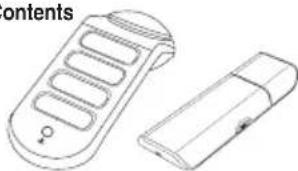
Line drawing of a remote control device with two views: one showing internal slots and the other a rectangular device (no text or symbols)• Four Wireless Buzz!™ Buzzers.
• Eight AA alkaline batteries.
• One USB receiver with receiver cap.
- One drawstring bag.
WARNING
To avoid potential electric shock or starting a fire, do not expose this product to rain or moisture.
Precautions
Safety
This product has been designed with the highest concern for safety. However, any electrical device, if used improperly, has the potential for causing fire, electric shock or personal injury. To ensure accident-free operation, be sure to follow these guidelines:
- Observe all warnings, precautions and instructions.
- Do not use the product if it functions in an abnormal manner.
• This product contains small parts, which, if removed, may be a choking hazard to children.
Use and Handling
- Do not expose the product to high temperatures, high humidity or direct sunlight.
- Operate in an environment where temperatures range between 5°C and 35°C.
- Do not allow liquid or small particles to get into the product.
- Do not put heavy objects on the product.
- Never disassemble or modify the product.
- Do not throw or drop the product, or physically damage it in any way.
- Do not touch the product's metal parts or insert foreign objects into its USB connector.
Cleaning the Wireless Buzz!™ Buzzers
Dust may build up on the product after an extended period of time.
- Before cleaning the product, disconnect it from the PlayStation®2 console or the PLAYSTATION®3 system for safety.
- Wipe the product's surface with a soft, dry cloth.
- The product should be cleaned by an adult, or cleaned under close adult supervision.
- Do not use a moistened cloth to clean the product as water may cause it to malfunction.
- Do not use benzene, paint thinner or other chemicals as these may damage the product.
- When using a commercially available cleaning cloth, follow the instructions supplied with it.
AA Alkaline Batteries
- Do not throw the batteries into fire.
- Do not carry the batteries with coins or other metallic objects. The batteries can generate heat if their positive and negative terminals come into accidental contact with metallic objects.
- Do not mix new batteries with old ones.
- Do not use different types of battery together.
- When you are not going to use the product for a long time, remove the batteries to avoid damage from battery leakage and corrosion.
- If battery leakage occurs, wipe off any deposit and install new batteries. If the deposit sticks to you, wipe it off thoroughly.
Connecting the Wireless Buzz!™ Buzzers
USB receiver
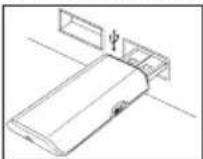
- Remove the receiver cap from the USB receiver and insert its USB connector into any USB connector on the front of the PlayStation 2 console or the PLAYSTATION 3 system.
- Turn on the PlayStation®2 console or the PLAYSTATION®3 system.
Wireless Buzz!™ Buzzers
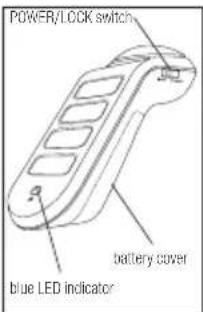
- Before using a Buzz™ Buzzer, carefully remove its battery cover and insert two AA alkaline batteries (supplied).
- To turn a Buzz™ Buzzer on, push the POWER/LOCK switch briefly towards the POWER position. When a Buzz™ Buzzer is activated, its blue LED indicator will flash rapidly eight times.
- To turn a Buzz™ Buzzer off, push the POWER/LOCK switch briefly towards the POWER position. The Buzz™ Buzzer's blue LED indicator will flash slowly four times to indicate that it has turned off. NOTE: A Buzz™ Buzzer will turn off automatically if left idle for 20 minutes.
- When using a Buzz!™ Buzzer, push the POWER/LOCK switch into the LOCK position to make sure it doesn't turn off accidentally.
Pairing the Wireless Buzz!™ Buzzers
These Wireless Buzz™ Buzzers have already been paired with the supplied USB receiver. If a replacement Buzz™ Buzzer is introduced, all four Wireless Buzz™ Buzzers must be paired with the USB receiver again.
- Push the POWER/LOCK switch on all four Wireless Buzz!™ Buzzers into the POWER position and hold it for four seconds, until their blue LED indicators glow continuously. Be sure to perform this operation within two metres of the PlayStation® 2 console or the PLAYSTATION®3 system.
- Press and hold the BIND button on the USB receiver. Its blue LED indicator will glow and flash once as each Buzz!™ Buzzer successfully pairs.
- As each Buzz™ Buzzer pairs with the USB receiver, its blue LED indicator and red Buzz™ button will fl ash briefl y, indicating a successful connection and pairing. To test the connection, press any button and the blue LED indicator on the Buzz™ Buzzer and the USB receiver will fl ash briefl y.
- The USB receiver will pair with a maximum of four Wireless Buzz™ Buzzers. To play with five to eight Wireless Buzz™ Buzzers, a second USB receiver is required.
Using the Wireless Buzz!™ Buzzers
When turned on, ensure that the Wireless Buzz™ Buzzers are within approximately 10 metres of the PlayStation®2 console or the PLAYSTATION®3 system. The usage and function of the product may vary depending on the software in use. See the appropriate software manual for details.
Troubleshooting
If you experience any difficulties while using the product, please call the appropriate PlayStation® customer service number which can be found:
- within every PlayStation®2 and PLAYSTATION®3 format software manual; and
- on our website at playstation.com
Specifications
Interface (USB receiver and PS2™/PS3™) USB type 1.1
Interface (Buzz™ Buzzer and USB receiver) RF 2.4GHz, GFSK
USB connector (USB receiver and PS2™/PS3™) USB type 1.1
USB connector (Buzz™ Buzzer and USB receiver) RF 2.4GHz, GFSK
Power consumption (USB receiver) Max. 100mA @ 5V
Power consumption (Buzz!™ Buzzer) Max. 45mA @ 3V
Buzz!™ Buzzer dimensions (approx.) 137 x 54 x 49mm
USB receiver dimensions (approx.) 77 x 23 x 8mm
Total weight (approx) 319g (without AA batteries)
Operation temperature 5°C - 35°C
Next time you replace your batteries, think about purchasing Sony rechargeable batteries. Using oneCycleEnergy Cycle Energy Blue rechargeable battery is the equivalent of using 1000 disposable batteries. Save money and be environmentally conscious! Visit us at: sony-europe.com/energy
The manufacturer of this product is Namtai Electronic (Shenzhen) Co., Ltd. located at Gushu Industrial Estate, Xixiang, Baoan, Shenzhen, 518126 China. Distributed in Europe by Sony Computer Entertainment Europe Ltd, 10 Great Marlborough Street, London, W1F 7LP.
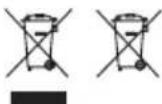
Where you see either symbol on any of our electrical products, batteries or packaging, it indicates that the relevant electrical product or battery should not be disposed of as general household waste in Europe. To ensure the correct waste treatment of the product and batteries, please dispose of them in accordance with any applicable local laws or
requirements for disposal of electrical equipment/batteries. In so doing, you will help to conserve natural resources and improve standards of environmental protection in treatment and disposal of electrical waste.
Design and specifications are subject to change without notice.
©2008 Sony Computer Entertainment Europe. "Buzz!" and the Buzz! logo are trademarks of Sony Computer Entertainment Europe.
“PLAYSTATION” and “PlayStation” are registered trademarks of Sony Computer Entertainment Inc. “PLAYSTATION” is a registered trademark of Sony Corporation. All rights reserved.


Marque : SONY
Modèle : Wireless Buzz! Buzzers
Catégorie : Contrôleur