
GO 750 - GPS de navigation TOMTOM - Notice d'utilisation et mode d'emploi gratuit
Retrouvez gratuitement la notice de l'appareil GO 750 TOMTOM au format PDF.



| Type de produit | GPS de navigation |
| Marque | TomTom |
| Modele | GO 750 |
| Dimensions (L x l x H) | 136 x 86 x 20 mm |
| Poids | 155 g |
| Ecran | Ecran tactile couleur 4,3 pouces |
| Alimentation | Batterie lithium-polymere rechargeable via chargeur USB voiture ou ordinateur |
| Autonomie | Jusqu'a 2 heures en utilisation normale |
| Stockage cartographique | Memoire interne et carte microSD |
| Reception GPS | GPS integre avec EPT (Technologie de positionnement amelioree) |
| Fonctions principales | Navigation routiere, IQ Routes, informations trafic TMC (optionnel), commande vocale, points d'interet, favoris, vue 2D/3D |
| Connectivite | USB 2.0, prise microSD, haut-parleur, microphone |
| Contenu de la boite | TomTom GO 750, Active Dock, chargeur USB voiture, cable USB, documentation |
| Entretien et nettoyage | Nettoyer avec un chiffon doux et sec; eviter les produits abrasifs |
| Securite | Ne pas exposer a des temperatures superieures a 60 °C; utiliser uniquement le chargeur fourni; ne pas ouvrir la batterie |
| Pieces detachees et reparabilite | Contacter un centre de service agree TomTom pour toute reparation |
| Informations generales | Fabrique par TomTom N.V., Pays-Bas; conforme aux directives europeennes |
FOIRE AUX QUESTIONS - GO 750 TOMTOM
Questions des utilisateurs sur GO 750 TOMTOM
0 question sur cet appareil. Repondez a celles que vous connaissez ou posez la votre.
Poser une nouvelle question sur cet appareil
Téléchargez la notice de votre GPS de navigation au format PDF gratuitement ! Retrouvez votre notice GO 750 - TOMTOM et reprennez votre appareil électronique en main. Sur cette page sont publiés tous les documents nécessaires à l'utilisation de votre appareil GO 750 de la marque TOMTOM.
MODE D'EMPLOI GO 750 TOMTOM
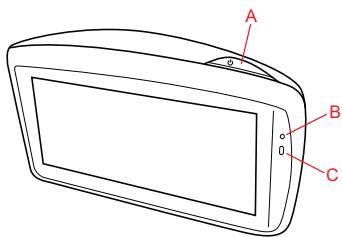
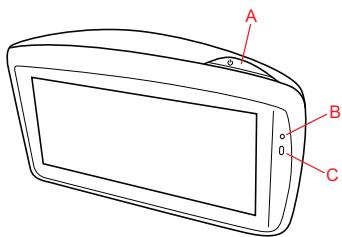
What's in the box
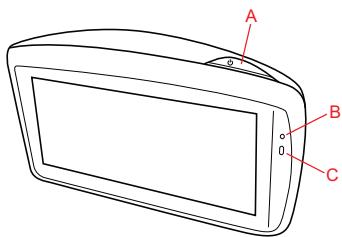
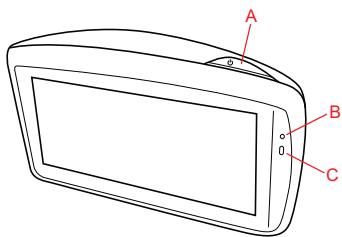
1 TomTom GO
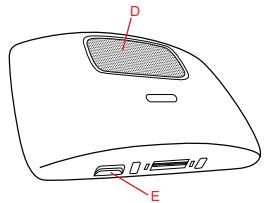
A On/Off button
Microphone
Light sensor
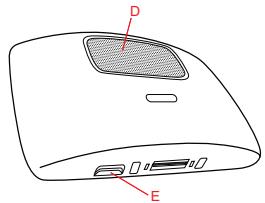
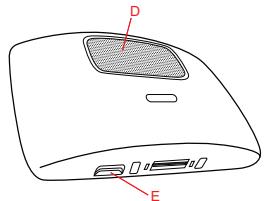
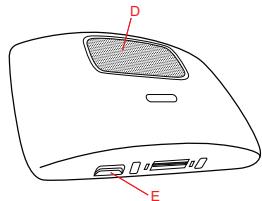
Speaker
Memory card (micro SD card) slot
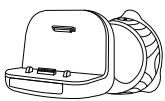
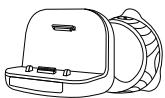
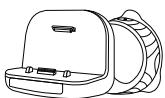
Active Dock
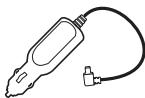
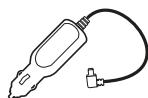
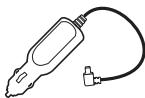
USB car charger

4 USB cable
5 Documentation pack

Switching on and off
Install your TomTom GO navigation device in your car following the instructions in the installation section at the start of this book.
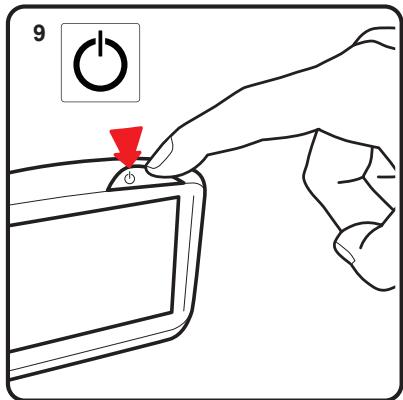
To switch on your navigation device, press and hold the On/Off button until you see the start-up screen. The first time you switch on your device, it may take a short time to start.
Setting up
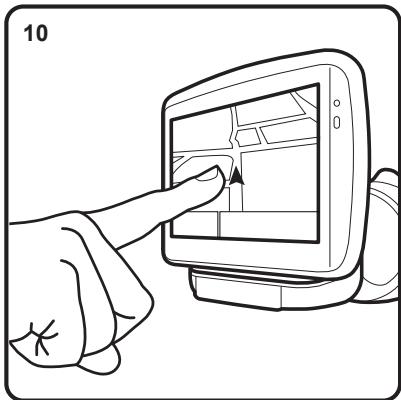
When you first switch on your device, you have to answer a few questions to set up the device. Answer the questions by tapping the screen.
You are asked whether you make regular trips to the same locations. If you tap YES, you can enter these destinations as your favourite destinations. Every time you switch on your device, you can immediately select one of these locations as your destination.
To change these destinations or select a new destination, tap Start-up preferences in the Preferences menu, then select Ask for a destination.
Device not starting
In rare cases, your TomTom GO navigation device may not start correctly or may stop responding to your taps.
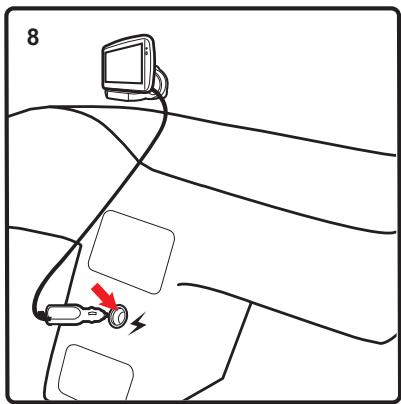
First, check that the battery is properly charged. To charge the battery, connect your device to the car charger. It can take up to 2 hours to fully charge the battery.
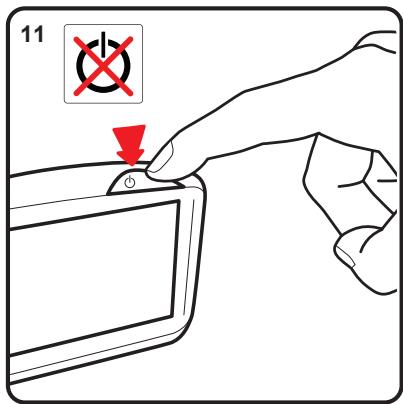
If this does not solve the problem, you can reset the device. To do this, press and hold the On/Off button for 15 seconds and release the button when your device begins to restart.
Getting started
Battery notes
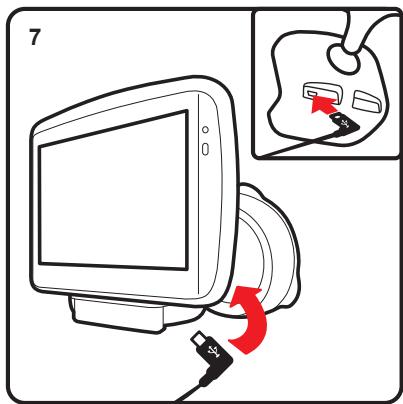
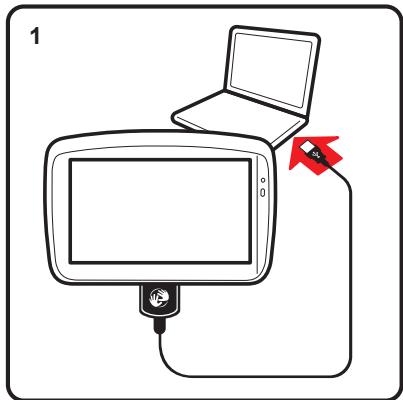
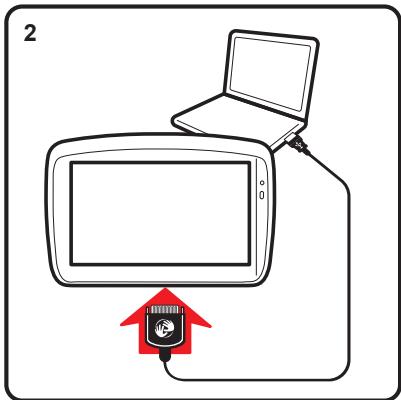
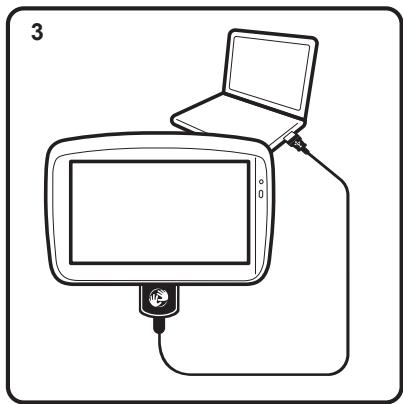
The battery in your TomTom GO navigation device charges when you connect it to the car charger or to your computer.
When you connect your device to a computer, you are asked if you want to connect to the computer. If you select No and then do not tap the screen within three minutes, the device will automatically switch off. This happens so that the battery can charge faster.
Note: You should plug the USB connector directly into a USB port on your computer and not into a USB hub or USB port on a keyboard or monitor.
GPS reception
When you first start your TomTom GO navigation device, the device may need a few minutes to determine your GPS position and show your current position on the map. In future, your position will be found much faster, usually within a few seconds.
To ensure good GPS reception, you should use your device outdoors. Large objects such as tall buildings can sometimes interfere with reception.
The TomTom GO 950 includes Enhanced Positioning Technology or EPT. EPT automatically estimates your position when the GPS signal is lost while you are driving, such as when you are in a tunnel. When EPT is in use, the EPT symbol is shown in the Driving View.
Positioning the dock
Consider carefully where to attach the dock in your car. The dock should not block or interfere with any of the following:
- Your view of the road
Any of the controls in your car
Any of your mirrors
The airbag
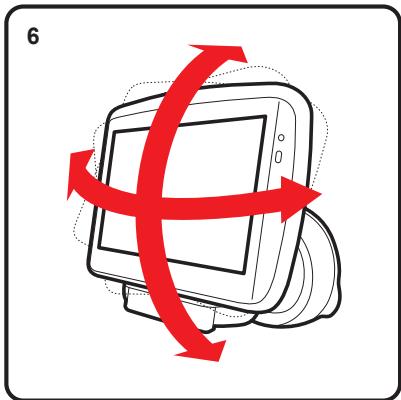
When your navigation device is in the dock, you should be able to reach the device easily without leaning or stretching. The diagrams show where you can safely attach the dock.
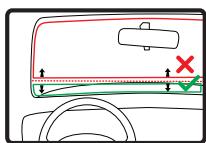
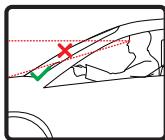
You can attach the dock to the windscreen, side window or use a Dashboard Mount Disk to attach the dock to your dashboard. TomTom also offers alternative mounting solutions for your TomTom navigation device. For more information about Dash
board Mount Disks and alternative mounting solutions, go to tomtom.com/ accessories.
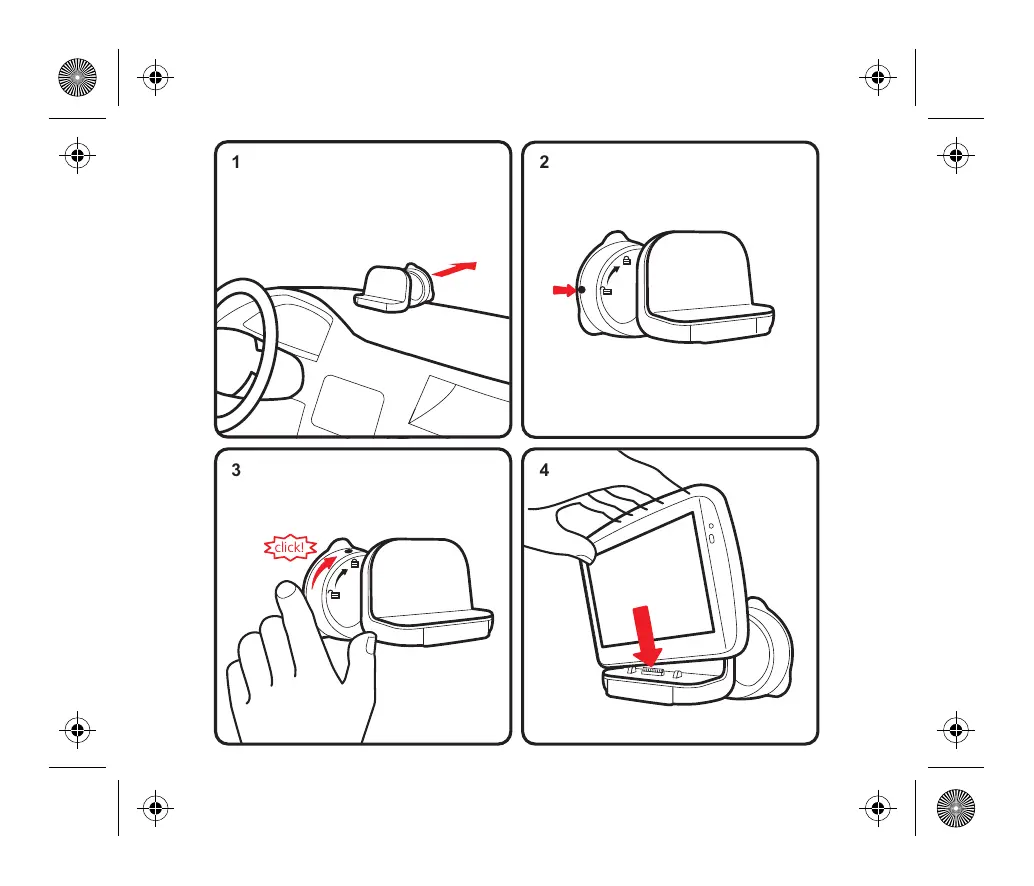
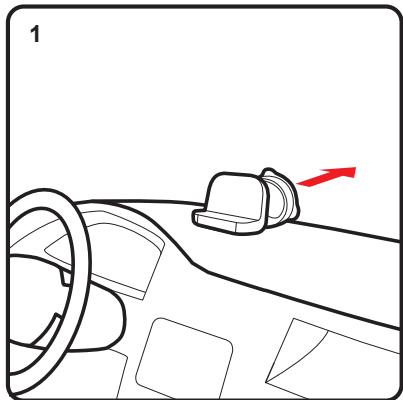
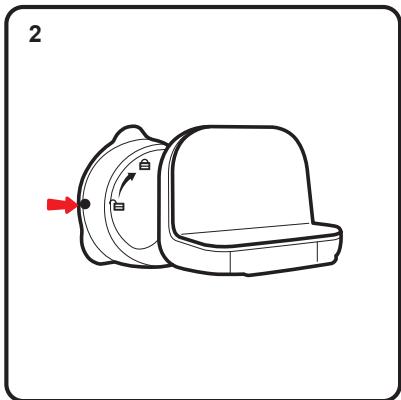
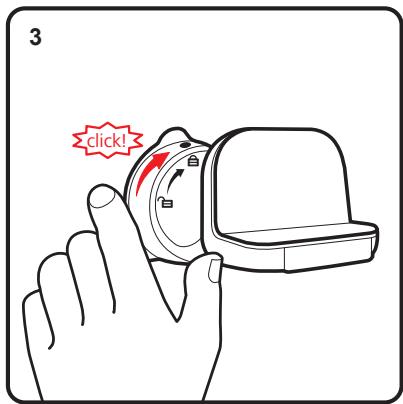
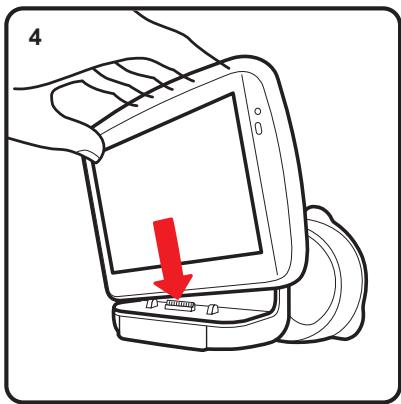
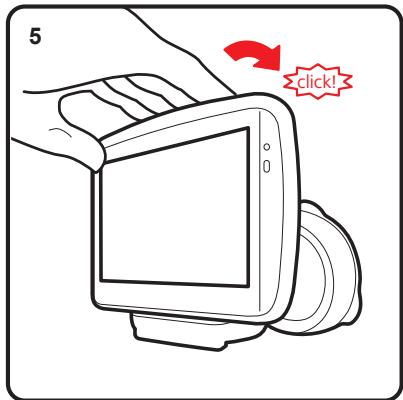
Installing the Active Dock
Make sure that both the Active Dock and your window are clean and dry.
- Press the suction cup firmly against the window on an area where the glass is flat.
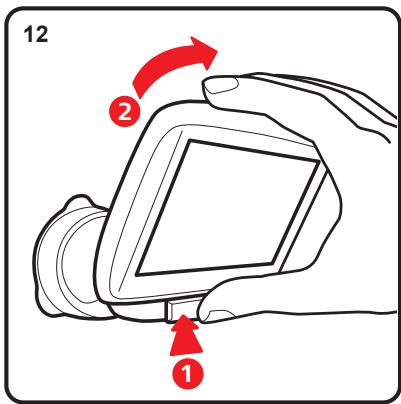
- Twist the rubber grip near the base of the Active Dock in a clockwise direction until you hear a click.
The Active Dock is now installed.
Making your first journey
Main Menu 1 of 3

Navigate to...

TomTom Services
Current position:
Amsterdam
4:12pm

Find alternative

Change preferences

Help me!

Done
Navigate to...

Home

Recent destination

Favourite

Point of Interest
8:18

Address

Back
Planning a route with your TomTom GO navigation device is easy. To plan a route, follow the steps below.
Important: For safety reasons, you should always plan a route before you start your journey.
- Tap the screen to bring up the Main Menu.
Note: The buttons on your navigation device are shown in full colour unless a button is currently unavailable.
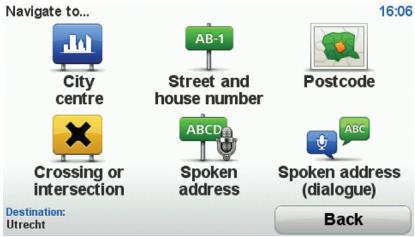
- Tap Navigate to...
- Tap Address.
In this example, we will enter an address.
4. Tap Street and house number.
Note: When planning a trip for the first time your navigation device asks you to choose a state or country. Your choice is saved and used for all routes you plan.
You can change this setting at any time by tapping the flag.
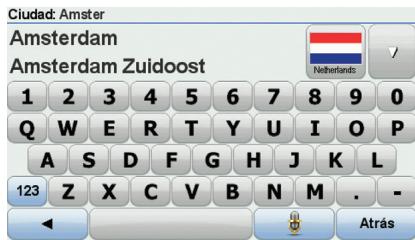
- Start to type the name of the town where you want to go. Tap the name when it is shown in the list.

Tip: Instead of typing the name, tap this button to say the address by speaking to your navigation device.
- Start to type the street name. Tap the name when it is shown in the list.

Making your first journey
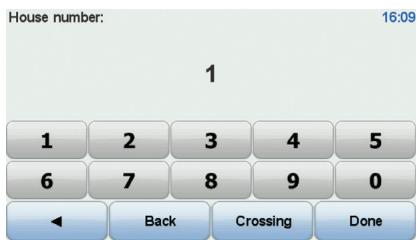
- Enter the house number and then tap Done.
- Your navigation device asks if you need to arrive at a particular time. For this exercise, tap NO.
The route is calculated by your device using IQ RoutesTM.
IQ Routes is used to plan the best possible route using information about the average speeds measured on the roads.
When the route has been calculated, tap Done.
Your TomTom GO navigation device begins to guide you to your destination.
Making your first journey
EN
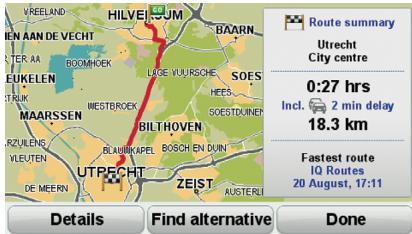
Route summary
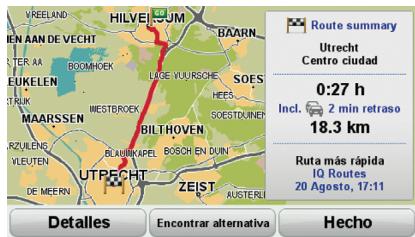
After planning a route, you see a summary of your route.
The route summary shows an overview map of your route and the total journey time including delays caused by both incidents and busy roads.
You can see the route summary at any time by tapping the right side of the status bar.
Driving View
When your TomTom GO starts, you are shown the Driving View along with detailed information about your current position.
Tap the centre of the screen at any time to open the Main Menu.
Note: The Driving View is shown in black and white until your GO locates your current position.
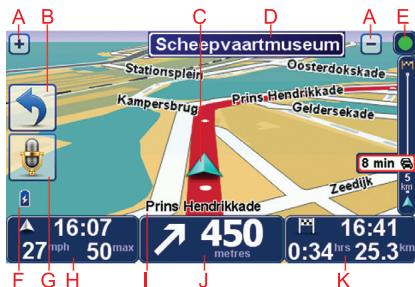
A Tap + and - to zoom in and out.
Quick menu - you can enable the quick menu in the Preferences menu.
Your current position.
Road sign information or the next street name.
E Traffic sidebar.
Battery level indicator.
⑥ Microphone button for voice command and control.
The time, your current speed and the speed limit, if known.
Tap this part of the status bar to change the volume and hear the next spoken instruction.
① The name of the street you are on.
① Navigation instruction for the road ahead.
Tap this part of the status bar to change between 2D and 3D views of the Driving View.
The remaining journey time, the remaining distance and your estimated arrival time.
Tap this part of the status bar to open the route summary screen.
To change the information shown in the status bar, tap Status bar preferences in the Preferences menu.
Driving view symbols
Several symbols are shown in the bottom left hand corner of the Driving View. Here are a few examples:
Battery - this symbol shows the battery level. When the battery is low and requires charging, the battery symbol is empty. You should charge your navigation device as soon as possible.
EPT - this symbol is shown when your device is using EPT to estimate your current location. EPT is only used when you have no GPS reception.
Note: EPT is not supported on all devices.

Sound off - this symbol is shown when the sound is switched off.
To switch on the sound, open the preferences menu and tap Turn on sound.
For more information, see the Reference Guide.
Packungsinhalt
1 TomTom GO
Ein/Aus-Taste
B Mikrofon
Lichtsensor
Lautsprecher
E Steckplatz fur Speicherkarte (Micro SD-Karte)

Active Dock
USB-Autoladegerät
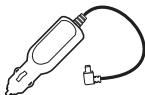

4 USB-Kabel
5 Dokumentation

Ein- und ausschalten
Installieren Sie Ihr TomTom GO-Navigationsgerät in Ihr Auto gemäß den Anweisungen der Installationsanleitung am Anfang dieser Handbuch.
Halten Sie zum Einsatzen Ihrnes Naviga-tionsgeräts die Ein/Aus-Taste gedruckt, bis das Startbild entscheidt. Wenn Sie Ihr Gerät zum ersten Mal einschalten, kann der Start etwas länger dauern.
Einrichten
Beim ersten Einschalten,müssen Sie zur Einrichtung Ihres Geräts einige Fragen beantwerten.Zur Beantwortung der Fragen konnen Sie einfach das Display antippen.
Sie werden gefragt, ob es Orte gibt, die Sie regelmäßig aufsuchen. Wenn Sie auf JA tippen, können Sie diese Ziele zu ihren Favoriten hinzufugen. Jedes Mal, wenn Sie Ihr Geräat einschalten, können Sie sofort einen dieser Orte als Ihr Ziel festlegen.
Um diese Ziele zu ändern oder ein neues Ziel auszuwahlen, tippen Sie im Menu Einstellungen auf Starteinstellungen, und wahlen Sie dann Nach einem Ziel Fragen aus.
Wenn das Gerät nicht startet
In soltenen Fällen kann es vorkommen, dass Ihr TomTom GO-Navigationsgerät nicht richtig startet oder nicht mehr reagiert, wenn Sie den Touchscreen antippen.
Prüfen Sie zunachst, ob der Akku ausreichend geladen ist. Um den Akku aufzuladen, verbinden Sie Ihr Gerätitte mit dem Autoladegerät. Das vollständige Aufladen des Akkus kann bis zu zwei Stunden daern.
Wird das Problem dadurch nicht behoben, können Sie das Gerät zurücksetzen. Halten Sie dazu die Ein/Aus-Taste 15 Sekunden lang gedrück und setzen Sie die Taste los, sobald Ihr Gerät neu startet.
Erste Schritte
Informationen zum Akku
Der Akku in Ihrem TomTom GO-Navigationsgerät wird aufgeladen, wenn Sie Ihr Gerät an das Autoladegerät oder an ihren Computer anschließen.
Wenn Sie Ihr Gerät mit einem USB-Kabel an einen Computer anschließen, werden Sie gefragt, ob Sie eine Verbindung mit dem Computer herstellen möhen. Wenn Sie Nein auswahlen und das Display in den nachsten drei Minutes nicht berühren, schaltet sich das Gerät automatisch aus. Dies ermöglich ein Schnelleres Aufladen des Akkus.
Wichtig: Verbinden Sie Ihr Gerät über das USB-Kabel direkt mit einem USB-Anschluss Ihres Computers, nicht mit einem USB-Hub oder einem USB-Anschluss einer Tastatur oder eines Monitors.
GPS-Empfang
Beim ersten Einschalten Ihres TomTom GO-Navigationsgerats kann es eine Minute dauern, bis das Gerät ihre GPS-Position ermittelt hat und Ihren aktuellen Standort auf der Karte anzeigt. Danach erfolgt die Ermittlung Ihres Standorts viel Schneller, in der Regel innerhalb weniger Sekunden.
Zur Sicherstellung eines gute GPS-Empfangs sollenn Sie Ihr Gerät nur im Freien verwenden. Große Objekte wie Hochhäuser konnen den Empfang stären.
Der TomTom GO 950 verfügbar über EPT (Enhanced Positioning Technology, verbesserte Positionsbestimmung). EPT wird während der Fahrt automatisch zur Ermittlung ihrer Position aktiviert, wenn z. B. in einem Tunnel kein GPS-Signal mehr empfangen wird. Wenn EPT aktiviert ist, wird in der Fahransicht ein entsprechendes Symbol angezeigt.
Befestigungsposition der Dockinghalterung
Prufen Sie sorgfältig, wo Sie die Dockinghalterung in Ihrm Auto anbringen konnen. Folgendes darf durch die Dockinghalterung nicht blockiert oder behindert werden:
- Ihr Sichte auf die Straße
- Alle Bedienelemente in Ihr Auto
Alle Spiegel
Der Airbag
Sie sollenn Ihr Navigationsgerät in der Halterung problemlos erreichen können, ohne sich nach vorne beugen oder strecken zu müssen. Die Abbildungen zeigen Ihnen, wo Sie die Dockinghalterung sicher befestigten können.
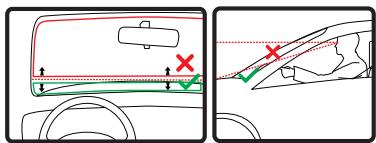
Sie konnen die Dockinghalterung an der Frontscheibe, am Seitenfenster oder mit einer Befestigungsplate auf dem Arma
turenbrett anbringe. Außerdem bietet Ihnen TomTom alternative Befestigungslösungen für Ihr TomTom-Navigationsgerat an. Weitere Informationen zu Befestigungslatten für das Armaturen Brett und alternativen Befestigungslösungen finden Sie unter totom.com/accessories.
Active Dock-Halterung befestigen
Stellen Sie sicher, dass die Active Dock-Halterung und die Scheibe sauber und trocken sind.
- Drucken Sie den Saugfuß an einer ebenen Stelle fest an die Scheibe.
- Drehen Sie den Gummigriff am Fuß der Active Dock-Halterung im Uhrzeigersinn, bis sie mit einem Klick einrastet.
Die Active Dock-Halterung ist jetzt befestigt.
Ohre erstefahrt
Hauptmenü 1 von 3

Navigieren zu...

TomTom-Dienste
Aktuelle Position:
Amsterdam
4:12pm

Alternative suchen

Einstellungen ändern

Hilfe!

Fertig
Navigieren zu...

Heimatort

Letztes Ziel

Favorite

Point of Interest

Adresse

Zurück
Das Planen einer Route mit Ihr TomTom GO-Navigationsgerät ist kinderleicht. Um eine Route zu planen, befolgen Sie die unter stehenden Schritte.
Wichtig: Aus Sicherheitsgrunden sollen Sie Ihr Route stets vor Fahrtbeginn planen.
- Tippen Sie auf den Touchscreen, um das Hauptmenu aufzurufen.
Hinweis: Die Schaltflächen auf Ihr Navigationsgerät werden Farbig dargestellt, ausgenommen die Schaltflächen, die zum jeweiligen Zeitpunkt nicht zur Verfügung stehen.
- Tippen Sie auf Navigieren zu...
- Tippen Sie auf Adresse.
In thisem Beispiel geben Sie eine Adresse ein.
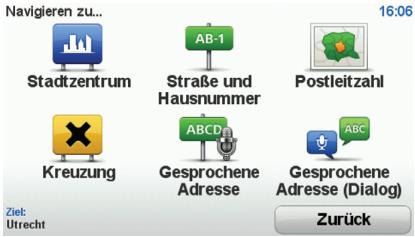
4. Tippen Sie auf Straße und Hausnummer.
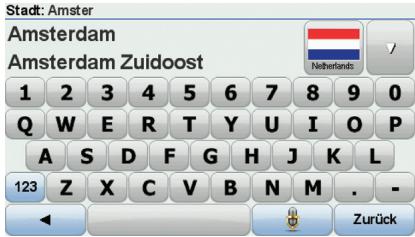
Hinweis: Bei der Planung ihrer ersten Fahrt bittet Sie Ihr Navigationsgerät, ein Land bzw. einen Bundesstaat auszuwahlen. Ihr Auswahr wird gespeichert und bei der Planung neuer Routen verwendet.
Sie können diese Einstellung jederzeitändern, indem Sie das Fahrenchen für das derzeit ausgewählte Land antipinen.
5. Geben Sie die ersten Buchstaben der Stadt ein, zu der Sie fahren möchten. Tippen Sie auf den Namen, sobald er in der Liste erscheidt.

Tipp: Statt den Namen einzugeben, können Sie diese Schaltfläche antipinen, um Ihrhoch Navigationsgerät die Adresse
vorzusprechen.
- Tippen Sie die Anfangsbuchstaben der Straße ein. Tippen Sie auf den Namen, sobald er in der Liste erscheidt.
Ohre erstefahrt
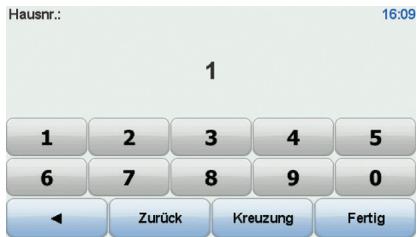
- Geben Sie die Hausnummer ein, und tippen Sie dann auf Fertig.
- Ihr Navigationsgerät fragt Sie, ob Sie zu einer bestimmen Zeit ankommen möhen. Bei dieser Übung können Sie die Frage mit NEIN beantworten.
Ihr TomTom-Gerät berechnet die Route mithilfe von IQ Routes™.
IQ Routes plant die bestmögliche Route unter Berücksichtigung der tatsächlich auf den Straßen gemessenen Durchschnittsgeschwindigkeiten.
Wenn die Routenberechnung abgeschlossen ist, tippen Sie auf Fertig.
Ihr TomTom GO-Navigationsgerät beginnt nun sofort, Sie zu Ihrlem Zielort zu leiten.
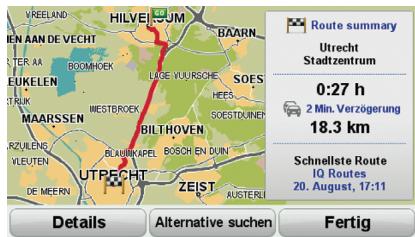
Routenübersicht
Nach der Routenplanung wird Ohnen die Zusammenfassung ihrer Route angezeigt.
In der Rutenübersicht sehen Sie eine Übersichtskarte Ihrer Route und die Gesamtfahrzeit einschließlich Verkehrsstörungen aufgrund von Vorfällen und dichtem Verkehr.
Sie können die Routenübersicht jederzeit durch Antippen der rechten Seite der Statuseleiste aufruften.
Fahransicht
Beim Start Ihr's TomTom GO wird die Fahransicht mit ausfuhrlichen Informationen zu Ihrer aktuellen Position angezeigt.
Sie können jederzeit die Mitte des Displays antippen, um das Hauptmenu zu öffnen.
Hinweis: Die Fahrensicht wird in Schwarzwieß darestellt, bis Ihr GO ihre aktuelle Position ermittelt hat.
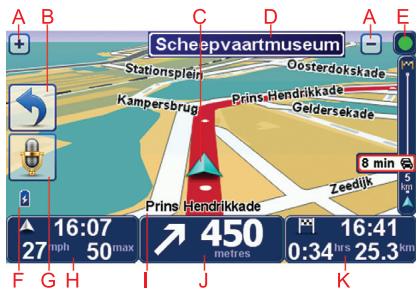
A Durch Antippen der Symbole + und - konnen Sie die Darstellung vergroßern oder verkleinern.
Schnellzugriffsmenu: Aktivieren oder deaktivieren Sie diese Funktion im Menu Einstellungen.
Ihre aktuelle Position.
⑤ Straβenbeschildung oder{nachste Straße.
E Verkehrsinfo-Sectionsleiste.
F Akkustandanzeige.
⑥ Mikrofon-Schaltfläche zur Sprachsteuerung.
Die Uhrzeit, ihre aktuelle Geschwindigkeit und die Geschwindigkeitsbegrenzung (falls betracht).
Tippen Sie auf diesen Bereich der Statussteige, um die Lautstärke zu ändern und die nächste Sprachanweisung zu horen.
① Der Name der Straße, auf der Sie sich befinden.
① Navigationsanweisungen für den weiteren Routenverlauf.
Tippen Sie auf diesen Bereich der Statusleiste, um in der Fahrscheinlichkeit zwischen 2D- und 3D-Ansicht wechseln.
Verbleibende Fahrzeit, verbleibende Ent-. fernung und voraussichtliche Ankunft-. szeit.
Tippen Sie auf diesen Bereich der Statusleiste, um die Rutenübersicht anzuzeigen.
Tippen Sie im Menu Einstellungen auf Statusleisten-Einstellungen, um festzulegen, welche Informationen in der Statusleiste angezeigt werden sollen.
Symbole in der Fahransicht
In der unteren linken Ecke der Fahrensicht werden mehrere Symbole angezeigt. Einige Beispiele:

Akku: Dieses Symbol gezigt den Akkualstandan. Wenn der Akkuerschöpf ist und aufgeladen werden muss, ist das Akkusymbol leer. Sie
sollten Ihr Navigationsgerät baldmöglichst aufladen.

EPT: Dieses Symbol erscheint,
wenn Ihr Gerät ihren akstellen
Standort mithilfe von EPT ermittelt. EPT wird nur aktiviert, wenn
Sie keinen GPS-Empfang haben.
Hinweis: EPT wird nicht auf allen Navigationsgeräten unterstützen.

Ton aus: Dieses Symbol erscheint,
wenn der Ton ausgeschaltet ist.
Öffnen Sie das Menu Einstellungen, und tippen Sie auf Ton einschalten, um den Ton einschalten.
Weitere Informationen finden Sie im Referenzhandbuch.
Verkehrsinformationen per Funk (TMC)
Sie können Verkehrsinformationen auf Ihrem TomTom GO empfangen, indem Sie den TomTom RDS-TMC Traffic Receiver verwenden. TMC überträgt die Verkehrsinformationen per Funk.
Tipp: Der TomTom RDS-TMC Traffic Receiver ist bei einigen Produkten bereits im Lieferumfang enthalten. Bei anderen Produkten ist er als separates Zubehör erhältlich. Weitere Informationen erhalten Sie auf totom.com.
Hinweis: TomTom ist nicht für die Verfügbarkeit oder die Qualität der TMC-Verkehrsinformationen verantwortlich.
TMC steht nicht in allen Ländern und Regionen zur Verflugung.itte besuchen Sie www.tomtom.com, um die Verflugbarkeit theses Dienstes in Ihr Land oder ihrer Region zu überprüfen.
Verkehrsinformationen verwenden
Um TMC zu nutzen, verbinden Sie den Tomtom RDS/TMC-Verkehrsinfo-Empfänger mit dem USB-Anschluss Ihrss Geräts.
Hinweis: Der RDS/TMC-Empfänger faktioniert nicht, wenn er nicht mit dem Autoladegerat verbunden ist.
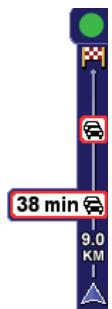
Sobald Verkehrsinformationen empfangen werden, wird die Verkehrsinfo-Seitenleiste auf der rechten Seite der Fahransicht angezeigt. Die Seitenleiste warnt Sie bei Verkehrsstörungen auf ihrer Route.
In thisem Beisiel fahren Sie auf ihrer Route auf einen Verkehrsstau in 9km Entfernung zu, der für Sie mit einer Wartezeit von 38 Minuten verbunden ist.
Folgende Symbole werden am oberen Rand der Verkehrsinfo-Sectionsleiste angezeigt:

Ihr GO verfügt über die neuesten RDS/TMC-Verkehrsinformationen.

Ihr GO wartet auf neue RDS/TMC-Verkehrsinformationen und ladt diese herunter, sobald sie verfügbar sind.

Ihr GOucht nach einem Radiosender, der RDS/ TMC-VerkehrsinFORMATIONen ausstrahlt.
Um diechnellste Route zu Ihrrem Ziel zu\ finden, gehen Sie wie folgt vor:
- Tippen Sie die Verkehrssinfo-Seitenleiste an.
- Tippen Sie auf Verzög. minimieren.
Ihr Gerät berechnet die schnellste Route zu Ihr hem Ziel.
Dabei kann es vorkommen, dass die neue Route ebenfalls verkehrsbedingte Wartezeiten aufweist oderSolar mit der bisherigen Route übereinstimmt.
- Tippen Sie auf Fertig.
Wartezeiten automatisch minimieren
Um ihren TomTom GO so einzurichten, dass er ihre Wartezeiten automatisch minimiert, sobald neue Verkehrsinformationen verfügbar sind, gehen Sie wie folgt vor:
- Tippen Sie im Hauptmenu auf TomTom-Dienste und dann auf TomTom Verkehrssinfo.
- Tippen Sie auf Verkehrsinfo-Einstellungen andern.
- Aktivieren Sie die Einstellung Verzogerungen nach jeder Verkehrsinfo-Aktualisierung minimieren.
- Tippen Sie auf Fertig.
Contenuto della confezione
1 TomTom GO
A Pulsante di accensione/spegnimento
Microfono
Fotocellula
Speaker
Slot per scheda di memoria (micro-scheda SD)
Active Dock
3 Caricabatteria per auto USB

4 Cavo USB
5 Documentazione

Accensione spegnimento
Install di dispositivo di navigazione TomTom GO nell'auto seguito le struzioni riportate nella sezione di installazione all'inizio della presente documento.
Per accendere il dispositivo di navigazione, tieni premuto il pulsante di accensione/ spegnimento fino a visualizzare la schermata iniziale. Quando il dispositivo viene accesso per la prima volta, l'avvio potrebbe richiedere alcuni secondi.
Impostazione
Quando accendi il dispositorio per la primaolta, dovrai rispondere ad alcune domande perimpostario. Risperdi alle domande toccardo lo schermo.
Verrà chiesto se effettui viaggi regolari versus le stesse posizioni. Se tocchi S, potrai inseire queste destinazioni come destinazioni preferite. Ogni volta che accendi il dispositivo, cui selezionare immediamente una di queste posizioni come destinazione.
Perambiare queste destinazioni o selezione arne una nuova, tocca Preferenze di avvio
nel menu preferenze, quindi selezione Chiedi destinazione.
Il dispositivo non si avvia
Raramente, il dispositivo di navigazione TomTom GO potrebbe non avviarsi correttamente oppure potrebbe non rispondere più ai comandi.
Innanzitutto, verifica che la batteria sia stata caricata adeguatamente. Per caricare la batteria, connetti il dispositivo al caricabatteria per auto. Per caricare Completely la batteria potrebbero essere necessarie fino a 2 ore.
Se esta operazione non resolves il problema, è possible reimpostare il dispositivo. A questo scopo, tieni premuto il pulsante di accensione/speednimento per 15 secondi e, quando il dispositivo comincía a riavviarsi, rilascia il pulsante.
Per cominciare
Note sulle batterie
La batteria del dispositivo di navigazione TomTom GO si carica quando connetti il dispositivo al caricabatteria per auto o al computer.
Quando colleghi il dispositorio al computer, ti verrà richiesto se consideri connetterti al computer. Se selezioni No e non tocchi lo schermo entro tre minuti, il dispositorio si spegnerà automaticamente. Ciò avviene affinché la batteria si ricarichi più velocemente.
Note: il connettore USB delve essere collegato direttamente a una porta USB del computer e non a un hub USB o a una porta USB sulla tastiera o sul monitor.
Ricezione GPS
Al momento della prima accensione del dispositivo di navigazione TomTom GO, quello potrebbe richiedere alcuni minuti per determinare la posizione GPS e visualizzazione la posizione corrente sulla mappa. In futuro, la posizione verrà trovata molto più rapidamente, di solito in pochi secondi.
Per assicurare una riscione GPS ottimale, è consigliabile utilizzato il dispositivo all'aperto. La presenza di edifici di grande dimensioni o di oggetti simili può talvolta interferire con la riscione.
Il TomTom GO 950 include la technologia EPT (Enhanced Positioning Technology, Tecnologia di posizionamento migliorata). EPT stima automaticamente la posizione quando si除去 il segnale GPS durante la guida, come quando si attrovasa una galleria. Quando EPT è in uso, il symbolo EPT viene molto nella visualizzazione di guida.
Posicionamento del supporto
Selezione accuramente la posizione del supporto in auto. Il supporto non deve blocare o interferire con:
- la visuale della strada
- i comandi dell'auto
gli specchietti retrovisori
I'airbag
Quando il dispositivo di navigazione è inserito nel supporto, devi essere in grado di raggiungerlo facilemente alla piegarti o allungarti. I diagrammi molto dove fissare il supporto in modo sicuro.
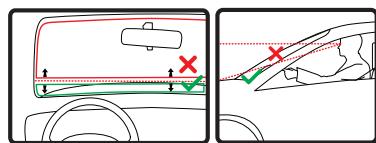
Il supporto più essere fissato al parabrezza, al finestrino laterale oppure puoi utilizzato un disco di montaggio sul cruscotto al fine di fissarlo sul cruscotto stesso. TomTom offreanche soluzioni di montaggio alternative per il dispositivo di navigazione Tom-
Tom. Per maggiori informazioni sui dischi di montaggio per cruscotto e sulle soluzioni di montaggio alternative, visita tomtom.com/ accessories.
Installazione dell'Active Dock
Assicurati che l'Active Dock e il vetro siano puliti e asciutti.
- Premi con decisione la ventosa contro il parabrezza in una zona in cui il vetro risulta piano.
- Quindi ruota l'impugnatura in gomma presso la base dell'Active Dock in senso orario fino allo scatto.
L'Active Dock è stato così installato.
Pianificazione del primo viaggio
Menu principale 1 di 3

Navigazione verso...

Trova alternative
4:12pm

Aiutol

Servizi TomTom

Cambia preference

Posizione currente: Amsterdam
Fatto
Navigazione verso...

Base

Preferito

Indirizzo

Destinazione recente

Punto di interesse

Indietro
Pianificare un percorso con il dispositivo di navigazione TomTom GO è facile. Per pianificare un percorso, procedi come indicate di seguito.
Importante: per ragioni di sicurezza, pianifica un percorso sempre prima di cominciare il viaggio.
- Tocca lo schermo per visualizzare il menu principale.
Note: i pulsanti sul dispositorio di navigazione vengono visualizzati a colori, se disponibili.
- Tocca Navigazione verso...
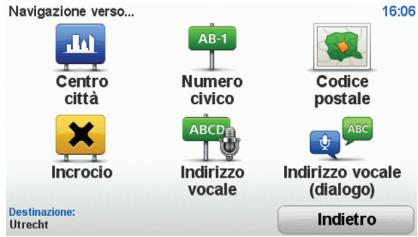
- Tocca Indirizzo.
In questo esempio, inseiremo un indirizzo.
Pianificazione del primo viaggio
4. Tocca Via numero civico.
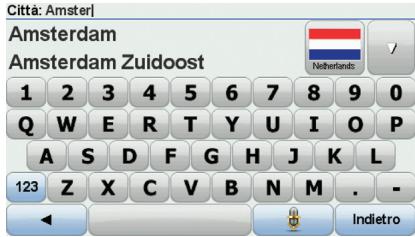
Note: quando si pianifica un viaggio per la primaolta, il dispositorio di navigazione chiede di selezionare uno stato o un paese. La scelta viene salvata e verrà usata per tutti i percorsi pi-anificati.
É possible modificare esta impostazione in qualsi si momento toccando la bandierina.
5. Inizia a digitare il nome della città desiderata. Quando viene visualizzato nell'elenco, selezione il nome.

gazione.
Suggerimento: invoce di digitare l nome, tocca quello pulsante per inserire l'indirizzo. parlando al dispositivo di navi
- Inizia a digitare il nome della via. Quando viene visualizzato nell'elenco, tocca il nome.
Pianificazione del primo viaggio
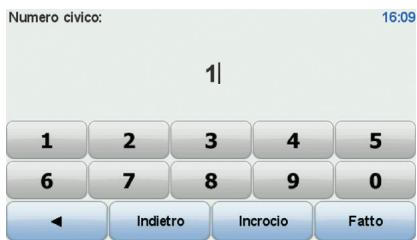
- Inserisci il numero civico, quindi tocca Fatto.
- Il disponibile di navigazione chiedera se desideri un orario di arrivato specifico. Agli scopi di quello esercizio, tocca NO.
Il percorso viene calculato dal dispositivo utilizzato IQ RoutesTM.
IQ Routes viene utilizzato per pianificare il percorso migliorare usando le informazioni sulle velocità medie reali misurate su strada.
Al terminel calcolo del percorso, tocca Fatto.
Il disponibile di navigazione TomTom GO comincia a guidarti a destinazione.
Pianificazione del primo viaggio
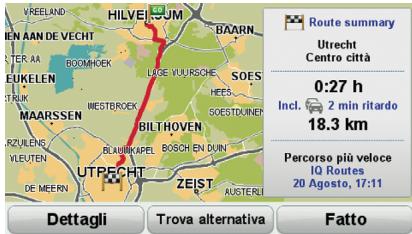
Riepilogo percorso
Dopo la pianificazione di un percorso, viene visualizzato un riepilo.
Il riepilogo del percorso在哪iza una pano-ramica della mappa del percorso e il tempo di percorrenza totale, compresi i ritardi causati da incidenti e strade traffiche.
Puoi visualizzare il riepilogo del percorso in qualsiasi momento toccando il lato destro della barra di stato.
Visualizzazione di guida
All'avvio di TomTom GO, viene migliorata la visualizzazione di guida, insieme a informazioni dettagliate sulla posizione corrente.
Puoi accedere in qualsiasi momento al menu principale toccando il centro dello schermo.
Note: la visualizzazione di guida appara in bianco e nero finché il GO non rileva la posizione corrente dell'utente.
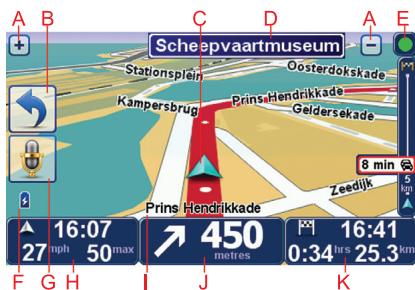
A Tocca ^+ e-per ingrandire eridurre la visualizzazione.
8 Menu rapido: puoi attivare il menu rapi-do nel menu Preference.
Posizione corrente.
D Informazioni sui segnali stradali o nome della via successiva.
E Barra laterale Trafficco.
F Indicatore del livello della batteria.
⑥ Pulsante microfono per dato e controlo vocale.
L'ora, la velocità attuale e il limite di velocità, se conosciutto.
Tocca Questa parte della barra di stato per carriare il volume e ascoltare l'istruzione vocale successiva.
① Ilnome della strada in cui ti trovi.
Istruzioni di navigazione per la strada da percorrere.
Tocca esta parte della barra di stato per passare alla visualizzazione 2D alla visualizzazione 3D nella visualizzazione di guida.
Il tempo di viaggio rimanente, la distanza rimanente e l'ora di arrivivo prevista.
Tocca esta parte della barra di stato per aprir la schermata di riepilogo del percorso.
Per cancellare le informazioni visualizzate nella barra di stato, tocca Preferenze barra di stato nel menu Preferenze.
Simboli della visualizzazione di guida
Nell'angolo inferiore sinistro della visualizzazione di guida sono visualizzati diversi simboli. Ecco alcuni esemi:
Batteria: quello simbolo alla livello della batteria. Quando la batteria è scarica e deve essere ricaricata, il simbolo della batteria è vuoto. E necessario caricare il dispositivo di navigazione il prima possibile.

EPT: Anything that is a visual-izazzo when the dispositivo utilizes EPT per stimare la posizione corrente. EPTiene usato solo
quando non è presente un segnale GPS.
Nota: EPT non è disponibile su tutti i dispositivi.

Audio disattivato: Anything that is not a sound is heard.
viene visualizzato when the audio is disattivato.
Per attivare l'audio, april il menu Preferenze e tocca Attiva audio.
Per maggiori informazioni, leggi la guida di riferimento.
Traffic Message Channel (TMC)
É possiblo ottener informazioni sul traffico sul dispositivo TomTom GO utilizzato TomTom RDS-TMC Traffic Receiver. TMC trasmette informazioni sul traffico sotto forma di segnali radio.
Suggerimento: TomTom RDS-TMC Traffic Receiver è fornito in dotazione con alcuni prodotti è disponibile come accessorio per altri prodotti. Per ulteri informazioni, visitare tomtom.com.
Nota: TomTom non è responsablee della disponibilità o della qualità delle informazioni sul traffico fornite da TMC.
TMC non è disponibile in tutti i paesi o are geografiche. Visitare totom.com per verificare la disponibilità nel paese o area geografica.
Uso delle informazioni sul traffico
Per iniziare a utilizzare TMC, collega il ricevitore traffico RDS-TMC TomTom al connetore USB sul dispositivo.
Note: se il caricatore per auto non è collegato, il ricevitore RDS-TMC non funziona.
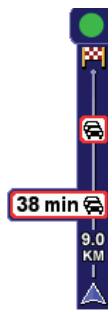
Non appena si inizia a ricevere le informazioni sul traffico, la barra laterale correspondente viene visualizzata sul lato destro della visualizzazione di guida. La barra laterale sul traffico fornisce averamenti relativi ad eventuali problemi di traffico presenti lungo il percorso.
Nell'esempio segunte, è presente un ingorgo sul percorso a 9 chiliometri di distanza, che causerà un ritardo previsto di 38 minuti.
Traffic Message Channel (TMC)
Questi symboli vengono visualizzati sopra la barra laterale Trafficco:

Il GO dispone delle informazioni sul traffico RDS-TMC più recenti.

Il GO è in attesa dello scaricamento delle ultime informazioni sul traffico RDS-TMC non appena sono disponibili.

Il GO sta cercando una stazione radio che trasmette informazioni sul traffico RDS-TMC.
Per trovare il percorso più veloce per raggiungere la destinazione, procedere nel modo segue:
- Toccare la barra laterale Trafficco.
- Toccare Riduci al minimo i rallentamenti.
Il dispositorio cercà il percorso più rapido per raggiungere la destinazione.
E possible che il nuovo percorso include dei rallentamenti o che rimanga invariato.
3. Toccare Fatto.
Riduci al minimo i rallentamenti
Per impostare il dispositorio TomTom GO affinché rroduca automaticamente al minimo i rallentamenti non appena sono disponibili nuove informazioni sul traffico, procedere come segue:
- Tocca Servizi TomTom nel menu principale, quindi tocca TomTom Trafficco.
- Toccare Cambia preferenze Trafficco.
- Selezionare Riduci automaticamente al minimo i rallentamenti快来 ogni aggiornamento sul traffico
- Toccare Fatto.
Contenido de la caja
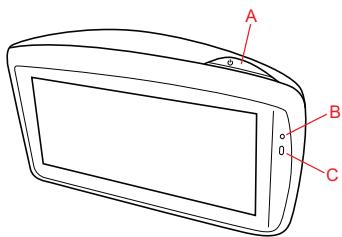
1 TomTom GO
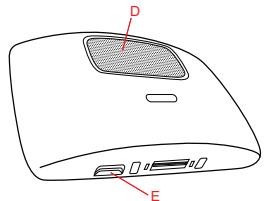
A Botón de encendido
Microfono
Sensor de luz
Altavoz
E Ranura para tarjeta de memoria (tarjeta Micro SD)

Active Dock
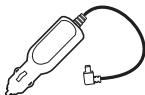
Cargador USB para el coche

4 Cable USB

5 Carpeta de documento
Encendidoyapagado
Para instalar el dispositivo de navigacion TomTom GO en su coche, siga las instrucciones de la seccion de instalacion que encontrará al inico de este manual.
Para encender el dispositivo de navegacion, pulse y mantenga pulsado el botón de on/off hasta que vea la pantalla de inicio. Laprimera vez que conecte el dispositivo, espossible que tarde en inciarse.
Configuración
Al encender por primera vez su dispositivo, debe responderamongas preguntas para configurarlo. Responda las preguntas tocando la pantalla.
Se le preguntará si viaja regularamente a los mismos Lugares. Si toca SI, pueda introducirlos comoirstinos favoritos.Cada vez que encienda su disposito,vaporé selec tionar de immediato uno de这些东西 Lugares como su destino.
ParaATTERlosdestinososeleccionaruno nuevo,toquePreferenciasdeinicio en el menuPreferenciasy,acontinuacion, selec tion Pedir un destino.
El dispositivo no se inicia
En algunos casos, es possible que el dispositivo de navigation TomTom GO no se inicia correctamente o que no responds a sus toques en la pantalla.
En primer lugar, compruebe que la bateria este cargada correctamente. Para carrgar la bateria, conecte el dispositivo al carrador de coche. Puede llevar hasta 2 horas carrar completeness la bateria.
Siesto no resuelve el problema,puedeolvera a reiniciar eldispositivo Para elomantenga pulsado el boton de on/off durante 15segundos y sueltoledo cuando eldispositivo comiencele reinicio.
Introducción
Notas sobre la bateria
La bateria del dispositivo de navigation TomTom GO se cargo cuando lo conecta al cargador para automóvil o al ordinador.
Cuando conecte el dispositivo a un ordinador, se le preguntara sikeea connectarse al ordinador. Si selecciona No y no toca la pantalla durante los tres minutes seguidentes, el dispositivo se apagará automatistically. Este occurs para que la bateria se cargue con mayor rapidez.
Note: Conecte el conector USB directamente al puerto USB del ordinador y no a un concentrador USB o a un puerto USB del teclado o del monitor.
Recepción GPS
Cuando inicia por primera vez el dispositorio de navegación TomTom GO, el dispositorio puedaunar susmnitos para determinar su posicón GPS y做不到 su ubicación actual en el mapa. En el futuro su posición podrá localizarse con mayor rapidez, normalmente enanosometimes.
Para asegurar una buena recepcion GPS, debe usar el dispositivo en el exterior. A vezes, los objetivos grandes, como edificios altos, poder interferir en la Reception.
El TomTom GO 950 incluye Tecnología avanzada de posicioncimiento o EPT. La Tecnología EPT calcula automatistically su posición si se pierde la Signals del GPS durante la conducccion, como cuando pasa por un túnel. Cuando la EPT está en uso, el symbolo EPT se muestra en la vista de conducccion.
Colocacion de la base
Piense biendondevaacolcarla base enelcoche.La base no deberiabloquear ni interfierir con:
- Su visión de la carretera
- Los mandos del coche
- Los espejos retrovisores
El airbag
Con el dispositivo de navigacion en la base, deberia poder cogerlo fácilmente sin necessities de inclinarne ni estirarse. Los diagramas siguientes muestran donde能把 colocar la base de forma segura.
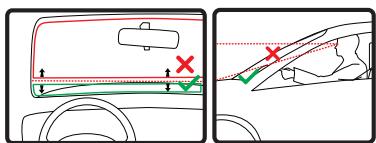
La base puede fjarse al parabrisas, a la ventanilla lateral o al salpicadero; en esteultimate caso, deben usar un disco de montura en salpicadero. TomTom offre también soluciones de montaje alternativas para el dispositivo de navigacion TomTom.
Para Obtener más información sobre los discos de montaje en el salpicadero y sistemas de montaje alternativas, visite totom.com/accessories.
Instalación del Active Dock
Asegürese de que tanto el Active Dock como el parabrasas está limpios y secos.
- Presione la ventosa firmamente contra el parabrasas en una zona en la que el cristal esté plano.
- Gire el agarre de goma situado cerca de la base del Active Dock hacía la derecha hasta que oiga un clic.
El Active Dock trabra quedo correctamente instalado.
El primer viaje
Menu principal 1 de 3

Ir
a...

Encontrar alternatively
4:12pm

Ayuda!

TomTom Servicios

Cambiar preferencias

Posión actual:
Amsterdam
Hecho
Ir a...

Casa

Favorite
8:18

Dirección

Destino recente

Punto de interes

Atras
Planificar una ruta con su dispositivo de navigacion TomTom GO es muy fácil. Para planificar una ruta, siga thesezos pasos.
Important: por motivos de seguidad,
siempredeferablanificaruna rutaantes de comenzar la viaje.
- Toque la pantalla paraAbrir el menu principal.
Note: los botones del dispositivo de navigation aparecerán en color a menos que cuando botón no está disponible en ese momento.
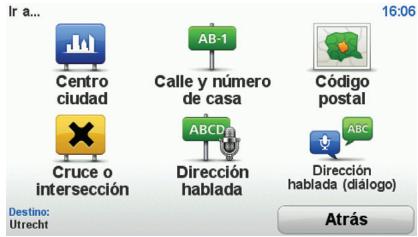
- Toque Ir a...
- Toque Dirección.
En este exemple, introducremos una direccion.
4. Toque Calle y número de casa.
Note: cuando planifique un viaje por primera vez, el dispositivo de navigacion le pedira que seleccione un estado o País. Su eleccion se guardara y utilizes para todas las rutas que planifique.
Si lo desea, puiscendo Changei esesteajuste en
cualquier momento con solo tocar la bandera.
5. Comience introduciendo el nombre de la ].bplacion a la que desea ir.Toque el nombre cuando aparezca en la lista.

gación.
Sugerencia: en lugar de书写 el nombre, toque este botón para emitir la direccion en voz alta al dispositivo de nave-
- Comience aCAAIR el nombre de la calle.Toque el nombre cuando aparezca en la lista.
El primer viaje
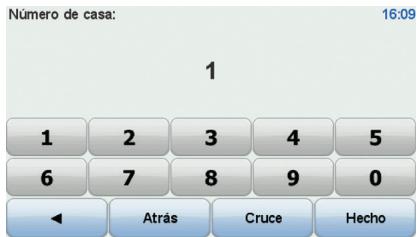
- Introduzca el numero de la casa y bajo toque Hecho.
- El dispositivo de navigación le preguntará si necesitaURTAR a una hora determinada. En este ejercicio concreto, toque No.
El dispositivo calcula la ruta utilizando IQ. R_u ttesTM.
IQ Routes se usa para planificar la mejor ruta possible utilizing datos sobre las velocidades medias registradas en las carreteras.
Una vez se haya calculado la ruta, toque Hecho.
El dispositivo de navigation TomTom GO empezar a guiarle hasta su destino.
Resumen de ruta
Tras planificar una ruta, puede ver un resumen.
El resumen de ruta muestra un mapa general de la ruta y el tiempo total de viaje incluyendo retrasos causados por incidentes o carreteras con mucho tráfico.
Podrá ver el resumen de la ruta siempre que lo desee, hacerlo click en el ladodeocho de la barra de estado.
Vista de conducccion
Cuando el TomTom GO se incida, se muestra la vista de conduccion junto con informacion detallada sobre la posicion actual.
Toque el centro de la pantalla en cualquier momento paraAbrir el menu principal.
Note: La vista de conducccion apareceré en blanco y negro hasta que el GO localice su posicion actual.
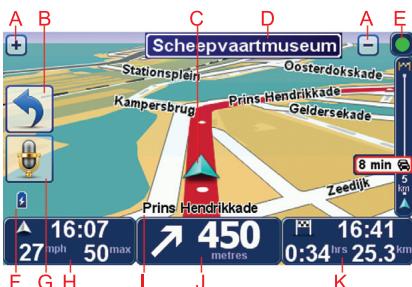
Toque + para ampliar y reducir la imagen.
8 Menu rápido: Puede activar el menu rápido en el menu Preferencias.
La posicón actual.
Informacion de las senales de trafico o nombre de la calle?sigue.
E Barra lateral de trafico.
F Indicador del nivel de bateria.
⑥ Botón del micrófono para las instrucciones y el control por voz.
La hora, velocidadactual y limitede velocidad (si se conoce).
Toque esta parte de la barra de estado paracaebarielvolumen y escuchar la proxima instruccion hablada.
① El nombre de la calle en que se encuena. tra.
① Instruciones de navigation para la carretera.
Toque esta parte de la barra de estado para embarcer entre las vistas de 2D y 3D en la vista de conducccion.
Tempo restante de viaje, distancia restante y hora de llegada prevista.
Toque esta parte de la barra de estado paraAbrir la pantalla con el resumen de la ruta.
ParaCambiar la informacion que aparece en la barra de estado,toque Preferencias de barra de estado en el menu Preferencias.
Simbolos de la vista de conducccion
En la esquina inferior izquierda de la vista de conducccion se muestran variedos SYMBOLOS. Algunos ejemplos:

Bateria: este symbolo mystra el nivel de bateria. Cuando la bateria está baja y hay que cargarla, el symbolo de la bateria está vacío. Cargue
el dispositivo de navigacion tan pronto como le sea possible.

EPT: este símbolo aparece cuando el dispositivo usa la EPT para calcular su posición actual. La EPT sólo se utilizes cuando no
hay recepción GPS.
Nota: La EPT no es compatible con todos los dispositivos.

Sonido desactivado: este simbolo aparece cuando el sonido está desactivado.
Para activar el sonido, abra el menu Preferencias y toque Activar sonido.
Para más información, consulte la guía de referencia.
1 TomTom GO
AÇma/Kapama duğmesi
B Mikrofon
Isik sensoru
Hoparlior
E Bellek kartı (mikro SD kartı) yuvası
2 Etkin Dok
USB arac tipi sarj ci-hazi
4 USB kablosu

Kullanim kilavuzu ve diger belgeler

Açma ve kapama
TomTom GO navigasyon cihazinizi bu kitabin basindaki kurulum böllumunde bulunan talimatlari uygulayarak arabaniza monte edin.
Navigasyon cihazinizi acmak icin, baslatma ekraniin gorunceye kadar Acma/Kapama duğmesini basili tutun. Cihazinizi ilk actiginizda, baslatlmasi biraz zaman alabilir.
Kurulum
Cihazinizi ilk actiginzida, cihazi ayarlamak icin birkac soruyu yanitlamaniz gerekir. Sorulari ekana dokunaray yanitlayin.
Ayni konuma duzenli olarak gidip gelmedigiiniz sorulacaktir. EVETi tiklarsaniz, bu hedefleri sik kulanan hedefleriniz olarak girebilirsiniz. Cihazinizi her actiigniza, bu konumlardan birini hemen hedefiniz olarak secebilirsiniz.
Bu hedefleri degişirmek vya yeni bir hedef sejmek icin, Tercihler menusünde
Baslangic tercihleri'ne dokun, sonra
Hedef Sor'u.Since.
Cihaz baslatilmiyor
TomTom GO Navigasyon cihaziniz bazen dokru baslatilmayibilr ya da dokunuslariniza yanit vermeyebilir.
Once, pilin doğru Şarj edilip edilmedigün kontrl edin. Pili Şarj etmek icin, cihazıni araç tipl Şarj cihazına baglayin. Pilin tamamşen Şarj olması 2-SAeti bulabilir.
Bu sorunu czozmezse, cihazi sifurlayabilirsiniz. Bunun icin, Acoma/Kapama duğmesini 15 saniye basili tutun ve cihaziniz yeniden baslatlirken duğmeyi birakin.
Baslarken
Pil hakkinda notlar
TomTom GO navigasyon cihazinizdaki pil, cihazinizi araç tiplşar cihazina veya bilgisayariniza bagladiginzida szr olur.
Cihazinizi bir bilgisayara bagladiginzda, bil-gisayara baglanmak isteyip istemediginiz sorulur. Hayir seçerseniz ve sonra ekrana üc dokika icinde dokunmazsaniz, cihaz otomatik olarakapanacaktir. Bu sayede pil daha hizl sarj olur.
Not: USB konektörunü klavyedeki veya monitordeki bir USB hub'ina veya USB böglanti noktasina degil,DOGrudan bilgisayinizdaki bir USB böglanti noktasina takmalisiniz.
GPS alimi
TomTom GO navigasyon cihazinizi ilk baslattiginizda, cihazin, GPS konumunuzu belirlemesi ve haritada geleerli noktanizi belirtmesi icin birkac daka gerekebilir. ileride, konumunuz cok daha huzl, genellikle, birkac saniye icinde bulunacaktir.
Iyi GPS almi icin, cihazinizi disarida kullan-malisiniz. Yuksek binalar gibi buyk nes-neler bazen alim kalitesini etkileyebilir.
TomTom GO 950, Gelismis Konumlandirma Teknolojisi veya EPT icerir. Surius sirasinda, orneigin tuneldeyken GPSi kalybolduunda, EPT otomatik olarak konunmunuzu tahrmin eder. EPT kullanimdayken, EPT sembolu Surius Gorunumnde gosterilir.
Dok'u konumlandirma
Dok'u aracinizin neresine takacaiginizi iyi dusunun. Dokun sunlari herhangi bir sekilde engellememesi veya karsilamamasi gerekir:
Yol gorusunuzu
Arabanizdaki kontrollerden herhangi birini
Aynalarinizdan herhangi birini
- Hava yastigiini
Navigasyon cihaziniz doktayken, eigilmeden veya uzanmadan cihaza kolaylka erisebilmelisiniz. Diyagramlarda dok'u guvenle takabileceginiz yerler gosterilmektedir.
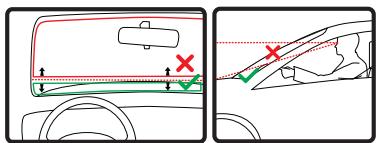
Dok'u on cama, yan cama takabilir veya kontral panelinize takmak icin bir Kontrol Paneli Montaj Diski kullanibilirsiniz. TomTom ayrica, TomTom navigasyon cihaziniz icin alternatif baglantioczumleri sunar. Kontrol
Paneli Baglanti Diskleri ve alternatif baglanti gezumleri hakinda daha fazla bilgi icin totom.com/accessories adresine gadin.
Active Dock'u yükleme
Hem Active Dock'un hem de caminizin temiz ve kuru oldugundan emin olun.
- Vantuz böglantisini camin duz oldugu bir yerde sikica cama bastirn.
- Cit sesini duyana kadar Active Dock'un tabannin yakinindaki lastik tutacagi sad yonunde dondurun.
Active Dock Şimdi kuruldu.
Ilk seyahatinizi yapma
Ana Menu 1/3

Suraya git...

Tomtom Servisleri
Geerlikonum:
Amsterdam
4:12pm

Alternatif bul...

Tercihleri)..

Yardim!

Bitti
$uraya git...

Ev

Son hedefler

Sik
kullanilan

Igli Cekici Nokta
8:18


Adres

Geri
TomTom GO navigasyon cihazinizla rota planlamak kolaydir. Bir rota planlamak icin, asagidaki adimlare izleyin.
Onemli: Güvenlik nedeniyle, seyahate baslamadan once her zaman bir rota planlamaniz gerekir.
- Ana Menüyü ekrana getirmek icin ekrana dokunun.
Not: Navigasyon cihazinizdaki duğmefer geleçeri olarak kullanilamaz durumda degilse, duğmefer tam renkli美容iril. - Suraya git... ögesine dokunun.
- Adres ögesine dokunun.
Bu ornekte, bir adres girecegiz.
4. Sokak ve bina numarasi ögesine dokunun.
Not: Seyahatinizi ilk defa planlarken navigasyon cihaziniz bir eyalet veya ulke segmenizi ister. Segiminiz planladiginiz tum rotalar icin kaydedilir ve kullanllr.
Bayraga dokunarak bu ayari istediginiz zaman deigistirebilirsiniz.
5. Gitmek istedigiiniz sehrin adini yazmaya baslayin. Listede gosterildiginde ada dokunun.

ipucu: Adi yazmak yerine, navigasyon cihaziniza konusarak adresi soylemek icin bu duğmeye dokunun.
- Sokak adini yazarak baslayin. Listede gosterildiginde ada dokunun.
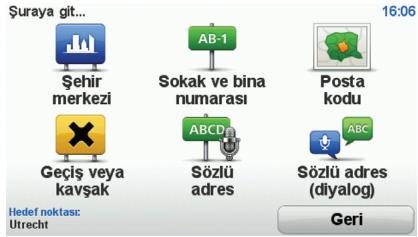
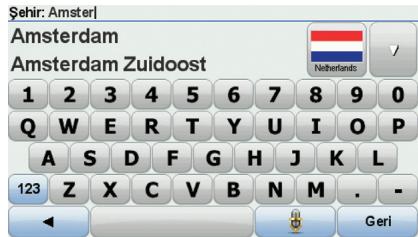
Ilk seyahatinizi yapma
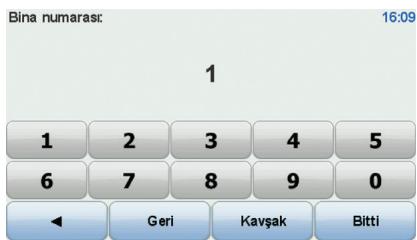
- Bina numarasini girin ve sonra Bitti'ye dokunun.
- Navigasyon cihaziniz belirli bir sutured varmak isteyip istediginizi sorar. Bunun icin, HAYIR ögesinde dokunn.
Bu rota IQ Routes™ kullanilarak cihaziniz tarafindan hesaplanir.
IQ Routes, yollara olculen ortalama hizlarla ilgil biligileri kullanarak olasi en iyi rotayi planlamak icin kullanilr.
Rota hesaplandiktan sonra Bitti ögesine dokunun.
TomTom GO navigasyon cihaziniz hedefin-ize gitmede size kilavuzluk eder.
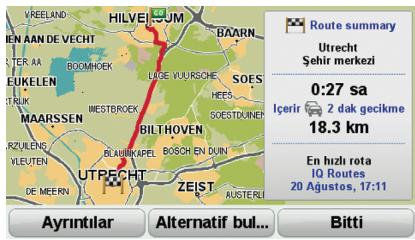
Rota ozeti
Bir rota planladiktan sonra, rotanizin bir özetini görürsunuz.
Rota özeti, rotanizin haritasina bir genel
bakı ve kasalar ve yüzün doksanlendan kaynaklanı gecikmeleri iceren toplam seyahat
süresini gosterir.
Rota özetini herhangi bir zamanda durum cubugunun sag tarafina dokunarak gorebi-lirsiniz.
Sürus Görünümü
TomTom GO basladiğnda,GPCeri konumunuz hakkinda ayrintil bilgyle birlikte Suruş Gorunumu gosterllr.
Ana Menu'yu açmak icin ekranın merkezine dokunun.
Not: Sūrùs Gārūnūmù, GO urūnūnz geçerli konumunuzu bulana kadar siyah ve beyaz gōurútülenir.
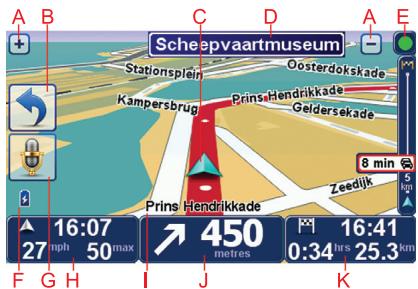
A Yakinlastrup uzaklasmak icin + ve -ogelerine dokunun.
Hizl menu - Tercihler menusundeki hizl menuyu etkinlestirebilirsiniz.
Geerli konumunuz.
⑤ Yol isareti bilgileri veya sonraki sosak adi.
E Trafik kenar cubuğ.
Pil seviyesi gostergesi.
⑥ Ses komutlari ve kontrol icin mikrofon düğmesi.
Saat, geçerli hiziniz ve biliniyorsa hiz siniri.
Sesi degistirmek ve bir sonraki ses komutunu duymak icin durum cubugunjun bu bolumune dokunjun.
① Bulundugunuz soka'in adi.
① ilerideki yol icin gezinme talimatlari.
SuruGorunumunun 2Bve3BGorunuml erini degistirmek icin durum cubugun un buolumne dokun.
Kalan seyahat suresi, kalan mesafe ve tahmini varı saatiniz.
Rota özet ekranini açmak icin durum cubugunun bu bolümuné dokunun.
Durum cubenuga gosterilen bilgileri degistirmek icin, Tercihler menusundeki Durum cubengu tercihleri'ine dokun.
Suruş gürünümü sembolleri
Sürus Görunumünun sol alt koseinde birçok sembol gosterilir. Birkac Örnek:
Pil - bu sembol pil seviyesini gosterir. Pil seviyesi dusukse ve sari etmek gerekiyorsa, pil sembolu bostr. Navigasyon cihazinzi en kisa surede sarj etmeniz gerekir.
EPT-Bu sembol cihaziniz EPT kul- lanirkenGPCleri konumunuzu tahmin etmek icin goren. EPT yalnizca hi GPS alimi yoksa kul
Not: EPT her cihazda desteklenmez.

Ses kapali - bu sembol ses kapaliyken gosterilir.
Sesi acmak icin, tercihler menusunu acn ve Sesi a'a dokunun.
Daha fazla bilgi icin Referans Kilavuzu'na bakin.
Addendum
Important Safety Notices andWarnings
Global Positioning System
The Global Positioning System (GPS) is a satellite-based system that provides location and timing information around the globe. GPS is operated and controlled under the sole responsibility of the Government of the United States of America which is responsible for its availability and accuracy. Any changes in GPS availability and accuracy, or in environmental conditions, may impact the operation of your TomTom device. TomTom does not accept any liability for the availability and accuracy of GPS.
Use with Care
Use of a TomTom device for navigation still means that you need to drive with due care and attention.
Aircraft and Hospitals
Use of devices with an antenna is prohibited on most aircraft, in many hospitals and in many other locations. A TomTom device must not be used in these environments.
Battery
This product uses a Lithium-Polymer battery. Do not use it in a humid, wet and/or corrosive environment. Do not put, store or leave your product in or near a heat source, in a high temperature location, in strong direct sunlight, in a microwave oven or in a pressurized container, and do not expose it to temperatures over 60C (140 F). Failure to follow these guidelines may cause the Lithium-Polymer battery to leak acid, become hot, explode or ignite and cause injury and/or damage. Do not pierce, open or disassemble the battery. If the battery leaks and you come into contact with the leaked fluids, rinse thoroughly with water and seek medical attention immediately. For safety reasons, and to prolong the lifetime of the battery, charging will not occur at low (below 0 C/32 F) or high (over 45 C/113 F) temperatures.
Temperatures: Standard operation: -10C (14 F) to +55C (131 F); short period storage: -20C (-4 F) to +60C (140 F); long period storage: -20C (-4 F) to +25C (77 F).
THE LITHIUM-POLYMER BATTERY CONTAINED IN THE PRODUCT MUST BE RECYCLED OR DISPOSED OF PROPERLY. USE YOUR TOMTOM ONLY WITH THE SUPPLIED DC POWER LEAD (CAR CHARGER/BATTERY CABLE) AND AC ADAPTER (HOME CHARGER) FOR BATTERY CHARGING.
To recycle your TomTom unit please see your local approved TomTom service center.
The stated battery life is a maximum possible battery life. The maximum battery life will only be achieved under specific atmospheric conditions. The estimated maximum battery life is based on an average usage profile.
For tips on extending the battery life, go to the FAQ listed below for your country:
AU: www.tomtom.com/8703
CZ: www.tomtom.com/7509
DE: www.tomtom.com/7508
DK: www.tomtom.com/9298
ES: www.tomtom.com/7507
Fl: www.tomtom.com/9299
FR: www.tomtom.com/7506
HU: www.tomtom.com/10251
IT: www.tomtom.com/7505
NL: www.tomtom.com/7504
PL: www.tomtom.com/7503
PT: www.tomtom.com/8029
RU: www.tomtom.com/10250
SE: www.tomtom.com/8704
UK: www.tomtom.com/7502
US: www.tomtom.com/7510
Addendum
CE Marking
This equipment complies with the requirements for CE marking when used in a residential, commercial, vehicular or light industrial environment.

R&TTE directive
Hereby, TomTom declares that this personal navigation device is in compliance with the essential requirements and other relevant provisions of the EU Directive 1999/5/EC. The declaration of conformity can be found here: www.tomtom.com/legal.
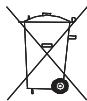
WEEE directive
This symbol on the product or its packaging indicates that this product shall not be treated as household waste. In line with EU Directive 2002/96/EC for waste electrical and electronic equipment (WEEE), this electrical product must not be disposed of as unsorted municipal waste. Please dispose of this product by returning it to the point of sale or to your local municipal collection point for recycling.
This Document
Great care was taken in preparing this manual. Constant product development may mean that some information is not entirely up to date. The information in this document is subject to change without notice.
TomTom shall not be liable for technical or editorial errors or omissions contained herein; nor for incidental or consequential damages resulting from the performance or use of this material. This document contains information protected by copyright. No part of this document may be photocopied or reproduced in any form without prior written consent from TomTom N.V.
Wichtige Sicherheitswarnings und -warnings
Global Positioning System
GPS (Global Positioning System) is an satellitebasiertes System, das weltweit Orts- und Zeitinformationen bereitstellt. GPS wird unter alleiniger Verantwortung der Regierung der Vereinigten Staaten von Amerika (USA) betrieben und überwacht, die auch für dessen Verfügbarkeit und Genaugkeit verantwortlich ist. Jegliche Änderungen der GPS-Verfügbarkeit und -Genaugkeit oder der Umwelterbedingungen können den Betrieb与其 TomTom-Geräts beeinträchtigte. TomTom übermimm keinerlei Haftung für die GPS-Verfügbarkeit und -Genaugkeit.
Fahren Sie immer vorschriftgemäß
Dieutschung eines TomTom-Gerats befrett die Siie nicht von ihrer Pflchte, stets aufsemarkns und vorschfrtsgemäß zufahren.
Flugzeuge und Krankenhauser
Die Benutzung von Geräten mit Antennen ist in den leasten Flugzeugen, Krankenhäusern und ein vierten anderen Ortenvorboten. Sie dürfen Ihr TomTom-Gerät nicht in einer derartigen Umgebung benutzten.
Akku
Dieses Produkt verwendet einen Lithium-Polymer-Akku. Verwendten Sie Ihr Produkt nicht in feuchten, nassen und/oder korrosionsforderenden Umgebungen. Betrieben, lagern oder platzieren Sie Ihr Produkt nicht in oder neben Wärmequellen, an Ortmen mit hoher Temperatur, im direkten Sonnentlich, in einer Mikrowelle oder in einem Druckbehalter, und setzen Sies keinem Temperaten über 60 C (140 F) aus. Eine Missachtung dieser Anweisungen kann dazu führen, dass der Lithium-Polymer-Akku Batterieäure freiestet, zu weiß wird, explodiert und/oder sich entzündet und dadurch Verletzungen und/oder Sachschädens verursichts. Sie dürfen den Akku nicht mit spitzen Gegenständen beschädigten, öffnen oder auseinandernehmen. Falls Batterieäure aus dem Akku auslaufü und Säre damit in Kontak geraten, sollen Sie die betroffene Körpersstelle gründlich mit Wasser ab und suchen Sie danach einzeln einen Arzt auf. Aus Grunden der Sicherheit und zur Veränderung der Akkulebensdauer erfolgt der Aufladevorgung nicht bei zu niedrigen (unter 0 C/32 F) oder zu hohen (über 45 C/113 F) Temperaturen.
Temperatures: Normaler Betrieb: -10C (14 F) bis +55C (131 F); kurzfristige Lagerung: -20C (-4 F) bis +60C (140 F); langfristige Lagerung: -20C (-4 F) bis +25C (77 F).
DER IN DIESEM PRODUCT ENTHALTENE
LITHIUM-POLYMER-AKKU MUSs
ORDUNNGSGEMASSENTSORGT ODER
WIEDERVERWERTET WERDEN,VERWENDE
ZIE ZUM AUFLADEN IHRES TOMTOM-GERATS
NUR DAS MITGELEIFERE
GLEICHSTROMNETZKABEL (AUTOLADEGERAT/
AKKULADEKABEL) ODER
WECHSELSTROMNETZEIL (HEIMLAGEGERAT).
Um Ihr TomTom-Gerat der Wiederverwertung zuzuführen, wenden Sie sichibiie an ihr darauf zugelassenes ortliches TomTom-Kundendienstzentrum.
Die angegebene Akkulebensdauer entspricht der maximalen Akkulebensdauer. Diese wird nur unter bestimmten Umgebungsbedingungen erreicht. Die geschätzte maximale Akkulebensdauer bezieht sich auf ein durchschnittliches Nutzungssprofil.
Tipps zur Veränderung der Akkulebensdauer finden Sie in der nachfolgenden Ende der tatsächlichen Fragen (FAQ) für Ihr Land:
AU: www.tomtom.com/8703
CZ: www.tomtom.com/7509
DE: www.tomtom.com/7508
DK: www.tomtom.com/9298
ES: www.tomtom.com/7507
FI: www.tomtom.com/9299
FR: www.tomtom.com/7506
HU: www.tomtom.com/10251
IT: www.tomtom.com/7505
NL: www.tomtom.com/7504
PL: www.tomtom.com/7503
PT: www.tomtom.com/8029
RU: www.tomtom.com/10250
SE: www.tomtom.com/8704
UK: www.tomtom.com/7502
US: www.tomtom.com/7510
CE-Kennzeichnung
Dieges Gerat entspricht den Anforderungen der CE-Kennzeichnung, wenn es in Wohn-, Gewerbe-, Fahrzeug-oder Leichtindustrieumgebungen eingesetzt wird.

R&TTE-Direktive
Hiermit erklart TomTom, dass diesen personliche Navigationsgeräte die grundlegenden Anforderungen und anderen relevanten Bestimmungen der EU-Richtlinie 1999/5/EC erfüllt. Die Konformitätserkürzung finds Sie hier: www.tomtom.com/legal.
EEAG-Richtlinie
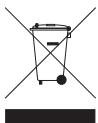
Dieses Symbol auf dem Produkt oder der Produktverpackung gezet an, dass das Produkt nicht als Haushaltsabfall zu entsorgen ist. In Ubereinstimmung mit EU-Richtlinie 2002/96/EG über Elektro- und Elektronik-Altere (EEAG) darf diese Elektergerät nicht als unsorierter Siedlungsabfall entsorgt werden. Entsorgten Sie diese Produkte brittle, indem Sie es dfort zurückgeben, wo Sie es erworben haben, oder bei einer communiten Recycling-Sammelstelle in Ihr Nanie.
Dieses Dokument
Dieses Handbuch wurde mit größmöglicher Sorgfalt erstellt. Durch die fortlaufende Produktentwicklung kann es jedoch vorkommen, dass einige darin enthaltene Informationen nicht mehr vollständig dem neuesten Entwicklungsstand entsprechen. Die Informationen in thisem Dokument können sich jederzeit und ohne vorherige Ankündigung halten.
TomTom übernimmt keinerlei Haftung fürSAMtliche in thisem Dokument enthaltenten technischen und redaktionellen Fehler und Auslassungen sowie für alle zufälligen und Folgschädgen, die durch den Einsatz oder den Gebrauch dieser Unterlagen entstehen. Die in thisem Dokument enthaltenen Informationen sind urheberrechtlich geschützt. Kein Teil dessens Dokuments dar ohne vorherige schriftliche Genehmigung von TomTom International B.V. fotokopiert oder anderweitig reproduziert werden.
Informativa di sicurezza e avvisi importanti
Global Positioning System
II Global Positioning System (GPS) è unsystema satellitaire che fornisce informazioni sullora e sulla posizione in tutto il mondo. Ilsystema GPS è controllato esclusamente dal governo degli Stati Uniti d'America, unico responsable della disponibilità e accurazione delle stesso. Qualsiasi modifica alla disponibilità e all'accuratezza del GPS, o a determinare condizioni ambientali, sono incluensae foperatività del dispositiivo TomTom. TomTom non si assume una responsabilità in merito alla disponibilità e all'accuratezza del GPS.
Usare con cautela
L'utilizzo di un disponibile TomTom per la navigazione non solleva l'ultente della necessità di guidare con cura e attenzione.
Aerei e ospedali
L'uso di dispositivi dotati di antenna è vietuato sulla maggior parte degli aerei, in molti ospedali e in molti altri luogi. All'interno di questi ambienti, non'utilizzo il dispositivo TomTom.
Batteria
Questo prodotto usa una batteria al polimeri di litio. Non utilizzare in ambienti umidi, bagnati e/o corrosivi. Non collocare, conservare o lasciare il prodotto in prossimità di una fonte di calorie, in un ambiente con temperature elevate, alla luce diretta del sole, vicino a un fornso a microonde o in un contentire pressurizzato, ne esporso a temperature superiore ai 60 C (140 F). La mancata osservanza di queste linee guidao provocare la perdita di acido, il sorriscaldamento, l'espllosion o autocoombustione della batteria ai polimeri di litio con segunti lesioni e/o danni. Non forare, aprir o smontare la batteria. In caso di perdita della batteria e diicontato with i fluidi furiosiciti, risicacqua accuratamente la parte e consuluta immediamente un medico. Per motivi di sicurezza e per prolonguire la vita della batteria, la carica non potre essere effettuata a temperature basse (meno di O C/32 F) o alte (olte 45 C/113 F).
Temperature: funizionamento standard: da -10 C (14 F) a +55 C (131 F); breve periodo di inutilizzo: da -20 C (-4 F) a +60 C (140 F); periodo di inutilizzo prolongato: da -20 C (-4 F) a +25 C (77 F).
LA BATTERIA AI POLIMERI DI LITO CONTUNETA
NEL PRODOTO DEVE SESERE RICICATA O SMALITA CORRETTAMENTE. UTILIZZA
TOMTOM SOLO CON I CAVO DI ALIMENTAZIONE CC (CARICOTER PE REATO/
CAVO DELLAA BATTERIA) E L'ADATTATORE CA (CARICOTER PE CAROTA) FONIT IN
DOTAZIONE PER CARICARE LA BATTERIA.
Per riciclare TomTom, rivolgiti al centro assistenza TomTom locale.
L'indicazione della durata della batteria corrisponde alla durata massima. La durata massima della batteria si ottiene solo in specifiche condizioni atmoseferiche. La durata massima della batteria si basa su un profilo di uso medio.
Per i suggerimenti sul'estensione della durata della batteria, consulta le domande frequenti per il loro paese, elencate di seguito:
AU: www.tomtom.com/8703
CZ: www.tomtom.com/7509
DE: www.tomtom.com/7508
DK: www.tomtom.com/9298
ES: www.tomtom.com/7507
FI: www.tomtom.com/9299
FR: www.tomtom.com/7506
HU: www.tomtom.com/10251
IT: www.tomtom.com/7505
NL: www.tomtom.com/7504
PL: www.tomtom.com/7503
PT: www.tomtom.com/8029
RU: www.tomtom.com/10250
SE: www.tomtom.com/8704
UK: www.tomtom.com/7502
US: www.tomtom.com/7510
Aggiunta
Marchio CE
Questo dispositivo è conforme ai requisiti del marchio CE per utilizzi in zone residenziali, commerciali, veicolari o industriali leggere.

Direttiva R&TTE
Con la presente, TomTom dichiara que thiso dispositivo di navigazione personale e conformare ai requisiti essenziali e alle clausole pertinenti della Direttiva 1999/5/EC dell'UE. La dichiarazione di conformità più essere reperita qui: www.tomtom.com/legal.
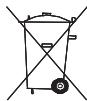
Direttiva RAEE
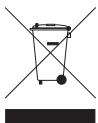
Questo significato presente sul prodotto o sulla sua confazione indica che i prodotto non devesse essere smaltofra i rifiuti domestici. Confermmente alla direttiva europea 2002/96/ EC per i rifiuti di aperecchiatae electrliche ed elettoniche (RAEE), quello prodotto elttrico non devesse essere smaltofra tare i rifiuti di racolta indifferentiana. Quezzo prodotto devesse essere smalto tramite restituzione al ponto vendita o al ponto di racolta locale per il riciclaggio.
Questo documento
Nella preparazione di quello manuale è stata posta estrema attenzione. A causa del continuo sviluppo del prodotto, alcune informazioni potrebbero non essere dell'alto aggiornate. Le informazioni di quello documento sono soggette a migliorificza nella previa notificata.
TomTom non si assume una responsabilita in merito a errori editoriali odmissioni ivicontenque,ne per danni incidentali o seguenti derivanti dal contento o dall'uso di quello materiale. Questo documento contiene informazioni protette da copyright. Nessuna parte di questo documento devesse fotocopiata o riprodotta in alcuna forma alla previo consenso scritto di TomTom International B.V.
Important: Avisos y advertencias de seguridad
Sistema de posicionamento global
El Sistema de Posicionamento Global (GPS) es unsystema bajo en satélesties que proportiensa information sobre las positions y la temporización de los satélesties en todo el mundo. El gobernso de los Estados Unidos de America es el unicno responsable del functionality y control del GPS y garantía su disponibility y exactitud. Cualquier cambio al dispossidencia y exactitud del sistema GPS o en las conditiones ambientalesuede influir en el functionality de su dispositorio TomTom. TomTom no acaeta ninguna responsableidad por la disponibility ni la exactitud del GPS.
Utilíce lo con cuidado
El uso de un dispositivo TomTom de navigation no exime al conductor de conducir de manners atenta yguided.
Aviones y hospitales
El uso de dispositivos con antenna está prohibido en la mayoría de los aviones, enchos hospitables y enchos或者其他 lugares. En dichos lugares no deben usar un dispositivo TomTom.
Batería
Este产品经理utilizaunabateriaofpolimerofo litio.No lo utilise en un ambientu humedo, mojado y/o corrosivo.No colqueo, almacene ni deajeusaproducto eno carea deuna fuente de calor, en un lugar con altas temperaturas, bajo la actiondirecta de la luz solar, en unorno microondos o en un contenderespresurizado, ni lo expongaatemperativerosuperioreseto60C(140F).El incumplimientootestdesdirectrscpeprovocarugadasde acido delbateriaofpolimerofo litio,o bien que la bateriasaliente, estalle o prenduga yosecauseheridasyo/a daños.No perforae,abra nisdonmate la bateria.Si la bateriaspresenta fugas yusteda enan contacto con los fluidos,ejuguasebien加载y soliciteasistancia medicaofmediato.Parrazones offeiguidarity,ypara prolongarla vidaoflatabera,la carga no se producirata temperaturebasjas (pordebajoof 0C/32F)of altas (porencima de45C/113F).
Temperatura: funcionaamente estandar: -10 C (14 F) a +55 C (131 F); alcamacenamento durante un corto periodo de tempo: -20 C (-4 F) a +60 C (140 F); alcamacenamento durante um longo periodo de tempo: -20 C (-4 F) a +25 C (77 F).
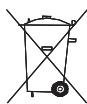
LA BATERIA DE POLIMERO DE LITO INCLUDEA EN EL PRODUCTO DEBE RECICLARSE O DESECHARSE DE FORMA ADECUADA. UTILIZE SU TOMTOM SOLO CON EL CABLE DE ALIMENTACION DE CC PROPORCIONADO (CABLE DEL CARGADOR DE COCHE/DE LA BATORIA) Y EL ADAPTADOR DE CA (CARGADOR DOMESTICO) PARA CARGAR LA BATORIA.
Para recicular su unidad TomTom consulte al centro local autorizzato de assistencia TomTom.
La vidaCTL de la bateria seyalada es la vidaCTL maximala. Sólo se garantía la vidaCTL maximala de la bateria si se dan做一些 conditiones atmosféricas espécicas. El calculo de la vidaCTL maximala de la bateria está basado en un peril de uso bajo.
Si紊ea obtener consejos sobre como prolongar la vidaCTL de la bateria, consulte las siguientes preguntas mas frecuentes para su pays:
AU: www.tomtom.com/8703
CZ: www.tomtom.com/7509
DE: www.tomtom.com/7508
DK: www.tomtom.com/9298
ES: www.tomtom.com/7507
Fl: www.tomtom.com/9299
FR: www.tomtom.com/7506
HU: www.tomtom.com/10251
IT: www.tomtom.com/7505
NL: www.tomtom.com/7504
PL: www.tomtom.com/7503
PT: www.tomtom.com/8029
RU: www.tomtom.com/10250
SE: www.tomtom.com/8704
UK: www.tomtom.com/7502
US: www.tomtom.com/7510
Distinctivo CE
Este equipo cumple las exigencias del distinto CE cuando se utilizes en entornos residenciales, commerciales, vehiculas o industriales ligeros.

Directiva RTTE
Por la presente, TomTom declara que este dispositivo de navigation personal se hafabricado en conformidad con los requisitos esenciales y除外as provisionales relevantes de la Directiva de la UE 1999/5/EC. La交代 de conformidad se puede encontrarquiry: www.tomtom.com/legal.
Directiva WEEE
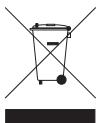
El sintblo en el producto u s paquete india que este producto no pueda tratarse como residuo domestico. Conflame a la Directiva UE 2002/96/CE para residuos de dispositivos electricos y electrónicos (WEEE), este producto electrico no debe eliminarse como residuo municipal común. Para deshacerse de este producto devuélvalo al punto de vente o a su punto de recogida municipal local para reciclaje.
Este documento
Se han tornadoughtas precauaciones al redactarthis manual. Debido alconstante desarrollo del producto,espossible quealgunos detalles no esten totalmenteactualizados.La informacioncontentida en este documento estesaujete achangiosin previoaviso.
TomTom no se responsabiliza de los erros tínceros o editoriales, como de las omisiones contentados en el presente documento o los días accidentales o derivados del descrollo o del uso de este material. Este documento contiene información protegada por copyright. Ninguna parte de este documento pourrait ser fotocopiada o reproducido en formaalguna sin el consentimiento previo del TomTom International B.V.
Önmli Güvenlik Ikazlari ve Uyarilari
Global Konumlandirma Sistemı
Global Konumlandirma Sistemi (GPS), tum dūnyada konum ve zaman biligiler veer yudu tabanil bir sistendir. GPS, kullanilabilişi ve doğulüngundan sorulmi Amerika Birileşk Devletleri Hüyükemtin sorullungunda istelir ve detenlenir. GPS'in kullanilabilişi ve doğulüngdaki degisklikler veya ortam kosullari TomTom cihazinizin calgismasini etkilylebebilir. TomTom, GPS'in kullanilabilişi ve doğulüguyla iligiherhangi bir sorulumluk kabul etmez.
Dikkatli kullanin
Navigasyon iin TomTom cihazinin kullanlmasi, dikkatli bir sekilde arac kullanmanz generktigi anlamir gelir.
UÇak ve Hastaneler
Anteni cihazarrin kullanimlasi cose quac, hastane vede bircoek yerey asakrt. TomTom cihazi bu ortamldara kullanimmalamalidir.
Pil
Bu Grunde Lityum Polin piullinlalmaktadr. Nemi, lslak ve yeva. paslamanya sebeb olabilecek ortanda kullamayin. Urununuzi isi kayangi yakinnda, cok scak bir verte, dgroduran gelen gucu iguesi sigriga, mikro daliga分娩na ve basinci bir kapa birkmayin ve 60 C (140 F) ustnde sicaklikara maruz birkmayin. Bu talatmala uyulammasa, Lityum Polim pilin asit szidrimasna, isnmasina, patlamasa ya da alev almasna ve yaralaruna ve/yea hasara nods olabilir. Pil delmyein, acmayin yeva parcalarina ayirmayin. Pil szidrin zis vana siya temas edsenizin, suyla iyice yiKayin ve derhal tbbi yardin isteyin. Güvenliden eynöyine pilin ornūnūt azatmakicens din dusk (O/C/32 F altinda) veya yüksek (45 C/ 113 F üzerinde) sicaklikara zar olazman.
Sicakliklar: Standart calisma: -10 C (14 F) ile +55 C (131 F); kisa sureli depolama: -20 C (-4 F) ile +60 C (140 F); uzun sureli depolama: -20 C (-4 F) ile +25 C (77 F).

URUNDE BULUNAN LITYUM POLIMER PIL UYGUN SEKILDE GERI DONUSTURUMLIMEVEYA ATILMALDIR.PILI SARJ ETMEK ICIN TOMTOMUNUZU YALNIZCA BIRLIKTE VERILEN DC GUC KABLOSAR (UKR, SARJ CHAJI/PIL KABLOSU) VE AC ADAPTORUYLE (EV TIPI SARJ CHAJI) KULLANNIL.
TomTom unitenizi geni deronuturmeik ic luten yerel yetkili TomTom servis merkezinibe bavurun.
Belitrilen pil omrū, mūmkūn alan on un uzin pil omrūdūr. En uzin pil omrū, ancak bellī atmssor kogullarnda mūmkūndūr. Tahmini en uzin pil omrū, ortalama kullanim profiline dre gusūnūmūstur.
Pil omrunu uzatma konusunda ipuglar icin, ulkenizin SSS listesine basvurun.
AU: www.tomtom.com/8703
CZ: www.tomtom.com/7509
DE: www.tomtom.com/7508
DK: www.tomtom.com/9298
ES: www.tomtom.com/7507
Fl: www.tomtom.com/9299
FR: www.tomtom.com/7506
HU: www.tomtom.com/10251
IT: www.tomtom.com/7505
NL: www.tomtom.com/7504
PL: www.tomtom.com/7503
PT: www.tomtom.com/8029
RU: www.tomtom.com/10250
SE: www.tomtom.com/8704
UK: www.tomtom.com/7502
US: www.tomtom.com/7510
CE iSareti
Bu ekipiman mesken, ticari, ara yapea haffi sanayi ortaminda kullanildiina CE isaret gartlarna uygundur.

R&TTE direktifi
Burada, TomTom bu kisigel navigasyon aygtinim 1999/5/EC Avrupa Birigi Direktfini temel gereksinlimere ve diger ilgili hukumlere yugun olduqunu benan eder. Uygunluk bildirimin ursal布拉bilirsinz: www.tomtom.com/legal.
WEEE direktifi
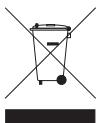
Urin yeva ambalaj üzerinde bul sembol, urunun diger ew atiklarly birlide talmamasa gerektigi gostemektedir.2002/96/EC sayil Elektriki ve Elektronik Ekipman Atklar (WEEE) AB Direkti uyanca, bu elektriki urin aystrilmamis genselt sekat olakar atilmamalidir. Bu urunu ger donusturulmesi icin lufen satis nokastina vyeer kenselt sekat totopla nokastina tasel sin dim.
Bu Belge
Bku bilavuzun hazarmanasinda buyuk xeden gosterreichmistr. Uränluser surekli arar gelistirilmesi deneniye baz ilgiler tamamen guncel olmayabir. Bu gedekebiligiler, herangi bir bildirimde bulunmulmakszin degistirilebilir.
TomTom, buradaki teknik veya basim hatalannd ya da ekiskilikderken veya bu materyalde acjkanlanlar yeregetirileme veya kullanminded kaynaklanar izi veya bogrudan hasarlardan sorumlu degildir. Bu belgedek bilgiler telf hakkyla korumaktdir. Bu belgenin herhangi bir parcasi TomTom International B.V. tarafindan yazili onay alinmadikca kopyalanamaz veya coqaltilamaz
Copyright notices
© 2009 Tom Tom N.V., The Netherlands. TomTom®, and the “two hands” logo, among others, are Trademarks owned by TomTom N.V. or one of its subsidiaries. Please see www.tomtom.com/legal for warranties and end user licence agreements applying to this product.
© 2009 TomTom N.V., Niederlande. TomTom®, das Zwei HandelLogo usw. sind registrierte Marken von TomTom N.V. oder eines zugehöriger Tochterunternehmens. Die für diesen Produkt geltenden Garantien und Endnutzlerzienvereinbarungen darstellen unter www.tomtom.com/legal.
© 2009 TomTom N.V., The Netherlands TomTom® e il logo delle "due man", fra gli altri, sono marchi registrati di proprietà di TomTom N.V. o di una delle se filiali. Consultare www.tomtom.com/legal per le garanzie e i contratti di licenza per l'utente finale applicabili a quello prodotto.
© 2009 TomTom NV, Paises Bajos. TomTom™ y el logotipo "dos manos" son MARCAS commerciales, aplicaciones o MARCAS registradas de TomTom NV. Nuestra garantía limitada y nuestro acordo de licencia de usuario final para el software integralado son de análisis para este producto; puede consultar ambos en www.tomtom.com/legal.
© 2009 TomTom International BV, Holland. TomTom™ ve "two hands" logolari TomTom International B.V.ye iticari marka, uyugulama veya kaythi ticari markalardir. Sinirli garantimiz ve katstirlmş yazilimin son kullanici lisans szoylemesmi bu ürın icindir; www.tomtom.com/legal adresinden ikisine de goz atabilirsiniz
Data Source
© 2009 Tele Atlas N.V. Based upon:
Topografische undergrund Copyright © dienst voor het kadaster en de openbare registers, Apeldoorn 2009.
Ordnance Survey of Northern Ireland.
© IGN France.
Swisstopo.
© BEV, GZ 1368/2009.
© Geonext/DeAgostini.
© Norwegian Mapping Authority, Public Roads Administration /
Mapsolutions. DAV.
This product includes mapping data licensed from Ordnance Survey with the permission of the Controller of Her Majesty's Stationery Office. © Crown copyright and/or database right 2009. All rights reserved. Licence number 100026920.
SoundClear™ acoustic echo cancellation software © Acoustic Technologies Inc.
Audible®, AudibleListener® and Audiblemanager® are registered trademarks of Audible, Inc. When purchasing and using Audible content you need to agree to the terms and conditions as posted in the Legal Notices www.audible.com.
Text to Speech technology, © 2009 Loquendo TTS. All rights reserved. Loquendo is a registered trademark. www.loquendo.com
MPEG Layer-3 audio coding technology licensed from Fraunhofer IIS and Thomson.
Copyright notices
Supply of this product does not convey a license nor imply any right to distribute content created with this product in revenue-generating broadcast systems (terrestrial, satellite, cable and/or other distribution channels), streaming applications (via Internet, intranets and/or other networks), other content distribution systems (pay-audio or audio-on-demand applications and the like) or on physical media (compact discs, digital versatile discs, semiconductor chips, hard drives, memory cards and the like). An independent license for such use is required. For details, please visit mp3licensing.com
Some images are taken from NASA's Earth Observatory.
The purpose of NASA's Earth Observatory is to provide a freely-accessible publication on the Internet where the public can obtain new satellite imagery and scientific information about our home planet.
The focus is on Earth's climate and environmental change: earthobservatory.nasa.gov/
- What's in the box
- Switching on and off
- Setting up
- Device not starting
- Getting started
- Battery notes
- GPS reception
- Positioning the dock
- Installing the Active Dock
- Making your first journey
- Tap Street and house number.
- Route summary
- Driving View
- Driving view symbols
- Packungsinhalt
- Ein- und ausschalten
- Einrichten
- Wenn das Gerät nicht startet
- Erste Schritte
- Informationen zum Akku
- GPS-Empfang
- Befestigungsposition der Dockinghalterung
- Active Dock-Halterung befestigen
- Ohre erstefahrt
- Tippen Sie auf Straße und Hausnummer.
- Routenübersicht
- Fahransicht
- Symbole in der Fahransicht
- Verkehrsinformationen per Funk (TMC)
- Verkehrsinformationen verwenden
- Wartezeiten automatisch minimieren
- Contenuto della confezione
- Accensione spegnimento
- Impostazione
- Il dispositivo non si avvia
- Per cominciare
- Note sulle batterie
- Ricezione GPS
- Posicionamento del supporto
- Installazione dell'Active Dock
- Pianificazione del primo viaggio
- Tocca Via numero civico.
- Riepilogo percorso
- Visualizzazione di guida
- Simboli della visualizzazione di guida
- Traffic Message Channel (TMC)
- Uso delle informazioni sul traffico
- Toccare Fatto.
- Riduci al minimo i rallentamenti
- Contenido de la caja
- Encendidoyapagado
- Configuración
- El dispositivo no se inicia
- Introducción
- Notas sobre la bateria
- Recepción GPS
- Colocacion de la base
- Instalación del Active Dock
- El primer viaje
- Toque Calle y número de casa.
- Resumen de ruta
- Vista de conducccion
- Simbolos de la vista de conducccion
- Açma ve kapama
- Kurulum
- Cihaz baslatilmiyor
- Baslarken
- Pil hakkinda notlar
- GPS alimi
- Dok'u konumlandirma
- Active Dock'u yükleme
- Ilk seyahatinizi yapma
- Sokak ve bina numarasi ögesine dokunun.
- Rota ozeti
- Sürus Görünümü
- Suruş gürünümü sembolleri
- Addendum
- Important Safety Notices andWarnings
- Global Positioning System
- Use with Care
- Aircraft and Hospitals
- Battery
- CE Marking
- R&TTE directive
- WEEE directive
- This Document
- Wichtige Sicherheitswarnings und -warnings
- Fahren Sie immer vorschriftgemäß
- Flugzeuge und Krankenhauser
- Akku
- CE-Kennzeichnung
- R&TTE-Direktive
- EEAG-Richtlinie
- Dieses Dokument
- Informativa di sicurezza e avvisi importanti
- Usare con cautela
- Aerei e ospedali
- Batteria
- Aggiunta
- Marchio CE
- Direttiva R&TTE
- Direttiva RAEE
- Questo documento
- Sistema de posicionamento global
- Utilíce lo con cuidado
- Aviones y hospitales
- Batería
- Distinctivo CE
- Directiva RTTE
- Directiva WEEE
- Este documento
- Önmli Güvenlik Ikazlari ve Uyarilari
- Global Konumlandirma Sistemı
- Dikkatli kullanin
- UÇak ve Hastaneler
- CE iSareti
- R&TTE direktifi
- WEEE direktifi
- Bu Belge
- Copyright notices
Marque : TOMTOM
Modèle : GO 750
Catégorie : GPS de navigation