
EQ601 - Égaliseur audio YAMAHA - Notice d'utilisation et mode d'emploi gratuit
Retrouvez gratuitement la notice de l'appareil EQ601 YAMAHA au format PDF.


| Type de produit | Égaliseur graphique stéréo |
| Caractéristiques techniques principales | 6 bandes d'égalisation, réglage de niveau, filtres passe-haut et passe-bas |
| Alimentation électrique | Alimentation secteur 100-240V AC |
| Dimensions approximatives | 482 mm x 44 mm x 200 mm |
| Poids | 2,5 kg |
| Compatibilités | Compatible avec la plupart des systèmes audio professionnels et domestiques |
| Fonctions principales | Amélioration de la qualité sonore, ajustement des fréquences, réduction des bruits indésirables |
| Entretien et nettoyage | Nettoyer avec un chiffon doux, éviter les produits chimiques agressifs |
| Pièces détachées et réparabilité | Disponibilité de pièces de rechange via le service après-vente Yamaha |
| Sécurité | Ne pas exposer à l'humidité, respecter les consignes de sécurité électrique |
| Informations générales | Idéal pour les musiciens, les ingénieurs du son et les installations audio professionnelles |
FOIRE AUX QUESTIONS - EQ601 YAMAHA
Questions des utilisateurs sur EQ601 YAMAHA
0 question sur cet appareil. Repondez a celles que vous connaissez ou posez la votre.
Poser une nouvelle question sur cet appareil
Téléchargez la notice de votre Égaliseur audio au format PDF gratuitement ! Retrouvez votre notice EQ601 - YAMAHA et reprennez votre appareil électronique en main. Sur cette page sont publiés tous les documents nécessaires à l'utilisation de votre appareil EQ601 de la marque YAMAHA.
MODE D'EMPLOI EQ601 YAMAHA
EQUALIZER 601
Owner's Manual

What are Add-On Effects?
Add-On Effects are software packages that install additional high-quality effects programs on digital consoles.
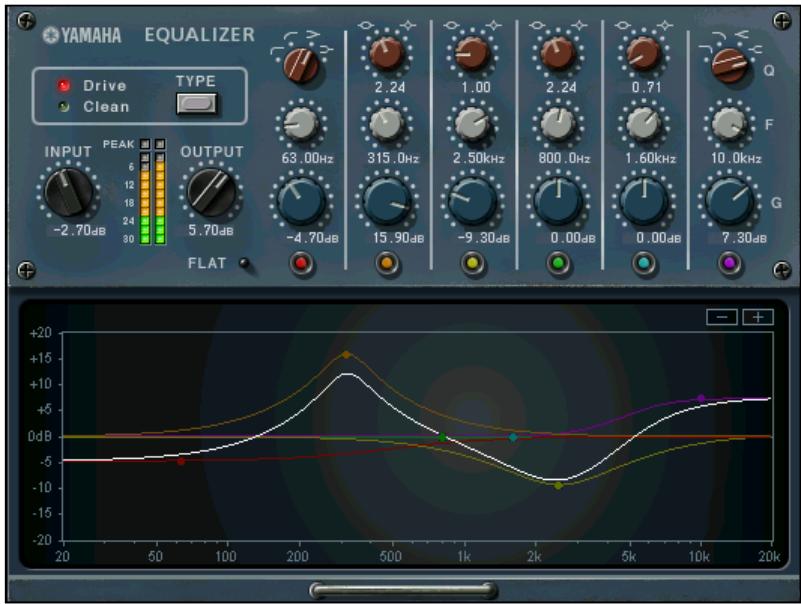
Studio Manager Equalizer601 Window
What is Equalizer60I?
Equalizer601 is an Add-On Effects package.
This effect emulates the characteristics of analog equalizers used in 1970s. It adds drive to the sound by reproducing distortion typical to analog circuits.
What is VCM (Virtual Circuitry Modeling)?
VCM is a technology that enables you to model element levels in analog circuits (such as resistors and capacitors). This technology was developed by an engineering group led by Mr. Kunimoto, an engineer who developed the first physical modeling synthesizers, VL1 and VP1. Equalizer601 utilizes VCM technology.
Special Notices
- Copying of the commercially available music sequence data and/or digital audio files is strictly prohibited except for your personal use.
- The software and this Owner's Manual are exclusive copyrights of Yamaha Corporation.
- Copying of the software or reproduction of this manual in whole or in part by any means is expressly forbidden without the written consent of the manufacturer.
- Yamaha makes no representations or warranties with regard to the use of the software and documentation and cannot be held responsible for the results of the use of this manual and the software.
- The screen displays as illustrated in this Owner's Manual are for instructional purposes, and may appear somewhat different from the screens which appear on your computer.
- The company names and product names in this Owner's Manual are the trademarks or registered trademarks of their respective companies.
© 2003 Yamaha Corporation. All rights reserved.
Installing Equalizer60I
See the Add-On Effects Installation Guide for more information on installing Equalizer601.
Installing Equalizer60I
As with other effects, you can recall and edit the Equalizer601 program on the console or in Studio Manager. The basic operation is as follows:
1 Select one of the internal effects processors.
2 Patch the signal to and from the currently selected effects processor.
3 Locate the Effects Library page.
4 Select and recall Equalizer601.
5NOTE When you recall the program, all effects processor outputs will be muted temporarily.
5 Locate the Effects Edit page.
6 Set the parameters. (See the "Part Names and Functions" section for more information on Equalizer601 parameters.)
The procedure for recalling and editing Equalizer601 varies depending on the console you are using. Refer to the Owner's Manual that came with your console for more information.
Editing Parameters in Studio Manager
In Studio Manager, editable parameters appear in both the Equalizer601 window and the Generic Editor window. The Equalizer601 window enables you to edit Equalizer601 specific parameters, and the Generic Editor window enables you to edit parameters common to Equalizer601 and other Effects.
Refer to the Studio Manager Owner's Manual for your console for more information on the Generic Editor window.
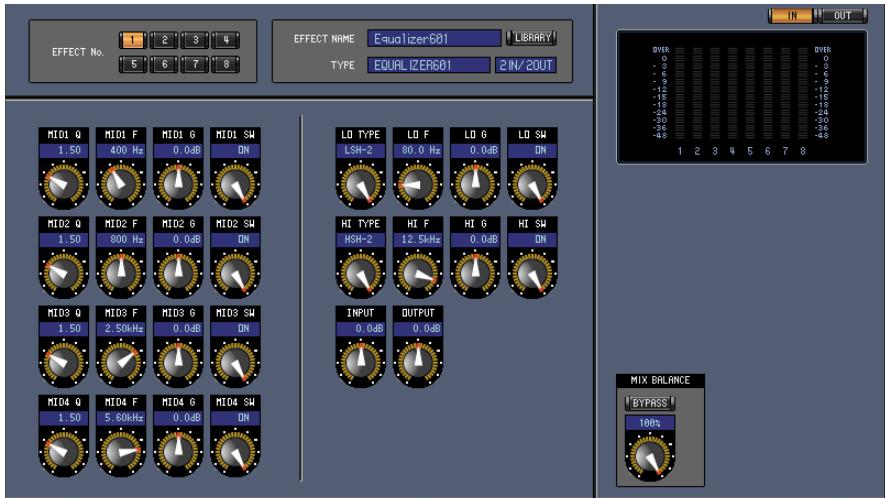
Studio Manager Generic Editor Window
Part Names and Functions
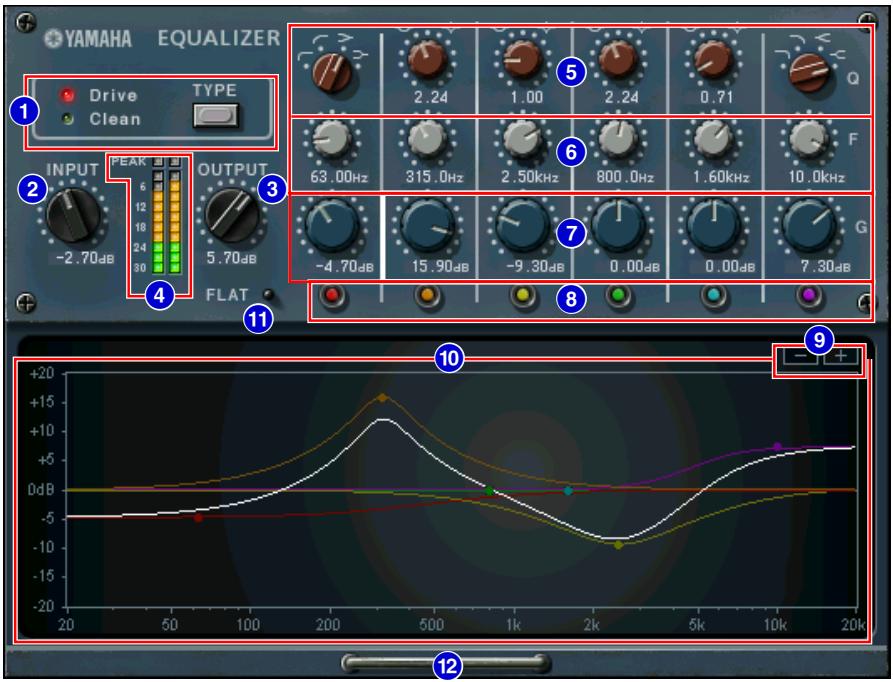
Studio Manager Equalizer601 Window
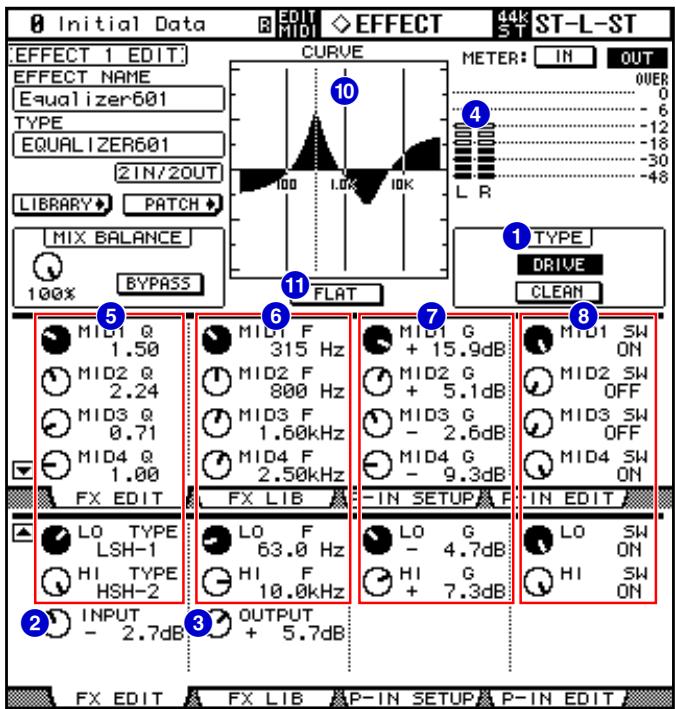
Console screen (This is a DM2000 screen.)
Marque : YAMAHA
Modèle : EQ601
Catégorie : Égaliseur audio