
SLPJ22 - Lecteur CD portable PANASONIC - Notice d'utilisation et mode d'emploi gratuit
Retrouvez gratuitement la notice de l'appareil SLPJ22 PANASONIC au format PDF.

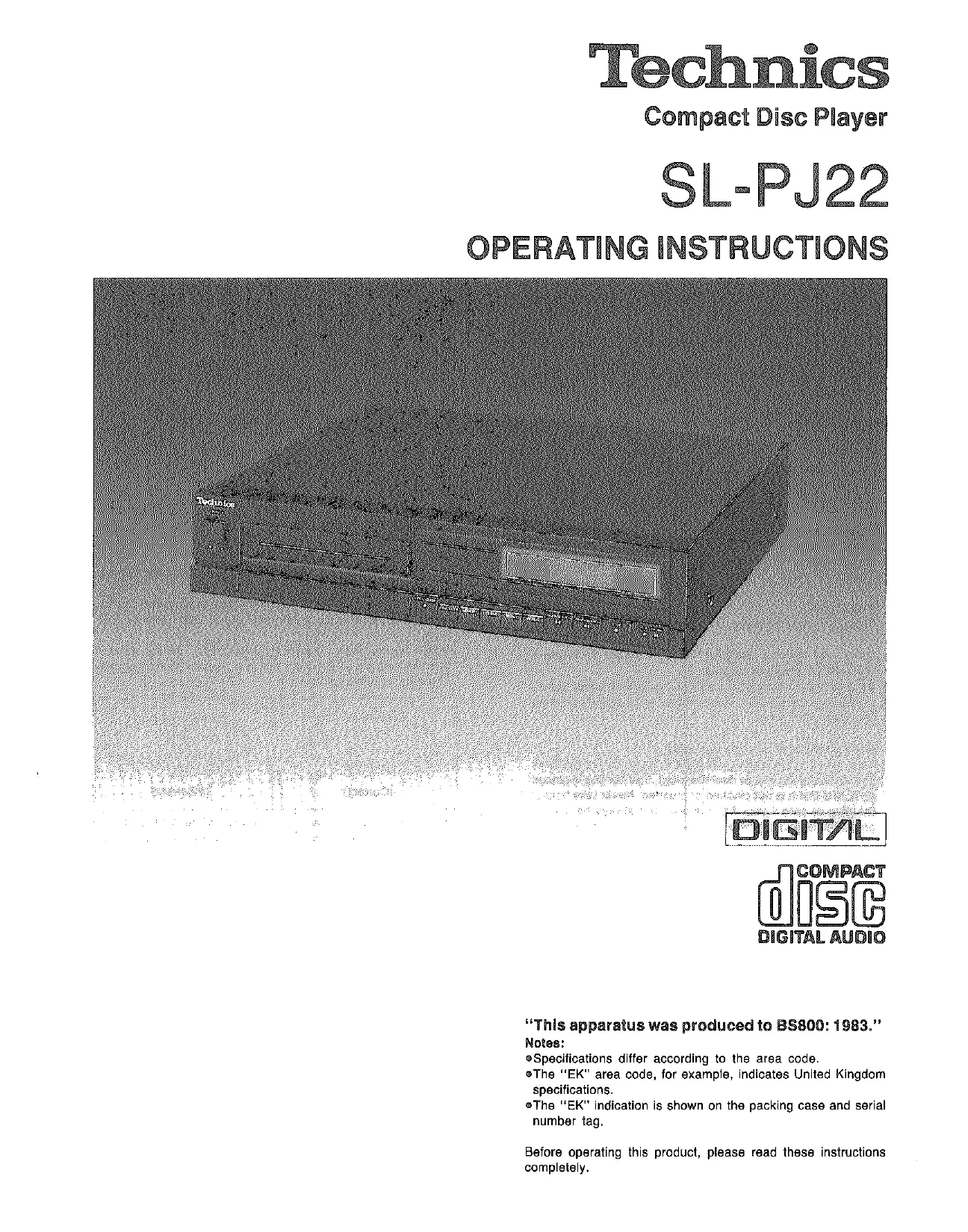
| Type de produit | Lecteur CD portable |
| Marque | Panasonic |
| Modèle | SL-PJ22 |
| Dimensions (L x P x H) | 36 x 28 x 7,7 cm |
| Poids | 3,3 kg |
| Alimentation | 240 V, 50/60 Hz, 10 W |
| Nombre de canaux | 2 (stéréo) |
| Réponse en fréquence | 2 – 20 000 Hz |
| Rapport signal/bruit | 96 dB |
| Distorsion harmonique | 0,004 % (1 kHz, 0 dB) |
| Séparation des canaux | 90 dB |
| Plage dynamique | 96 dB |
| Pleurage et scintillement | En dessous de la limite mesurable |
| Fréquence d'échantillonnage | 44,1 kHz |
| Conversion N/A | 16 bits linéaire |
| Longueur d'onde du laser | 780 nm |
| Temps d'accès | 1 seconde (dernière plage) |
| Types de lecture | Automatique, accès direct, répétition, programmée (20 plages), recherche manuelle |
| Affichage | Numéro de plage, temps (4 modes), indicateurs de lecture/pause/répétition/disque |
| Sortie audio | Ligne (2 V, 600 Ω), casque |
| Entretien | Nettoyer le boîtier avec un chiffon doux et sec. Ne pas utiliser de solvants. Nettoyer les disques du centre vers l'extérieur avec un chiffon humide. |
| Sécurité | Ne pas exposer à l'humidité, à la chaleur excessive ou aux chocs. Débrancher lorsqu'il n'est pas utilisé. Utiliser uniquement le cordon d'alimentation fourni. |
FOIRE AUX QUESTIONS - SLPJ22 PANASONIC
Questions des utilisateurs sur SLPJ22 PANASONIC
0 question sur cet appareil. Repondez a celles que vous connaissez ou posez la votre.
Poser une nouvelle question sur cet appareil
Téléchargez la notice de votre Lecteur CD portable au format PDF gratuitement ! Retrouvez votre notice SLPJ22 - PANASONIC et reprennez votre appareil électronique en main. Sur cette page sont publiés tous les documents nécessaires à l'utilisation de votre appareil SLPJ22 de la marque PANASONIC.
MODE D'EMPLOI SLPJ22 PANASONIC
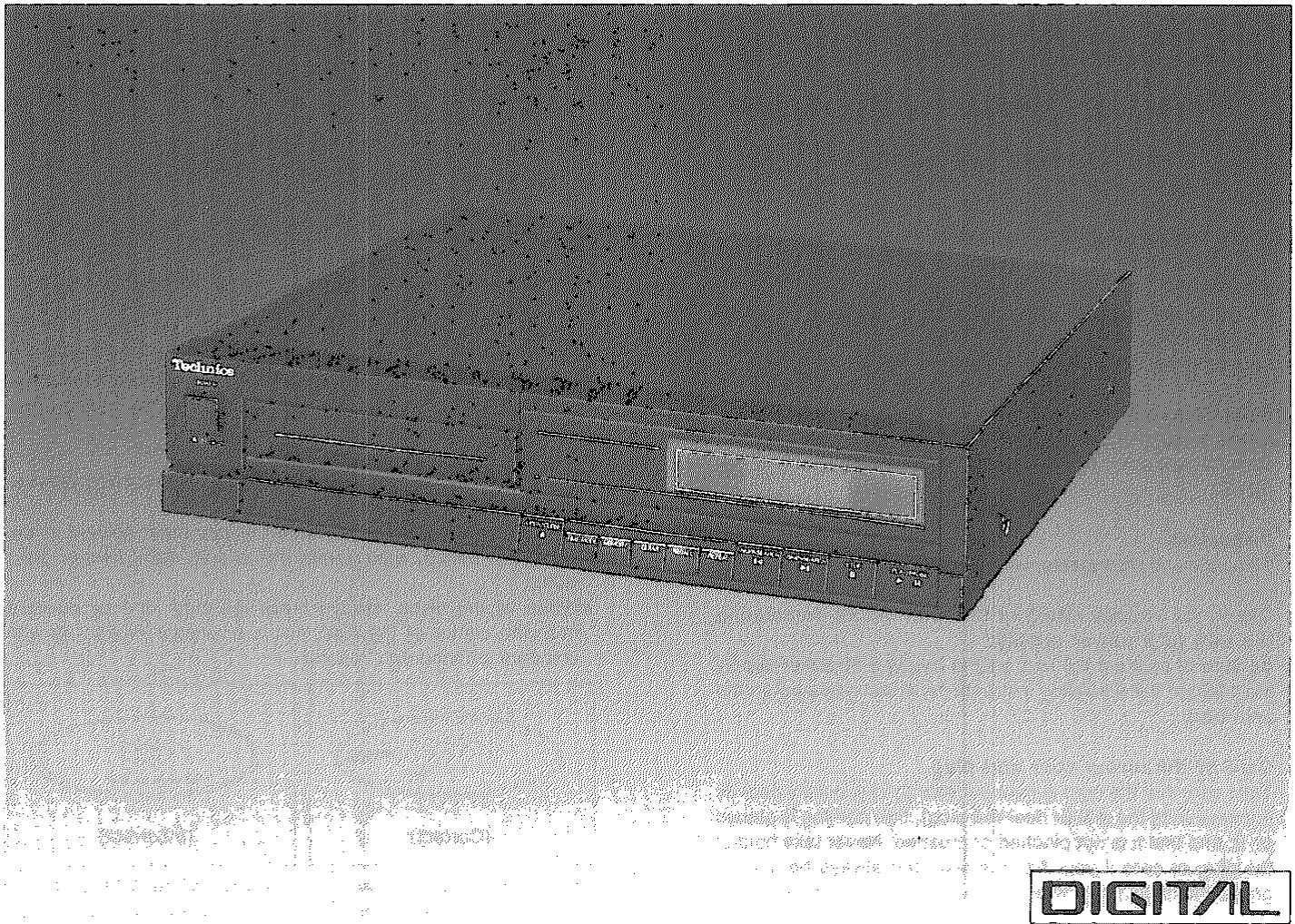
Technics
Lecteur de disque compact
SL-PJ22
MODE D'EMPLOI
NUMÉRIQUE

Cet appareil a été fabriqué conformément à la norme BS800: 1983.
Remarques :
- Les spécifications varient selon le code de région. Par exemple, le code de région « EK » indique les spécifications du Royaume-Uni. Le code « EK » figure sur l'emballage et sur la plaque signalétique.
Avant d'utiliser cet appareil, veuillez lire attentivement ces instructions.
Conseils de sécurité
Avant d'utiliser cet appareil, assurez-vous de lire attentivement les sections pertinentes du mode d'emploi et ces conseils de sécurité, puis conservez-les à portée de main pour référence future. Portez une attention particulière aux avertissements figurant sur l'appareil lui-même ainsi que dans le mode d'emploi.
- Évitez les endroits humides ou mouillés. N'utilisez pas cet appareil à proximité d'une baignoire, d'un lavabo, d'une piscine ou d'un endroit similaire. Évitez également les sous-sols humides.
- Ne laissez pas d'eau ou tout autre objet étranger pénétrer à l'intérieur de cet appareil.
Ne placez pas de petits objets métalliques ou tout objet contenant du liquide sur ou à proximité de l'appareil.
- Évitez de placer l'appareil là où il sera exposé aux rayons directs du soleil ou là où la ventilation est insuffisante.
Ne placez pas cet appareil dans une bibliothèque ou entre des armoires, à moins qu'une ventilation adéquate ne soit prévue, ou là où des rideaux ou des meubles pourraient obstruer les ouvertures de ventilation.
- Placez cet appareil à l'écart des appareils émettant de la chaleur. Ne placez jamais cet appareil sur ou à proximité d'un radiateur, d'une bouche de chaleur, d'un poêle ou de tout autre équipement émettant de la chaleur (y compris les amplificateurs).
- Placement
Placez l'appareil sur une étagère ou un support stable, de niveau et sans vibrations.
- Vérifiez la tension nominale de cet appareil avant de le connecter à une source d'alimentation.
Assurez-vous de connecter l'appareil uniquement au type d'alimentation indiqué dans le mode d'emploi ou sur l'appareil lui-même.
- Entretien du cordon d'alimentation et de la fiche.
Veillez à ce que le cordon ne soit pas plié brusquement (surtout près de sa connexion à l'appareil ou près de la fiche), qu'aucun objet ne soit posé dessus, et qu'il ne soit pas pincé ou écrasé. Ne saisissez jamais la fiche ou le cordon si votre main est mouillée, et assurez-vous toujours de saisir le corps de la fiche lors de la connexion ou de la déconnexion.
- Entretien
Reportez-vous au mode d'emploi pour plus de détails.
- Réparations
Sauf pour les réglages expliqués dans le mode d'emploi, n'essayez pas de réparer vous-même l'appareil. Faites appel à un technicien qualifié (ou à votre revendeur ou au centre de service le plus proche).
Concernant les disques compacts
Précautions de manipulation
Seuls les disques compacts portant cette marque peuvent être utilisés avec cet appareil.

Respectez les précautions suivantes pour profiter pendant de nombreuses années des mêmes performances sonores exceptionnelles de vos disques compacts.
- Tenez les disques compacts par les bords afin de ne pas salir la surface avec des traces de doigts.
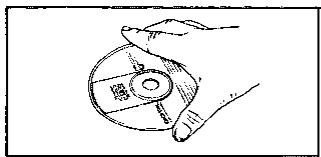
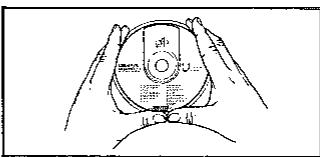
- Veillez à ne pas rayer la surface avec les ongles ou d'autres objets pointus, en particulier lors de l'insertion et du retrait des disques de leurs boîtiers. Ne pliez pas le disque. *N'utilisez pas de sprays de nettoyage pour disques vinyles ni de liquides antistatiques.
- N'essuyez pas avec de la benzine, du diluant ou tout autre solvant. Si la surface est sale, essuyez-la délicatement avec un chiffon doux et humide (eau uniquement). Lors de l'essuyage des disques, déplacez toujours le chiffon directement du centre du disque vers l'extérieur, et non en mouvement circulaire comme pour les disques vinyles standard.
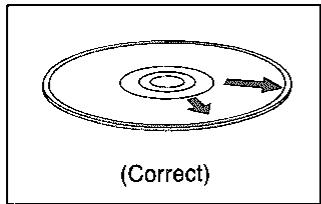
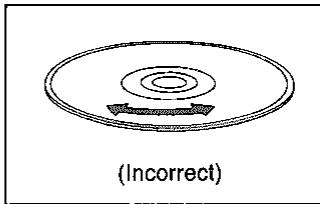
(Sur les disques compacts, les rayures circulaires le long d'une ligne de creux sont plus susceptibles de provoquer des erreurs que les rayures droites traversant plusieurs lignes de creux.)
Si le disque est passé d'un environnement froid à une pièce chaude, de l'humidité peut se former sur le disque. Essuyez-la avec un chiffon doux, sec et non pelucheux avant d'utiliser le disque. Ne séchez pas les disques avec un sèche-cheveux. - N'écrivez pas sur le côté étiquette avec un stylo à bille, un crayon dur ou tout autre instrument d'écriture. *Manipulez les disques compacts avec soin. Les traces de doigts, la saleté et les rayures peuvent provoquer des sauts et des distorsions.
Précautions de stockage
- Veillez à ranger les disques dans leurs boîtiers pour les protéger de la poussière, des rayures et du gauchissement.
- Ne placez pas et ne rangez pas les disques dans les endroits suivants :
1) Les endroits exposés à la lumière directe du soleil.
2) Les endroits humides ou poussiéreux.
3) Aux endroits directement exposés à une sortie de chaleur ou à un appareil de chauffage.
4) Dans la boîte à gants ou la plage arrière d'une automobile.
Installation
Cet appareil contient de nombreux composants optiques sensibles. Pour profiter de performances optimales à tout moment, évitez d'utiliser cet appareil dans les conditions suivantes.
Dans un véhicule fermé ou tout autre endroit où la température pourrait dépasser 40 °C (100 °F). - Pendant de longues périodes en plein soleil. Dans des endroits très froids (en dessous de 5 °C ; 40 °F). Dans des endroits très humides. - Près d'une sortie de chaleur ou d'un appareil de chauffage. Dans des endroits poussiéreux ou enfumés. Dans des endroits sujets aux vibrations. Sur une surface instable ou inégale. - Près d'appareils générant de forts champs magnétiques. - À la portée des enfants. Dans des endroits où le panneau arrière est à moins de 10 cm (environ 4 pouces) du mur ou de l'arrière d'un meuble audio.
Pour des performances fiables, assurez-vous de placer l'appareil sur une surface plane et de niveau. Ne pas le faire peut entraîner un dysfonctionnement de l'appareil.
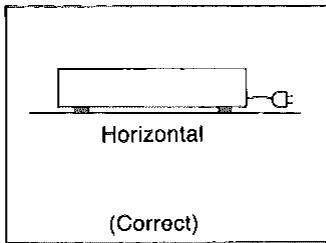
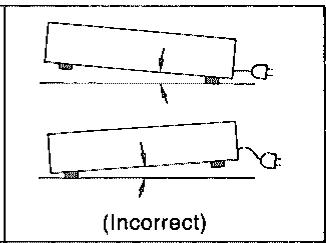
Ne placez pas l'appareil près d'un tuner ou d'un téléviseur.
Cet appareil utilise des signaux haute fréquence et peut provoquer des interférences avec la réception du tuner et du téléviseur. Si cela se produit, éloignez l'appareil du tuner ou du téléviseur, ou passez d'une antenne intérieure à une antenne extérieure pour le téléviseur.
Sinon, coupez l'interrupteur d'alimentation (secteur) pendant l'utilisation d'un tuner ou d'un téléviseur.
Ne placez aucun objet lourd sur le panneau supérieur (sauf les composants système recommandés).
Remarques et entretien
Lors du transport ou du stockage de l'appareil, manipulez-le avec précaution afin de ne pas le soumettre à de forts chocs.
Retirez toujours le disque avant de ranger l'appareil pour une période quelconque.
■ Avant de transporter cet appareil, assurez-vous de retirer le disque et de verrouiller l'arbre de verrouillage, sinon des dommages graves en résulteront.
(Voir la page 2 pour les instructions d'expédition de cet appareil.)
Ne démontez pas cet appareil et n'essayez pas d'y apporter des modifications vous-même.
Cet appareil est un dispositif très complexe qui utilise un capteur laser pour lire les informations à la surface des disques compacts. Le laser est soigneusement blindé afin que ses rayons restent à l'intérieur du boîtier. Par conséquent, n'essayez jamais de démonter l'appareil ou de modifier ses pièces, car vous pourriez être exposé aux rayons laser et à des tensions dangereuses.
Baissez le volume de l'amplificateur.
Les disques compacts ont beaucoup moins de bruit et une plage dynamique beaucoup plus large que les disques vinyles. Par conséquent, vous risquez d'augmenter le volume trop haut si vous le réglez en écoutant le bruit de surface comme avec un disque vinyle. Pour éviter ce problème, baissez le volume et augmentez-le à votre convenance seulement après le début de la musique.
■ Les temps affichés par cet appareil peuvent différer légèrement des temps de piste indiqués dans la notice du disque.
La notice fournie avec chaque disque compact indique la durée de lecture de chaque piste. Étant donné que les temps calculés par cet appareil incluent les intervalles de pause, le temps affiché peut différer du temps indiqué dans la notice de cette différence.
■ Fermez le plateau à disque lorsqu'il n'est pas utilisé.
L'appareil contient une lentille de mise au point de précision qui n'est pas visible de l'extérieur. Fermez toujours le plateau à disque lorsque vous n'utilisez pas le lecteur afin de protéger cette lentille de la saleté et de la poussière.
■ Coupez l'interrupteur d'alimentation du lecteur de disques compacts lorsque vous utilisez un tuner.
Entretien
Essuyez le boîtier avec un chiffon doux et sec.
Pour éviter d'endommager la finition du boîtier, ne nettoyez pas cet appareil avec des solvants ou des composés volatils tels que l'alcool, la benzine ou le diluant à peinture. N'utilisez pas de chiffons de dépoussiérage traités.
À propos de l'humidité
De l'humidité peut se former sur la lentille dans les cas suivants...
Immédiatement après la mise en marche d'un chauffage. Dans une pièce humide ou très humide. - Lorsque l'appareil est soudainement déplacé d'un environnement froid vers un environnement chaud.
Si de l'humidité se forme à l'intérieur de cet appareil, il risque de ne pas fonctionner correctement. Pour remédier à ce problème, mettez l'appareil sous tension (secteur) et attendez environ une heure que l'humidité s'évapore.
Merci d'avoir acheté ce lecteur de disques compacts. Pour des performances et une sécurité optimales, veuillez lire attentivement ces instructions.
Précautions pour une utilisation sûre de cet appareil pour le modèle standard britannique SL-PJ22. (Modèle "EK" uniquement)
L'indication "EK" figure sur la plaque signalétique.
Attention :
Cet appareil est à double isolation, la mise à la terre de sécurité n'est pas requise.
Cette fiche du cordon d'alimentation (secteur) ne doit être connectée qu'à des appareils électroniques équipés de prises appropriées.
Sinon, coupez et jetez la fiche, et installez-en une appropriée conformément aux instructions ci-dessous.
Important
Les fils de ce cordon d'alimentation sont colorés selon le code suivant :
Bleu : Neutre
Marron : Phase
Comme les couleurs des fils du cordon d'alimentation de cet appareil peuvent ne pas correspondre aux marques colorées identifiant les bornes de votre prise, procédez comme suit. Le fil de couleur BLEU doit être connecté à la borne marquée de la lettre N ou de couleur NOIR. Le fil de couleur MARRON doit être connecté à la borne marquée de la lettre L ou de couleur ROUGE.
Cet équipement doit être débranché du secteur lorsqu'il n'est pas utilisé.
Avant utilisation
- Placez un chiffon doux sous l'appareil pour le protéger des rayures.
- Appuyez sur l'arbre de verrouillage sur le panneau inférieur pour le mettre en position (LIBRE) (☐-☐).
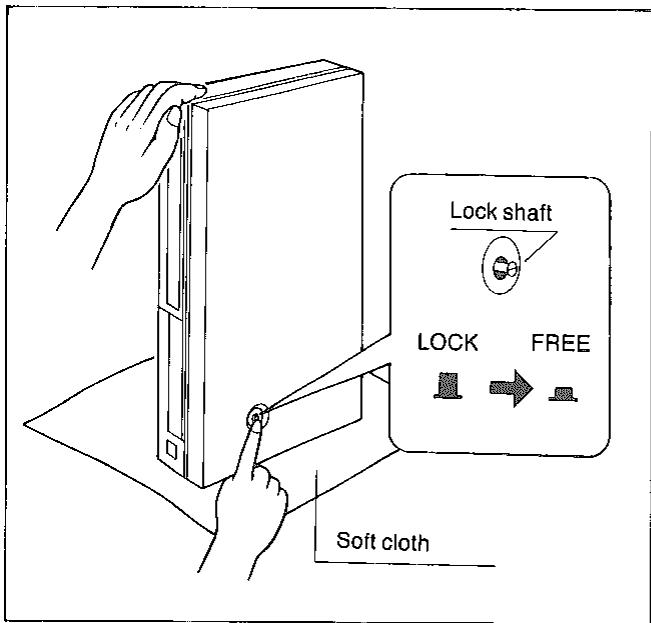
REMARQUE :
SI L'APPAREIL EST TRANSPORTÉ À NOUVEAU, SUIVEZ LES ÉTAPES SUIVANTES :
1) Retirez le disque du support. 2) Tirez l'arbre de verrouillage vers la position (VERROUILLÉE) (☐→☐). ATTENTION :
Ne transportez pas l'appareil sans verrouiller l'arbre de verrouillage. DES DOMMAGES GRAVES EN RÉSULTERONT.
Sommaire
Avant utilisation 2
Accessoires 2
Installation 3
Remarques et entretien 3
Conseils de sécurité 4
Concernant les disques compacts 4
Connexions.... 5
Commandes et fonctions du panneau avant 6\~7
Lecture d'un disque 8~12
Guide de dépannage 13
Spécifications ....... quatrième de couverture
Attention
Ce produit utilise un laser.
L'utilisation de commandes, de réglages ou l'exécution de procédures autres que celles spécifiées ici peut entraîner une exposition à des radiations dangereuses.
Accessoires
Cordon d'alimentation (secteur).... 1
Câble de connexion stéréo 1
Cordon d'enregistrement synchronisé 1
Cordon de télécommande (réf. SJP2257T) 1
Connexions
- Assurez-vous que vos mains sont sèches lors des connexions.
- Mettez tous les appareils hors tension avant de procéder aux connexions.
- Effectuez toutes les connexions fermement.
- Assurez-vous de lire les instructions d'utilisation de tous les appareils connectés.
(Lors de la connexion d'un amplificateur de système ou de l'installation d'autres composants, veuillez vous référer aux instructions d'utilisation des composants respectifs.)
![graph TD A["Line out terminals"] --> B["LINE OUT"] C["Synchro recording terminal"] --> D["Rear panel of this unit"] E["Remote control terminal"] --> F["AC outlet"] G["SYNCHRO REC"] --> H["REMOTE"] I["AC IN socket"] --> J["AC OUTLET ~SWITCHED ~240V 50W MAX"] K["Stereo connection cable (included)"] --…](/content/2019/08/105247/images/1f92b534aea1ee27bc633933888d0ac5fb21e2b8bb639efeb24e90b0049a200f.jpg)
Panneau arrière de l'amplificateur ou du récepteur
① Bornes de sortie de ligne (LINE OUT)
Ce sont les bornes de sortie audio.
©Connectez les bornes de sortie de ligne aux bornes CD ou AUX de votre amplificateur ou récepteur. Ne connectez pas les bornes de sortie de ligne aux bornes PHONO de votre amplificateur ou récepteur.
② Borne d'enregistrement synchro (SYNCHRO REC)
*Connectez le cordon d'enregistrement synchro à la borne d'enregistrement synchro CD de votre amplificateur.
Fonction d'enregistrement synchro
L'enregistrement peut être synchronisé avec le début et la fin de la lecture du disque et l'opération de pause.
■ Fonction de fonctionnement direct
La source d'entrée de l'amplificateur peut être automatiquement commutée sur CD ou AUX lorsque le bouton lecture/pause est enfoncé. Il est également possible de démarrer automatiquement la lecture du disque lorsque le sélecteur de source d'entrée de l'amplificateur est commuté sur lecture CD, à l'aide de la télécommande.
Remarque :
Cette borne ne peut être utilisée qu'avec des amplificateurs ou des platines à cassettes Technics dotés d'une borne d'enregistrement synchro pour lecteur CD. (Contactez votre revendeur pour plus de détails.)
⑧ Borne de télécommande (REMOTE)
*Remarque : Cette borne ne peut être utilisée qu'avec des amplificateurs ou des platines à cassettes Technics (ou des égaliseurs graphiques) dotés d'une borne de télécommande pour lecteur CD. (Contactez votre revendeur pour plus de détails.)
④ Prise secteur (AC outlet)
■ Prise "COMMUTÉE" ("SWITCHED")
La prise secteur est mise sous/hors tension par l'interrupteur d'alimentation de cet appareil. Un équipement audio d'une puissance nominale maximale de 50 W peut être connecté.
⑤ Prise d'entrée secteur (AC IN)
Connectez cette prise à une prise murale ou à une prise secteur à l'aide du cordon d'alimentation.
[La configuration de la fiche d'alimentation secteur peut différer selon la région.]
Commandes et fonctions de la face avant
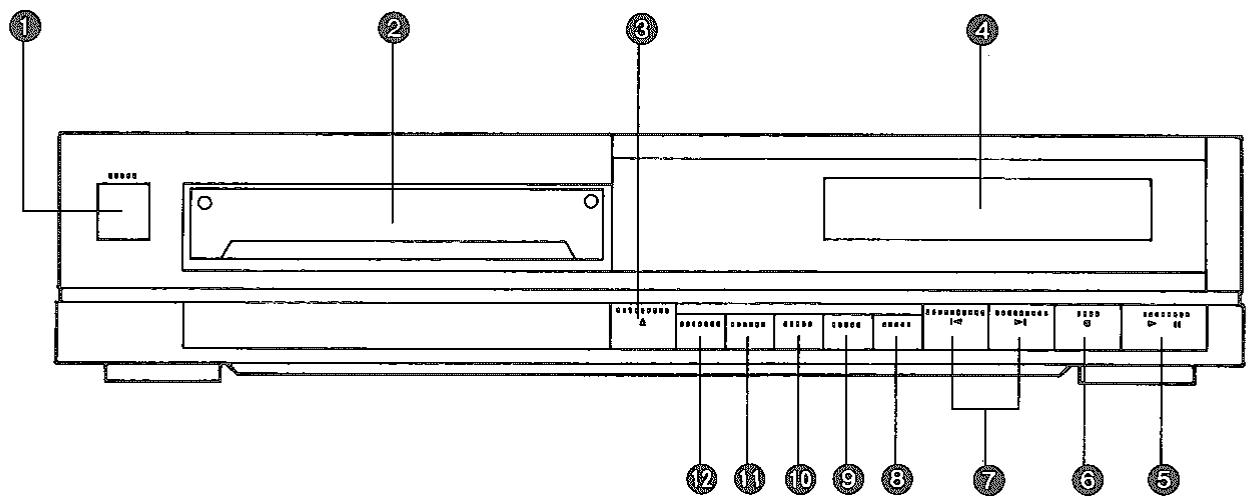
① Interrupteur d'alimentation
Appuyez (☐→) pour mettre l'appareil sous tension.
Appuyez à nouveau (→) pour mettre l'appareil hors tension.
(Voir page 8.)
② Plateau de disque
Le disque est inséré dans ce support avec la face étiquetée vers le haut.
(Voir page 8.)
③ Bouton d'ouverture/fermeture
Appuyez sur ce bouton pour ouvrir et fermer le support du disque.
(Voir page 8.)
④ Panneau d'affichage
(Voir page 7.)
(Veuillez vous référer aux éléments ④A à ④F.)
⑤ Bouton lecture/pause
Ce bouton est utilisé pour les trois opérations suivantes.
- Si le bouton est enfoncé alors que l'appareil est en mode arrêt ou en mode pause, la lecture commence et l'indicateur de lecture s'allume.
- Si le bouton est enfoncé pendant la lecture, l'appareil passe en mode pause et l'indicateur de pause s'allume.
- Si le cordon d'enregistrement synchronisé est correctement connecté, appuyer sur ce bouton lorsque l'appareil est en mode arrêt ou pause fait passer automatiquement le sélecteur d'entrée de l'amplificateur sur "CD".
Pickup :
Le pickup est un dispositif laser qui lit les informations sur la surface du disque. Le pickup se déplace sur le disque pendant la lecture, mais il n'est pas visible de l'extérieur du boîtier.
Mode pause :
La lecture est arrêtée, mais le pickup reste à l'endroit où il se trouvait lorsque le bouton lecture/pause a été enfoncé. Le disque tourne pendant que l'appareil est en mode pause.
Bouton d'arrêt
Appuyez sur ce bouton pour arrêter la lecture du disque et annuler tous les réglages précédents.
Remarque :
Lorsque ce bouton est enfoncé, l'appareil revient en mode arrêt.
(Voir page 8.)
Mode arrêt :
En mode arrêt, le pickup se trouve au début de la première piste et l'affichage indique le nombre total de pistes et la durée totale de lecture du disque.
(Le disque ne tourne pas.)
Boutons de saut/recherche avant et arrière
Ces boutons sont utilisés pour les cinq opérations suivantes.
- Pour programmer des numéros de plages avant de lancer la lecture (lecture programmée).
Appuyez sur l'un ou l'autre des boutons avant de lancer la lecture.
(Voir page 9 pour plus de détails.)
- Pour lancer la lecture à partir d'une plage spécifique (lecture par accès direct).
Appuyez sur l'un ou l'autre des boutons avant de lancer la lecture.
(Voir page 10 pour plus de détails.)
- Pour passer au début d'une plage spécifique (lecture par saut).
Appuyez brièvement (moins d'une seconde) sur l'un ou l'autre des boutons pendant la lecture ou en mode pause.
(Le nombre de plages sautées est égal au nombre de fois où l'un de ces boutons est enfoncé.) (Voir page 10 pour plus de détails.)
- Pour déplacer la tête de lecture vers l'avant ou l'arrière jusqu'à un point souhaité (lecture par recherche manuelle).
Maintenez l'un ou l'autre des boutons enfoncé et relâchez-le lorsqu'il atteint le point souhaité.
La tête de lecture se déplace d'abord lentement, puis rapidement si l'un des boutons de saut/recherche est maintenu enfoncé pendant plus de 3 secondes environ.
(Voir page 10 pour plus de détails.)
- Pour spécifier le temps de lecture (min.) (lecture par édition prédéfinie).
(Voir page 12 pour plus de détails.)
⑧ Bouton de répétition
Appuyez sur ce bouton pour activer le mode de répétition.
(Le témoin de répétition s'allume.)
Appuyez à nouveau pour annuler le mode de répétition.
(Voir page 11.)
⑨ Bouton de rappel
Appuyez sur ce bouton pour afficher la séquence de lecture programmée en mémoire.
Lorsque ce bouton est enfoncé, les plages stockées en mémoire pour la lecture programmée sont affichées une par une.
(Voir page 9.)
⑩ Bouton d'effacement
Appuyez sur ce bouton pour annuler la plage programmée lorsque l'appareil est en mode d'arrêt.
Chaque fois que ce bouton est enfoncé, l'entrée précédente est annulée.
(Voir page 9.)
⑩ Bouton de mémoire
Appuyez sur ce bouton pour saisir les numéros de plage avant de commencer la lecture (lecture programmée).
(Un maximum de 20 sélections peut être programmé.)
La lettre « F » (FULL) s'affiche si plus de 20 sélections mémoire sont tentées.
(Voir page 9.)
⑫ Bouton de sélection du mode de temps
Utilisez ce bouton pour sélectionner le mode d'affichage du temps souhaité.
① Temps de lecture restant du disque. ② Numéro de plage et temps de lecture restant de la plage en cours. ③ Temps de lecture depuis le début de la première plage. ④ Numéro de plage et temps de lecture écoulé depuis le début de la plage en cours.
(Voir page 11.)
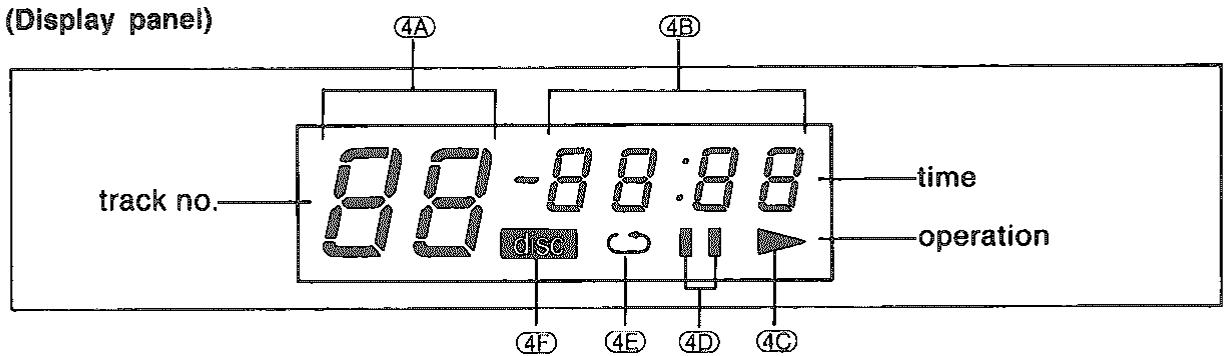
④A Affichage du numéro de plage (track)
Les numéros de plage (jusqu'à 99) sont affichés ici.
④B Affichage du temps
Cet affichage montre quatre modes de temps (voir page 11) et l'ordre programmé (voir page 9).
④C Indicateur de lecture (▶)
S'allume lorsque le mode de lecture est activé et s'éteint lorsque la lecture est arrêtée.
④D Indicateur de pause (II)
S'allume lorsque le mode pause est activé et s'éteint lorsque le mode pause est annulé.
④ Indicateur de répétition ( )
s'allume lorsque le mode répétition est activé et s'éteint lorsque le mode répétition est annulé.
④F Indicateur de disque ( disque )
Clignote lorsque le chargeur de disque s'ouvre ou se ferme.
S'allume lorsqu'un disque est dans le chargeur (si l'appareil est sous tension) et que le chargeur de disque est fermé.
Lecture d'un disque
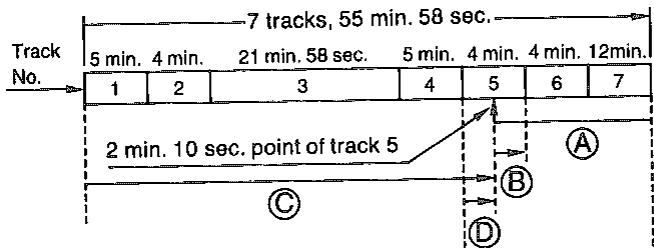
Tous les exemples des pages 8 à 12 se réfèrent à un disque contenant 7 pistes et ayant une durée totale de lecture de 55 minutes et 58 secondes, comme illustré.
1 Lecture automatique
(Pour lire un disque du début à la fin.)
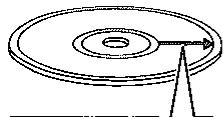
| Track 1 | Track 2 | Track 3 | Track 4 | Track 5 | Track 6 | Track 7 |
| 5 min. | 4 min. | 21 min. 58 sec. | 5 min. | 4 min. | 4 min. | 12 min. |
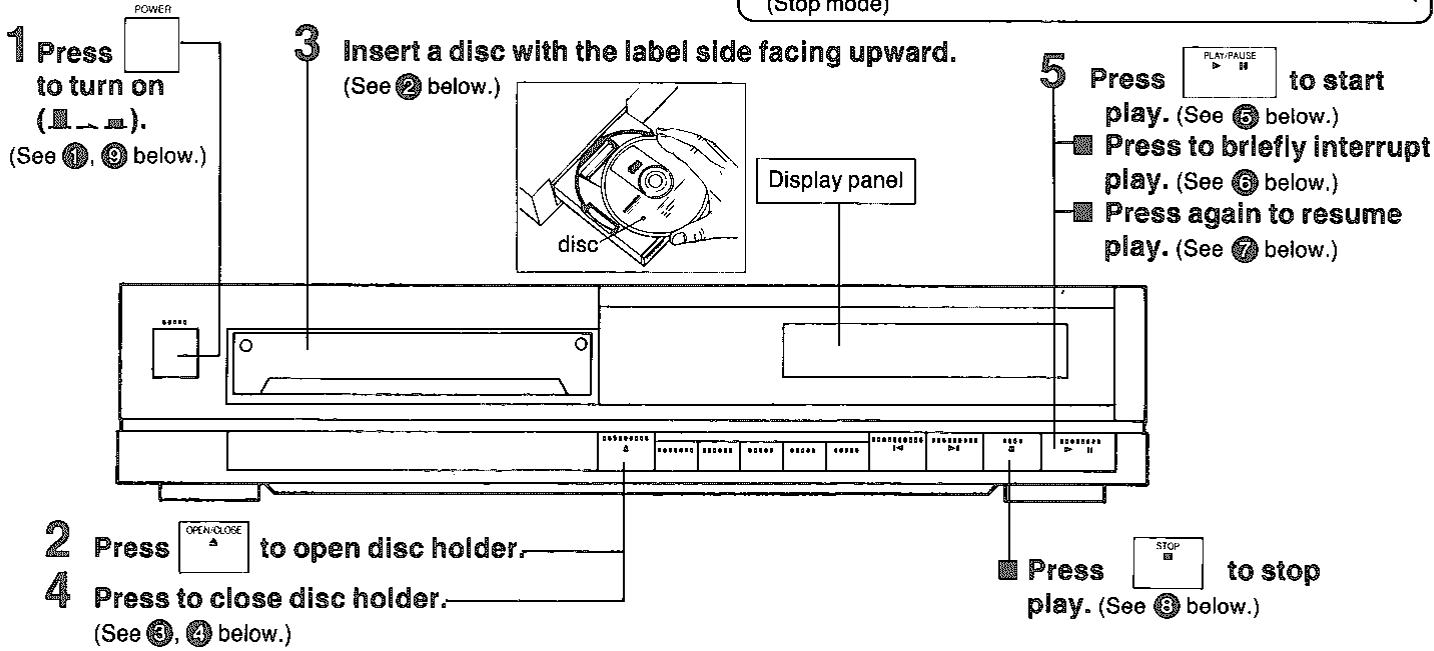
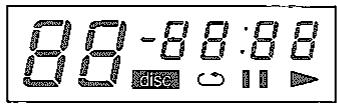
① L'affichage s'illumine momentanément comme indiqué ci-dessous :
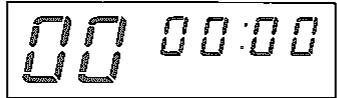
Ensuite, l'affichage indique tous les zéros comme indiqué ci-dessous.
Insérez le disque uniquement après que le chargeur de disque se soit complètement ouvert. Si le disque est inséré trop tôt, il peut être endommagé. N'inclinez pas l'appareil pendant que le chargeur de disque s'ouvre ou se ferme, car le disque pourrait tomber du chargeur. L'étape 4 peut être ignorée en appuyant sur le bouton lecture/pause après avoir inséré un disque. Dans ce cas, le chargeur se fermera et la lecture commencera directement à partir de la piste 1, mais les pistes et la durée totale de lecture ne seront pas affichées. 4 Si le bouton ouverture/fermeture est enfoncé, l'affichage s'illumine comme indiqué ci-dessous.
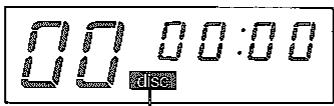
L'indicateur de disque clignote.
Les informations du disque sont en cours de lecture.

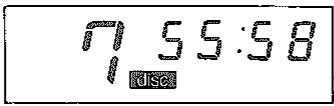
Lecture des informations du disque terminée.

Mode d'arrêt.
⑤ L'indicateur de lecture (▶) s'allume et la lecture commence.
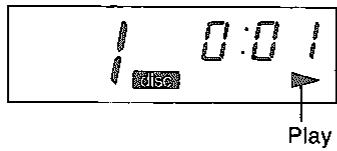
(L'illustration ci-dessus montre que le point 1 seconde de la piste 1 est en cours de lecture.)
L'appareil passe en mode pause et l'indicateur de pause s'allume.
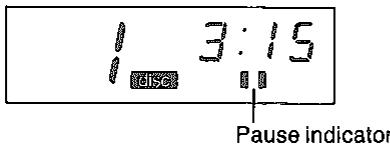
(L'illustration ci-dessus montre que la lecture est interrompue au point 3 minutes 15 secondes de la piste 1.)
Le mode pause est annulé, la lecture reprend et l'indicateur de lecture s'allume. Le pickup revient au début de la première piste et l'appareil passe en mode d'arrêt.
Après la lecture de la dernière piste, le pickup revient au début de la première piste et l'appareil passe en mode d'arrêt.
Lorsqu'il n'est pas utilisé
- Retirez le disque du support de disque.
- Fermez le support de disque.
- Éteignez l'appareil (secteur).
2 Lecture programmée
(Lorsque l'appareil est en mode d'arrêt.)
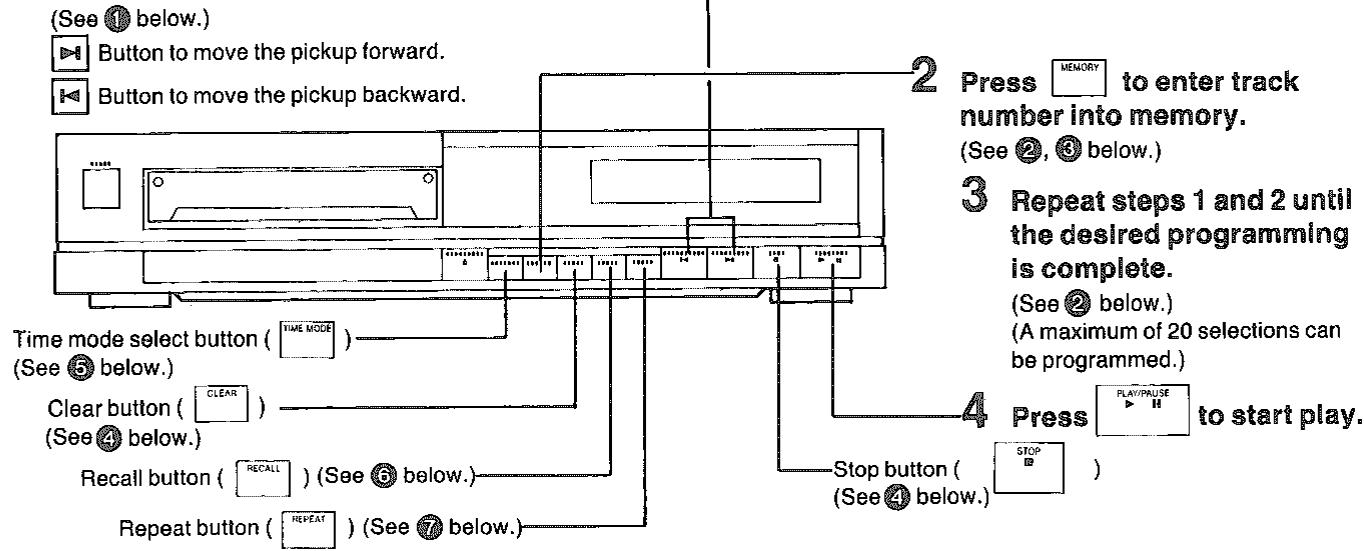
1 Tout en regardant l'affichage du numéro de piste, appuyez brièvement pour spécifier le numéro de piste souhaité.
Remarque :
Sur cette page et les suivantes, ces procédures de fonctionnement de base sont omises.
● Mise sous/hors tension (secteur) ● Interruption de la lecture Ouverture/fermeture du plateau du disque • Arrêt de la lecture Insertion/retrait du disque
Si plus de 20 sélections sont saisies, « F » (plein) s'affiche sur le panneau d'affichage et aucune autre sélection ne peut être programmée.
② Exemple :
Pour lire les pistes 3, 5 et 1 dans cet ordre.
Appuyez comme suit.
Appuyez
trois fois.
![graph LR A["SKIP/SEARCH"] --> B["MEMORY"] B --> C["SKIP/SEARCH"] C --> D["MEMORY"] D --> E["Specify track 5."]](/content/2019/08/105247/images/812a267c2d7baed96e37652d8528c8a5aab368f1ab1e777477809ee7934d6f35.jpg)
Appuyez
quatre fois.
![graph LR A["Skip/SEARCH"] --> B["MEMORY"] B --> C["PLAY-PUASE"] style A fill:#f9f,stroke:#333 style B fill:#ccf,stroke:#333 style C fill:#cfc,stroke:#333](/content/2019/08/105247/images/60f9f778c1aa4f5e74af1eec7625843ae4683b4cc765f30852ba1075e71934a1.jpg)
Pour saisir le même numéro de piste en succession, appuyez simplement sur le bouton mémoire le même nombre de fois que la piste doit être lue.
Par exemple, pour programmer les pistes 3, 5, 5 et 1 dans cet ordre, appuyez deux fois sur le bouton mémoire après que la piste 5 apparaît à l'écran.
④ Comment annuler le programme
- Si vous faites une erreur lors de la saisie d'un numéro de piste, appuyez sur le bouton d'effacement pour annuler cette saisie. Chaque fois que ce bouton est enfoncé, la saisie précédente est effacée. Pendant la lecture, cependant, la piste en cours de lecture ne peut pas être annulée.
- Toutes les entrées du programme sont annulées lorsque le bouton d'arrêt est enfoncé, ou lorsque l'alimentation (secteur) est coupée. Dans ce cas, toutes les fonctions sont arrêtées.
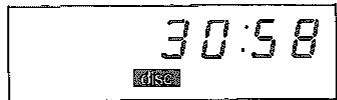
⑤ Confirmation de la durée totale de lecture (avant de commencer la lecture)
Pour afficher la durée totale de lecture de toutes les plages programmées.
Par exemple ; si les plages 3, 5 et 1 sont spécifiées et que le bouton de sélection du mode de temps est enfoncé, 30 minutes 58 secondes s'affichent.
Confirmation du programme
(Pendant la lecture programmée ou en mode pause.) Pour afficher les numéros des plages programmées.
Lorsque le bouton de rappel est enfoncé pendant la première plage programmée (plage 3), les numéros des plages programmées s'affichent un par un dans l'ordre de lecture. Après l'affichage de la dernière plage, la plage en cours est affichée. Le schéma ci-dessous montre les plages 3, 5 et 1 programmées dans cet ordre.
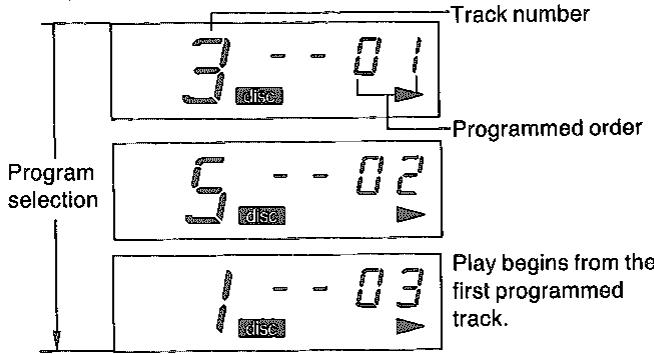
7 Remarque :
Les plages programmées qui ont été lues ne sont pas affichées à moins que le bouton de répétition soit activé.
(Lors de la lecture répétée des plages programmées, appuyez sur le bouton de répétition avant de commencer la lecture. Dans ce cas, tous les numéros de plages programmées seront affichés lors de la confirmation du programme.)
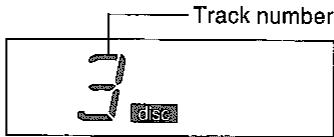
3 Lecture par accès direct (Lorsque l'appareil est en mode arrêt.)
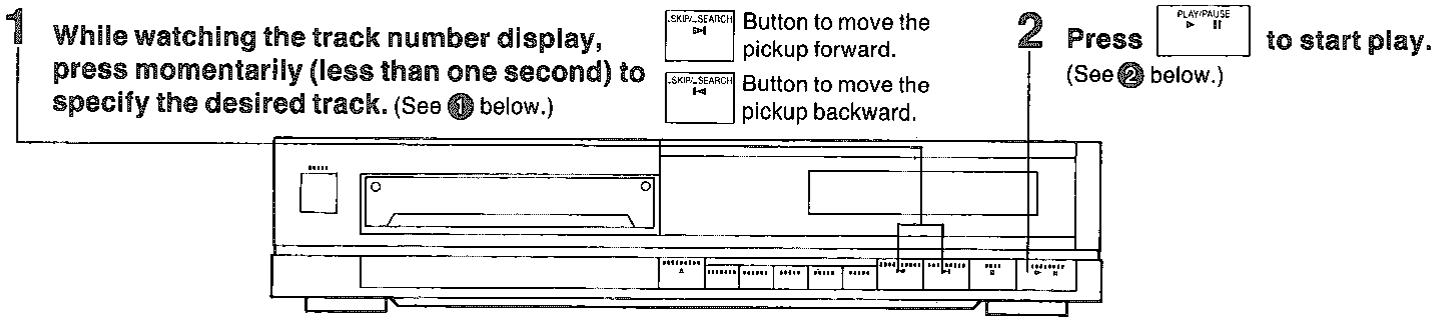
① Par exemple :
Pour lire un disque de la plage 3 jusqu'à la fin du disque.
Appuyez trois fois sur ▶i → LECTURE/PAUSE
L'affichage indique la plage 3 spécifiée.
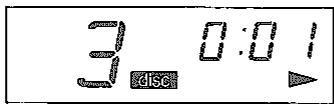
② L'indicateur de lecture (▶) s'allume et la lecture commence à partir de la plage 3.
4 Recherche manuelle
(Pendant la lecture ou en mode pause.)
Pour lire le disque à partir d'un point précis
Maintenez ou appuyez pour déplacer la tête de lecture vers l'avant ou l'arrière. Relâchez le bouton lorsque le point souhaité est atteint. (Voir ① ci-dessous.)
La tête de lecture avance.
La tête de lecture recule.
5 Saut de lecture
(Pendant la lecture ou en mode pause.) Pour sauter au début d'une plage spécifique
Appuyez brièvement sur SKIP SEARCH ou SKIP SEARCH jusqu'à ce que la plage souhaitée soit localisée.
(Voir ① ci-dessous.)
La tête de lecture saute vers l'avant.
La tête de lecture saute vers l'arrière.
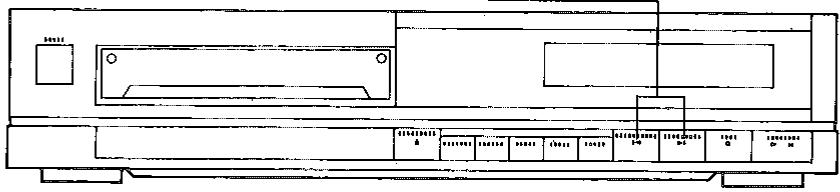
① Recherche avant ou arrière
La tête de lecture se déplace lentement au début, puis rapidement si l'un des boutons est maintenu enfoncé pendant plus de 3 secondes environ. Si l'un des boutons est enfoncé pendant la lecture d'un disque, le son du disque peut être entendu pendant le déplacement de la tête. Le niveau de sortie à ce moment est réduit de 12 dB (1/4) par rapport au niveau normal. Pendant la lecture programmée, la tête ne peut être déplacée qu'entre le début et la fin de la plage en cours de lecture. Si vous déplacez la tête jusqu'à la fin de la plage en cours de lecture puis relâchez le bouton de saut/recherche, la lecture programmée continuera avec la plage suivante dans la séquence mémoire (si elle existe). Si vous déplacez la tête jusqu'à la fin de la dernière plage en mémoire puis relâchez le bouton de recherche, l'appareil passe en mode arrêt.
① Saut avant
En lecture automatique, la tête de lecture passe au début de la piste suivante à chaque pression sur la touche. En lecture programmée ou en lecture répétée programmée, la tête de lecture passe au début de la piste programmée suivante à chaque pression sur la touche.
Saut arrière
En lecture automatique, la tête de lecture passe au début de la piste en cours. Si on appuie à nouveau rapidement, la tête de lecture passe au début de la piste précédente. En lecture programmée (fonction de répétition non activée), la tête de lecture ne recule que jusqu'au début de la piste en cours. En lecture répétée programmée, la tête de lecture passe au début de la piste en cours. Si on appuie à nouveau rapidement, la tête de lecture passe au début de la piste programmée précédente.
6 Lecture répétée
(Avant la lecture, pendant la lecture ou en mode pause.)
Répétition de tout le disque et des pistes programmées
Appuyez sur REPEAT avant la lecture.
L'indicateur de répétition ( ) s'allume pour indiquer que le mode répétition a été activé. (Voir ① ci-dessous.)
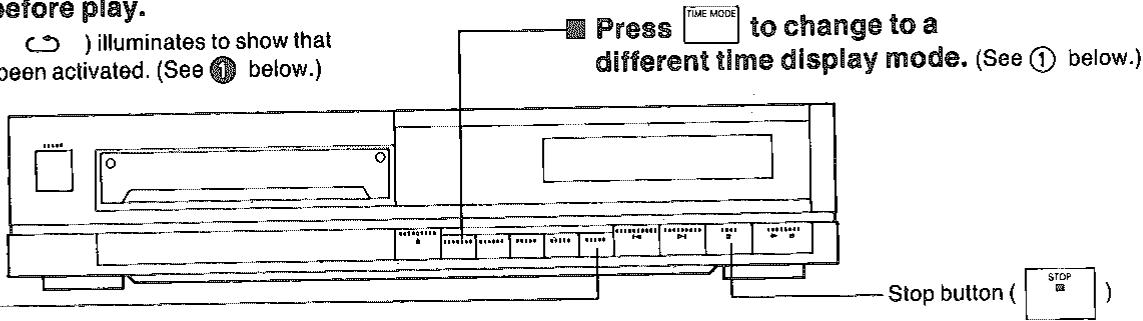
7 Affichage du mode de temps
(Pendant la lecture ou en mode pause.)
Quatre modes d'affichage du temps peuvent être sélectionnés.
① | Lecture répétée
Pour la lecture automatique
Appuyez sur le bouton de répétition avant la lecture ou pendant la lecture ; toutes les pistes seront lues en boucle.
Pour la lecture par accès direct
Appuyez sur la touche de répétition pendant la lecture en accès direct ; les plages de la plage sélectionnée à la fin du disque sont lues, puis le lecteur revient à la première plage et lit toutes les plages en répétition.
Pour la lecture programmée
- Appuyez sur la touche de répétition avant la lecture programmée ; les plages programmées seront lues en répétition.
- Appuyez sur la touche de répétition pendant la lecture programmée ; seules les plages programmées restantes seront lues en répétition.
- Appuyez à nouveau sur la touche de répétition pour annuler la lecture en répétition. (Le témoin s'éteint.)
- Appuyer sur la touche d'arrêt annule également le mode répétition, mais cela efface aussi les réglages de programmation précédents.
① Fonction d'affichage du mode de temps
Dans l'exemple, un disque de 55 min 58 s est en lecture à un point situé 2 min 10 s après le début de la plage 5.
Chaque fois que la touche de sélection du mode de temps est enfoncée, le mode d'affichage du temps change de la manière suivante :
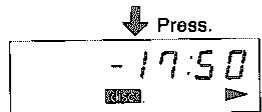
(Pendant la lecture programmée, le temps de lecture total restant du programme est affiché.)
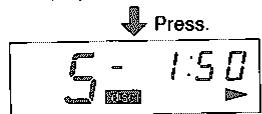
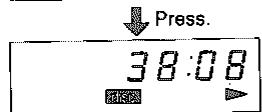
(Pendant la lecture programmée, le temps de lecture depuis le début de la première plage programmée est affiché.)
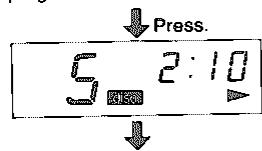
Ⓐ Temps de lecture restant du disque. (B) Numéro de plage et temps de lecture restant de la plage en cours. © Temps de lecture depuis le début de la première plage. (D) Numéro de plage et temps de lecture écoulé depuis le début de la plage en cours.
Remarque :
Dans les cas suivants, l'affichage de l'heure indique « --;-- » lorsque le temps de lecture restant du disque est affiché :
- Lorsqu'un numéro de plage supérieur à 20 est programmé ;
- Lorsque le temps de lecture total d'un programme dépasse 99 minutes. (Par exemple, si une plage de 20 minutes est programmée pour être lue six fois, le temps de lecture total du programme est de 120 minutes.)
8
Lecture programmée avec durée prédéfinie
(Lorsque l'appareil est en mode arrêt.)
La durée souhaitée (1 à 99 minutes) peut être spécifiée.
- Une durée maximale de 99 minutes peut être spécifiée pour la lecture programmée.
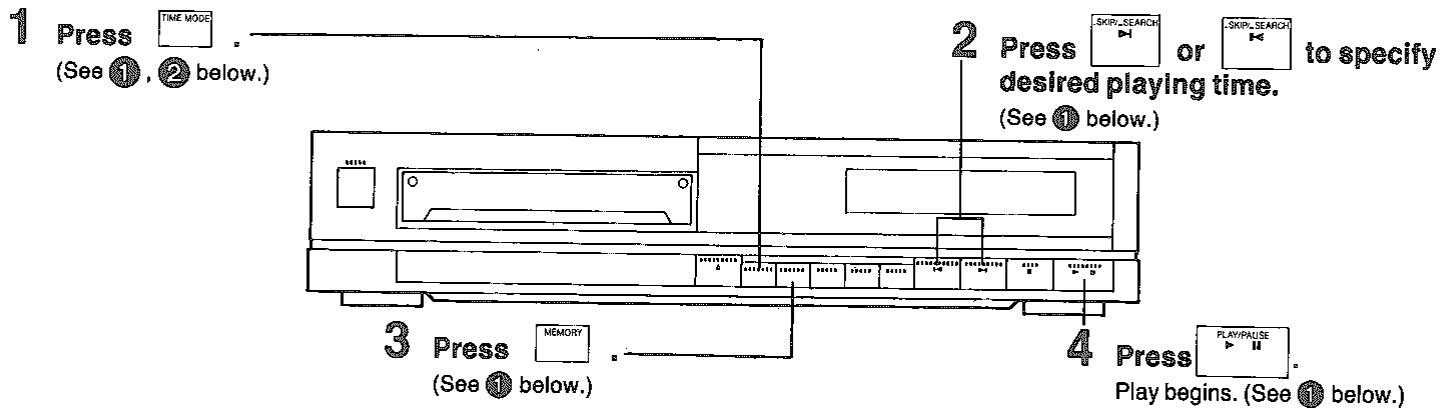

Par exemple ;
Pour ne lire que 15 minutes :
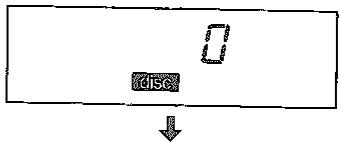
Lorsque le bouton de sélection du mode de temps est enfoncé en mode arrêt :
Appuyez.

Lorsque 15 minutes sont spécifiées :

Appuyez.
(Spécifiez
15 minutes.)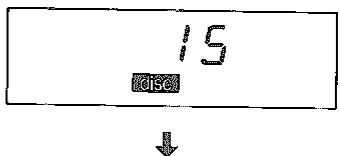
Lorsque 15 minutes sont entrées en mémoire.
(Pour la lecture automatique ou la lecture en répétition, cette opération peut être omise.)
Appuyez sur la touche.
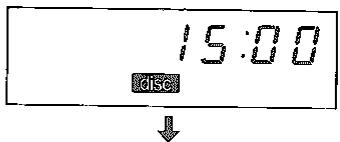

Lorsque la touche lecture/pause est enfoncée :
Appuyez sur la touche.
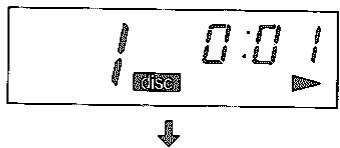

Après la lecture du temps d'édition prédéfini (15 minutes), l'appareil passe en mode pause.
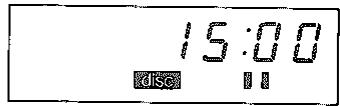
Remarque :
Le temps de pause est inclus dans le temps d'édition prédéfini.
Remarques :
Pendant la lecture automatique, l'appareil passe en mode pause après 15 minutes de lecture. Pendant la lecture programmée, l'appareil passe en mode pause après 15 minutes de lecture, et la piste programmée suivante est affichée s'il y a une autre piste programmée.
(La lecture est relancée en appuyant sur la touche lecture/pause.)
Pendant la lecture en répétition, l'appareil passe en mode pause toutes les 15 minutes. (La lecture est relancée en appuyant sur la touche lecture/pause.) Si un temps d'édition prédéfini plus long que la durée d'enregistrement est spécifié, l'appareil passe en mode arrêt après la lecture de la dernière piste. Pour l'édition prédéfinie pendant la programmation, le temps d'édition prédéfini doit être spécifié avant la saisie des sélections de programme. - L'utilisation des touches de saut/recherche pendant la lecture d'édition prédéfinie ne soustrait pas de temps au temps spécifié. Elle déplace simplement la durée souhaitée vers le nouvel emplacement. Pour annuler cette fonction, appuyez sur la touche d'arrêt.

Confirmation du temps restant spécifié
La touche de mode de temps peut également être utilisée pour la fonction suivante.
Pour afficher le temps restant spécifié.
Par exemple : si 15 minutes ont été spécifiées puis que les pistes 2→4→6 sont programmées, appuyer sur la touche de sélection du mode de temps affiche le temps de lecture restant entre la fin de la dernière piste programmée et le temps d'édition prédéfini de 15 minutes.
Cette indication est utile pour déterminer si les pistes programmées peuvent tenir sur une cassette ou une section d'une cassette.
Si la piste 2 a une durée de lecture de 4 minutes, la piste 4 de 5 minutes et la piste 6 de 4 minutes (comme dans l'exemple de disque à la page 8), le temps de lecture restant affiché sera de deux minutes (15 minutes moins 13 minutes).
Remarque :
Lorsque le bouton de sélection du mode de temps est enfoncé, -F F : F F apparaîtra sur l'écran si le temps de lecture programmé est plus long que le temps d'édition prédéfini. Dans ce cas, annulez le numéro de piste à l'aide du bouton d'effacement et reprogrammez afin que le temps de lecture programmé soit dans le temps d'édition prédéfini.
Guide de dépannage
Si l'appareil ne fonctionne pas correctement, vérifiez tous les points suivants, ainsi que les connexions et les positions de commande de tous les composants connectés à cet appareil, avant de demander une réparation professionnelle. Ce tableau ne comprend pas les vérifications des connexions erronées ou des réglages incorrects d'autres composants. Si le problème n'est pas résolu par ce tableau ou n'est pas inclus dans les problèmes énumérés ci-dessous, contactez votre revendeur Technics pour obtenir de l'aide.
| Problem | Causes | Remedy |
| Disc holder does not close when the open/close button is pressed. | ●The disc is warped. | ●Replace the disc. |
| Disc is inserted but number of tracks and playing time are not displayed. | ●The lock shaft is in the out position (☐).●Disc is inserted upside down.●Disc is dirty.●Disc is scratched.●Disc is seriously warped.●A non-standard disc is inserted.●Moisture has formed inside the player. | ●Press to the in (unlocked) position (☐→☐).●Insert disc again properly.●Wipe clean with soft cloth.●Use a new disc.●Use a new disc.●Use only discs with the ☐/☐/☐/☐/☐/☐/☐/☐/☐/☐/☐/☐/☐/☐/☐/☐/☐/☐/☐/☐/☐/☐/☐/☐/☐/☐/☐/☐/☐/☐/☐/☐/☐/☐/☐/☐/☐/☐/☐/☐/☐/☐/☐/☐/☐/☐/☐/☐/☐/☐/☐/ |
| Certain sections of a disc are not played normally. | ●The lock shaft is in the out position (☐).●Disc is dirty.●Disc is scratched. | ●Press to the in (unlocked) position (☐→☐).●Wipe clean with soft cloth.●Play disc, skipping over scratched sections (if so desired); otherwise, replace disc. |
Remarque :
Si vous connectez un amplificateur Technics avec une télécommande dotée de la fonction d'atténuation numérique du volume (pour lecteur CD), vous pouvez réduire le niveau de sortie comme suit.
Fonction d'atténuation numérique du volume
• Chaque fois que le bouton ▼ ou ▲ est enfoncé, le mode d'affichage passe en mode d'atténuation (affichage en dB). Le réglage actuel du niveau de volume numérique est affiché momentanément dans l'affichage du temps.
Appuyer à nouveau sur l'un de ces boutons pendant que l'affichage en dB est allumé entraîne un changement de niveau de volume comme décrit ci-dessous.
Pour baisser le niveau de volume, appuyez sur le bouton □. Le niveau de volume peut être abaissé jusqu'à -12 dB par pas de 2 dB.
Par exemple, lorsque le bouton □ est enfoncé une fois :
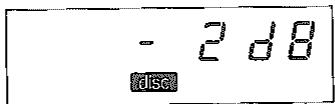
Lorsque le bouton □ est enfoncé à nouveau :
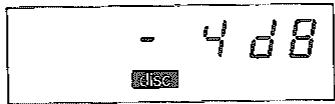
- Appuyez sur le bouton □ pour revenir à 0 dB par pas de 2 dB.
Une fois l'affichage en dB éteint, la durée de lecture est de nouveau affichée.
L'atténuation du volume est également automatiquement ramenée à 0 dB lors de la mise hors tension (secteur).
Remarque : le niveau du casque est également affecté.
Spécifications techniques
(Mesurées selon EIAJ [CP-307])
Audio
Nombre de canaux : 2 (gauche et droite, stéréo)
Réponse en fréquence : 2–20 000 Hz (EIAJ)
Gamme dynamique : 96 dB
Rapport signal/bruit : 96 dB (EIAJ)
Distorsion harmonique : 0,004 % (1 kHz, 0 dB)
Distorsion harmonique totale : 0,006 % (1 kHz, 0 dB) (EIAJ)
Séparation des canaux : 90 dB (EIAJ)
Pleurage et scintillement : en dessous de la limite mesurable
Filtre passe-bas : filtre numérique haute résolution
Format du signal
Fréquence d'échantillonnage : 44,1 kHz
Système de correction : algorithme Technics Super Decoding
Algorithme
Conversion numérique-analogique : linéaire 16 bits
Tête de lecture
Temps d'accès : 1 seconde
(accès à la dernière piste)
Source lumineuse : laser à semi-conducteur
Longueur d'onde : 780 nm
Système de déplacement : système d'accès linéaire à grande vitesse
Généralités
Alimentation : ~50/60 Hz, 240 V
Consommation électrique : 10 W
Tension de sortie : 2 V (à 0 dB) (EIAJ)
Impédance de sortie : environ 600 Ω
Impédance de charge : plus de 10 kΩ
Dimensions
(L×P×H) : 36×28×7,7 cm
14 5/32'' × 11 1/32'' × 3 1/32''
[Lorsque le chargeur de disque est ouvert :
42 cm 16 17/32'' (P)]
Poids : 3,3 kg (7,3 livres)
Fonctions
Lecture automatique : tous les titres
Lecture directe : numéro de titre
Lecture répétée : disque entier ou titres programmés
Recherche : saut de titre avant/arrière
Recherche manuelle avant/arrière
Lecture programmée : jusqu'à 20 sélections
Affichage : nombre total de pistes (jusqu'à 99)
Piste programmée
Piste en cours
Affichage du temps (min., sec.)
Affichage des modes de temps
Indicateurs : indicateur de disque
Indicateur de répétition
Indicateur de lecture
Indicateur de pause
Chargement du disque : type horizontal à moteur
Enregistrement synchronisé
borne : 1/8 de pouce (M3)
Télécommande
borne : 1/8 de pouce (M3)
Les spécifications sont sujettes à modification sans préavis.
Le poids et les dimensions sont approximatifs.
(Pour le DANEMARK uniquement)
AVERTISSEMENT - Rayonnement laser invisible lors de l'ouverture. ÉVITER TOUTE EXPOSITION DIRECTE AU FAISCEAU.
(À l'intérieur de l'appareil)
DANGER - Rayonnement laser invisible lors de l'ouverture.
ÉVITER TOUTE EXPOSITION DIRECTE AU FAISCEAU.
(À L'INTÉRIEUR DU PRODUIT)
- TECHNICS
- SL-PJ
- MODE D'EMPLOI
- REMARQUES
- CONSEILS DE SÉCURITÉ
- CONCERNANT LES DISQUES COMPACTS
- PRÉCAUTIONS DE MANIPULATION
- PRÉCAUTIONS DE STOCKAGE
- INSTALLATION
- REMARQUES ET ENTRETIEN
- ENTRETIEN
- À PROPOS DE L'HUMIDITÉ
- PRÉCAUTIONS POUR UNE UTILISATION SÛRE DE CET APPAREIL POUR LE MODÈLE STANDARD BRITANNIQUE SL-PJ22. (MODÈLE "EK" UNIQUEMENT)
- ATTENTION
- IMPORTANT
- AVANT UTILISATION
- REMARQUE
- SI L'APPAREIL EST TRANSPORTÉ À NOUVEAU, SUIVEZ LES ÉTAPES SUIVANTES
- SOMMAIRE
- ACCESSOIRES
- CONNEXIONS
- ① BORNES DE SORTIE DE LIGNE (LINE OUT)
- ② BORNE D'ENREGISTREMENT SYNCHRO (SYNCHRO REC)
- ⑧ BORNE DE TÉLÉCOMMANDE (REMOTE)
- ④ PRISE SECTEUR (AC OUTLET)
- ⑤ PRISE D'ENTRÉE SECTEUR (AC IN)
- COMMANDES ET FONCTIONS DE LA FACE AVANT
- ① INTERRUPTEUR D'ALIMENTATION
- ② PLATEAU DE DISQUE
- ③ BOUTON D'OUVERTURE/FERMETURE
- ④ PANNEAU D'AFFICHAGE
- ⑤ BOUTON LECTURE/PAUSE
- PICKUP
- MODE PAUSE
- BOUTON D'ARRÊT
- BOUTONS DE SAUT/RECHERCHE AVANT ET ARRIÈRE
- ⑧ BOUTON DE RÉPÉTITION
- ⑨ BOUTON DE RAPPEL
- ⑩ BOUTON D'EFFACEMENT
- ⑩ BOUTON DE MÉMOIRE
- ⑫ BOUTON DE SÉLECTION DU MODE DE TEMPS
- LECTURE D'UN DISQUE
- LECTURE AUTOMATIQUE
- LECTURE PROGRAMMÉE
- TOUT EN REGARDANT L'AFFICHAGE DU NUMÉRO DE PISTE, APPUYEZ BRIÈVEMENT POUR SPÉCIFIER LE NUMÉRO DE PISTE SOUHAITÉ
- ② EXEMPLE
- ④ COMMENT ANNULER LE PROGRAMME
- ⑤ CONFIRMATION DE LA DURÉE TOTALE DE LECTURE (AVANT DE COMMENCER LA LECTURE)
- CONFIRMATION DU PROGRAMME
- LECTURE PAR ACCÈS DIRECT (LORSQUE L'APPAREIL EST EN MODE ARRÊT.)
- ① PAR EXEMPLE
- RECHERCHE MANUELLE
- SAUT DE LECTURE
- ① RECHERCHE AVANT OU ARRIÈRE
- ① SAUT AVANT
- SAUT ARRIÈRE
- LECTURE RÉPÉTÉE
- AFFICHAGE DU MODE DE TEMPS
- ① | LECTURE RÉPÉTÉE
- POUR LA LECTURE AUTOMATIQUE
- POUR LA LECTURE PAR ACCÈS DIRECT
- POUR LA LECTURE PROGRAMMÉE
- ① FONCTION D'AFFICHAGE DU MODE DE TEMPS
- LECTURE PROGRAMMÉE AVEC DURÉE PRÉDÉFINIE
- LA DURÉE SOUHAITÉE (1 À 99 MINUTES) PEUT ÊTRE SPÉCIFIÉE
- PAR EXEMPLE
- CONFIRMATION DU TEMPS RESTANT SPÉCIFIÉ
- POUR AFFICHER LE TEMPS RESTANT SPÉCIFIÉ
- GUIDE DE DÉPANNAGE
- FONCTION D'ATTÉNUATION NUMÉRIQUE DU VOLUME
- SPÉCIFICATIONS TECHNIQUES
- (MESURÉES SELON EIAJ [CP-307])
- AUDIO
- FORMAT DU SIGNAL
- TÊTE DE LECTURE
- GÉNÉRALITÉS
- FONCTIONS
Marque : PANASONIC
Modèle : SLPJ22
Catégorie : Lecteur CD portable