
SL1210MK2 - Platine vinyle PANASONIC - Notice d'utilisation et mode d'emploi gratuit
Retrouvez gratuitement la notice de l'appareil SL1210MK2 PANASONIC au format PDF.


| Type de produit | Platine vinyle |
| Marque | Panasonic (Technics) |
| Modèle | SL-1210MK2 |
| Dimensions (L × H × P) | 45,3 × 16,2 × 36 cm |
| Poids | 12,5 kg |
| Alimentation | 110-120 / 220-240 V, 50/60 Hz |
| Consommation | 13,5 W |
| Vitesses de rotation | 33 1/3 et 45 tr/min |
| Moteur | Moteur DC sans balais |
| Type d'entraînement | Entraînement direct |
| Couple de démarrage | 1,5 kg·cm |
| Temps de démarrage à 33 1/3 tr/min | 0,7 s |
| Pleurage et scintillement | 0,01% WRMS |
| Rapport signal/bruit (pondéré) | -78 dB |
| Bras de lecture | Universel, suspension à cardan |
| Longueur effective du bras | 230 mm |
| Déport | 15 mm |
| Pression de lecture | 0 à 2,5 g |
| Cartouche fournie | EPC-207C (aimant mobile) |
| Sortie cartouche | 3 mV à 1 kHz |
| Réglage de hauteur du bras | 0 à 6 mm (hélicoïdal) |
| Anti-skating | Réglable |
| Éclairage de pointe | Oui, commutable |
| Lubrification | Toutes les 2000 heures (huile d'origine) |
| Sécurité | Ne pas ouvrir, éviter l'humidité, débrancher avant entretien |
FOIRE AUX QUESTIONS - SL1210MK2 PANASONIC
Questions des utilisateurs sur SL1210MK2 PANASONIC
0 question sur cet appareil. Repondez a celles que vous connaissez ou posez la votre.
Poser une nouvelle question sur cet appareil
Téléchargez la notice de votre Platine vinyle au format PDF gratuitement ! Retrouvez votre notice SL1210MK2 - PANASONIC et reprennez votre appareil électronique en main. Sur cette page sont publiés tous les documents nécessaires à l'utilisation de votre appareil SL1210MK2 de la marque PANASONIC.
MODE D'EMPLOI SL1210MK2 PANASONIC
Technics
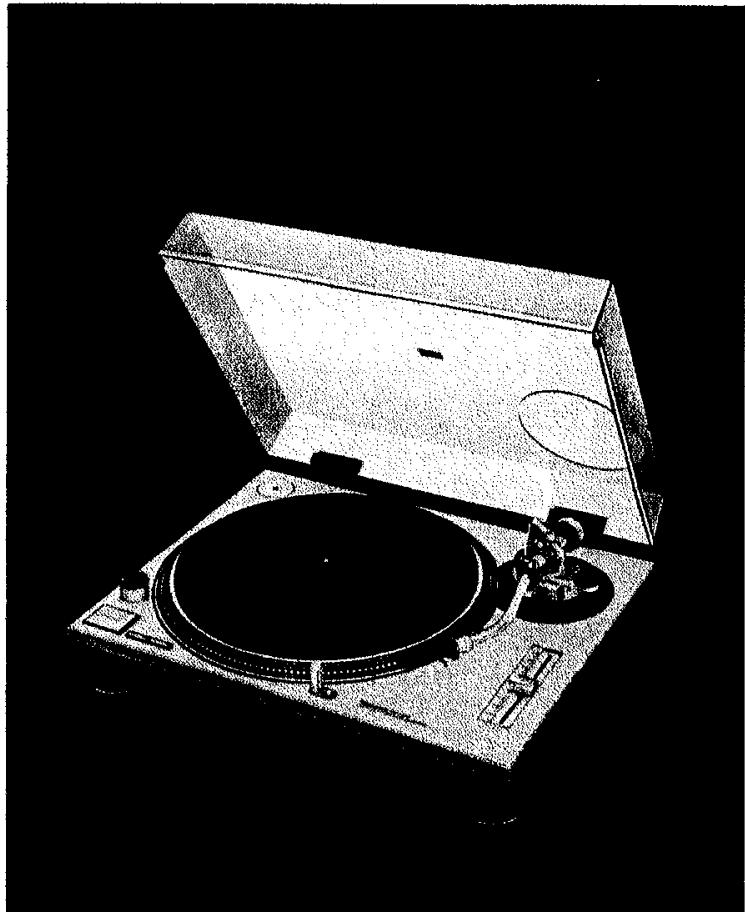
Turntable System
SL-1200MK2
SL-1210MK2
Operating instructions
natural_image
Illustration of a vintage CD or DVD stand with open lid and circular dial (no text or symbols)English 3\~8
Deutsch 9\~14
Français 15\~20
Nederlands 21 \~ 26
Español 27 \~ 32
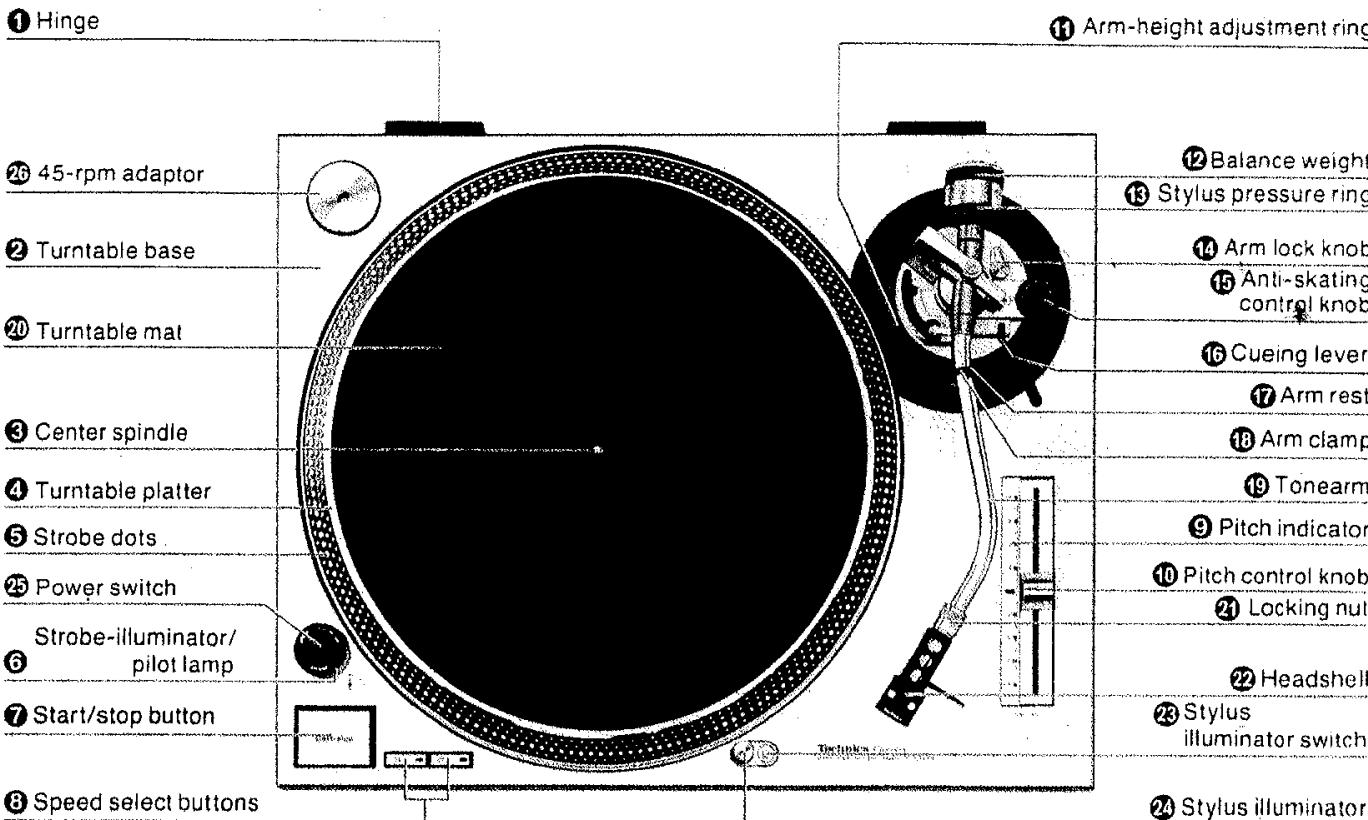
Parts identification
1
Assembly and set-up

Adjustments

We want to thank you for selecting the SL-1200MK2/SL-1210MK2.
For optimum performance, we recommend that you read these instructions carefully.
Before use
Caution:
Never connect the AC power plug before assembly has been completed.
Attach the dust cover last, so that assembly and adjustments can be made most conveniently.
Note:
The operating instructions are commonly applicable to units with cartridge and without cartridge, and also to those of different colors.
For the units without cartridge, the cartridge section of the specifications may be neglected.
■ Checklist of parts
Turntable unit 1
Turntable platter 1
Turntable mat 1
Dust cover 1
45-rpm adaptor 1
Balance weight 1
Auxiliary weight....1
Headshell 1
Shell weight 1
Overhang gauge (for the unit without cartridge) .....
Assembly and set-up
■ Installation of turntable platter
- Place the turntable platter on the center spindle.
Note:
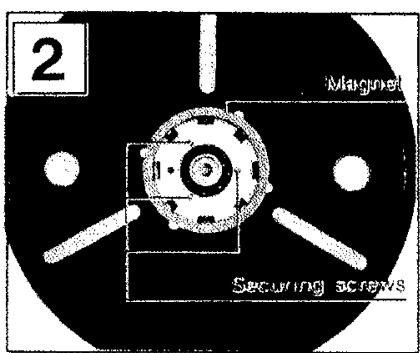
The rotor is connected to the underside of the turntable platter. (The magnet of the motor is attached to the turntable platter.) To maintain optimum performance, extra care should be taken to prevent adhesion of dust or iron filings to the magnet and not to damage the magnet by dropping it.
Do not remove or loosen the screws. Should the position of the fixed magnet be altered by loosening the securing screws, the rated performance of the unit cannot be guaranteed. (See Fig. 2.)
- Place the turntable mat on the platter.
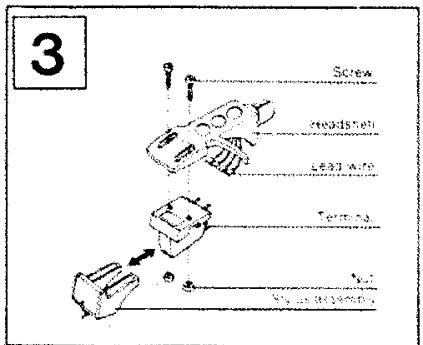
■ Installation of cartridge (See Fig. 3.)
(For the unit without Cartridge)
When you install a cartridge, refer to the operation instructions of that cartridge.
During installation, attach the stylus protector to guard the stylus tip from damage.
- Connect the lead wires to the cartridge terminals. The terminals of most cartridges are color coded. Connect each lead wire to the terminal of the same color.
White (L+).... Left channel+
Blue (L-) ..... Left channel-
Red (R+).... Right channel+
Green (R-) ..... Right channel-
- Install a cartridge to the headshell, and tighten it with screws provided with the cartridge.
Note:
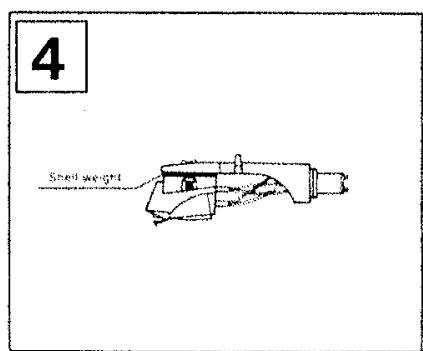
Use the shell weight only for a lightweight cartridge (less than 6.0 g). (See Fig. 4.)
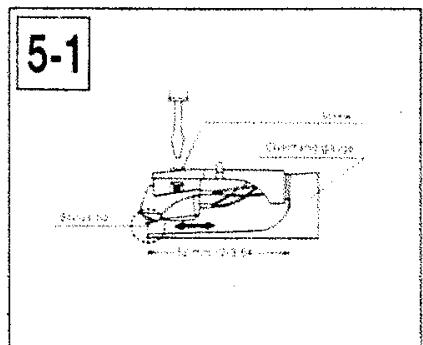
■ Adjustment of overhang (See Fig. 5-1.)
(For the unit with overhang gauge)
- Insert the headshell into the gauge.
- Loosen the mounting screws and move the cartridge forward or backward until the stylus tip lines up with the edge of the gauge.
- Tighten the mounting screws without moving the cartridge.
Note:
Your cartridge is now adjusted for lowest tracking error and minimum distortion.
This gauge is exclusively designed for this tonearm.
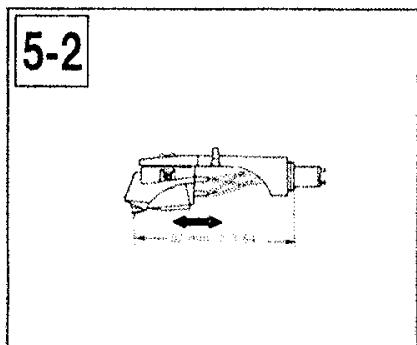
■ Adjustment of overhang (See Fig. 5-2.)
(For the unit without overhang gauge)
The overhang of this unit is 15 mm.
Loosen the mounting screw and move the cartridge forward or backward until the distance between the stylus tip and the plug becomes 52 mm (2-3/64") as shown in the picture.
Tighten the mounting screws without moving the cartridge. Adjust horizontal zero balance, stylus pressure and arm-lift height whenever you change the cartridge.
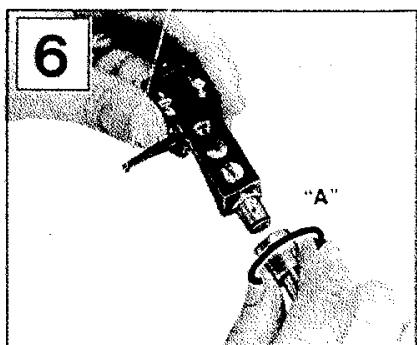
■ Installation of headshell (See Fig. 6.)
Insert the headshell into the front end of the tubular arm, and turn the locking nut clockwise (in the direction shown by the arrow "A"), with the headshell firmly held horizontally.
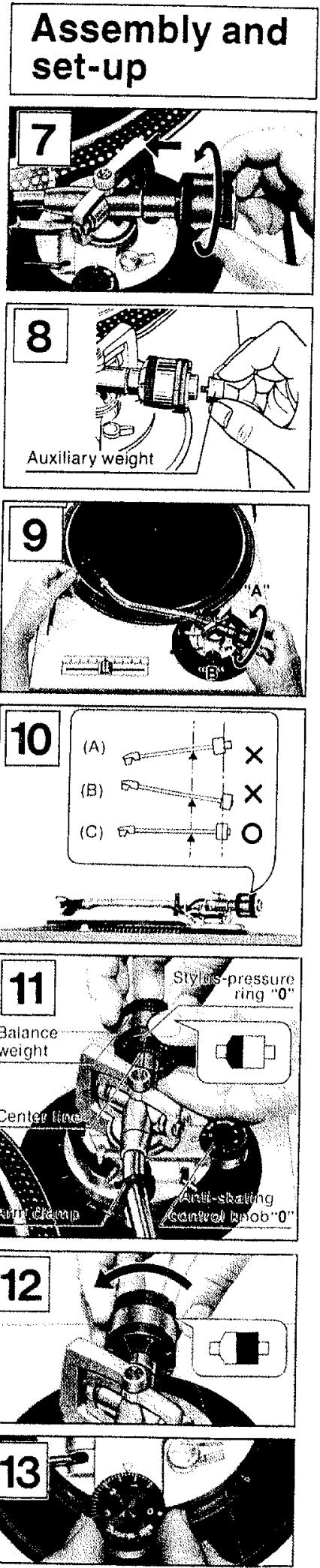
■ Installation of balance weight (See Fig. 7.)
Place the balance weight on the rear shaft of the tonearm.
Note:
In case the cartridge weight exceeds 10 g, it is necessary to fix the attached auxiliary weight over the rear shaft of the arm.
With this auxiliary weight in use, it is possible to use any cartridge whose weight is in the range of 9.5–13 g. (See Fig. 8.)
■ Adjustments of horizontal zero (0) balance and stylus pressure
- Remove the stylus protector, if your cartridge has a detachable one. Be careful not to touch your fingers to the stylus tip.
- Release the arm clamp and lift the tonearm from the arm rest to free it.
- Turn the entire balance weight clockwise (indicated by the arrow "A") or counterclockwise (indicated by the arrow "B") until the tonearm is approximately balanced horizontally (floats freely). (See Figs. 9 and 10.)
Note:
(A)
Excessive forward advancement of the balance weight causes the cartidge side to be lowered.
(B)
Excessive backward retreatment of the balance weight causes the cartridge side to be raised.
(C)
Upon balancing between the balance weight and cartridge, the tonearm is held horizontal.
During the adjustment of the horizontal zero (0) balance, be careful that the stylus tip of the cartridge does not contact the turntable mat or turntable base.
-
After the tonearm is horizontally zero (0) balanced, temporarily refasten the tonearm with the arm clamp.
-
Hold the balance weight stationary with one hand as shown in the picture, and rotate only the stylus-pressure ring to bring the numeral "0" of the ring into alignment with the center line on the tonearm rear shaft. (See Fig. 11.)
The adjustment of the horizontal zero (0) balance is now completed.
- After adjusting the horizontal zero (0) balance, turn the balance weight clockwise in the direction of the arrow and align to the correct stylus pressure. (See Fig. 12.)
(Follow the cartridge manufacturer's recommendation.)
As the stylus-pressure ring moves in step with the balance weight, proper stylus pressure can be selected by directly reading the graduated ring.
■ Adjustment of anti-skating control
Set the anti-skating control knob to the same value as the stylus pressure. (See Fig. 13.)
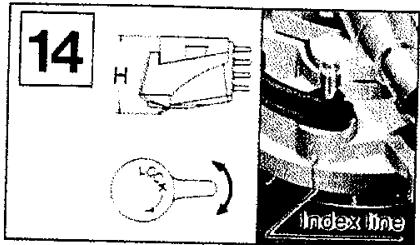
■ Adjustment of tonearm height (See Fig. 14.)
The height of the tonearm can be adjusted up to 6 mm and a scale is provided on the adjust ring in 0.5 mm increments. Be sure to set the proper arm height using the adjust scale and referring to the table below.
Before adjusting the tonearm height, unlock the tonearm by turning the arm lock knob.
| Height of cartridge (mm) (H) | Scale reading on the arm-height adjust ring |
| 15 | 0 |
| 16 | 1 |
| 17 | 2 |
| 18 | 3 |
| 19 | 4 |
| 20 | 5 |
| 21 | 6 |
For example, if the cartridge height is 17.5 mm. the arm-height adjust ring should be positioned at the intermediate location between 2 and 3 on the scale. (See Fig. 14.)
Caution:
Be sure to lock the tonearm by turning the arm lock knob in the direction indicated by the arrow after finishing the height adjustment for the tonearm.
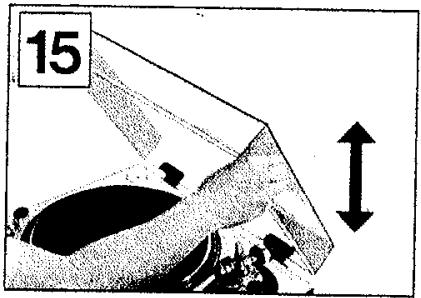
■ Installation of dust cover (See Fig. 15.)
Place the dust cover in position from directly above, holding it at both sides. For detaching the dust cover, be certain first to raise it as illustrated before removal.
Note:
Opening or closing of the dust cover during play should be avoided. This may not only cause undesired vibrations, but also result in skipping of the stylus.
If you must open the dust cover during play, do so as gently as possible.
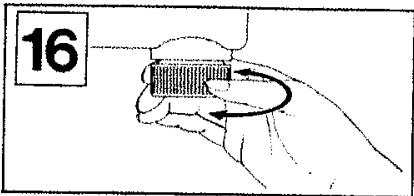
■ The legs/insulators also have functions for adjusting the height of the turntable unit itself. After installing the unit in the place for use, adjust the legs to stabilize the main body horizontally. (See Fig. 16.)
Placement
■ Place the unit in a stable and horizontal position, where there is little or no vibration.
■ Locate the unit as far away from the speakers as possible and isolate the unit from sound radiation from them.
■ Do not place the unit where it is exposed to direct sun, dust, moisture or heat.
- Keep it in a well ventilated place.
■ When a radio is placed too close to the turntable and is played while the turntable is in operation, interference to AM/FM reception may result.
Connections
■ Connect the AC power plug
Connect the AC power plug to an AC wall socket.
Caution:
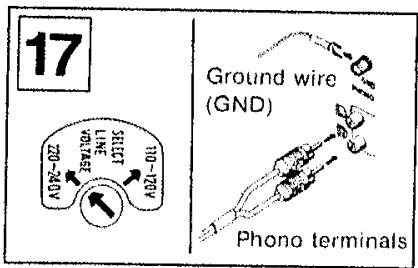
Make sure that the turntable's AC line-voltage selector is matched to your local voltage before connecting the AC power plug.
Never connect to a DC socket.
If the pre-selected voltage is different from your local voltage, turn the AC line-voltage selector with a screw-driver so that it corresponds to your local voltage.
The AC line-voltage selector is located under the turntable platter. (See Fig. 17.)
■ Connect the output terminals (See Fig. 17.)
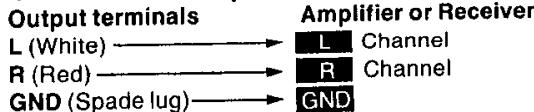
flowchart
graph LR
    A["Output terminals"] --> B["L (White)"]
    A --> C["R (Red)"]
    A --> D["GND (Spade lug)"]
    B --> E["L Channel"]
    C --> F["R Channel"]
    D --> G["GND"]
    E --> H["Amplifier or Receiver"]
    F --> H
    G --> H
Note:
Be sure to connect the ground terminal firmly to the amplifier or receiver. If this connection is not made or is loose, a power source "HUM" will result.
How to operate
- Place a record on the turntable mat.
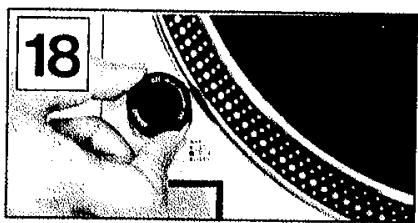
- Turn the power switch to the "on" position. (See Fig. 18.)
The speed indicator for 33-1/3 rpm and the strobe-illuminator will all light up.
Note:
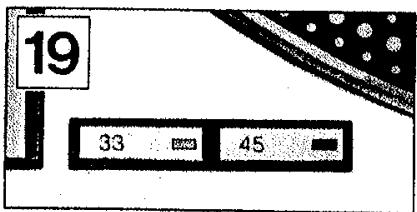
Since the unit has been designed to select 33-1/3 rpm automatically each time you push the power switch to "on", push the 45 rpm speed select button if you play a 45 rpm record (See Fig. 19.)
-
Remove the stylus protector, if your cartridge has a detachable one.
-
Release the arm clamp.
-
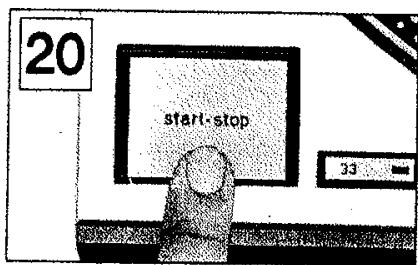
Push the start/stop button. (See Fig. 20.) The turntable platter will start to rotate.
-
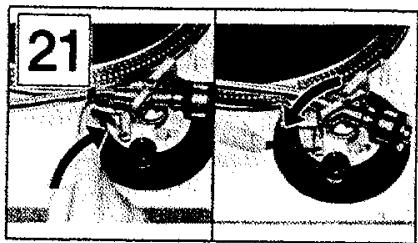
Set the cueing lever to the up position. (See Fig. 21.)
-
Move the tonearm over the desired groove.
-
Set the cueing lever to the down position. (See Fig. 21.) The tonearm will descend slowly onto the record and play will begin.
-
When play is finished, move the tonearm to the arm rest; secure the tonearm with the arm clamp.
-
Push the start/stop button. After the turntable is brought to a stop by means of the electronic brake, turn off the power.
Note:
The electronic brake does not function if the power switch is turned off before the start/stop button is pushed.
■ How to suspend play
Set the cueing lever to the "up" position.
The stylus tip of the cartridge will be lifted from the record.
■ When you play a 45-rpm record with a large center hole
Place the 45-rpm adaptor on the center spindle. Push the 45 speed select button.
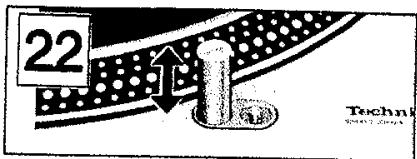
■ Stylus illuminator (See Fig. 22.)
This unit is provided with a stylus illuminator for illuminating the stylus tip during play.
By pressing the stylus illuminator switch, the stylus illuminator is raised into position for illuminating the stylus tip. When not in use, keep the stylus illuminator lowered through depression.
Note:
The switch must be firmly engaged.
Incomplete depression of the switch will not raise the illuminator even though the lamp is lit.
Adjustments
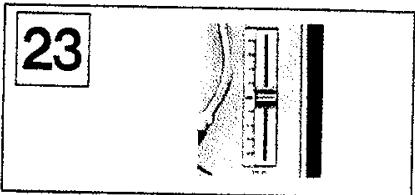
■ Pitch control (fine adjustment of speed) (See Figs. 23 and 24.)
When the pitch control knob is located at the center of the position after turning on the power, the green LED indicator is lit showing the operating condition for the predetermined speed (either 33-1/3 or 45 rpm). The pitch control is variable in a range of about ±8%.
Figures on the indicator show approximate percentages for variable pitch control.
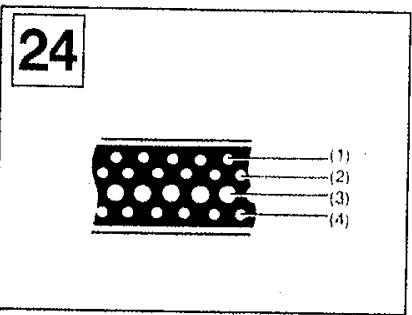
When the strobe dots in 4 stages marked at the peripheral edge of the turntable appear to be stationary, variation of individual pitches is shown. (See Fig. 24.)
When (1) appears stationary, it shows a +6% pitch variation.
When (2) appears stationary, it shows a +3.3% pitch variation.
When (3) appears stationary, it shows normal turntable speed, 33-1/3 or 45 rpm.
When (4) appears stationary, it shows a -3.3% pitch variation.
Note:
The strobe-illumination of this unit employs a strobe-illuminator LED synchronized with the precise quartz frequency.
For fine adjustment of the turntable speed, be sure to effect the adjustment according to the LED illumination.
The LED illumination is not synchronized using fluorescent lamps.
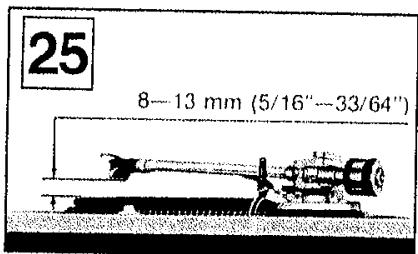
■ Adjustment of arm-lift height
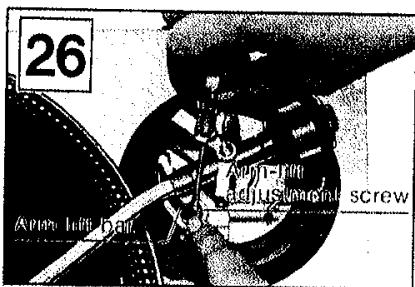
(See Figs. 25 and 26.)
The arm-lift height (distance between the stylus tip and record surface when the cueing lever is raised) has been adjusted at the factory before shipping to approximately 8\~13 mm.
If the clearance becomes too narrow or too wide, turn the adjustment screw clockwise or counterclockwise while pushing the arm lift down.
Clockwise rotation
—distance between the record and stylus tip is decreased.
Counterclockwise rotation
—distance between the record and stylus tip is increased. Note:
As the adjusting screw has a hexagonal head, be sure to make the adjustment while depressing the arm lift, or the screw will not move freely.
Also be sure that the hexagonal head retracts correctly into the arm lift when the latter is released.
■ Replacement of stylus (for the unit with cartridge)
The unit is furnished with a diamond stylus.
The life of the stylus differs depending on the conditions of use, but it is recommended that you replace the stylus at the first sign of wear. About 500 hours of use is an approximate standard.
The replacement stylus for the unit is the EPS-207ED.
-
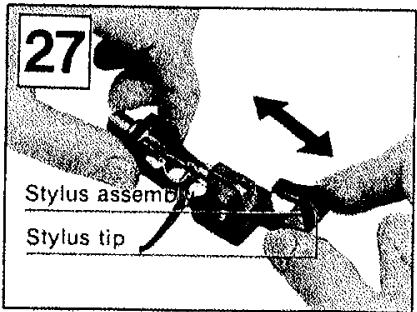
Remove the headshell/cartridge from the tubular arm. Hold the stylus assembly with your fingers and withdraw it slantwise, as shown in the picture. (See Fig. 27.)
-
Align the new stylus assembly with the square opening of the cartridge main body, and push it into the opening positively as far as it will go
Notes and maintenance
■ Use utmost care when handling the platter and when placing it on the motor shaft to prevent possible damage to the magnet.
- Do not turn "on" the power supply, with the turntable platter detached.
■ Before detaching or attaching the headshell, be sure to turn the power of the amplifier or receiver off.
Detaching or attaching of the headshell with the volume control turned up may cause damage to the speakers.
■ When play is finished, be sure to secure the tonearm with the arm clamp.
After play is finished, if the unit is not to be used for some time, care should be taken to secure the tonearm to protect the stylus tip.
For the same reason, the stylus protector should also be attached.
■ Dust and dirt should be carefully removed from stylus tip or records.
Dust and dirt on the stylus tip or record may not only result in deterioration of tone quality, but also cause undue wear of the record and the stylus tip itself.
Special stylus tip brushes and record cleaners can be purchased in most electronic supply houses.
■ Wipe the headshell terminals from time to time.
Dust and dirt at the headshell terminals may result in increased "HUM" noise or intermittent sound. Use a soft dry cloth to clean the headshell terminals.
■ Wipe the dust cover and turntable base with a soft, dry cloth.
Never use any cleaners containing alcohol, benzine or thinner.
Use of a chemical dust cloth should also be avoided. Be sure that the dust cover is not exposed to insecticide spray.
To remove stubborn fingerprints or grease spots, detach the dust cover and disconnect the AC power plug.
Use a soft cloth slightly moistened with a mild soap and water solution.
Do not wipe the dust cover during play, or the tonearm may be attracted toward the dust cover due to the generation of static electricity.
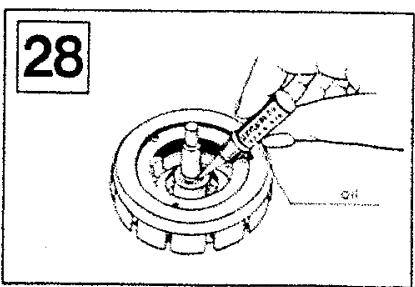
■ Lubrication (See Fig. 28.)
Apply 2 or 3 drops of oil once after every 2000 hours of operation.
The time interval is much longer than that for conventional type motors (200–500 hours).
Please purchase original oil. (Part number is SFWO 010.)
■ Transportation of the unit to distant places for removal and the like.
Pack up the unit in the reverse order to that for unpacking, using the packing materials furnished when the unit was purchased. Should there be no such packing materials, be sure to take the following steps.
- Remove the turntable platter together with the turntable mat, and wrap it up to prevent any damage to them.
- Return the tonearm to the arm rest, and affix it with tape or the like.
- Remove the balance weight and the headshell/cartridge from the tonearm and then wrap them up to avoid any damage to them.
- Wrap up the turntable base with a blanket or soft paper also to prevent any possible damage to it.
Specifications
General
| Power supply: | 110-120/220-240 V, 50 or 60 Hz |
| Power consumption: | 13.5 W |
| Dimensions: | 45.3 × 16.2 × 36 cm |
| (W × H × D) | (17-27/32'' × 6-19/64'' × 14-11/64'') |
| Weight: | 12.5 kg (27.6 lb) |
■ Turntable section
| Type: | Quartz direct driveManual turntable |
| Drive method: | Direct drive |
| Motor: | Brushless DC motor |
| Turntable platter: | Aluminum diecastDiameter 33.2 cm (13-5/64")Weight 2 kg (4.4 lb.) |
| Turntable speeds: | 33-1/3 rpm and 45 rpm |
| Starting torque: | 1.5 kg·cm (1.3 lb·in) |
| Build-up characteristics: | 0.7 s. from standstill to 33-1/3 rpm |
| Braking system: | Electronic brake |
| Wow and flutter: | 0.01% WRMS*0.025% WRMS (JIS C5521)±0.035% peak (IEC 98A Weighted) |
| *This rating refers to turntable assembly alone, excluding effects of record, cartridge or tonearm, but including platter.Measured by obtaining signal from built-in frequency generator of motor assembly. | |
| Rumble: | -56 dB (IEC 98A Unweighted)-78 dB (IEC 98A Weighted) |
■ Tonearm section
| Type: | Universal |
| Effective length: | 230 mm (9-1/16") |
| Arm height adjustment range: | 0–6 mm |
| Overhang: | 15 mm (19/32") |
| Effective mass: | 12 g (without cartridge) |
| Offset angle: | 22° |
| Friction: | Less than 7 mg (lateral, vertical) |
| Tracking error angle: | Within 2"32' (at the outer groove of 30 cm (12") record |
| Within 0"32' (at the inner groove of 30 cm (12") record | |
| Stylus pressure adjustment range: | 0–2.5 g |
| Applicable cartridge weight range: | 6–10 g |
| 13.5–17.5 g (including headshell) | |
| (with auxiliary weight): | 9.5–13 g |
| 17–20.5 g (including headhsell) | |
| (with shell weight): | 3.5–6.5 g |
| 11–14 g (including headshell) | |
| Headshell weight: | 7.5 g |
■ Cartridge section
| Model No. | EPC-207C |
| Type: | Moving magnet |
| Frequency response: | 20 Hz to 25 kHz20 Hz to 15 kHz ± 2 dB |
| Output voltage: | 3 mV at 1 kHz5 cm/s, zero to peak lateral velocity[8.5 mV at 1 kHz 10 cm/s, zero to peak 45° velocity (DIN 45500)] |
| Channel separation: | 25 dB at 1 kHz |
| Channel balance: | Within 2 dB at 1 kHz |
| Compliance (dynamic): | 10 × 10 irc cm/dyne at 100 Hz |
| Stylus pressure: | 1.75 ± 0.25 g (17.5 ± 2.5 mN) |
| Load impedance: | 47 kΩ to 100 kΩ |
| Weight: | 5.6 g (cartridge only) |
| Replacement stylus: | EPS-207ED(Elliptical stylus) |
Specifications subject to change without notice.
Weight and dimensions shown are approximate.
For longer and safer use of this unit
In order to receive the best service from this unit, and for the safest operation, carefully read the following information.
Power source
It is very dangerous to use this unit at a voltage which is different from the rated voltage.
There is danger of combustion if the unit is connected to a power source which is different from the rated voltage.
Be very careful concerning this point.
Direct current cannot be used.
There are some places, such as ships, where direct current is used as the power source. Before connecting the unit, confirm the power source.
■ Connection of power cord
Be sure to never touch the power cord with wet hands because there is danger of electric shock. This is true, of course, of all electric equipment.
Do not pull the power cord.
Never pull the power cord to disconnect it. Always pull the plug only.
■ Location of unit
Choose a place which is not in direct sunlight.
Select a place which will assure good ventilation.
■ Never place heating equipment nearby.
Be sure to keep stoves and other sources of heat away from this unit, because heat radiated by such equipment may cause deformation of plastic parts or damage the cabinet, or, at worst, cause a fire.
■ Especially for families with children
Take care that no small items, such as metal objects, are put inside this unit.
In addition, children should be especially warned not to put anything into the ventilation holes, such as toys or a screwdriver, because these things may cause an electric shock or result in a malfunction of the unit.
■ If water spills on the unit.
If water should happen to spill on the unit, from an overturned vase for example, there is danger of fire or electric shock. Disconnect the power plug from the electric outlet immediately, and contact the store from which the unit was purchased.
■ Reconstruction can cause accidents.
Absolutely never try to remodel, reconstruct or repair this unit yourself. Do not attempt to touch any internal parts because to do so may result in an electric shock or other accident.
■ Be sure the power is off.
After you have finished using this unit, check once more to be sure that the power is off. If the unit is left with the power on for a long period of time, it may not only be damaged, thus shortening its useful life, but may also lead to a dangerous accident.
Features
■ Total quartz locked continuous pitch adjustment about ±8%
Quartz-phase-locked control means almost perfect accuracy of turntable rotation.
But with most quartz turntables, this accurate control circuit must be cut out when the pitch control is employed.
With the SL-1200MK2/SL-1210MK2, however, pitch is variable continuously (analogically) by up to approximately ±8% under total quartz-locked control. The pitch is controlled with a large sliding lever, located to the right of the turntable platter.
Four lines of platter markings are also provided indicating +6%, +3.3%, 0% (exact rated speed) and -3.3% change from rated speed.
■ Aluminum diecast cabinet and special heavy rubber base material provide acoustic isolation
The effects of external vibrations are dramatically reduced in the turntable by this new turntable construction.
The turntable base is precision-made aluminum diecast. And the underside of the main base is made of a heavy rubber material (special one-piece molding) which has excellent vibration resistance and absorbing characteristics. The turntable platter is also vibration-damped with specially fabricated rubber matting in the underside along with the thick turntable sheet (rubber mat). Four large-size insulating feet also help to absorb unwanted vibrations.
These features make the SL-1200MK2/SL-1210MK2 ideal for use with extra-high sound pressure levels.
■ High torque for fast starts
The integral rotor/platter motor delivers 1.5 kg·cm (1.3 lb·in) starting torque. This high torque gives very quick starts enabling the platter to reach 33-1/3 rpm within 0.7 s. (a quarter of a turn). This is a big advantage in many professional applications where fast cueing is a necessity.
■ Stylus illuminator for low-light conditions
■ High sensitivity, low mass, gimbal suspension tonearm
The highly sensitive tonearm features a genuine gimbal suspension, the rotational center of which is precisely defined at one point. Bearings are finished to a tolerance of ±0.5 microns. This, and the extra-closeness of pivot center to the bearings, result in the minimal friction of 7 mg (0.007 g) for both horizontal and vertical movement. Add to this the low 12-gram effective tonearm mass (including headshell.
without cartridge) and you have a tonearm compatible with the wide range of compliances found in today's cartridges. If you choose a popular high compliance MM cartridge, the low range resonance frequency will appear in the correct area to avoid warp frequencies of records, but without entering the low end of the audio spectrum. This tonearm is provided with a computer designed, light-weight, high-rigidity headshell made of single-piece diecast aluminum to resist partial vibration. The universal design allows headshell interchangeability. Contacts are gold-plated.
■ Helicoid tonearm height adjustment
Arm height is adjustable within a range of 6 mm to accommodate varying cartridge dimensions. Adjustments are done with a precision-made helicoid.
■ Other fine features
- Quick stops are achieved with a fully electronic braking system.
●A strobe illuminator is provided. The stroboscope is controlled by the extremely stable quartz oscillator, rather than potentially unstable AC line frequency.
●Power on/off control built-into strobe illuminator for ease of operation. - Soft-touch start/stop switch allowing precision control capability without the annoyance of accidental operation.
●Technics integral rotor/platter motor construction with full cycle detection FG.
- Technics
- SL-1200MK2
- SL-1210MK2
- Operating instructions
- Parts identification
- Assembly and set-up
- Before use
- Caution:
- Note:
- ■ Checklist of parts
- ■ Installation of turntable platter
- ■ Installation of cartridge (See Fig. 3.)
- (For the unit without Cartridge)
- ■ Adjustment of overhang (See Fig. 5-1.)
- (For the unit with overhang gauge)
- ■ Adjustment of overhang (See Fig. 5-2.)
- (For the unit without overhang gauge)
- ■ Installation of headshell (See Fig. 6.)
- ■ Installation of balance weight (See Fig. 7.)
- ■ Adjustments of horizontal zero (0) balance and stylus pressure
- (A)
- (B)
- (C)
- ■ Adjustment of anti-skating control
- ■ Adjustment of tonearm height (See Fig. 14.)
- ■ Installation of dust cover (See Fig. 15.)
- Placement
- Connections
- ■ Connect the AC power plug
- ■ Connect the output terminals (See Fig. 17.)
- How to operate
- ■ How to suspend play
- ■ When you play a 45-rpm record with a large center hole
- ■ Stylus illuminator (See Fig. 22.)
- Adjustments
- ■ Pitch control (fine adjustment of speed) (See Figs. 23 and 24.)
- ■ Adjustment of arm-lift height
- (See Figs. 25 and 26.)
- Clockwise rotation
- Counterclockwise rotation
- ■ Replacement of stylus (for the unit with cartridge)
- The replacement stylus for the unit is the EPS-207ED.
- Notes and maintenance
- Specifications
- For longer and safer use of this unit
- Power source
- ■ Connection of power cord
- ■ Location of unit
- ■ Never place heating equipment nearby.
- ■ Especially for families with children
- ■ If water spills on the unit.
- ■ Reconstruction can cause accidents.
- ■ Be sure the power is off.
- Features
- ■ Total quartz locked continuous pitch adjustment about ±8%
- ■ Aluminum diecast cabinet and special heavy rubber base material provide acoustic isolation
- ■ High torque for fast starts
- ■ Stylus illuminator for low-light conditions
- ■ High sensitivity, low mass, gimbal suspension tonearm
- ■ Helicoid tonearm height adjustment
- ■ Other fine features
Marque : PANASONIC
Modèle : SL1210MK2
Catégorie : Platine vinyle