V2V-SDHD-S - Lyd/video konverter Smart-AVI - Gratis bruksanvisning og manual
Finn enhetens veiledning gratis V2V-SDHD-S Smart-AVI i PDF-format.


Brukerspørsmål om V2V-SDHD-S Smart-AVI
0 spørsmål om dette apparatet. Svar på dem du kjenner, eller still ditt eget.
Still et nytt spørsmål om dette apparatet
Last ned instruksjonene for din Lyd/video konverter i PDF-format gratis! Finn veiledningen din V2V-SDHD-S - Smart-AVI og ta den elektroniske enheten tilbake i hendene. På denne siden er alle dokumenter som er nødvendige for bruken av enheten din publisert. V2V-SDHD-S av merket Smart-AVI.
BRUKSANVISNING V2V-SDHD-S Smart-AVI
What's in the Box?
| PART NO. QTY DESCRIPTION | ||
| V2V-SDHD 1 HD-5D | I/SDI to | HDMI and Audio Converter. |
| PS5VDC2A 1.5 Volt | 2 Amp | Power Supply |
Technical Specifications
| HD-SDI/SDIVIDEO | |
| Format | SMPTE 259/292/296 Compliant |
| Input Interface | BNC |
| Resolution | 525i, 625i, 720p 50/59.94/60, 1080i 50/59.94/60 |
| Output Interface | BNC Loopback Equalized |
| AUDIO | |
| Signal Type | DTS HD/Dolby trueHD/LPCM7.1/DTS/Dolby AC3/DSD |
| Output Interface | 2-Channel RCA R/L Analog |
| HDMIVIDEO | |
| Format HDMI 1.3b [Deep | Color, xvYcc color space supported] |
| DVI Compliance | Single-link DVI-D 1.1 |
| HDCP Compliance | 1.0/1.1 |
| Video Bandwidth | Single-link 340MHz [10.2Gbps] |
| Resolution | 480i,480p,720i,720p,1080i,1080p |
| Output Interface | (1) HDMI[7.1ch audio & video] |
| Connector | Type A[19-pin female] |
| Maximum Distance | 25 ft. |
| OTHER | |
| Power External 100-240 V | AC/SVDC2A @10W |
| Dimensions 5 in W x 1 in | H x 3.3/5 in D |
| Weight 0.5 lb | |
| Operating Temp. 0-55 °C | (32-131°F) |
| Storage Temp. -20-85 °C | (-4-185°F) |
| Humidity Up to 95% | |
© Copyright 2012 SmartAVI, All Rights Reserved
NOTICE
The information contained in this document is subject to change without notice. Smart-AVI makes no warranty of any kind with regard to this material, including but not limited to, implied warranties of merchantability and fitness for any particular purpose.
Smart-AVI will not be liable for errors contained herein or for incidental or consequential damages in connection with the furnishing, performance or use of this material.
No part of this document may be photocopied, reproduced or translated into another language without prior written consent from Smart-AVI.
For more information, visit www.smartavi.com.
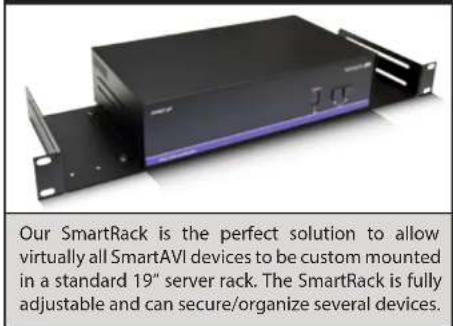
Rack Mountable Option
Smart-AM SMART AUDIO VIDEO INNOVATION
SmartAVI, Inc. / Twitter: smartavi 11651 Vanowen St. North Hollywood, CA 91605 Tel: (818) 503-6200 Fax: (818) 503-6208 http://www.SmartAVI.com

V2V_FAMILY
Installation Manual
V2V-SDHD
natural_image
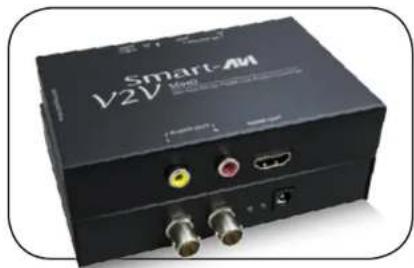
Black Smart-AI V2V audio device with ports and connectors (no visible text or symbols on body)HD-SDI/SDI to HDMI and Audio Converter

www.smartavi.com
Introduction
The V2V-SDHD enables you to connect your high-definition HD-SDI or SDI devices to HDMI displays or TVs with embedded HDMI audio. It also features 2-channel RCA audio output for monitoring or connection to external speakers. Often the display or TV will have poor sound or no sound at all, requiring the additional audio output. The V2V-SDHD also features a looping HD-SDI/SDI connection that allows you to daisy chain the signal to other outputs. This means that you can have multiple HDMI displays playing the HD-SDI/SDI signal.
Features
- Converts HD-SDI/SDI input signal to one HDMI 1.1 signal with embedded audio
• Also has 2-channel RCA Audio output - Looping HD-SDI/SDI allows for daisy-chaining additional equipment
• HDMI output: Supports up to 1080p/60HZ
• HDCP 1.3b protocol compliant
• Audio formats supported : DTS-HD/Dolby-trueHD/LPCM7.1/DTS/Dolby-AC3/DSD
• Digital with no loss of quality
• Installs in minutes
Applications
• Home Theater
• Presentation Rooms
• Conference Center Systems
- Camera Surveillance
- Video Phone
• Control Room Systems
- Recording Studio
Installation
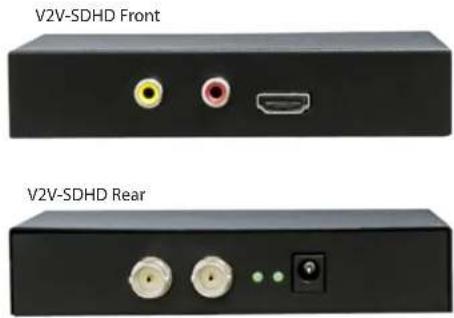
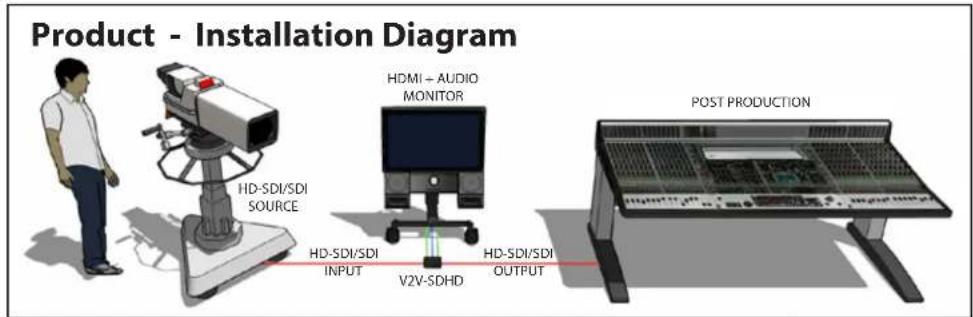
- Connect an HD-SDI/SDI video input device to the HD-SDI/SDI IN port on the rear of the V2V-SDHD.
- Connect an HDMI display to the HDMI OUTPUT port on the front of the V2V-SDHD.
- Optionally connect speakers or a stereo receiver with the AUDIO OUT ports on the V2V-SDHD.
- Optionally connect additional HD-SDI/SDI output devices to the HD-SDI/SDI OUT port on the V2V-SDHD.
- Connect the power cord to the V2V-SDHD.
- Power on the input device and the display/speakers.