V2V-AV2HV - Lyd/video konverter Smart-AVI - Gratis bruksanvisning og manual
Finn enhetens veiledning gratis V2V-AV2HV Smart-AVI i PDF-format.


Brukerspørsmål om V2V-AV2HV Smart-AVI
0 spørsmål om dette apparatet. Svar på dem du kjenner, eller still ditt eget.
Still et nytt spørsmål om dette apparatet
Last ned instruksjonene for din Lyd/video konverter i PDF-format gratis! Finn veiledningen din V2V-AV2HV - Smart-AVI og ta den elektroniske enheten tilbake i hendene. På denne siden er alle dokumenter som er nødvendige for bruken av enheten din publisert. V2V-AV2HV av merket Smart-AVI.
BRUKSANVISNING V2V-AV2HV Smart-AVI
TECHNICAL SPECIFICATIONS
| INPUT | |
| Input Video Resolution | YPbPr: 1080p@50/60Hz, 1080i@50/60Hz, 720p@50/60Hz, 576i/p, 480i/p |
| Input Video Signal | 0.5-1.0 volts p-p |
| Input DDC Signal | 5 volts p-p (TTL) |
| OUTPUT | |
| Video | HDMI Set 720p or 1080p output format with integrated audio, VGA |
| Audio | Stereo Audio 3.5mm jack socket |
| OPERATING FREQUENCY | |
| Vertical Frequency Range | 50/60Hz |
| Video Amplifier Bandwidth | 1.65Gbps/165MHz |
| OTHER | |
| Power Switching | Power Supply 110/220v 5VDC2A |
| Operating Temperature Range | 0 to +70°C (32 to +158°F) |
| Operating Humidity Range | 5 to 95 % RH (no condensation) |
| Dimensions 4.3 | in. W x 1.1 in. H x 3.1 in. D |
WHAT'S IN THE BOX?
| PART NO. QTY DESCRIPTION | ||
| V2V-AV2HV-S | 1 HD | Video Converter with Stereo Audio |
| PS5VDC2A 1 | Power | Supply |
Smart-AM
SMART AUDIO VIDEO INNOVATION
NOTICE
The information contained in this document is subject to change without notice. SmartAVI makes no warranty of any kind with regard to this material, including but not limited to, implied warranties of merchantability and fitness for particular purpose.
SmartAVI will not be liable for errors contained herein or for incidental or consequential damages in connection with the furnishing, performance or use of this material.
No part of this document may be photocopied, reproduced, or translated into another language without prior written consent from SmartAVI Technologies, Inc.
Many industry-leading companies have recognized the innovation and power of SmartAVI's technologies and have successfully implemented them within their systems. Users of SmartAVI technology include:

800.AVI.2131
Tel: (818) 503-6200 Fax: (818) 503-6208 11651 Vanowen St. North Hollywood, CA 91605
SmartAVI.com

Designed and Manufactured in the USA
Smart-AM
SMART AUDIO VIDEO INNOVATION
V2V-AV2HV
HD Video Converter with Stereo Audio
natural_image
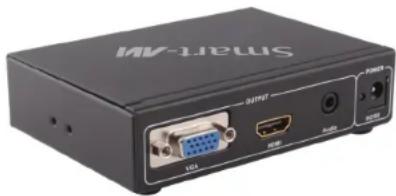
Black Smart AV electronic device with ports and connectors (no visible text or symbols on body)YPBPR, CVBS, S-Video and R/L Audio to HDMI or VGA and Stereo Audio Converter
USER MANUAL
INTRODUCTION
The V2V-AV2HV connects to older devices via HDMI, converting video for optimized performance and output picture quality.
The V2V-AV2HV is easy to use and enhances audio-visual content automatically, so set-up is simple and hassle-free.
With a wide range of device connectivity and refined media output, the V2V-AV2HV is the best way to make the most of aging AV equipment.
FEATURES
• Installs in seconds, no need of setting.
• Auto detect the input resolution without setting.
- Convert YPbPr video and R/L audio into complete HDMI and VGA+stereo audio.
• Supports CVBS video and R/L audio into complete HDMI and VGA+stereo audio.
- Convert S-video video and R/L audio into complete HDMI and VGA+stereo audio.
• Supports highest video resolution up to 1080p
- 165MHz/1.65Gbps per channel (6.75Gbps all channel) bandwidth.
- 8bit per channel (24bit all channel) deep color.
- Supports OSD( On Screen Display ) menu operation.
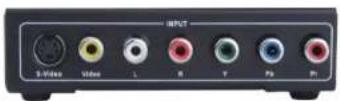
V2V-AV2HV Front
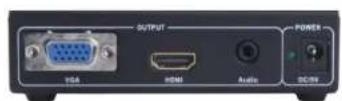
V2V-AV2HV Back
INSTALLATION DIAGRAM
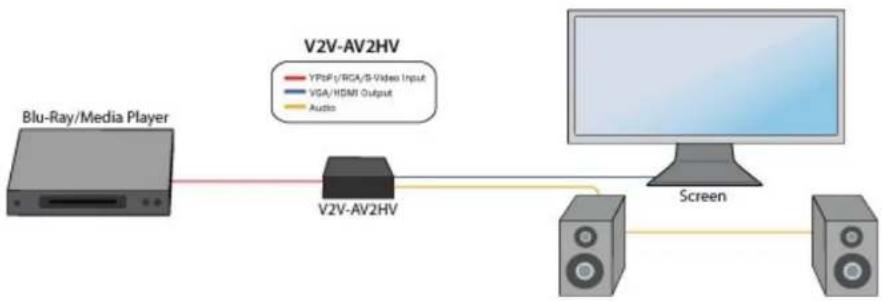
flowchart
graph LR
    A["Blu-Ray/Media Player"] -->|YPs/F/RCA/S-Video Input| B["V2V-AV2HV"]
    B -->|VGA/HDMI Output| C["Screen"]
    B -->|Audio| D["Monitor"]
CONNECTING THE V2V-AV2HV
- Power o all devices
- Connect the V2V-AV2HV to a display device via HDMI
- Connect the VGA input to video source
- Connect 3.5 Audio jack to the audio output source
- Connect the component video green "Pr," blue "Pb," and red to the "Y" RCA jacks and the component source audio to L and R.
- Connect the composite video Yellow jack, to the composite input, and the corresponding audio jacks R and L into Audio-R and Audio-L respectively.
- Connect the power supply to the DC 5v
- Turn on the power to each external device
- Turn on the power to the V2V by toggling the power switch
- Use the Remote control, or front control panel to change sources.
- Use OSD for advanced control and menu operaon
SUPPORTED FILE TYPES
Video: MPEG, H.264, RM/RMVB
Audio: MPEG
Images: BMP, JPEG, PNG
APPLICATIONS
- Courtrooms
- Schools
• Conference Center Systems - Universities
- Hospitals
• Control Room Systems - Broadcasting Facilities
- Recording Studios