HDX-PRO - Extendeur AV Smart-AVI - Gratis bruksanvisning og manual
Finn enhetens veiledning gratis HDX-PRO Smart-AVI i PDF-format.


Brukerspørsmål om HDX-PRO Smart-AVI
0 spørsmål om dette apparatet. Svar på dem du kjenner, eller still ditt eget.
Still et nytt spørsmål om dette apparatet
Last ned instruksjonene for din Extendeur AV i PDF-format gratis! Finn veiledningen din HDX-PRO - Smart-AVI og ta den elektroniske enheten tilbake i hendene. På denne siden er alle dokumenter som er nødvendige for bruken av enheten din publisert. HDX-PRO av merket Smart-AVI.
BRUKSANVISNING HDX-PRO Smart-AVI
Smart-AM Smart Audio Video Integration
UserManual
HDX-PRO
natural_image
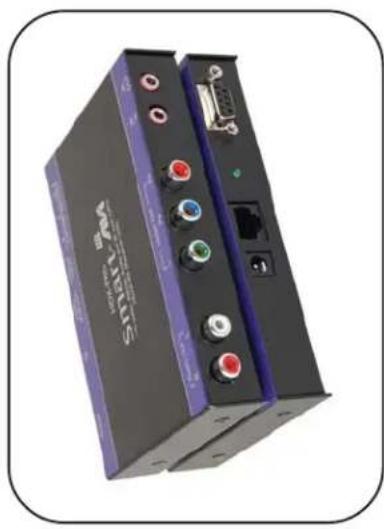
Exterior view of a Smart-AM device with ports, connectors, and a port (no visible text or symbols on the device body)Use a single CAT5 to broadcast high resolution HDTV Video, Stereo Audio, RS232 and IR up to 1000ft away.
www.smartavi.com
© Copyright 2007 Smart-AVI, All Rights Reserved
Notice
The information contained in this document is subject to change without notice. Smart-AVI makes no warranty of any kind with regard to this material, including but not limited to, implied warranties of merchantability and fitness for any particular purpose.
Smart-AVI will not be liable for errors contained herein or for incidental or consequential damages in connection with the furnishing, performance or use of this material.
No part of this document may be photocopied, reproduced or translated into another language with out prior written consent from Smart-AVI.
For the complete manual, visit www.smartavi.com.
t p i r c s e D
Smart-AM
2840 N. Naomi Ave.
Burbank, California 91504
Phone: (818) 565-0011
Facsimile: (818) 565-0020
m_hdxpro-062509
| Technical Specifications |
| TRANSMITTER AND RECEIVER |
| VideoBandwidth 400MHzAnalog signal Level 1 voltImpedance 75 ohms |
| Connector3 RCA |
| FormatYPbPr analog component video |
| AudioBandwidth 20 KHzSignal level OdBImpedance 10K ohmsConnector RCA Left and Right |
| System and CableType Cat5 UTP EIA 568AConnector RJ45 |
| PowerRequirements 5V DC @500mAConnector 5x2.1 DC Jack |
| RS232DB9 Malc/Femalebaudrate up to 115,000bps |
| IRIR Emitter OutputIR Frequency Range 30KHz to 80KHzEmitter Distance Up to 10'Connector 3.5mm stereo jack for emitter |
Recieve on DB9 Male
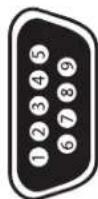
| PiniP No.0N | RiP Namena N. 8 N | DescriptionpiraseDN on |
| 2 | RxD | Receive Data on DB9 Male |
| 3 | TxD | Transmit Data on DB9 Male |
| 5 | SGND | Ground |
Transmit on DB9 Female
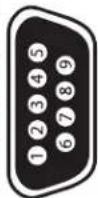
| PiniP No.0 | N | Name: N | Description: D | N |
| 2 | TxD | Transmit Data on DB9 Female | ||
| 3 | RxD | Recieve Data on DB9 Female | ||
| 5 | SGND | Ground | ||
ta tio iaD
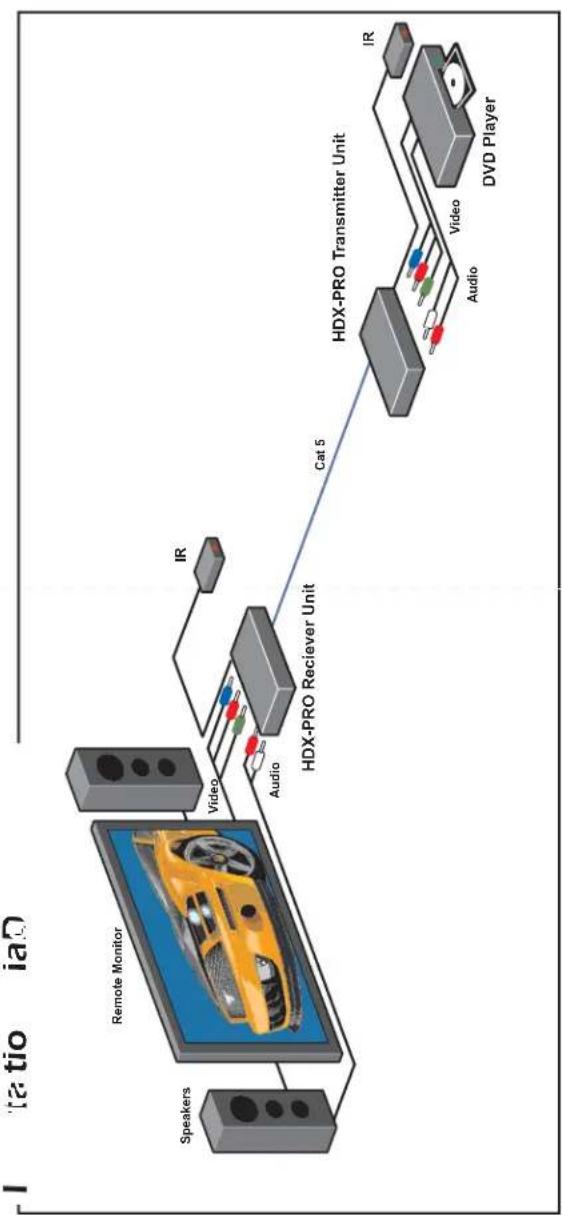
flowchart
graph LR
    A["Speakers"] --> B["Remote Monitor"]
    B --> C["Video"]
    C --> D["HDX-PRO Receiver Unit"]
    D --> E["Cat 5"]
    E --> F["HDX-PRO Transmitter Unit"]
    F --> G["Video"]
    G --> H["IR"]
    F --> I["Audio"]
    F --> J["Video"]
    F --> K["DVd Player"]
Features
Supports HDTV Screen Y,Pb, Pr
Uses easy to install, inexpensive CAT-5/5e/6/7/8. Output reaches up to 1,000 feet (300 m). Resolutions up to 1900x1200.
300 MHz Bandwidth.
Sends high-resolution HDTV component, Stereo Audio, RS232 and IR
Compatible with Line Level Stereo Audio Signals. High ground loop immunity. Built-in lightning, power surge and transient
protection.
Designated trimmer in the remote unit to compensate for cable length.
Compact Metal Case Enclosure. Supports RS232 and IR
What's in the box?
HDX-PRO
Please check the contents of the package before beginning installation.
Connecting The Transmitter
-
Connect the output of component video source to the video input of the transmitter using RCA to RCA cable
-
Connect audio source to the audio input of the transmitter using audio rca cable
-
In the back of the unit connect the CAT5 cable that will connect to the receiver (XTPRO-RX).
*NOTE: You can not use RS232 and IR at the same time.
Adjusting and Tuning the Signal
In order to fine tune the signal, adjust the individual
dials one at a time starting with GREEN, then BLUE, and lastly RED. As you turn the dials you will notice
the colors slightly change as you increase or decrease the strength. All dials should be around the same distance.
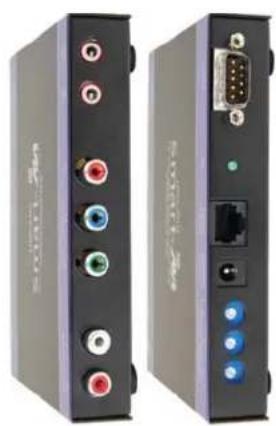
natural_image
Front and back view of a black electronic device with ports, connectors, and a port (no visible text or symbols)Connecting The Receiver
-
Connect CAT5 cable (coming from the transmitter) to the back of the receiver.
-
Connect display monitors to the RCA
connectors on the front of the receiver.
- Connect a sets of external speakers to the audio output connections on the front of the unit.
Preparing & Connecting System CAT5 Cable
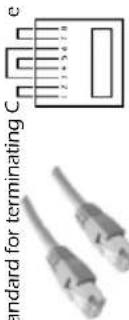
Pair 1 Pins 1 & 2
Pair 2 Pins 3 & 6 Pair 3 Pins 4 & 5
Pair 4 Pins 7 & 8
Connectors:Connectors: RJ-45
Capacitance: Conductor Gauge: 24 AWG
| HDX-PROX Package Content | ||
| Qt | Itemat | ParfNo |
| 1 | HDX-PRO Transmitter Unit | HDX-PRO-TX |
| 1 | HDX-PRO Receiver Unit | HDX-PRO-RX |
| 2 | 5 volt dc power supply | PS-5D1A-US |
| 1 | HDD 15 male to male VGA cable (6ft) | CC-VGAMM-06 |
| Optionatio | ||
| 1 | Audio 3.5 mm stereo miniplug cable | CC-ADMM06 |
| 1 | IR EYE Receiver | SM-EYE |
| 1 | IR Emitter | SM-LED |
| 1 | Serial m/f DB9 6ft. | CCSERMF06 |