HDX-POE-RXS - Extendeur AV Smart-AVI - Gratis bruksanvisning og manual
Finn enhetens veiledning gratis HDX-POE-RXS Smart-AVI i PDF-format.


Brukerspørsmål om HDX-POE-RXS Smart-AVI
0 spørsmål om dette apparatet. Svar på dem du kjenner, eller still ditt eget.
Still et nytt spørsmål om dette apparatet
Last ned instruksjonene for din Extendeur AV i PDF-format gratis! Finn veiledningen din HDX-POE-RXS - Smart-AVI og ta den elektroniske enheten tilbake i hendene. På denne siden er alle dokumenter som er nødvendige for bruken av enheten din publisert. HDX-POE-RXS av merket Smart-AVI.
BRUKSANVISNING HDX-POE-RXS Smart-AVI
TECHNICAL SPECIFICATIONS
| VIDEO | |
| Resolution 800X600, 1024X768, 1280X1024, 1366X768, 1920X1200, 480i, 720p, 1080i, 1080p and 3D | |
| Color Depth Deep Color 36/30/24 Bit at 1080p and 3D | |
| Video Bandwidth 10.2 Gbps | |
| Input Video Signal 1.2 Volts P-P | |
| Input DDC Signal 5 Volts (TTL) |
| AUDIO | |
| Format Up to PCM 8 | channel, DolbyDigital TrueHD,and DTS-HD Master Audio |
| Input Interface HDMI | (Integrated) |
| Output Interface HDMI | (Integrated) |
| IR | |
| Signal Type | 38kHz, 56kHz |
| Interface | 3.5 mm Jack Socket (Female) |
| I/O CONNECTOR (Transmitter) | |
| Input | HDMI-A 19PIN Socket12VDC Jack3.5mm Jacks for IR Receiver |
| Output | RJ45 Jack3.5mm Jack for IR Emitter |
| I/O CONNECTOR (Receiver) | |
| Input | RJ45 Jack3.5mm Jack for IR Receiver12VDC Jack |
| Output | 3.5mm Jack for IR EmitterHDMI-A 19PIN Socket |
| SYSTEM | |
| Interface RJ-45 | |
| Cable Requirements | CAT5/5e/6 |
| Maximum Length 250 ft. | |
| OTHER | |
| Power | 12VDC2.5A |
| Approvals | UL, CE, ROHS Compliant |
| Operating Temp. | 32 to 104°F (0 to 40 °C) |
| Storage Temp. -4 to | 140 °F (-20 to 60 °C) |
| Humidity | 10% to 85% (Non-condensing) |
| Dimensions | 0.9" x 2.9" x 3.7" |
| Weight | 0.26 lbs |

Designed and Manufactured In the USA
800.AVI.2131
Tel: (818) 503-6200 Fax: (818) 503-6208
11651 Vanowen St. North Hollywood, CA 91605
SmartAVI.com
Smart-AM SMART AUDIO VIDEO INNOVATION
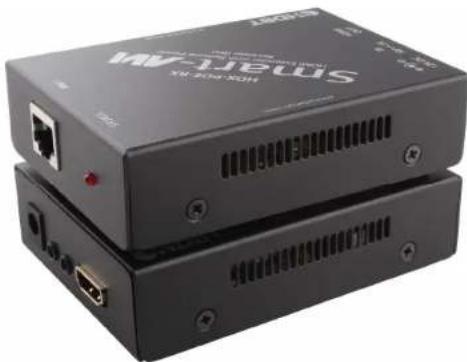
HDX-POE
natural_image
Two black electronic devices labeled 'MV-Jeews' with ports and ventilation slots (no readable text beyond branding)HDMI, IR, and Power Extender Over Single CAT5e/6 Cable
Watch and control HDTV 1080p video up to 250ft from the source via Cat5e/6 using HDBaseT and POE technology
USER MANUAL
OVERVIEW
Are you extending your HD signal reach and finding that the best potential new locations don't have the proper power available? You may not have to scale down your plans if you consider using an HDX-POE system from SmartAVI. HDX-POE injects power into HDBaseT CAT5/CAT6 cable that transports both HDMI and IR and picks it off at the load.
FEATURES
• Supports POE: Can be powered by TX or RX
- Extends HDMI,IR and Power Output over one Cat5e/6 Cable
• Extends IR Control Signals for Remote Control
• Uses HDBaseT Technology
- Full HD support: 1080p@60Hz@48 bit/pixels, 1080p@120Hz@24 bit/pixels, 3D, 1080P60Hz and 4K x 2K@30Hz@24bit
• Data Signals up to 3.4Gbps
• HDMI 1.4 and HDCP Compliance
• Uses Bi-Directional IR Communication
• Transmits High-Quality Dolby TrueHD, DTS-HD MA Audio Signals
• Transmits 1080p Resolution Video up to 250 ft
WHAT'S IN THE BOX?
| PART NO. | DESCRIPTION |
| HDX-POES | HDBaseT HDMI & IR Extender over a Single Cat5e/6 Cable Includes: [HDX-POE-TX, HDX-POE-RX and (PS12V2.5A Wall Mount)] |
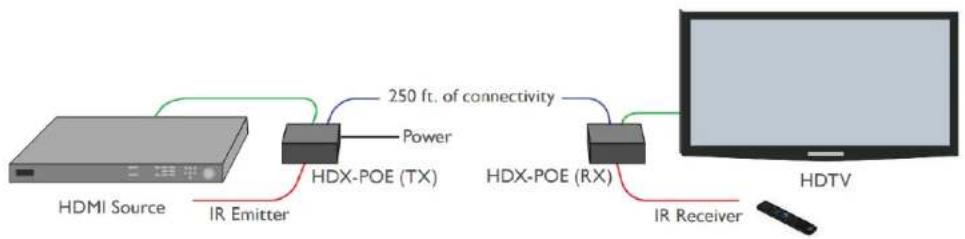
APPLICATION DIAGRAM
flowchart
graph LR
    A["HDMI Source"] -->|IR Emitter| B["HDX-POE (TX)"]
    B -->|250 ft. of connectivity Power| C["HDX-POE (RX)"]
    C -->|IR Receiver| D["HDTV"]
CONNECTING THE HDX-POE
- Power off the HDMI source and display.
- Connect an HDMI cable from the HDMI source to the HDMI IN port of the HDX-POE transmitter.
- Connect an IR emitter (optional) to the IR OUT port on the transmitter.
- Connect the HDX-POE transmitter to the HDX-POE receiver using a CAT5e/6 cable (up to 150ft).
- Connect an IR receiver (optional) to the IR IN port on the receiver.
- Connect an HDMI cable from the HDMI OUT port on the HDX-POE receiver to the HDMI Display.
- Connect the power on the HDX-POE transmitter plugging in their power adapters (12VDC2A) or provide 12VDC input from the rear DC input port. NOTE: If the RX side has connected DC adapter, TX can get the DC power over the CAT5e/ CAT6 cable, so leave DC input port empty. Only 1 power supply is required for both units.
- Power on the HDMI source, displays and speakers. The RX will read the EDID from the monitor, and then pass the data into the TX automatically.