HKM-02S - Bryter Smart-AVI - Gratis bruksanvisning og manual
Finn enhetens veiledning gratis HKM-02S Smart-AVI i PDF-format.


Brukerspørsmål om HKM-02S Smart-AVI
0 spørsmål om dette apparatet. Svar på dem du kjenner, eller still ditt eget.
Still et nytt spørsmål om dette apparatet
Last ned instruksjonene for din Bryter i PDF-format gratis! Finn veiledningen din HKM-02S - Smart-AVI og ta den elektroniske enheten tilbake i hendene. På denne siden er alle dokumenter som er nødvendige for bruken av enheten din publisert. HKM-02S av merket Smart-AVI.
BRUKSANVISNING HKM-02S Smart-AVI
What's in the Box?
| PART NO. QTY DESCRIPTION | ||
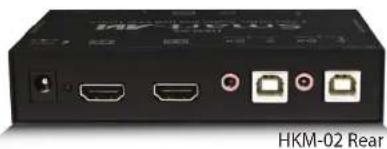
| HKM-02 1 2X1 | KVM HDMI, USB, Audio | |
| Power Supply | PS5VD C2A | |
Technical Specifications
| VIDEO | |
| Format | HDMI 1.3b [Deep Color, xvYcc color space supported] |
| DVI Compliance | Single-link DVI-D 1.1 |
| HDCP Compliance | 1.0/1.1 |
| Video Bandwidth | Single-link 340MHz [10.2Gbps] |
| Resolution | 480i,480p,720i,720p,1080i,1080p |
| Input Interface | (2) HDMI[7.1ch audio & video] |
| Output Interface | (1) HDMI[7.1ch audio & video] |
| Connector | Type A[19-pin female] |
| Maximum Distance | 25 ft. |
| AUDIO | |
| Frequency Response 20 Hz to 20 KHz | |
| Impedance 600 ohm | |
| Nominal Level 0-1.0 V | |
| Common Mode Rejection at 60dB | |
| Input Interface (2) 3.5 mm Stereo Audio | |
| Output Interface (1) 3.5 mm Stereo Audio | |
| USB | |
| Signaling | USB 1.1 and 1.0 |
| Input Interface (2) USB Type B | |
| Output Interface (4) USB Type A | |
| CONTROL | |
| Front Panel | Tact Switch |
| OTHER | |
| Power | External 100-240 VAC/5VDC2A @10W |
| Dimensions | 5"W x 1.625"H x 3.5"D |
| Weight | 5 lbs. |
| Approvals | UL, CE, ROHS Compliant |
| Operating Temp. | 32-131°F (0-55 °C) |
| Storage Temp. | -4-185 °F (-20-85 °C) |
| Humidity | Up to 95% |
© Copyright 2011 Smart-AVI, All Rights Reserved
NOTICE
The information contained in this document is subject to change without notice. Smart-AVI makes no warranty of any kind with regard to this material, including but not limited to, implied warranties of merchantability and fitness for any particular purpose.
Smart-AVI will not be liable for errors contained herein or for incidental or consequential damages in connection with the furnishing, performance or use of this material.
No part of this document may be photocopied, reproduced or translated into another language without prior written consent from Smart-AVI.
For more information, visit www.smartavi.com.
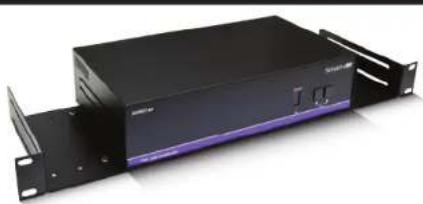
Rack Mountable Option
natural_image
Exterior view of a black server rack unit with visible drive bays and ventilation slots (no text or symbols)Our SmartRack is the perfect solution to allow virtually all SmartAVI devices to be custom mounted in a standard 19" server rack. The SmartRack is fully adjustable and can secure/organize several devices.

SmartAVI, Inc. / Twitter: smartavi 11651 Vanowen St. North Hollywood, CA 91605 Tel: (818) 503-6200 Fax: (818) 503-6208 http://www.SmartAVI.com
Smart-AVI SMART AUDIO VIDEO INNOVATION
Installation Manual
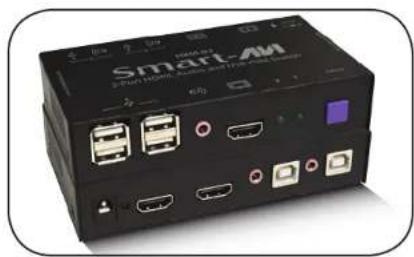
HKM-02
2-Port HDMI KVM with USB Keyboard and Mouse, and Stereo Audio
natural_image
Black smart AM device with multiple ports and connectors (no visible text or symbols)Control 2 Computers, PC or Mac on one Display with USB Keyboard and Mouse, and Stereo Audio
www.smartavi.com
Introduction
The HKM-02 is a cross-platform HDMI switch capable of sharing one HDMI Monitor between two computers, PC or Mac. View two computers with HDMI on a single screen, saving money and desktop space.
Features
• Compatible with Mac, PC, Linux and Sun
• Supports High Definition HDMI
• Supports USB keyboard and mouse
• Balanced stereo audio output
• Front panel tactile switch with LED indicator
• Supports Auto-scan mode for simple discovery
Applications
• Home Theater Integration
• Digital Signage Deployment
• Information Kiosks/Displays
• Film/Recording Studios
In the medical or industrial field, where it may not be practical (or safe) to have one or more CPUs in the general vicinity, SmartAVI's HDMI Switch Series is the perfect solution, allowing for either PC or Mac signals to be extended from computer to the display.
Another practical use for one of our HDMI Switch would be for media recording studios, where soundproofing and space issues come into play. Using a HDMI Switch eliminates the inherent "hum" of a powered CPU and gives you the freedom of using your keyboard, mouse and monitor without having to find room for the computer itself in the same workspace.
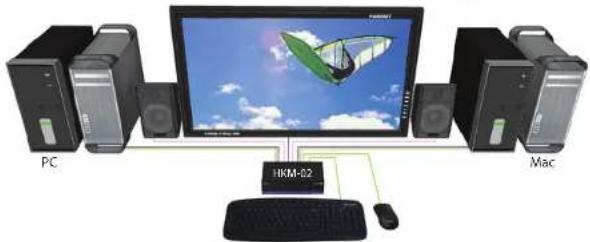
Product - Installation Diagram
flowchart
graph TD
    PC["PC"] -->|Data Bus| Monitor["Monitor"]
    Mac["Mac"] -->|Data Bus| Monitor
    Monitor -->|Data Bus| HKM-02["HKM-02"]
    HKM-02 -->|Data Bus| Mouse["Mouse"]
    HKM-02 -->|Data Bus| Keyboard["Keyboard"]
    HKM-02 -->|Data Bus| Mouse
    HKM-02 -->|Data Bus| Mouse
Installation
- Turn off all computers and the display.
- Connect the HDMI extension cables, USB cables, and audio cables (not included) to the computers and to the "IN" ports on the HKM-02.
- Connect the display to the "OUT" HDMI connector on the HKM-02.
- Connect USB mouse and keyboard to the "OUT" USB connector on the HKM-02.
- Connect speakers to the "OUT" audio connector on the HKM-02.
- Connect the power cord and power-on the HKM-02.
- Power on the computers, speakers and the display.
- Use the front panel buttons to select the desired input port.
Switching Between Ports
Front Panel Control
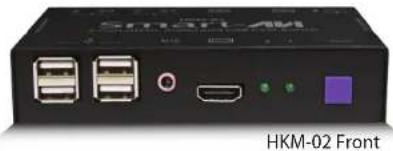
To switch ports using the front panel, press Select button to cycle through the available ports. The selected port number will be indicated by the LED display.
natural_image
Black electronic device labeled 'HKM-02 Front' with ports and connectors (no readable text beyond branding)