DVX-UTRXS - Bryter Smart-AVI - Gratis bruksanvisning og manual
Finn enhetens veiledning gratis DVX-UTRXS Smart-AVI i PDF-format.


Brukerspørsmål om DVX-UTRXS Smart-AVI
0 spørsmål om dette apparatet. Svar på dem du kjenner, eller still ditt eget.
Still et nytt spørsmål om dette apparatet
Last ned instruksjonene for din Bryter i PDF-format gratis! Finn veiledningen din DVX-UTRXS - Smart-AVI og ta den elektroniske enheten tilbake i hendene. På denne siden er alle dokumenter som er nødvendige for bruken av enheten din publisert. DVX-UTRXS av merket Smart-AVI.
BRUKSANVISNING DVX-UTRXS Smart-AVI
What's in the Box?
| PART NO. QTY DESCRIPTION | |
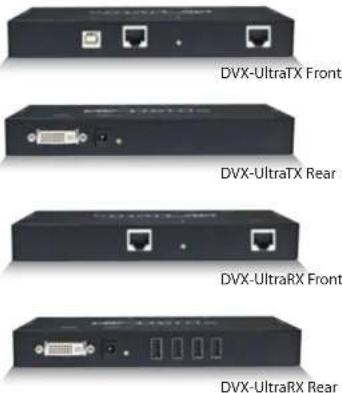
| DVX-UTTXS 1 DVI-D+USB 2.0 Extender Transmitter | |
| DVX-UTRXS 1 DVI-D+USB 2.0 Extender Receiver | |
| Power Supply 2 PS3VDC4A | |
Technical Specifications
| VIDEO | |
| Format DVI-D Single Line | |
| Maximum Pixel Clock 165 MHz | |
| Input Interface (TX) DVI-D 29-pin female | |
| Output Interface (RX) DVI-D 29-pin female | |
| Resolution Up to 1920 x 1200 @60Hz | |
| DDC 5 volts p-p(TTL) | |
| Input Equalization Automatic | |
| Input Cable Length Up to 20 ft. | |
| Output Cable Length Up to 20 ft. | |
| USB | |
| Signal Type | USB 2.0 (Fully Transparent) |
| Input Interface (TX) | (1) USB Type B (Female) |
| Output Interface (RX) | (4) USB Type A (Female) |
| OTHER | |
| Power | External 100-240 VAC/SVDC4A @20W |
| Dimensions | 6.25 in W x 1 in H x 3.5 in D |
| Weight | 1 lb |
| Operating Temp. | 0-55 °C (32-131°F) |
| Storage Temp. | -20 85 °C (-4-185°F) |
| Humidity | Up to 95% |
© Copyright 2011 Smart-AVI, All Rights Reserved
NOTICE
The information contained in this document is subject to change without notice. Smart-AVI makes no warranty of any kind with regard to this material, including but not limited to, implied warranties of merchantability and fitness for any particular purpose.
Smart-AVI will not be liable for errors contained herein or for incidental or consequential damages in connection with the furnishing, performance or use of this material.
No part of this document may be photocopied, reproduced or translated into another language without prior written consent from Smart-AVI.
For more information, visit www.smartavi.com.
Smart-AM SMART AUDIO VIDEO INNOVATION
SmartAVI, Inc. / Twitter: smartavi 11651 Vanowen St., North Hollywood, CA 91605 Tel: (818) 503-6200 Fax: (818) 503-6208 http://www.SmartAVI.com

Installation Manual
DVX-Ultra
DVI-D and USB 2.0 Extender
over STP
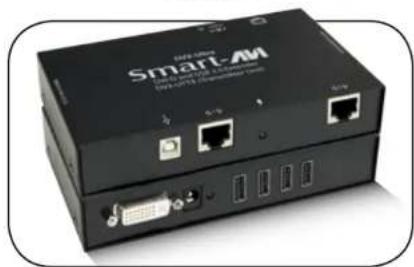
natural_image
Exterior view of a Smart-M network device with ports and connectors (no readable text or symbols beyond branding)DVI-D and USB 2.0 Extender up to 250 feet over STP Cable
www.smartavi.com
Introduction
The DVX-Ultra extends DVI-D Video and USB 2.0 up to 250 feet over 2 CAT6 STP Cables.
Features
• Extends USB 2.0 and DVI-D signals up to 250 feet from the computer
• Data recovery for digital video
• Supports 1920x1200 digital video resolution
• Fully compliant with USB 1.1 and 2.0 specifications
• Supports USB 1.1 (12 Mbps) and USB 2.0 (480 Mbps) data rates
• Integrated Four-Port Hub in the receiver
• Compatible with all operating systems
• External power adapter for transmitter and receiver unit
• Fully transparent USB (does not use any emulation)
- Plug and play
Applications
• Medical Applications
• Industrial Work Areas
• Home Theater Integration
• Digital Signage Deployment
• Information Kiosks/Displays
• Film/Recording Studios
Product - Installation Diagram
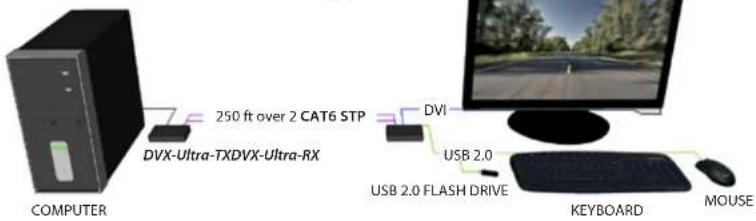
Connecting the DVX-Ultra
- Power off all devices.
- Connect a DVI-D source (computer) to the DVI-D port of the DVX-Ultra-TX labeled ☐.
- Connect a USB source to the USB port of the the DVX-Ultra-TX labeled
- Connect the DVX-Ultra-TX to the the DVX-Ultra-RX with two STP (Sheilded Twisted Pair) cables using the ports labeled ·1 and ·2 .
- Connect a DVI monitor to the port of the DVX-Ultra-RX labeled □.
- Connect up to 4 USB 2.0 devices to the ports on the DVX-Ultra-RX labeled
- Connect the power supply to the ports labeled on the DVX-Ultra-TX and DVX-Ultra-RX.
- Power on the computer, displays and USB 2.0 devices.
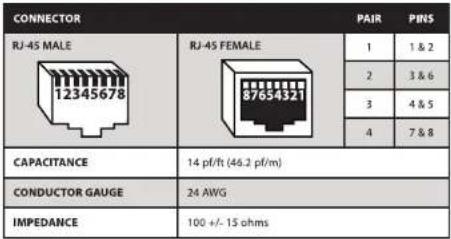
CAT5/5e/6 CABLE SPECIFICATIONS
 |