
RE-455X - プリンター CANON - 無料のユーザーマニュアル
デバイスのマニュアルを無料で見つける RE-455X CANON PDF形式.

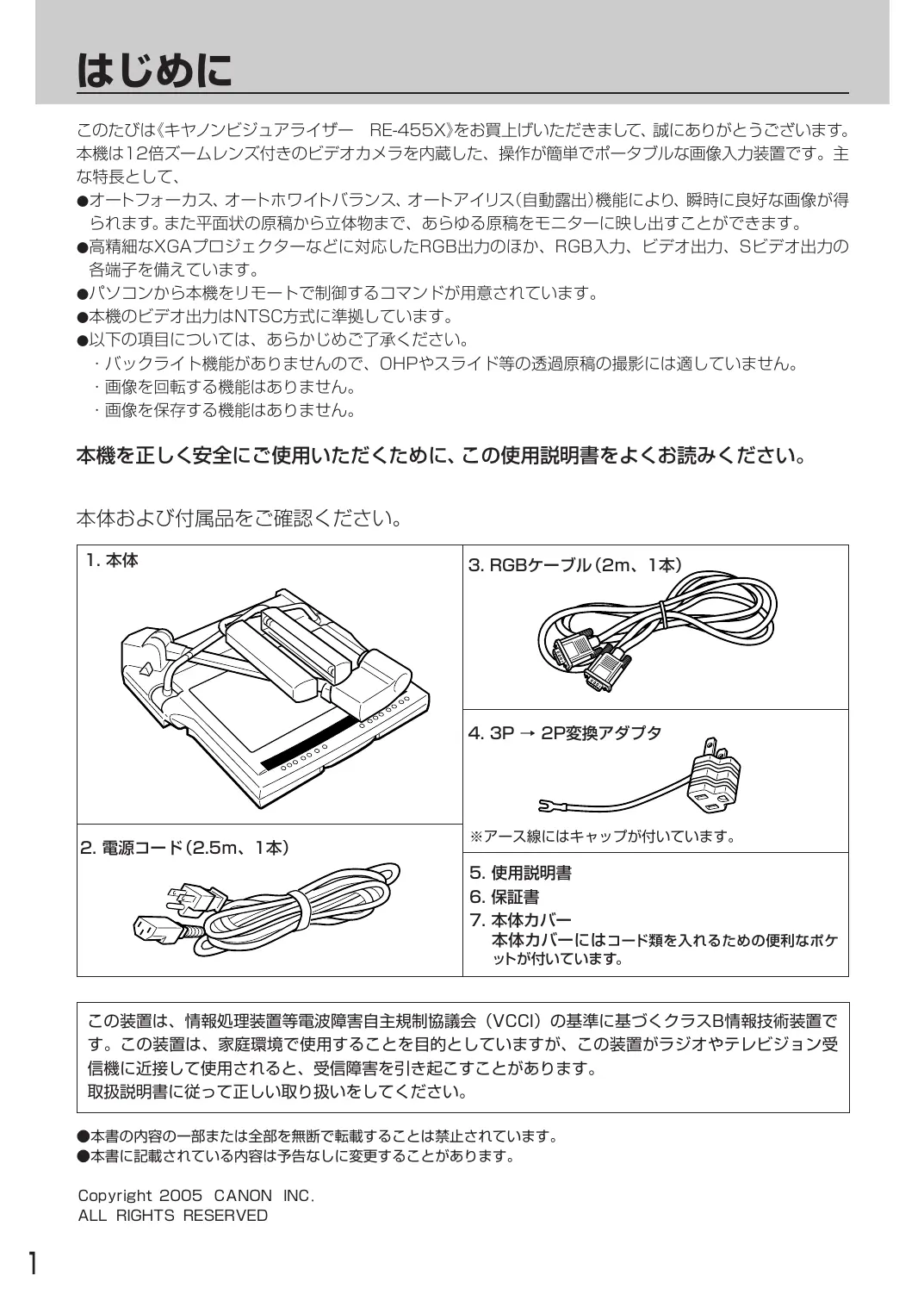


| 製品タイプ | 多機能プリンター(印刷、コピー、スキャン) |
| ブランド | Canon |
| モデル | RE-455X |
| 寸法 (幅 x 奥行 x 高さ) | 43 x 34 x 28 cm |
| 重量 | 8,5 kg |
| 電源 | 220-240 V, 50/60 Hz |
| 印刷技術 | インクジェット |
| 印刷解像度 | 最大4800 x 1200 dpi |
| 印刷速度(黒) | 15ページ/分 |
| 印刷速度(カラー) | 10ページ/分 |
| 給紙トレイ容量 | 100枚 |
| 接続性 | USB 2.0, Wi-Fi |
| ディスプレイ | モノクロLCD |
| 消費電力(待機時) | 10 W |
| 騒音レベル(印刷時) | 50 dB |
| 主な機能 | 印刷、コピー、スキャン |
| メンテナンスとクリーニング | 印刷ヘッドのクリーニング、カートリッジの交換 |
| セキュリティ | 自動オフ、設定ロック |
| 交換部品 | インクカートリッジ(黒、シアン、マゼンタ、イエロー) |
| 修理可能性 | 修理可能性指数:7/10 |
| 一般情報 | 取扱説明書はPDFでダウンロード可能 |
よくある質問 - RE-455X CANON
ユーザーの質問 RE-455X CANON
0 質問 この機器について。知っているものに答えるか、ご自身の質問をしてください。
この機器について新しい質問をする
デバイスの取扱説明書をダウンロード プリンター 無料でPDF形式で!マニュアルを見つける RE-455X - CANON 電子デバイスをもとに戻しましょう。このページにはデバイスの使用に必要なすべての書類が掲載されています。 RE-455X ブランド CANON.
使用説明書 RE-455X CANON
本製品を使いにる前に本書を必す説みにり、正しく使用か。
本书中的「安全に使いたはたに」は必す説みか。も、供説みにた後、。
它的はりは《キヤノンビジュア现代农业一RE-455X》を買上い了一的きまて、誠にかうごさい。本機は12倍ス一ムレNs付きの比才力M如を内藏た、操作が簡單で木一夕ルな画像入力装置です。主な特長とて、
- 才一トフロース、才一トモフィトバラNs、才一トアイリス(自動露出)機能によ、瞬時に良好な画像が得らて。まも平面状の原稿から立体物まて、あらゆる原稿をモニタ一に映し出てがてきま�。
- 高精細なXGAプロジ党的建设一各有对应了RGB出力のほさ、RGB入力、ビデ才出力、Sビデ才出力の各端子を備えいたします。
- 豪丶コンから本機をリモトに制御するコマンドが用意せていま�。
本機のビデ才出力はNTSC方式に準拠ていす。
●以下の項目にては、あらかじて了承くさい。
·巴克拉卜機能がませんの、OHPやスリト等の透過原稿の撮影には適ていません。
·画像在回軀る機能はありません。
·画像在保存的機能はにません。
本機を正し<安全にご使用くださいますと、ご使用説明書をよくお読みくだい。
本体おはみ付属品をご確認くだい。
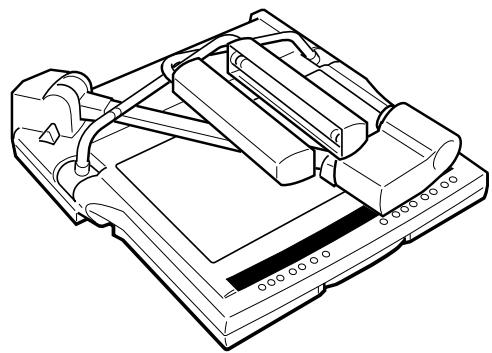
1. 本体
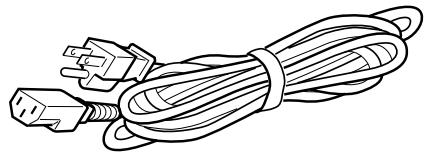
2. 電源コト(2.5m、1本)
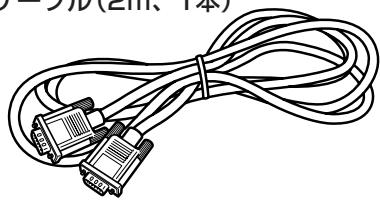
3. RGBケーリル(2m、1本)
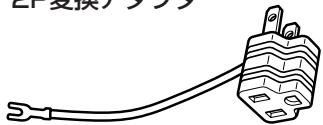
4.3P→2P変換アダフタ
※一久線にはヤリフが付いていす。
5.使用說明書
6. 保証書
7. 本体力八一
本体力八一にはコト類を入るたの便利なボットが付ていま�。
它的装置は、情報处理装置等電波障害自主規制協議会(VCCI)の基準に基じくクラスB情報技術裝置です。它的装置は、家庭環境で使用するとを目的とては、它的装置がラジ才やテレジドン受信機に近接て使用くださると、受信障害を引起的こさこがたは。
取拔説明書從去正用取拔也到下
本書の内容の一部たは全部を無断で軸載するとは禁止いたします。
本书記載載的內容是予告不以變更的它か有之。
Copyright 2005 CANON INC.
ALL RIGHTS RESERVED

安全にお使いんだくたに 3
1 各部の名称はたらき
2組み立て、収納、接統 9
3 電源入から终了て… 12
13
木瓦卜巴兰斯を調整し直すとき 14
画角をLETTER/A4サイズにると… 14
出力画像を静止画にするとき 14
白用紙の原稿を映すとき 15
画像の明るさや画質を調整するとき 15
4いろりな機器の接続 16
比才二夕一出力すると… 16
八元一 16
外部入力機器の画像に切換るとき(入力選択) 17
画像をAV機器に記録するとき… 18
八夕夕夕夕夕夕夕夕夕夕夕夕夕夕夕夕夕夕夕夕夕夕夕夕夕夕夕夕夕夕夕夕夕夕夕夕夕夕夕夕夕夕夕夕夕夕夕夕夕夕夕夕
八夕工 19
5 故障のはと思った. 20
6 主仕樣 21
它的使用說明書には、人体への危害や財産への損害を未然に防ご、本機を安全に使いんだたかに守てんだきい事項を記載てります。その表示と両記号の意味は次のようになていります。
本書中に使わてるマーケの説明
| 警告 | 它的表示为無視て取扱いを誤った場合に、死亡たは重傷を負う可能性が想定いたします内容を示ります。安全请点击使けたがくたに、必すその警告事項を守りくだせ。 |
| 注意 | 它的表示为無視て取扱いを誤った場合に、傷害たは物の損害の発生する可能性が想定いたします内容を示ります。安全请点击使けたがくたに、必すその注意事項を守りくだせ。 |
| 願い | 操作上必す守りてんだけた重要事項や禁止事項が書か/weります。機器の故障や損傷お願いいたします。必す請みくだせ。 |
| MEMO | ��作の参考くださいます。請务必見習しむ。請勿言わる。 |
本機の故障、誤動作、不具合哪に碍て生た純料經濟損害にきまは、当社は一切その責任を負いかねますの。
日常のお手出入
清掃は、柔らか布を水たはうす中性洗剤溶液で湿らせ、輕く拭きとてくださ。濡れのよう+kは使用してくださ。
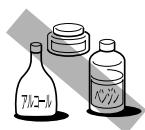
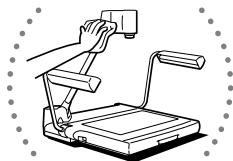

清掃のときは、必す電源コトを融合せに拔てくださ。も、アルコル、バング、シングナ等の引火性溶剂は使用しぃいくださ。そのら本体内部の電気部品に接触すると、火災・感電の原因にelizeます。

-
一ム拉卜点灯中およ消灯直は堂光兰不加熱にていすの、直接手を触いうに気をつてくさ。使用後に折たたはとは、特に注意てくさ。
-
一ム拉卜の堂光LANPを交換するとは、LANPの温度がじゆうに下てから行てくだせ。

レンズが污った場合は、刷毎たは柔らかい布で表面を傷けないように拭てくだせ。

ル或火性溶剂近は置かいてくさ。火災·感電的原因にらます。

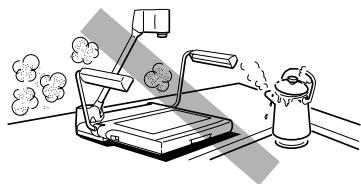
湿気やほこり、油煙の多い場所に置,Noいは
火災·感電·故障の原因くださるごたたは。

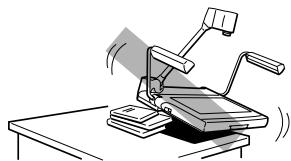
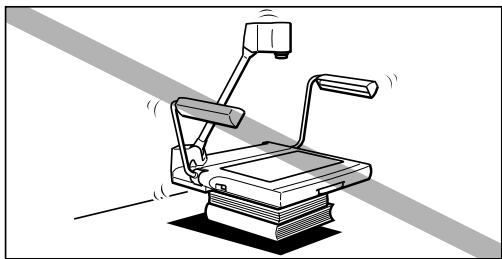
不安定な場所に置:NOでくだせ。
振動の多い場所や落下するそquelのあた不安定場所に置,Noはくさ。落ちた、倒たてはけが及故障の原因为る它のははま。

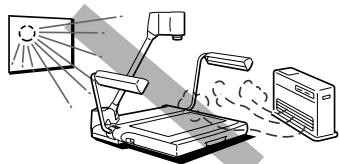
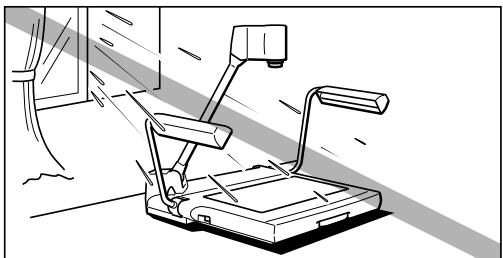
直射日光の当た場所やストフローの熱器具の近に置かないてください。
内部の温度が上かり、火災・故障の原因之称うにた態ります。た、電源コーブが熱器具に触ibleようご注意てくだせ。
電源にて

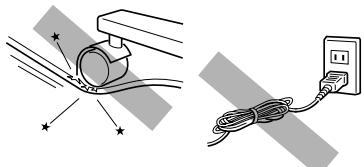
電源コードを傷けないくだいたします。
電源コードを加工,Th、傷をつたは、重物を載せ。、無理に曲けた、束てしぃいてくさ。電源。一ドが傷んだ(芯線の露出、断線等行业)場合は、販売店にご連絡くさ。そのまえ使用すると漏電し火災·感電の原因になま�。

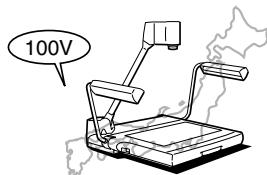
本機は国内専用です。
海外はこ使用になれせん。

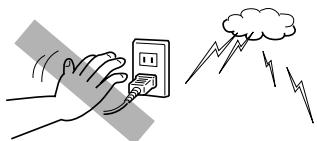
雷鳴出了一電源不等。
雷にようは火災・感電・故障の原因にらます。近くに雷が発生たときは、電源TPLGをCONSENTにから拔いて使用をお控えくだせ。

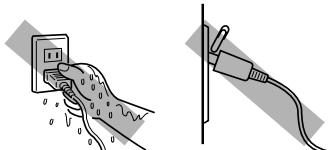
濡了一手電源TPLはさわらないてください。
感電の原因になまむ。電源TPLGはCONSENTに確実に差してうくさい。も、電源TPLGの羽に金屬なかが触る或火災·感電の原因为なまむ。
電源にて…つむき

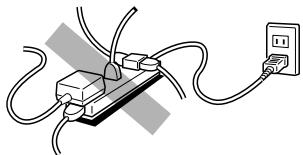
夕足配線をしおてくだせ。
た、延長一卜は使わいてくさ。過熱·癸火の原因になま�。

電源コードには、必す付属の電源コードを使いんださ。も、必すAC100Vの電源CONsetトを使いんださ。
付属の電源コト以外のコトを使った、AC100V以外の電源CONSENTを使ったと、火災、感電、故障の原因为之称す。

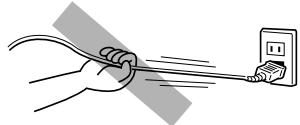
電源TPLA格を持てCONsetトから拔てください。
一卡引張和一卡的傷也火災·感電的原因。

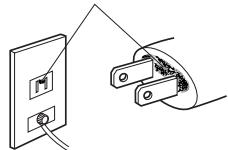
但 三或污乱被拭起取
電源TPLGを定期に拭き、その周邊およんだ広sentに溜またほこや污れを、乾いた布で拭き取てください。
はこ、湿気、油煙の多いとこ或、電源テ格を長期間差たまにすると、その周边に溜まったはこが湿気を吸て絶縄不良之称、火災の原因になま。

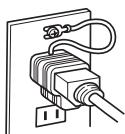
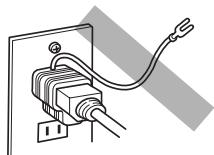
必すアスの付た電源CONSENTを使てくださ。付属の「3P→2P変換アダフタ」を使場合も、必すアスを接続するようにしてくださ。
一、一、一、一、一、一、一、一、一、一、一、一、一、一、一、一、一、一、一、一、一、一、一、一、一、一、一、一、一、一、一、一、一、一、一、一、一、一、一、一、一、一、一、一、一、一、一、一、一、一、一

電源コードの接続は、必す電源スイチを切った状態で行てくだせ。
取拔上的注意

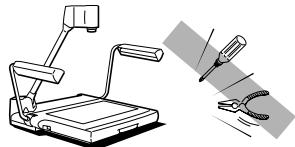
分解或改造をしおてくだせ。
火災·感雹·故障の原因になま�。

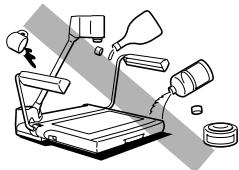
液体或引火性溶剂为乙醇等。
本機の内部に薬品、化粧品、水哪家液体、たはル一丶、バングン、シングナ一等の引火性溶剂をこばせないてくさ。万一そのらが内部に入った場合は、ます本機の電源を切り、電源TPLGをCONSENTに拔て販売店に連絡くさ。そのます使用すると火災·感電·故障の原因にたはます。

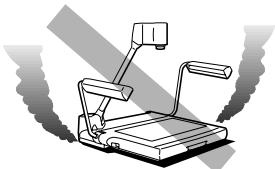
異常狀態のまま使用くださいますかんだい。
煙が出來、変な音や変な臭いがする各样の異常状態のまま使用くださいます。火災·感電·故障の原因にごります。万一煙が出たすに本機の電源を切り、必す電源TPLGをCONSENTにら拔き、煙が出なるのを確認し販売店に連絡くださいます。客様による修理は危険ですか�絶対に行わないで}

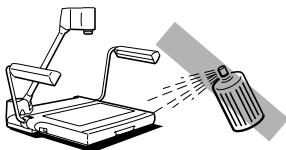
近く可燃性のスPLE一を使用くださいますかはい。
スプレーのガスが本体内部の電気部品のはに接触すると、火災·感電の原因にelizeます。

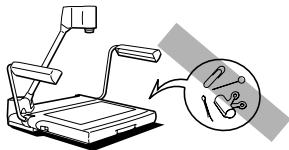
内部与金属類を差し違なてください。
本機の内部にクリットや木チキスの針哪家的金属類を差込んだり、落とたてしおてはくさ。万一那一枝が内部に入った場合は、ます本機の電源を切り、電源フロダをCONSENTに拔て販売店にご連絡くさ。そのまま使用すると火災·感電·故障の原因にNINGま�。

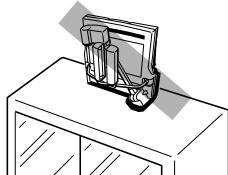
保管るときは水平に置てくだせ。
立て保管すると倒てけが及故障の原因になま�。
た、本機を持ら運はきは、必す電源を才にて一ト一類を外し、本機を折たたみ、ヤリングハンドルを引き出于此利用くさい。アムを持て運は和落てけが及故障の原因になま�。

アムライトを点灯中お願い消灯直後の堂光LANPが熱にていはの、直接手触�能いように気をつけてんださ。使用後に折りたたむときは、特別注意てくださ。
1 各部の名称のはたらき
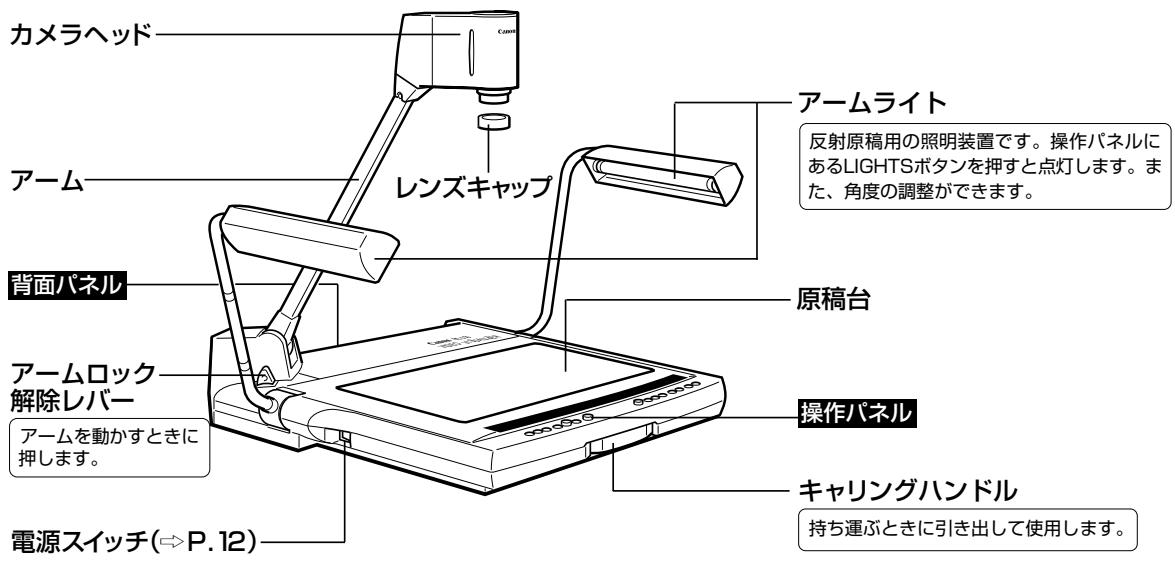

電源を切った後、再度電源を接入る场合は5秒以上的間隔くださいますようお願いいたします。間隔が短いと動作不良の原則に_WP。

アーマラーツはLIGHTS术atorsを押てもむには点灯ません。拉丁保護のた約3秒間予熱をして後に点灯さててて。
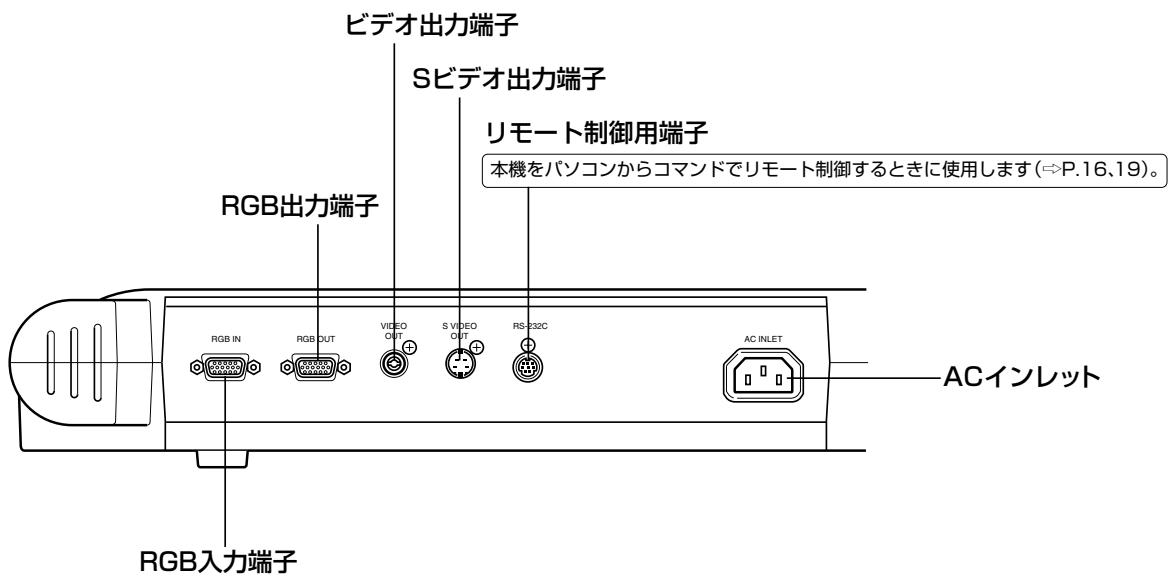
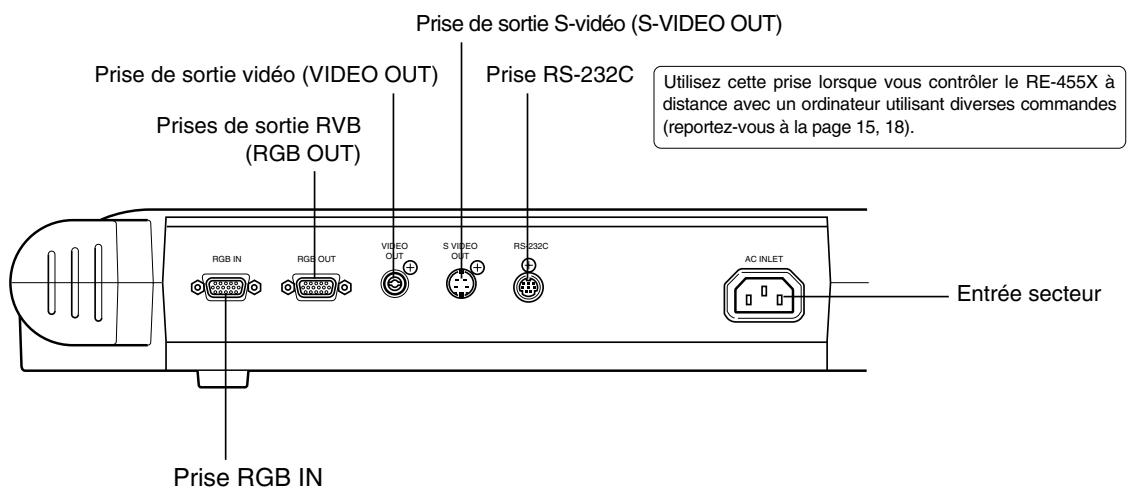
背面八不儿
いろな機器の接続のかたは16亀一ジにあらいたします。
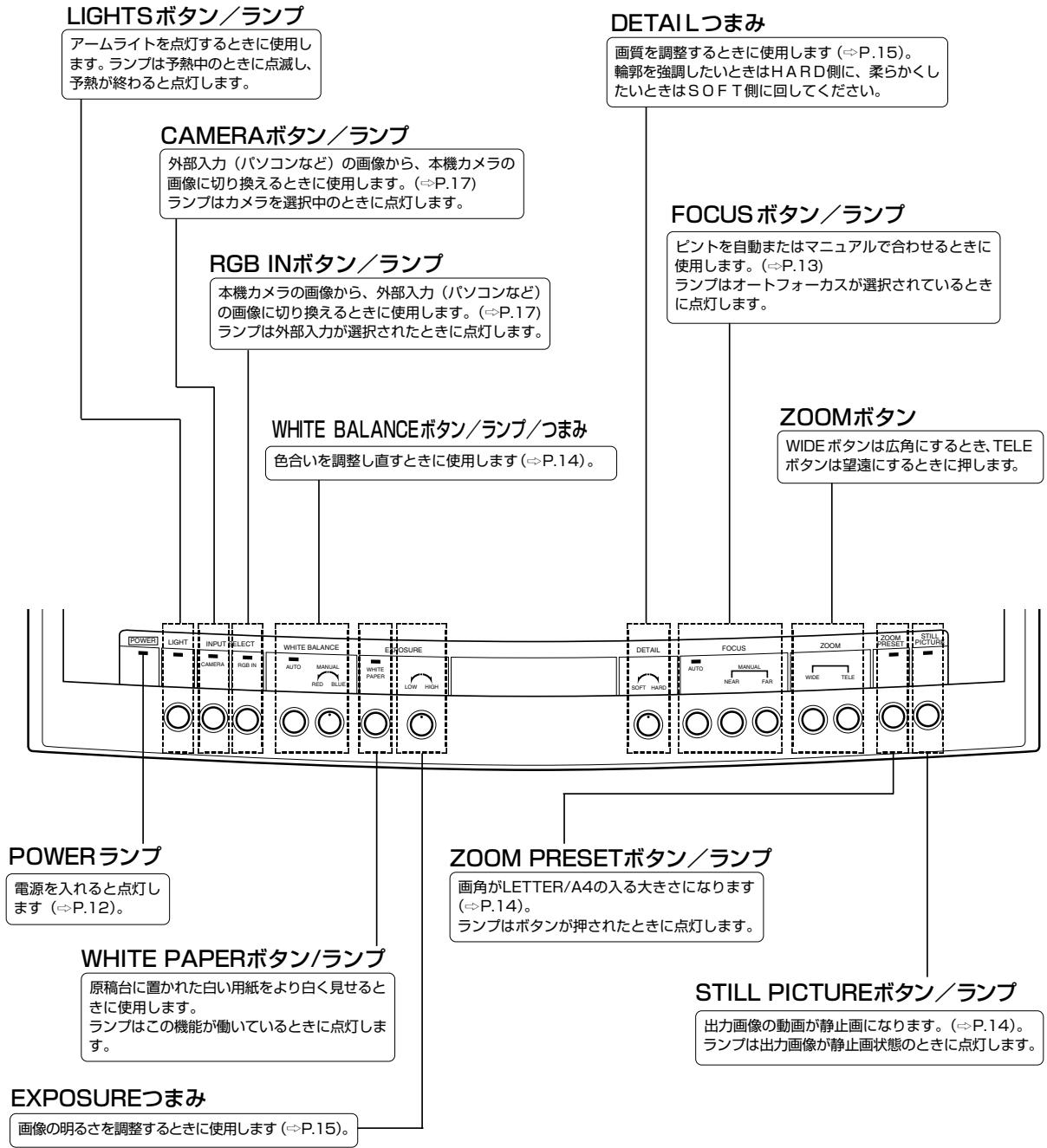
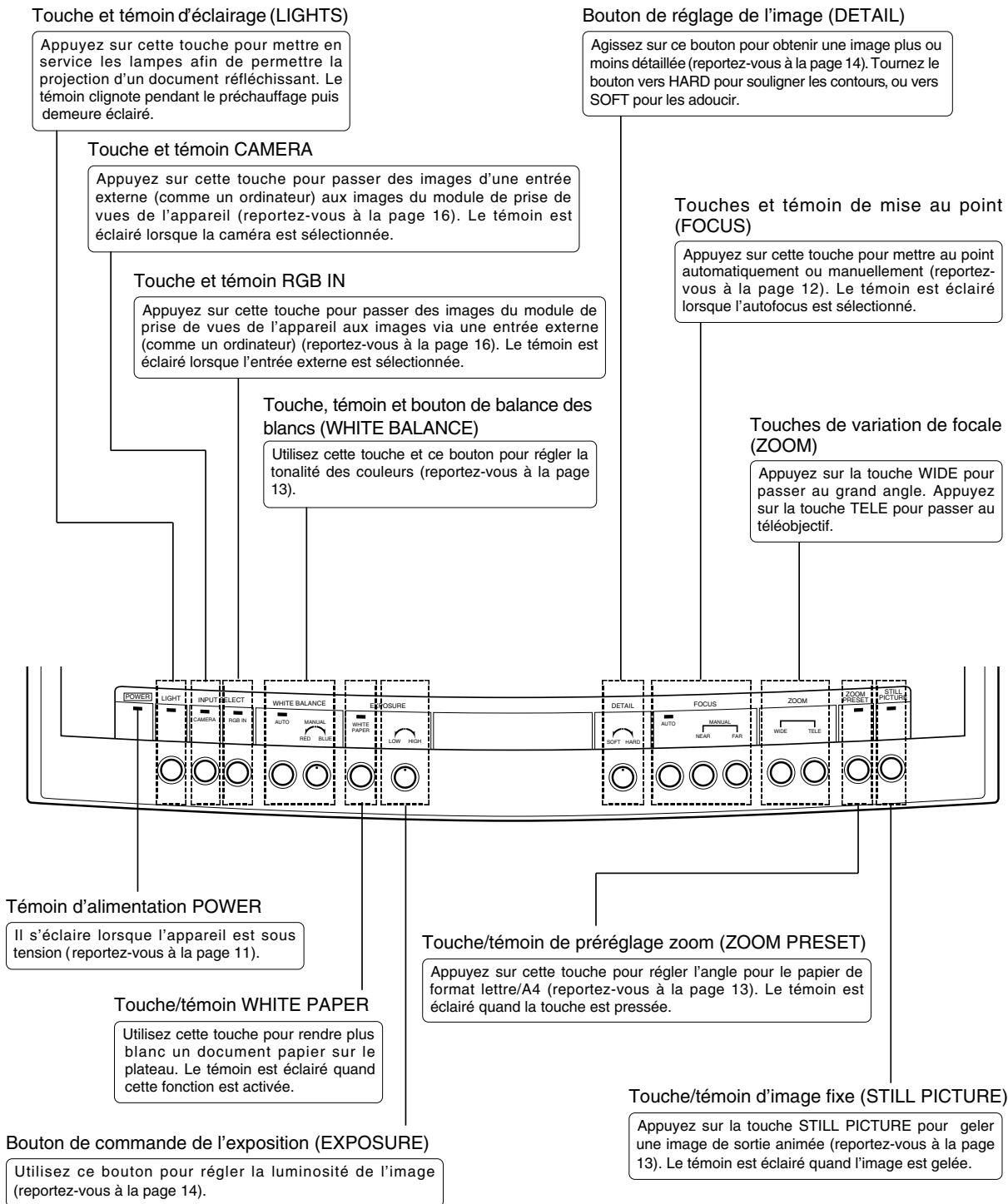
操作八不儿
2組み立て、収納、接続
組み立てかた
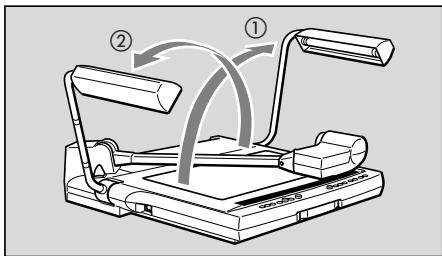
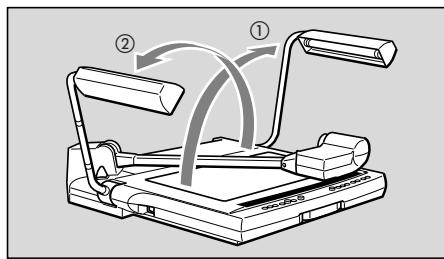
2本の一ムトを起にしま。
① ② 的顺以右側のアーマライトから起ててくだせ。
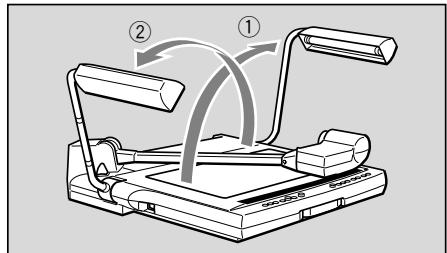
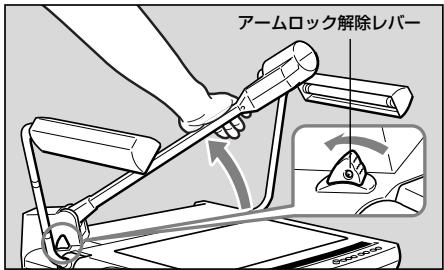
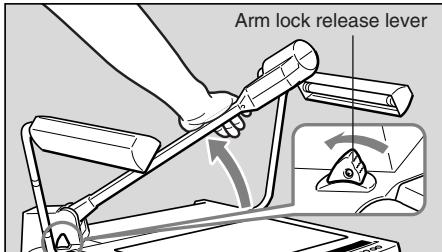
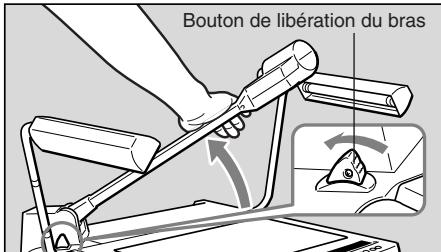
2 一ムロク解除レハ一を押し、一ムを止る位置て起こしま�。

必アムを押えなかリアムロク解除レハ一を押てくだせ。
一ムを押えないレハ一を押すと、急に一ムがはね上て、思わけがや故障の原因にらむ。た一ム起は静かに行てくさい。
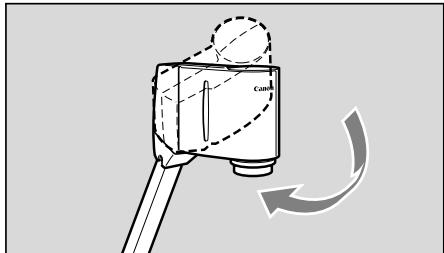
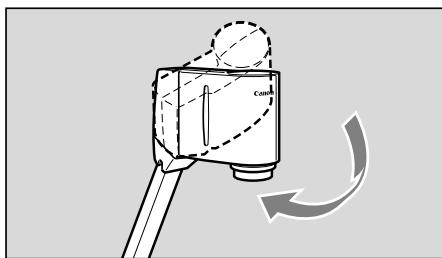
3 力メラハドを原枠台の方向に向けます。
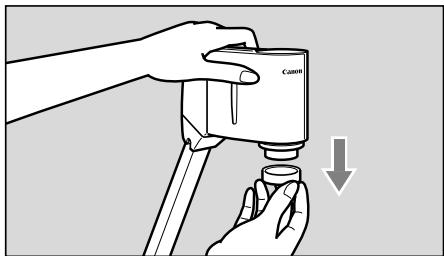
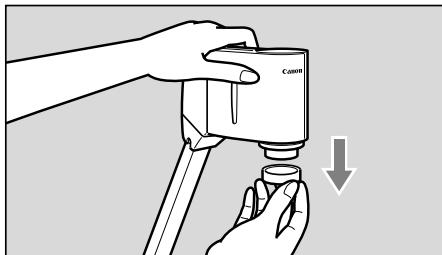
4 4
Lenvskaipfo的紛失にご注意くさ。
収納のしおた
1 1

収納逕前に、必す本機の電源を切てくだせ。
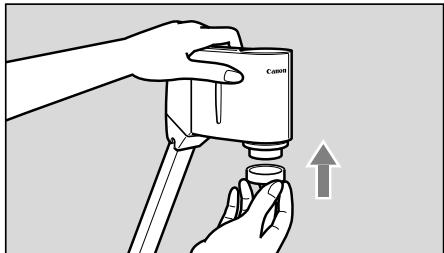
2 力メラハドを横に向けます。
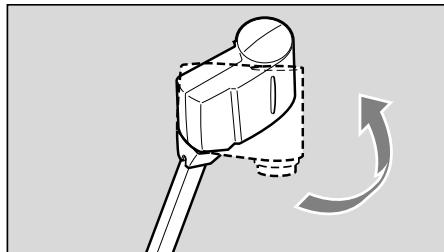
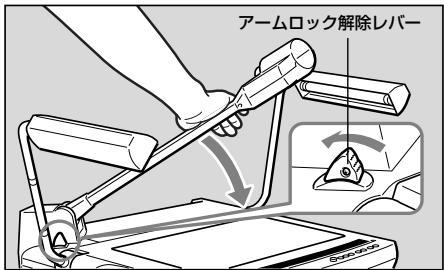
右手对一入持去一入口和解除八一。

必すアムを押えなから収納てくだせ。
アムを押えない以収納すると、急にアムがはね上て、思わけがや故障の原因にibility。また収納は静かに行てくだせ。
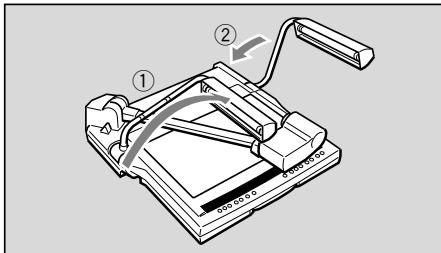
4 2本のアムライトをもどります。
① ② 的顺以左側のアーマライトからもとてくだせ。

アムライトを消灯直後は萤光LANPが高温にncyいますのて、直接手を触ないよう注意てください。

長期間ご使用に,Noらないきは付属の本体力ハ一をかてくさい。 本体力ハ一にはコト類が収納得起的木ケットが付いていま�。

本機の温度が十分に下がたとを確認てから、本体力宀一をかてくだい。
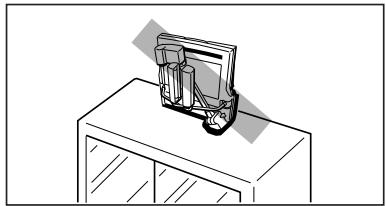
本機を保管するとは水平に置てくだせ。立て保管すると倒てけがや故障の原因にelizeます。
本機持ち運丶きは、電源を才七にてコ卜類を外丶、本機を折りたて、ヤリングハンドルを引き出于利用くさい。
接続のしおた
プロジクターと接続するとは、本体に付属のRGBケーレルを使用てくだせ。た電源コトドも本体に付属のモの使用てくだせ。
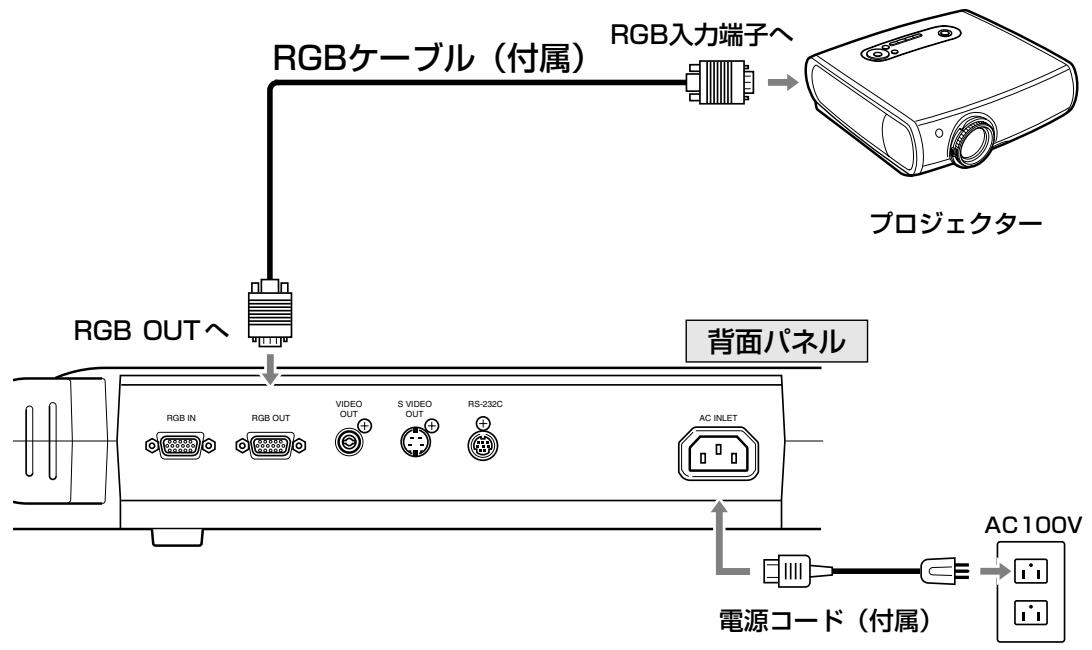

本機おはみ使用する機器を保護するた、接続するとは必は電源スイチを切てくだせ。も、ケームル類の拔き差は必はTPL格部持て行てくだせ。

XGAI対応た予プロジクタ一をご使用くだせ。
いろりな機器の接続のたは16ハジにあらま。使用する機器の取扱かたは、そquelの機器に付属の説明書をお表みくさ。
電源を入います。
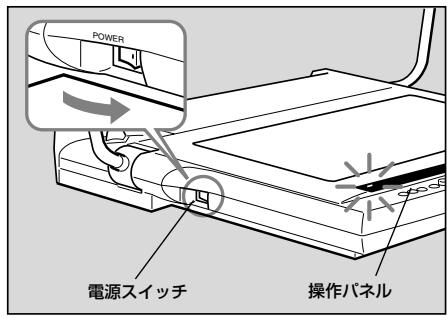
本機の電源を接入と操作ハルに係るPOWERLANPが点灯いたします。

電源入れて、画像が写し出さるまに約20秒かはま。
- 電源を入ると、木フィットバラスとフローカが自動のに調整いたします。
使用る各機器の電源を入いま�。
绦方の電源を先に入てもかません。
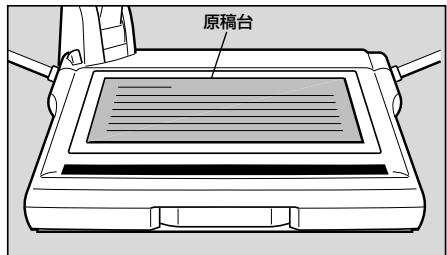
3 原稿台の中央に原稿を置ります。
画像が出ないとはんじスヤフを付たまにていいか確認てください。
4 ヒINTを合わせます。
電源入後は才一トカ一力さ作動しま�。
才一トフ才一力スでビCNTトが合わいとは、マニュアルフ才一力スに切り換て、マニュアルでビCNTトを合わてくださ。
5 终了んだら、電源を切ります。
POWERランフが消灯いたします。アーリ�トが点灯くださる场合は同時に消灯いたします。使用た機器のはの電源も必須くださいますば切てくだいたします。
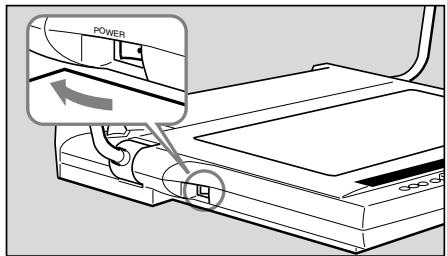

電源を切った後、再度電源を入る场合は5秒以上的間隔くださいます。間隔が短いと動作不良の原因にncy�ります。

使用しいきは成長の電源を切てくさ。も、長く使用しぃいきは本機の電源ご一載を外てくさ。
トが合わないき(マニアルフカ力ス)
才一トカ一力スでビCNTが合わないときや、立体物の任意の位置にビCNTを合わせたきは、マニアルでビCNTを合わせます。マニアルによるビCNT合わせは原稿台から約65mmの高さま�能成功です。なお立体物は被写体深度の関係上、被写体全体にビCNTが合わないとわるま�。
以下の手順で行ったさい。
① FOCUS プタナを押てマニアルフローに切り換えます。
② NEAR モタクや FAR モタクを押てに卜を調整いたします。
才一力一力スにもどすとは、FOCUS木たを押てくさい。
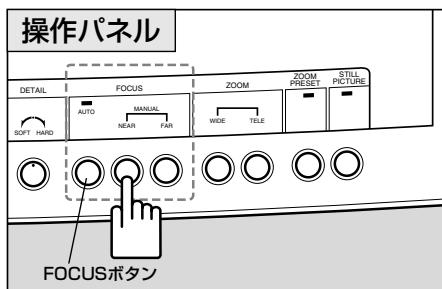

- FOCUS术計を2秒以上押すと、ウンチット・オーツフロー(ウンチットAF:被写体にビCNTトが合うと、ビCNTトが固定いたします。被写体をひんばんに取ibleるときにおすてしります。
立体物と紙の原稿を取るては写写出きはは、ウソ�トAFに切り換った状態で、そのとFOCUS木たを押てビCNT合わせをてくさ。 - ナンチットAF时代的FOCUSランフは、才一トフカス中は点滅し、ビCNTが合うと消灯ります。
- ナンシャットAFから通常の才一トフカカスにもどしぃは、FOCUS モタ的安全上押てくさい。
才一トフカスの苦手なたの
以下のようお願いいたしますにはれにビCNTが合わないご)”た)”は。その場合は、マニアルでビCNTを合わせてくだ)”
(1)反射率の低いもの(暗色合いの布地、髪の毛等各种)
(2)光沢のあるモの(電話機、ガラスの器なと)
(3) イラス越しのモの
(4) 濡淡の差の減少たの
(5)横線または斜の線ののもの
木フィ卜BARANsを調整し直すとき
色合的不自然怎和好之色合以了上和是卡马二阿尔有木瓦卜巴兰斯为调整直到下
以下の手順で行てくだいたします。
① WHITE BALANCE モタナを押いたします。(マニュアルモードにな)=()
② WHITE BALANCEつまみを回て好しぎ色適合に調整いたします。RED側に回すと赤は、BLUE側に回すと青はな)=(2)
③ 色合いが調整しぎき態いきは、原稿を取り除き、う一度WHITEBALANCEトクを押て、①·②の操作を行てください。
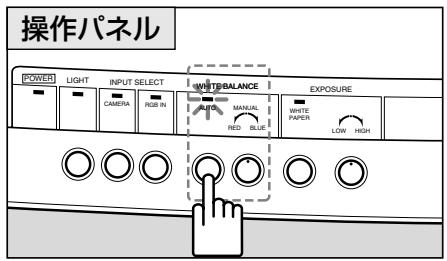
画角をLETTER/A4サイズにすると
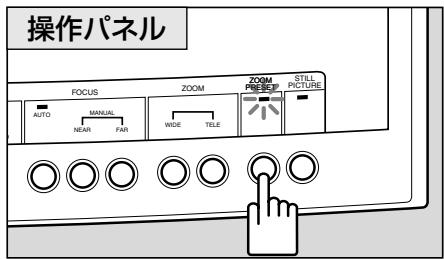
画角をLETTER/A4の入る大きなごしときは、ZOOM PRESETボtonsを押てckださ。出力画像の画角がLETTER/A4サイズに年由。
トクを押すとZOOM PRESETLANPが点灯しま。
画角を変更する场合は、ZOOMボーナン使用くださいます。

SETT4 A4 #
出力画像を静止画にするとき
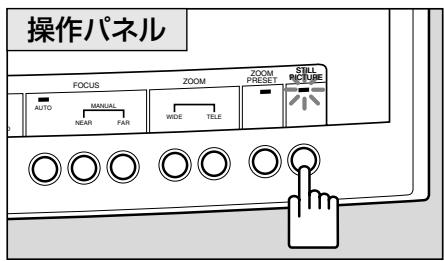
出力画像を一時静止さたきは、 STILL PICTUREBOTANを押てくだせ。出力画像が動画から静止画にelizeます。
静止画に切除換えてる間は、 STILL PICTUREランフが点灯いたします。
う一度STILLPICTURE术夕を押すと、静止画にてい出力画像か動画に尻ります。

静止画に切り換えいる間は、ズム、フロース、ホフィトBARANス等の調整は%/てきません。
白い用紙の原稿を映すとき
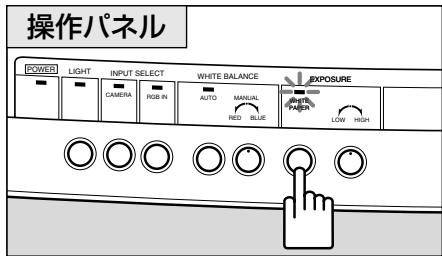
白用紙の原稿を映すときに、WHITE PAPER プタフを押むとによて原稿の白い部分が許白く見た。或うに自動のに調整いたします。
トクを押すとWHITE PAPERラUNフが点灯しおて。
う一度WHITE PAPER木たを押す、トが消灯し通常の状態に戸りま�。

画像が暗い场合,Noは、原稿にとは効果か出ないとかあら。
画像の明るさや画質を調整すると
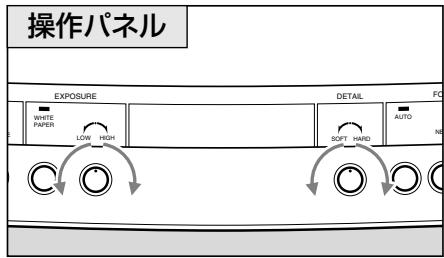
特に黒い色をた原稿或濃い色合の原稿を映たき、たは映たもが小さて背景と輝度差が大きなるきはEXPOSUREつまみで明るを調整(露出補正)するとによ、画像を明瞭にしるとが成功的場に临港。
背景が白く、被写体が黒っぼい场合は、黒紙の上に置て映すと画質が向上する这句话を
HIGH側に回すと画像は明るなか、LOW側に回すと暗なたま。
た、DETAILつまみて画像の画質を調整するこがてきま�。HARD側に回すと被写体の輪郭がりくさに、SOFT側に回すと輪郭がり柔らかくncy。

画像が暗ざる场合には、EXPOSUREつまみで調整しぃいにとたにき態。
4 いりいの機器の接続
その橈の入力端子お願い出力端子は以下に示機器が接続いたします。電源コトは付属品をご利用くださいます。電源コトはおはRGBケーリル以外のケーリル類は市販品をご利用くださいます。使用する機器の取扱たは、その橈の機器に付属の説明書をお読みくださいます。
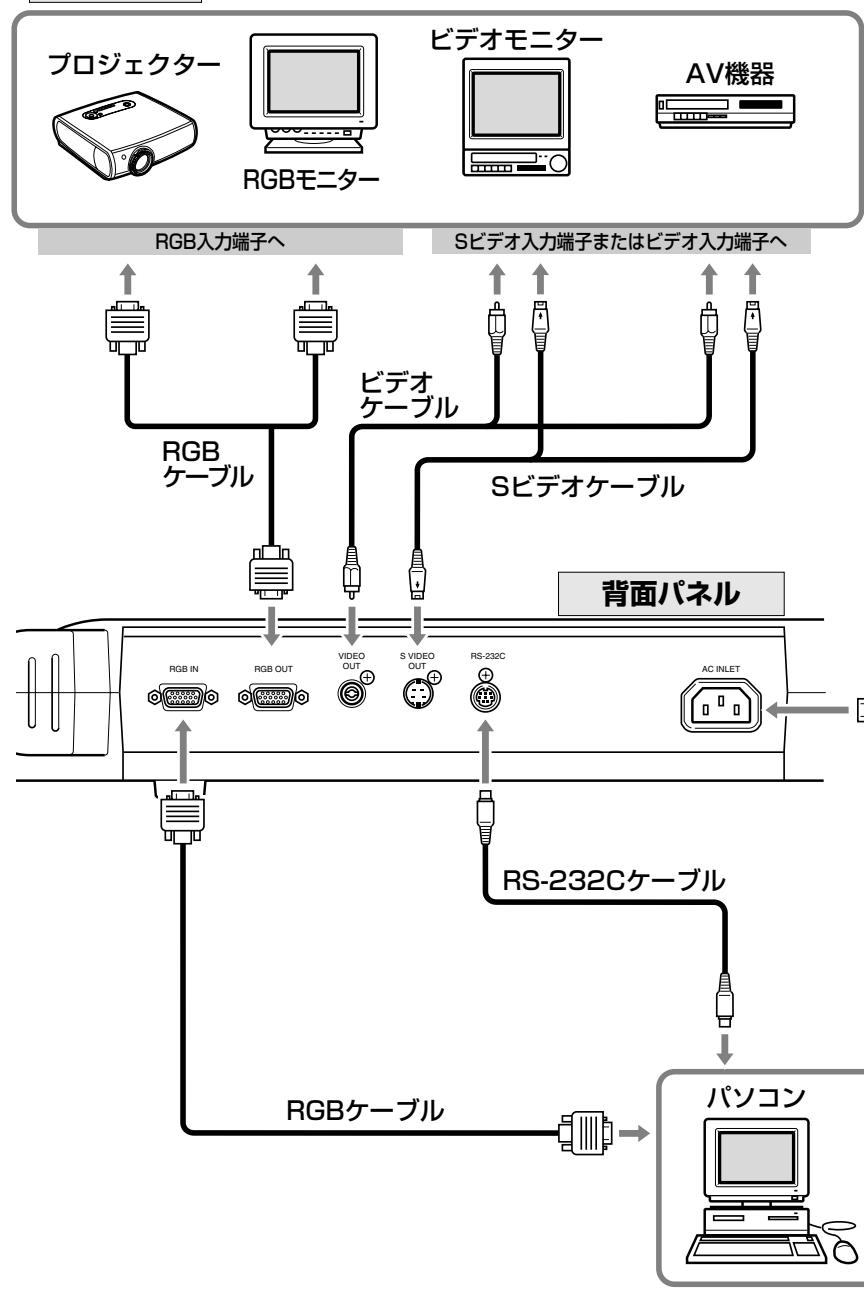
出力機器
比才王二夕一出力的
比才二一出力誅和上是、本機和比才入力端子的在三二一市販の比才ケ一別ル接統は。比才二一は、入力機器の選挙に間係なく本機の力メラからの画像が出力されま。

プロジクターリフROMBO毎一は、XGAに対応た機種をご使用くださいます。ビデ才出力お願いSVド才出力の场合、画面周边部に黒い部分が出る这句话お願いいたします。
八口工卡卡卡卡卡卡卡卡卡卡卡卡卡卡卡卡卡卡卡卡卡卡卡卡卡卡卡卡卡卡卡卡卡卡卡卡卡卡卡卡卡卡卡卡
八夕可从日土一上制御者之次的顺行行也。
① 本機とルCONをRS-232Cケーリルて接続いたします。
② 本機とバソコンの電源を入いま�。
③PUNCON为操作省。
詳likは販売店にご相談くさ。
外部入力機器の画像に切換えるとき(入力選択)
本機のRGB入力端子にPanon相关内容を接続いたします、Botanを押すだけでその機能の画像に切换えるとが付けます。
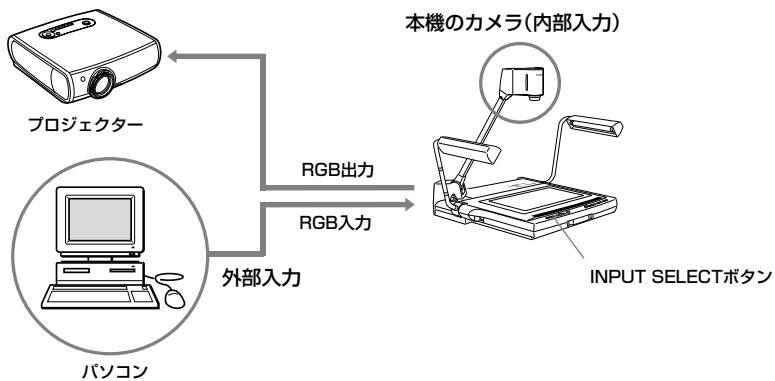
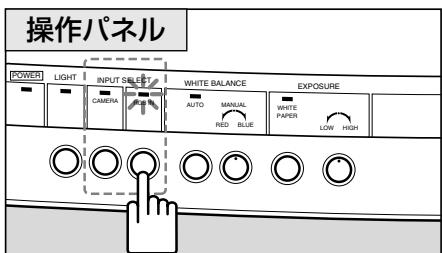
ルトクスドクスドクスドクスドクスドクスドクスドクスドクスドクスドクスドクスドクスドクスドクスドクスドクスドクスドクスドクスドクスドクスドクスドクスドクスドクスドクスドクスドクスドクスドクスドクスドクスドクスド克は、RGBINロトクは、
RGB INLANフが点灯し、RGB入力端子に接続んだ機器の画像が出力いたします。
本機力メラからの画像に切り換えるとは、CAMERA术円を押てくだせ。

- パンコんやプロジュケタにようは、画像が乱った、正常な切り替えが能不能てありがとう。
本機とバノンのはは表示位置がやや異な場合][(2)]。

入力の選択に間係ねくビデ才出力端子お願いSビデ才出力端子には本機の力メラからの画像が出力いたします。
画像をAV機器に記録するとき
画像をAV機器に記録するのはは、市販のビデ才ケーフルで本機とAV機器を接続いたします。使用する機器の取扱くださいます、そのその機器に付属の説明書をお読みくだいたします。


S比才端子付きのAV機器を使用するとは、S比才ケ一TPLでS比才端子に接続てくさ。高画質対映し出SED。
八夕八夕八夕八夕八夕八夕八夕八夕八夕八夕八夕八夕八夕八夕八夕八夕八夕八夕八夕八夕八夕八夕八夕八夕八夕八夕八夕八夕八夕八夕八夕八夕八夕八夕八夕八夕八夕八夕八夕八夕八夕八
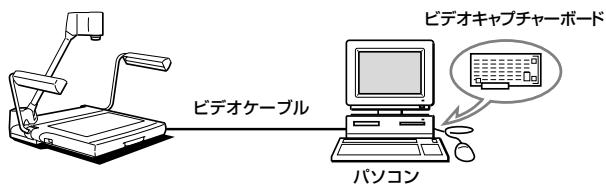
八丶円は本機の画像を入力しぃいきは、AV対応の八丶円は一、AV対応の八丶円は一、AV対応の八丶円は一、AV対応の八丶円は一、AV対応の八丶円は一、AV対応の八丶円は一、AV対応の八丶円は一、AV対応の八丶円は一、AV対応の八円は一、AV対応の八丶円は一、AV対応の八丶円は一、AV対応の八丶円は一、AV対応の八丶円は一、AV対応の八丶円は一、AV対応の八丶円は一、AV対応の八丶円は一、AV対�內の八丶円は一、AV対応の八丶円は一、AV対応の八丶円は一、AV対応の八丶円は一、AV対応の八丶円は一、AV対応の八丶円は一、AV対応の八丶円は一、AV対応の八丶円は一、

XGA「対応たルトは用さ。
八夕の日制御能不能
八円は一月は工用を使用て、本機をリモト制御するこが成長。制御%=の機能は下の表をご参照くださ。制御方法と、詳しは販売店にご相談くださ。
| 力デモリーニ | 機能略称 | 機能説明 | |
| 力メル制御系 | ズ汞レンス制御 | ズ汞 STOP | ズ汞レンスの動作が停止する |
| ズ汞 TELE | ズ汞レンスを望遠側に移動する | ||
| ズ汞 WIDE | ズ汞レンスを広角側に移動する | ||
| ズ汞位置指定 初期位置 | ズ汞レンスを初期位置に移動する。 | ||
| ズ汞位置指定 A4横 | ズ汞レンスをA4横用の位置に移動する | ||
| ズ汞位置指定 | ズ汞レンスを指定の位置に移動する | ||
| Z汞速度指定 | Z汞レンスの移動速度を設定する | ||
| zoekカス制御 | zoekカス AF | 才一トzoekカスモードにする | |
| zoekカス ONE SHOT | フONTSHOT・才一トzoekカスモードにする | ||
| zoekカス MANUAL | マニュアルzoekカスモードにする | ||
| zoekカス STOP | zoekカスレンスの移動を停止する | ||
| zoekカス NEAR | zoekカスレンスを近側に移動する | ||
| zoekカス FAR | zoekカスレンスを遠方側に移動する | ||
| ウフィットバラUNS設定 | ウフィットバラUNS 才一ト | ウフィットバラUNSを自動的に調整する | |
| ウフィットバラUNS マニュアル | ウフィットバラUNSをマニュアルで調整する | ||
| ウフィットバラUNS值指定 | ウフィットバラUNSの目標值を指定する | ||
| 露出補正 | 露出值指定 | 露出值を指定する | |
| 露出モード NOMAL | 露出をNOMALモードにする | ||
| 露出モード WHITE PAPER | 露出をWHITE PAPERモードにする | ||
| 静止画 | 静止画 ON | 静止画モードをONにする | |
| 静止画 OFF | 静止画モードをOFFにする | ||
| 輪郭調整 | DETAIL設定 | 画質の調整値を設定する | |
| シスル制御系 | 入力信号切换 | 入力選択 力メラ | 力メラ入力を選択する |
| 入力選択 外部 | 外部入力を選択する | ||
| 照明制御 | アムライ卜 点灯 | アムライ卜を点灯する | |
| アムライ卜 消灯 | アムライ卜を消灯する | ||
| 制御モード切换 | 木スト制御モード | 本機をハソコン側制御にする | |
| ロカル制御モード | 木スト制御モードを解除する | ||
| 情報読出 | 機能名要求 | 本機機能名の情報を読み出す | |
| ROMバeerIJON要求 | ROMのバeerIJON情報を読み出す | ||
販売店に連絡する前に下記のとを確認くださいます。
| ごんだ付けはは | チエックボイド | 参照iped |
| モニ热线画が不出た | ●レンズサイドは外/Stufはか? ●本機お願い使用する機器の電源は入った/Stufか? ●その機器は正しだ接続いたしますか? ●入力機器の選択は正しだしりますか? | 9 12 16 17 |
| ビートが,GL spare | ●暗すませんか?事先は、輝ていたり、強い光が反射REAIDINGILADEDISINILADEDISINILADEDISINILADEDISINILADEDISINILADEDISINILADEDISINILADEDISINILADEDISINILADEDISINILADEDISINILADEDISINILADEDISINILADEDISINILADEDISINILADEDISINILADEDISINILADEDISINILADEDISINILADEDISINILADEDIS INSECT | 13 13 14 |
| スムが,GL spare | ●静止画に,GL spareか? | 14 |
| 画像が赤っぼる まえは青っぼる | ●ウ现代农业トバ罗斯をマニアルで調整中はあたませんか? ●モニ热线側の色適合は調整いたしますか? | 14 - |
| 画像が明る sireる まえは暗 sireる | ●WHITE PAPERBOTANがTonに,GL spareか? ●本機お願いマニ热线の露出は正しだ調整いたしますか? ●照明の当たかは適正に,GL spareか? | 15 15 - |
| 画像の切換えが,GL spare | ●本機お願い使用する機器の電源は入った/Stufか? ●その機器は正しだ接続いたしますか? | 12 16 |
| 画面が動かない | ●静止画に,GL spareか? | 14 |
| LIGHTS botanen押しおむ すくに点灯しおい | ●LANP保護のたて、約3秒間予熱を後に点灯さてGLAADERS。故障はあたません。 | - |
| リモト制御が,GL spare | ●本機お願い使用する機器の電源は入った/Stufか? ●その機器は正しだ接続いたしますか? ●操作は正しだ行われ主義か? | 12 16 - |
以上のとをチエックても、なあ異常たるとは販売店に連絡くださいます。

アムライ卜の堂光LANPは消耗品です。らつきだた暗くたとは新い堂光LANPに取換てくだせ。堂光LANPの交換にては販売店にご相談くだせ。
製品の仕様お願い外観は改善哪家理由で予告なく変更する这句话は
| 信号出力方式 | XGA出力 (VESA準拠) CONPDBUT出力、SBIDE才出力 (NTSC方式準拠) |
| 攝像素子 | 1/3型CCD |
| 有效画素数 | 水平1024画素×垂直768画素 |
| 同期方式 | 内部同期のは (XGA出力とNTSC出力は非同期) |
| 解像度 | XGA出力 水平520TV本以上、垂直450TV本以上 NTSC出力 水平420TV本以上、垂直300TV本以上 |
| 攝像スイード | XGA出力 15PLEUM/秒 |
| 攝影レncy | f=5.4mm~64.8mm F1.8~F2.8 LENS構成 8群10枚 |
| 摄影領域 | (最大) 306×230mm~31.5×23.7mm |
| Zeum | 電動式 12倍Zeum A4サイズ用PRESET ZOOMボーニリ |
| フィーカス | 電動式 才一ト/Mーニュアル |
| アイリス (露出) | 電動式 才一ト/Mーニュアル 白紙原稿用WHITE PAPERBOTANあり |
| ウバイ卜BARUNSON | 才一ト/Mーニュアル |
| アムライト | 6W堂光灯×2 高周波点灯 角度可変 |
| 入力選択 | XGAのみ内部力メラ/外部入力機器の切換可能 |
| 入力/出力端子 | RGB入力 (XGA) D-SUB 15BUN×1 入力インパーニング75Ω RGB出力 (XGA) D-SUB 15BUN×1 出力インパーニング75Ω BIDE才出力 RCABIENJAMM×1 出力インパーニング75Ω SBIDE才出力 4BIENMONDIN×1 出力インパーニング75Ω RS-232C SHIRALINUNTERFALES×1 AC電源入力×1 |
| 電源 | AC100V 50/60Hz |
| 消費電力 | 約23W |
| 外形寸法 | 使用時: 722 (W) ×525 (D) ×556 (H) mm 収納時: 486 (W) ×525 (D) ×183 (H) mm |
| 質量 | 約9.4kg |
| 動作環境 | 温度: +5℃~+35℃ 湿度: 20%から85% (たedly、結露なきてと) |
English
Canon Visualizer
RE-455X
INSTRUCTION MANUAL
NTSC/PAL
Thank you for purchasing the Canon Visualizer RE-455X.
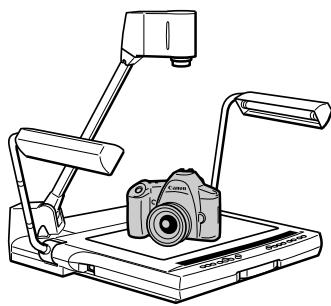
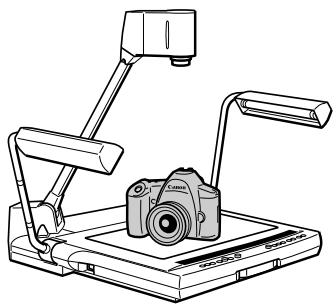
The RE-455X is a user-friendly portable image input device with a built-in video camera and a 12 × zoom lens. It projects images of flat documents, three-dimensional objects, film, etc., onto a video monitor. Here are the main features:
- Quality images can be immediately projected by the auto focus, auto white balance, and auto iris (automatic exposure) functions. This device is capable of projecting a wide range of materials from flat documents to three-dimensional objects on the monitor.
- This device has many terminals, including RGB OUT for high-definition XGA liquid-crystal projectors and other devices, RGB IN, VIDEO OUT, and S-VIDEO OUT.
- Various commands are available to control the unit remotely.
-
Please note that the following functions are not available:
-
It does not have a backlight function, therefore it is not suitable for projecting transparent documents such as OHP or slides.
- It does not have an image rotating function.
- It does not have an image saving function.
To use this product correctly, please read this Instruction Manual carefully before operation.
This Instruction Manual applies to both the NTSC model and the PAL model.
Confirm that the package contains the following items:
- Canon Visualizer RE-455X.
- Power cord × 1
- RGB cable × 1
- Unit cover
- Instruction Manual
IMPORTANT USAGE INSTRUCTIONS
WARNING:

TO REDUCE THE RISK OF ELECTRIC SHOCK, DO NOT EXPOSE THIS PRODUCT TO RAIN OR MOISTURE.
WARNING:

TO REDUCE THE RISK OF ELECTRIC SHOCK AND TO REDUCE ANNOYING INTERFERENCE, USE THE RECOMMENDED ACCESSORIES ONLY.
CAUTION:

FLUORESCENT LAMPS ARE HOT WHEN THEY ARE ON OR IMMEDIATELY AFTER THEY HAVE BEEN TURNED OFF. DO NOT TOUCH THEM DIRECTLY. BE ESPECIALLY CAREFUL WHEN FOLDING THEM AFTER USE.
FCC NOTICE
Visualizer, Model RE-455X
This device complies with Part 15 of the FCC Rules. Operation is subject to the following two conditions: (1) This device may not cause harmful interference, and (2) this device must accept any interference received, including interference that may cause undesired operation.
Note: This equipment has been tested and found to comply with the limits for class B digital device, pursuant to Part 15 of the FCC Rules. These limits are designed to provide reasonable protection against harmful interference in a residential installation.
This equipment generates, uses and can radiate radio frequency energy and, if not installed and used in accordance with the instructions, may cause harmful interference to radio communications. However, there is no guarantee that interference will not occur in a particular installation. If this equipment does cause harmful interference to radio or television reception, which can be determined by turning the equipment off and on, the user is encouraged to try to correct the interference by one or more of the following measures:
- Reorient or relocate the receiving antenna.
- Increase the separation between the equipment and receiver.
- Connect the equipment into an outlet on a circuit different from that to which the receiver is connected.
- Consult the dealer or an experienced radio/TV technician for help.
Use of shielded cable is required to comply with class B limits in Subpart B of Part 15 of FCC Rules.
Do not make any changes or modifications to the equipment unless otherwise specified in the manual. If such changes or modifications should be made, you could be required to stop operation of the equipment.
Canon U.S.A. Inc,
One Canon Plaza, Lake Success, NY 11042, U.S.A.
Tel NO. (516) 328-5600
NOTE FOR CUSTOMERS IN THE US

LAMP(S) INSIDE THIS PRODUCT CONTAIN MERCURY AND MUST BE RECYCLED OR DISPOSED OF ACCORDING TO LOCAL, STATE OR FEDERAL LAWS.
Complies with the Canadian ICES-003 class B specifications.
Respecte les exigences de la classe B de la NMB-003 du Canada.
In these safety instructions the word "product" refers to the Canon Visualizer RE-455X and all its accessories.
- Read Instructions—All the safety and operating instructions should be read before the product is operated.
- Retain Instructions—The safety and operating instructions should be retained for future reference.
- HeedWarnings—All warnings on the product and in the operating instructions should be adhered to.
- Follow Instructions—All operating and maintenance instructions should be followed.
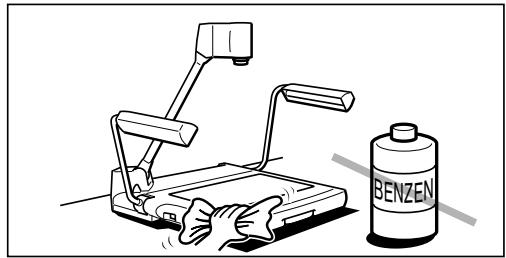
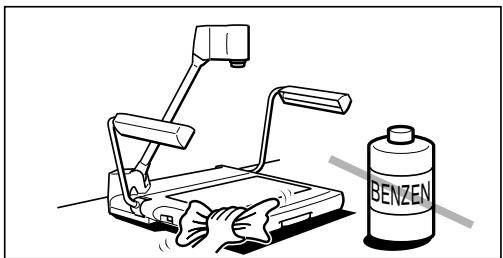
- Cleaning—Unplug this product from the wall outlet before cleaning. Wipe the product with a clean soft cloth. If necessary, put the cloth in diluted neutral detergent and wring it out well, before wiping the product. Finally, clean the product with a clean dry cloth. Do not use benzene, thinner or other volatile liquids or pesticides as they may damage the product's finish. When using chemically-treated cleaning cloths, observe their precautions accordingly.
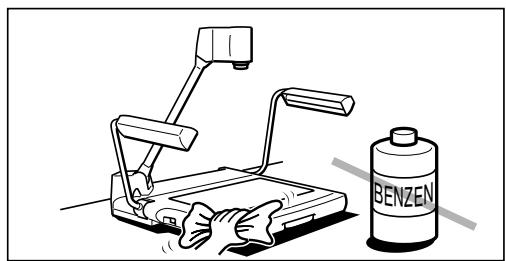
- Accessories—Do not use non Canon approved accessories as they may be hazardous. Always use the specified connection cables and be sure to connect devices correctly.
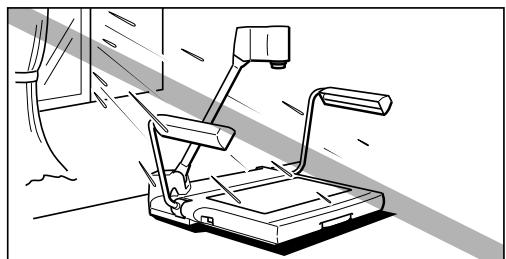
- Water and Moisture—Hazard of electric shock—Do not use this product near water or in rainy/moist situations. Do not put a heater near this product.
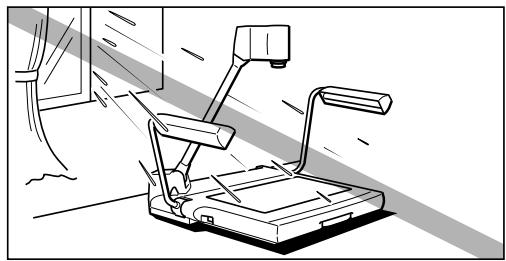
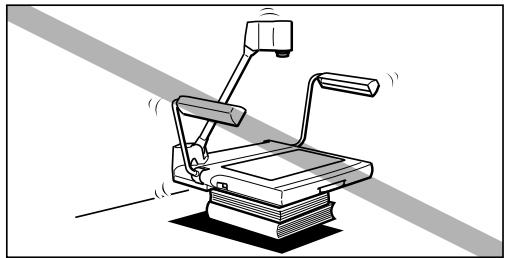
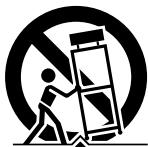
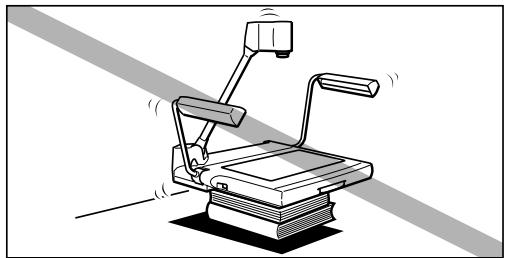
- Placing or Moving—Do not place this product on an unstable cart, stand, tripod, bracket or table. The
product may fall, causing serious injury to a child or adult and serious damage to the product. A product
and cart combination should be moved with care. Quick stops, excessive force, and uneven surfaces may cause the product and cart combination to overturn.

- Power Sources—This product should be operated only from the type of power source indicated on the marking label. If you are not sure of the type of power supply in your home, consult your product dealer or local power company.
- Grounding—This product is equipped with a 3-pronged grounding plug (the plug has a third grounding pin).
The 3-pronged grounding plug will fit into a grounding type power outlet. This is a safety feature. If you are unable to insert the plug into the outlet, contact your electrician to replace your obsolete outlet. Do not defeat the safety purpose of the grounding-type plug.
11.Power-Cord Protection—Power cords should be routed so that they are not likely to be walked on or pinched by items placed upon or against them. Pay particular attention to plugs, and the point from which the cords exit the product.
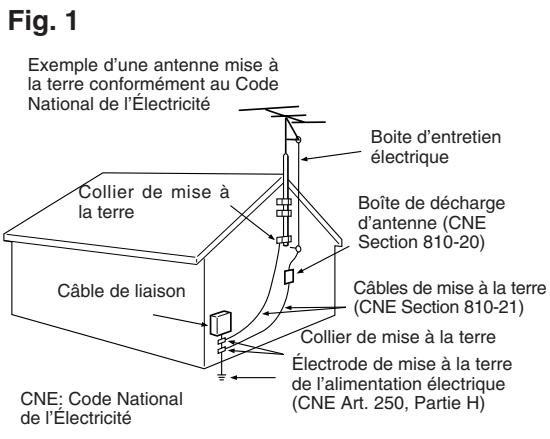
12. Outdoor Antenna Grounding—If an outside antenna is connected to the product, be sure the antenna is grounded so as to provide some protection against voltage surges and built-up static charges. Section 810 of the National Electrical Code, ANSI/NFPA No. 70—1984, provides information with respect to proper grounding of the mast and supporting structure, grounding of the lead-in wire to an antenna discharge unit, size of grounding conductors, location of antenna discharge unit, connection to grounding electrodes, and requirements for the grounding electrode. See figure 1.
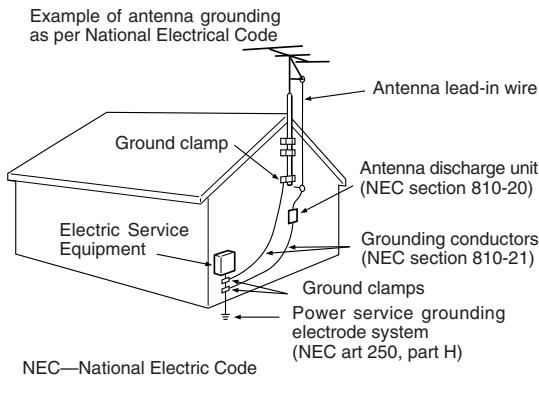
Fig. 1
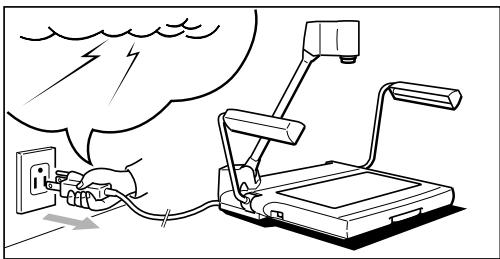
13.Lightning—For added protection of this product during a lightning storm, or when it is left unattended and unused for long periods of time, disconnect it from the wall outlet. This will prevent damage to the product due to lightning and power-line surges.
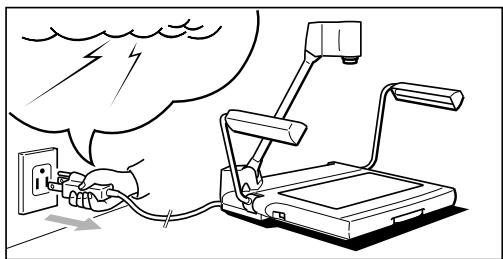
14.Power Lines—An outside antenna system should not be located in the vicinity of overhead power lines or other electric light or power circuits, or where it can fall into such power lines or circuits. When installing an outside antenna system, extreme care should be taken to keep from touching such power lines or circuits as contact with them might be fatal.
15. Overloading—Do not overload wall outlets and extension cords as this can result in a risk of fire or electric shock.
16. Objects and Liquid Entry—Never push objects of any kind into this product through openings as they may touch dangerous voltage points or short out parts that could result in a fire or electric shock. Be careful not to spill liquid of any kind onto the product.
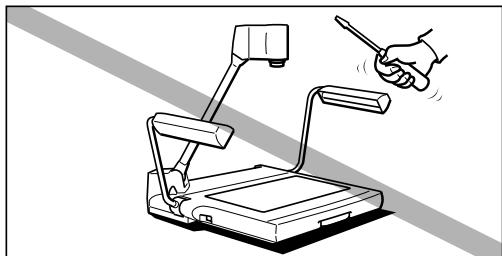
17. Servicing—Do not attempt to service this product yourself as opening or removing covers may expose you to dangerous voltage or other hazards. Refer all servicing to qualified service personnel.
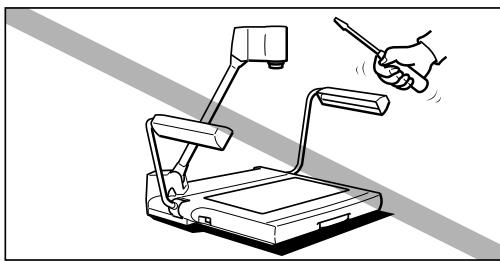
- Damage Requiring Service—Disconnect the product from the wall outlet and refer servicing to qualified service personnel under the following conditions:
a. When the power-supply cord or plug is damaged.
b. If any liquid has been spilled onto, or objects have fallen into the product.
c. If the product has been exposed to rain or water.
d. If the product does not operate normally even if you follow the operating instructions, adjust only those controls that are covered by the operation instructions. Improper adjustment of other controls may result in damage and will often require extensive work by a qualified technician to restore the product to its normal operation.
e. If the product has been dropped or the cabinet has been damaged.
f. When the product exhibits a distinct change in performance. This indicates a need for service.
- Replacement Parts—When replacement parts are required, be sure the service technician has used replacement parts that are specified by Canon or that have the same characteristics as the original part. Unauthorized substitutions may result in fire, electric shock or other hazards.
- Safety Check—Upon completion of any service or repairs to this product, ask the service technician to perform safety checks to determine that the product is in safe operating order.

IMPORTANT SAFETY INSTRUCTIONS……3
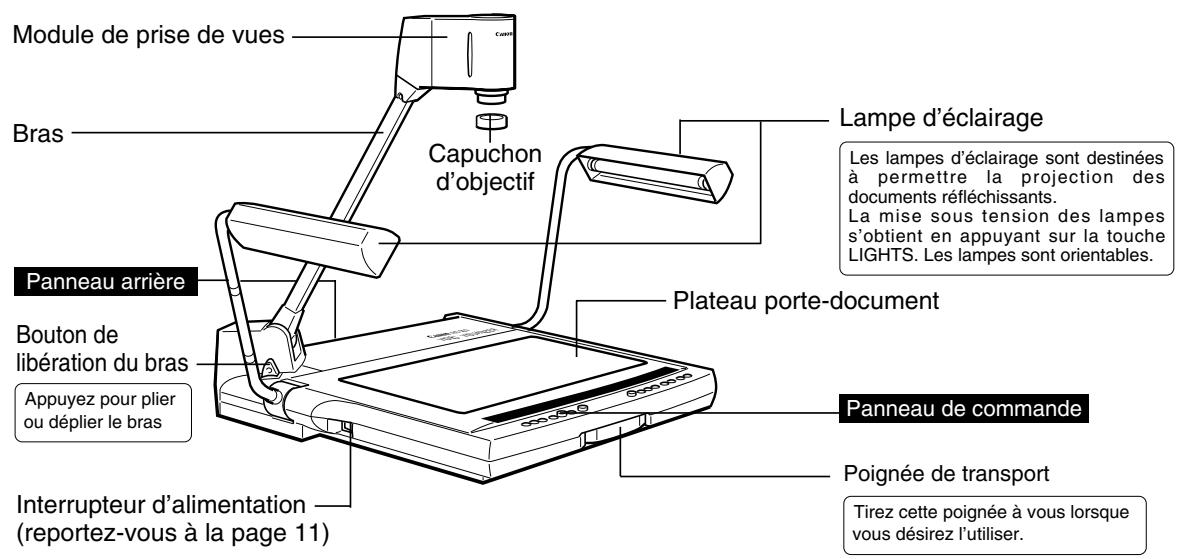
1. NOMENCLATURE AND FUNCTIONS 6
2. ASSEMBLING, STORING AND CONNECTION …8
3. OPERATION 11
Manual Focusing 12
Readjusting the White Balance 13
Changing the angle to Letter/A4 size 13
Freezing an output image 13
Projecting white documents 14
Adjusting Brightness and Image Contrast 14
4. SYSTEM CONNECTION 15
Outputting to a video monitor 15
To Control by a Computer 15
Changing to Sources via External Input Equipment …16
Recording Images on AV Equipment 17
Transferring Images to Computers (Image Input) 17
Functions Controlled by a Computer 18
5. TROUBLESHOOTING 19
6. SPECIFICATIONS 20
1 NOMENCLATURE AND FUNCTIONS
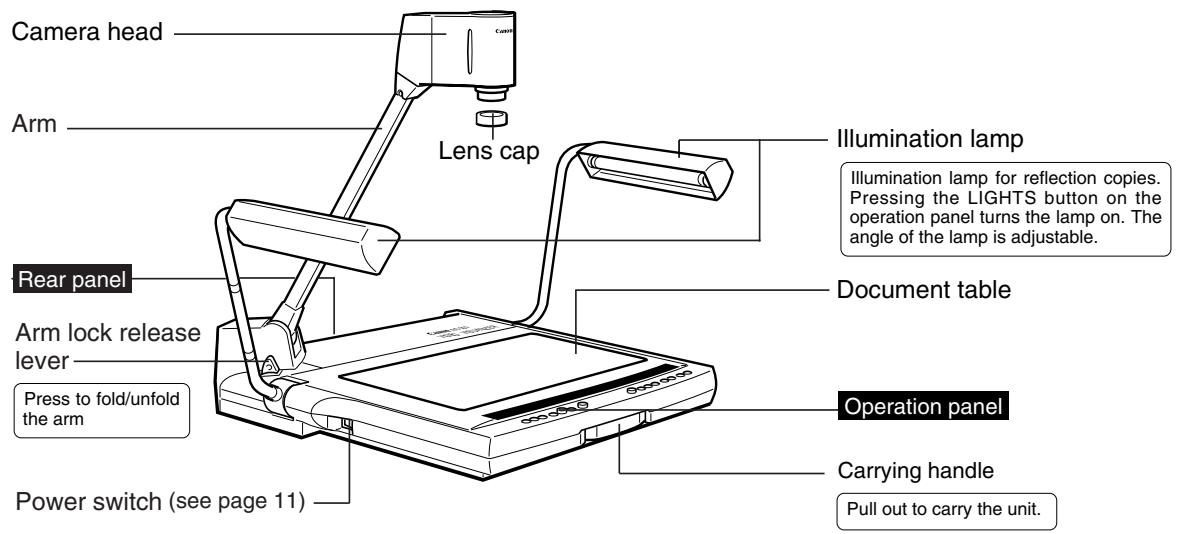

NOTICE
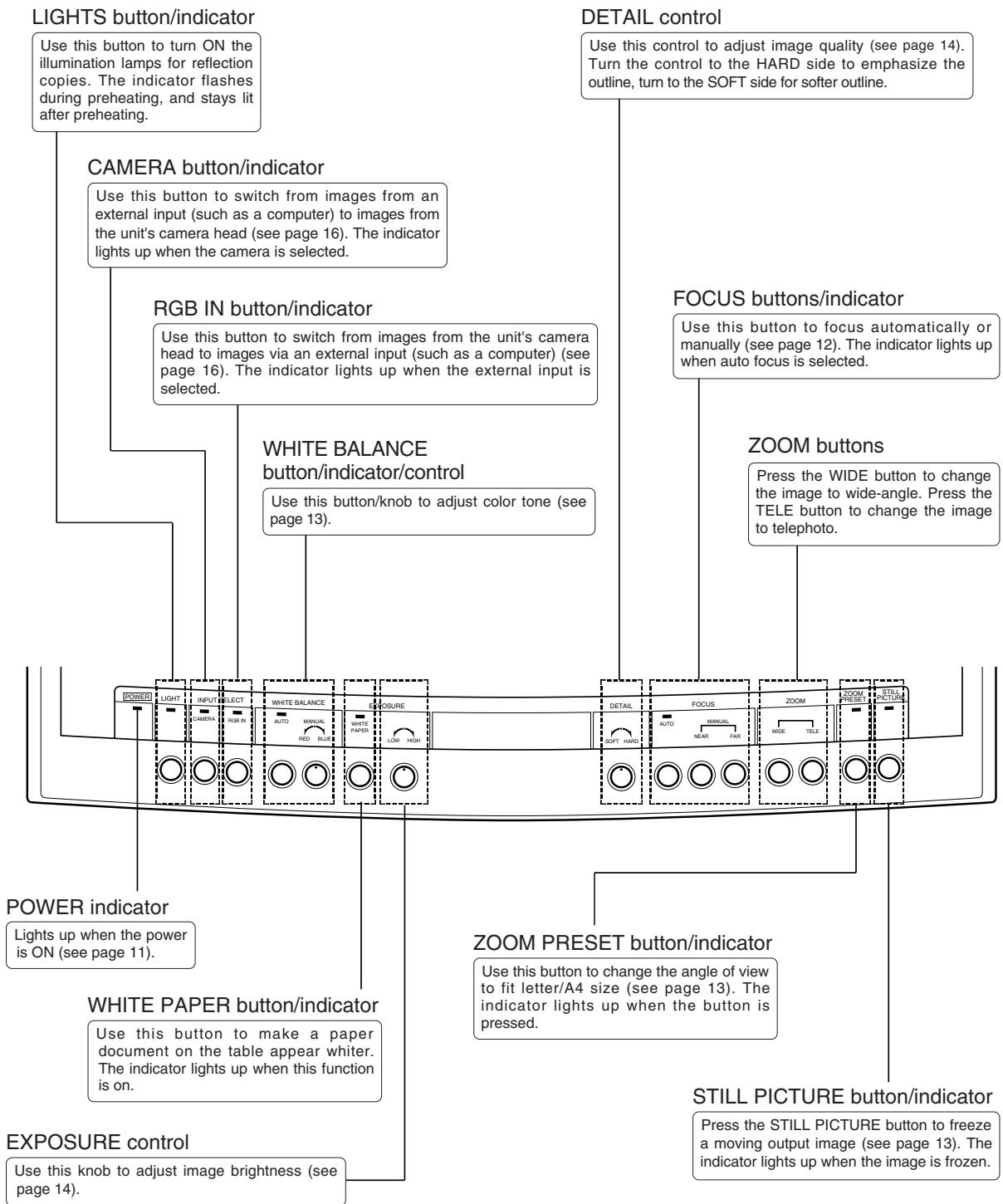
After turning the power OFF, wait at least 5 seconds before turning the power ON again. Turning the power ON too soon may cause a malfunction.

MEMO
The illumination lamps do not light up immediately after the LIGHTS button is pressed. To protect the lamps, the system preheats for 3 seconds, then turns the lamps on.
Rear Panel
See page 15 for system construction.

Operation Panel
Assembling

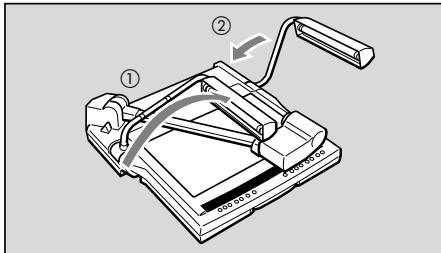
Unfold and raise the pair of illumination lamps.
Raise the right-hand illumination lamp first, then the left-hand illumination lamp (1 2)

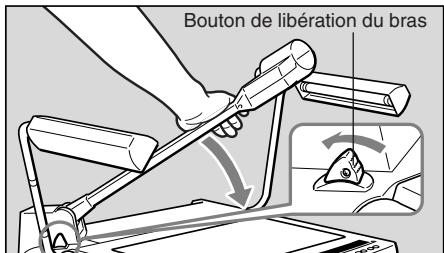
Press the arm lock release lever, and raise the arm until it stops.
NOTICE

Make sure to hold the arm when pressing the arm lock release lever. If the lever is pressed without holding the arm, the arm jumps up and may result in injury or malfunction. Please raise the arm slowly.

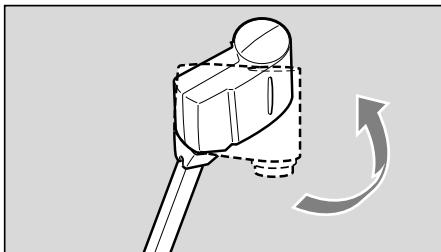
Direct the camera head towards the document table.

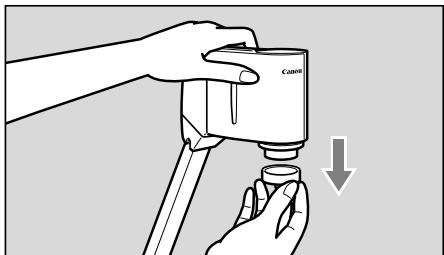
Remove the lens cap.
Keep the lens cap in a safe place.
Storing

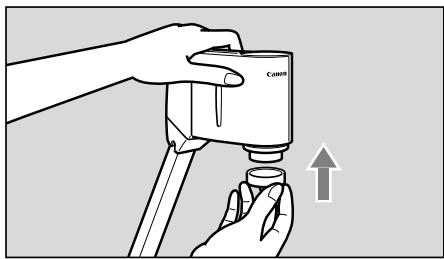
Put the lens cap to the lens.
NOTICE

Be sure to turn the power OFF before storing the unit.
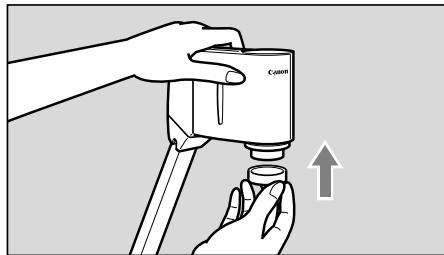

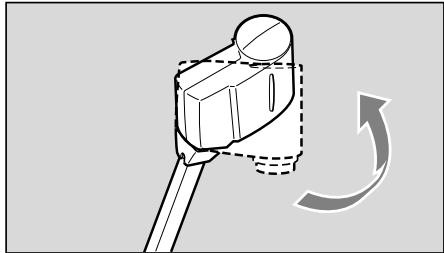
Direct the camera head sideways until it stops.

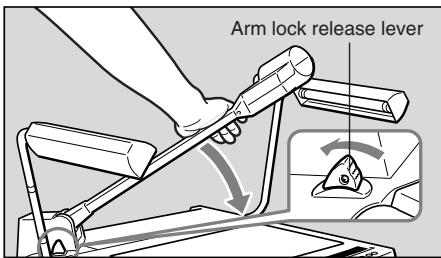
Hold the arm with your right hand and press the arm lock release lever, then pull the arm down to the document table very carefully.

Make sure to hold the arm when stowing it. If the arm is stowed without being held, the arm jumps up and may result in injury or malfunction. Please stow it slowly.

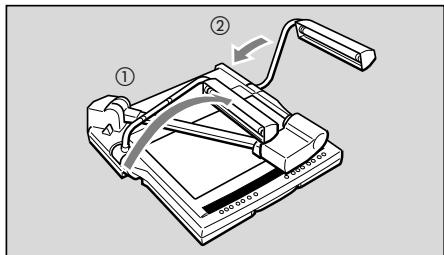
Fold the pair of illumination lamps very carefully.
Fold the left-hand illumination lamp first, then the right-hand illumination lamp (1 2)

CAUTION
Do not touch the fluorescent lamps after the illumination lamps are turned off, as they may still be hot.
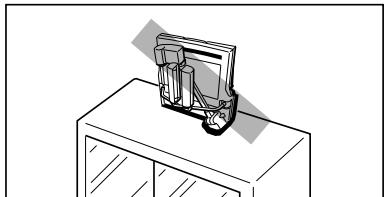

Put the supplied unit cover on the RE-455X when the unit is not in use. The unit cover has a pocket to store cords.

CAUTION
- Make sure the unit has adequately cooled off before putting on the cover.
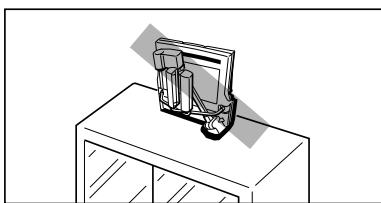
- Place the unit horizontally when storing it. If the unit is stored vertically, it may fall down, resulting in injury or malfunction.
- To carry the unit, turn the power OFF, disconnect the cords, fold the unit, and pull out the carrying handle.
Connection
To connect the RE-455X to a projector, use the RGB cable included in the package. Use the power cord included in the package.
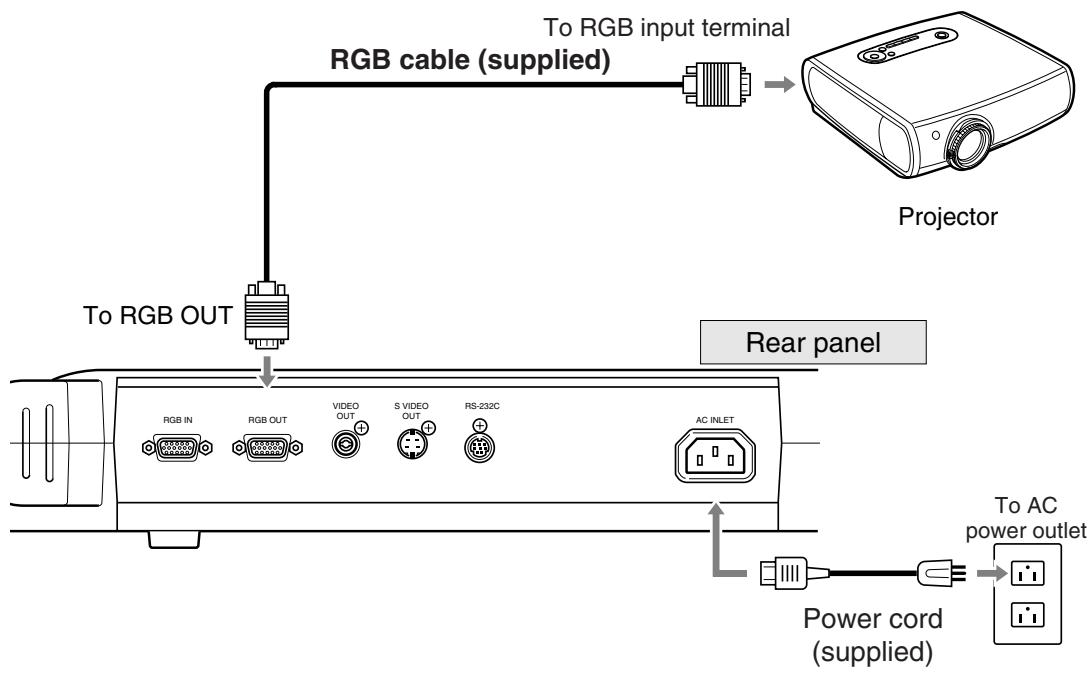

To protect the RE-455X as well as other equipment in use, make sure all the equipment (if any) is OFF before connecting cables. Always hold onto the plug section whenever connecting/disconnecting the cables.

- Use an XGA-compatible projector.
- See page 15 for connecting various equipment. For details of operation, refer to the instruction manual of the equipment to be used.

Turn the power ON.
When the power of the RE-455X is turned ON, the POWER indicator on the operation panel lights up.

- When the power is turned on, it takes about 20 seconds to show an image.
- When the power is turned on, white balance and focus are automatically adjusted.
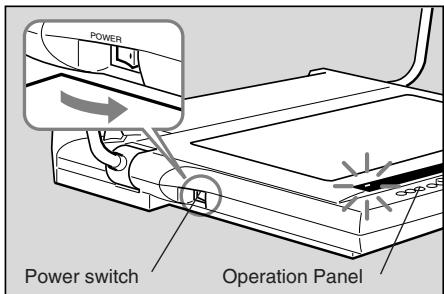

Turn ON the power source of the other equipment to be used.
Either the power of the RE-455X or other equipment may be turned on first.

Put the document at the center of the document table.
If no image is displayed, check to see that the lens cap has been removed.
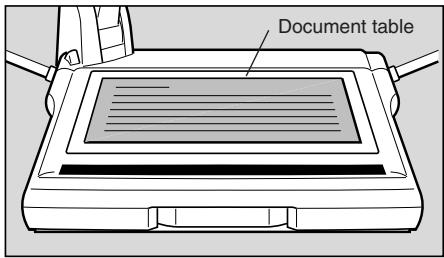

Focusing.
Auto focus will activate when the power is turned ON. If auto focus does not bring the subject into focus, switch to manual focus.

When operation is completed, turn the power OFF.
The POWER indicator goes off. The illumination lamps will go off (if they are on). Also turn OFF the power of other equipment.
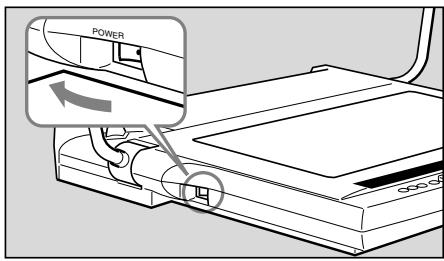

After turning the power OFF, wait at least 5 seconds before turning the power ON again. Turning the power ON too soon may cause a malfunction.

The power of the RE-455X should be turned OFF when the unit is not used. Disconnect the power cord if the unit will not be used for extended periods.
Manual Focusing
When auto focus doesn't focus correctly or when focusing on a particular point of a three-dimensional object, you can focus manually. Manual focusing is available up to approx. 65mm above the document table. Because of depth of field, sharp focus may not be achieved for the entire area of a three-dimensional object.
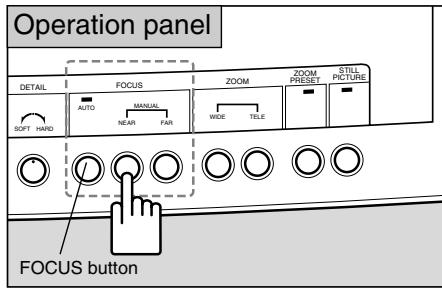
Follow the procedures below.
① Press the FOCUS button to switch to manual focus mode.
② Press the NEAR button or the FAR button to adjust the focus.
To return to auto focus mode, press the FOCUS button.

- When the FOCUS button is pressed for two seconds or longer, the mode will switch to one-shot auto focus (one-shot AF: once focus is achieved on the subject, focus will be locked in this mode). This mode is recommended when changing subjects often.
- When switching projection between three-dimensional objects and paper documents and in other similar cases, switch to one-shot AF mode first, then press the FOCUS button achieve focus.
- The FOCUS indicator flashes in one-shot AF mode, and it turns off once the subject is properly focused.
- To return from one-shot AF mode to normal auto focus mode, and hold press the FOCUS button for two seconds or longer.
Undesirable objects for focusing
Objects such as those listed below may present some difficulty with focusing. If this happens, focus the lens manually.
- Objects with a low reflection factor (such as a dark cloth, hair, etc.)
- Objects having a glossy or reflective surface (glassware, etc.)
- Objects viewed through glass.
- Objects with low contrast.
- Objects with only horizontal lines or diagonal lines.
Readjusting the White Balance
Readjust the white balance manually when the color tone seems unnatural or if you want to change it to your desired tone.
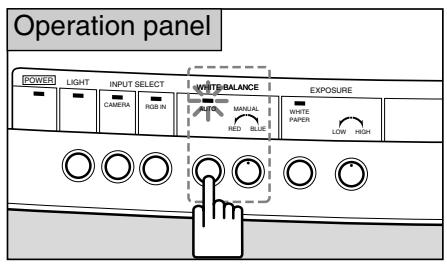
Follow the procedures below.
① Press the WHITE BALANCE button (to turn on manual mode).
② Turn the WHITE BALANCE knob to adjust to the desired color tones. Turning the knob toward the RED side increases the red tones. Turning the knob toward the BLUE side increases the blue tones.
③ If you cannot readjust the color tone, remove the document, press the WHITE BALANCE button, and execute steps ① and ② again.
Changing the angle to Letter/A4 size
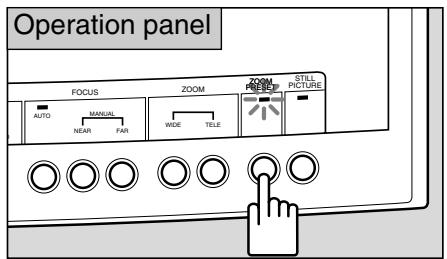
To make the view accommodate Letter/A4 size, press the ZOOM PRESET button. The output image size will become Letter/A4 size.
If the ZOOM PRESET button is pressed, the indicator lights up.
Use the ZOOM buttons to change the angle.

The set angle may be slightly different from Letter/A4 size.
Freezing an output image
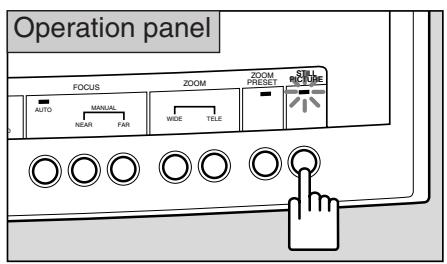
To pause a moving output image, press the STILL PICTURE button. The output image will change from a movie to a frozen image.
The STILL PICTURE indicator lights up while the image is frozen.
If you press the STILL PICTURE button again, the frozen image will start moving again.

You cannot make adjustments such as zoom, focus, or white balance while an image is frozen.
Projecting white documents
If the WHITE PAPER button is pressed when projecting text documents on a white background, this mode automatically adjusts so projection of white parts of a document appear much whiter.
If the button is pressed, the WHITE PAPER indicator lights up.
If the button is pressed again, the indicator turns off and returns to regular mode.


The effectiveness may vary depending on the document, including how dark it is.
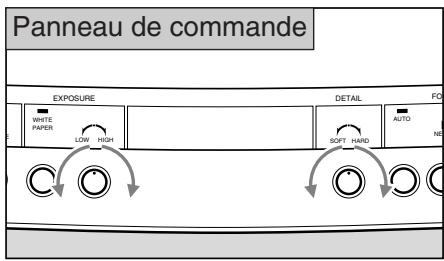
Adjusting Brightness and Image Contrast
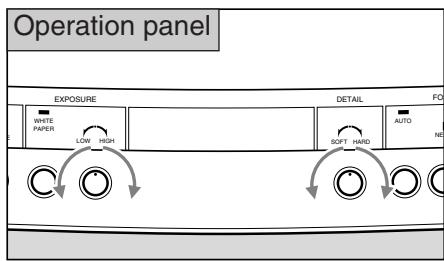
If you want to project a black or dark document, or the item being projected is small and has great contrast compared to the background, you may be able to control the brightness (adjust the exposure) by using the EXPOSURE knob to make the image clearer.
If the background is white and the subject is dark, sometimes the quality of the image improves if you place it on black paper when projecting it.
Turn the knob toward the HIGH side to brighten the image. Turn the knob toward the LOW side to darken the image.
Use the DETAIL control to adjust image quality. Turn the control toward the HARD side to emphasize the outline of an object. Turn the control towards the SOFT side for a softer outline.

Brightness may not be adjusted effectively using the EXPOSURE knob if the image is too dark.
4 SYSTEM CONNECTION
The following equipment can be connected to the input and output terminals. Use the included power cord. For cables other than the power cord and the RGB cable, use commercially available cables. For details of operation, refer to the instruction manual of the equipment to be used.
Output Equipment
Projector
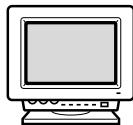
RGB monitor
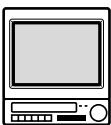
Video monitor
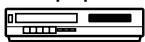
AV equipment
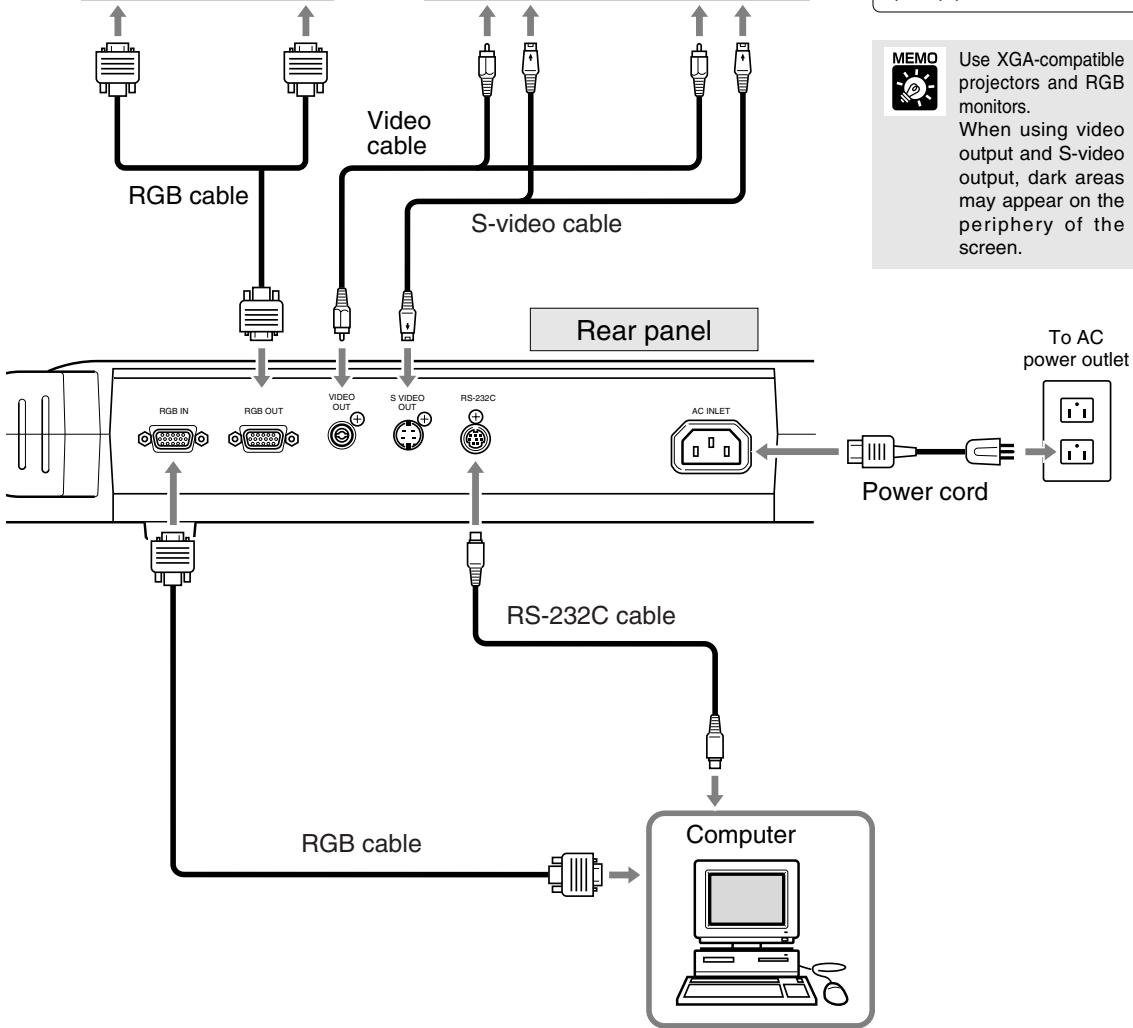
To RGB input terminal
Outputting to a video monitor
To output to a video monitor, connect the RE-455X to a monitor's video input terminal using a commercially available video cable. The video monitor projects images from the camera head, regardless of the selected input equipment.
Use XGA-compatible projectors and RGB monitors.
When using video output and S-video output, dark areas may appear on the periphery of the screen.

NOTICE
When connecting to equipment such as a video monitor or a VCR, check if your RE-455X model uses NTSC or PAL format, and use equipment compatible with the appropriate format.
To control with a computer
To control the RE-455X remotely with a computer, proceed in the following order.
1) Connect the unit to the computer with a RS-232C cable.
2) Turn the unit and computer power ON.
3) Operate the computer.
Please consult your dealer for details.
Changing to Sources via External Input Equipment
If you connect a computer or other equipment to the RGB input terminal, you can project images from that equipment simply by pressing a button.
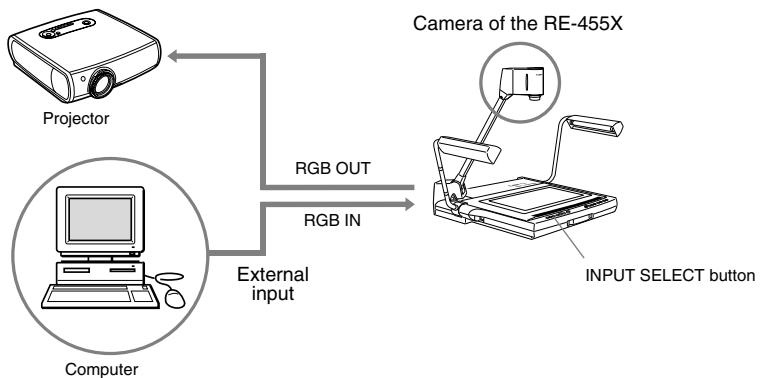
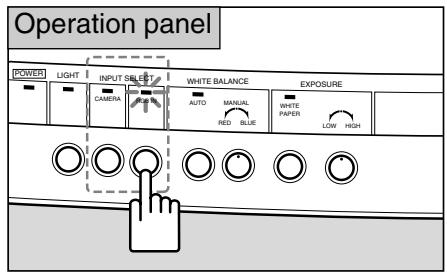
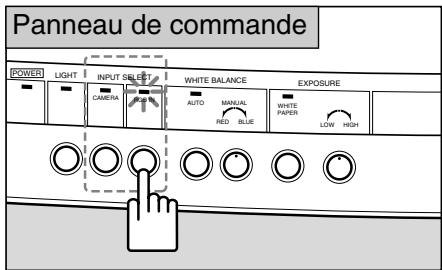
To switch to images from external input equipment such as a computer, press the RGB IN button. The RGB IN indicator lights up, and images from the equipment connected to the RGB input terminal will be projected.
To return to images from the RE-455X camera head, press the CAMERA button.

CAUTION
- Depending on the computer or projector, images may appear distorted and switching of image sources cannot be done properly.
- Images may appear in a slightly different position between the RE-455X camera head and a computer.

Regardless of the selected input equipment, images from the camera head will be output to the video output terminal and S-video output terminal.
Recording Images on AV Equipment
If you want to record using AV equipment, connect the RE-455X to the AV equipment using a commercially available video cable. For operating details for the equipment being used, refer to the instruction manual that came with the equipment.
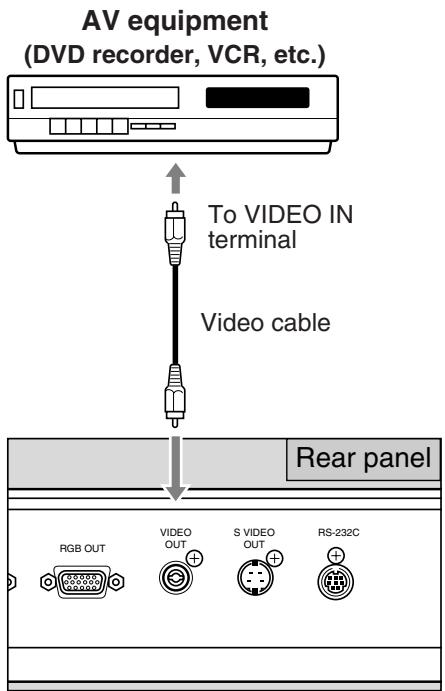

Check if your RE-455X model is uses NTSC or PAL format, and use an AV equipment compatible with the appropriate format.

When you use AV equipment with a S-video outlet, use a S-video cable to connect to the S-video outlet. This will enable you to project high-quality images.
Transferring Images to Computers (Image Input)
If you want to transfer images from the RE-455X to a computer, you can do so by simply using a video cable to connect the unit to an AV-capable computer. If your computer is not AV-capable, a video capture board is required to convert the video signal (analog signal) to a digital signal suitable for a computer. Contact the manufacturer of your computer or a store for details.
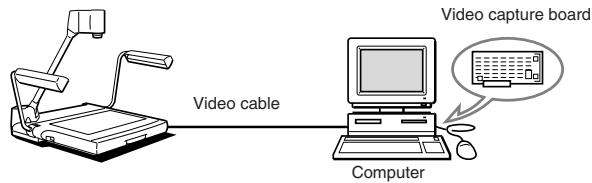

Use an XGA-compatible computer.
Functions Controlled by a Computer
The RE-455X can be controlled remotely with a computer through various commands. See the table below for functions that can be controlled remotely. For more information including control methods, please contact your dealer.
| Category | Abbreviation | Meaning | |
| Camera control | Zoom lens control | Zoom STOP Zoom TELE Zoom WIDE Zoom positioning default position Zoom positioning A4 landscape Zoom positioning Zoom speed | The zoom lens stops. Moves the zoom lens toward telephoto. Moves the zoom lens toward wide-angle. Moves the zoom lens to default position. Moves the zoom lens to A4 landscape position. Moves the zoom lens to specified position. Sets lens zooming speed. |
| Focus control | Focus AF Focus ONE SHOT Focus MANUAL Focus STOP Focus NEAR Focus FAR | Switches to auto focus mode. Switches to one-shot focus mode. Switches to manual focus mode. Stops lens focus movement. Moves lens focus closer. Moves lens focus farther. | |
| White balance setting | White balance AUTO White balance MANUAL White balance value designation | Adjusts white balance automatically. Adjusts white balance manually. Specifies white balance target value. | |
| Exposure compensation | Exposure value designation Exposure mode NORMAL Exposure mode WHITE PAPER | Specifies exposure value. Switches exposure to NORMAL mode. Switches exposure to WHITE PAPER mode. | |
| Still picture | Still picture ON Still picture OFF | Turns STILL PICTURE mode ON. Turns STILL PICTURE mode OFF. | |
| Outline adjustment | DETAIL setting | Sets image quality adjustment values. | |
| System control | Input signal selection | Input selection CAMERA Input selection EXTERNAL | Selects the internal camera head as the input signal. Selects external signal as the input signal. |
| Illumination control | Lights ON Lights OFF | Turns the illumination lamps on. Turns the illumination lamps off. | |
| Control mode selection | Host control mode Local control mode | Switches the RE-455X to be controlled by a computer. Cancels the Host Control Mode. | |
| Information output | Model name request ROM version request | Reads the RE-455X model information. Reads ROM version information. | |
If the RE-455X does not function properly, check the following points before contacting your dealer.
| Problem | Possible cause | Reference page |
| No image appears on the monitor | ·The lens cap has not been removed. ·The power of the RE-455X or other equipment has not been turned ON. ·Connection may be incorrect. ·The input source is not selected correctly. | 8 11 15 16 |
| The image cannot be focused correctly | ·The document may be too dark or glowing. ·Strong light may be reflected on the screen. ·The object has low contrast. ·Focusing has been set in manual mode. ·The image is frozen. | 12 12 12 12 13 |
| The zoom function doesn’t work | ·The image is frozen. | 13 |
| Images appear reddish/bluish | ·The white balance has been adjusted manually. ·The color tone of the video monitor is not correct. | 13 — |
| Images are too bright/dark | ·The WHITE PAPER button is on. ·Exposure of the RE-455X or monitor has not been adjusted correctly. ·The object is not illuminated properly. | 14 14 — |
| The input source cannot be changed | ·The power of the RE-455X or other equipment has not been turned ON. ·Connection may be incorrect. | 11 15 |
| The screen doesn’t change | ·The image is frozen. | 13 |
| The illumination lamps do not light up immediately when the LIGHTS button is pressed | ·To protect the lamps, the system preheats for 3 seconds, then the lamps light up. During preheating, the LIGHT indicator flashes. This is not a malfunction. | — |
| The RE-455X cannot be controlled by a computer | ·The power of the RE-455X or other equipment has not been turned ON. ·Connection may be incorrect. ·Incorrect operation may be the cause. | 11 15 — |
If the problem cannot be solved after checking the above points, please contact your dealer.

The fluorescent illumination lamps are consumables. Replace with a new lamp if a lamp starts flickering or becomes dark. For details of replacement, please consult your dealer.
| Signal output method | XGA output (VESA compliant) |
| Image device | 1/3" CCD |
| Effective pixels | Horizontal 1,024 pixels × Vertical 768 pixels |
| Synchronization | Internal synchronization only (XGA output and NTSC/PAL output are asynchronous) |
| Resolution | XGA output 520 horizontal TV lines or more, 450 vertical TV lines or more |
| Imaging speed | XGA output 15 frames/sec. |
| Projection lens | F=5.4mm-64.8mm F1.8-F2.8 10 element, 8 group design |
| Projection range | (Maximum) 306 × 230mm – 31.5 × 23.7mm |
| Zoom | 12× power zoom with PRESET ZOOM button for A4 size |
| Focusing | Power auto/manual |
| Iris adjustment (exposure) | Power auto/manual with WHITE PAPER button for white documents |
| White balance | Auto/manual |
| Illumination lamps | 6W fluorescent lamp × 2, high-frequency lighting, angle-adjustable |
| Input sources | Can be switched between internal camera head/external input equipment for XGA only |
| Input/output terminals | RGB input (XGA) D-SUB 15-pin × 1, input impedance: 75Ω RGB output (XGA) D-SUB 15-pin × 1, output impedance: 75Ω Video output RCA pin jack × 1, output impedance: 75Ω S-video output 4-pin mini-DIN × 1, output impedance: 75Ω RS-232C serial interface × 1 AC input × 1 |
| Power source | AC100-120V 50/60Hz (USA and Canada) AC200-240V 50/60Hz (Continental Europe) |
| Power consumption | NTSC: Approx. 23W PAL: Approx. 25W |
| Dimensions | Operating position: 722 (W) × 525 (D) × 556 (H)mm Folded position: 486 (W) × 525 (D) × 183 (H)mm |
| Weight | Approx. 9.4kg |
| Operating environment | Temperature: +5°C – +35°C (4°F - 95°F) Relative humidity: 20% – 85% (no condensation) |
- Weight and dimensions are approximate.
- Errors and omissions excepted.
- Specifications and design of the product are subject to change without notice.
- Canon is a registered trademark of Canon Inc.
Français
Visualiseur Canon
RE-455X
MODE D'EMPLOI
NTSC/PAL
Nosusyouremercionsd'avoirfaitlacquisitionduVisualiseurCanonRE-455X.
Le RE-455X est un apparéil portatif et pratique permettant la saisie d'images grâce à saamera qui est munie d'un objectif zoom x12. Il assure la projection de documents plats, d'objets tridimensionnels, de films, etc., sur un monieur video. Ses principales particularités sont les suivantes:
- Des images de qualité peuvent être projétées immédiatement par les fonctions de mise au point, de balance des blancs et de diaphragme automatique (exposition automatique). Cet apparéil est capable de projeter sur l'écran une large gamme de supports allant des documents plats aux objets en trois dimensions.
- Cet apparéil est pourvu de nombreuses prises, y compris des prises RGB OUT pour projecteurs à cristaux liquides XGA haute définition et autres équipements, des prises RGB IN, VIDEO OUT et S-VIDEO OUT.
- Diverses commandes sont disponibles pour contrôle l'appareil à distance.
-
Veuillez remarquer que les fonctions suivantes ne sont pas disponibles.
-
Il ne possède pas de fonction de rétroéclairage, et ne convient donc pas à la projection de transparents comme les rétroprojecteurs ou les diapositives.
- Il ne possède pas de fonction de rotation d'image.
- Il ne possède pas de fonction d'enregistrement d'image.
Pour tirer le meilleur parti de cet apparéil, veuilles prendre la peine de lire attentivement ce mode d'emploi.
Ce mode d'emploi s'applique aussi bien au modele NTSC qu'au modele PAL.
Assurez-vous que l'emballage contient les éléments suivants:
- Visualiseur Canon RE-455X
- Câble d'alimentation × 1
- Cable RGB × 1
- Housse
- Mode d'emploi
INSTRUCTIONS D'UTILISATION IMPORTANTES
ATTENTION:

POUR RÉDUIRE LES RISQUES DE SECOUSSE ÉLECTRIQUE, NE PAS EXPOSER CET APPAREIL À LA PLUIE OU À L'HUMIDITÉ.
ATTENTION:

POUR RÉDUIRE LES RISQUES DE SECOURS ÉLECTRIQUE, ET ÉVITER LES BROUILLAGES INTEMPESTIFS, N'UTILISEZ QUE LES ACCESSOIRES CONSEILLÉS.
ATTENTION:

LES LAMPES FLUORESCENTES SONT CHADES QUAND ELLES SONT ALLUMÉES OU IMMÉDIATEMENT APRès LEUR EXTINCTION. NE LES TOUCHEZ PAS DIRECTEMENT. SOYEZ PRUDENT SURTOUT AU MOMENT DE LES REPLIER APRès L'EMPÔI.
Respecte les exigences de la classe B de la NMB-003 du Canada.

REMARQUE POUR LES CLIENTS DES ÉTATS-UNIS
LA OU LES LAMPES À L'INTÉRIEUR DE CE PRODUIT CONTIENNENT DU MERCURE ET DOIVENT ÉTRE RECYCLÉES OU MISES AU REBUT CONFORMÉMENT À LA LÉGISLATION LOCALE, DES ÉTATS OU FÉDÉRALES.
Ce numéro de série de cet apparéil se trouve sur le panneau arrêté.
Le numéro de série est unique. Nous vous conseillons d'inscrite ci-dessous ce número ainsi que les autres renseignements importants et de conserver ce document qui est une preuve de votre achat et aidera à son identification en cas de vol.
Date d'achat
Distributeur ou revendeur
Adresse du distributeur ou du revendeur
Numéro de téléphone du distributeur ou du revendeur
Numero de modulo RE-455X
Numéro de série
Le terme "appareil" est utilisé dans ce qui suit pour désigner le Visualiseur Canon RE-455X et ses accessoires.
- Prenez connaissance du mode d'emploi —Vous nevez lire toutes les instructions relatives à la sécurité et au fonctionnement avant de faire usage de l'appareil.
- Conservez le mode d'emploi — De manière à pouvoir vous y reporter ultérieurement, conservez soigneusement les instructions relatives à la sécurité et au fonctionnement.
- Observe les mises en garde — Toutes les mises en garde apposées sur l'appareil ou mentionnées dans le mode d'emploi doivent être observées.
- Respectez les instructions — Toutes les instructions de fonctionnement et d'entretien doivent être respectées.
- Nettoyage — Débranchez la fiche du cable d'alimentation avant de nettoyer cet apparéil. Essuyez l' apparéil à l'aide d'un chiffon doux et propre. Le cas échéant, humectez le chiffon dans une solution étendue de détergent neutré et essorez-le soigneusement avant de nettoyer l' apparéil. Enfin, séchez l' apparéil au moyen d'un chiffon propre et sec. N'utilise nz essence, ni diluant, ni produits volatils ou chimiques qui peuvent endommager la finition de l' apparéil. Si vous désirez utiliser un chiffon de nettoyage improugné d'un agent convenable, respectez les instructions qui l'accompagnet.
- Accessoires: — N'utilisez aucun accessoire autre que ceux qui sontapprovés par Canon car cela pourrait être dangereux.Par ailleurs, n'utilisez que les câbles de liaison prescrits et voirlez à ce que les divers équipements soient reliés comme il convient.
- Eau et humidité — Risque de secousse électriche — N'utilise pas cet apparéil près d'un point d'eau ni dans une atmophère très humide. Évitez de placer l' apparéil à proximé d'un radiateur.
- Installation et transport — Ne déposez pas l'appareil sur une table, un chariot, un support, un trépied, une console instables. L'appareil pourrait tomber, être gravement endommagé ou sérieusement bleisser
quelqu'un. L'ensemble chariot et apparéil doit être mù avec précaution. Arrêts brusques, forces excessives et surfaces inégales peuvent entraîner le renversement du chariot et la chute de l'appareil.
- Alimentation — Cet appeareil ne doit être alimenté qu'à partir d'une source conforme à l'indication queporte la plaquette signalétique. Si vous ne connaissiez pas la nature de la source, prenez conseil du distributeur ou de la Compagnie d'électricité.
10.Mise à la terre — Cet apparéil est muni d'une fiche à 3 broches permettant sa mise à la terre. Cette fiche à 3 broches ne peut être branchée que sur une prise secteur possédant elle-même une borne de mise à la terre. Cette disposition vise à la sécurité. Si vous n'êtes pas en mesure de brancher la fiche dans la prise secteur, demandez à un électricien compétent de replacer la prise secteur qui est vraisemblablement d'un modele périmè. Ne tentez pas de passer autre à la sécurité qu'apporte la fiche à 3 broches. - Protection du cable d'alimentation — Le cable d'alimentation doit cheminer de manière qu'on ne puisse pas le piétiner, ni qu'il soit écrasé par un meuble ou un objet lourd. Examinez soigneusement le cheminement du cable d'alimentation pres de la prise secteur et au point de sortie de l'appareil.
12.Mise à la terre de l'antenne extérieure — Si, pour une raison quelconque, une antenne extérieure est reliée au produit, veillez à ce que cette antenne soit mise à la masse de manière à réaliser une protection contre les impulsions de tension et les charges d'électricité statique. La Section 810 du Code National de l'Electricité, ANSI/NFPA No. 70 — 1984, fournit toute information requise en matière de mise à la terre du mât et de la structure porteuse de l'antenne ainsi que du cable de liaison à une boîte de décharge, en matière de section du conducteur de terre, de l'emplacement de la boîte de décharge d'antenne, de la manière d'effectuer le raccordement aux electrodes de masse et de
caracteristiques de l'electrode de masse. Reportez-vous à la figure 1.
- Orage — Par mesure de protection complémentaire, débranchez la fiche du cable d'alimentationès que survient un orage, ou encore si vous n'envisagez pas d'utiliser l'appareil pendant une longue période. Vous évitez ainsi qu'il ne soit endommagé par une surtension du secteur due à la foudre.
- Lignes electriques — Une antennene extérieure ne doit pas etre installee a proximite d'une ligne aerieenne de distribution d'energie electrique, ni d'un apparveillage electrique; elle ne doit pas etre montee de telle maniere qu'elle puisse, en tombant, venir en contact avec cette ligne ou cet apparveillage. Lors de l'installation d'une antennene exterieure, veiliez tout particulierement a ne toucher ni ligne de distribution ni apparveillage electrique car le contact pourrait etre mortel.
- Surcharge — Ne surchargez pas les prises secteur ou les rallonges car cela peut entraîner un incendie, ou encore vous exposer à une secousse électrique.
-
Introduction d'objets étrangers ou de liquide — N'introduisez aucun objet dans les ouvertures de l'appareil car ils pourrait toucher un composant porté à une tension dangereuse, ce qui pourrait entraîner un incendie, ou encore vous exposer à une secousse électrique. Par ailleurs, veillez à ne renverser aucun liquide sur l'appareil.
-
Réparation — Ne tentez pas de réparer cet apparéil par vous-même car l'ouverture ou la dépose des capots peut vous exposer à des tensions dangereuses ou à autres risques. Faites entretenir l' apparéil par du personnel qualifié pour cela.
- Endommagement entrainant une réparation — Dans l'un des cas ci-dessous, débranchez la fiche du cable d'alimentation et faites vérifier ou réparer l'appareil par du personnel qualifié pour cela:
a. Le cable ou la fiche d'alimentation sont endommages.
b. Un liquide a ete renversé sur l'appareil, ou encore un objet étranger a ete introduit dans l'appareil par une de ses ouvertures.
c. L'appareil a ete exposé à la pluie ou à l'eau.
d. L'appareil ne fonctionne pas normalement bien que vous respectiez les instructions du mode d'emploi et que vous n'agissiez que sur les commandes mentionnées dans ce document. Sachez que toute action sur les autres commandes peut endommager l'appareil et entraine, le plus souvent, l'intervention couteuse d'un technicien qualifié à fin de rétablier les conditions normales de fonctionnement.
e. L'appareil est tombé, ou sa carrosserie a été endommagée.
f. Les performances de l'appareil se sont nettement dégradées et son entretien devient nécessaire.
19.Pieces de rechange — Si une piece doit être remplacée, assurez-vous auprès du service de réparation qu'elle le sera par la piece prescrite par Canon ou une pieces ayant des caractéristiques identiques. L'utilisation d'une piece non conforme à l'original peut entraîner un incendie, ou vous exposer à une secousse électrique ou à d'autres dangers.
20. Contrôle de sécurité — Àprouse toute intervention sur cet apparéil, exigez du service de réparation qu'il effectue un contrôle de sécurité afin de s'assurer que l' apparéil peut être utilisé sans danger.

INSTRUCTIONS IMPORTANTES RELATIVES À LA SÉCURITÉ … 3
1. NOMENCLATURE ET FONCTIONS 6
2. MONTAGE, RANGEMENT ET RACCORDEMENTS 8
3. FONCTIONNEMENT 11
Mise au point manuelle 12
Reprise du réglage de la balance des blancs 13
Changement d'angle au format Lettre/A4 13
Gel de l'image sortie 13
Projection de documents blancs 14
Réglage de la luminosité et de la contraste de l'image 14
4. CONFIGURATION D'UN SYSTème 15
Sortie à un moniteur video 15
Commande à partir d'un ordinateur 15
Changement de source avec un équipement d'entrée extérieur 16
Enregistrement d'images à l'aide d'un équipement audiovisuel 17
Transférer des images vers des ordinateurs (Entrée d'image) 17
Commande de l'appareil à partir d'un ordinateur 18
5. GUIDE DE DÉPANNAGE 19
6. CARACTERISTIQUES TECHNIQUES 20
1 NOMENCLATURE ET FONCTIONS

REMARQUE
Après mise hors tension, attendez au moins 5 secondes avant toute remise sous tension, faute de quoi une anomalie de fonctionnement peut survenir.

NOTE
Les lampes d'éclairage ne s'éclairent pas immédiatement après que vous appuyez sur la touche LIGHTS. En effet, pour protégger les lampes, elles sont préchauffées pendant 3 secondes avant d'être portées à la tension nominale.
Panneau arrête
Pour la configuration d'un système, reportez-vous à la page 15.
Panneau de commande
2 MONTAGE, RANGEMENT ET RACCORDEMENTS
Montage

Dépliez les deux supports des lampes d'éclairage.
Soulevez tout d'abord le support droit puis le support gauche (1) 2).

Appuyez sur le bouton de libération du bras de manière à le redresser.

Tenez bien lebras en appuyant sur le bouton de libération du bras. Sinon, le bras sautera vers le haut, ce qui peut entraîner des blessures ou un mauvais fonctionnement. Relevez-le lentement.

Dirigez le module de prise de vues vers le plateau portep-document.
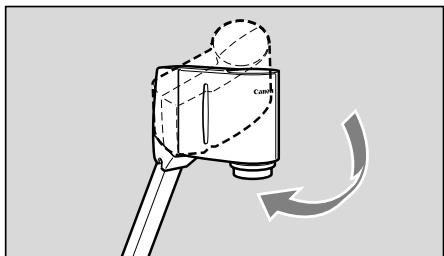

Retirez le capuchon d'objectif.
Rangez soigneusement ce capuchon.
Rangement

Posez le capuchon sur l'objet.

Veiller à bien déconnecter l'alimentation de l'appareil avant de ranger celui-ci.

Dirigez le module de prise de vues vers le (:oté jusqu'à ce qu'il viennent en butée.

Saisissez le bras avec la main droite, appuyez sur le bouton de libération du bras puis repliez soigneusement le bras vers le plateau portedocument.

Tenez bien le bras pour le ranger. Sinon, il sautera vers le haut, ce qui peut entraîner des blessures ou un mauvais fonctionnement. Rangez-le lentement.

Replacez les deux lampes d'éclairage dans leur position d'origine; opérez avec beaucoup de soin.
Abaissez tout d'abord le support gauche puis le support droit (1) (2) .

Ne touchez pas les lampes fluorescentes immédiatement après leur extinction car elles peuvent être chaudes.

Quand vous ne l'utilisez pas, couvrez l'appareil au moyen de la housse fournie.
Cette housse est munie d'une poche pour le rangement des câbles.

ATTENTION
Assurez-vous que l'appareil est bien refroidi avant de-retirer le couvercle.
- Placez l'appareil à l'horizontale lorsque vous l'entrepose. Si l'appareil est entreposé verticalément, il peut tomber, entraînant des blessures ou un dysfonctionnement.
- Pour transporter l'appareil, coupez l'alimentation, débranchez les câbles, repliez l'appareil et tirez la poignée de transport.
Raccordements
Pour relier le RE-455X à un projecteur, utilisez le cable RGB fourni avec l'appareil. Utilisez le cable d'alimentation fourni avec l'appareil.
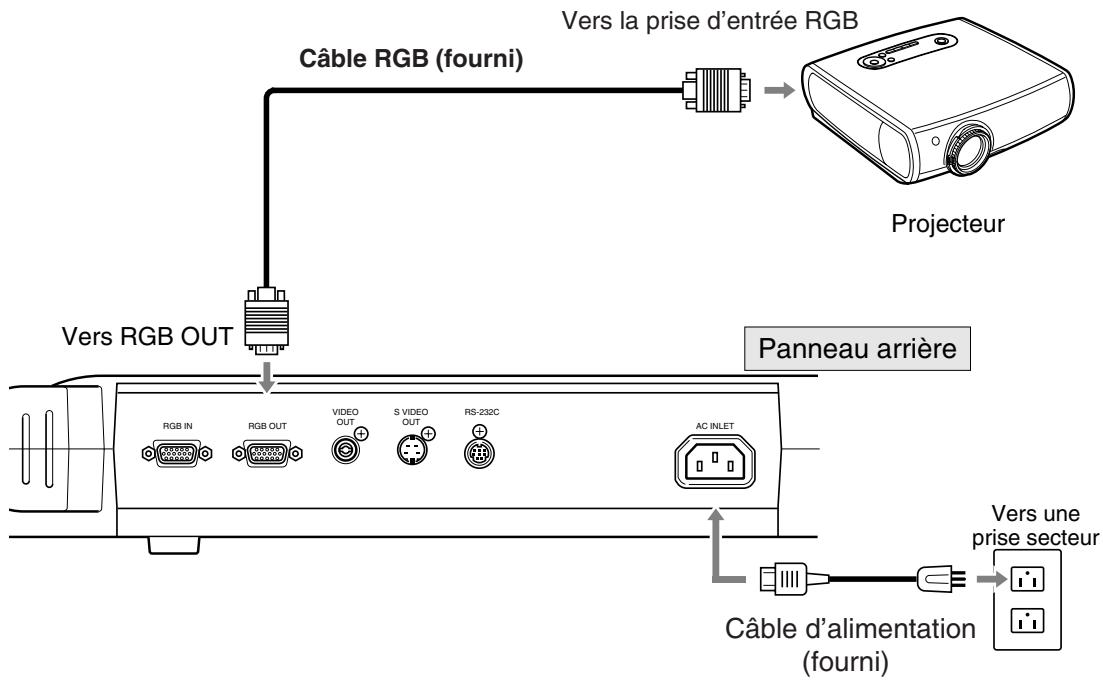

De façon à protéger le RE-455X et évientuèlement les autres équipements, n'oubliez pas de les méttre hors tension avant de débrancher les cables. Pour débrancher un cable, saississez sa fiche mais ne tirez pas sur le cable lui-même.

- Utilisez un projecteur compatible XGA.
- Pour le raccordement des équipements, reportez-vous à la page 15. Pour de plus amples détails sur le fonctionnement des équipements, reportez-vous à leur mode d'emploi.

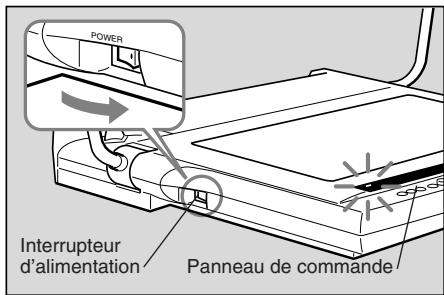
Mettez l'appareil sous tension.
Lorsque le RE-455X est sous tension, le témoin POWER du panneau de commande s'éclaire.

- A la mise sous tension, il faut environ 20 secondes avant qu'une image apparaisse.
- A la mise sous tension, la balance des blancs et la mise au point sont automatiquement régées.

Mettez sous tension l'équipement associé.
Si vous le désirez, cette mise sous tension peut être effectuee préalablement.

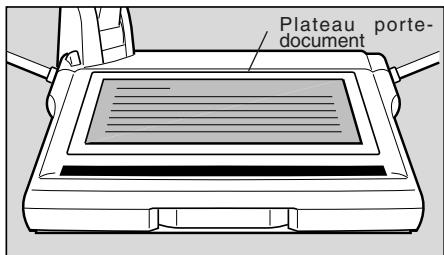
Placez le document au centre du plateau portedocument.
Si aucune image ne s'affiche, assurez-vous que le capuchon de l'objectif a bien ete retire.

Mise au point.
L'autofocus s'active lorsque l'alimentation est allumée.
Si la fonction autofocus ne met pas le sujet au point, passez en mise au point manuelle.

Lorsque vous ne désirez plus utiliser l'appareil, mettez-le hors tension.
Le témoin POWER s'eteint. Les lampes d'éclairage s'eteignent (si elles sont allumées). N'omettez pas demettre hors tension les autres équipements.

Après mise hors tension, attendez au moins 5 secondes avant toute remise sous tension, faute de quoi une anomalie de fonctionnement peut survenir.
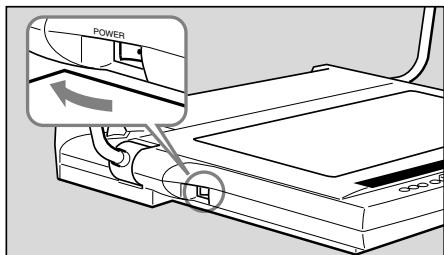

Le RE-455X doit être mis hors tension quand vous ne l'utilise pas. En outre, débranche la fiche du cable d'alimentation si vous n'envisagez pas d'utiliser l'appareil pendant une longue période.
Mise au point manuelle
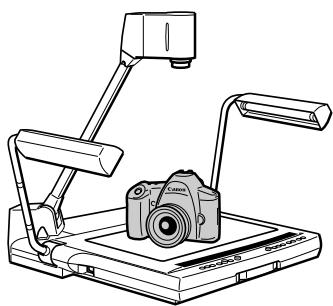
Lorsque l'autofocus n'effectue pas correctement la mise au point ou lorsque vous effectuez la mise au point sur un endroit précis d'un objet tridimensionnel, vous pouvez effectuer la mise au point manuellement. Cette mise au point peut etre effectuée jusqu'à une hauteur d'environ 65mm du plateau porte-document. A cause de la profondeur de champ, il est possible qu'une mise au point minutieuse ne soit pas réalisable pour la totalité de la zone de l'objet tridimensionnel.
Suivez les étapes ci-dessous.
① Appuyez sur la touche FOCUS pour passer en mode de mise au point manuelle.
② Appuyez sur la touche NEAR ou sur la touche FAR pour ajuster la mise au point.
Pour revenir en mise au point automatique, appuyez sur la touche FOCUS.
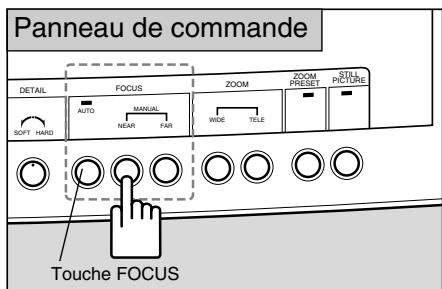

- Quand vous appuyez sur la touche FOCUS pendant au moins 2 secondes, le mode passée en autofocus a partir d'un cliché (AF à partir d'un cliché : une fois la mise au point effectuée sur le sujet, elle est verrouillée dans ce mode). Ce mode est conseilé lorsque vous changez souvent de sujet.
- Lorsque vous basculez entre une projection tridimensionnelle et des documents papier et dans d'autres cas similaires, passez d'abord en mode AF à partir d'un cliché, puis appuyez sur la touche FOCUS pour parvenir à la mise au point.
- Le témoin FOCUS clignote en mode AF à partir d'un cliché, puis il s'éteint lorsque le sujet est correctement mis au point.
- Pour revenir au mode autofocus normal à partir du mode AF à partir d'un cliché, appuyez sur la touche FOCUS pendant au moins 2 secondes.
■ Objets indésirables pour la mise au point
Des objets tels que ceux enumerés ci-dessous peuvent partager certaines difficultés de mise au point. Si cela se produit, mettez l'objet au point manuellement.
- Objets peu refléchissants (étoffe souvent, cheveux etc.)
- Objets à surface luiante ou réfléchissante (verre etc.)
- Objets vus à travers une vitre
- Objets à faible contraste
- Des objets avec des lignes horizontales ou diagonales
Reprise du réglage de la balance des blancs
Cette opération est nécessaire si la tonalité des couleurs ne semble pas naturelle ou si vous souhaitez obtenir une tonalité particulière.
Suivez les étapes ci-dessous.
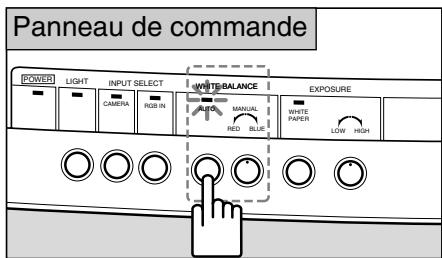
① Appuyez sur la touche WHITE BALANCE (pour activer le mode manuel).
② Tournez le bouton WHITE BALANCE pour obtenir la tonalité des couleurs souhaiée. Tournez-le vers RED pour augmenter la composante rouge, ou vers BLUE pour augmenter la composante bleue.
③ Si vous ne pouvez pas reprendre le réglage de la tonalité des couleurs, retirez le document, appuyez sur la touche WHITE BALANCE, pus exécutez à nouveau les étapes ① et ②
Changement d'angle au format Lettre/A4
Pour adapter la vue au format Lettre/A4, appuyez sur la touche ZOOM PRESET. La taille de l'image de sortie passe au format Lettre/A4.
Si vous appuyez sur la touche ZOOM PRESET le tímoin s'allume.
Utilizez les touches ZOOM pour modifier l'angle.
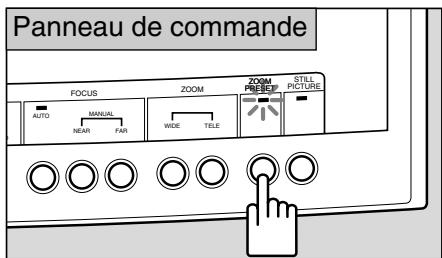

L'angle régle peut être légèrement différent du format Lettre/A4.
Gel de l'image sortie
Pourmettre en pause une image animée sortie,appuyez sur la touche STILL PICTURE.L'imagetrie passede'une image animeeaune image gelée.
Le témoin STILL PICTURE est éclairé pendant le gel de l'image.
Appuyez une seconde fois sur la touche STILL PICTURE, et l'image gelée se remettra à défilier.
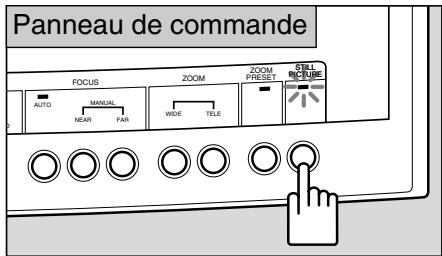

Les réglages tels que zoom, mise au point ou balance des blancs sont impossibles pendant le gel de l'image.
Projection de documents blancs
Si vous appuyez sur la touche WHITE PAPER lors de la projection de documents textuels sur un fond blanc, le mode s'ajuste automatiquement de sorte que la projection des parties blanches d'un document apparaisent beaucoup plus blanches.
A la pression de la touche, le témoin WHITE PAPER s'éclaire.
Appuyez une seconde fois, le témoin s'éteindra et l'appareil reviendra en fonctionnement ordinaire.
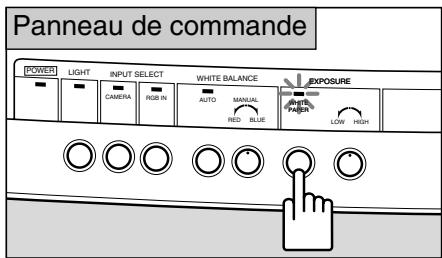

L'efficacité peut varier selon le document, y compris son degré d'assombrissement.
Réglage de la luminosité et du contraste de l'image
Si vous souhaitez projeter un document noir ou nombre, ou que l'objet projeté est petit et à fort contraste par rapport au fond, il sera possible de contrôler la luminosité (regler l'exposition) en agissant sur le bouton EXPOSURE pour accroître la nettedé de l'image.
Si le fond est blanc et que le sujet est nombre, la qualite de l'imag pourra parfois etre ameliore en le plaant sur du papier noir lors de la projection.
Tournez-le vers HIGH pour accroître la luminosité, ou vers LOW pour la décroître.
Agissez sur le bouton DETAIL pour obtenir une image plus ou moins détaillée. Tournez le bouton vers HARD pour souligner les contours, ou vers SOFT pour les adoucir.

Le réglage de la luminosité avec le bouton EXPOSURE peut ne pas être efficace si l'image est tropASFIRE.
4 CONFIGURATION D'UN SYSTÉME
Les équipements suivants peuvent être raccordés aux prises d'entrée et de sortie. Utilisez le cable d'alimentation fourni. Pour les cables autres que le cable d'alimentation et le cable RGB fournis, utilisez des cables disponibles dans le commerce. Pour de plus amples détails sur le fonctionnement des équipements, reportez-vous à leur mode d'emploi.
Équipements de sortie
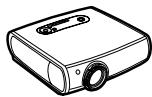
Projecteur
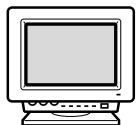
Moniteur RVB
Moniteur video
Equipement audiovisuel
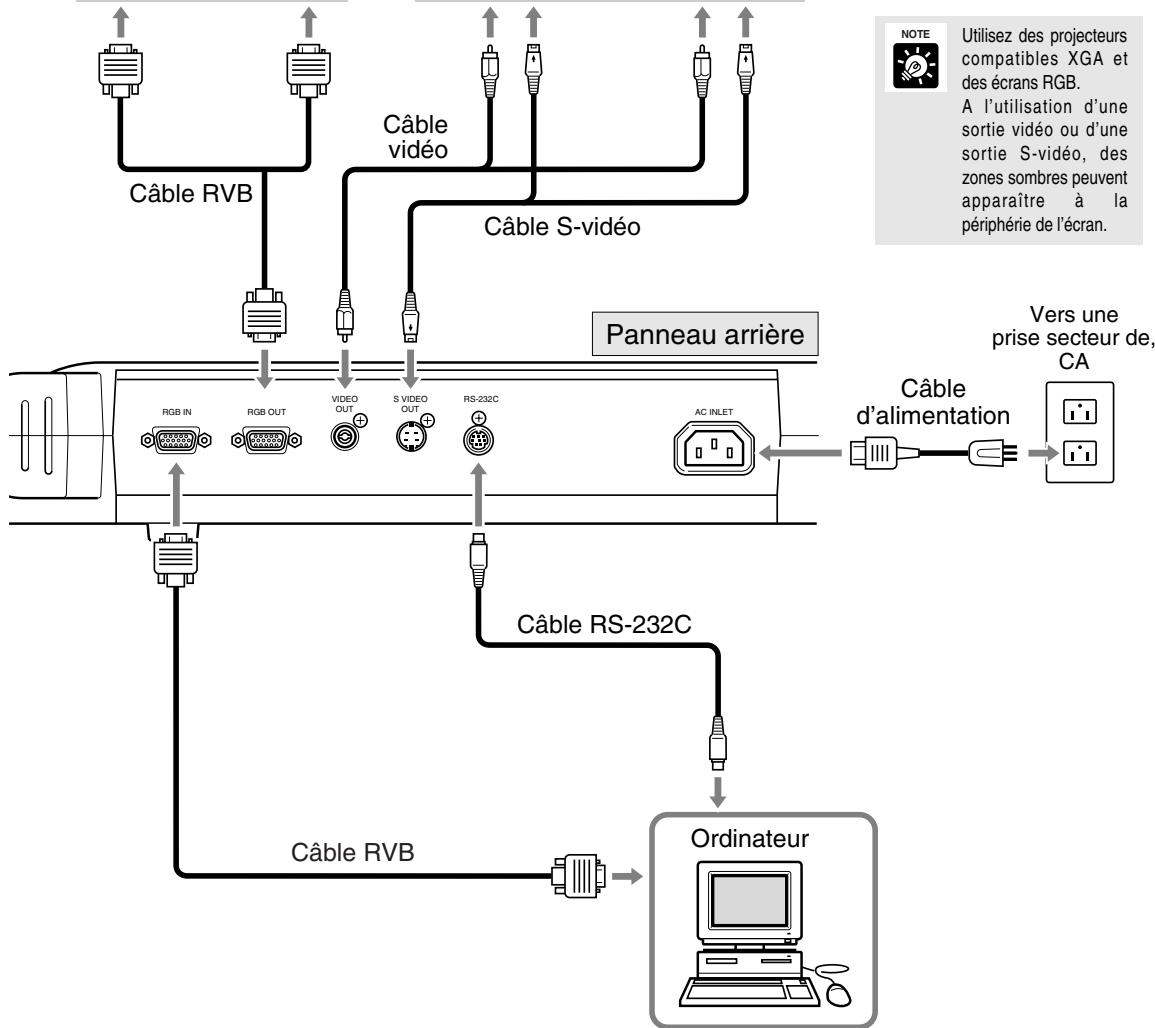
Vers la prise d'entrée RGB

REMARQUIE
Au raccordement d'un équipement tel que moniteur video ou magnétoscope, vérifie si votre modèle RE-455X utilise le format NTSC ou PAL, et employez un équipement compatible avec le format concerné.
Pour contrôler à l'aide d'un ordinateur
Pour contrôler le RE-455X à distance avec un ordinateur, procédéz dans l'ordre suivant.
1) Connectez l'appareil à l'ordinateur à l'aide d'un cable RS-232C.
2) Allumez l'appareil et l'ordinateur.
3) Utilizez l'ordinateur.
Veuillez contacter votre distributeur pour plus de détails.
Changement de source avec un équipement d'entrée extérieur
En raccordant un ordinateur ou un autre équipement à la prise d'entrée RGB, vous pouvez projeter des images de cet équipement en appuyant simplement sur une touche.
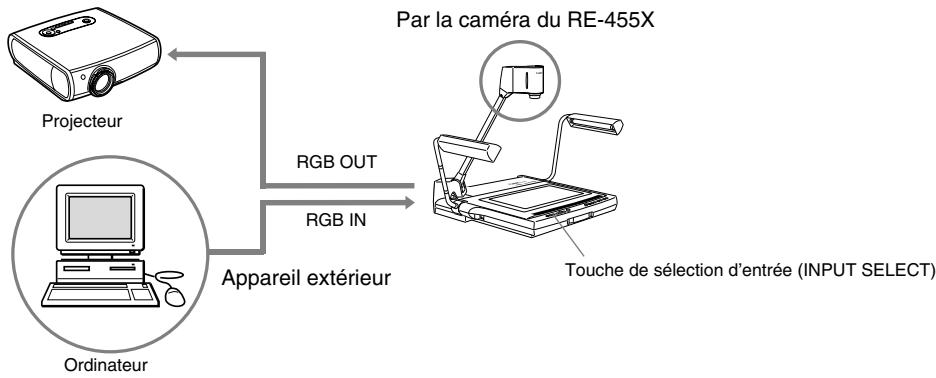
Pour commuter aux images d'un équipement d'entrée extérieur, comme un ordinateur, appuyez sur la touche RGB IN. Le tímoin RGB IN s'éclaire et les images sont projétées depuis l'équipement raccardé à la prise d'entrée RGB.
Appuyez sur la touche CAMERA pour revenir aux images du module de prise de vues du RE-455X.

ATTENTION
- En fonction de l'ordinateur ou du projecteur, les images peuvent apparaitre déformées et le basculement entre les sources d'images ne peut pas se faire correctement.
- Les images peuvent apparaître dans une position légèrement différente entre le module de prise de vues du RE-455X et un ordinateur.

Les images du module de prise de vues seront sorties à la prise de sortie video et à la prise de sortie S-video quel que soit l'équipment d'entrée sélectionné.
Enregistrement d'images à l'aide d'un équipement audiovisuel
Si vous souhaitez enregistrer avec un équipement audiovisuel, connectez-y le RE-455X avec un cable video disponible dans le commerce. Pour de plus amples détails concernant l'utilisation de l'équipement utilisé, reportez-vous au mode d'emploi fourni avec l'équipement.
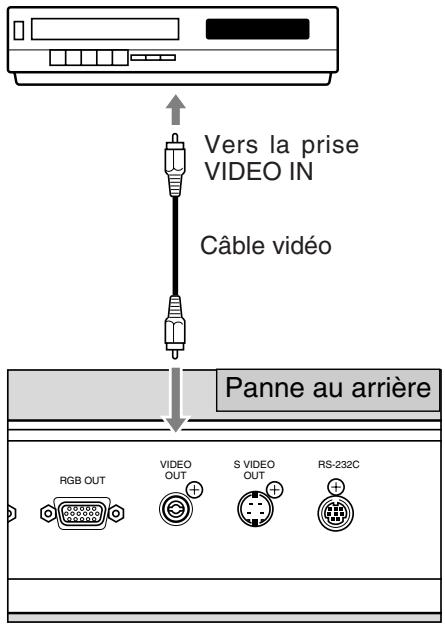
Equipement audiovisuel (Graveur de DVD, magnétoscope, etc.)

Vérifiez si votre modele RE-455X est de format NTSC ou PAL et utilisez un équipement audiovisuel compatible avec le format concerne.

Si vous utilisez un équipement audiovisuel pourvu d'une prise S-video, utilisez un cable S-video pour relier cette prise de manière à projeter des images de haute qualité.
Transférer des images vers des ordinateurs (Entrée d'image)
Si vous souhaitez transférer des images du RE-455X vers un ordinateur, vous pouze le faire en utilisant simplement un cable video pour connecter l'appareil à un ordinateur à capacité audiovisuelle. Si vous ordinateur n'a pas de capacité audiovisuelle, une carte de capture video est nécessaire pour convertir le signal video (signal analogique) en signal numérique convenant à un ordinateur. Contactez le fabriquant de votre ordinateur ou un magasin pour plus de détails.
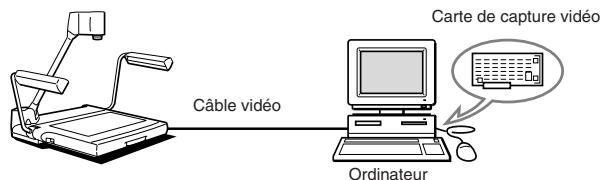

Utilizez un ordinateur compatible XGA.
Commande de l'appareil à partir d'un ordinateur
Le RE-455X peut être contrôle à distance par un ordinateur grâce à diverses commandes. Reportez-vous au tableau ci-dessous pour les fonctions qui peuvent être contrôleés à distance. Pour plus d'information y compris les méthodes de contrôle, veuillez contacter votre distributeur.
| Catégorie | Abréviations | Signification | |
| Commande de laamera | Commande de l'objectif zoom | Zoom STOPZoom TELEZoom WIDEPositionnoment zoom, position par défautPositionnoment zoom, paysage A4Positionnoment zoomVitesse zoom | Le zoom s'arrête.Le zoom passes en téléobjectif.Lez zoomonne en grand angulaire.Lez zoomonne à la position par défaut.Lez zoomonne à la position paysage A4.Lez zoomonne à la position spécifique.Règla la vitesse du zoom. |
| Commande de la mise au point | Mise au point AFMise au point ONE SHOTMise au point MANUALMise au point STOPMise au point NEARMise au point FAR | Commute à la mise au point automatique.Basculen mode de mise au point à partir d'un cliché.Commute à la mise au point manuelle.Arrête la mise au point.Met au point sur un objet plus proche.Met au point sur un objet plus éloigné. | |
| Réglage de la balance des blancs | Balance des blancs AUTOBalance des blancs MANUALBalance des blancs, indication de valeur | Règla automatiquement la balance des blancs.Règla manuelle le balance des blancs.Spécifie la valeur cible de balance des blancs. | |
| Correction de l'exposition | Exposition, indication de valeurMode d'exposition NORMALMode d'exposition WHITE PAPER | Règla la valeur d'exposition.Commute l'exposition au mode NORMAL.Commute l'exposition au mode WHITE PAPER. | |
| Image fixe | Image fixe ONImage fixe OFF | Met ON le mode STILL PICTURE.Met OFF le mode STILL PICTURE. | |
| Commandedusysteme | Réglage du contour | Réglage DETAIL | Règla la qualité de l'image. |
| Sélection du signal d'entrée | Sélection d'entrée CAMERASélection d'entrée EXTERNAL | Sélectionne le module de prise de vues comme signald'entrée.Sélectionne un signal extérieur comme signal d'entrée. | |
| Commande de l'éclairagement | Eclairage ONEclairage OFF | Met sous tension les lampes d'éclairage.Met hors tension les lampes d'éclairage. | |
| Sélection du mode de commande | Mode de commande hôteMode de commande local | Commute le RE-455X à la commande à partir de l'ordinateur.Annule le mode de commande par l'hôte. | |
| Sortied'informations | Demande de nom de modèleDemande de version ROM | Lit les informations de modèle du RE-455X.Lit les informations de version ROM. | |
5 GUIDE DE DÉPANNAGE
Si vous avez l'impression que le RE-455X ne fonctionne pas normalement, procedez aux vérifications suivantes avant de prendre contact avec le distributeur.
| Anomalie | Cause probable | Page de référence |
| Le moniteur n'affiche aucune image | • Le capuchon d'objectif n'a pas été retire. • Le RE-455X et les autres équipements ne sont pas sous tension. • Les raccordements sont incorrects. • La source d'images n'est pas correctement可以选择. | 8 11 15 16 |
| La mise au point de l'image est impossible | • Le document ou trop nombre, ou bien luiant. • Un éclairage puissant illumine l'écran. • L'objet projeté manque de contraste. • La mise au point a été effectué manuellement. • L'objet est gelée. | 12 12 12 12 13 |
| La fonction zoom est inopérante | • L'objet est gelée. | 13 |
| L'image semble rougeâtre ou bleuâtre | • La balance des blancs a été réglée manuellement. • La tonalité dewès couleurs du moniteur n'est pas correcte. | — 14 |
| Les images sont trop brillantes ou tropsons | • La touche WHITE PAPER est ON. • Le réglage du RE-455X ou du moniteur n'est pas correctement effectué. • L'objet n'est pas convenablement éclairé. | 14 14 — |
| La source d'images ne peut pas être可以选择 | • Le RE-455X et les autres équipements ne sont pas sous tension. • Les raccordements sont incorrects. | 11 15 |
| L'écran ne change pas | • L'objet est gelée. | 13 |
| Les lampes d'éclairage ne s'éclairent pas immédiattement après une pression sur la touche LIGHTS | • Pour protégger les lampes, un préchauffage est réalisé pendant 3 secondes. Il ne s'agit donc pas d'une anomalie. Le témoin LIGHT clignote pendant le préchauffage. | — |
| Le RE-455X ne peut pas être commandé par un ordinateur | • Le RE-455X et les autres équipements ne sont pas sous tension. • Les raccordements sont incorrects. • Utilisation incorrecte de l'appareil. | 11 15 — |
Si les vérifications ci-dessus ne vous permettent pas de résoudre le problème, consultez le distributeur.

Les lampes d'éclairage fluorescentes sont des consommables. Mettez en place une lampe neue si l'une d'elles commence à clignoter ou devient nombre. Pour plus de détails concernant le remplacement, veuillez consulterer votre distributeur.
| Sortie du signal | Sortie XGA (conforme à VESA) |
| Dispositif d'image | CCD 1/3 pouce |
| Pixels efficaces | Horizontalément 1.024 pixels x verticalément 768 pixels |
| Synchronisation | Interne seulement (sortie XGA et sortie NTSC/PAL asynchrones) |
| Définition | Sortie XGA 520 lignes de télévision horizontales ou plus, 450 lignes de télévision verticales ou plus |
| Vitesse d'image | Sortie XGA, 15 images/sec. |
| Objectif de projection | F = 5,4 mm - 64,8 mm, F1,8 - F2,8, 10 éléments en 8 groupes |
| Plage de projection | (maximum) 306 × 230 mm - 31,5 × 23,7 mm |
| Zoom | Zoom motorisé × 12 avec touche PRESET ZOOM pour le format A4 |
| Mise au point | Automatique motorisée/manuelle |
| Réglage du diaphragme (exposition) | Automatique motorisé/manuel avec touche WHITE PAPER pour les documents blancs |
| Balance des blancs | Automatique/manuelle |
| Lampes d'éclairage | 2 lampes fluorescentes 6 W, éclairage haute fréquence, orientables |
| Sources d'entrée | Commutable entre le module de prise de vues interieur/l'équipment d'entrée extérieur pour XGA seulement |
| Prises d'entrée/sorting | 1 entrée RGB (XGA), D-SUB 15 broches, impédance d'entrée: 75 Ω1 sortie RGB (XGA), connecteur D-SUB 15 broches, impédance de sortie: 75 Ω1 sortie vidéo, connecteur à broches RCA, impédance de sortie: 75 Ω1 sortie S-video, connecteur min-DIN 4 broches, impédance de sortie: 75 Ω1 interface série RS-232CEntrée d'alimentation secteur 1 |
| Alimentation | 100 - 120 V CA 50/60Hz (Etats-Unis et Canada)200 - 240 V CA 50/60Hz (Europe continentale) |
| Consommation | NTSC: Env. 23 WPAL: Env. 25 W |
| Dimensions | Position de fonctionnement: 722 × 525 × 556 mm (l×p×h)Position de rabattement: 486 × 525 × 183 mm (l×p×h) |
| Poids | Env. 9.4 kg |
| Conditions ambantes de fonctionnement | Température: 5°C - 35°C (41°F - 95°F)Humidité relative: 20 - 85% maximum (sans condensation) |
- Poids et dimensions sont approximatifs.
- Sauf erreurs ou omissions.
- Les caractéristiques et la presentation peuvent être modifiées sans avis préalable.
- Canon est une marque de fabrique déposée de Canon Inc.
Deutsch
Canon Visualizer
RE-455X
BEDIENUNGSCANLEITUNG
NTSC/PAL
De
Vielen Dank für das Vertrauen, das Sie unseren Produktten mit dem Kauf des Canon Visualizer RE-455X entgegengebracht haben.
Der RE-455X ist ein benutzerfreundliches tragbares Bildwiedergabesystem mit integrierter Videokamera und einem Zwölfach-Zoomobjektiv. Das Gerät ermöglicht die Wiedergabe von flachen Vorlagen (z.B. Film) oder auch dreidimensionalen Objeken auf dem Bildschirm eines Videomonitors. Folgende Hauptmerkmale zeichnen das Gerät aus:
- Sofortige Wiedergabe von hochwertigen Bildern mit Hilfe der Funktionen automatische Fokussierung, automatischer Weißabgleich und Blendenautomatik (automatische Belichtung). Möglichkeit zur Projektion vieler verschiedene Vorlagen auf dem Monitor von Papierdokumenten bis zu dreidimensionalen Objeken.
- Verfügbarkeit einer ganzen Reihe von Video-Ein-/Ausgängen, u.a. RGB OUT für hochauflösende XGA-LCD-Projektoren und andere Komponenten sowie RGB IN, VIDEO OUT und S-VIDEO OUT.
- Eine Fernbedienung des Geräts über verschiedene Befehle ist möglich.
-
Beachten Sierette, dass die folgenden Funktionen nicht verfügbar sind:
-
Funktion für Hintergrundbeleuchtung; davon eignet es sich nicht zur Projektion transparenter Vorlagen wie etwa OHP-Folien oder Dias.
- Keine Funktion zur Drehung von Bildern
Keine Funktion zur Speicherung von Bildern
Machen Sie sichitte vor Inbetriebnahme des Geräts gründlich mit dem Inhalt der vorliegenden Bedienungsanleitung vertraut, damit stets eine sachgemäße Handhabung gewährleistet ist.
These Anleitung gilt sowohl für NTSC- als auch PAL-Modelle.
Lieferumfang des Geräts (im Versandkarton):
- Canon Visualizer RE-455X
- Netzkabel × 1
- RGB-Kabel × 1
- Geräteabdeckung
- Bedienungsanleitung
ACHTUNG:

DAS GERÄT DARF WEDER REGEN NOCH FEUCHTIGKEIT AUSGESETZT WERDEN, DA SONST BRANDGEFAHR BZW. GEFAHR ELEKTRISCHER SCHLÄG EBESTEHT.
ACHTUNG:

NUR VOM HERSTELLER EMPFOHLENES ZUBEHÖR VERWENDEN, DA SONST DIE GEFAHR VON ELEKTRISCHEN SCHLÄGEN UND STÖRABSTRAHLUNGEN DROHT.
ACHTUNG:

WÄHREND DES BETRIEBS BZW. DIREKT NACH DEM AUSSCHALTEN SIND LEUCHTRÖHREN SEHR HEISS UND DÜRFEN DAHER DANN KEINESFALLS DIREKT BERÜHRT WERDEN. BEIM EINKLAPPEN NACH GEBRAUCH BESONDERS VORSICHTIG VORGEHEN.
Der Netzanschluß sollte in der Höhe des Visualizers installiert und leicht erreichen sein.itte vor dem Reinigen oder Warten den Netzsteckerziehen.
De
Dieses Produkt verwendet einen Mikrocomputer. Externe Hochfrequenzenergie usw. kann Bildstörungen verursachen; verwenden Sie daher theses Produkt nicht in einer derartigen Umgebung.
Im folgenden bezieht sich der Ausdruck "Gerät" auf den Canon Visualizer RE-455X und sein Zubehör.
- Gründliche Lektüre der Bediengsanleitung — Machen Sie sich vor der Inbetriebnahme des Geräts gründlich mit dem Inhalt der vorliegenden Bedienungsanleitung vertraut.
- Sichere Aufbewährung der Bedienungsanleitung — Die Bedienungsanleitung sicher aufbewahren, damit sie stets zum Nachschlagen zur Hand ist.
- Bechtung der Warnhinweise — Unbedingt alle Warnhinweise auf dem Gerät und in der Bedienungsanleitung beachten.
- Bechtung der Anweisungen — Unbedingt alle Anweisungen zur Bedienung und Instandhaltung des Geräts beachten.
- Reinigung — Unbedingt vor der Reinigung des Geräts den Netzsteckerziehen. Das Gerät mit einem sauberen, weichen Tuch abwischen. Gegebenenfalls ein mit Spülmittellösung angefeuchtes und gut ausgewrungenes Tuch verwenden. In thisem Fall zum Schluß mit einem sauberen, trockenen Tuch trockenreiben. Keinesfalls flüchtige Lösungsmittel wie Waschbenzin oder Farbverdünner zur Reinigung verwenden, da sonst die Oberfläche des Geräts angegriffen wird. Bei Verwendung von handelsüblichen Reinigungstüchern unbedingt die Gebrauchsanleitung beachten.
- Gerätezubehör — Nur solche Zubehörteile verwenden, die von der Firma Canon zugelassen sind, da bei andersartigen Teilen Gefährdungen drohen. Stets die vorgeschreibenben Verbindungskabel verwenden, und unbedingt auf korrekten Anschluß achten.
- Wasser und Feuchtigkeit/Stromschlaggefahr — Das Gerät keinesfalls in der Höhe von Wasser oder bei hoher Feuchtigkeit einsetzen. Auch die Nachbarschaft von Heizkörpern eignet sich nicht als Aufstellort für das Gerät.
- Transport oder Wechsel des Aufstellorts — Zu dieser Zweck keinesfalls unstabile Transportwagen, Ständer, Stative, Halterungen oder Tische nutzen. Anderfalls drohen schwere Personen- oder Sachschäden — z.B. durch Umstürzen des Geräts. Beim Transport des Geräts auf einem Transportwagen vorsichtig
vorgehen. Plötzliches Abbremsen, übermaßiger Kraftaufwand und Bodenunbenheiten können zum Umkippen von Wagenaund Geräf führen.

- Stromversorgung — Das Gerätarf nur mit der auf dem Typenschild angegebenen Netzspannung betrieben werden. Bei Fragen zur Netzspannung vor Ort wenden Sie sichitte an den Fachhändler oder den zuständigen Elektrizitätsversorger.
- Erdung — Das Gerät ist mit einem Netzstecker mit drei Kontakten ausgestattet (der dritte Kontakt dient zur Schutzerdung). Der Anschluß darf ausschließlich an eine entsprechende Steckdose erfolgen. Bei Problemen wenden Sie sichitte an einen Elektriker. Die Schutzerdung des Steckers darf keinesfalls aufgehoben werden.
11.Schutz des Netzkabels — Das Netzkabel ist so zu verlegen, daß es nicht zum Stolperdraht oder durch Gegenstände eingeklemmt/umgeknicht wird. Dabei vedienen der Netzstecker und die Austrittsstelle des Netzkabels aus dem Gerät besondere Beachtung. - Blitzschlag — Als zusammenliche Schutzmaßnahme während eines Gewitters oder vor längerem Nichtgebrauch den Netzstecker aus der Steckdoseziehen. Dadurch werden Geräteschäden durch Blitzschlag und Überspannungen im Stromnetzverhindert.
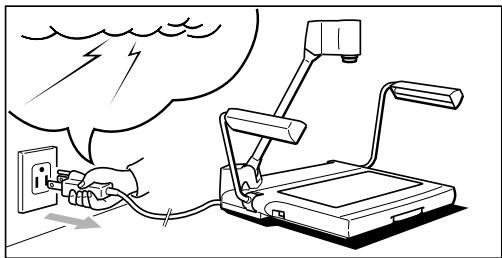
- Stromversorgungsleitungen — Außenantennen dürfen nicht an Orten in der Höhe von Stromnetz-Freileitungen und anderen Stromversorgungsleitungen oder elektrischer Beleuchting installiert sein oder an Orten, wo sie auf solche Leitungen umstürzen können. Bei der Installation von Außenantennen ist davon unbedingt dafür zu sorgen, daß wegen der schwerwiegenden Folgen jeder Kontakt mit den obengenannten Leitungen ausgeschlossen ist.
- Überlastung — Jede Übelastung von Steckdosen und Verlängerungskabeln vermeiden, da sonst Brand- oder Stromschlaggefahr droht.
- Eindringen von Fremdkörpm und Flüssigkeiten — Unbedingt vermeiden, daß durch die Gehäuseöffnungen Fremkörper in das Innere des Geräts eindringen. Andernfalls droht Brand- oder Stromschlaggefahr aufgrund von Kurzschluß oder Kontakt mit spannungsführenden Teilen. Keinesfalls Flüssigkeit auf dem Gerät verschütten.
- Servicearbeiten — Überlassen Sie alle Servicearbeiten am Gerät dem Fachmann. Denn beim Öffnen des Geräts oder Abnehmer von Geräteabdeckungen drohen dem Laien gefährliche Stromschläge und andere Gefahren.
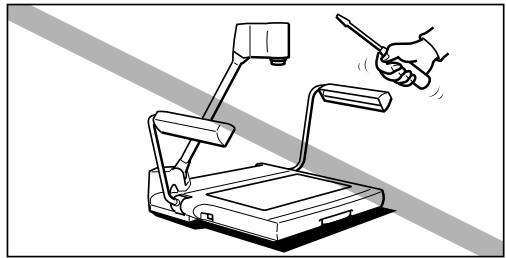
- Reparatur — In den nachstehend aufgeführten Fällen das Gerät vom Netz trennen und zur Reparatur an einen qualifizierten Servicetechniker abgeben.
a. Beschädigung von Netzkabel oder -stecker
b. Verschütten von Flüssigkeit auf dem Gerät oder Eindringen von Fremdkörpm in das Gerät
c. Einwirkung von Regen oder Wasser auf das Gerät
d. Auch bei Fehlfunktionen des Geräts bzw. korrekter Bedienung ausschließlich die Bedienteile handhaben, die in der Bedienungsanleitung angesprochen werden. Die unsachgemäß Handhabung anderer Bedien-/Einstellteile führt u.U. zu Geräteschädten und erfordert ggf. umfangreiche Einstellarheiten durch einen qualifizierten Techniker.
e. Umstürzen des Geräts oder Beschädigung des Gerätegehäuses
f. Deutliches Nachlassen der Geräteleistung
g. Falls das Produkt Rauch, ungewöhnliche Gerüche oder Betriebsgeräusche entwickelt
- Ersatzteile — Beim Austausch von Teilen im Rahmen von Reparaturen dürfen nur von Canon zugelassene oder äquivalente Ersatzteile verwendet werden. Bei Einsatz unzulässiger Ersatzteile drohen Gefährdungen wie Brand und Stromschlag.
- Prüfung auf Betriebssicherheit — Nach dem Abschluss von Service- oder Reparaturmaßnahmen ist stets eine Prüfung des Geräts auf Betriebssicherheit durch den Servicetechniker erforderlich.
De

WICHTIGE SICHERHEITSHINWEISE 3
1. TEILEBEZEICHNUNGEN UND FUNKTIONEN ……6
2. AUFBAU, ABBAU/LAGERUNG UND ANSCHLUSS 8
3. BEDIENUNG 11
Manuelle Scharfeinstellung 12
Korrektur des Weißabgleichs 13
Wechsel des Objektivwinkel auf Blattformat Letter/A4 … 13
AnhaltenvonAusgabebildern(Standbildanzeige) 13
Projektion von Schwarzzwei-Textvorlagen 14
Einstellung von Helligkeit und Kontrast 14
4. SYSTEMKCONFIGURATION 15
Bildwiedergabe über Videomonitor 15
Steuerung über Computer 15
Umschaltung auf Bildeingabe von externen Komponenten … 16
Bildaufzeichnung mit AV-Komponenten 17
Bildübertragung an Computer (Bildeingabe) 17
Computersteuerbare Funktionen 18
5. FEHLERSUCHE 19
6. TECHNISCHE DATEN 20
1 TEILEBEZEICHNUNGEN UND FUNKTIONEN
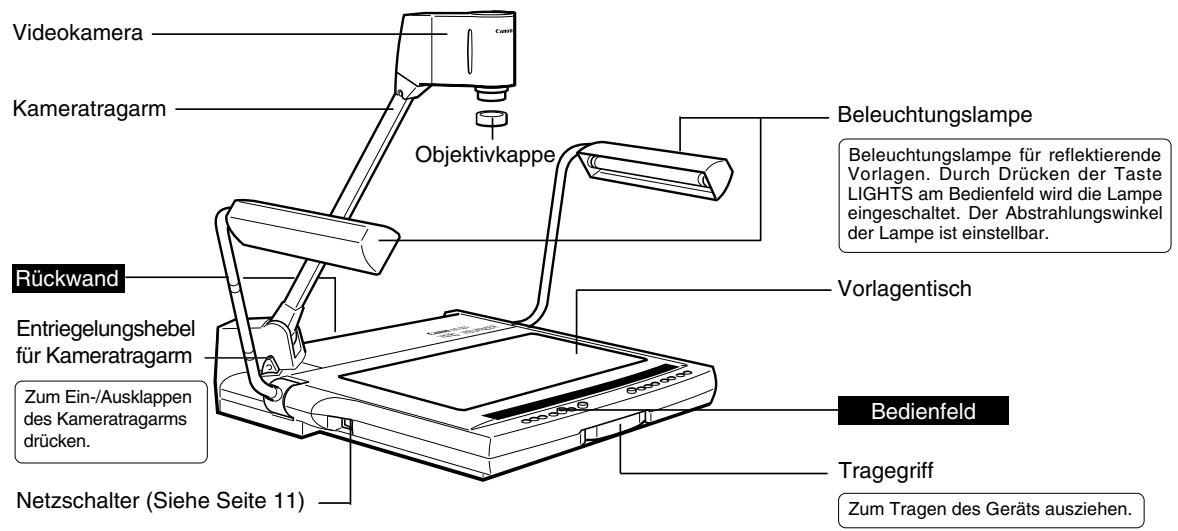

HINWEIS
Nach dem Ausschalten der Stromversorgung mindestens 6 Sekunden bis zum erneuten Einschalten des Geräts warten. Bei vorzeitigem Einschalten der Stromversorgung ist eine Fehlfunktion möglich.

MEMO
Die Beleuchtungslampen leuchten nicht direkt nach dem Drücken der Taste LIGHTS auf. Zum Schutz der Lampen wird eine Vorwärmzeit von 3 Sekunden eingehalten.
Rückwand
Zur Systemkconfiguration siehe Seite 15.
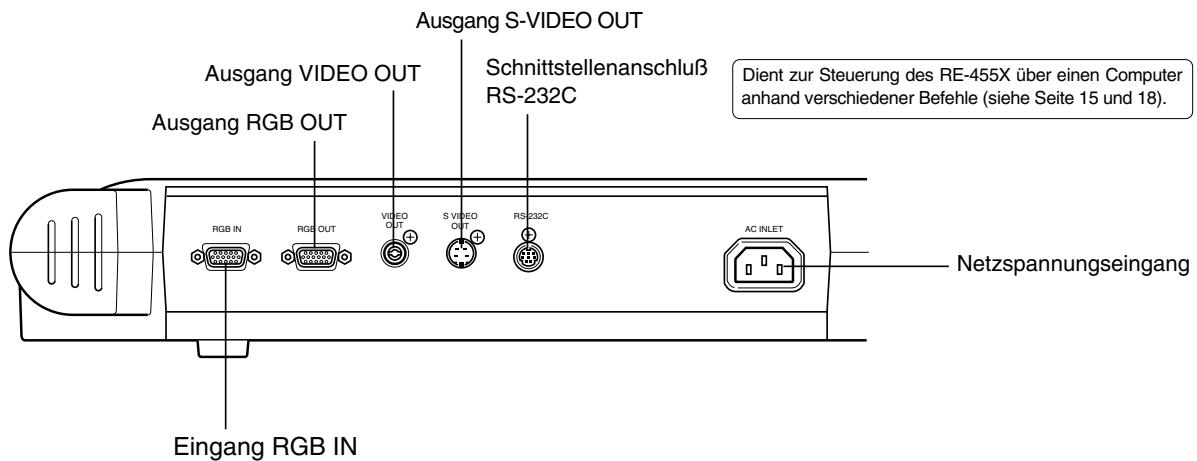
De
Bedienfeld
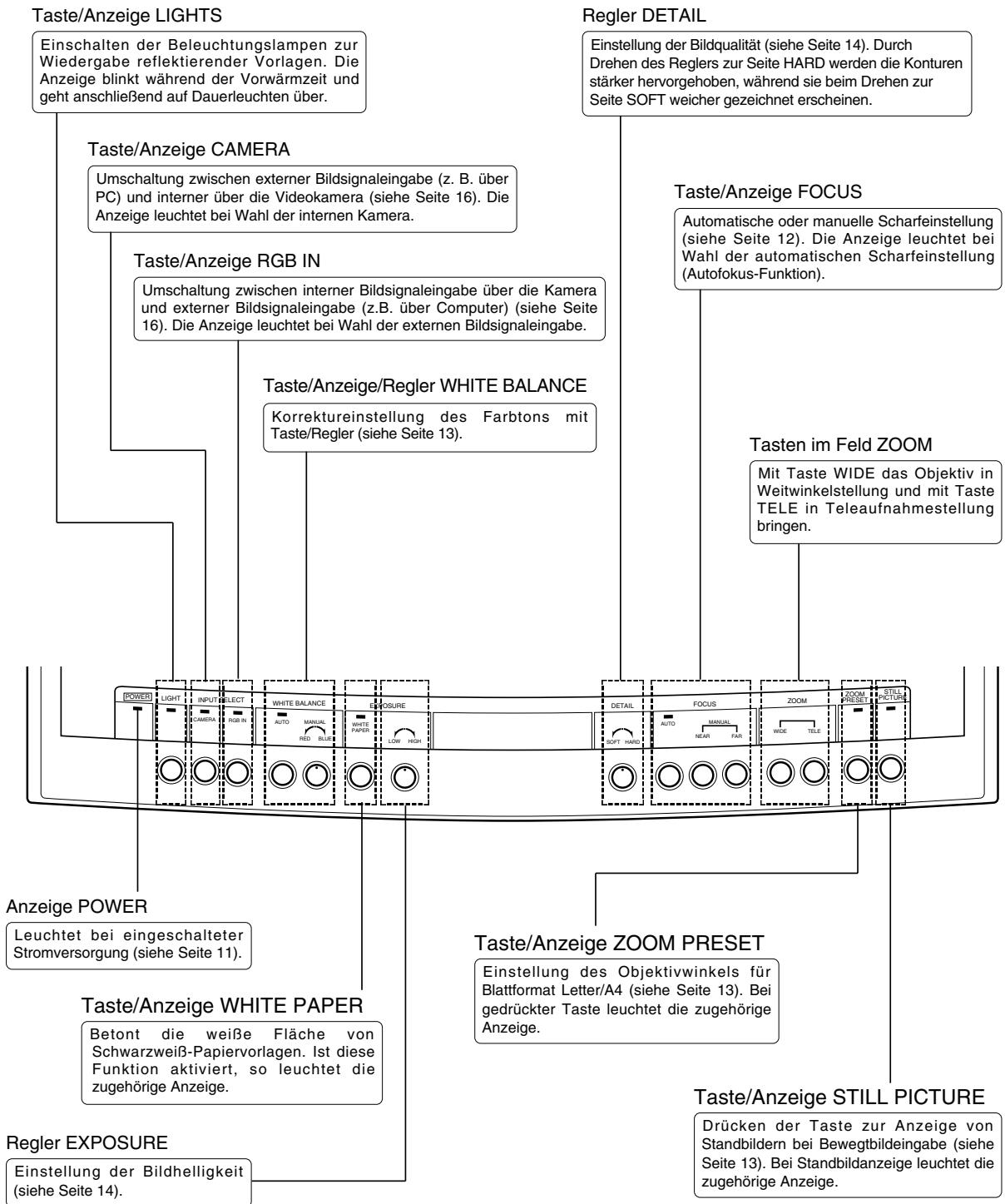
2 AUFBAU, ABBAU/LAGERUNG UND ANSCHLUSS
Aufbau

Die beiden Beleuchtungslampen nach oben klappen.
Zunachst die rechte Beleuchtungslampe und dann die linke nach oben klappen (1) 2).
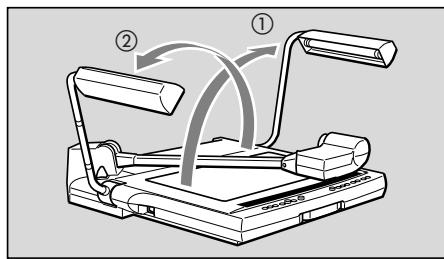

Auf den Entriegelungshebel für Kameratragarm drücken, und den Arm bis zum Anschlag nach oben klappen.

Beim Drücken des Entriegelungshebel unbedingt den Kameratragarm festhalten. Andernfalls droht durch Hochspringen des Arms die Gefahr von Verletzungen und Beschädigungen. Den Arm allmählich wieder loslassen.
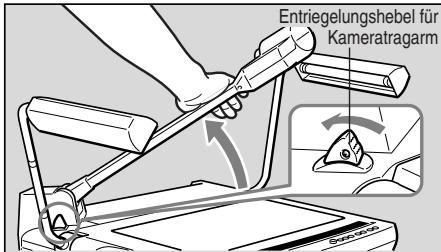

Die Videokamera auf den Vorlagentisch ausrichten.
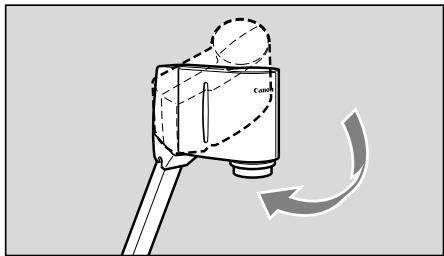

Die Objektivkappe abziehen.
Die Objektivkappe sichere aufbewahren.
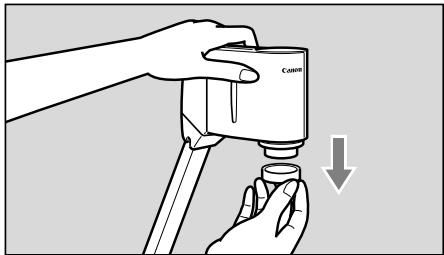
De
Abbau/Lagerung
1
Die Objektivkappe auf das Objektiv aufsetzen.
HINWEIS

Vor Abbau/Lagerung des Gerats unbedingt die Stromversorgung ausschalten.
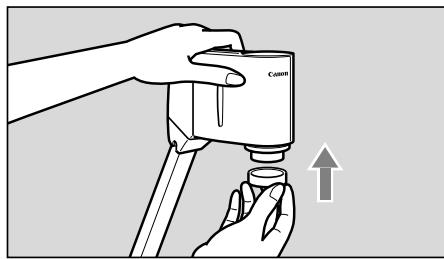
2
Die Videokamera bis zum Anschlag zur Seite drehen.
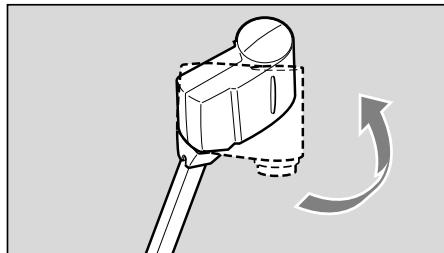
3
Den Kameratragarm mit der rechten Hand halten, und gleichzeitig auf den Entriegelungshebel drücken; danach den Tragarm äußert behutsam zum Vorlagentisch hinziehen.
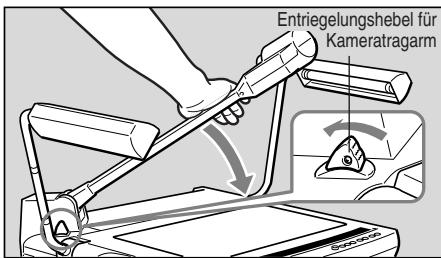

Beim Einklappen den Kameratragarm unbedingt fest halten.
Andernfalls droht durch Hochspringen des Arms die Gefahr von Verletzungen und Beschädigungen. Den Arm allmählich einklappen.
4
Die beiden Beleuchtungslampen äußert behutsam zusammenklappen.
Zunachst die linke Beleuchtungslampe und dann die rechte nach oben klappen (1) 2).
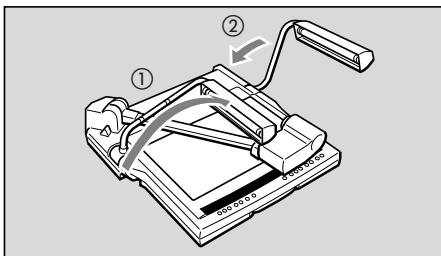

ACHTUNG
Keinesfalls die Beleuchtungslampen direkt nach dem Ausschalten berühren, da sie immer noch sehr heißt sein konnen.

Während des Nichtgebrauchs die Geräteabdeckung über den RE-455X ziehen. Die Geräteabdeckung verfügt über eine Tasche zur Aufbewährung der Kabel.
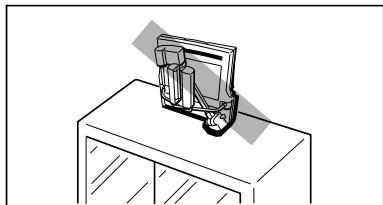

ACHTUNG
- Vor dem Aufsatzen der Abdeckung sicherstellen, dass das Gerät ausreichend abgekühlt ist.
- Das Gerät stets in horizontaler Lage aufbewahren. Wird das Gerät hochkant gelagert, so drohen Personen- und Sachschäden durch Umkippen.
- Zum Transport des Geräts die Stromversorgung ausschalten, die Kabel abtrennen, das Gerät einklappen und den Tragegriff herausziehen.
Anschluß
Der Anschluß des RE-455X an einen Projektor erfolgt über das mitgelieferte RGB-Kabel. Und zum Anschluß ans Stromnetz dient das mitgelieferte Netzkabel.
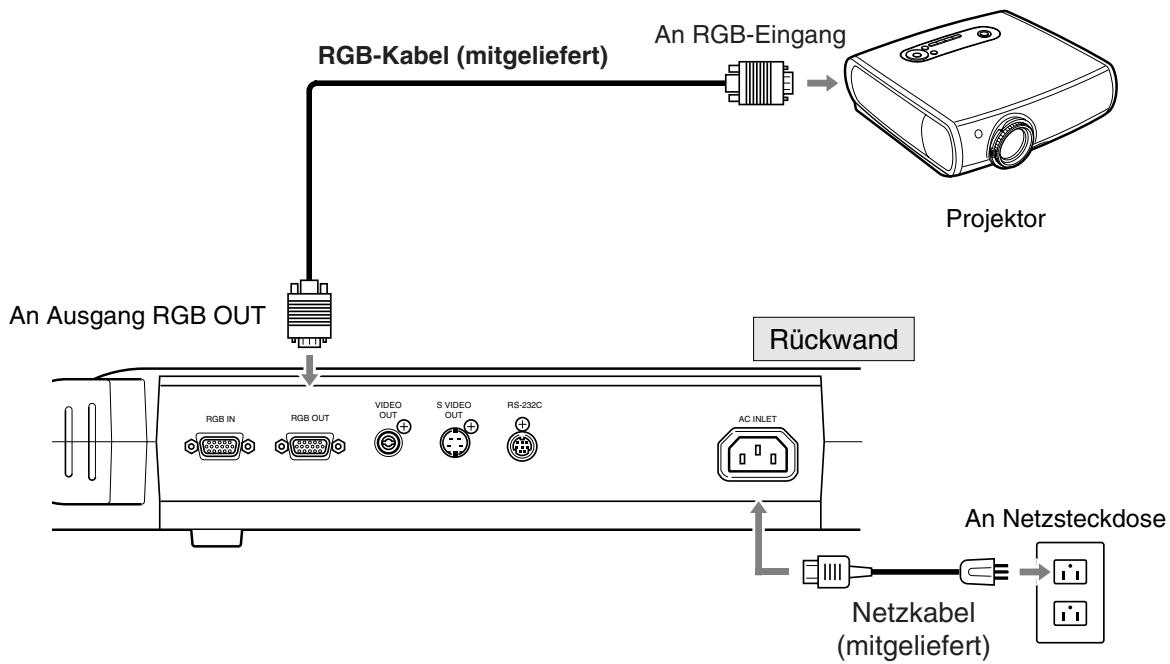

Zum Schutz des RE-455X und anderer eingesetzter Geräte sicherstellen, daß vor dem Herstellen der Kabelverbindungen die Stromversorgung aller Geräte ausgeschaltet ist. Beim Verbinden/ Abtrennen die Kabel stets am Stecker fassen.

-
Einen XGA-kompatiblen Projektor verwenden.
-
Zum Anschluß verschiedener Komponenten siehe Seite 15. Nähres zur Bedienungfindet sich in der Bedienungsanleitung der jeweiligen Komponente.

Die Stromversorgung des Geräts einschalten.
Sobald die Stromversorgung des RE-455X eingeschaltet worden ist, leuchtet die Anzeige POWER am Bedienfeld auf.

- Nach Einschalten der Stromversorgung dauert es etwa 20 Sekunden bis zur Bildanzeige.
- Beim Einsatz der Stromversorgung erfolgen automatisch WeiBabgleich und Scharfeinstellung.
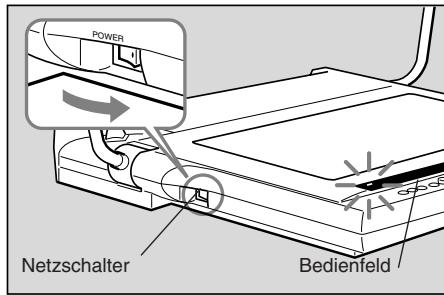

Die Stromversorgung der anderen angeschlossenen Bildsignalquellen einschalten.
Dabei ist die Einschaltreihenfolge der Geräte beliebig.

Die Vorlage mittig auf den Vorlagentisch legen.
Wird kein Bild auf dem Monitorschirm angezeigt, sicherstellen, daß die Objektivkappe abgenommen worden ist.
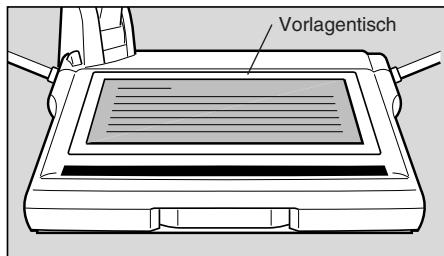

Scharfeinstellung.
Beim Einschalten der Stromversorgung wird die Autofokus-Funktion aktiviert.
Lässt sich die Vorlage mit der Autofokus-Funktion nicht scharf einstellen, auf manuelle Scharfeinstellung umschalten.

Ist der Bedienvorgang abgeschlossen, die Stromversorgung ausschalten.
Daraufhin erloschen die Anzeige POWER und die Beleuchtungslampen (sofern aktiviert). Die Stromversorgung der anderen Geräte ebenfalls ausschalten.
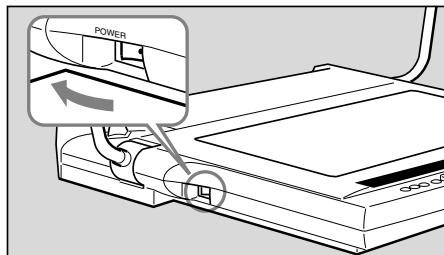

Nach dem Ausschalten der Stromversorgung mindestens 5 Sekunden bis zum erneuten Einsatzwarten. Durch vorzeitiges Einsatzen der Stromversorgung droht eine Fehlfunktion des Geräts.

Bei Nichtgebrauch des RE-455X muß das Gerät ausgeschelt sein, und bei längerem Nichtgebrauch ist außer dem der Netzstecker zuziehen.
Manuelle Scharfeinstellung
Bei mangelhoffer automatischen Fokussierung bzw. zur Fokussierung auf bestimme Stellen von dreidimensionalen Objekten ist manuelle Scharfeinstellung möglich. Die manuelle Scharfeinstellung ist bis zu einer Höhe von ca. 65 mm über dem Vorlagentisch möglich. Wegen der Scharfentiefe ist eine Scharfeinstellung u. U. nicht über die gesamte Oberfläche eines dreidimensionalen Objeks möglich.
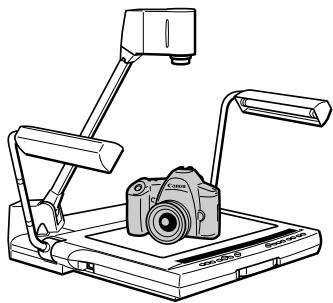
Zur Scharfeinstellung wie folgt vorgehen.
① Zum Umschalten auf manuelle Fokussierung die Taste FOCUS drucken.
Zur Fokussierung die Taste NEAR oder FAR drucken.
Zum Rückschalten auf automatische Scharfeinstellung die Taste FOCUS drucken.
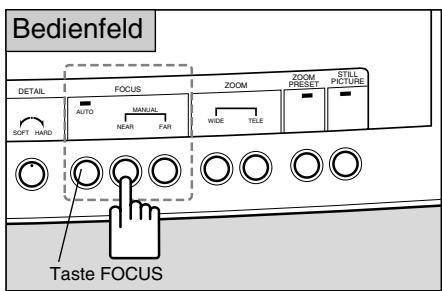

- Wird Taste FOCUS mindestens zwei Sekunden lang gedrück, so erfolgt Umschaltung auf Festeinstellungen-Autofokus (Feststell-AF-Modus: d. h. nach erfolgter Scharfinstellung auf das Object bleibt dieser Wert anschlieBend fest eingestellt). These Betriebsart empfeiht sich bei früigem Objektewchsel.
- Bei Umschaltung der Projektion zwischen dreidimensionalen Objekten und Papiervorlagen bzw. in vergleichbaren Fällen zunachst Feststell-AF-Modus wahlen und dann durch Drücken der Taste FOCUS die Scharfeinstellung vornehmen.
- Im Feststell-AF-Modus blinkt die Anzeige FOCUS so lange, bis das Objekt einwandfrei fokussiert ist und erlischt dann.
- Zum Rückschalten vom Feststell-AF- auf normalen Autofokus-Modus Taste FOCUS mindestens zwei Sekunden lang drücken.
Zur Fokussierung ungeeignete Objekte
Be den nachstehend aufgeführten Gegenständen ist u. U. bei der Scharfeinstellung mit Schwierigkeiten zu rechnen. In solchen Fällen ist auf manuelle Fokussierung des Objektivs überzugehen.
- Objekte mit niedrigem Reflexionsvermögen (z.B. dunkler Stoff oder Haare)
- Objekte mit glänzender oder reflektierender Oberfläche (z.B. Gegenstände aus Glas)
- Durch Glas betrachtete Objekte
- Objekte mit niedrigem Kontrast
- Objekte nur mit horizontalen oder diagonalen Konturlinien
Korrektur des Weißabgleichs
Bei unnatürlich wirkenden Farbstönen oder Wunsch nach Wechsel des Farbstons ist eine Korrektur des Weißabgleichs von Hand erforderlich.
Zur Korrektur des WeiBabgleichs wie folgt vorgehen.
① Taste WHITE BALANCE drucken (zum Umschalten auf manuellen Betrieb).
② Mit dem Regler im Feld WHITE BALANCE die gewündten Farbstone einstehen. Durch Drehen des Reglers zur Seite RED wird der Rotanteil betont und durch Drehen zur Seite BLUE der Blauanteil.
③ Wenn keine Farbstonkorrektur möglich ist, entfernen Sie das Dokument, drücken die Taste WHITE BALANCE und wiederholen die Schritte ① und ②.
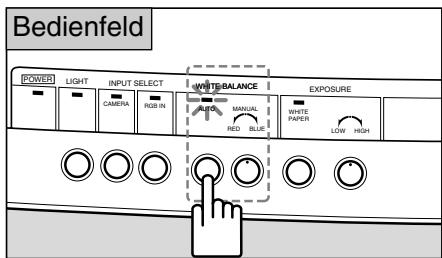
Wechsel des Objektivwinkel auf Blattformat Letter/A4
Um den Objektivwinkel an Blattformat Letter/A4 anzupassen, Taste ZOOM PRESET drücken. Das Ausgabebild nimmt das Format Letter/A4 an.
Bei gedrückter Taste ZOOM PRESET leuchtet die zugehörige Anzeige.
Mit den ZOOM-Tasten ist die Änderung des Objektivwinkels möglich.
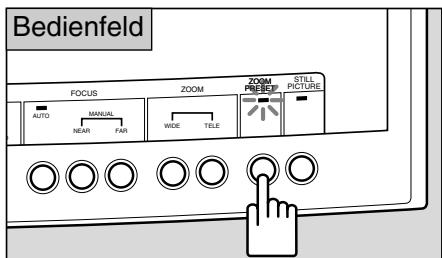

Der eingestellte Winkel kann gingefüglich vom Format Letter/A4 abweichen.
Anhaltenvon Ausgabebildern(Standbildanzeige)
Um eingehende Bewegtbilder anzuhalten, Taste STILL PICTURE drucken.
Daraufhin bleibt das Ausgabebild still stehen.
Solange das Bild stillsteht, leuchtet die Anzeige im Feld STILL PICTURE.
Durch erneutes Drücken der Taste STILL PICTURE wird die Bewegtbildausgabe fortgesetzt.
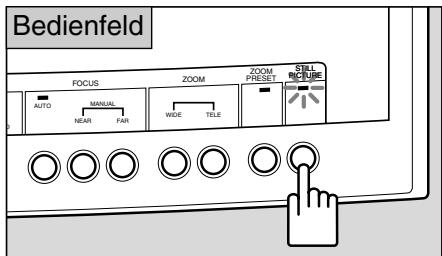

Bei Standbildanzeige sind Funktionen wie Zoomen, Fokussieren oder
WeiBabgleich nicht möglich.
Projektion von Schwarzweiß-Textvorlagen
Durch Drücken von Taste WHITE PAPER werden die weiß Flächen von Textvorlagen bei der Projektion automatisch deutlich hervorgehen.
Beim Drücken der Taste leuchtet die zugehörige Anzeige auf.
Bei erneutem Drücken der Taste erlischt die Anzeige und das Gerät schaltet auf Normalbetrieb zurück.
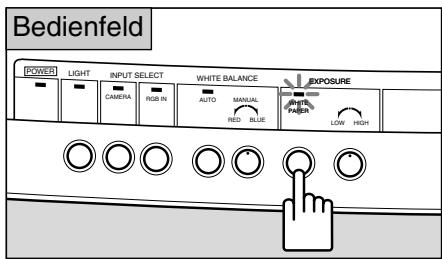

Die Effizienz dieser Funktion richtet sich danach, wie dunkel die Vorlage erscheint.
Einstellung von Helligkeit und Kontrast
Bei einer schwarzen oder dunklen Vorlage oder einem kleinen Objekt mit erheblichem Kontrast gegenüber dem Hintergrund ist im Interesse eines deutlicheren Bildes u.U. die Einstellung der Helligkeit (Belichtung) mit Regler EXPOSURE möglich.
Beiweissem Hintergrund und dunklem Objekt lassst sich u.U. die Bildqualität verbessern, wenn das Objekt während der Projektion auf schwarzes Papier gesetzt wird.
Bei Drehen zur Seite HIGH wird das Bild aufgehelt und bei Drehen zur Seite LOW abgedunkelt.
Der Regler DETAIL dient zur Einstellung der Bildqualität. Zur Hervorhebung der Konturen einer Vorlage den Regler zur Seite HARD drehen, für Konturen mit weicherer Zeichnung dagegen den Regler zur Seite SOFT drehen.

Bei zu dunklem Bild ist u.U. eine effektive Helligkeitseinstellung mit Regler EXPOSURE nicht möglich.
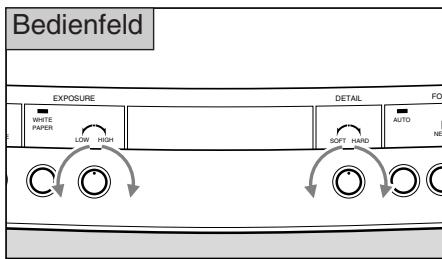
De
4 SYSTEMKONFIGURATION
Die nachstehend aufgeführten Komponenten können mit den Ein- und Ausgängen des Geräts verbunden werden. Verwenden Sie unbedingt das mitgelieferte Netzkabel und RGB-Kabel sowie handelsübliche Verbindungskabel. Naheres zur Bedienung der einzelnen Komponenten finds in den zugehörigen Bedienungsanleitungen.
Bildausgabegeräte
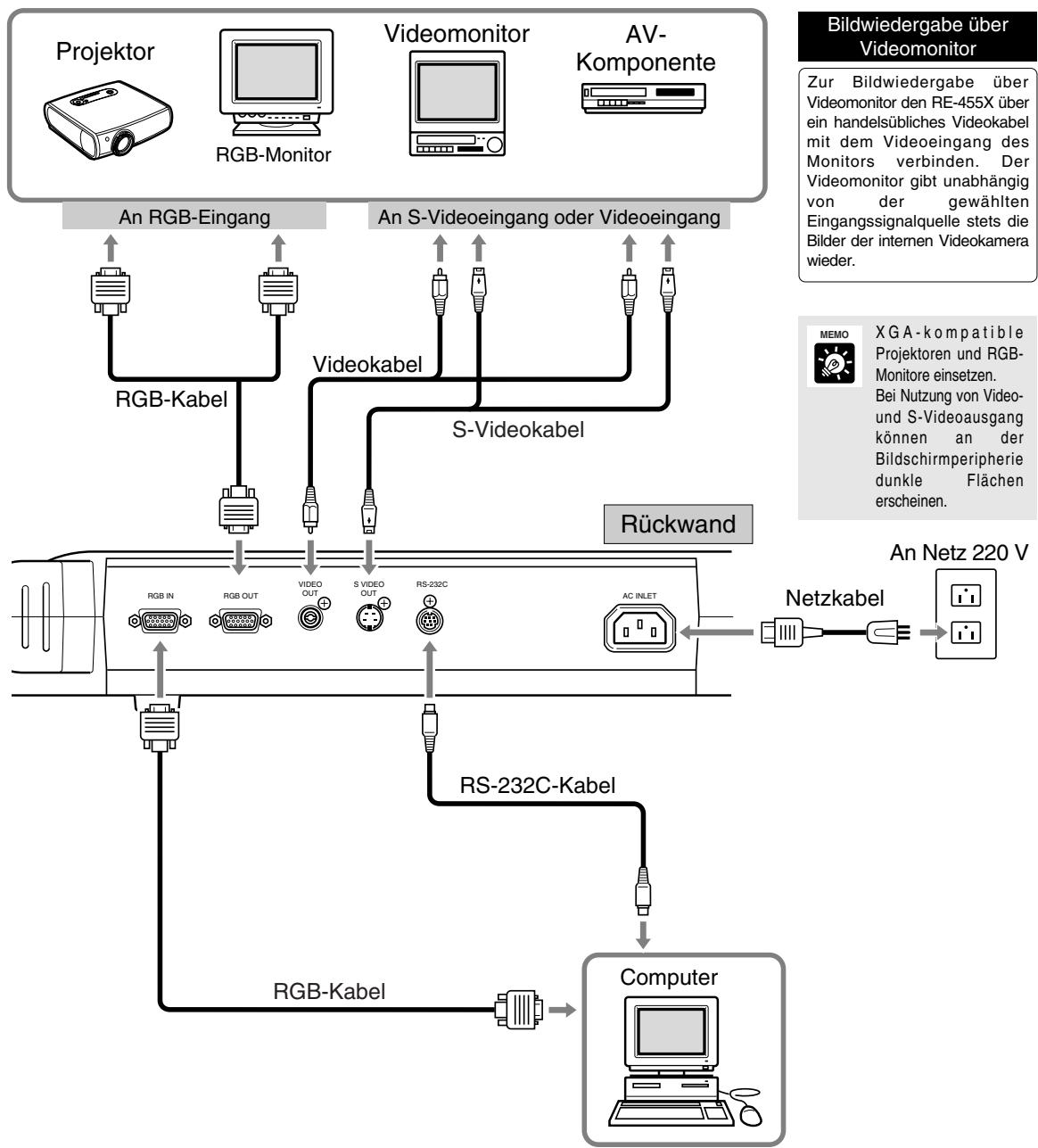
HINWEIS

Bei Anschluß an Komponenten wie Videomonitor oder Videorecorder zunachst feststellen, ob RE-455X ein NTSC-oder PAL-Modell ist, und dann formatkompitable Komponenten nutzen.
Steuerung über Computer
Zur Steuerung des RE-455X über Computer ist in der folgenden Abfolge vorzugehen:
1) Das Gerat über ein RS-232C-Kabel mit dem Computer verbunden.
2) Die Stromversorgung von Gerät und Computer einschalten.
3) Den Computer bedieren.
Naheres dazu erfolhren Sie bei ihrem Fachhändler.
Umschaltung auf Bildeingabe von externen Komponenten
Nach Anschluß eines Rechners oder anderen Geräts an den RGB-Eingang ist die Projektion der Bilder dieser externen Componenten einfach auf Tastedruck möglich.
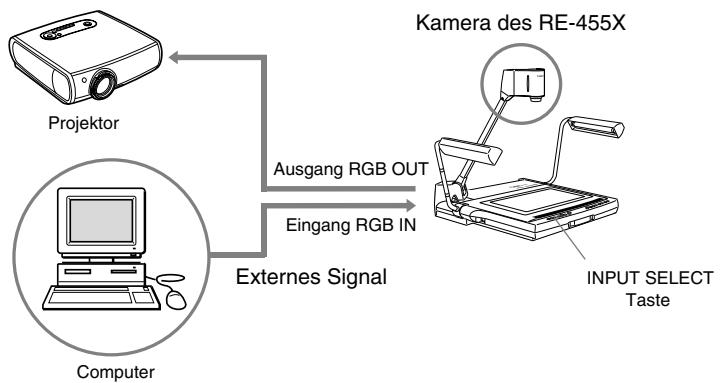
Zur Umschaltung auf die Bildeingabe von externen Komponenten wie etwa einem Computer die Taste RGB IN drücken. Daraufhin leuchtet die Anzeige RGB IN auf und die Eingabebilder von der Komponente am RGB-Eingang werden auf den Bildschirm projziert.
Zum Umschalten auf Bildeingabe von der Kamera RE-455X erneut die Taste CAMERA drucken.
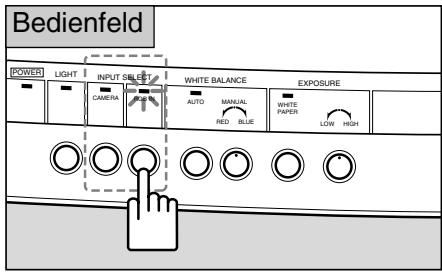

ACHTUNG
- Je nach Computer oder Projektor erscheinen die Bilder u. U. verzerrt und ist eine einwandfrei Umschaltung der Bildsignalquellen nicht möglich.
- Die Positionen der Bilder auf dem RE-455X-Kamerakopf und dem Computer können leicht voneinander abweichen.

Unabhängig von der gewählten Bildsignalquelle werden die Bilder der Videokamera stets über Videoausgang und S-Videoausgang ausgegeben.
Bildaufzeichnung mit AV-Komponenten
Zur Bildaufzeichnung mit AV-Komponenten ist die RE-455X über ein handelsübliches Videokabel an das jeweilige Gerät anzuschlieben. Naheres über die Bedienung des verwendeten Geräts findet sich in der zugehörigen Bedienungsanleitung.
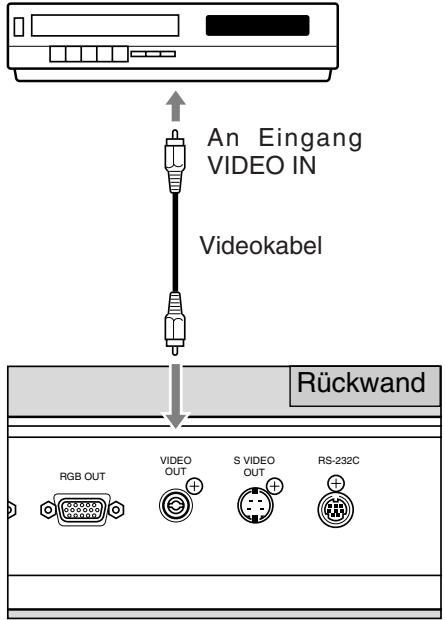
AV-Komponente (z. B. DVD-Rekorder oder Videorekorder)

Stellen Sie zunachst fest, ob es sich bei Ihrer RE-455X um ein NTSC- oder PAL-Modell handelt und verwenden Sie dann eine mit dem jeweiligen Format kompatible AV-Komponente.

Bei Einsatz einer AV-Komponente mit S-Videoausgang sind S-Videokabel zum Anschluss erforderlich. Dadurch ist bei der Projektion eine hohe Bildqualität garantiert.
Bildübertragung an Computer (Bildeingabe)
Sollen Bilder von der RE-455X an einen Computer übertragen werden, so ist dies einfach über ein Videokabel möglich, das das System mit einem AV-kompatiblen Computer verbindet. Ist der genutzte Computer nicht AV-kompatibel, so ist eine Videodigitizerkarte erforderlich zur Umsetzung der (analogen) Videosignale in digitale Form, die vom Computer verarbeitet werden kann. Naheres hierzu erfolhen Sie beim Computerhersteller oder dem Handler, bei dem der Computer bezogen wurde.
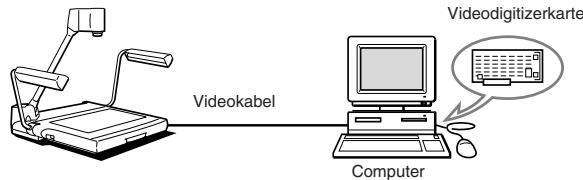

Einen XGA-kompatiblen Computer verwenden.
Computersteuerbare Funktionen
RE-455X lassst sich über verschiedene Befehle durch einen Computer steuern. Die Funktionen, bei denen diese Art der Fernbedienung möglich ist, sind aus der nachstehenden Tabelle ersichtlich. Nahere Informationen zu diesen Thema erfolhren Sie bei Ihr Machfachhandler.
| Kategorie | Abkürzung | Bedeutung | |
| Kamerast euerung | Steuerung des Zoomobjektivs | STOP | Das Zoomobjektiv hält an. |
| TELE | Das Zoomobjektiv bewegt sich in die Teleaufnahmestellung. | ||
| WIDE | Das Zoomobjektiv bewegt sich in die Weitwinkelstellung. | ||
| Positionierung, Ausgangsstellung | Das Zoomobjektiv bewegt sich in die Ausgangsstellung. | ||
| Positionierung, A4-Querformat | Das Zoomobjektiv bewegt sich in die Position für A4-Querformat. | ||
| Positionierung | Das Zoomobjektiv bewegt sich in die Vorgabeposition. | ||
| Geschwindigkeit | Einstellung der Geschwindigkeit beim Zoomen. | ||
| Scharfeinstellung | AF | Umschaltung auf automatische Fokussierung | |
| ONE SHOT | Umschaltung auf Feststell-AF-Modus | ||
| MANUAL | Umschaltung auf manuelle Fokussierung | ||
| STOP | Stoppen der Objektiffokusierung | ||
| NEAR | Fokussierung aufnahen Bereich | ||
| FAR | Fokussierung auf fernen Bereich | ||
| WeiBabgleich | AUTO | Automatische Einstellung des WeiBabgleichs | |
| MANUAL | Manuelle Einstellung des WeiBabgleichs | ||
| Wertzuweisung | Festlegung des Zielwerts des WeiBabgleichs | ||
| Belichtungskorrektur | Wertzuweisung | Festlegung des Belichtungswerts | |
| NORMAL | Umschaltung der Belichtung auf NORMAL-Modus | ||
| WHITE PAPER | Umschaltung der Belichtung auf WHITE PAPER-Modus | ||
| Standbildanzeige | ON | Einschalten des STILL PICTURE-Modus | |
| OFF | Ausschalten des STILL PICTURE-Modus | ||
| Einstellung der Bildkonturen | DETAIL: Einstellung | Einstellung der Bildqualität-Korrekturwerte | |
| Systemsteuerung | Wahl der Bildsignalquelle | INPUT SELECT: Kamera | Wahl der internen Videokamera als Bildsignalquelle |
| INPUT SELECT: Extreme | Wahl einer externen Komponente als Bildsignalquelle | ||
| Komponente | |||
| Beleuchtungseinstellung | LIGHT: Ein | Einschalten der Beleuchtungslampen | |
| LIGHT: Aus | Ausschalten der Beleuchtungslampen | ||
| Wahl des Steuermodus | Rechnersteuerung | Umschaltung des RE-455X auf PC-Steuerung | |
| Steuerung über Gerät | Ausschalten der PC-Steuerung | ||
| Informationsausgabe | Abruf modellbezogener Informationen | Auslesen der Informationen über Modell RE-455X | |
| Abruf der ROM-Version | Auslesen der Informationen über ROM | ||
Bei Betriebsstörungen des RE-455X gehen Sieitte zunachst gemaßer der folgenden Fehlersuchtabelle vor, bevor Sie sich an einen Fachhändler oder den Kundendienst wenden.
| Fehlersymptom | Mögliche Ursache | Siehe Seite |
| Keine Bildwiedergabe auf dem Monitorschirm | ·Objektivkappe nicht abgenommen. ·Stromversorgung des RE-455X oder der anderen angeschlossenen Geräte nicht eingeschaltet. ·Falsch angeschlossene Verbindungskabel. ·Falsche Wahl der Bildsignalquelle. | 8 11 15 16 |
| Korrekte Fokussierung des Bildes unwilling | ·Vorlage zu dunkel oder leuchtend. ·Reflexion von stark einfallendem Außenlicht auf dem Schirm. ·Vorlage mit zu niedrigem Kontrast. ·Einstellung auf manuelle Fokussierung. ·Standbildanzeige | 12 12 12 12 13 |
| Keine Zoomobjektivfunktion | ·Standbildanzeige | 13 |
| Bildwiedergabe mit Rot-/Blaustich | ·Manuelle Einstellung des Weißabgleichs ·Falsche Farbstoneinstellung des Videomonitors. | 13 — |
| Bild zu hell/dunkel | ·Taste WHITE PAPER betätig. ·Keine korrekte Belichtungseinstellung von RE-455X oder Monitor. ·Mangelhafte Ausleuchting der Vorlage. | 14 14 — |
| Umschaltung zwischen den Bildsignalquellen unwilling | ·Stromversorgung von RE-455X oder anderen angeschlossenen Geräten nicht eingeschaltet. ·Falsch angeschlossene Verbindungskabel. | 11 15 |
| Kein Wechsel der Schirmanzeige | ·Standbildanzeige | 13 |
| Kein direktes Einsalten der Beleuchtungslampen nach Drücken der LIGHT-Taste | ·Zum Schutz der Lampen wird bis zu ihrem Aufleuchten eine Vorwärmzeit von 3 Sekunden eingehalten. Das Blinken der Anzeige LIGHT während dieser Vorwärmzeit ist kein Hinweis auf eine Fehlfunktion. | — |
| Computersteuerung des RE-455X unwilling | ·Stromversorgung von RE-455X oder anderen angeschlossenen Geräten nicht eingeschaltet. ·Falsch angeschlossene Verbindungskabel. ·Bedienfehlher. | 11 15 — |
Läbt sich der Fehler anhand der obigen Tabelle nicht beheben, so wenden Sie sichitte an den Fachhändler oder Kundendienst.

Die Leuchtstoffrähren zur Beleuchting sind Verschleiße und müssen davon ausgetauscht werden, sobald sie flackern oder dunkel werden. Nähres zum Lampenaustausch erfolhen Sie bei ihrer Fachhändler.
| Signalausgabe | XGA-Format (nach VESA) |
| Bildwandler | 1/3* CCD |
| Auflösungsvermögen | 1024 Pixel (horizontal) × 760 Pixel (vertical) |
| Synchronisierung | Nur intern (XGA- und NTSC/PAL-Ausgangssignal asynchron) |
| Auflösung | XGA: min. 520 TV-Zeilen horizontal, min. 450 TV-Zeilen vertical |
| Bildfolgefrequenz | XGA: 15 Vollbilder/s |
| Projektensobjektiv | f = 5,4 bis 64,8 mm, Blende 1,8 bis 2,8, 10 Elemente in 8 Gruppen |
| Projektensbereich | (max.) 306 × 230 mm bis 31,5 × 23,7 mm |
| Zoom | 12fache Vergroßerung mit Taste PRESET ZOOM für Format A4 |
| Scharfeinstellung | Automatisch/manuell |
| Blendenregelung (Belichtung) | Automatisch/manuell mit Taste WHITE PAPER für Schwarzwleiß-Vorlagen |
| Weißabgleich | Automatisch/manuell |
| Beleuchtungslampe | 6-W-Leuchtstoffrähe ×2, Hochfrequenzbeleuchtung, Beleuchtungswinkel einstellbar |
| Bildsignalquelle | Umschaltung zwischen interner Videokamera und externer Komponente (nur XGA-Norm) |
| Ein-/Ausgänge | RGB-Eingang (XGA), 15pol. D-SUB ×1, Eingangsimpedanz: 75 RGB-Ausgang (XGA), 15pol. D-SUB ×1, Ausgangsimpedanz: 75 Videausgang, Cinch-Buchse ×1, Ausgangsimpedanz: 75 S-Videoausgang, 4pol. Mini-DIN ×1, Ausgangsimpedanz: 75 Serienne Schnittstelle RS-232C ×1 Netzspannungseingang ×1 |
| Anschlußwerte | 200-240 V AC 50/60Hz |
| Leistungsaufnahme | ca. 25 W |
| Abmessungen | Betriebsposition (B/T/H): 722 × 525 × 556 mm Einklapposition (B/T/H): 486 × 525 × 183 mm |
| Gewicht | ca. 9,4 kg |
| Betriebsbedingungen | Temperatur: 5 bis 35 C Relative Luftfeuche: 20 bis 85 % (keine Kondensation) |
Gewicht und Abmessungen sind Naherungswerte
- Irrtümer und Auslassungen vorbehalten.
- Änderungen bei technischen Daten und Konstruktion des Produkts vorbehalten.
- Canon ist ein eingetragenes Warenzeichen der Firma Canon Inc.
Italiano
Visualizzatore Canon
RE-455X
MANUALE D'ISTRUZIONI
NTSC/PAL
Grazie per l'acquisto del Visualizzatore Canon RE-455X.
Il modello RE-455X è un appearecchio per immissione immagini portatile e facile da usare con una videocamera incorpora t e un obiettivo Zoom di potenza 12× . Esso proietta immagini di documenti piatti, oggetti tridimensionali, pellicole, etc., su un monitor video. Ecco di seguito le sue caratteristiche principali:
- Immagini di qualità possono essere proiettate immediamente grazie alle funzioni di messa a fuoco automatica, bilanciamento automatico del bianco e regolazione automatica dell'iride (esposizione automatica). Questo appearecchio è in grado di proiettare sul monitor un'ampia gamma di supporti, dai documenti piatti a oggetti tridimensionali.
- Questo apparecchio possie de molti terminali, quali RGB OUT per proiettori a cristalli liquidi XGA ad alta definizione e altri dispositivi, RGB IN, VIDEO OUT e S-VIDEO OUT.
- Sono disponibili vari comandi per controllare l'unità in remoto.
- Le seguenti funzioni non sono disponibili:
Non dispone di una funzione di retroilluminazione, pertanto l'unità non è idonea alla proiezione di documenti trasparenti quali lucidi OHP o diapositive.
- Non dispone di una funzione di rotazione delle immagini.
- Non dispone di una funzione di salvataggio delle immagini.
Per usare correttamente quello prodotto, leggere attendamente quello manuale d'istruzioni prima dell'uso.
Questo manuale d'istruzioni vale sia per il modello NTSC che per il modello PAL.
Verificare che il pacco contente il prodotto include le voci seguenti.
- Visualizzatore Canon RE-455X
- Cavo di alimentazione elettrica × 1
- Cavo RGB × 1
- Copertura dell'unità
- Manuale d'istruzioni
AVVERTENZA:

PER RIDURRE I RISCHI DI SCOSSA ELETTRICA, NON SOTTOPORRE QUESTO PRODOTTO A PIOGGIA O UMIDITA.
ATTENZIONE:

LE LAMPADE FLUORESCENTI SONO CALDE DA SCOTTARE QUANDO SONO ACCESE O SUBITO DOPO ESSERE STATE SPENTE. NON TOCCARLE SENZA OPPORTUNA PROTEZIONE. FARE MOLTA ATTENZIONE NEL RIPIEGARLE DOPO L'uso.
- NOMENCLATURA E FUNZIONI 4
-
PER MONTARE, METTERE VIA E PER COLLEGARE …6
-
FUNZIONAMENTO 9
Messa a fuoco manuale 10
Ulteriore regolazione del bilanciamento del bianco 11
Per cancellare l'angolazione per il formato Lettera/A4 …11
Per bloccare un'immagine visualizzata 11
Per proiettare documenti bianchi 12
Come regolare la luminosità e il contrasto dell'immagine…12
- COLLEGAMENTO DI SISTEMA 13
Per visualizzare su un monitor video 13
Per il dato dal computer 13
Perambiare in sorgenti via apparecchio collegato a ingresso esterno 14
Per registrar immagini su un'apparecchiatura audiovisiva 15
Pertrasferireimmagini a un computer (Immaginin ingresso) 15
Funzioni comandate da un computer 16
- GUIDA ALLA SOLUZIONE DEI PROBLEMI DI FUNZIONAMENTO 17
- DATI CARATTERISTICICI 18
1 NOMENCLATURA E FUNZIONI
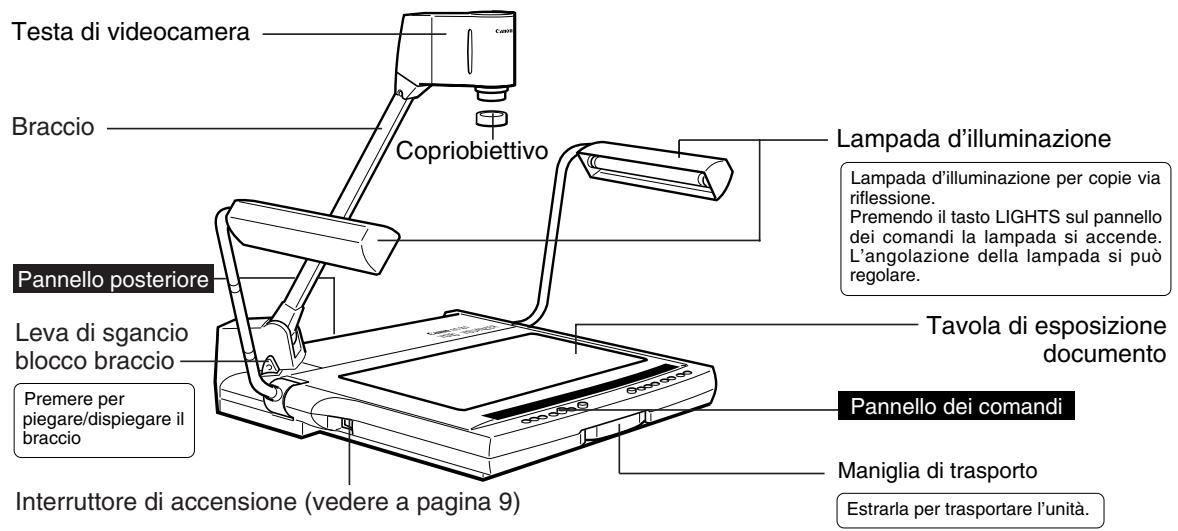

AVVISO
Dopo aver spento l'unità, attendere almeno 5 secondi prima di riaccenderla.
Accenderla troppo presto cui si sono in mani.

MEMO
Le lampade d'illuminazione non si accendono immediatamente appena si
preme il tastingo LIGHTS. Per proteggere le lampade, ilsystema rimane in
preriscaldamento per 3 secondi, dopo di che le lampade si accendono.
Pannello posteriore
Vedere a pagina 13 per quanto riguarda la costruzione del sistema.
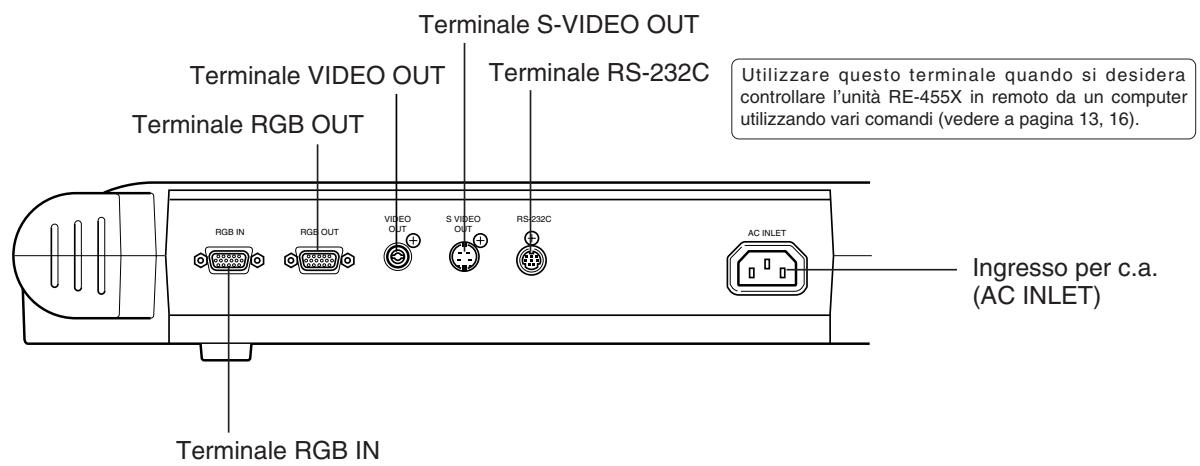
Pannello dei comandi
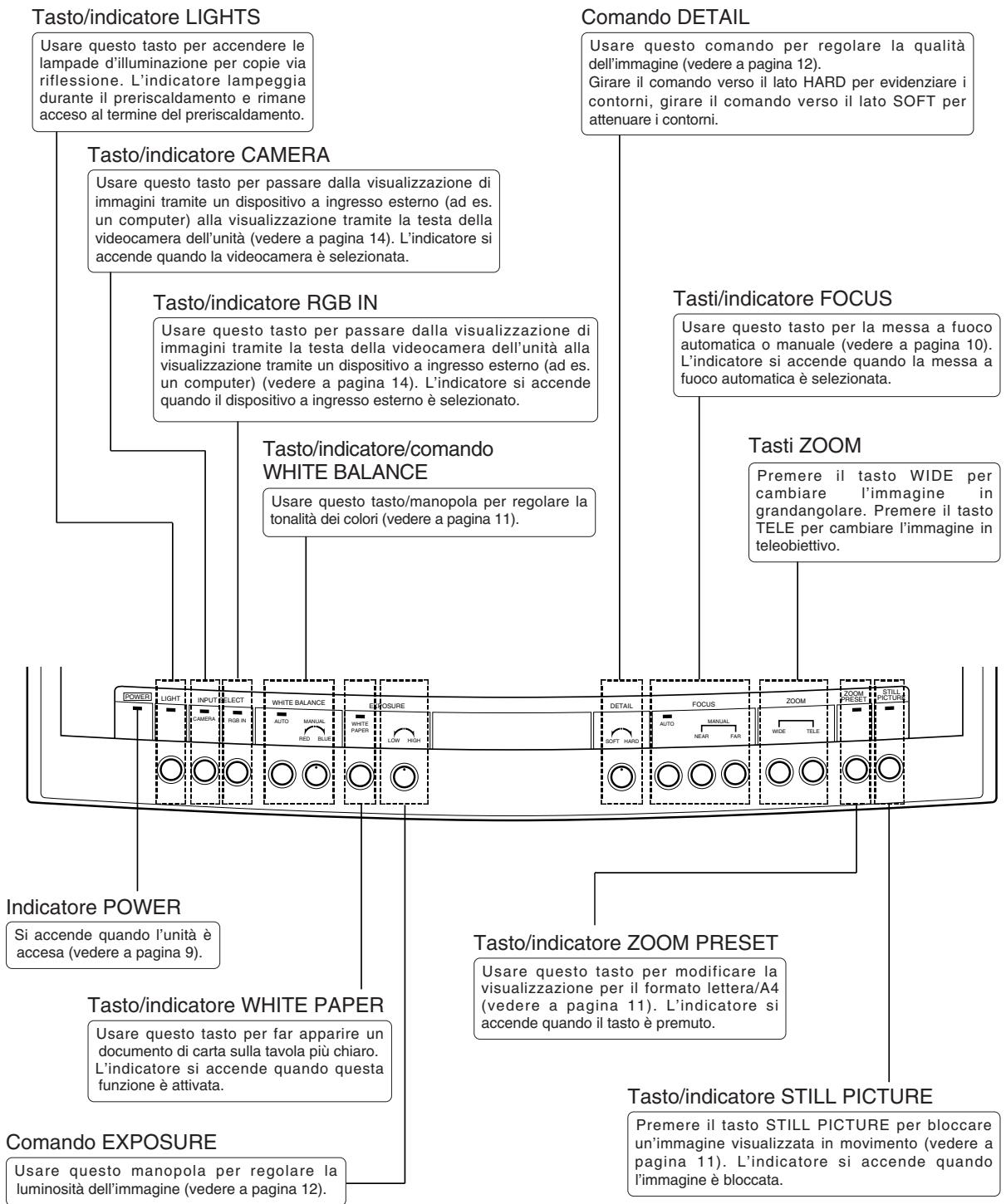
Per montare

Dispiegare e sollevare la coppia di lampade d'illuminazione.
Sollevare prima la lampada d'illuminazione destra, quando poi la lampada d'illuminazione sinistra (1 2)
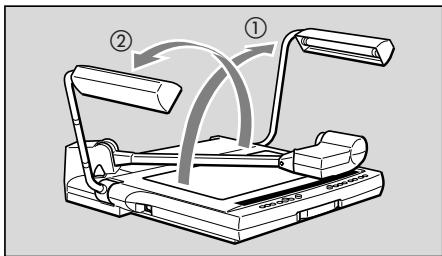

Premere la leva di sgancio blocco braccio e sollevare il braccio fino a che si ferma.

AVVISO
Mantenere il braccio nelle si preme la leva di sgancio blocco braccio. Se la leva viene premuta perché mantenere il braccio, il braccio salute in su e potrebbe essere causa di infortunio o malfunzionamento. Sollevare il braccio lentamente.
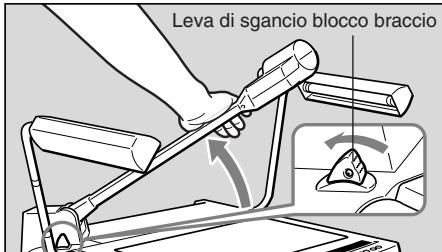

Rivolgere la testa di videocamera verso la davola di esposizione documento.
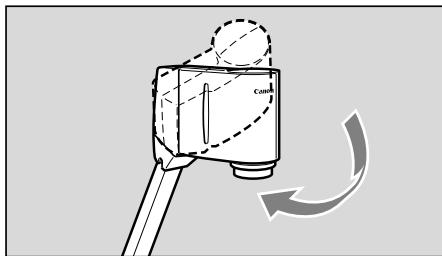

Rimuovere il copriobiettivo.
Conservare il copriobiettivo in un posto sicuro.
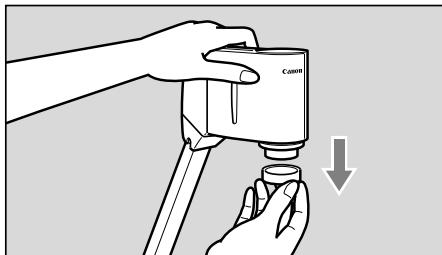
Permettere via

Mettere il copriobiettivo sull'obiettivo.
AVVISO

Impostare su OFF e spegnere l'unità, prima di metterla via.
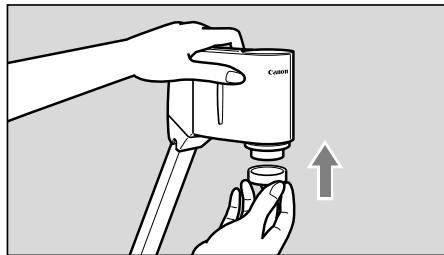

Girare su un bianco la testa di videocamera fino a che si ferma.
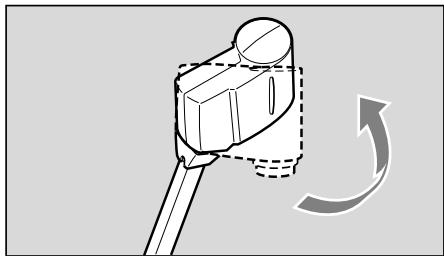

Sorreggere il braccio con la mano destra e premere la leva di sgancio blocco braccio, quando abbassare, con cura, il braccio sulla davola di esposizione documento.

Sorreggere il braccio nel ripiegarlo. Se il braccio viene ripiegato senza essereleenuto, salta su e potrebbe essere causa di infortunio o malfunzionamento. Ripiegarlo con cura.
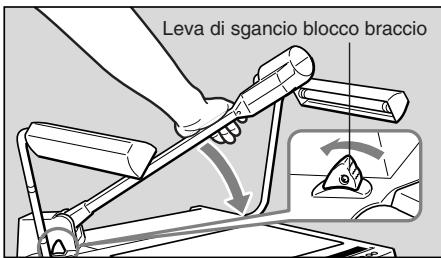

Piegare con cura la coppià di lampade d'illuminazione.
Piegare prima la lampada d'illuminazione sinistra, quando poi la lampada d'illuminazione destra (1 2)
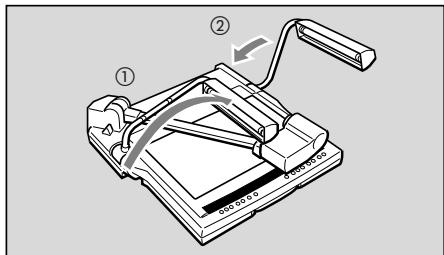

ATTENZIONE
Non toccare le lampade fluorescenti dopo lo spegnimento delle lampade d'illuminazione, potrebbero essere calde da scottare.
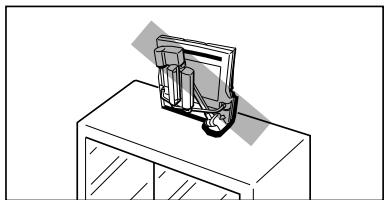

Quando si prevede di non usarla, ricoprire la RE-455X con la copertura fornita in dotazione. La copertura dell'unità possiede una tasca per conservare i cavi con spine.

ATTENZIONE
- Accertarsi che l'unità si sia raffreddata prima di porre sopra diessa la copertura.
- Conservare l'unità in posizione orizzontale. Se l'unità venisse conservata in verticale, potrebbe cadere e causare infortunio o malfunzionamento.
- Per trasportare l'unità, spegnerla (OFF), scollegare le spine dei cavi, ripiegarla ed estrarre la maniglia di trasporto.
Per collegare
Per collegare l'unità RE-455X a un proiettre, usare il cavo RGB compreso nella confezione. Usare il cavo di alimentazione elettrica compreso nella confezione.
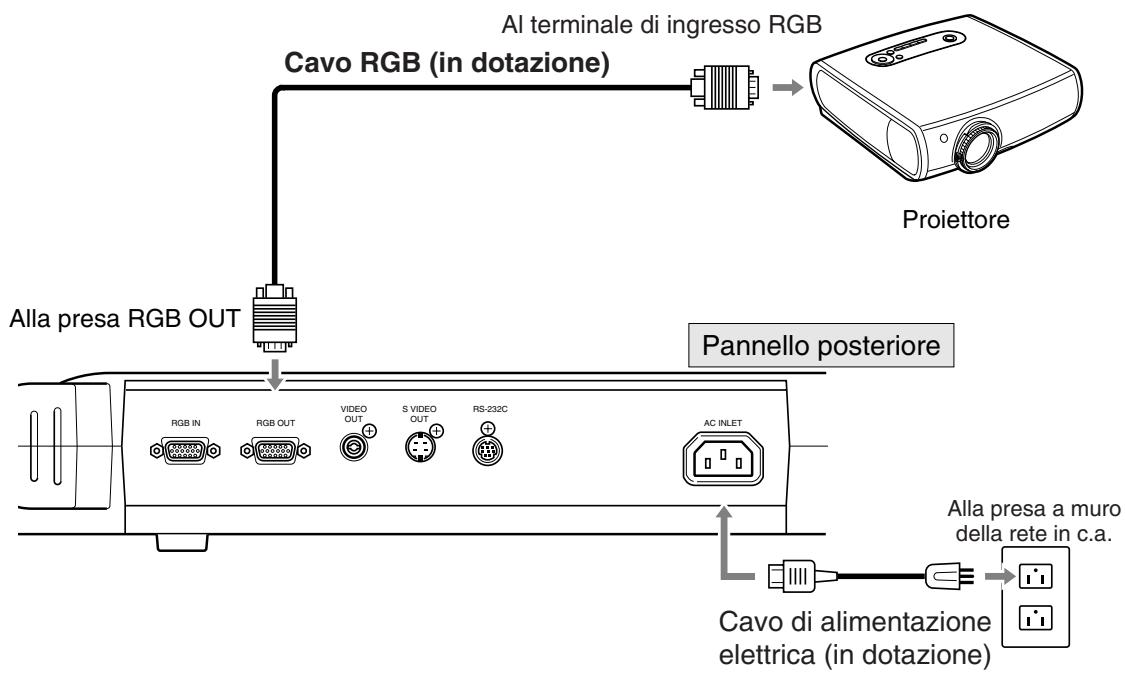

Per proteggere l'unità RE-455X e gli altri appearecchi in uso, accertarsi che (se ce ne sono) siano tutti spenti (OFF), prima di collegare i cavi. Afferrare sempre la spina, non il cavo, per collegare/scollegare un cavo alla presa.

- Utilizzato un proiettre compatibile con il formato XGA.
- Vedere a paglia 13 per collegare i vari apparecchi. Per i dettagli riguardanti il funzionamento, far riferimento al manuale di istruzioni dell'apparecchio da usare.

Accendere (ON).
Quando RE-455X è acceso, l'indicatore POWER sul pannello dei comandi è acceso.

- All'accensione, ci voglioni circa 20 secondi perché un'imagine venga visualizzata.
- All'accensione, il bilanciamento del bianco e la messa a fuoco vengono regolati automaticamente.
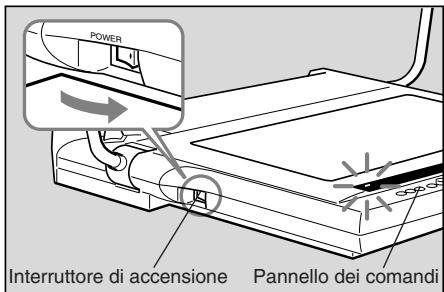

Accendere l'altro apparecchio da usare.
Accendere prima, indifferentemente, o l'RE-455X o l'alto apparecchio.

Mettere il documento al centro della tavola di esposizione documento.
Se non viene visualizzata nessuna imagine, accertarsi che il copriobiettivo sia stato rimioso.
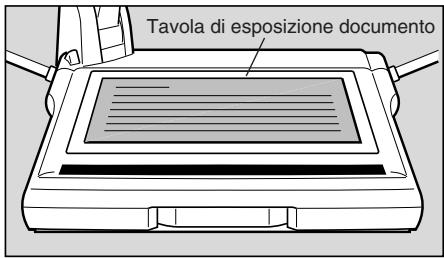

Messa a fuoco.
La messa a fuoco automatica si attiva all'accensione dell'apparecchio.
Se con la modalità di messa a fuoco automatica si dovesse riscontrare difficoltà nella messa a fuoco del soggetto, passare alla modalità di messa a fuoco manuale.

Quando l'operazione è stata completata, specnere l'unità.
L'indicatore POWER si spegne. Le lampade d'illuminazione si spengono (se accese). Spagnereanche l'alto apparecchio.
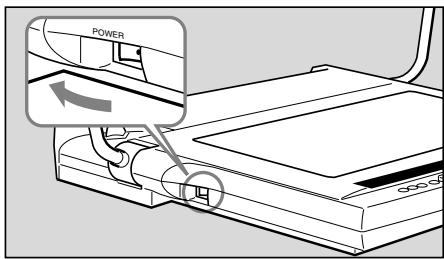

Dopo aver spento l'unità, attendere almeno 5 secondi prima di riaccenderla. Accenderla troppo presto più essere causa di malfunzionamento.

Bisogna spegnere l'RE-455X quando non si pensa di usare ancorta l'unità.
Scollegare la spina del cavo di alimentazione elettrica se si prevede di non usare l'unità per un periodo di tempo piuttosto lungo.
Messa a fuoco manuale
Quando la messa a fuoco automatica non risultta essere precisa o perMETTE a fuoco un punto particolare di oggetti tridimensionali, è possibile effettuare la messa a fuoco manuale. La messa a fuoco manuale è praticabile fino a circa 65~mm sulla tavola di esposizione del documento. A causa della profundità di Campo, non è possible ottenere una messa a fuoco nitida per l'intera area dell'oggetto tridimensionale.
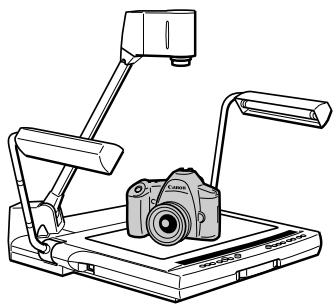
Seguire le procedure indicate di seguito.
① Premere il tasto FOCUS per passare alla modalità di messa a fuoco manuale.
② Premere il tasting NEAR o il tasting FAR per regolare la messa a fuoco.
Per ritornare alla modalità di messa a fuoco automatica, premere il tasto FOCUS.
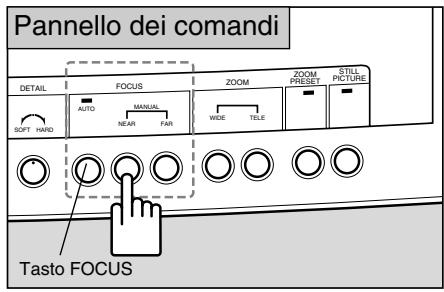

- Quando il tasting FOCUS viene premuto per due o più secondi, si attiva la modalità di messa a fuoco automatica One Shot (AF One Shot: una volta eseguita la messa a fuoco del soggetto, tale modalità viene mantenuta). Si consiglia tale modalità quando si cambia spesso soggetto.
- Quando si passa alla proiezione di oggetti tridimensionali a documenti cartacei e in altri casi similii, passare prima alla modalità AF One Shot, quando premire il tasto FOCUS per eseguire la messa a fuoco.
L'indicatore FOCUS lampeggia quando è in modalità AF One Shot è s spinegni una volta che il soggetto è stato quello a fuoco. - Per tornare alla modalità AF One Shot alla modalità di messa a fuoco normale, premere il tasto FOCUS per due o più secondi.
- Oggetti difficili daMETTERA fuoco
Gli oggetti quali quelli elencati di seguito possono presentare alcune dificoltà durante la messa a fuoco. Se questo dovesse accadere, eseguire la messa a fuoco manuale dell'obiettivo.
- Oggetti con un fattore di riflessione basso (quali un panno scuro, capelli, etc.)
- Oggetti che hanno una superficie lucente o riflettente (articoli di vetro, etc.)
- Oggetti vistiattraverso occhiali.
- Oggetti a basso contrasto.
- Oggetti che hanno solo righe orizzontali o verticali.
Ulterioriore regolazione del bilanciamento del bianco
Regolare di nuovo, in modo manuale, il bilanciamento del bianco quando i colori hanno tonalità non naturali o se si desidera cancellarla in una tonalità che si preferisce.
Seguire le procedure indicate di seguito.
① Premere il tasting WHITE BALANCE (per attivare la modalità di regolazione manuale).
② Girare la manopola WHITE BALANCE per ottenere le tonalità dei colori desiderate. Girando la manopola verso il lato RED, aumento lo tonalità dei rossi. Girando la manopola verso il lato BLUE, aumento lo tonalità dei blu.
③ Se non si riesce a regolare la tonalità del colore, rimuovere il documento, premere il tasting WHITE BALANCE ed eseguire nuovamente i passi ① e ②.
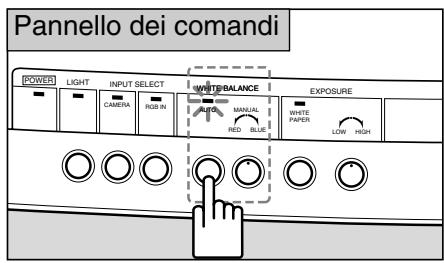
Perambiare l'angolazione per il formato Lettera/A4
Per fare in modo che la visualizzazione si adatti al formato lettera/A4, premere il tasto ZOOM PRESET.
Mediente esta selezione il formato dell'immagine visualizzata diventa lettera/A4.
Quando il tasting ZOOM PRESET è premuto, l'indicatore si accende.
Usare i tasti di zoom perambiare l'angolazione.
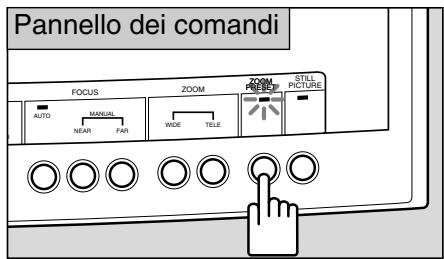

L'angolazione impostata potrebbe essere leggermente differente da quella per Formato Lettera/A4.
Per bloccare un’immagine visualizzata
Per mettere in pausa un'immagine visualizzata in movimento, premere il tasting STILL PICTURE. L'imagine visualizzata si trasforma da un film ad un'imagine bloccata.
L'indicatore STILL PICTURE si accende intanto che l'imagine è bloccata.
Se si preme di nuovo il tasting STILL PICTURE, l'imagine bloccata riprende a muoversi.
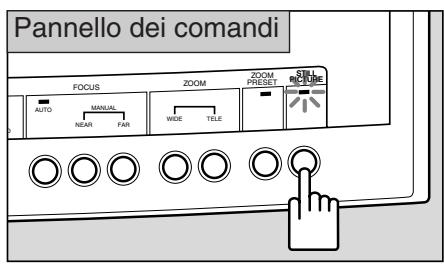

Non è possibile eseguire regolazioni quali di zoom, messa a fuoco, o bilanciamento del bianco intanto che un'imagine è bloccata.
Per proiettare documenti bianchi
Quando il tasting WHITE PAPER è premuto durante la proiezione di documenti di testo su di uno sfondo bianco, Questa modalità effettua una regolazione automatica che consente una proiezione delle parti bianche di un documento in modo che risultino più bianche.
Se si preme il tasto, l'indicatore WHITE PAPER si accende.
Se si preme di nuovo il tasto, l'indicatore si spegne e ritorna la modalità di proiezione normale.
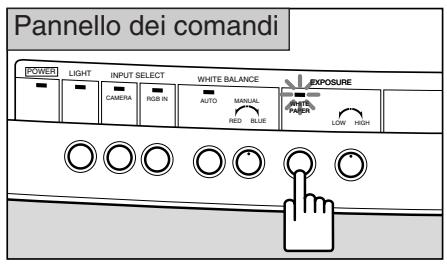

L'efficacia potrebbe variere a seconda del documento, ad esempio, da quando è scuro.
Come regolare la luminosità e il contrasto dell'immagine
Se bisogna proiettare un documento nero o scuro, o quando delve essere proiettato è di dimensioni piccole ed è in forte contrasto rispetto allo sfondo, potrebbe essere possibile regolare la luminosità (regolare l'esposizione) usinga manopola EXPOSURE per rendere l'immagine più chiara.
Quando lo sfondo è bianco e il soggetti è scuro, a volte la qualità dell'imagine cui dovrestà appoggiando l'oggetti su un foglio nero prima di eseguire la proiezione.
Girare manopola verso il lato HIGH per rendere l'immagine più luminosa. Girare manopola verso il lato LOW per rendere l'immagine più scura.
Usare il dato DETAIL per regolare la qualità dell'imagine. Girare il dato verso il lato HARD per evidenziare i contorni di un oggetto. Girare il dato verso il lato SOFT per attenuare i contorni.
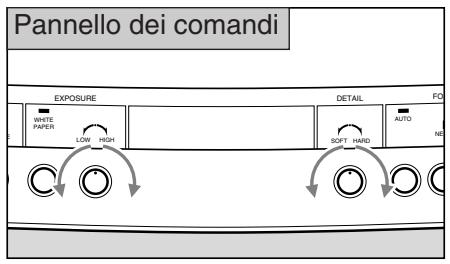

Se l'immagine è troppo scura, la luminosità potrebbe non essere regolata bene usando la manopola EXPOSURE.
4 COLLEGAMENTO DI SISTEMA
L'apparecchio seguente può essere collegato ai terminali di ingressso e di uscita. Usare il cavo di alimentazione elettrica fornito. Per gli altri cavi a parte il cavo di alimentazione elettrica e il cavo RGB, usare cavi disponibili in commercio. Per i dettagli riguardanti il funzionamento, far riferimento al manuale di istruzioni dell'apparecchio da usare.
Apparecchio di visualizzazione
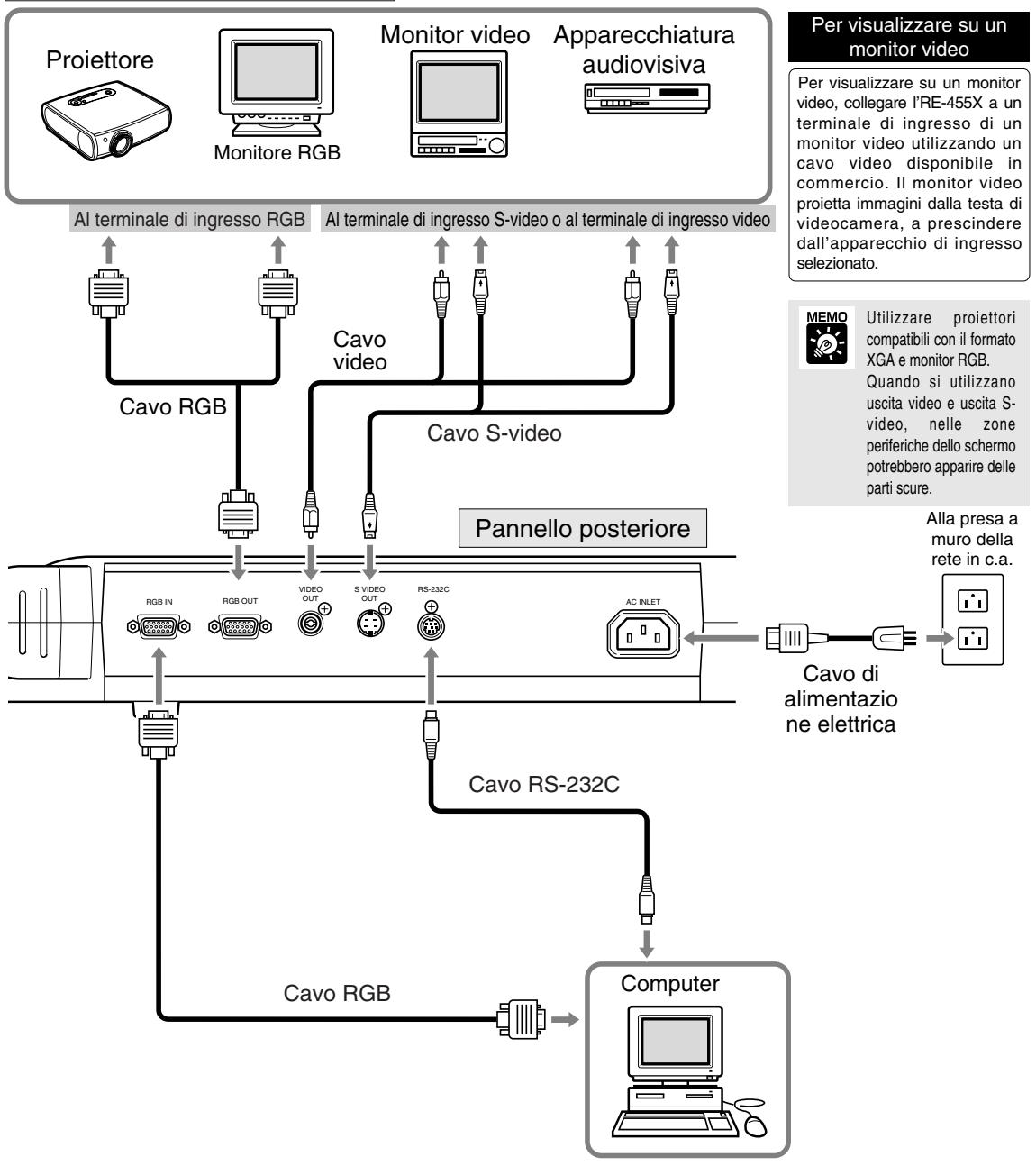
AVVISO

In caso di collegamento a un appearecchio quale un monitor video o un videoregistratore, controllare se il vosto modello RE-455X utilizza il formato NTSC o PAL e usare l'apparecchio compatibile avente il formato appropriato.
Controllo tramite computer
Per controllare l'unità RE-455X in remoto da un computer, procedere secondo l'ordine seguente.
1) Collegare l'unità al computertramite un cavo RS-232C.
2) Accendere sua l'unita che il computer.
3) Utilizzato il computer.
Per ulteriori dettagli, rivolgersi al rivenditore di fiducia.
Perambiare in sorgenti via apparecchio collegato a ingresso esterno
Se si collega un computer o un altro apparecchio al terminale di ingresso RGB, è possible proiettare immagini da quell'apparecchio semplicamente premendo un tasting.
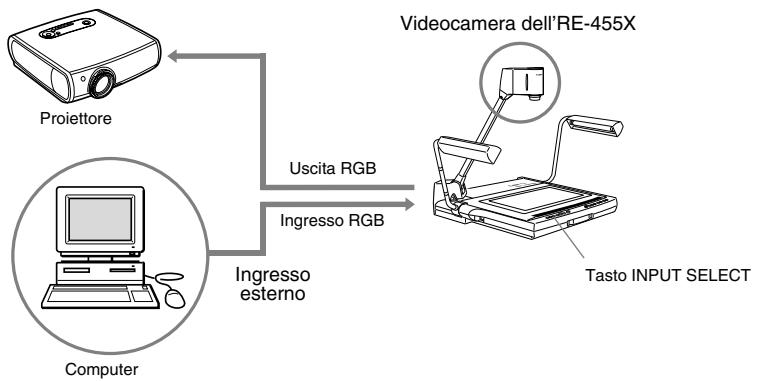
Per visualizzare immagini da un appearecchio collegato all'ingresso esterno quale un computer, premere il tasto RGB IN. L'indicatore RGB IN si accende e le immagini vengono proiettatetramite l'apparecchio collegato al terminale di ingresso RGB.
Per tornare a visualizzare le immagini alla testa della videocamera RE-455X, premere il tasto CAMERA.
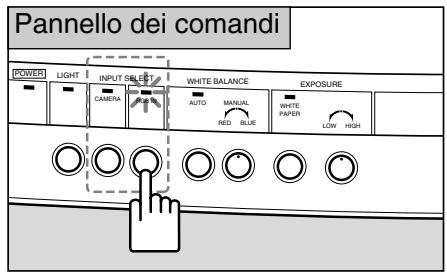

- A seconda del computer o del proiettre, le immagini sono risultare distorte e il passaggio ad altre sorgenti di visualizzazione può non avvenire correttamente.
- Le immagini possono apparire in una posizione leggermente diversa a seconda se visualizzate tramite la testa della videocamera RE-455X o tramite computer.

A prescindere dall'apparecchio di ingresso selezionato, le immagini alla testa di videocamera vengono trasmesse al terminale di uscita video e al terminale di uscita S-video.
Per registrar immagini su un'apparecchiatura audiovisiva
Se si desidera effettuare la registrazione utilizzato un'apparecchiatura audiovisiva, collegare l'RE-455X all'apparecchiatura audiovisiva utilizzato un cavo video disponibile in commercio. Per i dettagli relativi al funzionamento dell'apparechio utilizzato, fare riferimento al manuale di istruzioni fornito con l'apparecchio.
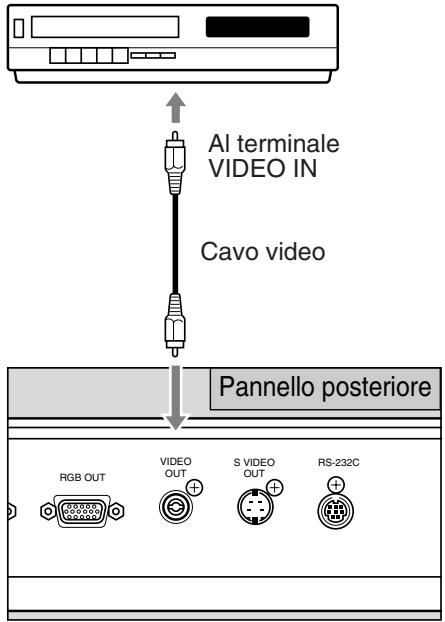
Apparecchiatura audiovisiva (registratore DVD, videoregistratore, ecc.)

Verificare se il modello RE-455X utilizes il formato NTSC o PAL, quindi utilizzare un'apparecchiatura audiovisiva compatible con il formato.

Quando si utilizes un'apparecchiatura audiovisiva con una presa S-video, utilizes cavi S-video per il collegamento alla relativa presa. Questo consentirà di proiettar immagini di elevata qualità.
Pertrasferireimmagini a un computer (Immagini in ingresso)
Se si desidera trasferire immagini dal RE-455X ad un computer, è sufficiente utilizzare un cavo video per collegare l'unità ad un computer dotato di ingressi audio/video. Se il computer non dispone di ingressi audio/video, è necessaria una schedà di acquisizione video per convertire il segnale video (segnale analogico) in un segnale digitale idoneo per il computer. Per ulteriori informazioni, contattare il produttore o un punto vendita.
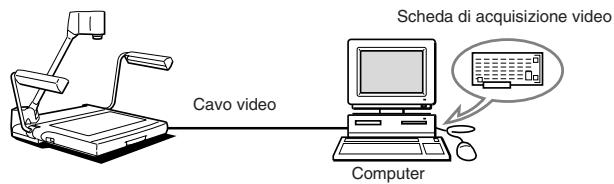

Utilizzare un computer compatible con il tipo XGA.
Funzioni comandate da un computer
L'unità RE-455X più essere controllata in remoto da un computer utilizzando vari comandi. Per le funzioni controllate in remoto,fare riferimento alla tabella seguente.Per ulteriori informazioni compresi i metodi di controllo,rivolgersi al rivenditore di fiducia.
| Categoria | Abbreviazione | Significato | |
| Comando videocamera | Comando obiettivo zoom | Zoom STOP | L'obiettivo zoom si arrasta. |
| Zoom TELE | Sposta l'obiettivo zoom versus teleobiettivo. | ||
| Zoom WIDE | Sposta l'obiettivo zoom versus grandangolare. | ||
| Posizionamento zoom posizione predefinita | Sposta l'obiettivo zoom sulla posizione predefinita. | ||
| Posizionamento zoom panorama A4 | Sposta l'obiettivo zoom sulla posizione Panorama A4. | ||
| Posizionamento zoom Velocità zoom | Sposta l'obiettivo zoom sulla posizione specificata. Imposta la velocità di zoom dell'obiettivo. | ||
| Comando messa a fuoco | Focus AF | Cambia in modalità di messa a fuco automatica. | |
| Focus ONE SHOT | Cambia in modalità di messa a fuco One Shot. | ||
| Focus MANUAL | Cambia in modalità di messa a fuco manuale. | ||
| Focus STOP | Arresta il movimento di messa a fuco dell'obiettivo. | ||
| Focus NEAR | Avvicina la messa a fuco dell'obiettivo. | ||
| Focus FAR | Allontana la messa a fuco dell'obiettivo. | ||
| Impostazione bilanciamento del bianco | Bilanciamento del bianco AUTO | Regola il bilanciamento del bianco in modo automatico. | |
| Bilanciamento del bianco MANUAL | Regola il bilanciamento del bianco in modo manuale. | ||
| Designazione valore bilanciamento del bianco | Specifica il valore da raggiungere in bilanciamento del bianco. | ||
| Compensazione dell'esposizione | Designazione valore di esposizione Modalità di esposizione NORMAL | Specifica il valore d'esposizione. | |
| Modalità di esposizione WHITE PAPER | Cambia l'esposizione su modalità NORMAL. Cambia l'esposizione su modalità WHITE PAPER. | ||
| Fermo immagine | Fermo immagine ON | Attiva la modalità STILL PICTURE. | |
| Fermo immagine OFF | Disattiva la modalità STILL PICTURE. | ||
| Comando sistema | Regolazione contorni | Impostazione DETAIL | Imposta i valori di regolazione della qualità dell'imagine. |
| Selezione segnale di ingressso | Selezione ingresso CAMERA | Seleziona la testa di videocamera interna come segnale di ingressso. | |
| Selezione ingresso EXTERNAL | Seleziona il segnale esterno come segnale di ingressso. | ||
| Comando dell'illuminazione | Luci accese (ON) | Accende le lampade d'illuminazione. | |
| Luci spene (OFF) | Spegne le lampade d'illuminazione. | ||
| Selezione modalità di commando | Modalità dato computer | Cambia perché l'RE-455X possa essere comandato da un computer. | |
| Modalità dato locale | Cancella la modalità dato computer. | ||
| Visualizzazione informazioni | Richiesta nome dello Richiesta versione ROM | Legge le informazioni del numero RE-455X. Legge le informazioni della versione ROM. | |
Se l'RE-455X non funzione correttamente, prima di rivolgersi al rivenditore di fiducia, controllare i punti seguenti.
| Problema | Causa possibile | Pagina di riferimento |
| Sul monitor non appare l'imagine. | Non è stato rimioso il copriobiettivo.Non si accende l'RE-455X o l'altre apparecchio. Il collegamento potrebbe non essere corretto.La sorgente di ingresso non è stata selezionata correttamente. | 691314 |
| Non è POSSIBLE mettere bene a fuoco l'imagine. | Il documento potrebbe essere troppo scuro o troppo luminoso.Force lo schermo è esposto a una force luce riflessa.L'oggetto ha molto相对较soÈ stata impostata la modalità di regolazione manuale della messa a fuoco.L'imagine è bloccata. | 1010101011 |
| La funzione di zoom non funziona. | L'imagine è bloccata. | 11 |
| Le immagini appaiono rossastre/bluastre. | Il bilanciamento del bianco è stato regolato in modo manuale.La tonalità dei colori del monitor video non è corretta. | 11— |
| Le immagini sono troppo chiare/scure. | Il tasting WHITE PAPER è in posizione di attivazione.Errata regolazione dell'esposizione dell'RE-455X o del monitor.L'oggetto non è illuminato bene. | 1212— |
| Non è POSSIBLE cancellare la sorgente di ingresso. | Mancata accensione dell'RE-455X, o dell'altre apparecchio.Force c'è un erre di collegamento. | 913 |
| La schermata non cambia. | L'imagine è bloccata. | 11 |
| Le lampade d'illuminazione non si accendono immediatamente quando si preme il tasto LIGHTS. | Per proteggere le lampade, ilsystema rimane in preriscaldamento per 3 secondi, dopo di che le lampade si accendono.Durante il preriscaldamento, l'indicatore LIGHT lampeggia. Non è un malfunzionamento. | — |
| Non è POSSIBLE Comandare l'RE-455X da un computer. | Mancata accensione dell'RE-455X, o dell'altre apparecchio.Force c'è un erre di collegamento.La causa potrebbe essere un'operazione errata. | 913— |
Se il problema non può essere risolto dopo che i punti sopra sono stati controllati, chiedere al rivenditore di fiducia.

Le lampade d'illuminazione fluorescenti sono parti deteriorabili. Quando una lampada inizia a dare segni di sfarfallo o si annerisce, sostituirla con una nuova lampada. Per i dettagli relativi alla sostituzione, rivolgersi al rivenditore di fiducia.
| Metodo di uscita segnale | Uscita XGA (conformità VESA) |
| Dispositivo d'imagine | CCD 1/3" |
| Pixel effettivi | 1.024 pixel orizzontale × 768 pixel verticali |
| Sincronizzazione | Solo sincronizzazione interna (l'uscita XGA e l'uscita NTSC/PAL sono asincrone) |
| Risoluzione | Uscita XGA 520 linee TV orizzontali o più, 450 linee TV verticali o più |
| Velocità di visualizzazione immagini | Uscita XGA 15 fotogrammi/sec. |
| Obiettivo di proiezione | F=5,4mm - 64,8mm; F1,8 - F2,8 progetto 10 elementi, 8 gruppi |
| Gamma di proiezione | (Massimo) 306 × 230 mm - 31,5 × 23,7 mm |
| Zoom | Zoom di potenza 12× con tasto PRESET ZOOM per formato A4 |
| Messa a fuoco | Automatica motorizzata/manuale |
| Regolazione dell'iride (esposizione) | Automatica motorizzata/manuale con tasto WHITE PAPER per documenti bianchi |
| Bilanciamento del bianco | Automatico/manuale |
| Lampade d'illuminazione | Lampada fluorescente di 6 W × 2, illuminazione ad alta frequenza, angolazione regolabile |
| Sorgenti di ingressso | Selezionabili a scelta tra testa di videocamera interna/apparecchio collegato a ingresso esterno solo per XGA |
| Terminali di ingresso/uscita | Ingresso RGB (XGA) D-SUB a 15 pin × 1, impedenza di ingresso: 75Ω Uscita RGB (XGA) D-SUB a 15 pin × 1, impedenza di uscita: 75Ω Uscita video presa a spinotto RCA × 1, impedenza di uscita: 75Ω Uscita S-video a 4 pin mini-DIN × 1, impedenza di uscita: 75Ω Interfaccia seriale RS-232C × 1 Ingresso CA × 1 |
| Tensione di rete di alimentazione | 200 - 240V CA 50/60Hz |
| Potenza assorbita | Circa 25 W |
| Dimensioni | Posizione di funzionamento: 722 (L) × 525 (P) × 556 (A) mm Posizione unità ripiegata: 486 (L) × 525 (P) × 183 (A) mm |
| Peso | Circa 9,4 kg |
| Condizioni ambientali di funzionamento | Temperatura: +5 °C – +35 °C (4°F - 95°F) Umidità relativa: 20% – 85% (senza condensa) |
- Il peso e le dimensioni sono approximati.
Salvo errors omissionsi. - I dati caratteristic e il design del prodotto sono soggetti a modifiche alla preavviso.
- Canon è un marco di fabbrica registrato di Canon Inc.
Espanol
Visualizador Canon
RE-455X
MANUAL DE INSTRUCCIONES
NTSC/PAL
Muchas gracias por su compra del Visualizador RE-455X de Canon
El RE-455X es un equipo de entrada de imagenes portátil, fácil de usar, con una videocamara y objetivo zoom 12× integrados. Proyecto imagenes de documentos planos, objetos tridimensionales, película, etc. en un monitor de video. Aquí está las principales caracteristicas:
- Pueden proyectarse inmediamente imagenes de calidad con las functions de enfoque automatico, balance del blanco automatico e iris automatico (exposacion automatica). Este equipo可以选择 proyectar una amplia gama de materiales, desde documents planos hasta objetos tridimensionales en el monitor.
- Este equipo tiene muchos terminales, incluyendo RGB OUT para proyectores de cristal liquido XGA de alta definencia y otros equipos, RGB IN, VIDEO OUT y S-VIDEO OUT.
- Hay various comandos disponibles para controlar la unidad a distancia.
-
Tenga en cuenta que las siguientes sistemas no están disponibles:
-
No tiene una función de contraluz, por tanto no esADEcuido para proyeetardocumentos transparentes como OHP o diapositivas.
-
No tiene una función para rotar imagenes.
-
No tiene una función para guardar imagenes.
Para usar correctamente este producto, lea cuidadosamente este manual de instrucciones antes de hacer funciona.
Este manual de instrucciones se aplica tanto al modelo NTSC como al modelo PAL.
Confirme que el paquete contiene los siguientes items:
- Visualizador RE-455X de Canon.
- Cable electrico × 1
- Cable RGB × 1
- Cubierta de la unidad
- Manual de instrucciones
INSTRUCCIONES IMPORTANTES PARA EL USO
ADVERTENCIA:
PARA REDUCIR EL PELIGRO DE DESCARGA ELECTRICA, NO EXPONGA Este PRODUCTO A LA LLUVIA O HUMEDAD.
PRECAUCION:

LAS LAMPARAS FLUORESCENTES ESTAN CALIENTES CUANDO ESTAN ENCENDIDAS O INMEDIATAMENTE DESPUES DE APAGARLAS. NO LAS TOQUE DIRECTAMENTE. TENGASPECIAL CUIDADO CUANDO LAS PLIEGUE DESPUES DEL USO.

AVISO A LOS CLIENTES DE LOS EE.UU.
LA O LAS LÁMPARAS DEL INTERIOR DE ESTE PRODUCTO CONTIENEMERCURIO Y DEBEN SER RECICLAS, O DEBE DISPONERSE DE ELLAS, CUMPLIENDO CON LAS LEYES LOCALES, ESTATALES O FEDERALES.
Es
- NOMBRE Y FUNCIONES DE LAS PIEZAS …4
-
ARMADO, ALMACENAMIENTO Y CONEXION…6
-
FUNCIONAMIENTO
Enfoque manual 10
Vuelva aJKLM el balance del blanco 11
Cambio del ángulo al tamano carta/A4 11
Congelación de unaImagen producida 11
Proyeccion de documents blancos 12
Ajuste del brill y contraste de la imagen 12
- CONEXION DEL SISTEMA 13
Salida a un monitor de video 13
Para controlar con un ordinador 13
Cambio de fuentes'utilizando un equipo de entrada de fuente 14
Grabación de imagenes en un equipo de AV 15
Transferencia de imagenes aordenadores
(Entrada deImagen) 15
Funciones controadas por un ordinador 16
- LOCALIZATION DE AVERIAS 17
- ESPECIFICACIONES 18
1 NOMBRE Y FUNCIONES DE LAS PIEZAS
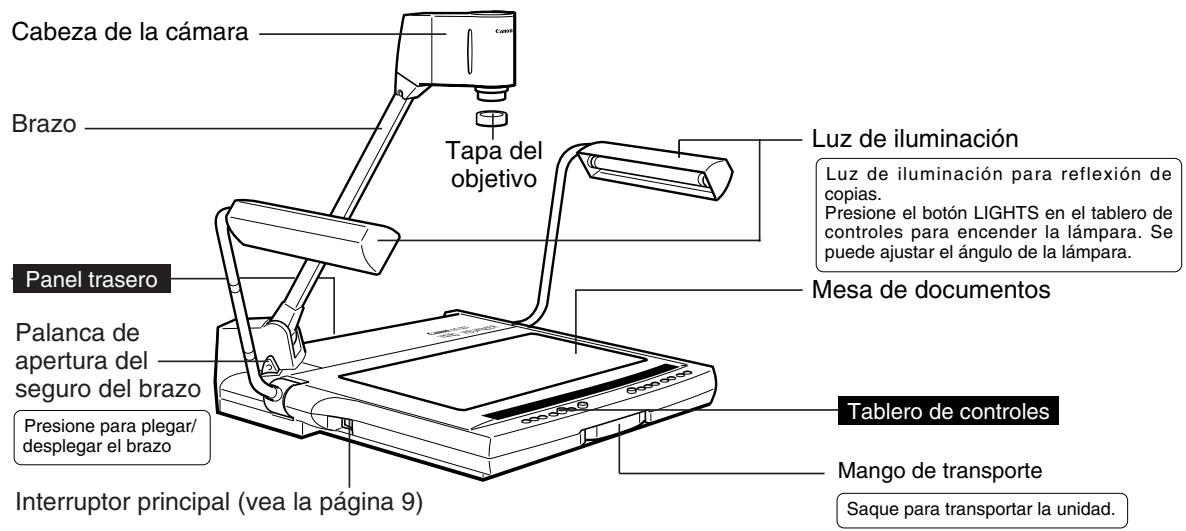

AVISO
Después de desconectar el interruptor, espere por lo menos 5segundos antes de volver a conectarlo. Si vuela a conectar el interruptor antes de tiempo pueda provocar un mal funcionaiento.

NOTA
Las lámparas de iluminación no se encienden inmediamente afterwards de presionar el botón LIGHTS. Para proteger las lámparas, el sistema se precaliente durante 3segundos y.afteres se encienden las lámparas.
Paneltrasero
Vea la página 13 para el Diseño del sistema.
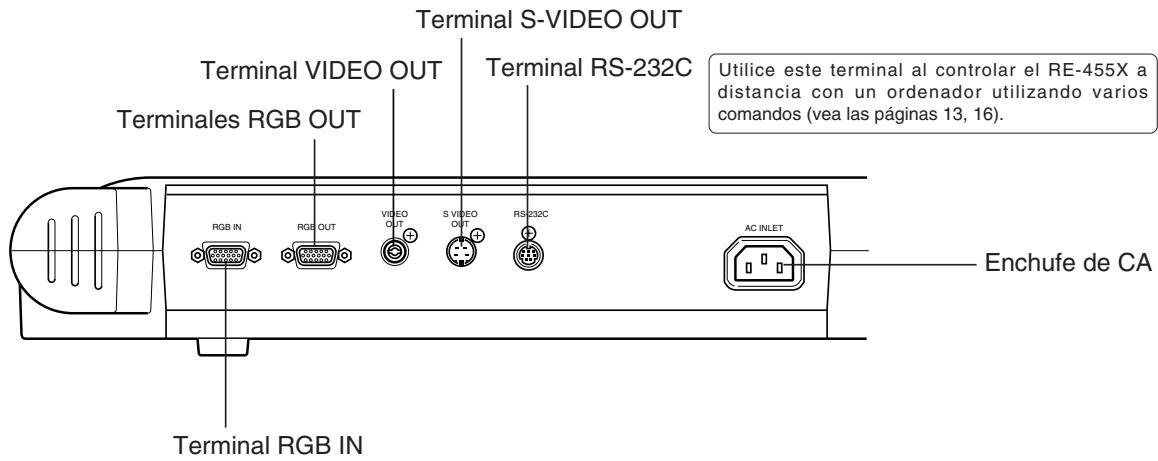
Tablero de controles
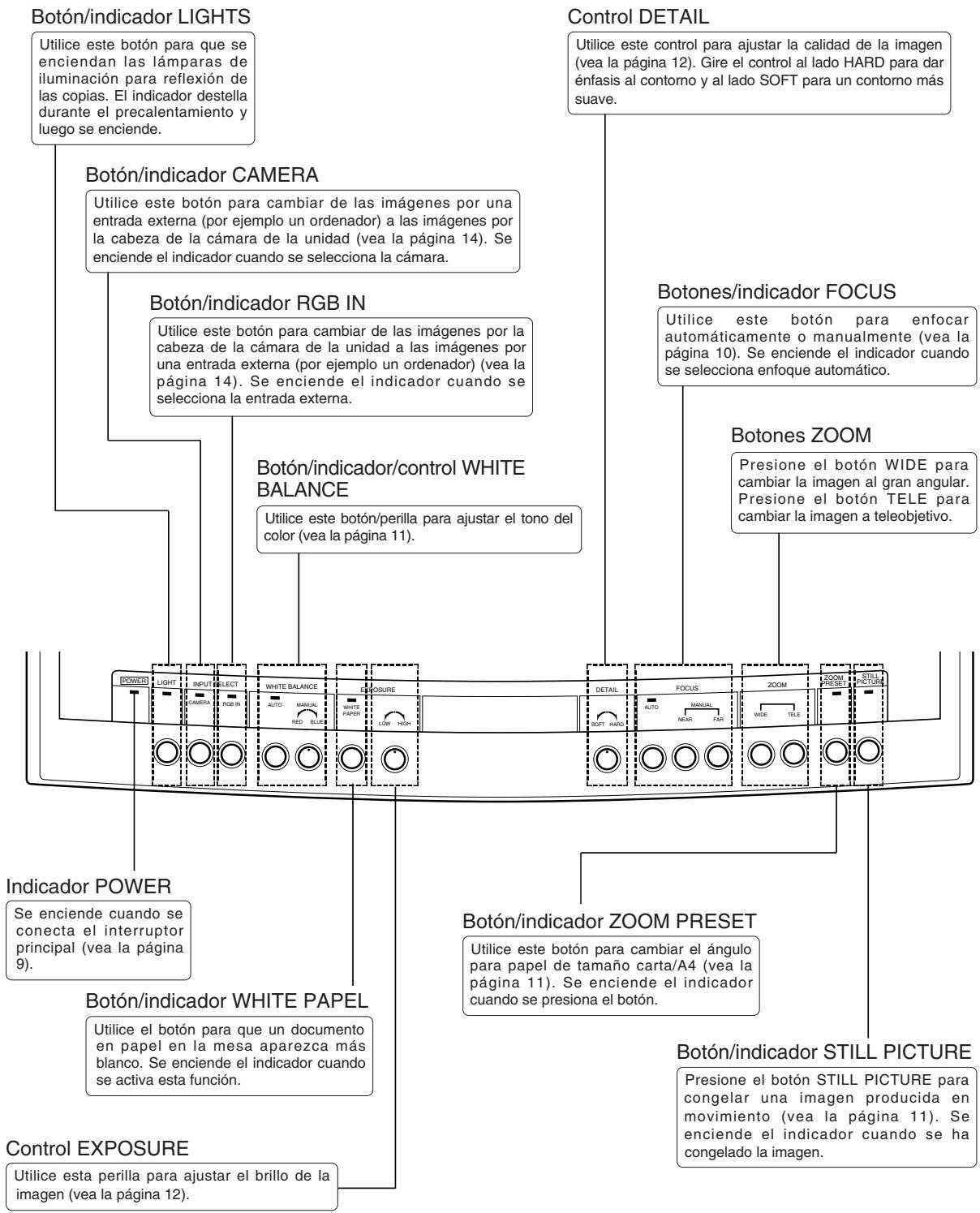
2 ARMADO, ALMACENAMIENTO Y CONEXION
Armado

Despliegue y levante el par de lámparas de iluminación.
Levante primero la lámpara de iluminación derecha y después la lámpara de iluminación izquierda. (1) → (2)
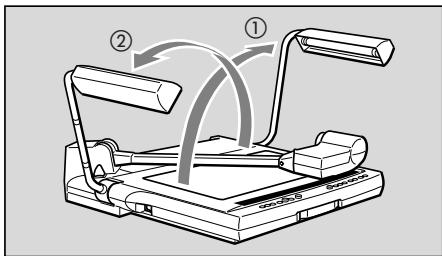

Presione la palanca de aperture del seguro del brazo y levante el brazo hasta su tope.

AVISO
Asegürese de sujetur el brazo cuando presione la palanca de aperture del seguro del brazo. Si se presiona la palanca sin sujetur el brazo, el brazo salta hacía arriba y pueda provocar heridas o mal funciona. Levante lentamente el brazo.
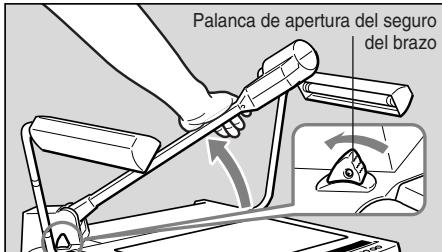

Apunte la cabeza de la-camera hacía la mesa de documents.
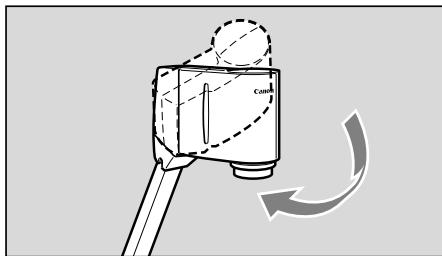

Abra la tapa del objetivo
Guarde la tapa del objetivo en un lugar seguro.
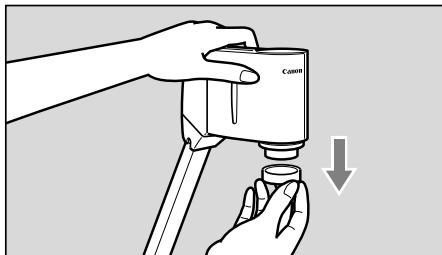
Es
Almacenamento

Ponga la tapa del objetivo en el objetivo.
AVISO

Asegürese de desconectar el interruptor principal antes de guardar launities.
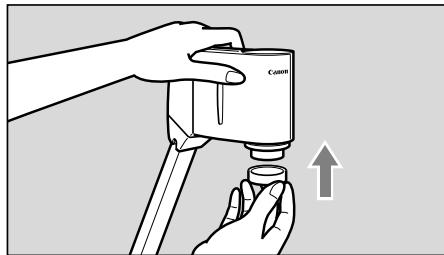

Mueva lackeza de la camarapa hacer unlucka su tope.
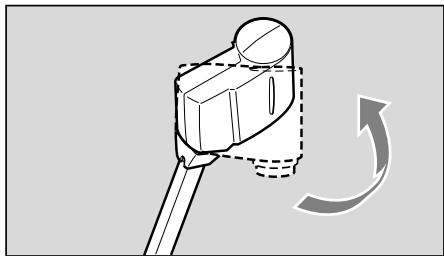

Sujete el brazo con su mano derecha y presione la palanca de aperture del seguro del brazo y después bajo muy cuidadosamente el brazo hacía abajo hacía la mesa de documentos.
AVISO

Asegürese de sujetar el brazo cuando lo guarda. Si se guarda el brazo sin sujetarlo, el brazo salta y pueda provocar heridas o mal funcionaimiento. Guarde lentamente.
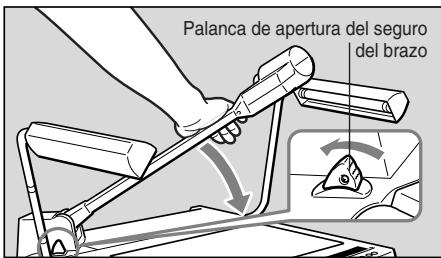

Pliegue muy cuidadosamente el par de lámparas de iluminación.
Pliegue primero la lámpara de iluminación izquierda y después la lampara de iluminación derecha (1) → (2).
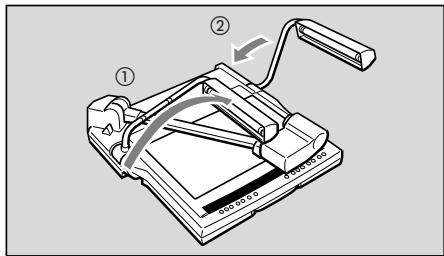

PRECAUCION
No toque las lámparas fluorescentes après de que se apaguen las lámparas de iluminación ya que pueda estar todas calientes.
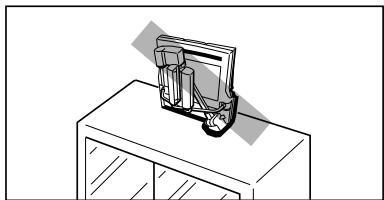

Ponga la cubierta de la unidad suministrada en el RE-455X cuando no lo utilise. La cubierta de la unidad tiene un bolsillo para guardar los cables.

PRECAUCION
- Antes deponer la cubierta aseguresede que la unidad se haya enfiado adecuadamente.
- Coloque la unidad horizontalmente cuando la guarde. Si se guarda la unidad verticalmente, pueda caerse provocando heridas o mal funciona.
- Para transporte launidad, apague la alimentación, desenchufe los cables, pliegue launidad y saque el mango de transporte.
Conexión
Para conectar el RE-455X a un projector, utilise el cable RGB incluido en el paquete. Utilice el cable electrico incluido en el paquete.
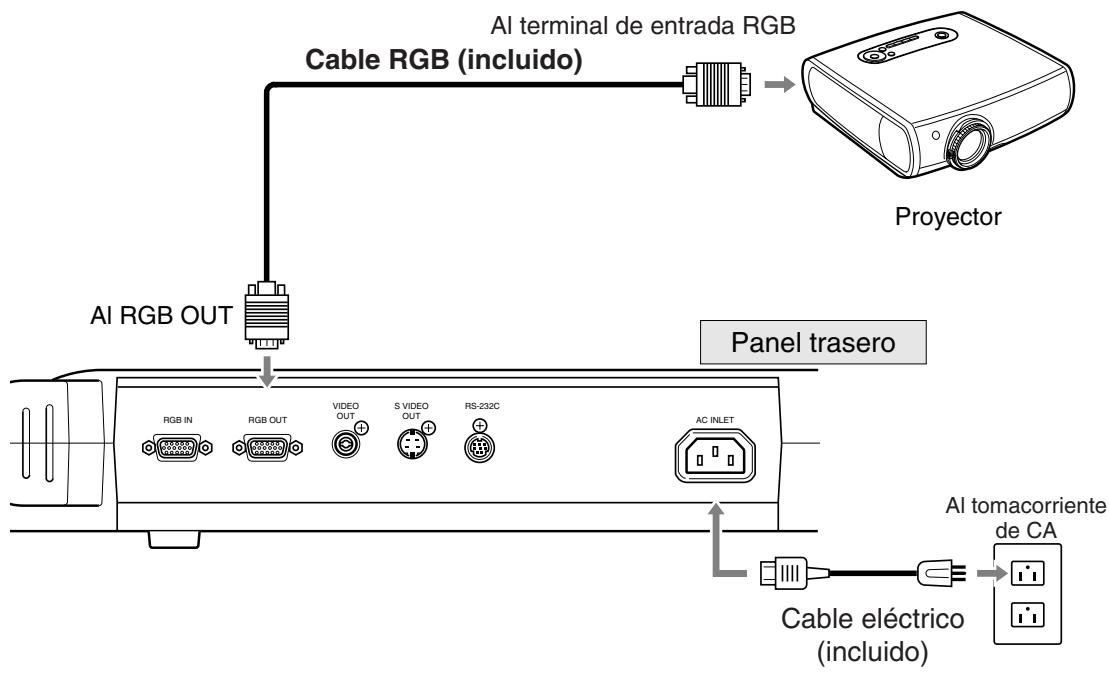

Para proteger el RE-455X y otros equipos realizados, asegúrese de que se ha disconnected el interruptor principal del equipo (si está instalado) antes de conectar cables. Sujete de la sección del enchufe para enchufar/desenchufar los cables.

- Utilice un projector compatible con XGA.
- Vea la page 13 para conectar distinctos equipos. Para más detailles del funciona, consulte el manual de instructaciones del equipo a utiliser.
Es

Conecte el interruptor principal.
Cuando se conecta el interruptor principal del RE-455X, se enciende el indicator POWER en el tablero de 控roles.

- Cuando se conecta el interruptor principal, demora uno 20segundos para que aparezca laImagen.
- Cuando se conecta el interruptor principal, se ajustan automatistically el balance del blanco y el enfoque.
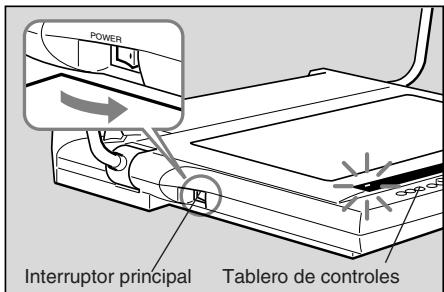

Conecte el interruptor principal del(other equipo autilizar.
Puede conectar primero el interruptor eletrico del RE-455X o del除外 equipo.

Ponga el documento en el centro de la mesa de documents.
Si no aparece ningunaImagen, verifique que se abrio la tapa del objetivo.
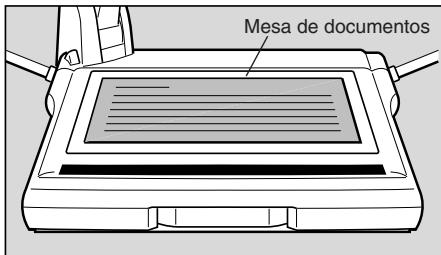

Enfoque.
El enfoque automatico se activara cuando se conecte el interruptor principal.
Si con el enfoque automatico no se logra enfocar el objetivo, cambie a enfoque manual.

Cuando se completó la operación, desconnecte el interruptor principal.
Se apaga el indicator POWER. Se apagarán las lámparas de iluminación (si está encendidas). Desconecte también el interruptor principal de otro equipo.
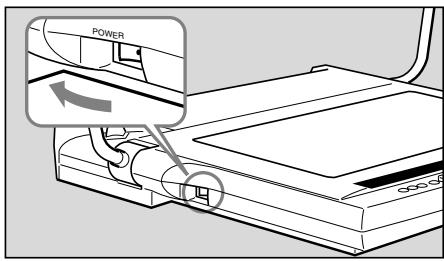

Després de desconectar el interruptor, espere por lo menos 5 seguidos antes de volver a conectarlo. Si vuelve a conectar el interruptor antes de tiempo puede provocar un mal funciona.

Debe desconectar el interruptor principal del RE-455X cuando no se usa la unidad. Desconecte el cable electrico si no se va a utilizar la unidad durante un长大o periodo de tiempo.
Enfoque manual
Cuando el enfoque automatico no enfoque correctamente o cuando intente enfocar sobre un punto particular de un objeto tridimensional可能导致 enfocar manualmente. El enfoque manual está disponible hasta aprox. 65~mm por encima de la mesa de documentos. Debido a la profundidad de campo, no es possibleocular un enfoque nitido de toda el area de un objeto tridimensional.
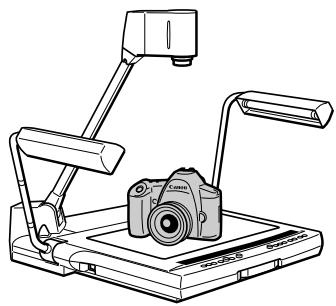
Siga el procedimiento explicado a continuación.
① Presione el boton FOCUS para cambio al modo de enfoque manual.
② Presione el boton NEAR o el boton FAR para ajustar el enfoque.
Para volver al modo de enfoque automatico, presione el botón FOCUS.
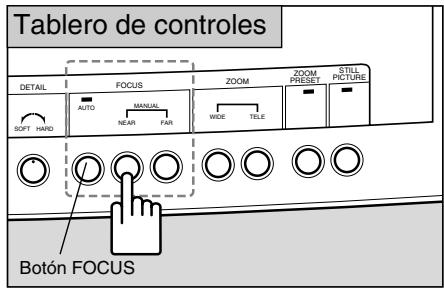

- Cuando el botón FOCUS se presiona durante dos segundos o más, el modo cambiará a enfoque automatístico de una toma (enfoque automatístico de una toma: una vez que se logra el enfoque del objetivo, el enfoque se fjará en este modo). Este modo es recommendable cuando se cambia frecimiento de objetivos.
- Cuando se cambia la proyeccion entre objetos tridimensionales y documents y en otheros casos similares, primero cambie al modo de enfoque automatico de una toma y despues presione el boton FOCUS para lograr el enfoque.
- En el modo de enfoque automatico de una toma el indicator FOCUS destella y se apaga una vez que el的对象 está enfocado correctamente.
- Para volver del modo de enfoque automatico de una toma al modo de enfoque automatico normal, presione el botón FOCUS durante dos segundos o más.
- Objetos que no desea enfocar
Hay objetivos como los de lasuma lista que pueda tener dificultades para ser enfocados. En este caso, enfoquemanualmente elobjet.
- Objetos con bajo factor de reflexión (tales como tela oscura, cabello, etc.
- Objetos con superficie brillante o con reflexión (objetos de cristal, etc.)
- Objetos vistos a工程技术 del vidrio.
- Objetos con bajo contraste.
- Objetos con solo lineasizontales o lineas diagonales.
Es
Vuelva a ajustar el balance del blanco
Vuelva a ajustar manualmente el balance del blanco cuando el tono de color se ve poco natural o si desea cambiarlo al tono deseado.
Siga el procedimiento explicado a continuación.
① Presione el boton WHITE BALANCE (para activar el modo manual).
② Gire la perilla WHITE BALANCE paraaabstaralos tonos de colordesrado.Girela perilla hacia elladoREDparaaugentar los tonos rojos.Girela perilla haciael lado BLUEparaaugentar los tonos azules.
③ Si no可以选择voltarajustar eltono de color,retireeldocumento,presioneelbotonWHITEBALANCEyvuelaarealizarlospagos ① y ②
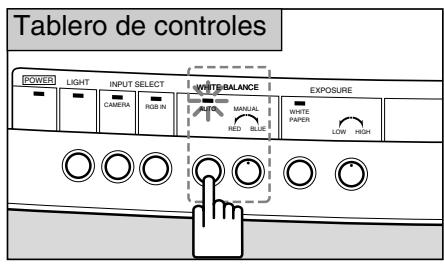
Cambio del ángulo al tamaño carta/A4
Para que el ángulo se ajuste al tiempo contra/A4, presione el botón ZOOM PRESET. El tiempo de laImagen producida se convierte a contra/A4.
Si se presiona el botón ZOOM PRESET, destella el indicator.
Utilice los botones ZOOM paraCambiar el angulo.
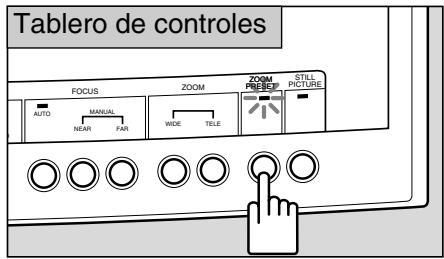

El ángulo fjado puede ser ligeramente diferente del:tamaño carta/A4.
Congelación de unaImagen producida
Para hacer una pausa en unaImagen producida en movimiento, presione el botón STILL PICTURE. LaImagen producida cambiará de movimiento aImagen congelada.
Se enciende el indicator STILL PICTURE cuando se congela laImagen.
Si vuye a presionar el botón STILL PICTURE, laImagen congelada volverá a moverse.
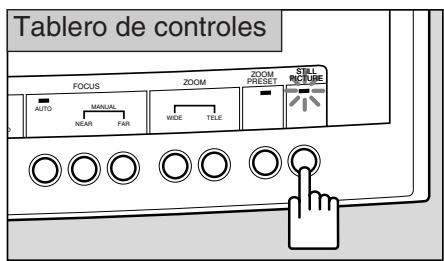

No puede hacer ajustes tales como el zoom, enfoque o balance del blanco con unaImagen congelada.
Proyección de documents blancos
Si se presiona el botón WHITE PAPER cuando se proyectan documentos con texto sobre un fondo blanco, este modo ajusta automatistically la proyección de forma que las partes blancas de un documento aparezcan是多么 más blancas.
Si se presiona el botón, se enciende el indicator WHITE PAPER.
Si se vuelve a presionar el botón, se apaga el indicator y vuelve al modo normal.
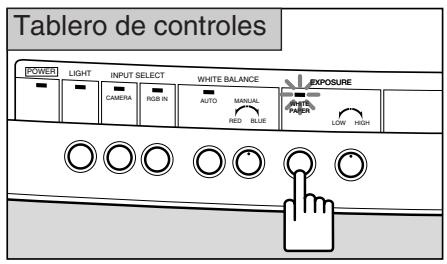

La efectividad puede cambiar según el documento, incluyendo su oscuridad.
Ajuste del brillo y contraste de laImagen
Si desea proyector un documento negro u oscuro, o cuando el item proyectado esPEGUEYO yiene gran contraste comparado con el fondo,gue controlar el brillo (ajuste de exposicion)utiliando la perilla EXPOSURE para que la imagen se vea mas nitida.
Si el fondo está blanco y el sujeto está oscuro, a veces la calidad de laImagen mejora si se coloca sobre un papel negro al proyector.
Gire la perilla hacía elazo HIGH para que brille laImagen. Gire la perilla hacía elazo LOW para que laImagen sea más oscura.
Utilice el control DETAIL paraaabstar la calidad de laImagen. Gire el control hacia el lado HARD para dar enfasis al contorno. Gire el control al lado SOFT para un contorno mas suave.

El brill no se ajustara efectivamente utilizing la perilla EXPOSURE si laImagen está demasiado oscura.
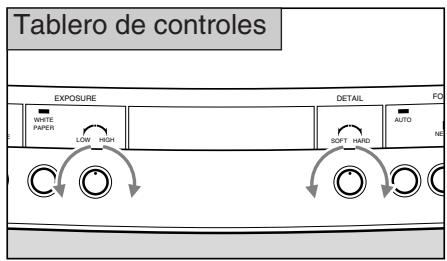
4 CONEXION DEL SISTEMA
Se pueda conectar elARRYante sestma a los terminales de entrada y salida Utilice el cable elctrico incluido. Para otherc cables que no sea el cable elctrico y el cable RGB, utilise cables de vente en los commercios. Para mas detalles del functionamento, consulte el manual de instrucciones del equipo a utilizear.
Equipo de salute
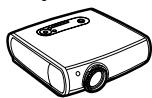
Projector
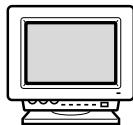
Monitor RGB
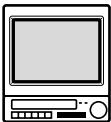
Monitor de video
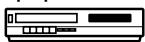
Equipo de AV
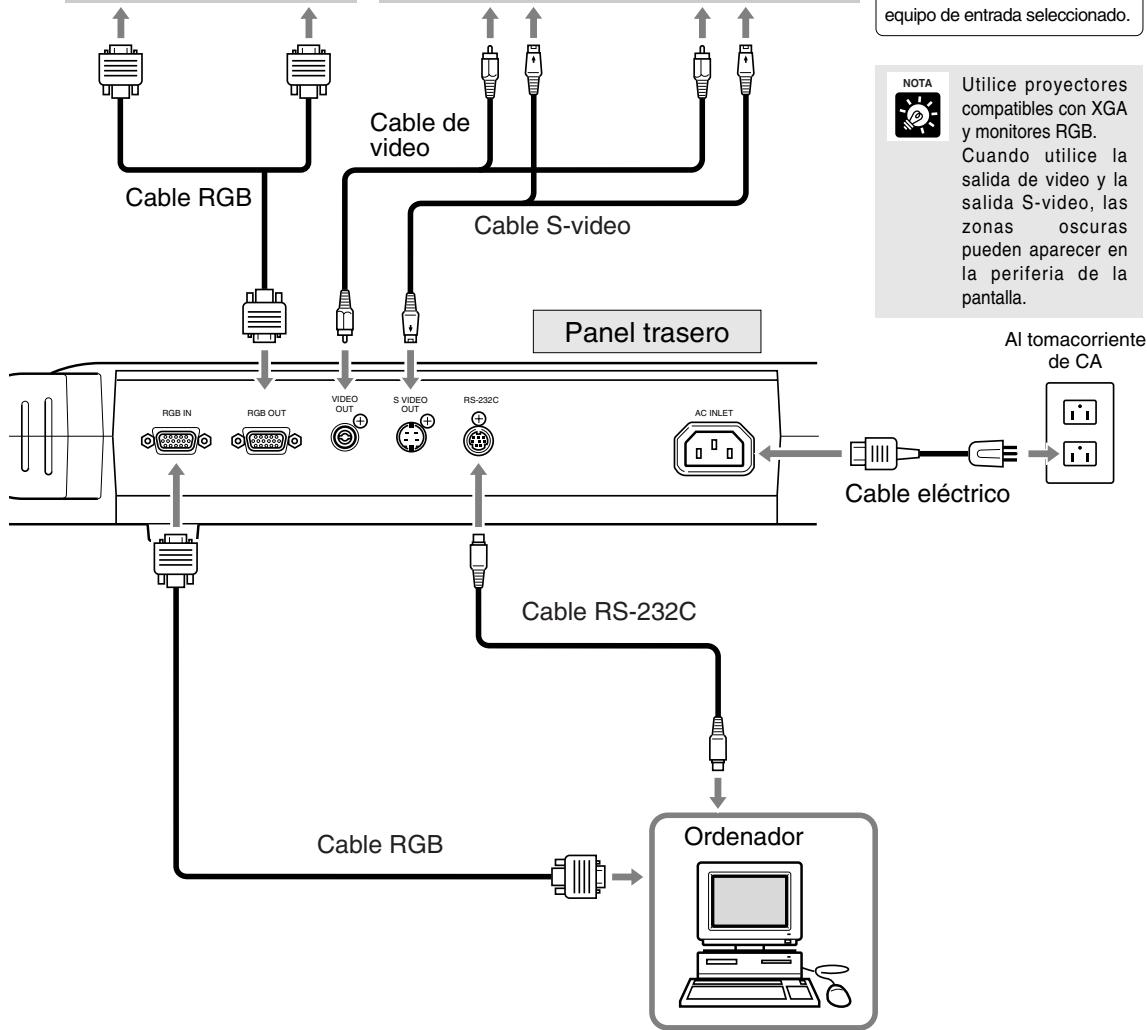
Al terminal de entrada RGB
Al terminal de entrada S-video o terminal de entrada de video
AVISO

Cuando se conecta a un equipo como un monitor de video o una videograbadora, verifique que su modelo RE-455X utilizes el formatting NTSC o PAL y utilize un equipo compatible con el formatting adequado.
Para controlar con un ordinador
Para controlar el RE-455X a distancia con un ordinador, siga el siguientes procedimiento.
1) Conecte launidad al ordernador con un cable RS-232C.
2) Encienda la unidad y el ordinador.
3) Haga的功能行 ordernador.
Para los detailles, consulte con su distribuidor.
Cambio de fuentes utilizing un equipo de entrada de fuente
Si conecta un ordinador u other equipo en el terminal de entrada RGB, pode proyestar imagenes de ese equipo simplement presionando un botón.
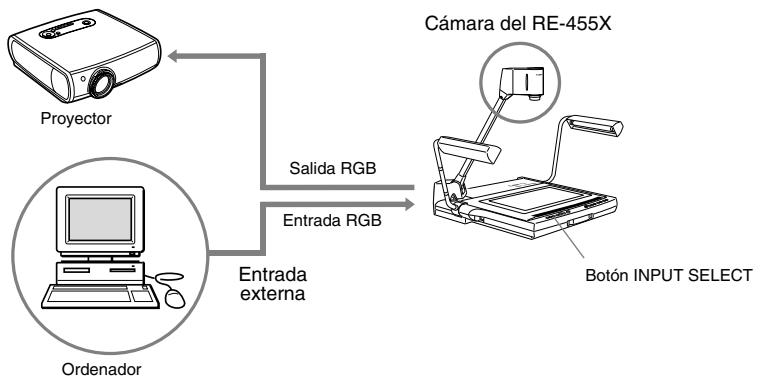
ParaATTERALIMAGENES DE UN EQUIPO DE entrada externo como porejemplo unordenador,presione el boton RGB IN.Se enciende el indicator RGB IN,y se proyeataran las imagenes del equipo conectado al terminal de entrada RGB.
Para volver a las imagenes de lackeza de la-camera RE-455X, presione el boton CAMERA.
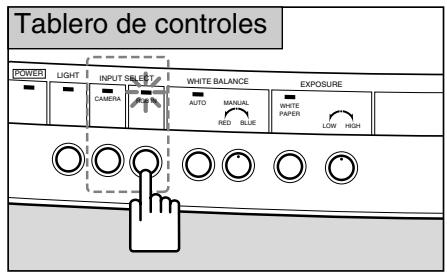

- Dependiendo del ordinador o del projector, las imagenes peuvent aparecer distorsionadas y el cambio de fuentes de imagenes pueda no hacerse adecuadamente.
- Las imagenes peuvent aparecer en una posicion ligeramente diferente entre lackeza de la camaral del RE-455X y un ordinador.

Searial equi de entrada selectionado,las imagenes de la cabeza de la camera saldran al terminal de calidad de video y terminal de calidad S-video.
Grabación de imágenes en un equipo de AV
Si desea grabar usar un equipo de AV, conecte el RE-455X al equipo de AV utilizing un cable de video de vente en los commercios. Para los detalles del funciona del equipo utilisé, consulte el manual de instrucciones que seenta con el equipo.
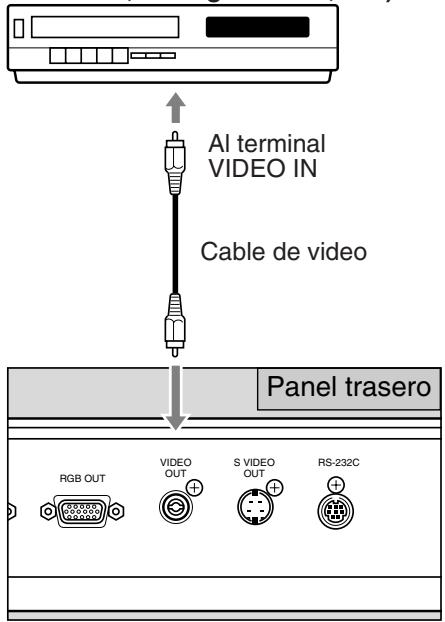
Equipo de AV (grabadora DVD, videograbadora, etc.)

Verifique si su modelo RE-455X utilize el formatting NTSC o PAL, y utilise un equipo de AV compatible con el formatting adequado.

utilizar un equipo de AV con una calidad S-video, utilise un cable S-video a conectar a la calidad S-video. Esto le permitirá proyeatar imagenes de alta dad.
Transferencia de imagenes aordenadores (Entrada deImagen)
Si deseas transferir imagenes del RE-455X a un ordinador,可以使 hacerlo fácilmente utilizing un cable de video para conectar el equipo a un ordinador con capacities de AV. Si su ordinador noiene capacidades de AV, se requiere una tarjeta de captura de video para convertir la seals de video (señal analógica) a una seals digital apropiada para un ordinador. Para mas detalles, consulte con el fabricante de su ordinador o con la tienda.
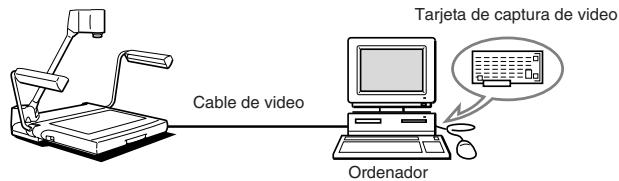

ce un ordenador compatible con XGA.
Funciones controladas por un ordinador
El RE-455X puede controlarse a distancia con un ordinador mediante diversos comandos. Para las functions que pueda controlarse a distancia, vea lasuma table. Para más información incluyendo los métodos de control, hable con su distribuidor.
| Categoría | Abreviación | Significado | |
| Control de la*camera | Control del objetivo zoom | Zoom STOPZoom TELEZoom WIDEPosición de zoom posición por omisiónPosición de zoom A4 horizontalPosición de zoomVelocidad de zoom | Se detiene el objetivo zoom.El objetivo zoom se mueve al teleobjetivo.El objetivo zoom se mueve al gran angular.Mueve el objetivo zoom a la posición por omission.Mueve el objetivo zoom a la posición de A4 horizontal.Mueve el objetivo zoom a la posición españica.Ajusta la velocidad del zoom. |
| Control de enfoquel | Enfoque AFEnfoque ONE SHOTEnfoque MANUALEnfoque STOPEnfoque NEAREnfoque FAR | Cambia al modo de enfoque automatístico.Cambia al modo de enfoque de una toma.Cambia al modo de enfoque manual.Detiene elmovement del enfoque del objetivo.Acerca el enfoque del objetivo.Aleja el enfoque del objetivo. | |
| Ajuste de balance del blanco | Balance de blanco AUTOBalance de blanco MANUALDeterminación de valor de balancedel blanco | Ajusta automatistically el balance del blanco.Ajustamanualmente elbalance del blanco.Especifica el valor objeto del balance del blanco. | |
| Compensación de laexposión | Determinación de valor de exposiónMode de exposión NORMALMode de exposión WHITE PAPER | Especifica el valor de la exposión.Cambia la exposión al modo NORMAL.Cambia la exposión al modo de papel blanco. | |
| Imagen fija | Imagen fija ONImagen fija OFF | Activa el modo STILL PICTURE.Desactiva el modo STILL PICTURE. | |
| Ajuste de contorno | Ajuste DETAIL | Ajusta los valeurs de ajuste de calidad de laImagen. | |
| Control delsystema | Selección de senal deentrada | Selección de entrada CAMERASelección de entrada EXTERNAL | Selecciónlackeza de cámara interna como senal de entrada.Selecióna la senal externa como senal de entrada. |
| Control del iluminación | Luces ONLuces OFF | Enciende las lámparas de iluminación.Apaga las lámparas de iluminación. | |
| Selección de modo decontrol | modo de control HostMode de control local | Cambia el RE-455X para controlarse por un ordinador.Cancela el modo de control Host. | |
| Salida de información | Solicitud de nombre de modeloSolicitud de version ROM | Lee la información del modele RE-455X.Lee la información de version ROM. | |
Es
Si el RE-455X no funciona correctamente, verifique los siguientes puntos antes de conectar su distribuidor.
| Problema | Causa posible | Págrina de referencia |
| No apareceImagen en el monitor | • No se abrio la tapa del objetivo. • No se connectó la alimentación del RE-455X u otro equipo. • La conexión可以选择 ser incorrecta. • La fuente de entrada no se selecciónó correctamente | 6 9 13 14 |
| LaImagen no suepe enfocarsecorrectamente | • El documento可以选择 ser demasiado oscuro o brillante. • Una luz fuerte可以选择 reflejarse en la pantalla. • El objeto tiene bajo contraste. • Se ajustó el enfoque en el modo manual. • LaImagen está conglomerada. | 10 10 10 10 10 11 |
| La funciona de zoom no funciona | • LaImagen está conglomerada. | 11 |
| Las imagenes aparecen rojizas/azuladas | • El balance del blanco se ajustómanualmente. • El tono de color del monitor de video no es el correcto. | 11 — |
| Las imagenes son muy brillantes/oscuras | • El botón WHITE PAPER estáactivado. • La exposición del RE-455X o el monitor no se ajustócorrectamente. • El objeto no estácorrectamente iluminado. | 12 12 — |
| No pueda Cambiarse la fuente de entrada | • No se connectó el interruptor principal del RE-455X o deotro equipo. • La conexión可以选择 ser incorrecta. | 9 13 |
| La pantalla no cambia. | • LaImagen está conglomerada. | 14 |
| Las lámparas de illuminación no se encienden inmediamente cuando se presiona el botón LIGHTS | • Para proteger las lámparas, el sistema se precaliente durante 3segundos ydescués se enciende. Durante el precalentamento,destella elindicador LIGHTS. Esto no es un mal funcionaiento. | — |
| El RE-455X no suepe controlarse por unordenador. | • No se connectó el interruptor principal del RE-455X o deotro equipo. • La conexión可以选择 ser incorrecta. • Una operación incorrecta可以选择 ser la causa. | 9 13 — |
Si no可以选择 resolverse el problema afterwards de verificar los+puntos anteriores,hable con su distribuidor.

Las lámparas de iluminación fluorescentes son consumables. Bombie por una nuevo lámpara si una lámpara empieza a parpadear o se oscurece. Para detalles sobre el cambio, consulte con su distribuidor.
| Método de salute deSEO | Salida XGA (cumple con VESA) |
| Equipo deImagen | CCD de 1/3 pulg |
| Pixeles efectivos | 1.024 pixeles horizontales × 768 pixeles verticales |
| Sintonización | Sólo sincronización interna (las salidas XGA yitters NTSC/PAL sin asincrónicas) |
| Resolución | Salida XGA con 520 lineas de TV horizontal y 450 lineas de TV verticales o más |
| Velocidad deImagen | Salida XGA de 15 fotogramas/seg. |
| Objetivo de proyección | F=5,4 mm 64,8mm, F1,8-F2,8 con un Diseño de 10 elementos, 8 grupos |
| Gama de proyección | (Maximo) 306 × 230 mm - 31,5 × 23,7 mm |
| Zoom | Zoom electrico 12x con botón PRESET ZOOM para tamanío A4 |
| Enfoque | Eléctrico automático/manual |
| Ajuste de iris(exposión) | Eléctrico automático/manual con botón WHITE PAPER para los documents blancos |
| Balance del blanco | Automático/manual |
| Lámparas de iluminación | Lámpara fluorescente de 6W × 2, luces de alta Frequencia, ajuste de ángulo |
| Fuentes de entrada | Puedeambiarse entre lackeza de cármara interna/equipo de entrada externa sólo para XGA |
| Terminales de entrada/salida | Entrada RGB (XGA) D-SUB de 15 patillas × 1, impedancia de entrada: 75ΩSalida RBG (XGA) D-SUB de 15 patillas × 1, impedancia de entrada: 75ΩEnchufe de patilla RCA de calidad de video ×1, impedancia de entrada: 75ΩMini DIN de 4 patillas de calidad S-video ×1, impedancia de calidad: 75ΩInterfase de série RS-232C ×1Entrada de CA ×1 |
| Fuente electrica | 100-120V CA 50/60Hz (EE.UU. y Canadá)200-240V CA 50/60Hz (Europa continental) |
| Consumo electrico | NTSC: Aprox. 23WPAL: Aprox. 25W |
| Dimensiones | Posición de configuracion: 722 (Al) × 525 (Prof) × 556 (Al) mmPosición pledada: 486 (An) × 525 (Prof) × 183 (Al) mm |
| Peso | Aprox. 9,4 kg |
| Ambiente defuncimiento | Temperatura: +5°C – +35°CHumedad relativa: 20% – 85% (sin condensación) |
- El peso y las dimensiones sonapproximados.
- Se exceptuán los errors y omisiones.
Las specifications y el Diseño del producto está susjetos a Cambios sin previo avis. - Canon es unamarca registrada de Canon Inc.
Es
CANON INC.
30-2, Shimomaruco 3-chome, Ohta-Ku, Tokyo 146-8501, Japan
CANON U.S.A., INC.
One Canon Plaza Lake Success, NY 11042 U.S.A.
CANON CANADA INC.
6390 Dixie Road Mississauga, Ontario L5T 1P7 Canada
CANON EUROPA N.V.
P.O.Box 2262,1180 EG Amstelveen, The Netherlands
CANON EUROPE LTD.
6 Roundwood Avenue, Stockley Park Uxbridge Middlesex UB11 1JA United Kingdom
CANON MEXICANA, S. DE R.L. DE C.V.
Blvd. Manuel Avila Camacho No. 138, Piso 17 Col. Lomas de Chapultepec C.P. 11000 Mexico, D.F. Mexico
CANON HONG KONG CO., LTD.
19/F., The Metropolis Tower, 10 Metropolis Drive, Hunghom, Kln., H. K.
CANON SINGAPORE PTE. LTD.
1 HarbourFront Avenue #04-01, Keppel Bay Tower Singapore 098632
CANON AUSTRALIA PTY. LTD.
1 Thomas Holt Drive North Ryde N.S.W. 2113 Australia
CANON SALES CO., INC.
16-6 Kohnan, 2-chome, Minato-ku, Tokyo, 108-8011, Japan
你問合世先
卡尼卡客樣相談専(全国共通番号)
050-555-90071
[受付時間]〈平日〉9:00~12:00 / 13:00~17:00
(土日祝日と年末年始弊社休業日ははませてんだきま�)
※上記番号をご利用んだけない方は043-211-9348をご利用(<だい)。
※上記番号はIP電話プロバイダ一般的サイバーにようお願いいたします。
※受付時間は予告なく変更する场合かあらて。あらかの御了承くだて。
This 使用说明書は 100% 再生紙及び揮発性有機化合物(VOC)洩口のインを使用いたします。
- 本機を正し<安全にご使用くださいますと、ご使用説明書をよくお読みくだい。
- 5.使用說明書
- 保証書
- 本体力八一
- 安全にお使いんだくたに 3
- 本書中に使わてるマーケの説明
- 日常のお手出入
- 電源にて
- 電源にて…つむき
- 取拔上的注意
- 各部の名称のはたらき
- 背面八不儿
- 操作八不儿
- 2組み立て、収納、接続
- 組み立てかた
- 2本の一ムトを起にしま。
- 一ムロク解除レハ一を押し、一ムを止る位置て起こしま�。
- 力メラハドを原枠台の方向に向けます。
- 4
- 収納のしおた
- 接続のしおた
- 電源を入います。
- 使用る各機器の電源を入いま�。
- 原稿台の中央に原稿を置ります。
- ヒINTを合わせます。
- 终了んだら、電源を切ります。
- トが合わないき(マニアルフカ力ス)
- 才一トフカスの苦手なたの
- 木フィ卜BARANsを調整し直すとき
- 画角をLETTER/A4サイズにすると
- 出力画像を静止画にするとき
- 白い用紙の原稿を映すとき
- 画像の明るさや画質を調整すると
- いりいの機器の接続
- 八口工卡卡卡卡卡卡卡卡卡卡卡卡卡卡卡卡卡卡卡卡卡卡卡卡卡卡卡卡卡卡卡卡卡卡卡卡卡卡卡卡卡卡卡卡
- 外部入力機器の画像に切換えるとき(入力選択)
- 画像をAV機器に記録するとき
- 八夕八夕八夕八夕八夕八夕八夕八夕八夕八夕八夕八夕八夕八夕八夕八夕八夕八夕八夕八夕八夕八夕八夕八夕八夕八夕八夕八夕八夕八夕八夕八夕八夕八夕八夕八夕八夕八夕八夕八夕八夕八
- 八夕の日制御能不能
- English
- To use this product correctly, please read this Instruction Manual carefully before operation.
- Confirm that the package contains the following items:
- IMPORTANT USAGE INSTRUCTIONS
- WARNING:
- CAUTION:
- FCC NOTICE
- Visualizer, Model RE-455X
- NOTE FOR CUSTOMERS IN THE US
- IMPORTANT SAFETY INSTRUCTIONS……3
- NOMENCLATURE AND FUNCTIONS 6
- ASSEMBLING, STORING AND CONNECTION …8
- OPERATION 11
- SYSTEM CONNECTION 15
- TROUBLESHOOTING 19
- SPECIFICATIONS 20
- NOMENCLATURE AND FUNCTIONS
- Rear Panel
- Operation Panel
- Assembling
- Unfold and raise the pair of illumination lamps.
- Press the arm lock release lever, and raise the arm until it stops.
- Direct the camera head towards the document table.
- Remove the lens cap.
- Storing
- Connection
- Turn the power ON.
- Turn ON the power source of the other equipment to be used.
- Put the document at the center of the document table.
- Focusing.
- When operation is completed, turn the power OFF.
- Manual Focusing
- Undesirable objects for focusing
- Readjusting the White Balance
- Follow the procedures below.
- Changing the angle to Letter/A4 size
- Freezing an output image
- Projecting white documents
- Adjusting Brightness and Image Contrast
- SYSTEM CONNECTION
- Output Equipment
- Outputting to a video monitor
- To control with a computer
- Changing to Sources via External Input Equipment
- Recording Images on AV Equipment
- Transferring Images to Computers (Image Input)
- Functions Controlled by a Computer
- Français
- Pour tirer le meilleur parti de cet apparéil, veuilles prendre la peine de lire attentivement ce mode d'emploi.
- Assurez-vous que l'emballage contient les éléments suivants:
- INSTRUCTIONS D'UTILISATION IMPORTANTES
- ATTENTION:
- REMARQUE POUR LES CLIENTS DES ÉTATS-UNIS
- INSTRUCTIONS IMPORTANTES RELATIVES À LA SÉCURITÉ … 3
- NOMENCLATURE ET FONCTIONS 6
- MONTAGE, RANGEMENT ET RACCORDEMENTS 8
- FONCTIONNEMENT 11
- CONFIGURATION D'UN SYSTème 15
- GUIDE DE DÉPANNAGE 19
- CARACTERISTIQUES TECHNIQUES 20
- NOMENCLATURE ET FONCTIONS
- Panneau arrête
- Panneau de commande
- MONTAGE, RANGEMENT ET RACCORDEMENTS
- Montage
- Dépliez les deux supports des lampes d'éclairage.
- Appuyez sur le bouton de libération du bras de manière à le redresser.
- Dirigez le module de prise de vues vers le plateau portep-document.
- Retirez le capuchon d'objectif.
- Rangement
- Raccordements
- Mettez l'appareil sous tension.
- Mettez sous tension l'équipement associé.
- Placez le document au centre du plateau portedocument.
- Mise au point.
- Lorsque vous ne désirez plus utiliser l'appareil, mettez-le hors tension.
- Mise au point manuelle
- Suivez les étapes ci-dessous.
- ■ Objets indésirables pour la mise au point
- Reprise du réglage de la balance des blancs
- Changement d'angle au format Lettre/A4
- Gel de l'image sortie
- Projection de documents blancs
- Réglage de la luminosité et du contraste de l'image
- CONFIGURATION D'UN SYSTÉME
- Équipements de sortie
- Pour contrôler à l'aide d'un ordinateur
- Changement de source avec un équipement d'entrée extérieur
- Enregistrement d'images à l'aide d'un équipement audiovisuel
- Transférer des images vers des ordinateurs (Entrée d'image)
- Commande de l'appareil à partir d'un ordinateur
- GUIDE DE DÉPANNAGE
- Deutsch
- Machen Sie sichitte vor Inbetriebnahme des Geräts gründlich mit dem Inhalt der vorliegenden Bedienungsanleitung vertraut, damit stets eine sachgemäße Handhabung gewährleistet ist.
- Lieferumfang des Geräts (im Versandkarton):
- WICHTIGE SICHERHEITSHINWEISE 3
- TEILEBEZEICHNUNGEN UND FUNKTIONEN ……6
- AUFBAU, ABBAU/LAGERUNG UND ANSCHLUSS 8
- BEDIENUNG 11
- SYSTEMKCONFIGURATION 15
- FEHLERSUCHE 19
- TECHNISCHE DATEN 20
- TEILEBEZEICHNUNGEN UND FUNKTIONEN
- Rückwand
- Bedienfeld
- AUFBAU, ABBAU/LAGERUNG UND ANSCHLUSS
- Aufbau
- Die beiden Beleuchtungslampen nach oben klappen.
- Auf den Entriegelungshebel für Kameratragarm drücken, und den Arm bis zum Anschlag nach oben klappen.
- Die Videokamera auf den Vorlagentisch ausrichten.
- Die Objektivkappe abziehen.
- Abbau/Lagerung
- Anschluß
- Die Stromversorgung des Geräts einschalten.
- Die Stromversorgung der anderen angeschlossenen Bildsignalquellen einschalten.
- Die Vorlage mittig auf den Vorlagentisch legen.
- Scharfeinstellung.
- Ist der Bedienvorgang abgeschlossen, die Stromversorgung ausschalten.
- Manuelle Scharfeinstellung
- Zur Fokussierung ungeeignete Objekte
- Korrektur des Weißabgleichs
- Wechsel des Objektivwinkel auf Blattformat Letter/A4
- Anhaltenvon Ausgabebildern(Standbildanzeige)
- Projektion von Schwarzweiß-Textvorlagen
- Einstellung von Helligkeit und Kontrast
- SYSTEMKONFIGURATION
- Steuerung über Computer
- Umschaltung auf Bildeingabe von externen Komponenten
- Bildaufzeichnung mit AV-Komponenten
- Bildübertragung an Computer (Bildeingabe)
- Computersteuerbare Funktionen
- Italiano
- Per usare correttamente quello prodotto, leggere attendamente quello manuale d'istruzioni prima dell'uso.
- Verificare che il pacco contente il prodotto include le voci seguenti.
- NOMENCLATURA E FUNZIONI
- Pannello posteriore
- Pannello dei comandi
- Per montare
- Permettere via
- Per collegare
- Accendere (ON).
- Accendere l'altro apparecchio da usare.
- Mettere il documento al centro della tavola di esposizione documento.
- Messa a fuoco.
- Quando l'operazione è stata completata, specnere l'unità.
- Messa a fuoco manuale
- - Oggetti difficili daMETTERA fuoco
- Ulterioriore regolazione del bilanciamento del bianco
- Seguire le procedure indicate di seguito.
- Perambiare l'angolazione per il formato Lettera/A4
- Per bloccare un’immagine visualizzata
- Per proiettare documenti bianchi
- Come regolare la luminosità e il contrasto dell'immagine
- COLLEGAMENTO DI SISTEMA
- Controllo tramite computer
- Perambiare in sorgenti via apparecchio collegato a ingresso esterno
- Per registrar immagini su un'apparecchiatura audiovisiva
- Pertrasferireimmagini a un computer (Immagini in ingresso)
- Funzioni comandate da un computer
- Espanol
- Para usar correctamente este producto, lea cuidadosamente este manual de instrucciones antes de hacer funciona.
- Confirme que el paquete contiene los siguientes items:
- INSTRUCCIONES IMPORTANTES PARA EL USO
- AVISO A LOS CLIENTES DE LOS EE.UU.
- NOMBRE Y FUNCIONES DE LAS PIEZAS
- Paneltrasero
- Tablero de controles
- ARMADO, ALMACENAMIENTO Y CONEXION
- Armado
- Almacenamento
- Conexión
- Conecte el interruptor principal.
- Conecte el interruptor principal del(other equipo autilizar.
- Ponga el documento en el centro de la mesa de documents.
- Enfoque.
- Cuando se completó la operación, desconnecte el interruptor principal.
- Enfoque manual
- - Objetos que no desea enfocar
- Vuelva a ajustar el balance del blanco
- Cambio del ángulo al tamaño carta/A4
- Congelación de unaImagen producida
- Proyección de documents blancos
- Ajuste del brillo y contraste de laImagen
- CONEXION DEL SISTEMA
- Equipo de salute
- Para controlar con un ordinador
- Cambio de fuentes utilizing un equipo de entrada de fuente
- Grabación de imágenes en un equipo de AV
- Transferencia de imagenes aordenadores (Entrada deImagen)
- Funciones controladas por un ordinador
ブランド : CANON
モデル : RE-455X
カテゴリ : プリンター