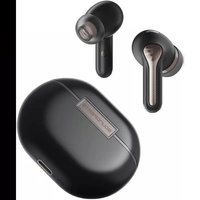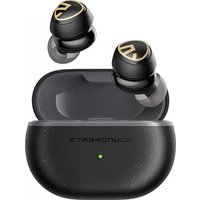
Mini Pro HS - Ecouteur SoundPEATS - Manual de uso y guía de instrucciones gratis
Encuentra gratis el manual del aparato Mini Pro HS SoundPEATS en formato PDF.


Preguntas de los usuarios sobre Mini Pro HS SoundPEATS
0 pregunta sobre este aparato. Responde a las que conoces o haz la tuya.
Hacer una nueva pregunta sobre este aparato
Descarga las instrucciones para tu Ecouteur en formato PDF gratis! Encuentra tus instrucciones Mini Pro HS - SoundPEATS y toma tu dispositivo electrónico nuevamente en la mano. En esta página están publicados todos los documentos necesarios para el uso de su dispositivo. Mini Pro HS de la marca SoundPEATS.
MANUAL DE USUARIO Mini Pro HS SoundPEATS
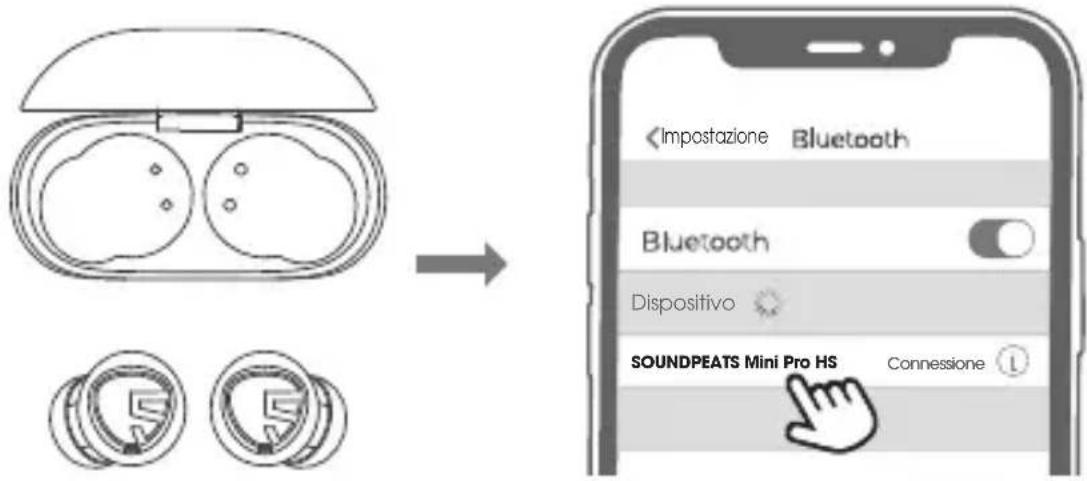
Abra la caja de carga, saque los dos auriculares, retire la película aislante de los contactos de carga de los auriculares y luego vuelva a colocar los auriculares en la caja de carga.
-
Abra la caja de carga, saque los dos auriculares, los auriculares se encenderán y entrarán en el modo de emparejamiento; luego las luces roja y blanca del indicador de auricular principal parpadean alternativamente, y la luz blanca del indicador de oído esclavo está siempre encendida ;
-
Encienda el dispositivo Bluetooth y luego seleccione SOUNDPEATS Mini Pro HS en la lista de Bluetooth para completar el emparejamiento.
Modo ANC
Mantenga presionado el botón táctil del auricular izquierdo durante 1.5S, interruptor de modo normal (Normal Mode)/ reducción de ruido (ANC ON) / paso a través (Pass through)
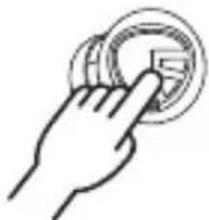
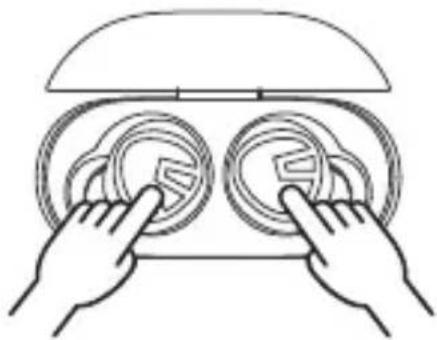
- Elimina la información de emparejamiento de los auriculares del dispositivo.
- Vuelva a colocar los dos auriculares en la caja de carga y asegúrese de que estén en el estado de carga
- Luego, mantenga presionados los dos auriculares durante 10 segundos hasta que los indicadores LED rojo y blanco de los dos auriculares parpadeen alternativamente dos veces y se complete el reinicio.
| Encender | Automático: abra la tapa de la caja de carga y saque los auricularesManual: mantenga presionadas las teclas táctiles de los auriculares durante 1.5S |
| Apagar | Automático: vuelva a colocar los auriculares en la caja de cargaManual: mantenga presionadas las teclas táctiles de los auriculares durante 10S |
| Reproducir / Pausar | Haga doble clic en las teclas táctiles de los auriculares |
| Volumen - | Haga clic en el botón táctil izquierdo del auricular |
| Volumen + | Haga clic en la tecla táctil derecha del auricular |
| Siguiente pista | Mantenga presionada la tecla táctil del auricular derecho 1.5S |
| Responder / colgar una llamada | Toca dos veces el botón táctil del auricular |
| Rechazar la llamada | Mantenga presionado el botón táctil del auricular 1.5S |
| Cambiar entre dos llamadas | Mantenga presionado el botón táctil del auricular 2S |
| Ingrese manualmente al modo de emparejamiento | Mantenga presionado el botón táctil del auricular 6S |
| Activar asistente de voz | Tres clics en el botón táctil derecho del auricular |
| Entrar / salir del modo de juego | Tres clics en el botón táctil izquierdo del auricular |
| Modo normal/ Modo ANC/ Modo de transparencia | Mantenga presionada la tecla táctil del auricular izquierdo durante 1.5S |
Preguntas y respuestas
P1: ¿Qué significa la luz indicadora cuando el auricular se está cargando?
La luz roja siempre está encendida cuando los auriculares se están cargando y luego se apaga después de estar completamente cargados.
P2: ¿Qué significa la luz indicadora de la caja de carga?
100% -50% muestran verde 49% -10% muestran amarillo 10% o menos muestra rojo
Cuando la caja de carga se está cargando, la luz indicadora respira lentamente: 20% o menos luz roja parpadea lentamente 20% -69% luz amarilla parpadea lentamente 70% -99% luz verde parpadea lentamente La luz 100% verde está siempre encendida
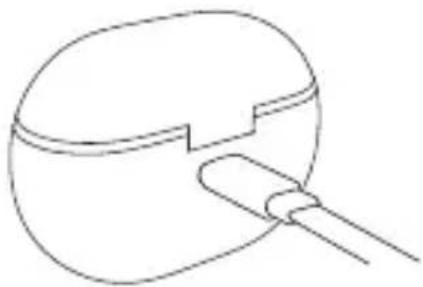
P3: ¿Cómo cargar la caja de carga?
- Conecte el adaptador de carga tipo C para cargarlo (la corriente de carga no excede 1A);
- Cuando no esté en uso durante mucho tiempo, cárguelo al menos una vez cada tres meses.
P4: ¿Por qué los auriculares siguen conectados al teléfono móvil después de volver a colocarlos en la caja de carga?
-
No queda energía en la caja de carga. Cuando la caja de carga está agotada, los auriculares no se pueden apagar después de volver a colocarlos en la caja de carga.
-
Asegúrese de que el auricular esté colocado correctamente en la caja de carga y que la hoja de metal de carga y las clavijas estén limpias. Intente limpiar el contacto de carga entre la caja de carga y el auricular con un paño suave.
P5: ¿Por qué el tiempo de uso no coincide con el que se anuncia?
Una sola carga no puede soportar el uso continuo durante 28 horas. Un auricular de una sola carga (Modo normal) usa aproximadamente 8 horas, (Modo de reducción de ruido) usa alrededor de 6 horas y la caja de carga proporciona 2.5 cargas.
Primo avvio
Ripristina
1. Cancella il record di associazione dal tuo dispositivo. 2. Riposizionare entrambi gli auricolari nella custodia di ricarica e assicurarsi che siano in stato di ricarica. 3. Tenere premuti entrambi i pulsanti per 10 secondi finché entrambi i LED non lampeggiano in rosso e bianco due volte, ripristino completato. natural_image
Line drawing of two hands holding circular objects on a device (no text or symbols)flowchart
graph LR
    A["Phone"] --> B["Radio"]
    B --> C["Mobile Phone"]
    C --> D["Phone"]
    D --> E["Radio"]
    E --> F["Mobile Phone"]
    F --> G["Phone"]
    G --> H["Radio"]
    H --> I["Mobile Phone"]
    I --> J["Phone"]
    J --> K["Radio"]
    K --> L["Mobile Phone"]
    L --> M["Phone"]
    M --> N["Radio"]
    N --> O["Mobile Phone"]
    O --> P["Phone"]
natural_image
Four mechanical bearing illustrations labeled L and R, showing different housing configurations (no text or symbols beyond labels)| Accensione | Automaticamente: apri il coperchio della custodia ed estrai entrambi gli auricolariManualmente: tenere premuti i pulsanti multifunzione per 1,5 secondi |
| Spegni | Automaticamente: rimetti entrambi gli auricolari nella custodia di ricaricaManualmente: tieni premuti i pulsanti multifunzione per 10 secondi |
| Play/Pausa | Tocca due volte il pulsante multifunzione |
| Volume - | Tocca una volta il pulsante multifunzione sinistro |
| Volume + | Tocca una volta il pulsante multifunzione destro |
| Prossima traccia | Tieni premuto il pulsante multifunzione destro per 1,5 secondi |
| Rispondi / Riaggancia la telefonata | Tocca due volte il pulsante multifunzione |
| Rifiuta telefonata | Tieni premuto il pulsante multifunzione per 1,5 secondi |
| Passa da una chiamata all'altra | Tieni premuto il pulsante multifunzione per 2 secondi |
| Accedere manualmente alla modalità di associazione | Tieni premuto il pulsante multifunzione per 6 secondi |
| Attiva l'assistente vocale | Tocca tre volte il pulsante multifunzione destro |
| Entra/esci dalla modalità di gioco | Tocca tre volte il pulsante multifunzione sinistro |
| Modalità di cancellazione attiva del rumore/ Modalità normale / Modalità trasparenza | Tieni premuto il pulsante multifunzione sinistro per 1,5 secondi |
Domanda e risposta
Domanda 1: cosa significa il LED degli auricolari?
Gli indicatori LED degli auricolari rimangono rossi quando sono in carica, scompaiono quando sono completamente carichi.Domanda 2: cosa dice il LED sulla custodia di ricarica?
| Verde | 100%—50% |
| Giallo | 49%-10% |
| Rosso | Meno del 20% |
| Rosso | Meno del 20% |
| Giallo | 20%-69% |
| Verde | 70%-99% |
| Soggiorni nel verde | 100% |
Domanda 3: Come caricare il caso?
Utilizzare un adattatore di tipo C per caricare la custodia (corrente non superiore a 1 A). Si prega di caricare gli auricolari e la custodia almeno una volta ogni 3 mesi quando non vengono utilizzati per un lungo periodo. natural_image
Simple line drawing of a mechanical component with a handle and base (no text or symbols)Domanda 4: Perché gli auricolari sono ancora collegati al mio telefono dopo averli riposizionati?
1. La custodia di ricarica è scarica. La custodia non spegne gli auricolari se la batteria della custodia è scarica. 2. Assicurati che gli auricolari siano ben posizionati nella custodia di ricarica e che i contattori di ricarica sia sugli auricolari che sulla custodia di ricarica siano puliti. Si prega di utilizzare qualcosa come un panno in microfibra per pulire i contattori.Domanda 5: La durata della batteria non è come pubblicizzata?
Una singola carica non ti darà 28 ore di riproduzione in modo coerente. Gli auricolari funzionano circa 8 ore per carica in modalità normale, 6 ore per carica in modalità di eliminazione del rumore attiva. La custodia di ricarica fornisce altre 2.5 ricariche.初めてのご使用
 充電ケースからイヤホンを取り出し、充電金属端子に貼りつけた青い絶縁テープを剥がし、一回イヤホンを充電ケースに戻してください。 1. 充電ケースからイヤホンを取り出すと、両側のイヤホンは自動でお互いに認識します。イヤホンの親機側のLEDインジケーターが赤と白に交互に点滅し、子機側では白く点灯します。 2. 続いて、端末側のBluetooth機能を有効にしてください。端末のBluetooth設定画面に『SOUNDPEATS Mini Pro HS』をタップし、ペアリングは完了です。イヤホンモードの使い方
左側のイヤホンのタッチボタンを1.5秒ロングタップし、イヤホンの各モードは通常モード(Normal mode)→ANCモード(ANC On)→外音取り込みモード(Pass through)→通常モード(Normal mode)のループで変更します。 natural_image
Hand pressing a circular button with a small symbol (no text or numbers visible)リセット
再度ペアリングできない場合、もしくはイヤホンが認識されない場合では、本機をリセットしてください。 まず、端末とのペアリングを解除してください。 次、2つのイヤホンを充電ケースに戻してください。 充電された状態で、両側のイヤホンのタッチボタンを同時に10秒間程ロングタップしてください。LEDインジケータは赤と白に交互に2回点滅したら、リセットは完了です。 natural_image
Line drawing of two hands adjusting circular components with a dome-shaped top (no text or symbols)製品図解
flowchart
graph LR
    A["1.5s"] --> B["Phone"]
    B --> C["2x1x"]
    C --> D["3x2"]
    D --> E["Play"]
    D --> F["Phone"]
    D --> G["Radio"]
    E --> H["Radio"]
    F --> I["Radio"]
    G --> J["Radio"]
イヤホンの装着
natural_image
Four mechanical bearing illustrations labeled L and R, showing different housing configurations (no text or symbols beyond labels)| 電源オン | 自動操作:イヤホンを充電ケースから取り出します手動操作:イヤホンのタッチボタンを1.5秒ロングタップします |
| 電源オフ | 自動操作:イヤホンを充電ケースに戻します手動操作:イヤホンのタッチボタンを10秒ロングタップします |
| 再生/一時停止 | イヤホンのタッチボタンを素早く2回タップします |
| 音量を上げる | 右側のイヤホンのタッチボタンを1回タップします |
| 音量を下げる | 左側のイヤホンのタッチボタンを1回タップします |
| 次の曲 | 右側のイヤホンのタッチボタンを1.5秒ロングタップします |
| 電話を受ける/切る | イヤホンのタッチボタンを素早く2回タップします |
| 着信拒否 | 着信中、イヤホンのタッチボタンを1.5秒ロングタップします |
| 通話切替 | 通話中、イヤホンのタッチボタンを2秒ロングタップします |
| ペアリングモード ヘ変更 | イヤホンのタッチボタンを6秒ロングタップします |
| 端末の音声認識アシスタント機能Siri/Google)を起動 | 右側のイヤホンのタッチボタンを素早く3回タップします( |
| ゲームモード(低遅延モード)を有効/停止 | 左側のイヤホンのタッチボタンを素早く3回タップします |
| ノーマルモード、ANCモード、外音取り込みモードなどイヤホンの各モードの使い方 | 左側のイヤホンのタッチボタンを1.5秒ロングタップします |
Q&A
Q1: イヤホンの充電中、イヤホンのLEDインジケータのステータスとその意味を教えてください。 充電中、イヤホンのインジケータで赤で点灯します。 フル充電されると、イヤホンのインジケータは自動で消灯します。 Q2:充電ケースのLEDインジケータのステータスとその意味を教えてください。 ケースのバッテリー残量は50%以上の場合、インジケータは緑で点灯します。 ケースのバッテリー残量は10%以上50%未満の場合、インジケータで黄色で点灯します。 ケースのバッテリー残量は10%未満の場合、インジケータで赤で点灯します。 充電ケースの充電中に、充電ケースのLEDインジケータはゆっくり点滅し、下記のステータスを意味しています。 ケースのバッテリー残量は20%未満の場合、インジケータは赤でゆっくり点滅します。 ケースのバッテリー残量は20%以上70%未満の場合、インジケータは黄色でゆっくり点滅します。 ケースのバッテリー残量は70%以上100%未満の場合、インジケータは緑でゆっくり点滅します。 ケースのバッテリーがフル充電された場合、インジケータは緑で長く点灯します。  Q3:充電ケースの充電のしかたを教えてください。 1.付属の充電ケーブルをACアダプター(別売)に接続し、LEDインジケータは点滅すると、充電が開始します。(5V/1Aを超える電流を取り込まないようにご注意ください。) 2.長期にわたって使用しない場合は、バッテリーの機能維持のために、3ヶ月に1回フル充電してください。 natural_image
Simple line drawing of a mechanical component with a handle and internal structure (no text or symbols)首次使用
 请打开充电盒,取出两只耳机,撕掉耳机充电触点上的绝缘膜,然后将耳机放回充电盒。 1、打开充电盒, 将两只耳机取出, 耳机将会开机并进入配对模式; 接着主耳机指示灯红灯和白灯交替闪烁, 从耳指示灯白灯常亮; 2、打开设备蓝牙,然后从蓝牙列表中选择SOUNDPEATS Mini Pro HS完成配对。ANC模式
长按左耳机触摸键1.5S,普通(Normal Mode)/降噪(ANC ON)/通透(Pass through)模式切换。 natural_image
Hand pressing a circular button with a square icon (no text or symbols)重置
1. 从设备中删除耳机的配对信息。 2. 请将两只耳机放回充电盒中,并确保它们处于充电状态。 3. 然后,长按耳机10秒钟,直到两个耳机上的LED指示灯红白灯交替闪烁两次,重置完毕。 natural_image
Line drawing of two hands adjusting circular buttons on a device (no text or symbols)flowchart
graph LR
    A["TV"] --> B["Radio"]
    B --> C["Phone"]
    C --> D["Mobile"]
    D --> E["Smartphone"]
    E --> F["Server"]
    G["Clock Icon"] --> H["Address Icon"]
    I["Server Icon"] --> J["Address Icon"]
    K["Address Icon"] --> L["Address Icon"]
    M["Address Icon"] --> N["Address Icon"]
natural_image
Four mechanical bearing illustrations labeled L and R, showing different housing configurations (no text or symbols beyond labels)| 开机 | 自动:打开充电盒盖,拿出耳机手动:长按耳机触控键1.5S |
| 关机 | 自动:将耳机放回充电盒手动:长按耳机触控键10S |
| 播放/暂停 | 双击耳机触控键 |
| 音量- | 单击左耳机触控键 |
| 音量+ | 单击右耳机触控键 |
| 下一曲 | 长按1.5S右耳机触控键 |
| 接听/挂断电话 | 双击耳机触控键 |
| 拒绝接听 | 长按耳机触控键1.5S |
| 在两个通话间切换 | 长按耳机触控键2S |
| 手动进入配对模式 | 长按耳机触控键6S |
| 激活语音助手 | 三击右耳机触控键 |
| 进入/退出游戏模式 | 三击左耳机触控键 |
| 普通/降噪/通透模式切换 | 长按左耳机触摸键1.5S |
Q&A
Q1: 耳机充电时,指示灯代表的意思?
耳机充电中红灯常亮,充满后熄灭。Q2: 充电盒指示灯显示代表什么意思?
100%-50%显示绿色 49%-10% 显示黄色 10%以下显示红色 当充电盒充电时,指示灯慢呼吸: 20%以下红色灯慢呼吸 20%-69%黄色灯慢呼吸 70%-99%绿色灯慢呼吸 100%绿色灯长亮  natural_image
Simple line drawing of a mechanical component with a handle and internal structure (no text or symbols)Q3: 如何给充电盒充电呢?
1. 连接Type-C充电适配器为其充电(充电电流不超过1A); 2. 长时间不使用时,每三个月至少充电一次。Q4: 为什么耳机放回充电盒后依然连着手机呢?
1. 充电盒没有剩余电量。当充电盒没电的时候,耳机放回并不能关机。 2. 请确保耳机有正确放置在充电盒内,同时充电金属片和pin针都干净,请尝试用软布清洁充电盒和耳机充电接触的地方。Q5: 为什么使用时长和宣传的不符呢?
一次充电不能支持持续使用28小时,单次充电耳机(普通模式)使用约8小时,(降噪模式)使用约6小时,充电盒提供2.5次充电。Eşleştirme
 Şarj kutusunun kapağını açın ve her iki kulaklığı da çıkarın, ardından yalıtım Filmini çıkarın ve geri takın. 1. Kulaklıklar, şarj kutusundan çıkarıldıktan sonra otomatik olarak birbiriyle eşleşir. Ana kulaklıktaki LED göstergesi kırmızı ve beyaz renkte yanıp söner, ikinci kulaklık beyaz renkte kalır. 2. Cihazda Bluetooth'u etkinleştirin ve eşleştirmek için Bluetooth listesinden "SOUNDPEATS Mini Pro HS" öğesini seçin.ANC Modu
Sol MFB'yi 1,5 saniye basılı tutun, Normal mod/ANC AÇIK/ Geçis modundan geçis yapın. natural_image
Hand icon showing a finger pressing a circular button (no text or symbols)Sifirla
1. Cihazınızdan eşleştirme kaydı silin. 2. Her iki kulaklığı da şarj kutusuna yerleştirin ve şarj durumunda olduklarıından emin olun. 3. Her iki LED de iki kez kırmızı ve beyaz renkte yanıp sönene kadar her iki düğmeyi de 10 saniye basılı tutun, sıfırlama işlemi tamamlandı. natural_image
Line drawing of two hands holding circular objects with a dome top (no text or symbols)flowchart
graph LR
    A["Phone"] --> B["1.5s"]
    B --> C["x1x"]
    C --> D["-3x2"]
    D --> E["+"]
    E --> F["+"]
    F --> G["+"]
    G --> H["+"]
    H --> I["+"]
    I --> J["+"]
    J --> K["+"]
    K --> L["+"]
    L --> M["+"]
    M --> N["+"]
    N --> O["+"]
    O --> P["+"]
    P --> Q["+"]
    Q --> R["+"]
    R --> S["+"]
    S --> T["+"]
    T --> U["+"]
    U --> V["+"]
    V --> W["+"]
    W --> X["+"]
    X --> Y["+"]
natural_image
Four circular mechanical components labeled L and R, showing different cross-sectional views (no text or symbols beyond labels)| Açık | Otomatik: Kasa kapağını açın ve kulaklıkları çıkarınManuel olarak: ÇFB'yi 1,5 sn basılı tutun |
| Kapat | Otomatik: Kulaklıkları geri yerleştirinManuel olarak: ÇFB'yi 10 saniye basılı tutun |
| Oynamak/Duraklat | MFB'ye çift dokunun |
| Hacim- | Sol MFB'ye bir kez dokunun |
| Hacim+ | Sağ MFB'ye bir kez dokunun |
| Sonraki parça | Sağ MFB'yi 1,5 sn basılı tutun |
| Bir Telefon GörüşmesiniCevaplama/Kapatma | MFB'ye çift dokunun |
| Bir Telefon GörüşmesiniReddet | MFB'yi 1,5 sn basılı tutun |
| İki Aktif Çağrı Arasında GeçişYap | MFB'yi 2 saniye basılı tutun |
| Eşleştirme Moduna ManuelOlarak Girin | MFB'yi 6 saniye basılı tutun |
| Voice Assistantı etkinleştirin | Sağ MFB'ye üç kez dokunun |
| Oyun Moduna Girin/Çıkın | Sol MFB'ye üç kez dokunun |
| Normal Mod/ ANCModu/Şeffaflık Modu | Sol MFB'yi 1,5 sn basılı tutun |
Soru-Cevap
S1: Kulaklıkların LED'i ne anlama geliyor?
Kulaklıkların LED göstergeleri, şarj olurken kırmızı kalır, tamamen şarj olduğunda kaybolur.S2: Şarj kutusundaki LED ne anlatıyor?
| Yeşl | 100%-50% |
| sari | 49%-10% |
| Kırmızı | %10'dan oz |
| Kırmızı | %20'den az |
| sarı | %20 - %69 |
| Yeşil | %70 - %99 |
| Yeşil Kalır | %100 |
Q3: Şarj kutusu nasıl şarj edilir?
1. Kasayı şarj etmek için bir C Tipi adaptör kullanın (akım 1A'yi geçmemelidir). 2. Lüffen kulaklıkları ve kılıfı uzun süre kullanılmadığında en az 3 ayda bir şarj edin. natural_image
Simple line drawing of a mechanical component with a handle and internal structure (no text or symbols)S4: Kulaklıklar telefonuma geri yerleştirdikten sonra neden hala bağlı?
1.Şarj kutusunun pili bitmiş. Kasanın pili bitmisse, kasa kulaklıkları kapatmaz. 2. Lütfen kulaklıkları şarj kutusuna iyice oturduğundan ve hem kulaklıklardaki hem de şarj kutusundaki şarj kontaktörlerinin temiz olduğundan emin olun. Lütfen kontaktörleri temizlemek için mikrofiber bez gibi bir şey deneyin.S5: Pil ömrü reklamı yapıldığı gibi değil mi?
Tek bir şarj size sürekli olarak 28 saat çalma süresi sağlamaz. Kulaklıklar normal modda şarj başına yaklaşık 8 saat, ANC modunda şarj başına 6 saat çalışır. Şarj kutusu 2,5 şarj daha sağlar.Pierwsze uruchomienie
 Otwórz pokrywę etui do ładowania i wyjmij obie wkładki douszne, a następnie zdejmij folię izolacyjną i włóż je z powrotem. 1. Wkładki douszne automatycznie łączą się w pary po wyjęciu z ładowarki. Wskaznik LED na głównej wkładce do ucha miga na czerwono i biało, druga wkładka pozostaje biała. 2. Włącz Bluetooth w urządzeniu i wybierz "SOUNDPEATS Mini Pro HS" na liście Bluetooth, aby sparować.Tryb ANC
Naciśnij i przytrzymaj lewy przycisk MFB przez 1,5 sekundy, przełącz z trybu normalnego / ANC ON / trybu przelotowego. natural_image
Hand icon showing a finger pressing a circular button (no text or symbols)Resetowanie
1. Wyczyść zapis parowania z urządzenia. 2. Umieść z powrotem obie wkładki douszne w etui do ładowania i upewnij się, że są w stanie ładowania. 3. Wciśnij i przytrzymaj oba przyciski przez 10s, aż obie diody LED zamigają na czerwono i biało dwa razy, odpocznij i zakończ. natural_image
Line drawing of two hands holding circular objects with a lid (no text or symbols)flowchart
graph LR
    A["1.5s"] --> B["2x1x"]
    B --> C["3x2"]
    C --> D["4x3"]
    D --> E["5x4"]
    E --> F["6x5"]
    F --> G["7x6"]
    G --> H["8x7"]
    H --> I["9x8"]
    I --> J["10x9"]
    J --> K["11x10"]
    K --> L["12x11"]
    L --> M["13x12"]
natural_image
Four technical line drawings of mechanical components labeled L and R (no text or symbols on diagrams)| Włączanie zasilania | Automatycznie: Otwórz pokrywę obudowy i wyjmij wkładki douszne. Ręcznie: Naciśnij i przytrzymaj przycisk wielofunkcyjny przez 1,5 sekundy |
| Wyłączanie | Auto : Wóż z powrotem wkładki douszne Ręcznie: Naciśnij i przytrzymaj przycisk wielofunkcyjny przez 10 sekund. |
| Odtwarzanie/Pauza | Dwukrotne stuknięcie przycisku wielofunkcyjnego |
| Głośność - | Pojedyncze stuknięcie lewego przycisku wielofunkcyjnego |
| Głośność+ | Pojedyncze stuknięcie prawego przycisku wielofunkcyjnego |
| Następny utwór | Naciśnij i przytrzymaj prawy przycisk wielofunkcyjny przez 1,5 sekundy |
| Odbieranie/rozłączanie połączenia telefonicznego | Stuknij dwukrotnie w przycisk wielofunkcyjny |
| Odrzuć połączenie telefoniczne | Naciśnij i przytrzymaj przycisk wielofunkcyjny przez 1,5 sekundy |
| Przełączanie między dwoma aktywnymi połączeniami | Naciśnij i przytrzymaj przycisk wielofunkcyjny przez 2 sekundy |
| Ręczne wejście w tryb parowania | Naciśnij i przytrzymaj przycisk wielofunkcyjny przez 6 sekund. |
| Aktywuj asystenta głosowego | Stuknij trzykrotnie prawy przycisk wielofunkcyjny |
| Wejście/wyjście z trybu gry | Potrójne stuknięcie lewego przycisku wielofunkcyjnego |
| Tryb normalny/TrybANC/Tryb przezroczystości | Naciśnij i przytrzymaj przycisk wielofunkcyjny przez 1,5 sekundy |
Pytania i odpowiedzi
P1: Co oznacza dioda LED w słuchawkach?
Dioda LED wkładek dousznych jest czerwona, gdy są one w trakcie ładowania, znika po w pełni naładowane.P2: O czym informuje dioda na etui do ładowania?
| Zielony | 100%-50% |
| Żółty | 49%-10% |
| Czerwony | Mniej niż 10% |
| Czerwony | Mniej niż 20% |
| Żółty | 20%-69% |
| Zielony | 70%-99% |
| Pozostaje w kolorze zielonym | 100% |
P3: Jak ładować etui do ładowania?
1. Użyj adaptera Type-C do ładowania etui (prąd nie przekracza 1A). 2. Proszę ładować wkładki douszne i etui co najmniej raz na 3 miesiące, gdy nie są używane przez dłuższy czas. natural_image
Simple line drawing of a mechanical component with a handle and internal structure (no text or symbols)P4: Dlaczego po umieszczeniu z powrotem wkładki douszne są nadal podłączone do mojego telefonu?
1. W etui do ładowania skończyła się bateria. Etui nie wyłączyć słuchawek, jeśli bateria etui jest wyczerpana. 2. Upewnij się, że słuchawki dobrze leżą w ładowarce, a styki ładowania zarówno na słuchawkach, jak i na ładowarce są czyste. Spróbuj wyczyścić styki za pomocą ściereczki z mikrofibry.P5: Czas pracy baterii nie jest taki, jak reklamowano?
Jedno ładowanie nie zapewni Ci 28 godzin ciągłego grania. Stuchawki działają około 8 godzin na jednym ładowaniu w trybie normalnym, 6 godzin na jednym ładowaniu w trybie ANC. Etui do ładowania zapewnia kolejne 2,5 ładowania.Eerste begin
 Open het deksel van het oplaaddoosje en haal beide oordopjes eruit, verwijder vervolgens de isolatiefolie en plaats ze terug. 1. De oordopjes worden automatisch aan elkaar gekoppeld nadat ze uit het oplaadetui zijn gehaald. LED-indicator op het hoofdoordopje knippert rood en wit, het tweede oordopje blijft wit. 2. Activeer Bluetooth op het apparaat en kies "SOUNDPEATS Mini Pro HS" in de Bluetooth-lijst om te koppelen.ANC-modus
Houd de linker MFB 1,5 seconde ingedrukt, schakel over van Normale modus (Normal Mode) / ANC AAN (ANC ON) / Pass-trough-modus (Pass through) natural_image
Hand icon showing a finger pressing a circular button (no text or symbols)Resetten
1. Wis het koppelingsrecord van uw apparaat. 2. Plaats beide oordopjes terug in het oplaadetui en zorg ervoor dat ze zich in de oplaadstatus bevinden. 3. Houd beide knoppen 10 seconden ingedrukt totdat beide LED's tweemaal rood en wit knipperen, rust voltooid. natural_image
Line drawing of two hands holding circular objects with a lid, no text or symbols presentflowchart
graph LR
    A["Phone"] --> B["1.5s"]
    B --> C["2x1x"]
    C --> D["-3x2"]
    D --> E["Server"]
    F["Radio"] --> G["1.5s"]
    H["Video"] --> I["2x1x"]
    J["Phone"] --> K["2x1x"]
    L["Radio"] --> M["2x1x"]
    N["Video"] --> O["2x1x"]
    P["Phone"] --> Q["2x1x"]
    R["Radio"] --> S["2x1x"]
    T["Phone"] --> U["2x1x"]
natural_image
Simple line drawing of a human ear with a circular pattern and directional arrows, no text or symbols present.natural_image
Simple line drawing of a human ear with a circular inset showing a magnified view (no text or symbols)| Schakel in | Auto: Open het deksel van de behuizing en haal de oordopjes eruitHandmatig: houd de MFB-knop 1,5 sec ingedrukt |
| Uitschakelen | Auto : Plaats de oordopjes terugHandmatig: houd de MFB 10 seconden ingedrukt |
| Speel / pauze | Dubbeltik op de MFB |
| Volume- | Tik één keer op de linker MFB |
| Volume+ | Tik één keer op de rechter MFB |
| Volgende nummer | Houd de rechter multifunctionele knop 1,5 sec ingedrukt |
| Een telefoongesprek beantwoorden/ophangen | Dubbeltik op de MFB |
| Weiger een telefoontje | Houd de MFB 1,5 sec ingedrukt |
| Schakelen tussen twee actieve oproepen | Houd de MFB 2S ingedrukt |
| Voer de koppelingsmodus handmatig in | Houd de MFB 6S ingedrukt |
| Activeer spraakassistent | Tik drie keer op de rechter MFB |
| Spelmodus openen/verlat- en | Tik driemaal op de linker MFB |
| Normale modus/ANC-mo- dus/Transparantiemodus | Houd de multifunctionele knop 1,5 sec ingedrukt |
V&A
V1: Wat betekent de LED van oordopjes?
De led-indicatoren van de oordopjes blijven rood als ze worden opgeladen en verdwijnen als ze volledig zijn opgeladen.V2: Wat vertelt de LED op het oplaadetui?
| Groen | 100%-50% |
| Geel | 49%-10% |
| Rood | Minder dan 10% |
| Rood | Minder dan 20% |
| Geel | 20%-69% |
| Groen | 70%-99% |
| 100% | 100% |
V3: Hoe de oplaadcassette opladen?
1. Gebruik een Type-C-adapter om de behuizing op te laden (stroom niet meer dan 1A). 2. Laad de oordopjes en de hoes ten minste eenmaal per 3 maanden op als ze lange tijd niet worden gebruikt. natural_image
Simple line drawing of a mechanical component with a handle and internal structure (no text or symbols)V4: Waarom zijn de oordopjes nog steeds verbonden met mijn telefoon nadat ze zijn teruggeplaatst?
1. De batterij van het oplaaddoosje is leeg. De case schakelt de oordopjes niet uit als de batterij van de case leeg is. 2. Zorg ervoor dat de oordopjes goed in het oplaadetui zitten en dat de oplaadschakelaars op zowel de oordopjes als het oplaadetui schoon zijn. Probeer jets als een microvezeldoek om de schakelaars schoon te maken.V5: Is de levensduur van de batterij niet zoals geadverteerd?
Een enkele lading geeft je niet constant 28 uur speeltijd. De oordopjes werken ongeveer 8 uur per oplaadbeurt in de normale modus, 6 uur per oplaadbeurt in de ANC-modus. De oplaadcassette biedt nog eens 2,5 oplaadbeurten.Första start
 Öppna laddningsfodralets lock och ta ut båda hörsnäckorna, ta sedan bort den isolerande filmen och sätt tillbaka dem. 1. Hörsnäckorna kopplas automatiskt ihop med varandra efter att ha tagits ut ur laddningsfodralet. LED-indikatorn på huvudörsnäckan blinkar i rött och vitt, den andra hörsnäckan förblir i vitt. 2. Aktivera Bluetooth på enheten och välj "SOUNDPEATS Mini Pro HS" på Bluetooth-listan för att para.ANC-läge
Tryck och håll ned vänster MFB i 1,5 sekund, växla från normalt läge / ANC ON / Pass trough-läge. natural_image
Hand pressing a button on a circular interface element (no text or symbols visible)Återställa
1. Rensa kopplingsposten från din enhet. 2. Sätt tillbaka båda hörsnäckorna i laddningsfodralet och se till att de är i laddningsstatus. 3. Tryck och håll båda knapparna intryckt i 10 sekunder tills båda lysdioderna blinkar i rött och vitt två gånger, vilan är klar. natural_image
Line drawing of two hands holding circular objects with a lid, no text or symbols presentflowchart
graph LR
    A["1.5s"] --> B["Phone"]
    C["2x1x"] --> D["Radio"]
    E["3x2"] --> F["Phone"]
    G[" "] --> H["Router"]
    I[" "] --> J["Phone"]
    K[" "] --> L["Radio"]
    M[" "] --> N["Phone"]
natural_image
Simple line drawing of a human ear with a circular button and directional arrows, no text or symbols present.natural_image
Simple line drawing of a human ear with a circular inset showing a mouth and a small circle below (no text or symbols)| Ström på | Auto: Öppna fodralets lock och ta ut öronsnäckornaManuellt: Tryck och håll ned MFB-knappen i 1,5 s, |
| Stäng av | Auto : Sätt tillbaka öronsnäckornaManuellt : Tryck och håll ned MFB i 10 sekunder |
| Spela/Pausa | Dubbeltryck på MFB |
| Volym- | Enkeltryck på vänster MFB |
| Volym+ | Enkeltryck på höger MFB |
| Nästa spår | Tryck och håll ned höger MFB i 1,5 s |
| Svara/lägg på etttelefonsamtal | Dubbeltryck på MFB |
| Avvisa ett telefonsamtal | Tryck och håll ned MFB i 1,5 s |
| Växla mellan två aktivasamtal | Tryck och håll ned MFB för 2S |
| Gå in i pamingslägemanuellt | Tryck och håll ned MFB för 6S |
| Aktivera Voice Assistant | Tryck tre gånger på höger MFB |
| Gå till/avsluta spelläge | Tryck tre gånger på vänster MFB |
| Normalläge/ANC-läge/Transparensläge | Tryck och håll ned MFB i 1,5 s |
Q&A
F1: Vad betyder LED-lampan på hörlurar?
LED-indikatorerna på hörlurar förblir röda när de laddas, försvinner när fulladdad.F2: Vad säger lysdioden på laddningsfodralet?
| Grön | 100%-50% |
| Gul | 49%-10% |
| Röd | Mindre än 10 % |
| Röd | Mindre än 20 % |
| Gul | 20%-69% |
| Grön | 70%-99% |
| Står i grönt | 100% |