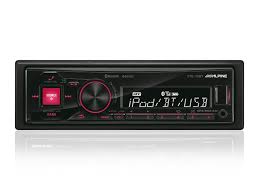
KCE-300BT - Bluetooth Car Stereo ALPINE - Free user manual and instructions
Find the device manual for free KCE-300BT ALPINE in PDF.


| Product Type | Bluetooth Car Stereo |
| Brand | ALPINE |
| Model | KCE-300BT |
| Dimensions (W x H x D) | 178 x 50 x 162 mm (1-DIN format) |
| Weight | 0.5 kg |
| Power Supply | 12 V DC (vehicle battery) |
| Output Power | 4 x 50 W max. |
| Main Functions | Bluetooth hands-free, audio streaming, FM/AM radio, CD player, USB, auxiliary input |
| Compatible Audio Formats | MP3, WMA, WAV (via USB) |
| Connectivity | Bluetooth, USB (front), AUX input (3.5 mm), radio antenna |
| Display | Backlit LCD display |
| Equalizer | Built-in 5-band graphic equalizer |
| Call Functions | Hands-free with built-in microphone, phonebook and call history |
| Security | Detachable anti-theft faceplate |
| Maintenance and Cleaning | Clean with a dry soft cloth; avoid chemicals |
| Spare Parts and Repairability | Parts available at Alpine service centers; faceplate, wiring, etc. |
| General Information | This device is designed for installation in a 12 V battery vehicle |
Frequently Asked Questions - KCE-300BT ALPINE
User questions about KCE-300BT ALPINE
0 question about this device. Answer the ones you know or ask your own.
Ask a new question about this device
Download the instructions for your Bluetooth Car Stereo in PDF format for free! Find your manual KCE-300BT - ALPINE and take your electronic device back in hand. On this page are published all the documents necessary for the use of your device. KCE-300BT by ALPINE.
USER MANUAL KCE-300BT ALPINE
Please read before using this equipment.
777 Supertest Road, Toronto,
Ontario M3J 2M9, Canada
Phone 1-800-ALPINE-1 (1-800-257-4631)
ALPINE ELECTRONICS OF AUSTRALIA PTY. LTD.
161-165 Princes Highway, Hallam
Victoria 3803, Australia
Phone 03-8787-1200
ALPINE ELECTRONICS GmbH
Frankfurter Ring 117,
80807 München, Germany
Phone 089-32 42 640
ALPINE ELECTRONICS OF U.K. LTD.
Alpine House
Fletchamstead Highway, Coventry CV4 9TW
U.K.
Phone 0870-33 33 763
ALPINE ELECTRONICS FRANCE S.A.R.L.
RCS PONTOISE B 338 101 280)
98, Rue de la Belle Etoile, Z.I. Paris Nord II
B.P. 50016, 95945 Roissy Charles de Gaulle
Cedex, France
Phone 01-48638989
Operating Instructions

WARNING
WARNING 2
CAUTION 2
Setup Before Using
About Bluetooth 3
Before Using Hands-Free Phone/ Audio Function 3
How to connect to a Bluetooth compatible device (Pairing). 3
Bluetooth SETUP
Bluetooth Setup Operation 4
Setting the Bluetooth Device 4
Registering the Bluetooth Device (AV Head Unit only) 5
Deleting a Bluetooth Device from the list .... 5
Setting the Search Mode. 5
Setting the Received Calls automatically .... 5
Hands-Free Phone Control
About the Hands-Free Phone 6
Answering a Call 6
Hanging up the Telephone 6
Adjusting the volume when receiving a Call .... 6
Redial Function 7
Call History 7
Redialing a Number In DIALED CALLS History. 7
Dialing a Number In RECEIVED CALLS History. 7
Dialing a Number In MISSED CALLS History. 7
Dialing a Number In The PHONE BOOK (PHONE BOOK) 7
Dialing a Number Using Direct DIAL INPUT (AV Head Unit only) 8
Dialing a Number from a CD Head Unit/ Digital Media Receiver 8
Bluetooth Audio Function
Bluetooth Audio Operation 9
Recalling the Bluetooth Mode 9
Selecting the desired Song 9
Pausing 9
Selecting a iRadio Channel (Preset Playlist) 9
Accessories 10
Installation
Velcro fastener Mounting. 10
Mounting the Microphone 10
Connections 11
Specifications 12
LIMITED WARRANTY ......WARRANTY-EN
- Setting items, operations, etc., may be modified or removed without notice depending on the connected Alpine Bluetooth compatible unit.
Operating Instructions
WARNING

WARNING
This symbol means important instructions. Failure to heed them can result in serious injury or death.
DO NOT DISASSEMBLE OR ALTER.
Doing so may result in an accident, fire or electric shock.
KEEP SMALL OBJECTS SUCH AS BATTERIES OUT OF THE REACH OF CHILDREN.
Swallowing them may result in serious injury. If swallowed, consult a physician immediately.
USE ONLY IN CARS WITH A 12 VOLT NEGATIVE GROUND.
(Check with your dealer if you are not sure.) Failure to do so may result in fire, etc.
BEFORE WIRING, DISCONNECT THE CABLE FROM THE NEGATIVE BATTERY TERMINAL.
Failure to do so may result in electric shock or injury due to electrical shorts.
DO NOT SPLICE INTO ELECTRICAL CABLES.
Never cut away cable insulation to supply power to other equipment. Doing so will exceed the current carrying capacity of the wire and result in fire or electric shock.
DO NOT DAMAGE PIPE OR WIRING WHEN DRILLING HOLES.
When drilling holes in the chassis for installation, take precautions so as not to contact, damage or obstruct pipes, fuel lines, tanks or electrical wiring. Failure to take such precautions may result in fire.
DO NOT USE BOLTS OR NUTS IN THE BRAKE OR STEERING SYSTEMS TO MAKE GROUND CONNECTIONS.
Bolts or nuts used for the brake or steering systems (or any other safety-related system), or tanks should NEVER be used for installations or ground connections. Using such parts could disable control of the vehicle and cause fire etc.
DO NOT ALLOW CABLES TO BECOME ENTANGLED IN SURROUNDING OBJECTS.
Arrange wiring and cables in compliance with the manual to prevent obstructions when driving. Cables or wiring that obstruct or hang up on places such as the steering wheel, gear lever, brake pedals, etc. can be extremely hazardous.
USE THIS PRODUCT FOR MOBILE 12V APPLICATIONS.
Use for other than its designed application may result in fire, electric shock or other injury.
MAKE THE CORRECT CONNECTIONS.
Failure to make the proper connections may result in fire or product damage.

CAUTION
This symbol means important instructions. Failure to heed them can result in injury or material property damage.
USE SPECIFIED ACCESSORY PARTS AND INSTALL THEM SECURELY.
Be sure to use only the specified accessory parts. Use of other than designated parts may damage this unit internally or may not securely install the unit in place. This may cause parts to become loose resulting in hazards or product failure.
DO NOT INSTALL IN LOCATIONS WITH HIGH MOISTURE OR DUST.
Avoid installing the unit in locations with high incidence of moisture or dust. Moisture or dust that penetrates into this unit may result in product failure.
HAVETHEWIRINGAND INSTALLATIONDONEBY EXPERTS.
The wiring and installation of this unit requires special technical skill and experience. To ensure safety, always contact the dealer where you purchased this product to have the work done.
ARRANGE THE WIRING SO IT IS NOT CRIMPED OR PINCHED BY A SHARP METAL EDGE.
Route the cables and wiring away from moving parts (like the seat rails) or sharp or pointed edges. This will prevent crimping and damage to the wiring. If wiring passes through a hole in metal, use a rubber grommet to prevent the wire's insulation from being cut by the metal edge of the hole.
Setup Before Using
About Bluetooth
Bluetooth is a short distance wireless technology to connect a mobile phone or personal computer. This allows you to enable a hands-free call or transmit data between Bluetooth compatible devices.
Depending on the Bluetooth version, a Bluetooth compatible device may not be able to communicate with this adapter.
- Proper function of this adapter with all Bluetooth compatible devices is not guaranteed.
- Depending on the surroundings, Bluetooth wireless connection may be unstable.
- When you place a call, or perform setup operations, be sure to stop your car in a safe place.
- For details on the control (selection, enter, cancel) from the connected unit, refer to the Owner's Manual of the respective unit.
Depending on the connected Bluetooth compatible device(s), the function may differ. Also refer to the Owner's Manual of the connected device(s).
Before Using Hands-Free Phone/ Audio Function
Before using the hands-free phone/audio function, the following settings need to be made.
1 Be sure to set "INT MUTE" (in the setup function of the connected head unit or Digital Media receiver) to OFF.
- Before making sound interruption on the Bluetooth compatible device, make sure that INT MUTE is set to OFF. (Initial setting on the unit is OFF.)
2 Set "Bluetooth IN" or "Bluetooth" to ADAPTER. (Refer to the Owner's Manual of the connected units.)
3 Turn the ignition key off (ACC OFF) and on again (ACC ON).
- Before using a hands-free phone, it must be paired with the adapter. Refer to "Bluetooth SETUP" (pages 4-5).
If "Bluetooth IN" or "Bluetooth" is set to OFF once, the communication to the adapter is canceled. To resume communication: reset to ADAPTER, set the ignition key from ACC to OFF once, and then to ON again.
* When a Bluetooth compatible device is not used, set "Bluetooth IN" or "Bluetooth" to OFF, and remove the adapter. If Bluetooth connection of the adapter is maintained, connection (pairing) error to the adapter may occur depending on the mobile phone, and result in malfunction.
How to connect to a Bluetooth compatible device (Pairing)
For details on the control from a Bluetooth compatible device, refer to the Owner's Manual of the Bluetooth compatible device.
1 Set a Bluetooth connection from a Bluetooth compatible device.
2 The PIN code ("0000") is displayed on the connected unit.
The PIN code is fixed as "0000."
3 Input the PIN code ("0000") in a Bluetooth compatible device.
4 If the connected unit is successfully connected to a Bluetooth compatible device, a paired device name and a registered number (No. 1 to 4 or guest mode) are displayed on the unit, and then the unit returns to normal mode.
- Set "Setting the Search Mode" (page 5) to ON to enable the KCE-300BT to recognize a mobile phone. For mobile phone passkey (passcode) input operation, refer to the mobile's Owner's Manual. Additionally, the mobile phone can be searched directly from an AV head unit. Refer to "Registering the Bluetooth Device (AV Head Unit only)" (page 5).
Bluetooth SETUP
The explanations in this Owner's Manual mainly describe the following operations from the AV head unit.
Bluetooth Setup Operation
The following steps 1 to 5 are common to the various Bluetooth functions. For details, refer to each individual function.
- When calling, or selecting the Tel. mode or Bluetooth Audio source, Bluetooth Setup operation cannot be performed.
Refer to the Owner's Manual of the CD Head unit, AV Head Unit or Digital Media Receiver, and set "Bluetooth IN" or "Bluetooth" to ADAPTER, and then perform Bluetooth SETUP operation.
1 Touch [SETUP] on the main source screen. The SETUP selection screen is displayed.
2 Touch [SOURCE] or [] of SOURCE. The SOURCE SETUP screen is displayed.
3 Touch [>>] of BLUETOOTH or BLUETOOTH SETUP. The Bluetooth setup is displayed.
4 Touch [▶] / [▶], [ON] / [OFF] or [▶] of the desired item to change its setting.
Setting items:
PAIRED DEVICES / DEVICE SEARCH / CLEAR
DEVICE / VISIBLE MODE / AUTO ANSWER
5 Touch [RETURN] to return to the previous screen.
Controlling from a CD Head Unit / Digital Media Receiver:
1 Press and hold SETUP for at least 2 seconds.
2 Turn the Rotary encoder or the Center jog dial to select Bluetooth or Bluetooth IN, and press ENT.
3 Turn the Rotary encoder or the Center jog dial to select the desired setting items and press ENT.
Setting items: Bluetooth IN Paired Device* Visible Mode* AUTO Answer* Clear Device*
- When "Bluetooth IN" or "Bluetooth" is set to ADAPTER, the above items are displayed.
4 Turn the Rotary encoder or the Center jog dial to change the settings.
5 Press ENT. (Depending on the connected units, this operation may not be necessary.)
6 Press and hold ESC (or SETUP) or BACK for at least 2 seconds. The SETUP mode is canceled.
Setting the Bluetooth Device
Select one of 5 connected Bluetooth compatible devices that you previously registered (one registered by guest mode*).
Setting item: PAIRED DEVICES
1 Select a Bluetooth compatible device to use (change connection) from the PAIRED DEVICE list.
2 Touch [▶].
- If the connection is successfully changed, "CONNECTED/(Device name)" is displayed for 2 seconds, and then the display returns to the SETUP screen.
- If you input the wrong passcode or communications fail, "FAILED" is displayed.
- If you want to connect another Bluetooth compatible device, after disconnecting the current Bluetooth compatible device, connect the Bluetooth compatible device you want to change to. The PIN code is fixed as "0000."
- Guest mode: Use this mode for a temporary pairing. Registration (in guest mode) is canceled once the ignition key goes from ACC to off.
Controlling from a CD Head Unit / Digital Media Receiver:
1 Turn the Rotary encoder or the Center jog dial to select a Bluetooth compatible device you want to use (you want to change connection).
2 Press ENT. (Depending on the connected units, this operation may not be necessary.)
Registering the Bluetooth Device (AV Head Unit only)
The Bluetooth device is used when a connectable Bluetooth compatible device is searched and connected from an AV head unit, or a new Bluetooth compatible device is registered.
Setting item: DEVICE SEARCH
1 When DEVICE SEARCH is selected, "SEARCHING..." is displayed, and searching starts.
2 Touch [▶] of a device name to be connected from the DEVICE SEARCH list.
3 If the adapter is successfully connected to a Bluetooth compatible device, a paired device name and a registered number (No. 1 to 4 or guest mode) are displayed, and then the unit returns to normal mode.
- If a mobile phone is registered for the first time: Input a passcode when the numeric keypad screen is displayed.
- A passcode input on a AV Head Unit is maximum 4-digit. If a passcode on the Bluetooth compatible device exceeds 4 digits, reset the passcode and make this setting again.
Deleting a Bluetooth Device from the list
You can delete the history of a previously connected Bluetooth compatible device.
Setting item: CLEAR DEVICE
1 Touch [▶] of the Bluetooth compatible device you want to delete from the CLEAR DEVICE list.
A message is displayed.
2 Touch [YES] if you want to delete.
- Touching [NO] will cancel the setting.
Controlling from a CD Head Unit / Digital Media Receiver:
1 Turn the Rotary encoder or the Center jog dial to select the Bluetooth compatible device to be deleted.
2 Press ENT. (Depending on the connected units, this operation may not be necessary.)
Setting the Search Mode
You can set whether the KCE-300BT can be recognized or not from a Bluetooth compatible device. Normally set this to ON.
Setting item: VISIBLE MODE
ON: Enable recognition of the KCE-300BT from the Bluetooth compatible device.
OFF: Disable recognition of the KCE-300BT from the Bluetooth compatible device.
- Depending on the mobile phone, you may be necessary to input passkey (passcode). For a mobile phone's passkey (passcode) input operation, refer to the mobile phone's Owner's Manual.
Setting the Received Calls automatically
When a call is received, you can set whether to receive it automatically or not.
Setting item: AUTO ANSWER
ON: When a call is received, it will be taken automatically.
OFF: When a call is received, it will not be received automatically. If a message is displayed and [YES] is touched when a call is received, you can receive the call. (When a CD Head Unit / Digital Media receiver is connected, press PHONE to receive a call.)
- Even if this setting is set to ON/OFF, the received call setting on the mobile phone takes priority.
Hands-Free Phone
Control
About the Hands-Free Phone
Hands-free calls are possible when using a HSP (Head Set Profile) and HFP (Hands-Free Profile) compatible mobile phone with a ALPINE Bluetooth compatible CD head unit, AV head unit, or Digital Media receiver.
- Avoid performing a hands-free call in a city where traffic is congested, or in the narrow street.
- Shut the windows while calling.
- If both persons use a hands-free call to each other, or you make a call in a noisy location, you may have difficulty hearing the other person's voice, or transmitting to the other person.
Certain voices may sound unnatural, depending on the person using the telephone, or on telephone line conditions. - Certain mobile phone features are dependent on the capabilities and settings of your service provider's network. Additionally, certain features may not be activated by your service provider, and/or the provider's network settings may limit the feature's functionality. Always contact your service provider about feature availability and functionality.
-
All features, functionality, and other product specifications, as well as the information contained in the Owner's Manual are based upon the latest available information and are believed to be accurate at the time of printing. Alpine reserves the right to change or modify any information or specifications without notice or obligation.
-
The explanations in this Owner's Manual mainly describe the following operations from the AV head unit.
Answering a Call
Incoming calls are announced by the received call ring tone and a displayed message (PHONE No.).
Touch [ ]
The call starts.
Indicator (Signal Strength): The indicator is displayed when the Bluetooth Audio source or Tel. mode on the AV head unit is active..
CD Head Unit / Digital Media Receiver:
Press [PHONE].
- When "Setting the Received Calls automatically" (page 5) is set to ON, you can receive a call automatically.
While calling, the source sound on the unit is muted.
Hanging up the Telephone
Touch[].
The call finishes.
CD Head Unit / Digital Media Receiver:
Press [PHONE].
Adjusting the volume when receiving a Call
While calling, you can adjust the volume. The adjusted volume level is stored.
Press [ ] / [ ] or turn the Rotary encoder to adjust the volume.
CD Head Unit / Digital Media Receiver:
Turn the Rotary encoder or the Center jog dial to adjust the volume.
- You may need to increase volume from your regular audio listening source level. However, increasing the volume excessively may result in feedback. If feedback is noticed as feedback is directly related to the volume, turn down the volume as low as acceptable to eliminate it. Positioning the microphone in a direction away from the main car speakers (e.g. clipped on sunvisor) may also reduce feedback at high volume.
Redial Function
You can redial the person you have previously called.
After finishing a call, touch []^* within 5 seconds.
The telephone is redialed.
- CD Head Unit / Digital Media Receiver: Press [PHONE].
Call History
Call History is recorded for up to the last 10 dialed/received/missed calls. There are various ways of making calls based on the "Call History." The following steps 1 to 4 are common to the various ways of making these calls. For details, refer to each individual category for making calls.
1 Press [SOURCE].
The source selection screen is displayed.
2 Touch [TEL].
The TELPHONE MENU screen is displayed.
3 Touch [>>] etc., of the desired item to change its setting.
Setting items: DIALED CALLS / RECEIVED CALLS/MISSED CALLS/PHONE BOOK/DIAL INPUT
4 Touch [RETURN] to return to the previous screen.
- If you place a call directly from the paired mobile phone, the phone number is not displayed, you cannot redial from the unit in this case.
Redialing a Number In DIALED CALLS History
Previously dialed telephone numbers are stored in dialed calls/received calls history. You can redial a number by searching from dialed calls history.
Setting item: DIALED CALLS
1 Select a name or a telephone number to call from the DIALED CALLS list.
2 Touch [▶].
The call is placed.
Dialing a Number In RECEIVED CALLS History
Telephone numbers from received calls are stored in the RECEIVED CALLS history. You can radial these numbers by searching here.
Setting item: RECEIVED CALLS
1 Select a person or a telephone number you want to call from the RECEIVED CALLS list.
2 Touch [▶].
The call is placed.
Dialing a Number In MISSED CALLS History
Telephone numbers for received calls that are missed, are stored in the MISSED CALLS history. You can redial these numbers by searching here.
Setting item: MISSED CALLS
1 Select a person or a telephone number you want to call from the MISSED CALLS list.
2 Touch [▶].
The call is placed.
Dialing a Number In The PHONE BOOK (PHONE BOOK)
Up to 1,000 telephone numbers are downloadable to the Bluetooth compatible unit from a mobile phone. Dial a call by selecting a person from the phone book list.
Setting item:PHONE BOOK
1 Select a person or a telephone number you want to call from the PHONE BOOK list.
2 Touch [▶].
The call is placed.
- If a name cannot be obtained via the phone book, only the telephone number is displayed.
Dialing a Number Using Direct DIAL INPUT (AV Head Unit only)
You can place a call by inputting the telephone number directly by the numeric keypad screen on the AV head unit.
Setting item: DIAL INPUT
1 Touch [INPUT].
The numeric keypad screen is displayed.
2 Touch (input) the telephone number, and then touch [ENT].
The call is placed.
- About the numeric keypad
RETURN: closes the numeric keypad input screen.
ALL DEL: deletes all input numbers.
BS (Back Space): deletes a previous number.
- The speed dial is recalled and the telephone is called by directly inputting the number which is registered with the speed dial on the mobile phone on the numeric keypad screen of the AV head unit (SPEED DIAL).
Dialing a Number from a CD Head Unit/Digital Media Receiver
1 Press [PHONE].
2 Turn the Rotary encoder or the Center jog dial to select the desired settings (DIALED / RECEIVED / MISSED / PHONE BOOK), and press ENT. The list is displayed.
3 Turn the Rotary encoder or the Center jog dial to select the telephone number you want to call, and then press ENT.
The call is placed.
- If there is no dialed/received calls history, or no registered list, "--------" is displayed for 2 seconds, and the display returns to the previous mode.
Bluetooth Audio Function
- The explanations in this Owner's Manual mainly describe the following operations from the AV head unit.
Bluetooth Audio Operation
Audio information of a Bluetooth compatible mobile phone, a portable player, etc., is controllable/playable wirelessly* from an ALPINE Bluetooth compatible CD Head Unit, AV Head Unit or Digital Media Receiver.
-
To play back audio, a mobile phone or a portable player conforming to A2DP (Advanced Audio Distribution Profile) or AVRCP (Audio/Video Remote Control Profile) is required. Not all functions work with all devices.
-
During a call, sound on the Bluetooth audio source is muted.
- Set a source to Bluetooth audio. When iRadio is played back, do not play back another application, such as MP3, from a mobile phone.
Depending on the iRadio-compatible mobile phone, tag information or preset numbers may or may not be displayed.
Recalling the Bluetooth Mode
1 Press SOURCE.
The source selection screen is displayed.
2 Touch [AUDIO].
The Bluetooth Audio main screen is displayed.
Controlling from a CD Head Unit / Digital Media Receiver:
Press SOURCE to activate the Bluetooth audio mode.
Selecting the desired Song
Touch [1].
Returns the beginning of the song being played back. Pressing and holding will return the beginning of the previous song.
Touch [▶▶].
Forwards the next song.
Controlling from a CD Head Unit / Digital Media Receiver:
Pressor
Pausing
Touch [▶/II].
A playback stops. Touching again will resume a playback.
Controlling from a CD Head Unit / Digital Media Receiver:
Press 11.
Selecting a iRadio Channel (Preset Playlist)
You can use this function only if an iRadio®-compatible device is connected.
1 Touch [PAGE 1/2].
2 If tag information is stored in the iRadio preset, you can recall tag information by touching any one of the buttons ([P-1] through [P-6]).
- Motorola iRadio® is an innovative mobile music subscription service that allows users to discover new music and play their personal digital music collection on the one device they are never without - their mobile phone. With hundreds of commercial-free stations, iRadio lets users listen to everything from major label hit makers to indie gems and everything in-between.
- Using the advanced KCE-300BT stereo Bluetooth car adapter, iRadio streams seamlessly from the phone to the car stereo, allowing users to enjoy iRadio wherever they go. Up to 6 iRadio channels can be selected using the preset buttons on the Head-Unit (1 through 6) and the music.
- In this iRadio mode, the metadata associated with a song (song title, artist) as well as the name of the radio channel may be displayed and scroll automatically.
Controlling from a CD Head Unit:
When the FUNC mode is set to OFF, press any one of the preset buttons (1 through 6).
Controlling from a Digital Media Receiver:
1 Press PRESET.
2 Turn the Center jog dial to select any one of the preset buttons (1 through 6), and press ENT.
Accessories
Check accessory parts.
KCE-300BT Module
Power Cable
x1
x1
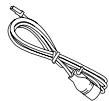
Microphone
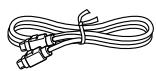
10Pin DIN Cable
x1
x1
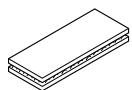
Velcro Fastener
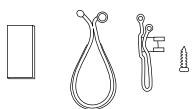
Microphone Mounting Brackets
x1
x1
Installation
Velcro fastener Mounting
For the sake of safety, mount the adapter in one of the following locations.
- Do not mount the adapter under your feet. Do not step on the adapter, or press excessively on it.
- Before mounting the adapter, secure enough space at its upper side to prevent noise or to result in malfunction when sending or receiving data.
Depending on the adapter mounting location noise may occur when using a Bluetooth compatible device, or a malfunction may result when sending or receiving data. In this case, mount the adapter in another location.
Attach one side of the Velcro fastener to the box.
Remove the backing from the other side of the Velcro strip. Gently press the adapter onto its selected mounting location.
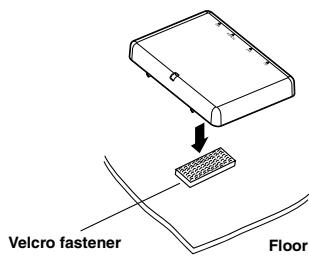
Mounting the Microphone
For the sake of safety, mount the microphone in the following location.
In a stable and secure location.
- In a location that does not inhibit safely driving the vehicle.
- Mount the microphone in a location where the driver's voice can easily be picked up.
Choose a location for the microphone that can easily pick up the drivers voice. Requiring the driver to move towards the mic for audibility causes a distraction that could be dangerous.
Mount the microphone using the supplied Velcro fastener or the bracket.
- Connect a Bluetooth compatible unit and an iPod® to the Bluetooth Box
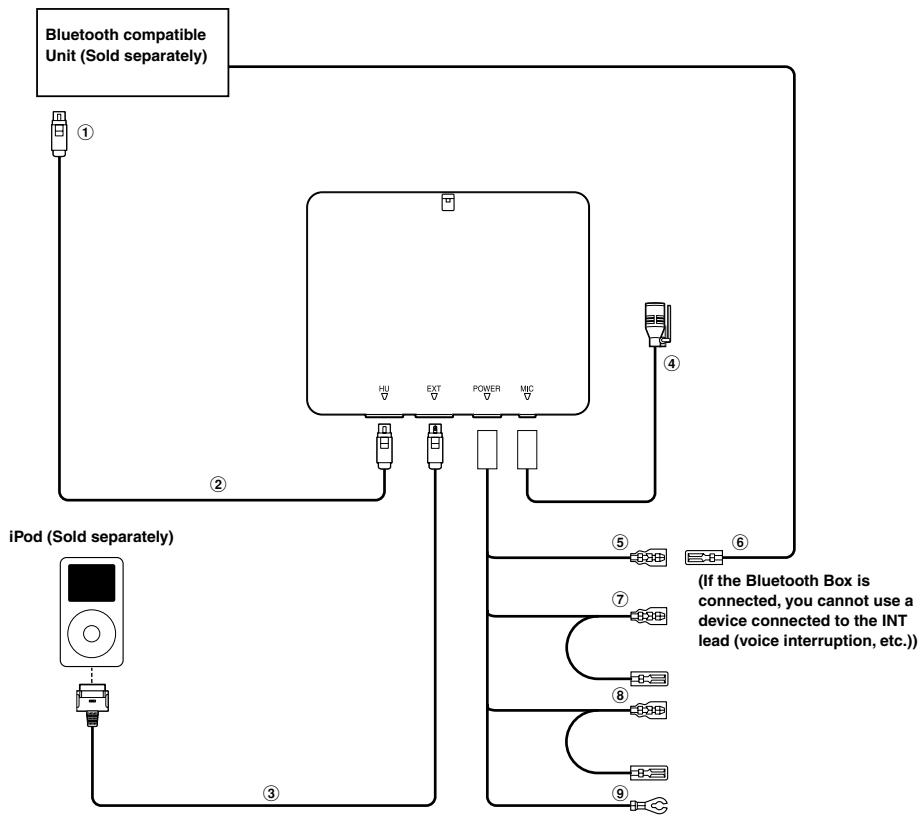
① To iPod Direct connector
② 10Pin DIN Cable (Included)
③ FULL SPEED™ Connection Cable (KCE-422i) (Depending on the connected unit, this cable may be supplied or sold separately.)
④ Microphone (Included)
⑤ Audio Interrupt Out lead (Pink/Black)
⑥ Audio Interrupt In lead (Pink/Black)
⑦ ACC (Ignition) lead (Red)
To the ACC Power lead.
⑧ Battery lead (Yellow)
Connect this lead to a terminal that constantly provides power (to the positive (+) post of the battery).
⑨ Ground lead (Black)
Connect to a metal part of chassis body with screw.
Specifications
BLUETOOTH SECTION
Bluetooth Version Bluetooth 1.1 CERTIFIED
Output Power +4 dBm Max. (Power class 2)
Profile HFP (Hands-Free Profile)
HSP (Head Set Profile)
A2DP (Advanced Audio Distribution Profile)
AVRCP (Audio/Video Remote Control Profile)
GENERAL
Power Requirement 13.5V DC
(10-16 V allowable)
Weight 92 g
CHASSIS SIZE
Width 96 mm (3-3/4")
Height 75 mm (2-15/16")
Depth 26 mm (1")
LIMITED WARRANTY
ALPINE ELECTRONICS OF AMERICA, INC. AND ALPINE OF CANADA INC. ("Alpine"), are dedicated to quality craftsmanship and are pleased to offer this Warranty. We suggest that you read it thoroughly. Should you have any questions, please contact your Dealer or contact Alpine at one of the telephone numbers listed below.
- PRODUCTS COVERED:
This Warranty covers Car Audio Products and Related Accessories ("the product"). Products purchased in the Canada are covered only in the Canada. Products purchased in the U.S.A. are covered only in the U.S.A.
- LENGTH OF WARRANTY:
This Warranty is in effect for one year from the date of the first consumer purchase.
WHO IS COVERED:
This Warranty only covers the original purchaser of the product, who must reside in the United States, Puerto Rico or Canada.
WHAT IS COVERED:
This Warranty covers defects in materials or workmanship (parts and labor) in the product.
WHAT IS NOT COVERED:
This Warranty does not cover the following:
① Damage occurring during shipment of the product to Alpine for repair (claims must be presented to the carrier).
② Damage caused by accident or abuse, including burned voice coils caused by over-driving the speaker (amplifier level is turned up and driven into distortion or clipping). Speaker mechanical failure (e.g. punctures, tears or rips). Cracked or damaged LCD panels. Dropped or damaged hard drives.
③ Damage caused by negligence, misuse, improper operation or failure to follow instructions contained in the Owner's manual.
④ Damage caused by act of God, including without limitation, earthquake, fire, flood, storms or other acts of nature. Any cost or expense related to the removal or reinstallation of the product.
⑤ Service performed by an unauthorized person, company or association.
⑥ Any product which has the serial number defaced, altered or removed.
⑦ Any product which has been adjusted, altered or modified without Alpine's consent.
⑧ Any product not distributed by Alpine within the United States, Puerto Rico or Canada.
⑨ Any product not purchased from an Authorized Alpine Dealer.
HOW TO OBTAIN WARRANTY SERVICE:
① You are responsible for delivery of the product to an Authorized Alpine Service Center or Alpine for repair and for payment of any initial shipping charges. Alpine will, at its option, repair or replace the product with a new or reconditioned product without charge. If the repairs are covered by the warranty, and if the product was shipped to an Authorized Alpine Service Center or Alpine, Alpine will pay the return shipping charges.
2 You should provide a detailed description of the problem(s) for which service is required.
③ You must supply proof of your purchase of the product.
4 You must package the product securely to avoid damage during shipment. To prevent lost packages it is recommended to use a carrier that provides a tracking service.
HOW WE LIMIT IMPLIED WARRANTY:
ANY IMPLIED WARRANTY INCLUDES INCLUDING FITNESS FOR USE AND MERCHANTABILITY ARE LIMITED IN DURATION TO THE PERIOD OF THE EXPRESS WARRANTY SET FORTH ABOVE AND NO PERSON IS AUTHORIZED TO ASSUME FOR ALPINE ANY OTHER LIABILITY IN CONNECTION WITH THE SALE OF THE PRODUCT.
HOW WE EXCLUDE CERTAIN DAMAGES:
ALPINE EXPRESSLY DISCLAIMS LIABILITY FOR
INCIDENTAL AND CONSEQUENTIAL DAMAGES
CAUSED BY THE PRODUCT. THE TERM "INCIDENTAL DAMAGES" REFERS TO EXPENSES OF
TRANSPORTING THE PRODUCT TO THE ALPINE SERVICE CENTER, LOSS OF THE ORIGINAL PURCHASER'S TIME, LOSS OF THE USE OF THE PRODUCT, BUS FARES, CAR RENTALS OR OTHERS COSTS RELATING TO THE CARE AND CUSTODY OF THE PRODUCT. THE TERM "CONSEQUENTIAL DAMAGES" REFERS TO THE COST OF REPAIRING OR REPLACING OTHER PROPERTY WHICH IS DAMAGED WHEN THIS PRODUCT DOES NOT WORK PROPERLY. THE REMEDIES PROVIDED UNDER THIS WARRANTY ARE EXCLUSIVE AND IN LIEU OF ALL OTHERS.
HOW STATE/PROVINCIAL LAW RELATES TO THE WARRANTY:
This Warranty gives you specific legal rights, and you may also have other rights which vary from state to state and province to province. In addition, some states/provinces do not allow limitations on how long an implied warranty lasts, and some do not allow the exclusion or limitation of incidental or consequential damages. Accordingly, limitations as to these matters contained herein may not apply to you.
IN CANADA ONLY:
This Warranty is not valid unless your Alpine car audio product has been installed in your vehicle by an Authorized Installation Center, and this warranty stamped upon installation by the installation center.
HOW TO CONTACT CUSTOMER SERVICE:
Should the product require service, please call the following number for your nearest Authorized Alpine Service Center.
CAR AUDIO 1-800-ALPINE-1 (1-800-257-4631) NAVIGATION1-888-NAV-HELP (1-888-628-4357)
Or visit our website at; http://www.alpine-usa.com