Black BK-SC800D - Subwoofer OSD Audio - Free user manual and instructions
Find the device manual for free Black BK-SC800D OSD Audio in PDF.


| Product Type | Subwoofer |
| Brand | OSD Audio |
| Model | Black BK-SC800D |
| Driver Size | 8 inches (dual) |
| Amplifier Power | 300 Watts RMS (built-in) |
| Frequency Response | 20 Hz - 200 Hz |
| Impedance | 8 Ohms |
| Sensitivity | 90 dB |
| Dimensions (H x W x D) | 18 x 12 x 12 inches |
| Weight | 22 lbs |
| Cabinet Material | MDF with black finish |
| Connectivity | RCA line-level input, speaker-level input |
| Protection | Short circuit, thermal overload, subsonic filter |
| Maintenance | Wipe with dry cloth; do not use solvents |
| Safety | Ensure stable surface; avoid exposure to moisture |
| Spare Parts | Contact OSD Audio customer support |
| Repair Information | Refer to authorized service center |
| General Information | Designed for home theater and music systems |
Frequently Asked Questions - Black BK-SC800D OSD Audio
User questions about Black BK-SC800D OSD Audio
0 question about this device. Answer the ones you know or ask your own.
Ask a new question about this device
Download the instructions for your Subwoofer in PDF format for free! Find your manual Black BK-SC800D - OSD Audio and take your electronic device back in hand. On this page are published all the documents necessary for the use of your device. Black BK-SC800D by OSD Audio.
USER MANUAL Black BK-SC800D OSD Audio
- Pencil
- Wire Cutter
- Safety Eye Wear
- Drill
- Phillips Screwdriver
- Gloves
- Tape Measure
- Utility Knife
- Sandpaper
18AWG minimum - for distances up to 10 ft
16AWG - from 10 to 50 ft
14AWG - from 50 to 100 ft
Installation:
Cut Out
NOTE: This is the most important part of the entire installation. If you are not certain whether any obstructions exist behind the desired mounting area, you should start by cutting a small hole in the center of your penciled mounting hole with a drywall saw.
Using the Cut Out dimensions measure and trace a template on the wall in the desired location. Cut along the traced line using a drywall saw or rotary drill. Use a piece of sandpaper to sand down the cut out edge for a smoother contour. (See Diagram 1.)
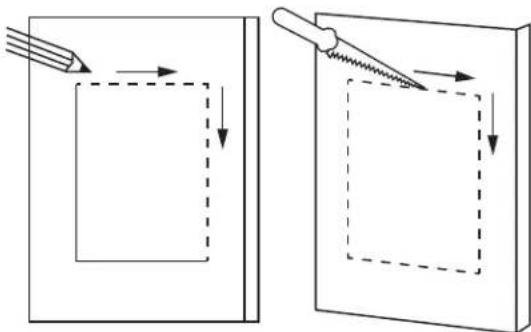
Diagram 1
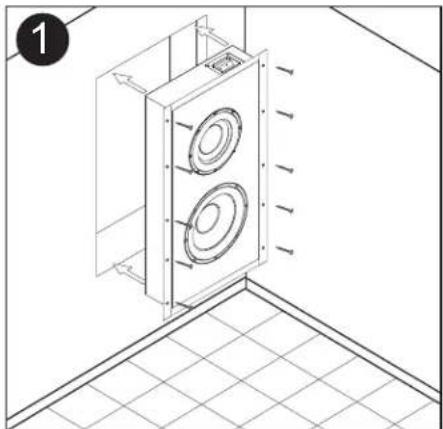
natural_image
Isometric technical drawing of a multi-panel air conditioner unit mounted on a tiled floor (no text or symbols)Cut and prepare a hole to install the SL800D into a stud bay where it can be securely mount to both wall studs.
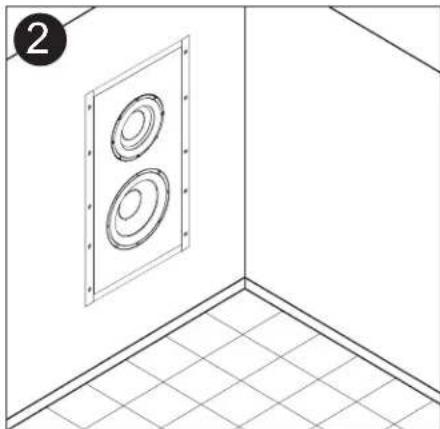
natural_image
Isometric view of a room corner with two circular fans and a grid-patterned floor (no text or symbols)Once in place the SL800D should be tested before securely mounting and moving onto step 3.
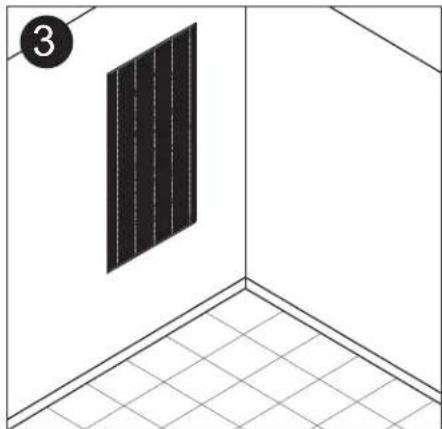
natural_image
Simple 3D diagram showing a corner with a black panel and a grid-patterned floor, no text or symbols present.Final step, install the magnetic grille system by simply laying it into place.
Specifications
• Dual In-Wall Subwoofer
• Power Handling: 300W
- Woofer: 8" 8 Ohm
• Passive Radiator: 10"
• Sealed Tuned Enclosure
• Freq Response: 40Hz - 500Hz
- Overall Dimensions: H 22" x W 17.5" x D 4.3"
- Cut Out Dimensions: H 20" x W 14.5"
- Mounting Depth: 3.9"
Warranty Information
All OSD AUDIO speaker products have (10) year Limited Warranty against defects in materials and workmanship. Proof of purchase must accompany all warranty claims. During the warranty period OSD AUDIO will replace any defective part and correct any defect in workmanship without charge for either parts or labor OSD AUDIO may replace returned speakers with a product of equal value and performance. In such cases, some modifications to the mounting may be necessary and are not OSD AUDIO's responsibility.
For this warranty to apply, the unit must be installed and used according to its written instructions. If necessary, repairs must be performed by OSD AUDIO. The unit must be returned to OSD AUDIO at the owner's expense and with prior written permission. Accidental damage and shipping damage are not considered defects, nor is damaged resulting from abuse or from servicing performed by an agency or person not specifically authorized in writing by OSD Audio. OSD AUDIO sells products only through authorized dealers and distributors to ensure that customers obtain proper support and service. Any OSD AUDIO product purchased from an unauthorized dealer or other source, including retailers, mail order dealers and online sellers will not be honored or serviced under existing OSD AUDIO warranty policy.
Any sale of product by an unauthorized source or other manner not authorized by OSD AUDIO shall void the warranty on the applicable product. Damage to, or destruction of components due to application of excessive power voids the warranty on those parts. In these cases, repairs will be made on the basis of the retail value of the parts and labor. To return for repairs, you must email customer service at RMA@audiogeargroup.com for a Returned Merchandise Authorization (RMA) number# then the unit must be shipped to OSD AUDIO at the owner's expense, along with a note explaining the nature of service required. Be sure to pack the speaker(s) in a corrugated container with at least 3 inches of resilient material to protect the unit from damage in transit.
This Warranty Does Not Cover: Damage caused by abuse, accident, misuse, negligence, or improper operation (installation) • Any products that have been altered or modified • Any product whose identifying number of decal, serial #, etc. has been altered, defaced or removed • Normal wear and maintenance.

Brand : OSD Audio
Model : Black BK-SC800D
Category : Subwoofer