
F-VXV70A - Air purifier PANASONIC - Free user manual and instructions
Find the device manual for free F-VXV70A PANASONIC in PDF.


| Product Type | Humidifying Air Purifier (indoor use only) |
| Technology | nanoe™ X (hydroxyl radical particles) |
| HEPA Composite Filter | Yes (inhibits allergens, bacteria, mold; replacement every 10 years, Part No. F-ZXKP70Z) |
| Deodorizing Filter | Yes (replacement every 10 years, Part No. F-ZXFD70Z) |
| Humidifying Filter | Yes (replacement every 10 years based on 8h/day, Part No. F-ZXKE90Z) |
| Anti-fungus Assembly | Yes (inhibits mold bacteria; cleaning required monthly) |
| Sensors | Dirt sensor (house dust), Odor sensor (smoke, etc.), Human activity sensor, Light sensor |
| Operation Modes | Full Auto, Clean Air, Humidifying, Auto Volume, Auto Direction, Econavi, Spot Air |
| Timer | 2 hours, 4 hours, Sleep (8 hours with dimmed indicators) |
| Air Volume Settings | Hi, Med, Lo, Auto (adjustable) |
| Airflow Direction | Adjustable louver; front panel opens automatically for strong adsorption |
| Child Lock | Yes (press and hold button for 3 seconds) |
| Filter Replacement Indicator | Yes (reset by pressing Lock and Timer buttons simultaneously for 3 seconds) |
| Cleaning Maintenance | Front panel, sensors, anti-fungus assembly, humidifying filter (use neutral detergent) |
| Safety Features | Auto shut-off on abnormality, thermal fuse, caution against water and volatile substances |
| Power Supply | Rated voltage AC (refer to rating label; use only specified voltage) |
| Dimensions | Not specified in manual |
| Weight | Not specified in manual |
| Warranty | Warranty card attached; keep with manual |
Frequently Asked Questions - F-VXV70A PANASONIC
User questions about F-VXV70A PANASONIC
0 question about this device. Answer the ones you know or ask your own.
Ask a new question about this device
Download the instructions for your Air purifier in PDF format for free! Find your manual F-VXV70A - PANASONIC and take your electronic device back in hand. On this page are published all the documents necessary for the use of your device. F-VXV70A by PANASONIC.
USER MANUAL F-VXV70A PANASONIC
natural_image
Exterior view of a white portable air purifier unit (no visible text or symbols)Panasonic®
OPERATING INSTRUCTIONS
HUỐNG DÃN SỬ DỤNG
Humidifying Air Purifier
This product is for indoor use only
PRODUCT FEATURES 8\~10
MAIN PARTS IDENTIFICATION…… 11\~12
SETUP 13\~15
OPERATION 16\~20
- CLEANING METHOD 21\~24
• FILTER REPLACEMENT 25
- WHEN IDLE FOR A LONG TIME 26
FURTHER INFORMATION 26\~29
FAQ 30\~31
TROUBLESHOOTING 32\~34
WHEN THE LOUVER SHIFTS 35
SPECIFICATIONS 35\~BACK COVER
OPTIONAL ACCESSORIES …… BACK COVER
NỘI DUNG
CÁC BIỆN PHÁP AN TOÀN 2\~6
CÁC YÊU CẦU CÀI ĐẶT VÀ VẬN HÀNH……7
TÍNH NĂNG SĂN PHĂM 8\~10
NHÂN DẠNG CÁC BỘ PHÂN CHÍNH …… 11\~12
CÀI ĐẠT TRƯỚC KHI VĂN HÀNH 13\~15
VĂN HÀNH 16\~20
• TẮT/BẶT NGUỒN·VỆ SINH/LÀM ẢM …… 16
• LU'U LU'Q'NG KHÔNG KHÍ•LUÒNG KHÔNG KHÍ… 17
• ECONAVI·CÀI ĐẠT ĐỘ ÂM 18
• ĐIỂM KHÔNG KHÍ·ĐỒNG HỒ HỆN GIỜ…… 19
• KHÓA TRÊ EM 20
BẢO TRÌ 20\~26
• PHƯƠNG PHÁP VỆ SINH MÁY 21\~24
• THAY BỘ LỌC 25
• KHI MÁY KHÔNG VĂN HÀNH TRONG THỜI GIAN DÀI 26
THÔNG TIN BỔ SUNG 26\~29
CÂU HỒI THƯỜNG GẠP 30\~31
GIÀI QUYẾT SỰ CÓ 32\~34
KHI CỦA THÔNG KHÍ DỊCH CHUYỀN 35
THÔNG SỐ KỸ THUẬT 35\~BÌA SAU
CÁC PHỤ KIỆN TÙY CHỌN......BÌA SAU
Warranty card attached
Thank you very much for purchasing this Panasonic product.
Please read these instructions carefully before operating or maintenance.
Also, be sure to read the "SAFETY PRÉCAUTIONS" (P.2\~6) section before operation.
Failure to comply with instructions could result in injury or property damage.
Make sure that the correct information is written on the warranty card, including the date of purchase and the name of the dealer. Keep the warranty card in a safe place along with the instructions for future reference.
The following symbols differentiate the levels of danger or injury that may result if the product is not used correctly as instructed.
Those things shown in this column indicate that there is possibility of causing death or severe injury.
Those things shown in this column indicate that there is possibility of causing minor injury or damage to properties.
The following symbols are used to indicate the type of instructions that need to be followed. (The symbols given below are examples)
This symbol indicates an action that must not be performed.
This symbol indicates an action that must be performed.
■ Do not touch the power plug with wet hands.
■ Do not use power other than the rated voltage.
(Otherwise, the power cord may be overheated and induce fire.)
■ Do not insert your fingers, metallic objects or others into the air inlet, air outlet or gaps.
(Otherwise, you may be hurt by the inner units with the possibility of electric shock or injury.)
■ Do not pull the power cord when carrying or storing the product.
(Otherwise, the power cord may be damaged with the possibility of fire or electric shock.)
■ Do not damage the power cord or power plug.
- Do not cut, modify, excessive distort, twist, squeeze the power cord, and do not place it near heat sources, place heavy weight on it, etc.
(Otherwise, the power cord may be damaged with the possibility of fire or electric shock.)
■ Do not use chloric or acid detergents.
(Toxic gases given off by the detergent may be harmful to your health.)
■Do not let the product get wet.
- Do not place cups, etc. on the product.
(Otherwise, the product may short circuit with the possibility of fire or electric shock.)
■ Prevent wheels from damaging power cord when you move product.
(Otherwise, electric shock or fire may occur.)
■ Do not disassemble or modify the product.
(Otherwise, the product may catch fire or malfunction, thus resulting in fire or electric shock.)
→ Contact the dealer for repair.
In case of any abnormality or malfunction, stop using the product immediately and disconnect the power plug.
(Otherwise, electric shock, fire or smoke may occur.)
- The product stops operating when moving the power cord.
- If the circuit breaker is tripped or when fuse blows.
- If the power cord or power plug becomes abnormally hot.
- If there is any other abnormalities or malfunctions.
→ Please stop using the product immediately and disconnect the power plug, and contact the dealer to check and repair.
■ Clean the power plug regularly.
■ Insert the power plug completely.
■ Do not clean the product with gasoline or other volatile mixture solvents, and avoid contacting with spray insecticides.
(Otherwise, the product may crack or short circuit with the possibility of injury, fire or electric shock.)
■Do not sit on or lean against this product.
(Otherwise, the product may fall over and injury may occur, the water may spill out and fire, electric shock may occur or wet furniture, etc.)
- Families with children should pay more attention.
■ Do not operate this product in places where indoor fumigation type insecticides are being used.
→ Ventilate the room with fresh air thoroughly after using insecticides before operating the product.
■ Do not push over or overturn the product.
(Otherwise, the water may spill out and fire, electric shock may occur or wet furniture, etc.)
■Do not place the product near combustible materials such as lighted cigarette, incense, etc.
■Do not use a punctured or damaged tank.
(Otherwise, the water spill out and may wet furniture, etc.)
■Do not use the following water.
■When disconnecting the power plug, hold the power plug instead of the power cord.
(Otherwise, the power cord may be damaged with the possibility of fire or electric shock.)
■Do not place the product in the following places.
- Where the temperature or humidity is extremely high, or watery area, such as bathroom.
(Otherwise, it may cause discomfort to animals and dry out plant.)
■Please pull out the tray slowly.
(If pull out quickly, the water may spill out and wet furniture, etc.)
■Keep the room well-ventilated when using the product together with a burner.
■Discharge water after removing the tray, and do not discharge water from the product directly.
(Otherwise, fire or electric shock may be caused due to short circuit.)
■Be sure to always keep the water in the tank and interior of the product clean.
(If the interior is contaminated by dirt or incrustation, a foul odor may occur due to mildew and miscellaneous bacterium breed, and thus do harm to your health, depending on individual constitution.)
→ When you feel uncomfortable, please consult a doctor at once.
- Turn off the product and disconnect the power plug, take out the tank, and pour water out of the tray.
(Otherwise, the water may spill out and fire, electric shock may occur or wet furniture, etc.)
- Hold the left and right handles, but not the louver, front panel or tank handle to carry the product.
(Otherwise, the product may fall off injury may occur.)
■ When moving the product by the wheels
- Before moving the product, please unlock the fixed hook from wheels first.
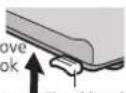
(Otherwise, the product is easily turned over and result in injury.)
■ Move the product horizontally.
(Otherwise, the floor or carpet may be scratched.)
■ Hold the handles to lift up and carry the product onto the carpet.
(Otherwise, the carpet may be scratched.)
Area that can enhance the effectiveness!
■ Place it on the floor as a countermeasure against pollen.
Since dust or pollen is likely to float in the air near the floor, we recommend you put the product on the flat floor in the room.
■ Way to circulate air more effectively.
Set the product with its left, right and top about 30 cm or more away from walls, furniture or curtains, etc., otherwise, the pollutants are difficult to be cleared.
To ensure effectiveness of this product, keep its back at least 1 cm away from the wall.
natural_image
Interior layout illustration of a modern living room with monitor, sofa, and wall (no text or symbols)■ Do not set the product in the following places.
(Otherwise, deformation, degeneration, discolor or malfunction may be occurred.)
- Near equipment such as TV and radio. Gàn tivi hoặc dài radio.
(Otherwise, visual disturbances or noises may be caused.)
→ Keep the product 1 m or above away from such devices.
- Where window or other objects may obstruct the humidity sensor.
■ Do not use the same power socket with TV, radio, etc.
■ Do not place any object on the product.
- Do not place magnet or metal objects on the product.
(May be induced with the product's built-in magnet, resulting the check indicator lights on, and the product cannot be operated.)
■ Do not place obstacles on the product air inlet and outlet.
(Otherwise it may affect product performance.)
■ If the product is used in the same place for a long period.
It may result in dirty surrounding walls or floor. We recommend that you move the product away from where it is placed when maintaining it.
■ When there may be freezing, please empty the tank and tray.
(If the product operates in the frozen status, malfunction may be caused.)
The "Mega catcher" and humidifying function can bring moist and clean air to you.
■ When the sensor detects contaminated indoor air, the front panel will automatically glide upward to implement strong adsorption. [Equipped with double layer louver]
■ It is activated by the human activity sensor to operate beforehand to prevent indoor pollutants from dispersing and collect dust at high speed.
■ Equipped with nanoe™ X technology.
■ The Econavi mode enables the product to operate in power saving mode.
- The so-called nanoe™ X are charged water purification particles generated by applying high voltage to separate water molecules.
- nanoe™ X features: high moisture content, small particles, high stability, etc.
- High moisture content (the moisture content is 1,000 times the moisture content of ordinary anions).
- Small particles (about 5 nm - 20 nm (nanometers) in size, able to penetrate deep into the fiber and stratum corneum).
- High stability (6 times more stable than a common ion, covering a distance of 10 m or above).
- More hydroxyl radicals (up to 4,800 billion of radicals are generated per second).
- Weak acidity (with weak acidity features close to that of hair and skin).
All of the above features have been tested by SGS-CSTC Standards Technical
Services Co., Ltd.
Note: nanoe™ and the nanoe™ mark are trademarks of Panasonic Holdings Corporation.
nanoe™ X are particulate ions containing hydroxyl radicals whose amount is 10 times that of nanoe™.
When the sensor (P.27) detects dirt in the air, the front panel opens according to the type and degree of the dirtiness to absorb the dirt by the best airflow. (P.29)
■ About "Human activity sensor"
The product can automatically adjust the air volume when it detects an action of a person or pet. It predicts generation of indoor dust and operates before indoor air pollutants disperse.
(When "Auto Vol.", "Full Auto", "Econavi" is selected.)
(Not all the pet actions can be detected.)
■ Lock the wheels: press down the fixed hook.
Unlock the wheels: move the fixed hook up.
(The product may move on a slippery floor even if wheels are locked.)
■ Human activity sensor (P.10)
It detects human activities and prompts you through the human activity sensor indicator (indicator lights on).
The sensor sensitivity is changeable. (P.31)
Show the air pollution levels detected by sensor.
Blue: indicates clean
Purple: indicates slight dirty
Red: indicates dirty
■ Dirt sensor and Odor sensor
Dirt sensor can detect house dust in air, etc.
Odor senor can detect odor from cigarettes, etc. The sensor sensitivity is changeable. (P.27)
The product detects the indoor brightness by the light sensor, and automatically adjusts the brightness of indicators on control panel and front indication, and the air volume. When sleeping, it becomes dark in the room, then the product will enter the "Sleep Mode Auto Operation" mode. (P.27\~28)
When the water fill indicator blinks or lights on indicate that you need add water. If you want to humidify, please add water. (P.15)
After filling water, the water fill indicator is off.
When the check indicator is on (P.34).
Indicates the nanoe™ X is generating when the indicator lights on. nanoe™ X will be generated in all operation modes except you switch off it. (P.26)
1 Fill in the label with the first date of use.
natural_image
Line drawing of a device casing with a handle and mounting bracket (no text or symbols)HEPA composite filter replacement
● Once every 10 years
Replacement HEPA composite filter
Part No. F-ZXKP70Z
Date installed:
Deodorizing filter replacement
- Replace a new one when the deodorizing function becomes less effective (Once every 10 years)
Replacement deodorizing filter
Part No. F-ZXFD70Z
Date installed:
Humidifying filter replacement
● Once every 10 years (based on operation of 8 hours every day)
Replacement humidifying filter
Part No. F-ZXKE90Z
Date installed:
(1)Remove the front panel.
Tháo tấm cần trước.
Front panel
Tấm cản trước
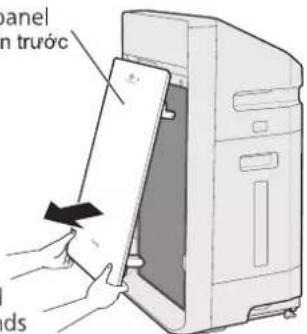
Pull it forward with both hands
(2) Toggle the filter hook upward, and remove filters (2 types).
Do not remove the black net of deodorizing filter.
Be sure to read P.2\~6 before startup.
(1) Install the deodorizing filter.
(There is no distinction between inside and outside, upper and lower.)
Lắp bộ lọc khử mùi.
(2) Install the HEPA composite filter.
(There is distinction between inside and outside, no distinction between upper and lower.)
(3) Toggle the filter hook downward to secure the filter.
Notice Luru y
Be sure to install the front panel before use.
(3)Screw the tank cover tightly. Văn chất nắp bình.
■ Be sure to use the tap water.
■ Do not use the following water.
Press the button to operate.
The product operates in full auto mode for first time usage, then it will operate based on the last used mode when it is resumed.
■ Press the button again, the product stops operating.
The product will purify the air and adjust the best humidity automatically according to the degrees of the dirt and humidity. The airflow and air volume are controlled automatically. (They cannot be switched manually.)
Clean air and humidifying mode
■ When water remains in the tank, it will humidify slightly. (Water in the tank will decrease slightly.)
If you do not need the humidifying function, please empty the water in tank and tray.
(only for "Clean air and humidifying mode", "Clean air mode")
Select appropriate air volume for purifying air or humidifying.
Automatically adjust the air volume according to the air pollution and humidity detected by sensor, and purify air or humidify by optimal air volume.
Purify air or humidify in a medium speed.
Purify air or humidify quickly.
(Indicator lights on)
(only for "Clean air and humidifying mode", "Clean air mode")
Change the airflow according to the dirt type.
The product will generate various airflow by the front panel and louver. (P.29)
Purify the dust and odor automatically according to the air pollution.
Purify the odor and smoke of the cigarette.
(Indicator lights on)
Purify the hypersensitive substances, such as pollen.
Econavi is a smart power-saving operation by combining the "patrol mode" with "learning mode", and adjusts the air volume automatically. (P.28\~29)

■ Press the button again to cancel. (Indicator lights off)
(When "Clean Air." or "Clean/Humid." is set, the Econavi can also be canceled by pressing the Air Volume button.)
(For full auto mode and humidified air purifying mode only [Auto Vol.])
The indicator will be changed sequentially as below each time the button is pressed.
Change the air blow direction by adjust the louver.
The indicator will be changed sequentially as below each time the button is pressed.
(Indicator lights on)
■ Press Air Volume or Airflow Dir. buttons to cancel. (Indicator lights off)
"Econavi" cannot be set in the "Spot Air." mode.
2 hours, 4 hours or sleep (8h) timer operation.
The indicator will be changed sequentially as below each time the button is pressed.
The product will stop operating after 2 hours.
The product will stop operating after 4 hours.
The indicators on front indication panel and the air volume indicators are off. The operation indicator on control panel become dim. The product starts operation at a low speed, then stop operating after 8 hours.
To prevent child from wrong pressing.
Press the button for about 3 seconds, then the child lock is set.
With this setting, other buttons cannot operate as you press them, it will generate "BI-BI-" sound.
When the product is operating, do not adjust the front panel or louver manually.
(Otherwise, the angle and moving range will change.)
→ If you adjusted them manually, please stop the product.
(The product can reset to the normal state when starts again.)
natural_image
Line drawing of a computer tower with ventilation slots (no text or symbols)Make sure to disconnect the power plug before cleaning the product.
(Otherwise, the product might operate with the possibility of electric shock or injury.)
Discharge water after removing the tray, and do not discharge water from the product directly.
(Otherwise, fire or electric shock may be caused due to short circuit.)
■ Do not use the detergents shown on the right. (The oxygenic bleach can be used only for the humidifying filter.)
■ When using chemically treated cloth, be sure to follow the instructions carefully.
■ When maintenance, do not leave the removed parts unattended.
■ Do not operate the product when the HEPA composite filter is removed.
(Dust will be inhaled into product inner parts, and causes the product breakdown. The HEPA composite filter cannot function while it is removed.)
■ Do not operate the product when the deodorizing filter is removed.
(The deodorizing filter cannot function while it is removed.)
■ Do not operate the product when the humidifying filter is removed.
(The humidifying filter cannot function while it is removed.)
■ Do not operate the product when the anti-fungus assembly is removed.
(The anti-fungus assembly cannot function while it is removed.)
If there is hard stains, please wipe it off with a soft cloth moistened with warm water or water containing neutral detergent for kitchen purpose.
Anti-fungus assembly
Bộ lọc chống nấm
Immerse it in kitchen-purpose neutral detergent solution and clean it.
Anti-fungus assembly
(anti-fungus agent containing)
Bộ chống nấm
■ Function of the anti-fungus assembly Inhibit the mold bacteria with the anti-fungus agent. Testing authority: Boken Quality Evaluation Institute Testing method: Install the anti-fungus assembly in the tray, and verify the method to prevent mold bacteria (Halo method) Testing result: Verify the effectiveness of preventing mold bacteria.
※1 As the dirtiness varies with the water quality, maintenance may be required even within one month after the last maintenance if there is unpleasant odor or the water in the tank is reduced in slow speed.
Humidifying filter assembly
Bộ lọc làm ẩm
2 Washing Rùa Humidifying filt
natural_image
Illustration of a bowl with chopsticks and a griddle inside, no text or symbols presentNotice Lưu ý
3 Reassembly Lắp đặt lại ① Attach the humidifying filt (No distinction between in
※1 As the dirtiness varies with the water quality, maintenance may be required even within one month after the last maintenance if there is unpleasant odor or the water in the tank is reduced in slow speed.
Deodorizing filter Bộ lọc khử mùi
Clean the black side (front side) with a vacuum cleaner, etc.
Wipe off any dust and dirt using a well wrung-out soft cloth
Wipe the dirt off the lens with a dry cotton swab
① After replacement (except the humidifying filter), please connect power plug, then press 🔒 and Timer buttons at the same time for about 3 seconds until the filter replacement indicator turns off then the reset is complete.
② Fill in installation date on the label attached with filter, then stick it on product to cover the old date. (P.13)
※1 Filter replacement period may be shortened, depending on the environment (such as where smoking is frequent). Please replace it when ineffective.
If the product is used in a room (especially hotel) with strong odor such as aromatic smell, cigarette smoke or barbecue smell, these odors may adhere to the filter. When the adsorption capacity of filter reaches saturation, odor will also be blown out again with the wind because of excess adsorption. When there is above situation, please clean the HEPA composite filter. If the situation persists, please replace the HEPA composite filter and deodorizing filter, even if the filter replacement indicator is off. In addition, if often used in a room with strong odor, please open the windows to ventilate the room regularly.
About nanoe™ X Thông tin về nanoe™ X
• Room temperature: about 5 °C\~35 °C (dew-point temperature: 2 °C or above)
The HEPA composite filter which with the Bio-sterilization and Super Allergy-buster can inhibit allergens (pollen, dead mites and feces), bacteria and mold.
■ Super Allergy-buster: inhibits the activity of allergens (pollen, dead mites and feces).
Testing authority: Osaka Municipal Technical Research Institute
Test method: check the decrease of refined house dust mite allergen, by using enzyme immune measuring method.
Inhibiting method: contact with Super Allergy-buster
Target: allergens trapped by the filter (mites, pollen)
Test result: inhibited 99% and above. (Daikou research report No. 2127)
■ The HEPA composite filter may give off unique and harmless smell of "Green Tea Catechin", "Bio-sterilization" and "Super Allergy-buster".
The sensor can detect the pollution of the air, and show the pollution level by clean sign.
The product can adjust the air volume according to the air pollution automatically and purify air by optimal air volume when the setting of "Full Auto", "Auto Vol.", "Auto Dir.".
The sensor's operation may vary depending on the indoor airflow condition if a heater is placed near the product in a room.
■ The sensor is not designed to detect bacteria and viruses.
■ The sensitivity of the sensor can be adjusted. (The default setting is "medium sensitivity".)
① Stop operating the product, then press Air Volume and Econavi buttons at the same time for about
3 seconds. (The air volume indicators light on in turn.)
② Please release the buttons, when the sensitivity is set as required.
Detects the indoor brightness by the light sensor, and automatically adjusts the brightness of indicators on control panel and front indication, and the air volume.
When sleeping, the room becomes dark, the indicators will be dimmed or turn off and the air volume becomes low.
When the air volume is set to "Hi", "Med" or "Lo", the air volume cannot adjust automatically.
① Stop operating the product, then press Timer and Econavi buttons at the same time for about 3 seconds. (The airflow indicators light on in turn.)
Econavi mode refers to the automatic operation by combining the "patrol mode" in which the product detects the dirt in the air in the room every hour with the "learning mode" in which the product can forecast the dirt generation by mastering the generation time of dirt every day.
The product will stop operating automatically after the air is cleaned. After the operation is paused for 55 mins, the product will operate for 5 mins with air volume set to "Med" in the patrol mode.
- While the operation is paused and in the patrol mode, if any dirt is detected, the product will operate with the air volume corresponding to the dirtiness.
- When under the setting of "Full Auto" or "Clean/Humid.", the product will also operate according to the indoor humidity even if the indoor air is clean.
- When the operation is paused, and there is no people in the room, the front indication will be off. If someone in the room, but there is no detection for human activity sensor, the front indication also will be off.
natural_image
Diagram of airflow around a device inside a transparent enclosure, showing circular and radial motion (no text or symbols)The product records the time and dirtiness of air during operation, and takes the preventive operation 5 mins before the recorded dirt is generated in the next day. (Although the records are updated every day, the previous records will be lost once the power plug is disconnected.)
The louver and front panel move to the best position according to the type and degree of dirt, and thus the product will operate.
The product uses the airflow function separately according to the type of dirt in the air, to achieve a good dirt-removal effect.
natural_image
Diagram of a device with arrows indicating flow or movement, no text or symbols present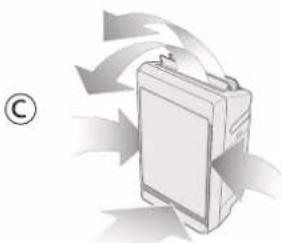
natural_image
Illustration of a battery with arrows indicating flow or movement (no text or symbols)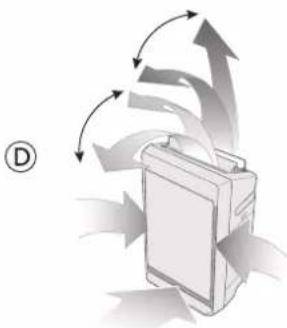
natural_image
Illustration of a device with directional arrows indicating flow or movement (no text or symbols)■When the air volume is set to "Hi", the product will operate with the front panel open.
■The product will operate with the front panel open after operating for 10 minutes.
Why does the clean sign not change or why is the front panel always opened?
Such problems may occur because of the difference in sensitivity of sensor. (P. 27)
To disable the human activity sensor. (Change the sensor sensitivity)
The sensitivity of the sensor can be adjusted.
① Stop operating the product, then press Air Volume and Airflow Dir. buttons at the same time for about 3 seconds.
(The clean/humidifying indicators light on in turn.)
② Please release the buttons, when the sensitivity is set as required.
Why is the human activity sensor indicator always on without people or pets moving?
When you use an electric room heater with swing function, if the indoor temperature changes, the sensor could automatically function even if nobody is moving.
Why is the human activity sensor indicator off?
■ The human activity sensor does not take effect beyond the detectable area or when it is blocked by furniture.
■ Is the human activity sensor stained?
Human activity sensor
natural_image
Close-up of a mechanical component with diagonal lines and a small arrow pointing to a feature (no text or symbols visible)Q12
During operation, indicators on front indication panel are off.
To turn off the indicators on front indication panel.
■ Please press Air Volume and Clean·Humid. buttons at the same time for about 3 seconds during operating to turn off the indicators.
■ Please press the buttons for 3 seconds again to relight the indicators.
If a problem is encountered, investigate it by going through the following items.
If the problem still persists, please disconnect the power plug and contact the dealer for repair.
natural_image
Line drawing of two hands installing or adjusting a rectangular object on a striped surface (no text or symbols)- Panasonic®
- OPERATING INSTRUCTIONS
- HUỐNG DÃN SỬ DỤNG
- Humidifying Air Purifier
- NỘI DUNG
- Warranty card attached
- ■ Clean the power plug regularly.
- ■ Insert the power plug completely.
- ■ Do not clean the product with gasoline or other volatile mixture solvents, and avoid contacting with spray insecticides.
- ■Do not sit on or lean against this product.
- ■ Do not operate this product in places where indoor fumigation type insecticides are being used.
- ■ Do not push over or overturn the product.
- ■Keep the room well-ventilated when using the product together with a burner.
- ■Discharge water after removing the tray, and do not discharge water from the product directly.
- ■Be sure to always keep the water in the tank and interior of the product clean.
- ■ When moving the product by the wheels
- ■ Move the product horizontally.
- ■ Hold the handles to lift up and carry the product onto the carpet.
- Area that can enhance the effectiveness!
- The "Mega catcher" and humidifying function can bring moist and clean air to you.
- ■ About "Human activity sensor"
- ■ Human activity sensor (P.10)
- ■ Dirt sensor and Odor sensor
- Fill in the label with the first date of use.
- Notice Luru y
- ■ Be sure to use the tap water.
- ■ Do not use the following water.
- Clean air and humidifying mode
- Select appropriate air volume for purifying air or humidifying.
- Change the airflow according to the dirt type.
- Change the air blow direction by adjust the louver.
- hours, 4 hours or sleep (8h) timer operation.
- To prevent child from wrong pressing.
- Anti-fungus assembly
- Bộ lọc chống nấm
- Immerse it in kitchen-purpose neutral detergent solution and clean it.
- Humidifying filter assembly
- Bộ lọc làm ẩm
- Washing Rùa Humidifying filt
- Notice Lưu ý
- Reassembly Lắp đặt lại ① Attach the humidifying filt (No distinction between in
- Deodorizing filter Bộ lọc khử mùi
- Clean the black side (front side) with a vacuum cleaner, etc.
- Wipe off any dust and dirt using a well wrung-out soft cloth
- Wipe the dirt off the lens with a dry cotton swab
- About nanoe™ X Thông tin về nanoe™ X
- Q12
Brand : PANASONIC
Model : F-VXV70A
Category : Air purifier