MG04 USB - Blender Audibax - Free user manual and instructions
Find the device manual for free MG04 USB Audibax in PDF.


| Product Type | Blender |
| Brand | Audibax |
| Model | MG04 USB |
| Dimensions (WxDxH) | 20 x 15 x 30 cm |
| Weight | 1.5 kg |
| Power Supply | AC 220-240V 50/60Hz |
| Power Consumption | 500 W |
| Jug Capacity | 1.5 L |
| Blade Material | Stainless steel |
| Jug Material | Tritan plastic |
| Speed Settings | 2 speeds + pulse |
| Safety Features | Safety lock, non-slip base |
| Cleaning | Detachable parts dishwasher safe |
| Maintenance | Clean after use, dry thoroughly |
| Spare Parts | Jug, blade assembly, lid |
| Repairability | Repairable by qualified technician |
| Included Accessories | Blender jug, lid, measuring cup |
Frequently Asked Questions - MG04 USB Audibax
User questions about MG04 USB Audibax
0 question about this device. Answer the ones you know or ask your own.
Ask a new question about this device
Download the instructions for your Blender in PDF format for free! Find your manual MG04 USB - Audibax and take your electronic device back in hand. On this page are published all the documents necessary for the use of your device. MG04 USB by Audibax.
USER MANUAL MG04 USB Audibax
Please read the manual before using the product

MG04 USB / MG06 USB / MG08 USB
USER'S MANUAL
4 CHANNEL 6 CHANNEL 8 CHANNEL
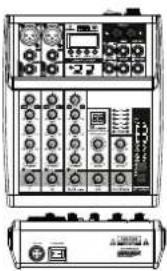
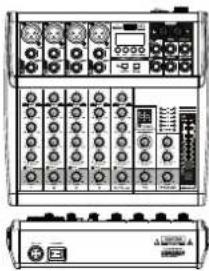
natural_image
Front and back view of a dual electronic device control panel with knobs and buttons (no visible text or labels)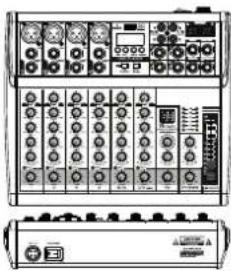
natural_image
Front view of a dual-panel electronic device with control knobs and indicator lights (no visible text or labels)*Built-in 16 bit DSP processor
*Built-in Bluetooth connect with mobile phone or other Bluetooth player
*Built-in MP3 player support a variety of formats music
*Connect the computer to record and play music
1.4/6/8 channels mixer
- Ultra-musical 3-band EQ on all channels
- High accurate level indicator
7.Sealed rotary controls to resist dust and grime - New Multi-Voltage power supply for worldwide use
2.Mic + stereo line inputs
4.Peck LED on all Channels
6. Phantom power switch (+48V)
8.Rugged steel chassis
CHANNEL INPUT
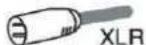
1.[MIC] Input, use this socket to connect the microphone of BALANCED XLR PLUG.

- [LINE] Input, connect the microphone, musical instrument or audio device (CD
player and so on) to the device. The socket is supporting UNBALANCED 1/4" PLUG.

- [INSERT] Input, can be inserted into a mono channel of compressor or equalizer.
- [GAIN] Controller, determines the basic volume of each channel, adjust them
for the maximum volume performance, when the volume gets too loud, the [PEAK]LED (9) indicator light will keep flashing. - [HIGH] Treble tone controller, adjust the controller to enhance or attenuate for 15dB at 12KHz.
6.[MID] Alto tone controller, adjust the controller to enhance or attenuate for 15dB at 2.5KHz.
7.[LOW] Bass tone controller, adjust the controller to enhance or attenuate for 15dB at 80Hz.
8.[FX] Controller, adjust the signal level from the channel to the reverberation line. Please note, the single level will vary with the different setting of the channel attenuator. If using the stereo channel, will mix the signals from L and R channels, then, send it to reverberation line.
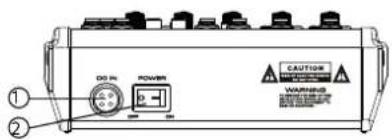
- The external power input socket, receiving external power supply, DC +15V, -15V, +48V, ground wire
- Power Switch
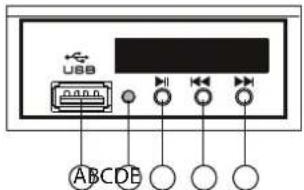
MP3 MODULE FUNCTION
A .USB insert
B.The power indicator
C.Play or Pause
D.Select to play next song
GENERAL SPECIFICATIONS
| 4 CHANNEL | 6 CHANNEL | 8 CHANNEL | ||
| Input channels | Mono:MIC/LINE | 2 | 2 | 4 |
| Stereo:LINE | 1 | 2 | 2 | |
| MP3 | 1 | 1 | 1 | |
| USB sound card | ||||
| TAPE/CD Input | 1 | 1 | 1 | |
| Output channels | STEREO OUT | 1 | 1 | 1 |
| PHONES | 1 | 1 | 1 | |
| RETURN | ||||
| Bus | STEREO | 1 | 1 | 1 |
| SEND | 1 | 1 | 1 | |
| Input Channel Function | PAD | 26dB | ||
| EQ | HIGH Gain +15dB/-15dB Frequency 12kHz shelving MID Gain +15dB/-15dB Frequency 2.5kHz shelving LOW Gain +15dB/-15dB Frequency 80kHz shelving | |||
| PEAK LED | LED turns on when post EQ signal reaches 3 dB below clipping level | |||
| Level Meter | 2"5-segment LED meter, (+6,+3,0,-3,-10 dB) | |||
| Effects | Built-in | Built-in | Built-in | |
| Phantom Power Voltage | +48V | |||
| Power Requirements | AC 100-240V, 50/60Hz DC +15V,-15V,+48V | |||
| Power Consumption | 20W | 20W | 20W | |
AUDIBAX
MG04 USB / MG06 USB / MG08 USB
- USB interface and MP3 display.
- [+48V PHANTOM] Button/LED, when the button is turned on, the LED light is on, provide DC+48V phantom power to XLR plug on MIC mono input. Please turn on this button when using the condenser microphone which is powered by a phantom power.
- Converting switch for "Channel" and "USB signal", 4. Channel input socket (stereo), 8CH mixer with two group of input socket, 4CH and 6CH mixers with one group of input socket, if only connect to L (MONO) socket, the mixer will send out the same mono signal to L and R sockets.
- [TAPE/CD IN] TAPE/CD signal input socket
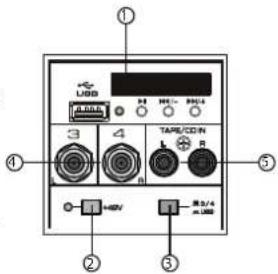
MAIN CONTROL
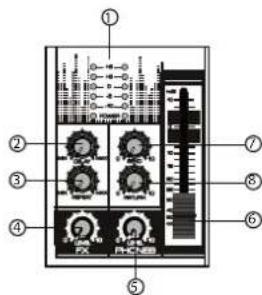
- Level indicators can show the signal level from [STEREO OUT] output. Adjust the LEVEL] controller to lower the level if [PEAK] indicator light up in RED.
- [DELAY] Controller, adjust the depth of the reverberation.
- [REPEAT] Controller, adjust the repetition times of the reverberation.
- [FX LEVEL] Effects return level controller, adjust the volume of effect.
- [LEVEL PHONES] Earphone controller, adjust the volume of earphone.
- [STEREO LEVEL] Fader, adjust the overall volume from [STEREO OUT] output signal.
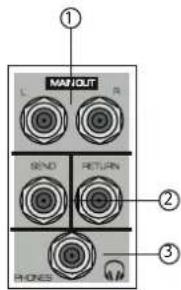
- [MAIN OUT] Output, connect the active speaker or amplifier.
-
[SEND&RETURN] Socket, when using the [SEND] output socket separately, can be connected with power amplifier, act as the monitoring signal. When using the [RETURN] input socket separately, can be connected with the audio source. When using two sockets together, can connect with the external audio processor.
-
[PHONES] Output socket, connect an earphone, the socket is stereo phone plug.
USER'S
MANUAL
9.[PEAK] LED indicator light, when the volume of input signal or volume after adjusting equalizer is too high, the LED indicator light will keep flashing, please rotate the [GAIN] CONTROLLER
10.[LEVEL] Controller, adjust to balance the volume of each channels.
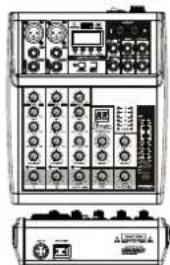
4 CHANNEL 6 CHANNEL 8 CHANNEL
natural_image
Front and back view of a dual electronic control panel with display, knobs, and buttons (no visible text or labels)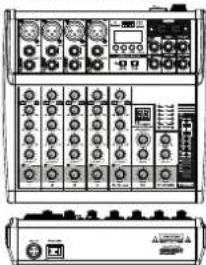
natural_image
Front view of a dual electronic testing device with multiple knobs and ports (no visible text or labels)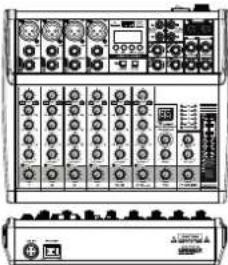
natural_image
Front view of a dual-chamber electronic device with multiple ports and control knobs (no visible text or labels)CHANNEL INPUT
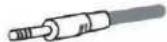
1.[MIC/LINE] Mono input, connect the microphone, musical instrument or audio device (CD player and so on) to the device. The sockets are supporting both XLR and UNBALANCED 1/4" PLUG.
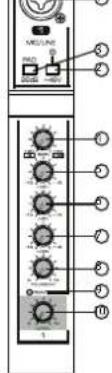

2.[+48V PHANTOM] Button/LED, when the button is turned on, the LED light is on, provide DC+48V phantom power to XLR plug on MIC/LINE mono input. Please turn on this button when using the condenser microphone which is powered by a phantom power.
3.[PAD] button, it will attenuate the sound input to the device when turn on this switch. You can turn on the switch if you hear the distortion or [PEAK]LED (9) indicator light is on.
4.[GAIN] Controller, determines the basic volume of each channel, adjust them for the maximum volume performance, when the volume gets too loud,
- the [PEAK]LED (9) indicator light will keep flashing.
5.[HIGH] Treble tone controller, adjust the controller to enhance or attenuate for 15dB at 12KHz.
6.[MID] Alto tone controller, adjust the controller to enhance or attenuate for 15dB at 2.5KHz.
7.[LOW] Bass tone controller, adjust the controller to enhance or attenuate for 15dB at 80Hz.
8.[FX] Controller, adjust the signal level from the channel to the reverberation line. Please note, the single level will vary with the different setting of the channel attenuator. If using the stereo channel, will mix the signals from L and R channels, then, send it to reverberation line.
9.[PEAK] LED indicator light, when the volume of input signal or volume after adjusting equalizer is too high, the LED indicator light will keep flashing, please rotate the [GAIN] CONTROLLER counterclockwise to turn down the volume. 10.[LEVEL] Controller, adjust to balance the volume of each channels.

MG04 USB / MG06 USB / MG08 USB
USER'S MANUAL
MAIN CONTROL
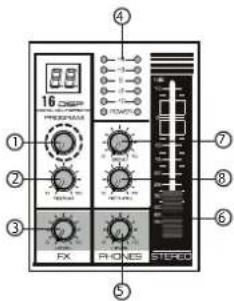
- [PROGRAM] Controller, select from 16 kinds of internal digital effects, provide the same signal to L and R stereo.
- [REPEAT] Echo controller of internal effects, adjust to
achieve the desired state of internal echo signal. - [FX LEVEL] Effects return level controller, adjust the volume
of effect. - Level indicators can show the signal level from [STEREO
OUT] output. Adjust the LEVEL] controller to lower the level if [PEAK] indicator light up in RED. - [LEVEL PHONES] Earphone controller, adjust the volume of
earphone - [STEREO LEVEL] Fader, adjust the overall volume from
[STEREO OUT] output signal. - [SEND] Level controller, adjust the sending level.
-
[RETURN] Level controller, adjust the return level.
-
USB interface, use for MP3 input or computer connection (can be used for U disk or computer software recording)
- MP3 Display, displays the status and details of the MP3 play.
3.[MAIN OUT] Output, connect the active speaker or amplifier. - [CTRL OUT] Output, connect the monitor room to monitor.
- [+48V PHANTOM] Button/LED, when the button is turned on, the LED light is on, provide DC+48V phantom power to XLR plug on MIC mono input. Please turn on this button when using the condenser microphone which is pow
- Converling switch for hannel 3/4 and USB signal.
- Channel input socket (stereo), 8CH mixer with two group of input socket, 4CH and 6CH mixers with one group of input socket. If only connect to L (MONO) socket, the mixer will send out the same mono signal to L and R sockets.
- [SEND&RETURN] Socket, when using the [SEND] output socket separately, can be connected with power amplifier, act as the monitoring signal. When using the [RETURN] input socket separately, can be connected with the audio source. When using two sockets together, can connect with the external audio processor.
- [PHONES] Socket, connect an earphone, the socket is supporting stereo phone plug.
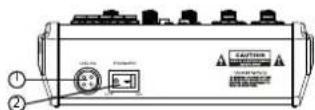
- The external power input socket, receiving external power supply, DC +15V, -15V, +48V, ground wire
- Power Switch
4 CHANNEL 6 CHANNEL 8 CHANNEL
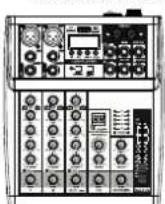
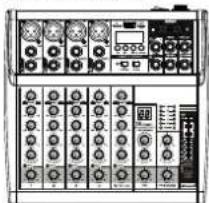
natural_image
Front view of a dual electronic device with multiple ports and control knobs (no visible text or labels)
natural_image
Front view of a black electronic device control panel with multiple knobs and buttons (no visible text or labels)
\*Built-In MP3 player support a variety of formats music
*LED Display for showing the playing status
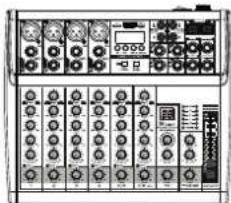
- 4/6/8 channels mixer
- Built-in DSP processor
- Peak LED on all Channels
- Phantom power switch (+48V)
-
Rugged steel chassis
-
Mic + stereo line inputs
- Ultra-musical 3-band EQ on all channels
- High accurate level indicator
- Sealed rotary controls to resist dust and grime
- New Multi-Voltage power supply for worldwide use
CHANNEL INPUT
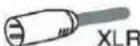
1.[MIC] Input, use this socket to connect the microphone of BALANCED XLR PLUG.

- [LINE] Input, connect the microphone, musical instrument or audio device (CD player and so on) to the device. The socket is supporting UNBALANCED 1/4" PLUG.

- [INSERT] Input, can be inserted into a mono channel of compressor or equalizer.
- [GAIN] Controller, determines the basic volume of each channel, adjust them
for the maximum volume performance, when the volume gets too loud, the [PEAK]LED (9) indicator light will keep flashing. - [HIGH] Treble tone controller, adjust the controller to enhance or attenuate for 15dB at 12KHz.
6.[MID] Alto tone controller, adjust the controller to enhance or attenuate for 15dB at 2.5KHz.
7.[LOW] Bass tone controller, adjust the controller to enhance or attenuate for 15dB at 80Hz.
8.[FX] Controller, adjust the signal level from the channel to the reverberation line. Please note, the single level will vary with the different setting of the channel attenuator. If using the stereo channel, will mix the signals from L and R channels, then, send it to reverberation line. - [PEAK] LED indicator light, when the volume of input signal or volume after adjusting equalizer is too high, the LED indicator light will keep flashing, please rotate the [GAIN] CONTROLLER
10.[LEVEL] Controller, adjust to balance the volume of each channels.
-
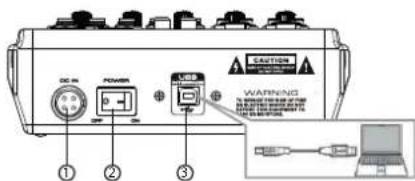
The external power input socket, receiving external power supply, DC +15V, -15V, +48V, ground wire.
-
Power Switch
-
USB Interface, connect to the computer via the included cable, when connecting or disconnecting the USB cable, please make sure to adjust the [STEREO LEVEL] controller to lowest level, if it is failed to connect with computer, please make sure to pay attention for following points:
- Are the USB cable and all necessary audio cables properly connected?
- Are you using a USB hub? USB hub may interfere to the proper operation, so, please try to connect the mixer to computer USB port directly.
-If the computer has multiple USB ports, try to different USB port.
- Are you using other USB devices at the same time? If so, try to remove the other device(s) and connect only the mixer USB.
If the mixer and computer hand up, please restart the application or computer, then, turn off the power supply of mixer, and turn on again.
GENERAL SPECIFICATION
| 4 CHANNEL | 6 CHANNEL | 8 CHANNEL | ||
| Input channels | Mono:MIC/LINE | 2 | 4 | 4 |
| Stereo:LINE | 1 | 1 | 2 | |
| MP3 | ||||
| USB sound card | 1 | 1 | 1 | |
| TAPE/CD Input | 1 | 1 | 2 | |
| Output channels | STEREO OUT | 1 | 1 | 1 |
| PHONES | 1 | 1 | 1 | |
| RETURN | ||||
| Bus | STEREO | 1 | 1 | 1 |
| SEND | ||||
| Input Channel Function | PAD | 26dB | ||
| EQ | HIGH Gain +15dB/-15dB Frequency 12kHz shelving MID Gain +15dB/-15dB Frequency 2.5kHz shelving LOW Gain +15dB/-15dB Frequency 80kHz shelving | |||
| PEAK LED | LED turns on when post EQ signal reaches 3 dB below clipping level | |||
| Level Meter | 2*5-segment LED meter,(+6,+3.0,-3,-10 dB) | |||
| Effects | Built-in | Built-in | Built-in | |
| Phantom Power Voltage | +48V | |||
| Power Requirements | AC 100 240V,50/60Hz DC +15V,-15V,+48V | |||
| Power Consumption | 20W | 20W | 20W | |
MP3 FUNCTION INTRODUCTION
- BLUETOOTH CONNECTION
a. Press the "MODE" button in order to select the Bluetooth mode, after the success of the selection, the Bluetooth icon on display is flashing, and display BT.
b.Open the Bluetooth, select "KT-08UP" for pairing, after the success of the pairing, there will be a sound prompt.
- BUTTON FUNCTION
a. "→" button, press first time to pause the playing song, press again to continue playing. b. "-" button, short press to play the previous song, long press to reduce the input volume
C. "###" button, short press to play the next song, long press to increase the input volume. d. [MODE] Selecting button, switching the functional model, select USB, REC, BT in order;
a. Press the "MODE" key to select the REC state.
b. Press the "▶" button to start recording, the LED screen shows the recording time, press the "▶" button again to pause the recording.
c.Press the "MODE" key back out the recording.
- Computer sound card: when connect the computer data cable, it will enter the PC playing states automatically (The computer will install the driver automatically at the first connection, need to wait until the installation finish, to play or record)
GENERAL SPECIFICATIONS
| 4 CHANNEL | 6 CHANNEL | 8 CHANNEL | ||
| Input channels | Mono:MIC/LINE | 2 | 4 | 4 |
| Stereo:LINE | 1 | 1 | 2 | |
| MP3 | 1 | 1 | 1 | |
| USB sound cord | 1 | 1 | 1 | |
| TAPE/CD Input | 2 | |||
| Output channels | STEREO OUT | 1 | 1 | 1 |
| PHONES | 1 | 1 | 1 | |
| RETURN | 1 | 1 | 1 | |
| Bus | STEREO | 1 | 1 | 1 |
| SEND | 1 | 1 | 1 | |
| Input Channel | PAD | 26dB | ||
| Function | EQ | HIGH Gain +15dB/-15dB Frequency 12kHz shelvingMID Gain +15dB/-15dB Frequency 2.5kHz shelvingLOW Gain +15dB/-15dB Frequency 80kHz shelving | ||
| PEAK LED | LED turns on when post EQ signal reaches 3 dB belowclipping level | |||
| Level Meter | 2*5-segment LED meter,(+6,+3,0,-3,-10 dB) | |||
| Effects | Built-in | Built-in | Built-in | |
| Phantom Power Voltage | +48V | |||
| Power Requirements | AC 100-240V,50/60Hz DC +15V,-15V,+48V | |||
| Power Consumption | 20W | 20W | 20W | |

MG04 USB / MG06 USB / MG08 USB
USER'S MANUAL
4 CHANNEL 6 CHANNEL 8 CHANNEL
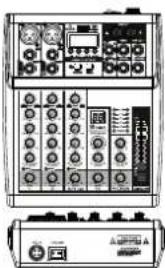
natural_image
Front and back view of a dual electronic device chassis with control panels and indicator lights (no visible text or labels)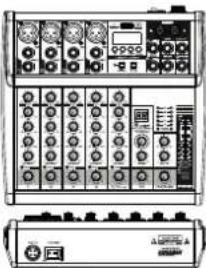
natural_image
Front and back view of a dual electronic device with multiple ports and control knobs (no visible text or labels)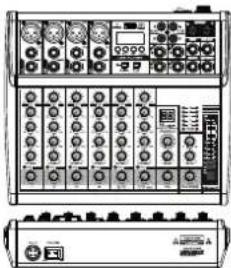
natural_image
Front view of a dual-chamber electronic device with control knobs and indicator lights (no visible text or labels)*Built-in 16 bit DSP processor
*Built-in Bluetooth connect with mobile phone or other Bluetooth player
*Built-in MP3 player support a variety of formats music
*Connect the computer to record and play music
1.4/6/8 channels mixer
3.Ultra-musical 3-band EQ on all channels
- High accurate level indicator
7.Sealed rotary controls to resist dust and grime
- New Multi-Voltage power supply for worldwide use
2.Mic + stereo line inputs
4.Peak LED on all Channels
6.Phantom power switch (+48V)
8.Rugged steel chassis
CHANNEL INPUT
1.[MIC] Input, use this socket to connect the microphone of BALANCED XLR PLUG.
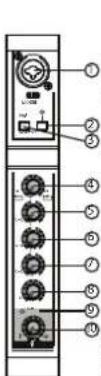
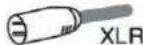
- [LINE] Input, connect the microphone, musical instrument or audio device (CD player and so on) to the device. The socket is supporting UNBALANCED 1/4" PLUG.

- [INSERT] Input, can be inserted into a mono channel of compressor or equalizer.
- [GAIN] Controller, determines the basic volume of each channel, adjust them.
for the maximum volume performance, when the volume gets too loud, the
[PEAK]LED (9) indicator light will keep flashing.
- [HIGH] Treble tone controller, adjust the controller to enhance or attenuate for
15dB at 12KHz.
6.[MID] Alto tone controller, adjust the controller to enhance or attenuate for
15dB at 2.5KHz
7 [LOW] Bass tone controller, adjust the controller to enhance or attenuate for
1.5dB at 80Hz
8.[FX] Controller, adjust the signal level from the channel to the reverberation line. Please note, the single level will vary with the different setting of the channel attenuator. If using the stereo channel, will mix the signals from L and R channels, then, send it to reverberation line.
9.[PEAK] LED indicator light, when the volume of input signal or volume after adjusting equalizer is too high, the LED indicator light will keep flashing, please rotate the [GAIN]
CONTROLLERcounterclockwise to turn down the volume. 10.[LEVEL] Controller, adjust to balance the volume of each channels.
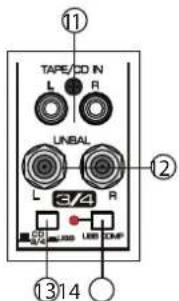
11.[TAPE/CD IN] TAPE/CD signal input socket.
12.[UNBAL] Channel input socket (stereo), 8CH mixer with two group of input socket, 4CH and 6CH mixers with one group of input socket.
13.CD & CHANNEL / USB signal conversion switch
14.[USB COMP] Companding button, it is for playing music on the USB sound card only.
MAIN CONTROL
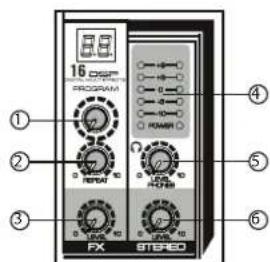
1.[PROGRAM] Controller, select from 16 kinds of internal digital effects, provide the same signal to L and R stereo.
2.[REPEAT] Echo controller of internal effects, adjust to achieve the desired state of internal echo signal.
3.[FX LEVEL] Effects return level controller, adjust the volume of effect.
4.Level indicators can show the signal level from [STEREO OUT]output. Ajust the LEVEL] controller to lower the level if [PEAK] indicator light up in RED.
5.[LEVEL PHONES] Earphone controller, adjust the volume of earphone.
6.[STEREO LEVEL] Controller, adjust the overall volume from [STEREO OUT] output signal.
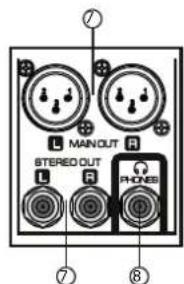
- Stereo output socket, connect the active speaker or amplifier, support to use with XLR socket and UNBALANCE1/4" socket.
8.[PHONES]Output socket, connect an earphone, the socket is supporting stereo phone plug.

MG04 - MG06 - MG08
MANUAL DE USUARIO

MG04 - MG06 - MG08
MEZCLADOR PROFESIONAL
agent:
natural_image
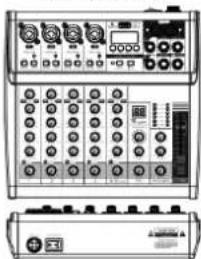
Front and back view of a dual-channel oscilloscope interface with knobs, dials, and display (no visible text or labels)6 CANALES
natural_image
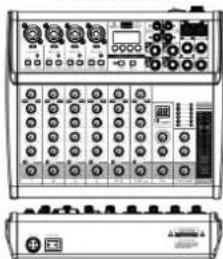
Front view of a dual electronic device with multiple ports and control panels (no visible text or labels)8 CANALES
natural_image
Front view of a dual electronic device with ports and indicators (no readable text or symbols)ENTRADA DE CANAL
natural_image
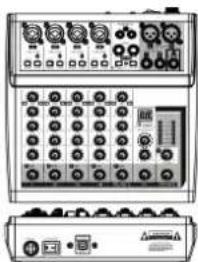
Front and back view of a dual oscilloscope device with knobs and display (no visible text or labels)6 CANALES
natural_image
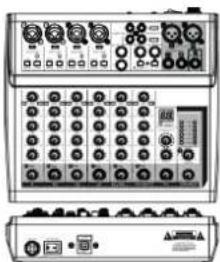
Front and back view of a dual electronic device with multiple ports and buttons (no visible text or labels)8 CANALES
natural_image
Front and back view of a dual electronic device with multiple ports and control knobs (no visible text or labels)Brand : Audibax
Model : MG04 USB
Category : Blender