MG05 XU - Blender Audibax - Free user manual and instructions
Find the device manual for free MG05 XU Audibax in PDF.


| Product Type | Blender |
| Model | MG05 XU |
| Brand | Audibax |
| Power Consumption | 500 W |
| Voltage | 220-240 V, 50/60 Hz |
| Jar Capacity | 1.5 L |
| Jar Material | Plastic (BPA-free) |
| Blade Material | Stainless Steel |
| Number of Speeds | 2 |
| Pulse Function | Yes |
| Dimensions (H x W x D) | 40 x 20 x 20 cm |
| Weight | 1.5 kg |
| Color | White/Black |
| Non-slip Feet | Yes |
| Dishwasher-safe Parts | Jar and lid (top rack) |
| Overheat Protection | Yes |
| Cord Length | 1 m |
| Warranty | 2 years |
Frequently Asked Questions - MG05 XU Audibax
User questions about MG05 XU Audibax
0 question about this device. Answer the ones you know or ask your own.
Ask a new question about this device
Download the instructions for your Blender in PDF format for free! Find your manual MG05 XU - Audibax and take your electronic device back in hand. On this page are published all the documents necessary for the use of your device. MG05 XU by Audibax.
USER MANUAL MG05 XU Audibax
Please read the manual before using the product
USB FOR DATA TRANSFER AND RECORDING, AND POWER SUPPLY
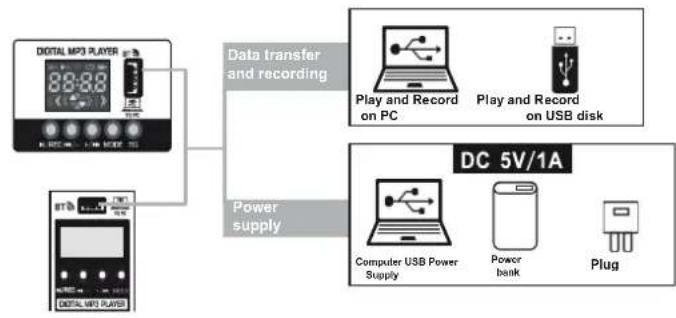
flowchart
graph TD
    A["Digital MP3 PLAYER"] --> B["Data transfer and recording"]
    C["Power supply"] --> B
    D["DC 5V/1A"] --> E["Play and Record on PC"]
    D --> F["Play and Record on USB disk"]
    D --> G["Computer USB Power Supply"]
    D --> H["Power bank"]
    D --> I["Plug"]
USB FOR POWER SUPPLY ONLY
AUDIBAX | MG05 XU
USER'S MANUAL
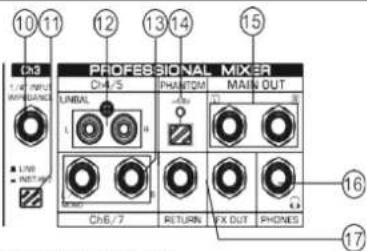
12.[TAPE/CD IN] TAPE / CD signal input jack.
13. Stereo channel input jack, if it is only connected to the L (MONO) jack, the mixer will send the same mono signal to the L and R jacks.
14.[+48V PHANTOM] Button / LED, when the button is on, the LED light is on, provides +48V DC phantom power to the XLR connector on the mono MIC input. Turn this button on when using the condenser microphone that works with phantom power.
15.[MAIN OUT] output, connect active speaker or amplifier.
16.[PHONES] Plug, plug in a headset, the plug is compatible with the stereo phone plug.
17.[FX OUT&RETURN] The jack, when the [FX OUT] jack is used separately, can be connected with a power amplifier, acts as a monitoring signal. When the [RETURN] input jacks are used separately, they can be connected with the audio source. When two plugs are used together, it can be connected with external audio processor.
MAIN CONTROL
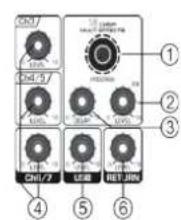
1.[PROGRAM] controller, select from 16 kinds of internal digital effects, provide the same signal to L stereo and R.
2.[FX LEVEL] Effects return level controller, adjust effect volume. Effects return level controller, adjust effect volume.
3.[DELAY] Controller, adjusts the depth of the reverberation.
4.Level knob
Adjust to balance the volume of each channel.
: [LEVEL] Controller, adjusts the volume of the 3CH channel.
: [LEVEL] Controller, adjust the volume of 4CH and 5CH channels.
: [LEVEL] Controller, adjust the volume of 6CH and 7CH channels.
5.[LEVEL] Controller, adjust the volume of the USB channel.
6. [RETURN] Level controller, adjust the return level
7. [POWER] power control switch
8.[POWER ON LED] the light is on, that the mixer has been running.
9. The level meters can show the signal level of the [MAIN OUT]
output. Adjust the [LEVEL] controller to lower the level of the [PEAK] indicator light in RED.
10.[MAIN LEVEL] Fader, adjusts the overall volume of the output signal [MAIN OUT].
11.[PHONES LEVEL] Headphone controller, adjusts the volume of the headphones.
ATTENTION
To avoid the possibility of product malfunction/damage, damage to data, or damage to other property, please follow the points below.
Operation and maintenance.
- Do not use the device near a TV, radio, stereo, mobile phone or other electrical devices. Otherwise, the device, TV or radio may generate noise.
- To avoid the possibility of panel defacement, unstable operation, or damage to internal components. Do not expose the device to excessive dust or vibration, or extreme heat or cold (such as in direct sunlight, near a heater, or in a car during the day).
- Do not place vinyl, plastic or rubber objects on the device, as they may discolor the panel. - When cleaning the device, use a soft, dry cloth. Do not use paint thinners, solvents, cleaning fluids, or chemical-impregnated cleaning cloths.
- Condensation may occur on the device due to rapid and drastic changes in ambient temperature when the device is moved from one place to another, or the air conditioner is turned on or off. For example, using the device while there is condensation can cause damage. If there is reason to believe that condensation may have occurred, leave the device for several hours without turning it on until the condensation has completely dried.
- Avoid setting all controls to maximum. Depending on the status of the connected devices, doing so may cause feedback and damage the speakers.
- When turning on your audio system, always turn on the power amplifier LAST, to prevent damage to the speakers. When turning off the unit, the power amp should be turned off FIRST for the same reason.
Precautions when using USB 2.0 and 5V DC terminals.
- When connecting the USB2.0 connector to the computer, you must comply with the following points. Otherwise, it may cause the computer to crash, crash, or lose data. If the computer or mixer freezes, restart the application software or computer's operating system, or unplug the mixer and turn it back on.
- Use a type AB USB cable. The USB 3.0 cable cannot be used.
- Before connecting the computer to the USB 2.0 terminal, exit any power-saving modes of the computer (such as sleep, sleep, standby).
AUDIBAX | MG05 XU
USER'S MANUAL
INTRODUCTION TO MP3 FUNCTIONS
1. BLUETOOTH CONNECTION
a. Press "MODE" button to select Bluetooth mode, after the selection success, the Bluetooth icon on the screen flashes and displays BT.
b.Open the Bluetooth for pairing, after the pairing success, there will be a sound prompt.
2. BUTTON FUNCTION
a. "/SET" button, press the first time to pause the song, press again to continue playing.
b. "" button, short press to play the previous song, long press to reduce the input volume.
c. "button, short press to play the next song, long press
to increase the input volume.
d. [MODE] Selecting the button, switching the functional model, select USB, REC, BT in order.
a. Press "MODE" key to select REC status.
b. Press "/REC" button to start recording, LED display shows recording time.
Press the "/REC" button again to pause the recording.
c. Press "MODE" key to rewind the recording.
4. COMPUTER SOUND CARD
When you connect the computer data cable, it will automatically enter the PC play slots (the computer will install the driver automatically at the first connection, you need to wait until the installation is finished, to play or record)
- EQ control key, there are 6 kinds of sound effects. (Normal / Rock / Pop / Classic / Jazz / Country)
GENERAL SPECIFICATIONS
| Frequency Response | 20Hz-20KHz ±1dB+4dBp@1kHz | ||
| Total harmonic distortion | <0.5%@+4dBp/22Hz -22KHz | ||
| Channel | 5-CH | 7-CH | |
| Input channels | Microphone | 2(XLR)+1(6.35Jack) | 2(XLR)+1(6.35Jack) |
| Stereo | 1(4-5 TS) | 2(4-5 TS/6 / RCA) | |
| MPS/EQ | 1 | 1 | |
| Bluetooth | 2.0Type-A | 2.0Type-A | |
| USB sound card | 1 | 1 | |
| Output channels | Main exit | L/R(6.35Jack) | L/R(6.35Jack) |
| Telephone outlet | 1(6.35Jack) | 1(6.35Jack) | |
| Auxiliaries | FX(Dut) | 1 | 1 |
| Return(In) | 1 | 1 | |
| Input Channel Function | E Q/2/bands | HIGH, Gain/±15cB. Frequency: 12KHz shelvingLOW: Gain/±15cB. Frequency: 60Hz shelving | |
| Peak LED | LED lights when post EQ signal reaches 3cB below clipping level | ||
| Level meter | 2×5 segment LED motor, (+6,+3.0, 3.10dB) | ||
| Effects/FX | Built-in 16 DSP | ||
| Phantom power voltage | +48V | +48V | |
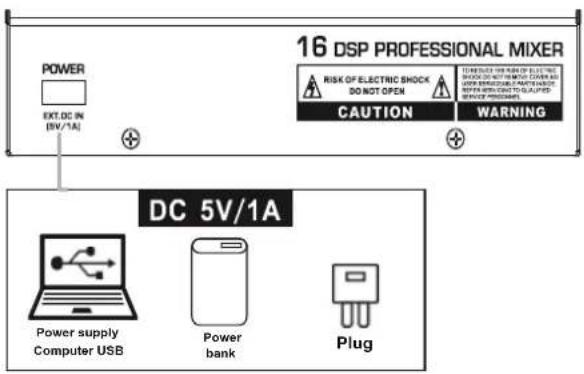
| Input Power | EXT.DC IN:5V-1A/2.0Type-A | ||
| Energy consumption | 5W | 5W | |
| Dimensions (WxHxD) | 130x42x210mm | 194x42x210mm | |
| 7"x1.6"x8.2" | 7.6"x1.6"x8.2" | ||
| Net weight | 1.19Kg(2.6lbs) | 1.26Kg(2.77lbs) | |
5 CHANNEL 7 CHANNEL
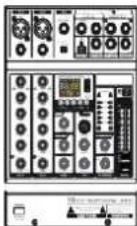
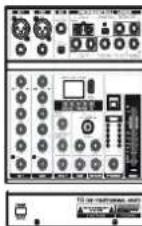
5/7 input channel mixer
• They are the network broadcast karaoke mixer with sound card, combine the traditional sound card and mixer function
• Built-in Bluetooth, connect with mobile phone or other bluetooth player
• Built-in MP3 player to play music in multiple formats and record, with LED display
- Connect USB to PC to play and record music
- Connect USB to PC or power bank to supply power, convenience for mobile audio connection and outdoor guitar playing and singing 16 built-in DSP
• Built-in stereo equalizer
• Strong metal chassis
• DC 5V / 1A power supply or PC power supply
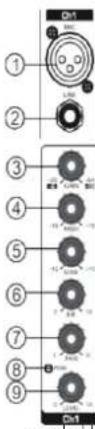
1.[MIC] Input, use this socket to connect the microphone of BALANCED XLR PLUG.
- [LINE] Input, connect the microphone, musical instrument or audio device (CD player and so on) to the device. The socket is supporting UNBALANCED 1/4" PLUG.
-
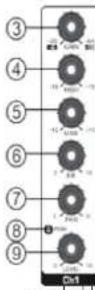
[GAIN] Controller, determines the basic volume of each channel, adjust for maximum volume performance, when the volume is too loud, the [PEAK] LED® indicator light will keep flashing.
-
[HIGH] Treble tone controller, adjust the controller to boost or attenuate by 15dB at 12KHz.
5.[LOW] Bass tone controller, adjust controller to boost or attenuate by 15dB at 80Hz.
6.[FX] Controller, adjusts the signal level of the channel to the line reverb. Note that the single level will vary with different channel fader settings. If you use the stereo channel, it will mix the signals from the L and R channels, then send them to the reverb line.
7.[PAN Control] The PAN control determines the position of the channel signal within the stereo image. When working with subgroups, you can use the PAN
control to assign the signal to a single output, giving you additional flexibility in recording situations.
8.[PEAK] LED indicator light, when the volume of the input signal or the volume after adjusting the equalizer is too high, the LED indicator light will keep flashing, turn the [GAIN] CONTROLLER@ counterclockwise to turn down the volume.
9.[LEVEL] controller, adjust to balance the volume of each channel.
10.[Guitar Input jack] To connect to an instrument, such as an electric guitar or electric bass.
This connector accepts telephone plugs. Or you can connect with a mono line input device.
11.[GUITAR/LINE converting switch] To convert the different input source to channel 3, press this switch to connect with high impedance audio source such as electric guitar and bass.
When the switch bounces, it connects with a low impedance audio source (LINE).

MG05 XU
MEZCLADOR DE INTERFAZ USB
agent:
Brand : Audibax
Model : MG05 XU
Category : Blender