BS 250 B - Pregnant GoGen - Free user manual and instructions
Find the device manual for free BS 250 B GoGen in PDF.


| Product Type | Portable Bluetooth Speaker |
| Brand | GoGen |
| Model | BS 250 B |
| Dimensions (approx.) | 180 x 70 x 70 mm |
| Weight (approx.) | 0.5 kg |
| Power Source | Rechargeable lithium-ion battery (3.7V, 1200mAh) |
| Charging Time | Approx. 2-3 hours |
| Playback Time | Up to 6 hours at moderate volume |
| Connectivity | Bluetooth 5.0, AUX input, MicroSD card slot, USB playback |
| Bluetooth Range | Up to 10 meters |
| Speaker Output | 3W RMS (single driver) |
| Frequency Response | 100 Hz - 20 kHz |
| Key Functions | Play/Pause, Volume control, Next/Previous track, Hands-free calling |
| Care & Cleaning | Wipe with a soft, dry cloth. Avoid liquids and abrasives. |
| Safety Warnings | Do not expose to water, high temperatures, or drop. Keep away from children. |
| Spare Parts & Repairability | No user-serviceable parts. Contact GoGen support for repairs. |
| General Information | Compact design, built-in microphone, LED indicator |
Frequently Asked Questions - BS 250 B GoGen
User questions about BS 250 B GoGen
0 question about this device. Answer the ones you know or ask your own.
Ask a new question about this device
Download the instructions for your Pregnant in PDF format for free! Find your manual BS 250 B - GoGen and take your electronic device back in hand. On this page are published all the documents necessary for the use of your device. BS 250 B by GoGen.
USER MANUAL BS 250 B GoGen
natural_image
Abstract black-and-white circular logo with a stylized white 'S' or wave-like symbol inside (no text or symbols)GoGEN
BS 250 B
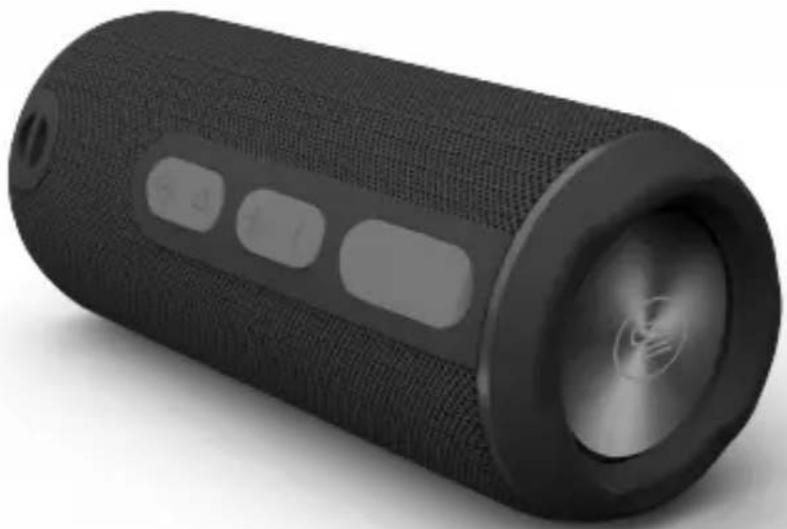
natural_image
Black cylindrical speaker with textured body and visible buttons, no text or symbols presentCZ SK PL EN HU
BLUETOOTH REPRODUKTOR
BLUETOOTH REPRODUKTOR
GŁOŚNIK BLUETOOTH
BLUETOOTH SPEAKER
BLUETOOTH HANGSZÓRÓ
NÁVOD K POUŽITÍ
NÁVOD NA POUŽITIE
INSTRUKCJA OBSŁUGI
USER MANUAL
HASZNÁLATI UTASÍTÁS
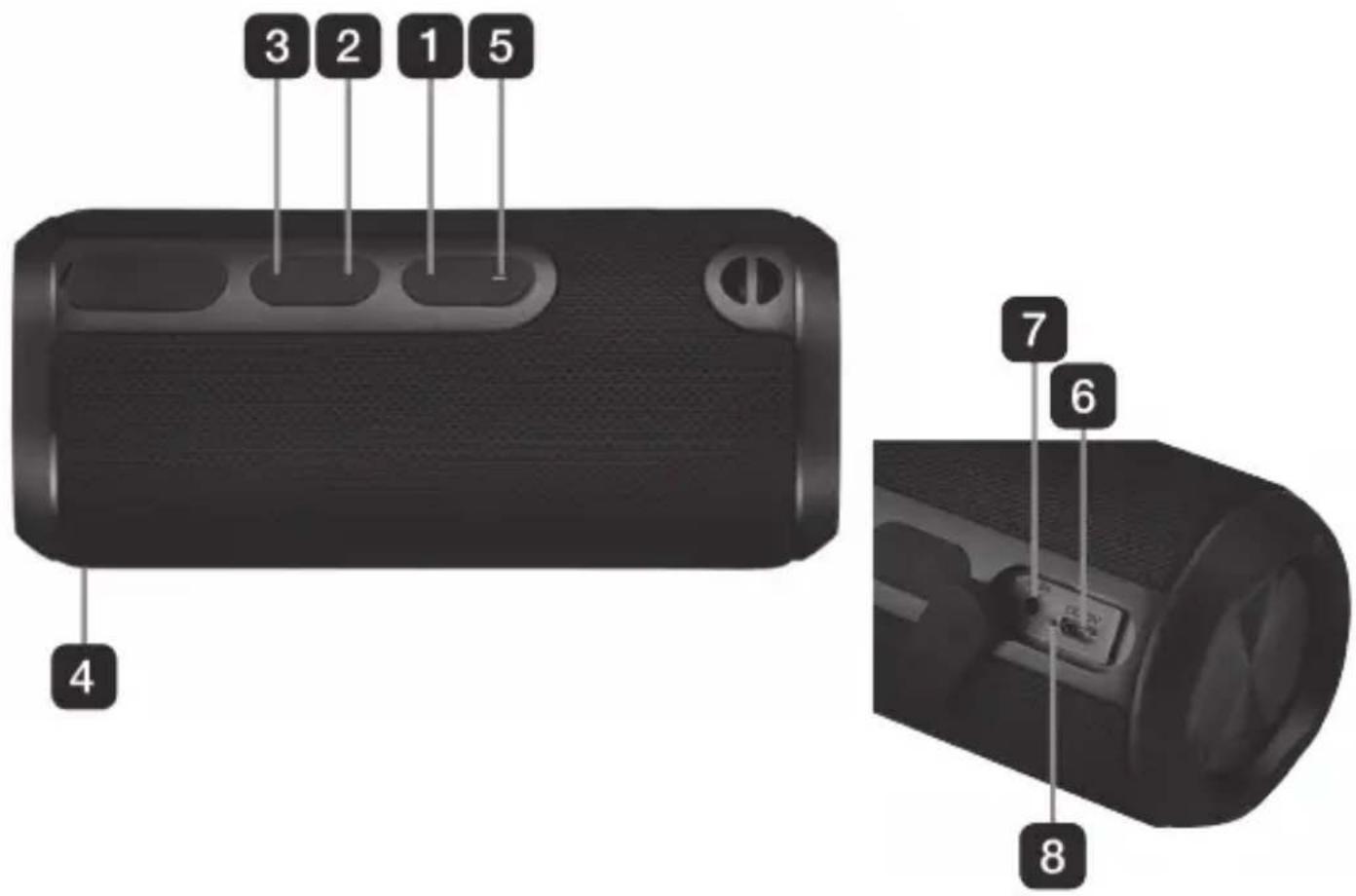
NÁKRES ZAŘÍZENÍ / NÁKRES ZARIADENIA / WYGLĄD URZĄDZENIA GUIDE TO THE APPLIANCE / KÉSZÜLÉK LEÍRÁSA
Bezpečnostní pokyny
- Please read through these operating instructions, so you will know how to operate your equipment properly. After you finished reading the instructions manual, put it away in a safe place for future reference.
- To protect against the risk of electrical shock / malfunction, do not put the Speaker or its USB Cable in water / liquids / heat / direct sunlight.
• Children must never play with the Speaker. - Stop using the Speaker if the USB Cable is damaged / the Speaker has been dropped/ damaged / liquid has entered the inside of the Speaker. Unplug the USB Cable from the
- USB port if a fault is detected and contact our customer service for examination.
- Do not try to repair the Speaker yourself.
- For safety reasons, only authorized service personnel are permitted to carry out repairs and fit replacement parts to the Speaker.
- When disconnecting the Speaker from the USB plug, pull the plug, not the USB Cable.
- Make sure the USB Cable does not get pinched.
- Switch off the Speaker when it is not in use.
- Do not leave the Speaker unattended when it is in use.
- Condensation may occur if the Speaker gets really cold (e.g. during transportation in the winter). Wait for two hours to let the Speaker reach room temperature before you use the Speaker.
BUTTON FUNCTIONS
1) Play / Pause
2) Volume + / Forward
3) Volume - / Backward
4) Microphone
1) Long press the On/Off Switch to the 'On' mode. The Speaker will prompt a signal to indicate that the Speaker is started.
2) Press On/Off/Mode button to select to play music in either the Bluetooth Mode or AUX Mode. Follow the individual instructions in the paragraph "Bluetooth Mode" or the "AUX Mode".
3) After operation, long press the On/Off Switch to the "Off" mode to turn off the Speaker.
Bluetooth Mode
1) The Indicator Light will flash quickly in blue to indicate that the Speaker is ready to pair via Bluetooth.
2) Start the Bluetooth function on your (e.g. phone) and begin searching for Bluetooth units.
3) Select "GoGEN BS250B" from the list of found Bluetooth units.
4) After a successful pairing, the speaker will prompt a signal and the Indicator Light will illuminate in blue.
5) Control the playback via the buttons of the Speaker and your phone. Press the volume buttons once to decrease/increase the volume. Press and hold the “+/-”-buttons to go to previous/next song.
Note: If you receive a call during playback, press the Call Button to answer. Press the Call Button again to end the call, the playback will be resumed.
6) To disconnect from the Speaker, press and hold the Call Button for 2 seconds. The Speaker will prompt a signal to indicate that the Bluetooth pairing has been disconnected.
AUX Mode
1) Insert the included AUX Cable into the AUX Input.
2) Connect the other end of the AUX Cable to the AUX Input of your (e.g. phone).
3) The Indicator Light of the Speaker will flash and the Speaker will prompt a signal to indicate that the AUX Cable is connected.
4) Start and control the playback on your phone.
5) To disconnect from the Speaker, turn off the playback on your phone and disconnect the AUX Cable from the Speaker. The Speaker will prompt a signal to indicate that the AUX Cable has been disconnected.
Charging
1) During Bluetooth mode, a battery icon will appear on the phone screen. This indicates the speaker battery level.
Note: Not all smartphones support this function.
2) During AUX Mode, the volume of the Speaker will lower when the battery is running low.
3) Insert the Micro USB end of the USB Cable into the Power Input of the Speaker. Insert the other end into a USB port of a computer or other device.
SPECIFICATION
Bluetooth Version V 4.2 Bluetooth Range 10 meters
Frequency Range 150 Hz - 18 kHz E.i.r.p 3,45 dBm
Operating frequency 2402 - 2480 MHz Battery Li-ion 3,6V / 2200 mAh
Battery Charging Time 2,5 - 3 hours Battery Playback Time 11 hours (60 % Volume)
Output 2 x 5 W IP code IPX5
Power supply 5 V / 1 A Dimensions 73 x 73 x 172 mm
Weight 374 g
WARRANTY
Our product is warranted for 2 full year from the date of purchase. The warranty is provided on all material defects and workmanship. Guarantee of 24 months does not apply to decrease in the accumulator's effective capacity caused by its use or age. Effective capacity gradually decreases depending on the method of use of the accumulator.
WE RESERVE THE RIGHT TO CHANGE TECHNICAL SPECIFICATIONS
WARNING: Do not use this product near water, in wet areas to avoid fire or injury of electric current. Always turn off the product when you don't use it or before a revision. There aren't any parts in this appliance which are reparable by consumer. Always appeal to a qualified authorized service. The product is under a dangerous tention.


To avoid danger of suffocation, keep the plastic bag away from babies And children. Do not use this bag in cribs, beds, carriages or playpens. This bag is not a toy.
Disposal of old Electrical & Electronic Equipment (Applicable in the European Union and other European countries with separate collection systems)
This symbol on the product or on its packaging indicates that this product shall not be treated as household waste. Instead it shall be handed over to the applicable collection point for the recycling of electrical and electronic equipment. By ensuring this product is disposed of correctly, you will help prevent potential negative consequences for the environment and human health, which could otherwise be caused by inappropriate waste handling of this product. The recycling of materials will help to conserve natural resources. For more detailed information about recycling of this product, please contact your local Civic Office, your household waste disposal service or the shop where you purchased the product.
Hereby, ETA a.s. declares that the radio equipment type BS250B is in compliance with Directive 2014/53/EU. The full text of the EU declaration of conformity is available at the following internet address: http://www.gogen.cz/declaration_of_conformity
natural_image
Abstract logo design with a stylized white 'S' inside a black circle (no text or symbols)GoGEN
www.GoGEN.cz
- Bezpečnostní pokyny
- BUTTON FUNCTIONS
- Bluetooth Mode
- AUX Mode
- Charging
- SPECIFICATION
- WARRANTY
- WE RESERVE THE RIGHT TO CHANGE TECHNICAL SPECIFICATIONS
- Disposal of old Electrical & Electronic Equipment (Applicable in the European Union and other European countries with separate collection systems)
- GoGEN
Brand : GoGen
Model : BS 250 B
Category : Pregnant