BPS 528B - Loudspeaker GoGen - Free user manual and instructions
Find the device manual for free BPS 528B GoGen in PDF.


| Product Type | Portable Bluetooth Speaker |
| Brand | GoGen |
| Model | BPS 528B |
| Dimensions (Approx.) | 180 x 80 x 80 mm |
| Weight (Approx.) | 0.5 kg |
| Power Source | Built-in rechargeable battery (DC 5V via Micro USB) |
| Battery Life | Up to 4 hours at moderate volume |
| Charging Time | Approx. 2-3 hours |
| Connectivity | Bluetooth 5.0, AUX input (3.5 mm), USB port for playback |
| Supported Audio Formats | MP3, WMA, WAV (via USB) |
| FM Radio | Yes, with auto search and memory presets |
| Controls | Buttons for power, volume, play/pause, track skip, mode switching |
| Additional Functions | Hands-free calling via built-in microphone, TF card slot |
| Cleaning and Maintenance | Wipe with a dry cloth; avoid moisture and direct sunlight |
| Safety Instructions | Do not expose to rain or liquids; keep away from heat sources |
| Spare Parts and Repairability | Contact GoGen support for battery replacement or repairs |
| General Information | Designed for portable use with rich sound and multiple playback options |
Frequently Asked Questions - BPS 528B GoGen
User questions about BPS 528B GoGen
0 question about this device. Answer the ones you know or ask your own.
Ask a new question about this device
Download the instructions for your Loudspeaker in PDF format for free! Find your manual BPS 528B - GoGen and take your electronic device back in hand. On this page are published all the documents necessary for the use of your device. BPS 528B by GoGen.
USER MANUAL BPS 528B GoGen
natural_image
Abstract logo design with a stylized white 'S' inside a circle on black background (no text or symbols)BPS 528 B
GoGEN
PL - 9
IMPORTANT: Please read before using and retain for future reference.
IMPORTANT NOTES
INTRODUCTION
• Thank you for buying our product.
- Please read through these operating instructions, so you will know how to operate your equipment properly. After you finished reading the instructions manual, put it away in a safe place for future reference.
FEATURES
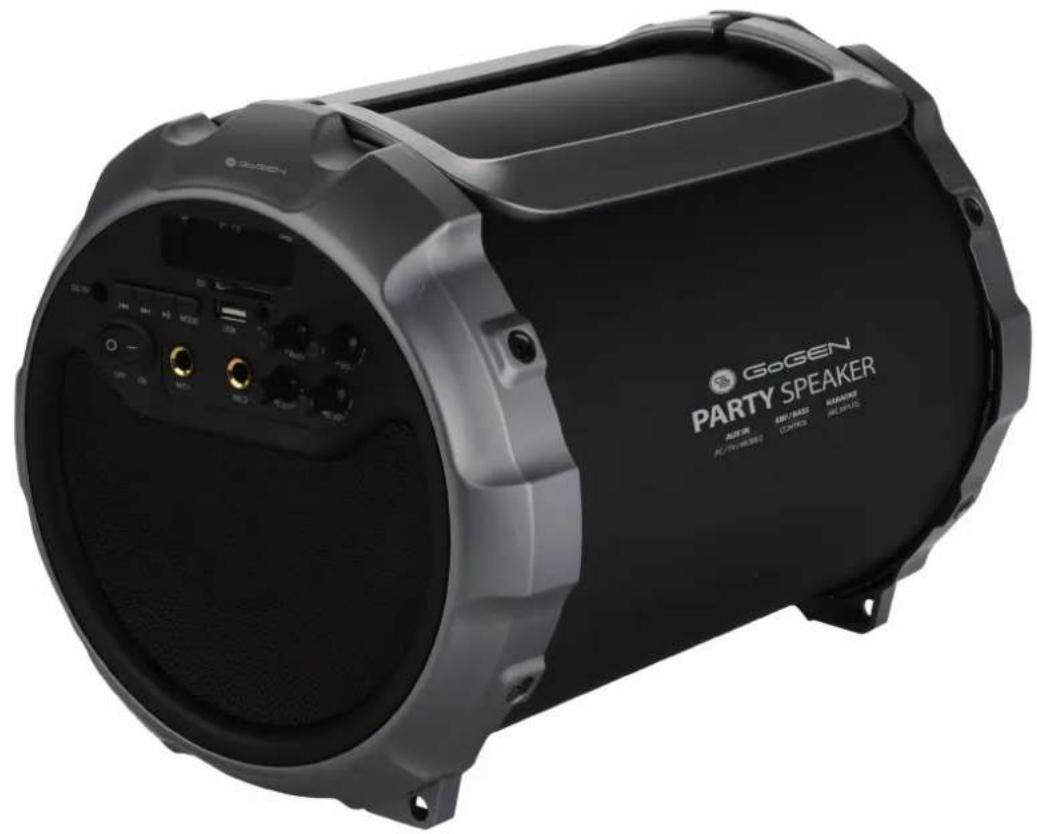
- Channel portable Bluetooth Speaker with 6 inch subwoofer;
- Output very clear sound and heavy bass, dynamic sound effect;
- Features A2DP Bluetooth: wirelessly stream music from any Bluetooth-enabled device;
- Secure simple pairing for user-friendly operation;
- 10 meters operating range;
- USB and SD card inputs;
- FM radio;
- Microphone input;
- With Line-in function, suitable for PC,MID,TV and other audio devices;
- Side panel control for volume and bass;
- Built-in lithium rechargeable battery 3600 mAh;
CONTROL PANEL:

- Charging jack
- Backward
- Forward
- Play/Pause
- Mode (Switch Bluetooth, USB disk, SD, FM and AUX-IN state)
- LED display
- SD slot
- Bass knob
- Volume knob
- On/Off button
- Mic input 1
- USB port
- Mic input 2
- Aux-in jack
- Mic Echo knob
- Mic volume knob
MUSIC PLAYING:
- Turn the Power button to "ON".
- Insert SD/MMC card or USB flash disk into slot, audio files play automatically.
- Under playing mode, short PREV or NEXT to select songs you like, long press to fast forward or backward the song.
- Spin VOL knob to adjust the volume up or down. Spin Bass-vol knob to adjust the bass volume.
- Press PLAY/PAUSE to play or pause.
- For other compatible music devices or your MP3/MP4 players, use the supplied audio cable to connect from the device's "Line Out" to the "Aux In" of this devices. When using an external device, all functions will be controlled by the external devise.
- Please turn the Power button to "OFF" while without use.
USE BLUETOOTH FUNCTION:
- Turn the power button to "ON", The LED screen will display bt and beep twice, twinkling quickly.
- Activate Bluetooth of mobile phone and search for device name "GOGEN BPS528" then connect it. The bt on the screen stop twinkling and beep three times once connected successful.
- Play the music from your mobile phone and enjoy.
- Press PREV or NEXT button on the devices or on Mobile phones to select songs you like.
- Press Play/pause button on the devices or on Mobile phones to play/stop the music.
- Use the "Volume" to adjust volume up and down. Or adjust the mobile phones' volume.
- Use the "Bass knob" to adjust bass.
USE FM RADIO:
- Under FM radio state, the audio cable provided treat as antennal. Please insert the audio cable to get best FM signal before using.
- Turn the power button to "ON" without SD or USB Card inserted. Then press the "MODE" button to switch to FM.(The order of the mode is Bluetooth, SD,USB,FM and AUX-IN).
- Under playing mode, short press "Play/pause" button to auto search the FM Channel and store it automatically.
- Press LAST or NEXT button to change the stored FM channel.
AUX-IN:
For other compatible music devices or your MP3/MP4 players, use the supplied audio cable to connect from the device's "Line Out" to the "Aux In" of this devices. Then press the "MODE" button to switch to AUX-IN state. Enjoy...When using an external device, all functions will be controlled by the external devise except the volume adjusting.
MICROPHONE:
This product with two Microphone input. just plug the 6.5 MM microphone into the Mic hole then you can use. The volume and Echo can be adjusted by the knobs of "MIC-Vol" & "MIC-ECHO". (Please note that, Microphone cannot be use under FM radio state)
CHARGING:
- The charger is not included in the accessories. Please use the universal --- 5V / 1 A charger to charge this devices. Put the provided charge cable into the charging jack, connect the other end to the charger, the charging indicator beside the LED screen will keep lighting. (When playing music during charging, please put the volume to middle, because for some music with heavy bass, the charger may can not afford the high current temporarily under the maximum volume).
- Charge time should be 7 - 9 hours. When charging full, the indicator light will switch off.
- To prolong the life of battery, DO NOT CHARGE CONTINUOUSLY FOR LONGER THAN 9 HOURS.
NOTE:
- The unit will operate without the wire connection using the lithium battery.
The amount of battery life depends on how hard the unit is working. Heavy, loud, bass music will use more energy to produce than spoken word. - The built-in rechargeable battery is not replaceable. Do not remove or replace it, do not throw in the trash or in the fire.
- When cleaning the product, use a soft dry cloth. For more severe stains, please dampen the cloth with water only. Anything else has the chance of dissolving the paint or damaging the plastic.
SPECIFICATIONS
Bluetooth version: V2.1+EDR
Wireless Working Frequency: 2,402 - 2,480 GHz
E.I.R.P: 0,91 dBm
Product size: ∅ 225*310(L) mm
Horn Size: 3 inch
Subwoofer Size: 6 inch
Horn output: 2 x 3 W (4 Ω)
Subwoofer output: 15 W (4 Ω)
Battery Capacity: 3600 mAh
Frequency Response: 100 - 20 000 Hz
Power supply / Charging: 5 V / FA
USB / SD supporting: MAXIMUM 32 GB
Accessories:
Charge cable, audio cable, microphone, user manual
WE RESERVE THE RIGHT TO CHANGE TECHNICAL SPECIFICATIONS.
Disposal of old Electrical & Electronic Equipment (Applicable in the European Union and other European countries with separate collection systems).

This symbol on the product or on its packaging indicates that this product shall not be treated as household waste. Instead it shall be handed over to the applicable collection point for the recycling of electrical and electronic equipment. By ensuring this product is disposed of correctly, you will help prevent potential negative consequences for the environment and human health, which could otherwise be
caused by inappropriate waste handling of this product. The recycling of materials will help to conserve natural resources. For more detailed information about recycling of this product, please contact your local Civic Office, your household waste disposal service or the shop where you purchased the product.
Hereby, ETA a.s. declares that the radio equipment type BPS528B is in compliance with Directive 2014/53/EU. The full text of the EU declaration of conformity is available at the following internet address: http://www.gogen.cz/declaration_of_conformity


TO AVOID DANGER OF SUFFOCATION, KEEP THIS PLASTIC BAG AWAY FROM BABIES AND CHILDREN. DO NOT USE THIS BAG IN CRIBS, BEDS, CARRIAGES OR PLAYPENS. THIS BAG IS NOT A TOY.
Guarantee of 24 months does not apply to decrease in the accumulator's effective capacity caused by its use or age. Effective capacity gradually decreases depending on the method of use of the accumulator.
natural_image
Abstract logo design with white stylized 'S' inside a black circle (no text or symbols)GoGEN
- GoGEN
- IMPORTANT NOTES
- INTRODUCTION
- FEATURES
- CONTROL PANEL:
- MUSIC PLAYING:
- USE BLUETOOTH FUNCTION:
- USE FM RADIO:
- AUX-IN:
- MICROPHONE:
- CHARGING:
- NOTE:
- SPECIFICATIONS
- Accessories:
- WE RESERVE THE RIGHT TO CHANGE TECHNICAL SPECIFICATIONS.
- Disposal of old Electrical & Electronic Equipment (Applicable in the European Union and other European countries with separate collection systems).
Brand : GoGen
Model : BPS 528B
Category : Loudspeaker