
KIP-300 - Intercom Syscom - Free user manual and instructions
Find the device manual for free KIP-300 Syscom in PDF.


| Product Type | Intercom |
| Brand | Syscom |
| Model | KIP-300 |
| Dimensions (H x W x D) | 130 x 90 x 25 mm |
| Weight | 200 g |
| Power Supply | 2 x AAA batteries or 5V DC adapter (not included) |
| Main Functions | Two-way audio, call button, door release, volume control |
| Connection Type | Wireless (2.4 GHz FHSS) or wired (RJ11) |
| Range | Up to 100 m outdoors (line of sight) |
| Audio Features | Full duplex hands-free communication, echo cancellation |
| Mounting | Wall mount (screws included) or desktop stand |
| Indoor/Outdoor | Indoor use only |
| Operating Temperature | 0°C to 40°C |
| Display | None (audio only) |
| Spare Parts | Battery cover, wall mount bracket, power adapter (sold separately) |
| Repairability | User-replaceable batteries; other repairs by authorized service center |
| Maintenance | Clean with dry soft cloth; avoid liquids; replace batteries when low |
| Safety | Use only specified batteries; do not disassemble; keep away from moisture |
| Certifications | CE, FCC |
| Package Contents | 1 x Intercom unit, 1 x wall mount bracket, 2 x AAA batteries, 1 x user manual |
Frequently Asked Questions - KIP-300 Syscom
User questions about KIP-300 Syscom
0 question about this device. Answer the ones you know or ask your own.
Ask a new question about this device
Download the instructions for your Intercom in PDF format for free! Find your manual KIP-300 - Syscom and take your electronic device back in hand. On this page are published all the documents necessary for the use of your device. KIP-300 by Syscom.
USER MANUAL KIP-300 Syscom
To receive after service, have the following ready before you contact our branches.
- Name of the product.
- Model number of the product.
- The area of problem.
- Phone number and address at which you can be contacted.
Warranty Card
| PRODUCT | |
| MODEL | |
| DATE PURCHASED | |
| WARRANTY PERIOD | |
| AGENCY ADDRESS |
KOCOM Warrantles the original purchaser of this product as follows.
1) This product is produced under strict quality control and inspection procedures.
2) If this product breaks down during proper use as a result of product defect, KOCOM will repair it within one year from date of purchase free of charge.
3) The following cases will be subject to charge, even during warranty period:
a. Breakdown during transport, or through careless treatment, by consumer.
b. Breakdown cause by unauthorized repair, or system modification.
c. Breakdown caused by natural disaster or power disorder.
KOCOM

KOREA COMMUNICATIONS CO LTD
http://www.kocom.com
E-mail: export@kocom.co.kr
This manual is based on the date as shown in the right and specifications are subject to change without notice for quality improvement
KIP-300 11.03.23
KOCOM
www.kocom.com
KIP-300 MANUAL
INTERPHONE
■2-wire Non-Polarity
■ Slave Interphone
Thank you very much
for your purchasing of our product
Passer read carefully
before operating and
Then keep it. Thank you.


natural_image
White Kocom phone with coiled cord (no visible text or symbols)KOCOM CO.,LTD.
Name of Devices

How to Install
■ Interphone Installation
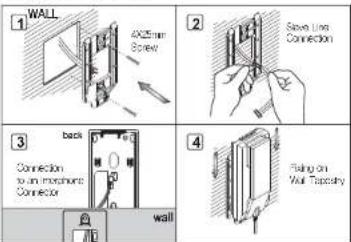
① Install an "Interphone Wall-mounting Tapestry" on a wall.
2 Connect a "Save Connector" to the wire installed.
3 Connect a "Save Connector" to the connector on the backside of an Interphone.
4 Install an interphone on an "Interphone Wall-mounting Tapestry" and then fix it,
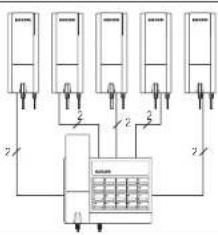
Wiring Diagram

flowchart
graph TD
    A["Device 1"] --> B["Control Unit"]
    C["Device 2"] --> B
    D["Device 3"] --> B
    E["Device 4"] --> B
    F["Device 5"] --> B
    G["Device 6"] --> B
    H["Device 7"] --> B
    I["Device 8"] --> B
    J["Device 9"] --> B
    K["Device 10"] --> B
    L["Device 11"] --> B
    M["Device 12"] --> B
    N["Device 13"] --> B
    O["Device 14"] --> B
    P["Device 15"] --> B
    Q["Device 16"] --> B
    R["Device 17"] --> B
    S["Device 18"] --> B
    T["Device 19"] --> B
    U["Device 20"] --> B
    V["Device 21"] --> B
    W["Device 22"] --> B
    X["Device 23"] --> B
    Y["Device 24"] --> B
    Z["Device 25"] --> B
    AA["Device 26"] --> B
    AB["Device 27"] --> B
    AC["Device 28"] --> B
    AD["Device 29"] --> B
    AE["Device 30"] --> B
- To connect a wiring code to a terminal, loose a screw, connect the end of a cord to the bottom of the screw and then fix it.
- To fix a wiring code, fix it with a stapler not to damage the cord.
- To use the existing wire, be careful of disconnection and short circuit.
Product Functions
| Model No. | KIP-300 |
| Input Power | supplied by DC 24V Slave. |
| Power Consumption | Under 2W during Operation |
| Call Mode | Handset Call |
| Wiring Specification | 2-Wire(slave) Non-Polarity |
| Size | (W)75mm×(H)176mm×(D)52mm |
Product Composition

Interphone

Fixed hanging ring of interphone

Interphone Wall
-mounting Screw

2-PIN Slave Connector
How to Operate
■ Paging and Calling from a Slave to Interphone

If a slave calls out, an
interphone rings ring-back tone.
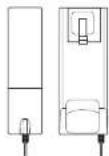
Pick up a handset and then make a call.

if a user hangs up a
handsel, the call is closed.
■ Paging and Calling from an Interphone to a Slave

If a user picks up a handset, ring-back tore rings.

If a user picks up a handset at a Slave, a call is started.
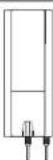
If a user hangs up a handset, the call is closed.

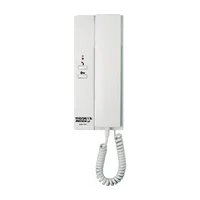
Brand : Syscom
Model : KIP-300
Category : Intercom