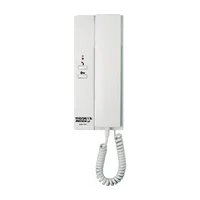
KDP-601-A1 - Intercom Syscom - Free user manual and instructions
Find the device manual for free KDP-601-A1 Syscom in PDF.


| Product Type | Wired Audio Intercom System |
| Model | KDP-601-A1 |
| Brand | Syscom |
| Dimensions (Approx.) | 150 mm x 80 mm x 30 mm |
| Weight (Approx.) | 200 g |
| Power Supply | 12V DC (via adapter, not included) |
| Power Consumption | < 2 W standby, < 5 W active |
| Audio | Full-duplex hands-free communication |
| Door Release | Supports remote door lock release (electric strike) |
| Call Function | One-button call to indoor station |
| Connection Type | Wired (2-wire or 4-wire, typical) |
| Indoor Station Compatibility | Syscom KDP series indoor units |
| Operating Temperature | -10°C to 50°C |
| Weather Resistance | IP44 (splash-proof, outdoor use) |
| Material | ABS plastic, anti-UV |
| Mounting | Wall-mounted (surface or flush mount) |
| Maintenance | Clean with a soft damp cloth; do not use solvents |
| Safety | Low voltage (12V DC), CE compliant |
| Spare Parts / Repairability | Contact Syscom support for spare parts; user-replaceable units |
| Warranty | 2 years (standard) |
Frequently Asked Questions - KDP-601-A1 Syscom
User questions about KDP-601-A1 Syscom
0 question about this device. Answer the ones you know or ask your own.
Ask a new question about this device
Download the instructions for your Intercom in PDF format for free! Find your manual KDP-601-A1 - Syscom and take your electronic device back in hand. On this page are published all the documents necessary for the use of your device. KDP-601-A1 by Syscom.
USER MANUAL KDP-601-A1 Syscom
KDP-601AM & KDP-601DM Manual for Operation and Installation
◆ Features
Gentle chime suundi
KDP-611AM:AC220V(only)ar 11HV(only)
■ KDP-601DM : Used DC 6V(4 Piece of 1.5V batteries)
Used DC 12V / 300mA[External Power Source]
■ Communication range: 0.65mm wire, 300lm line
■ Can be combined with door opener
■ Easily mounted on wall, desk

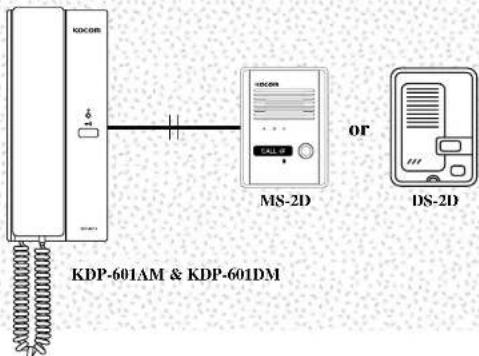

KOCOM CO.,LTD.
KOCOM CO.,LTD.
This manual is based on the date as shown in the right and specifications are subject to change without notice for quality improvement.
Door Phone 06.09
DOOR PHONE
KDP-601AM & KDP-601DM
Warranty

To receive after sales service, have the following ready when you contact our branches.
- Name of the product.
- Model number of the product.
- The area of problem.
- Phone number and address at which you can be contacted.
Warranty Card
| PRODUCT | |
| MODEL | |
| DATE PURCHASED | |
| WARRANTY PERIOD | |
| AGENCY | |
| AGENCY ADDRESS |
- KOCOM Warranties the original purchaser of this product as follows.
1) This product is produced under strict quality control and inspection procedures.
2) If this product breaks down during proper use as a result of product defect,
KOCOM will repair it within one year from date of purchase free of charge.
3) The following cases will be subject to charge, even during warranty period:
a. Breakdown during transport, or through careless treatment, by consumer.
b. Breakdown caused by unauthorized repair, or system modification.
c. Breakdown caused by natural disaster or power disorder.
Cautions for Safety
For safe use, please stick to the following cautions.
- Read this cautions carefully and keep it within easy reach of you.
- For right installation, read this cautions thoroughly. Please install the product according to its specifications.
- This Cautions for Safety may include items that are not contained in specifications of the product that consumer purchases.
- Reading this cautions, use the product in a right manner. For further information, please contact our A/S center.
About Symbol
A variety of symbols are used in this Cautions for Safety and your products to guide you to use products in a right and safe manner and to prevent possible risks for users and other persons and damages to their property. The meaning of each symbol is as follows. After fully aware of meaning of each symbol, read the following cautions.
| Warnings | This symbol means that wrong handling or ignorance of matters that this symbol indicates may cause serious injury or even death of user. |
| Cautions | This symbol means that wrong handling or ignorance of matters that this symbol indicates may cause serious injury or properly damage of user. |
| This symbol means the matter that user should not do at any event. | |
| This symbol means that user should follow the instructions. |
Symbols on Drawing

This symbol means that contents (high voltage, electric shock, warnings, etc.) to which user should pay attention are included.

This symbols means that a certain action is not permitted. Specific points not permitted are depicted around this symbol (for example, in the left drawing, disassembly is not permitted.).

This symbol means instructions or is used to force user to do a certain action. Specific instructions are depicted on the drawing (for example, the left drawing instructs user to detach power plug from an outlet).

Warnings

Warnings for disposal
- Do not throw used-up battery into fire places, which may cause fire and explosion.

Cautions

Cautions for installation
- The relevant law obliges users to have a qualified electrician carry out wiring work for power supply. Work by disqualified persons may cause fire and electric shock.
- Wiring work for communication cables needs techniques and experiences. For this type of wiring work, please consult to your local sales agent.
- According to the standard for electric work and other relevant regulations, install communication cables at the place away from power cables. The failure to install cables separately may cause fire, electric shock and communication troubles.
- Do not install the product on rolling table or sleeping place.
Dropping or falling may cause damage on your product.
• In installation, avoid the place exposed to tremor or shocks, which may cause damages on your product. - Even if your product is waterproof, do not install it slanted place of water leakage, which may cause a short circuit.
- For the product of wall-mounting type with fixing pegs, keep it safely. Fixing pegs may cause injury of user.


• Install the product of wall-mounting type carefully not to drop from the wall. Dropping due to earthquake or tremors may cause injury of user.

- When installing the product on the wall, consider the thickness and material of the wall. Dropping in use may cause injury of user.

Cautions for Use
- Do not put heavy thing on the product. Dropping or falling due to heavy things on it may cause injury of user.

Cautions for Repairs and Maintenance
- Clean the dust inside the product regularly. Failure to clean the dust for long time may cause fire. For inspection and cleaning of the inside of product, please contact your local sales agent.
- When putting your hands into the inside of equipment, be sure that plug is already detached from an outlet or circuit breaker is turned off.
- Be careful not to expose the product to benzene, thinner or hot water.
• Do not expose detergent directly to the product in a way of spraying, etc. - Moving equipment, he sure that the plug is detached from an outlet.
- For equipment whose cables are connected to terminals, please contact your local sales agent or qualified electrician.
- When replacing old fuse with new one, do not directly touch it with bare hands. Use insulated tools or contact A/S center.

Warnings
Cautions for Use
- Do not install the product or bathroom or at the place near a washing machine, or at other humid places. It may cause fire or electric shock.
- Do not install the product or the place near a dresser, humidifier or heater. Also avoid the place exposed to spark, heat or humidity. All of them may erase fire and electric shock.
- Do not install the product at the place exposed to dust, metals and harmful gas such as hydrogen sulfide gas, all of which may cause fire and electric shock.
- Do not install the product at the place exposed to water and chemicals. This may cause fire and electric shock.
- Do not scratch, break or arbitrarily process power cable, which may cause fire and electric shock. Putting a heavy thing on a cable, heating it or pulling it may cause impairment on it.
- Do not place power cable at the place near heating equipment. It may cause damage of cable's clothing material, which result in fire ad electric shock. When detaching plug from an outlet, do not pull power cable.
- Darmages on power cable may cause fire and electric shock. When detaching plug from an outlet, please hold the plug tightly.
- Do not detach plug from an outlet with wet hand. I may cause electric shock.


- When using the existing wiring, be sure of the suitability of it to the product and install the product. Failure to this caution may cause fire.
- When moving equipment, be sure that plug is detached from an outlet and communication cable is disconnected. Damage on cables may cause fire.
- Voltage other than prescribed rated voltage is not permitted, which cause fire and electric shock.
- Do not use power terminal of products main body in other equipment than prescribed ones. It may cause fire and short-circuit.
• In wiring work, use the designated wiring materials.
Writing work using other materials than designated ones may cause fire.
- The equipment without waterproof marking shall not be installed at the place water leaks. It may cause electric shock and short circuit.
- When working, he sure that power is disconnected. Failure to disconnect power may cause electric shock.
- Be sure that the power cable is connected and earths according to designated method. Failure to connection and earth may cause line.
- Do not connect power to other terminals than designated ones.
- It may cause fire and electric shock.
- When building a system with the product, do not connect the product either equipment than designated one. It may cause fire.
- When installing A/C switch, do work after removing the substance that may cause short circuit or electric shock.
- Before installing or providing AIS service, he sure that the power is disconnected.

Warnings
Cautions for Use
• This product is only for home. Do not the product for industrial or military use.
- Do not handle the equipment with wet hand, which may cause electric shock.
- Do not place wet or metallic materials on equipment. Water leakage or intrusion of metallic materials may cause fire and electric shock.
- Do not block the ventilating opening of equipment or put alen substances into it, which may cause fire and electric shock.
- Do not use battery that is not designated or mix new battery with old ones. Insert batteries to fit their polarity. Explosion or leakage of battery may cause fire and injury of user.
- When visitor's image or voice is not displayed on screen or not sounded from speaker, please check another identity before opening the door and contact our A/S center.
- Do not use equipment when lighting is expected or strokes. It may cause fire and electric shock.


- Do not open rear cover, cabinet and cover of equipment. It may cause electric shock.
- Do not modify power cable or pull it with excessive strength, which may cause fire and electric shock.
- Do not modify equipment. It may cause fire and electric shock.
- Call signal may cause damage on user's bearing ability.
Cautions for Abnormality
- When power cable is broken (exposure of core or short-circuit), do not fail to replace broken cable with new one. Failure to replace broken power cable may cause fire and electric shock.
- When detecting any abnormalities in equipment to communication is not available, images do not be displayed on screen, calling is not available, or abnormal sound is heard, immediately detach plug from an outlet, or turn off circuit breaker or detach batteries from equipment (in case that equipment has no plug) before requesting repairs to sales agent or A/S center. Keeping connection to power supply may cause fire and electric shock.
- When alien substances go into equipment, immediately detach plug from an outlet, or run off circuit breaker or detach batteries from equipment (in case that equipment has no plug) before requesting repair to sales agent or AIS center.
- In the case of smoke or smell of unknown origin from equipment, keeping use it may cause fire and electric shock. Detach plug from an outlet, or turn off circuit breaker or detach batteries from equipment (in case that equipment has no plug) and be sure to check no more smoke or smell from equipment before requesting repair to sales agent or A/S center. Since personal repairing work by user may serious accidents. In any case, do not repair equipment with your own hand.
- When dropping equipment or breaking its cabinet, detach plug from an outlet, or turn off circuit breaker or detach batteries from equipment (in case that equipment has no plug) before requesting repair to sales agent or A/S center. Keeping use equipment may cause fire and electric shock.
- Avoid direct exposure to sunlight and store equipment at the place free from dust and high temperature as you can. High temperature of equipment may cause fire and electric shock.
Safety Instructions, Warnings, and Cautions of Each System
- This equipment is electronically precision equipment, so do not arbitrarily disassemble it.
- In installation of the product, do not fail to follow the specifications (specifications offered by KOCOM).
- Do not touch the product with alien materials (for example, sticker, magnet, opener, metal chopstick, etc.) or insert them into the product (it may cause reduction of the product's durability and harmful results to user as well).
- In the rainy season, water is likely to penetrate into the product along the wiring. Thus, U-type finishing is recommended as a desirable method of end part finishing.
System for Multi-unit Housing
- In installation, he careful that other wiring or metallic substances should not contact to the system for multi-unit housing.
- In installation, be careful that alien substances should not go into the system.
- Before installation, he fully aware of wiring specifications of each model.
- In installation, be sure that the length and dimension of wiring meet the requirement prescribed in installation manual.
- Excessive strength and external shock may cause mechanical breakdowns of equipment.
- Do not arbitrarily open the case of the product
(When user opens the case arbitrarily, KOCOM may reject to provide A/S service).
Lobby Phone: KLP-(100, 104, 108, 112), KLP-(P100, P104, P108, P112), KDP-(100, 104, 108, 112)
- A stroke of lighting or strong shock may give fatal and adverse effects on system. Thus, do not fail to ground the system.
- For registration of household password, please refer to user manual of the concerned product (it is applied to ten-key lobby phone products
[KLP-100, KLP-P100 and KDP-100].
Image Splitter: KSV-104P
- An image splitter can support up to four households.
- In the case of over four householders, additional image spliners are needed.
Image Amplifier: KHU-102P
- In installation, follow the specification for image in/output
Video Phone
- In assembling the product, be careful that wall-mourching peps should not contact with wirings.
- In connection of cables, strip its insulation n/f as much as necessary (Excessive stripping n/f its insulation may cause short circuit).
- Be careful that signal cables should not be wired with A/C wiring (it may cause poor display quality).
- Do not drop handset (its damage or short-circuit due to drop may make communication impossible).
- When connecting wires to terminals, use standard screwdriver (otherwise, screws may loosen, which will result in disconnection of wiring).
- Do not clean CRT screen with wet towel or cloth. When water penetrates into the product, it may cause short-circuit.
Do not fail to clean it with dry towel or soft cloth. - Do not install camera at the place where water penetrates or leaks. Penetration or leakage of water may cause electric shock or short circuit.
Home Auto: KHV-444/454/446/456
- Do not insert any metallic materials into the inside of fuse cover. It may cause electric shock.
- Do not close ear to speaker. Abrupt call or signal may give harmful effects on user's hearing.
- After running power on and off, check again that input contents are saved correctly. Otherwise, data may be missed when auto-signal mode operates.
-
Use a standard detector. Non-standardized detectors are likely to cause fire due to excessive voltage or current.
-
Please install motion detector at a place easily detect the motions of subjects. When detector is installed at a wrong place or obstacles block the front side of detector, it cannot work well.
- When setting night guard mode, be sure that detector should be connected well.
- Sufficiently charge the battery of wireless handset before using it. Be careful that children should not throw battery. Be sure to close battery cover (When children throw or disassemble battery, it may cause serious accidents).
- Be careful that the polarity of the product matches to that of guardroom communication cable. When polarity is reversed, it may cause abnormal operations of the product or apartment system as a whole.
4-Line Related Products: KVM-604, 624, 524RG, 524G, 524GS, 520, KCV-346/356
- In wiring work, be careful that wirings should keep away from the wall-mounting pegs or other furniture at regular interval. Contact of wiring with wall-mounting pegs, etc. may cause short-circuit, electric shock and fire (it is applied to all products with wall-mounting pegs).
- Use the prescribed standard wirings. Non-standardized wirings may give adverse effects on operation of product (it is applied to both video phone and CCTV).
CCTV Camera
- Do not install at noisy places.
- Do not install at the place exposed to electromagnetic waves.
Excessive electromagnetic waves may cause continuous noise on screen and mechanical troubles. - When installing camera outdoor, please put it in the outdoor case. Otherwise, when it rains, the camera may be broken or operate incorrectly.
- Install the product at well-ventilated places.
- Do not use the product for medical or military uses.
- Do not install the product at humid places. It may cause reduction of the product's durability as well as fire and electric shock.
- When lens is stained with alien substances, clean it with soft cloth to prevent the damages on it.
- Install the product out of reach of children.
Precautions for Operation
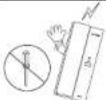 | As this device consists of precise electronic components, and high voltage is generated internally, do not attempt to disassemble. | ||
 | Do not drop indoor station, and avoid strong impact. | 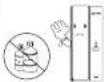 | When cleaning, never use wet hands, volatile benzene or paint thinner. |
 | Keep away from humidifier and stove. High temperature and humidity can cause malfunction. | (10022) | Maintain the product clear by frequently cleaning with soft cloths. |
Name of Each Part

How to operate (Instruction for operating)

Wiring Diagram

Wiring Diagram
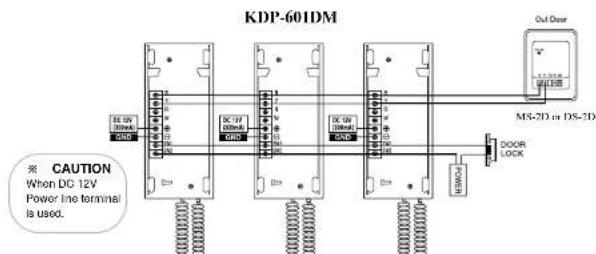
flowchart
graph TD
    A["DC 12V Power Line"] --> B["RS/DC"]
    B --> C["DC 7F/DC"]
    C --> D["RS/DC"]
    D --> E["DC 5N/DC"]
    E --> F["RS/DC"]
    F --> G["MS-2D or DS-2D Interface"]
    G --> H["OUT Door"]
    H --> I["DOOR LOCK"]
    style A fill:#f9f,stroke:#333
    style I fill:#ccf,stroke:#333
    note right of A: CAUTION When DC 12V Power line terminal is used.
Installation
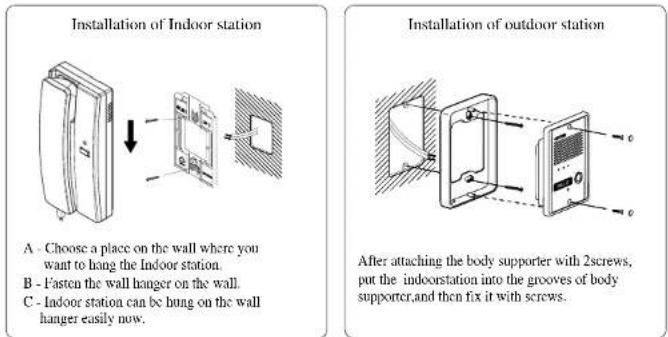
Specifications
| Description | KDP-601AM KDP-601DM | |
| Electric source | AC 220V(only) or 110V(only) BATTERY: DC 6V(4 Piece of 1.5V batteries)LINE TERMINAL: DC 12V / 300mA | |
| Consumption | Un load: 0.5W Inload: 3.3W Un load: 0.25mW Inload: 1.3W | |
| Signal Sound | Chime Chime | |
| Wiring | 2Wired polarity 2Wired polarity | |
| Range | 300m( 0.65mm) | 300m( 0.65mm) |
Component
● Master station for indoor-use ● Out door panel ● Wall hanger for master station

- KOCOM CO.,LTD.
- DOOR PHONE
- Warranty
- Cautions for Safety
- For safe use, please stick to the following cautions.
- About Symbol
- Symbols on Drawing
- Warnings
- Warnings for disposal
- Cautions
- Cautions for installation
- Cautions for Use
- Cautions for Repairs and Maintenance
- Cautions for Abnormality
- Safety Instructions, Warnings, and Cautions of Each System
- System for Multi-unit Housing
- Video Phone
- Home Auto: KHV-444/454/446/456
- 4-Line Related Products: KVM-604, 624, 524RG, 524G, 524GS, 520, KCV-346/356
- CCTV Camera
Brand : Syscom
Model : KDP-601-A1
Category : Intercom