KDP-601A1M - Intercom Syscom - Free user manual and instructions
Find the device manual for free KDP-601A1M Syscom in PDF.


Pick your language and provide your email: we'll send you a specifically translated version.
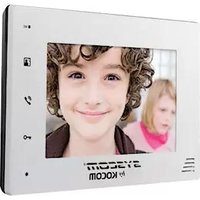
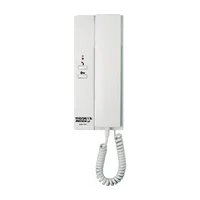
| Product Type | Wired Video Door Phone Intercom System |
| Brand | Syscom |
| Model | KDP-601A1M |
| Display | 7-inch TFT LCD color screen, 1024x600 resolution |
| Camera | Outdoor unit with 1/3-inch CMOS sensor, infrared night vision up to 5m |
| Audio | Full duplex speakerphone with echo cancellation |
| Wiring | 2-wire connection, plug-and-play |
| Power Supply | DC 12V, 1A (adapter included) |
| Dimensions (Monitor) | 200 x 130 x 20 mm |
| Dimensions (Door Station) | 130 x 90 x 30 mm |
| Weight (Monitor) | 0.45 kg |
| Weight (Door Station) | 0.3 kg |
| Main Functions | Video intercom, door unlock, motion detection, night vision, monitor recording (SD card up to 32GB) |
| Protection Rating (Door Station) | IP54 weatherproof |
| Operating Temperature | -10°C to 50°C |
| Mounting | Wall-mounted monitor and door station |
| Maintenance & Cleaning | Wipe with soft dry cloth; avoid water and solvents |
| Safety | CE and RoHS compliant; overcurrent protection |
| Spare Parts & Repairability | Contact Syscom authorized service center for spare parts; user-replaceable SD card |
| General Information | Package includes: monitor, door station, 2-wire cable, power adapter, mounting screws, user manual |
Frequently Asked Questions - KDP-601A1M Syscom
How do I install the Syscom KDP-601A1M intercom?
Installation involves mounting the door station outdoors and the monitor indoors. Connect them using the provided 2-wire cable. Ensure the power adapter is plugged into a 220V outlet. Detailed steps are in the user manual.
Can I connect multiple monitors to one door station?
This model supports only one monitor per door station. For multiple monitors, consider a multi-room kit.
How do I adjust the volume?
Press the volume up/down buttons on the side of the monitor during a call. The settings are saved automatically.
What SD card is compatible for recording?
Use a microSD card up to 32GB, formatted as FAT32. Insert into the slot on the monitor.
Why is the screen black?
Check the power connection and ensure the monitor is turned on. If the door station is not connected, the screen may remain off.
Can I unlock the door from the monitor?
Yes, press the unlock button on the monitor to release the door lock. The door station must be connected to a compatible electric lock.
Does the camera work at night?
Yes, the outdoor unit has infrared LEDs for night vision up to 5 meters.
How do I reset the device to factory settings?
Press and hold the reset button (small hole) on the monitor for 10 seconds using a paperclip. All settings will be cleared.
Is the door station weatherproof?
Yes, it has an IP54 rating, meaning it is protected against dust and water splashes.
What is the warranty period?
Syscom offers a 2-year warranty from the date of purchase. Keep your receipt for service.
User questions about KDP-601A1M Syscom
0 question about this device. Answer the ones you know or ask your own.
Ask a new question about this device
No questions yet. Be the first to ask one.
Download the instructions for your Intercom in PDF format for free! Find your manual KDP-601A1M - Syscom and take your electronic device back in hand. On this page are published all the documents necessary for the use of your device. KDP-601A1M by Syscom.
USER MANUAL KDP-601A1M Syscom

Manual assistant
Powered by Anthropic
Waiting for your message
Product information
Brand : Syscom
Model : KDP-601A1M
Category : Intercom