
FA7450 - Ventilateur domestique SUNBEAM - Free user manual and instructions
Find the device manual for free FA7450 SUNBEAM in PDF.


| Product Type | Domestic Fan |
| Brand | Sunbeam |
| Model | FA7450 |
| Dimensions (H x W x D) | Approx. 40 x 30 x 30 cm |
| Weight | 2.5 kg |
| Power Supply | 120V AC, 60Hz |
| Power Consumption | 45 W |
| Blade Diameter | 40 cm |
| Number of Speed Settings | 3 |
| Oscillation | Yes, 90° |
| Tilt Adjustment | Yes, manual |
| Fan Type | Pedestal Fan |
| Base Material | Plastic with weighted base |
| Motor Type | AC induction motor |
| Noise Level | Low to moderate |
| Grille Material | Steel with protective coating |
| Cleaning Instructions | Unplug, wipe with damp cloth, dry before use |
| Safety Certification | UL listed |
| Dust Filter | None |
| Remote Control | Not included |
| Repairability | Blades and motor replaceable |
| Spare Parts Available | Yes, via Sunbeam service centers |
| Warranty | 1 year limited warranty |
| Included Accessories | Fan unit, base, blade guard, screws |
Frequently Asked Questions - FA7450 SUNBEAM
User questions about FA7450 SUNBEAM
0 question about this device. Answer the ones you know or ask your own.
Ask a new question about this device
Download the instructions for your Ventilateur domestique in PDF format for free! Find your manual FA7450 - SUNBEAM and take your electronic device back in hand. On this page are published all the documents necessary for the use of your device. FA7450 by SUNBEAM.
USER MANUAL FA7450 SUNBEAM
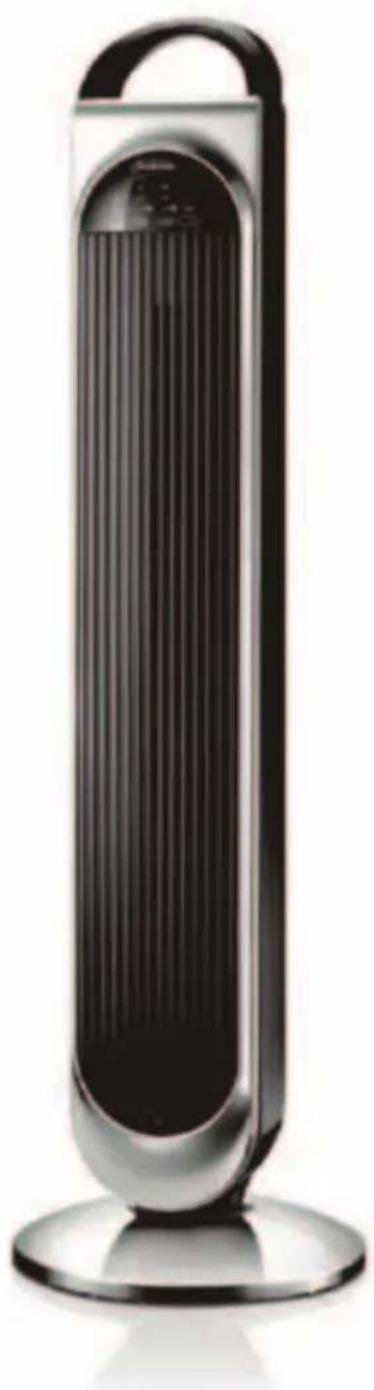
Sunbeam Tower Fan with Remote Control
Instruction Booklet FA7450 99cm Tower Fan
Please read these instructions carefully and retain for future reference.
natural_image
Black and white photo of a vertical electric fan with a curved handle and ventilation grille (no text or symbols visible)Contents
Sunbeams Safety Precautions 1
Safety Precautions For Your Tower Fan 2
Locating Your Tower Fan 3
Features of Your Tower Fan 4
Assembling Your Tower Fan 5
Remote Control 6
Using Your Tower Fan 7
Troubleshooting Guide 11
Care And Cleaning 11
Important instructions – retain for future use.
Sunbeam's Safety Precautions
Sunbeam is very safety conscious when designing and manufacturing consumer products, but it is essential that the product user also exercise care when using an electrical appliance. Listed below are important precautions for the safe use of an electrical appliance.
- Read carefully and save all the instructions provided with an appliance.
- Always turn the power off at the power outlet before you insert or remove a plug. Remove by grasping the plug - do not pull on the cord.
- Turn the power off and remove the plug when the appliance is not in use and before cleaning.
- Do not use your appliance with an extension cord unless this cord has been checked and tested by a qualified technician or service person.
- Always use your appliance from a power outlet of the voltage (A.C. only) marked on the appliance.
- This appliance is not intended for use by persons (including children) with reduced physical, sensory or mental capabilities, or lack of experience and knowledge, unless they have been given supervision or instruction concerning use of the appliance by a person responsible for their safety.
- Children should be supervised to ensure that they do not play with the appliance.
- The temperature of accessible surfaces may be high when the appliance is operating.
-
Never leave an appliance unattended while in use.
-
Do not use an appliance for any purpose other than its intended use.
- Do not place an appliance on or near a hot gas flame, electric element or on a heated oven.
- Do not place on top of any other appliance.
- Do not let the power cord of an appliance hang over the edge of a table or bench top or touch any hot surface.
- Do not operate any electrical appliance with a damaged cord or after the appliance has been damaged in any manner. If damage is suspected, return the appliance to the nearest Sunbeam Appointed Service Centre for examination, repair or adjustment.
- For additional protection, Sunbeam recommend the use of a residual current device (RCD) with a tripping current not exceeding 30mA in the electrical circuit supplying power to your appliances.
- Do not immerse the appliance in water or any other liquid unless recommended.
- Appliances are not intended to be operated by means of an external timer or separate remote control system.
- This appliance is intended to be used in household and similar applications such as: staff kitchen areas in shops, offices and other working environments; farm houses; by clients in hotels, motels and other residential type environments; bed and breakfast type environments.
If you have any concerns regarding the performance and use of your appliance, please visit www.sunbeam.com.au or contact the Sunbeam Consumer Service Line. Ensure the above safety precautions are understood.
Safety Precautions For Your Tower Fan
- Do not use outdoors.
- Do not run the cord of the fan under carpeting. Do not cover the cord with throw rugs, runners or other floor coverings. Arrange the cord away from traffic areas so that it will not be tripped over.
- Do not use this fan in the immediate surrounds of a bath, shower, laundry area or swimming pool.
- Be sure the fan is placed on a dry, even surface. Do not use on soft surfaces, such as beds, where opening may become blocked.
- Keep your fan away from heat sources, corrosive gases and avoid direct sunlight.
- This fan is only to be used with the base fitted and in good condition.
- Disconnect the power plug before dismantling, assembling or before cleaning.
-
Always unplug the fan when not in use for any long length of time.
-
The fan must not be used if the guards are damaged in any way.
- Do not insert or allow foreign objects to enter any ventilation or exhaust openings as this may cause electric shock or fire, or damage to the fan.
- Never insert fingers, pencils or any other objects through the guards whenever the power plug is connected, especially while running.
- Avoid touching mobile parts of the fan.
- Do not attempt to move your fan whilst it is operating. If your fan needs to be moved, please ensure that it is turned off and you use the carry handle on top of the tower.
- When scrapping the fan at the end of its useful life, follow local regulations.
Locating Your Tower Fan
- Always locate your fan on a level surface.
- Your tower fan should be located in a dry, cool, well ventilated location. Keep your fan away from heat sources, corrosive gases and avoid direct sunlight.
- Do not attempt to move your tower fan whilst it is operating. If your fan needs to be moved, please ensure that it is turned off and you use the carry handle on top of the fan.
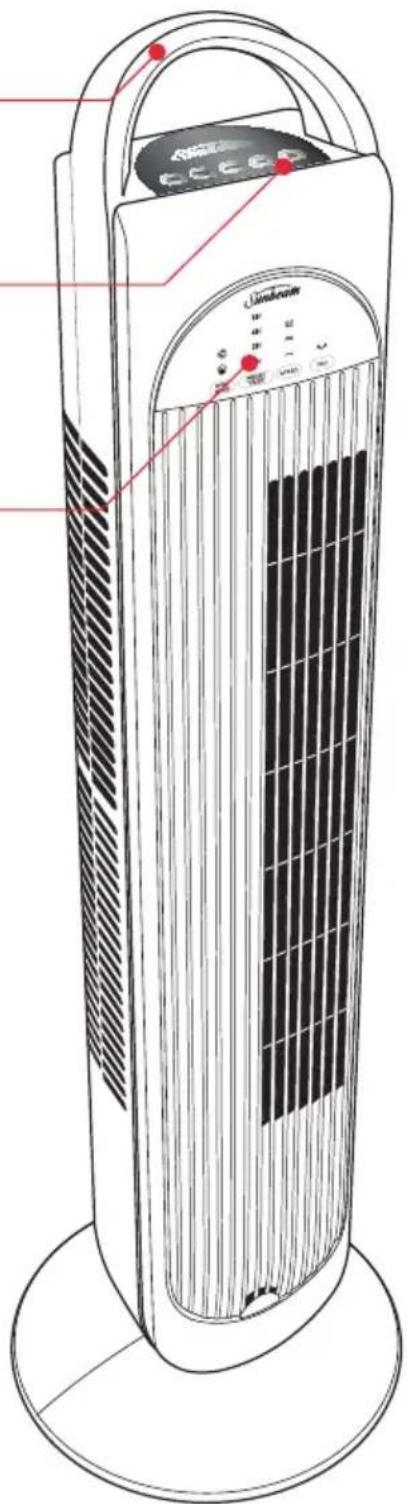
Features Of Your Sunbeam Tower Fan
Carry handle
Convenient carry handle allows you to easily carry your fan from room to room.
Control Panel
Simply press the on/off button to turn the unit on. Use the other buttons to select wind mode, timer, speed and oscillation functions.
Indication Panel
The indication panel allows you to quickly see which functions have been selected on your tower fan.
Assembling Your Tower Fan
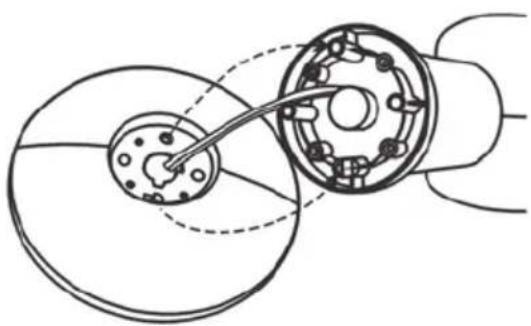
- Locate the two halves of the base.
- Remove the two butterfly screws from underneath the tower section of the fan and set aside.
- Feed the power cord between the two halves of the base. See Figure 1.
natural_image
Pure mechanical diagram showing a shaft and housing assembly without any text, numbers, or symbolsFigure 1
- Clip the two halves of the base together, ensuring the cord remains within the channel formed when the two halves come together.
- Place the two butterfly screws back into the holes they were removed from and firmly fasten. See Figure 2.
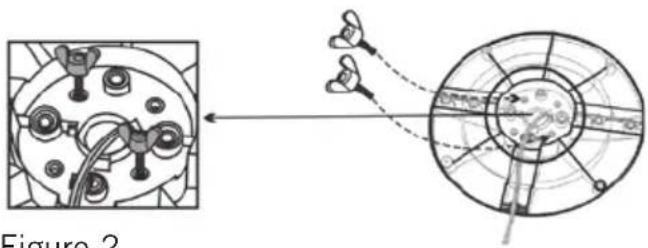
Figure 2
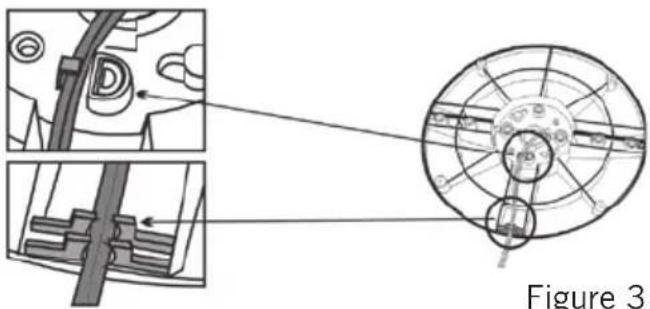
- Feed the power cord through the two guides on the bottom of the base; the cord will then come out through the outer rim.
- Insert the 4 silicon feet provided into the holes under the base.
- Stand the fan upright, it is now ready for use. See Figure 3.
natural_image
Technical diagram of a mechanical assembly with cross-sectional views and labeled component (Figure 3), no readable text or symbols present.Figure 3
Remote Control
Remote control
Operates within 8 metres of the Tower Fan.
Fan speed button
Choose from 3 speed settings, low medium or high.
Wind Mode
You have a choice of 2 Nature or Sleep airflow types.
When used in nature mode, the fan speed is randomly adjusted, giving the feeling of a natural breeze.
When set to Sleep Mode the fan speed decreases after 30 minutes from high to medium, then medium to low. When used with the timer, will ultimately switch the unit off.
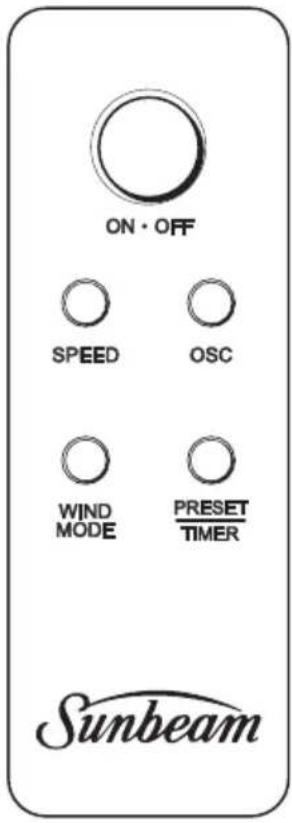
Oscillation
Your tower fan oscillates 70°, distributing cool air throughout the room.
Preset/Timer
The preset timer allows you to set your tower fan to turn on/off after 1,2,4 or 8 hours.
Using the remote control
- Point the remote towards the control panel on the front of the tower to operate.
Inserting or changing the batteries
- Slide the rear cover off the remote control unit.
- Insert the 2 AAA batteries provided with your tower fan.
- Replace the rear cover.
Using Your Tower Fan
- Place the fan on a level surface.
- Insert the plug into a 230/240V power outlet and turn the power on.
- Press the power button on/off.
- Press the fan speed button to select low, medium or high depending on your preference.
- To switch the fan off, simply press the power button on/off.
- If you will not be using the fan for a length of time, it is advisable to turn the power off at the wall socket and unplug the power cord.
Selecting a fan speed setting
Your Sunbeam tower fan has 3 speed settings as follows:
- low speed "
\~” light illuminates - medium speed "
≈” light illuminates - high speed "
≈” light illuminates
To select a fan speed, simply press the fan speed button on the tower or the remote. Each press of the button will increase the fan speed and then return back to the lowest speed again.
Using the oscillation function
The 70 degree oscillation function can be used on any setting.
- Turn the unit on and select any fan speed.
- Press the 'OSC' button on the tower or the remote. The fan will begin to oscillate from side to side.
To stop the fan from oscillating, simply press the 'OSC' button once again.
Using the preset timer
To set the Timer to turn off
- Press the on/off button.
- Press the Preset/Timer button, which automatically starts at 1 hour (1H). To change the time, press the Preset/Timer button until the desired time is 1, 2, 4 or 8H.
- To Turn off the timer, continue pressing the Preset/Timer button until there is no light illuminated.
Note: Alternatively, you can press the on/off switch to turn off the fan and turn back on again. This also disengages the timer function.
Using Your Tower Fan (continued)
To set the Timer to turn on
-
With the fan off, but on at the power outlet (Standby mode) continuously press the Preset/Timer button first to select the desired time.
-
You can also select the wind speed, wind mode and oscillation options once the preset time has been selected.
WIND MODES
Nature mode

Nature mode provides an extra level of comfort by simulating the natural rise and fall of the wind over time. You can use this mode on any fan speed setting.
To use Nature mode:
- Choose a fan speed.
- Press the button on either the tower or the remote until the light illuminates.
The fan will now vary its speed every few seconds between the chosen fan speed, each lower fan speed, and off. For example, if you set the fan speed to 2 (medium), the actual fan speed will alternate between 2, 1 and off. To cancel Nature mode, press the Wind mode button on either the tower or the remote until the light is no longer illuminated.
Sleep mode

Sleep mode is identical to Nature mode with the added advantage that the highest fan speed gradually decreases over time. This allows you to turn the fan on a high speed setting last thing at night, knowing that by the time you are asleep, the fan has switched itself down to a slower speed.
To use Sleep mode:
- Choose a fan speed.
- Press the Wind mode button on either the tower or the remote until Sleep mode is illuminated.
The fan will now operate in the same manner as with Nature mode, except that after 30 minutes, the maximum speed will decrease. Eventually in this mode, the fan switches down to 1 (low) speed, which alternates between 1 and off.
To cancel Sleep mode, Press the Wind mode button on either the tower or the remote until the light is no longer illuminated.
Troubleshooting Guide
If your tower fan fails to operate check the following:
- Make sure the electrical outlet or circuit breaker is working.
- Check for obstructions around the air intake grill.
If your remote control fails to operate check the following:
- Ensure that you point the remote towards the front of the fan.
- Check that the batteries are not worn. Replace if necessary.
Care and Cleaning
Ensure that your fan is switched off and disconnected from the power outlet before cleaning.
- Carefully wipe your fan using a clean cloth. Do not use abrasive cleaners or brushes to clean the appliance as these may scratch the surface.
- Take care that excessive dust does not build up in the air-intake and air-outlet grill, and clean it occasionally using a dry brush or vacuum cleaner.
- Store the fan in a cool dry place when not in use, in its original carton if possible.
Notes
2 Year Replacement Guarantee
In the unlikely event that this appliance develops any malfunction within 2 years of purchase (3 months commercial use) due to faulty materials or manufacture, we will replace it for you free of charge.
Should you experience any difficulties with your appliance, please phone our customer service line for advice on 1300 881 861 in Australia, or 0800 786 232 in New Zealand. Alternatively, you can send a written claim to Sunbeam at the address listed below. On receipt of your claim, Sunbeam will seek to resolve your difficulties or, if the appliance is defective, advise you on how to obtain a replacement or refund.
Your Sunbeam 2 Year Replacement Guarantee naturally does not cover misuse or negligent handling and normal wear and tear.
Similarly your 2 Year Replacement Guarantee does not cover freight or any other costs incurred in making a claim. Please retain your receipt as proof of purchase.
The benefits given to you by this guarantee are in addition to your other rights and remedies under any laws which relate to the appliance.
Our goods come with guarantees that cannot be excluded under the Australian Consumer Law and under the New Zealand Consumer Guarantees Act.
In Australia you are entitled to a replacement or refund for a major failure and for compensation for any other reasonably foreseeable loss or damage. You are also entitled to have the goods repaired or replaced if the goods fail to be of acceptable quality and the failure does not amount to a major failure.
Should your appliance require repair or service after the guarantee period, contact your nearest Sunbeam service centre.
For a complete list of Sunbeam's authorised service centres visit our website or call:
Australia
www.sunbeam.com.au
1300 881 861
Units 5 & 6, 13 Lord Street
Botany NSW 2019 Australia
New Zealand
www.sunbeam.co.nz
0800 786 232
26 Vestey Drive, Mt Wellington
Auckland, New Zealand
Need help with your appliance?
Contact our customer service team or visit our website for information and tips on getting the most from your appliance.
In Australia
Visit www.sunbeam.com.au
Or call 1300 881 861
In New Zealand
Visit www.sunbeam.co.nz
Or call 0800 786 232
is a registered trademark.
Made in China.
Due to minor changes in design or otherwise,
the product may differ from the one shown in this leaflet.
© Copyright. Sunbeam Corporation Limited 2008.
ABN 45 000 006 771
Units 5 & 6, 13 Lord Street
Botany NSW 2019 Australia
Unit 3, Building D
26 Vestey Drive
Mt Wellington Auckland
New Zealand
Sunbeam Corporation is a division of GUD Holdings Ltd.

- Sunbeam Tower Fan with Remote Control
- Contents
- Important instructions – retain for future use.
- Sunbeam's Safety Precautions
- Safety Precautions For Your Tower Fan
- Locating Your Tower Fan
- Features Of Your Sunbeam Tower Fan
- Carry handle
- Control Panel
- Indication Panel
- Assembling Your Tower Fan
- Remote Control
- Fan speed button
- Wind Mode
- Oscillation
- Preset/Timer
- Using the remote control
- Inserting or changing the batteries
- Using Your Tower Fan
- Selecting a fan speed setting
- Using the oscillation function
- Using the preset timer
- Using Your Tower Fan (continued)
- WIND MODES
- Nature mode
- Sleep mode
- Troubleshooting Guide
- If your tower fan fails to operate check the following:
- If your remote control fails to operate check the following:
- Care and Cleaning
- Notes
- Year Replacement Guarantee
- Australia
- New Zealand
- Need help with your appliance?
- In Australia
- In New Zealand
- is a registered trademark.
Brand : SUNBEAM
Model : FA7450
Category : Ventilateur domestique