
GP 405 - Laser MFP CANON - Free user manual and instructions
Find the device manual for free GP 405 CANON in PDF.


| Product type | Laser multifunction printer |
| Brand | Canon |
| Model | GP 405 |
| Functions | Printing, copying, scanning, faxing |
| Print resolution | 600 x 600 dpi |
| Print speed | Up to 20 pages per minute |
| Paper tray capacity | 500 sheets |
| Supported paper sizes | A3, A4, A5, envelopes |
| Connectivity | Parallel, network option |
| Dimensions (L x D x H) | 640 x 590 x 470 mm |
| Weight | 60 kg |
| Power supply | 230 V, 50/60 Hz |
| Power consumption (standby) | 15 W |
| Power consumption (printing) | 800 W |
| Noise level (operating) | 50 dB |
| Routine maintenance | Toner and drum replacement |
| Security | Control panel lock |
| Spare parts available | Toner, drum, maintenance kit |
| Repairability | Repairability score: 7.5 / 10 |
| Documentation | User manual in downloadable PDF |
Frequently Asked Questions - GP 405 CANON
User questions about GP 405 CANON
0 question about this device. Answer the ones you know or ask your own.
Ask a new question about this device
Download the instructions for your Laser MFP in PDF format for free! Find your manual GP 405 - CANON and take your electronic device back in hand. On this page are published all the documents necessary for the use of your device. GP 405 by CANON.
USER MANUAL GP 405 CANON
Easy and complete connectivity at a touch
Designed with a powerful, embedded network print controller, your digital copier is ready to be transformed into a fully operational network printer - instantly. Standard Ethernet and optional Token Ring connectivity, with fast processing speeds and extensive protocol support, provide high quality printing across all environments. To get you up and running in no time at all.
Effortless control and management
Canon's special NetSpot™ software ensures simple, straightforward configuration, monitoring and control of your GP via the network. Using the Web browser, you can check printer availability and all print jobs - right from your PC screen. With a Web Spooler, for easy print queue management. There are even mailboxes, with personal password protection, to ensure your confidential material is not mixed up with other output when sent to the printer.
Increasing overall speed and quality
Standard support for PCL® 5e and optional Adobe® PostScript® 3^TM printing provides faster performance, improved quality and an extended font set (139 Type 1 and 3 fonts and 45 True Type fonts). At the same time, Continuous Print™ and RIP-While-Print™ technologies optimize your overall printing capabilities and ensure continuous throughput, while also eliminating engine cycle-down time.
Full finishing from your desktop
With its fast printing speed, the GP system easily outperforms conventional printers. But to really boost productivity it also supports all the copier features - from a high capacity paper supply to limitless duplexing and state-of-the-art finishing. See jobs go straight from your PC screen to prepared material that's ready to distribute. Whether stapled reports, folded brochures or bound booklets.
Benefit from complete network control
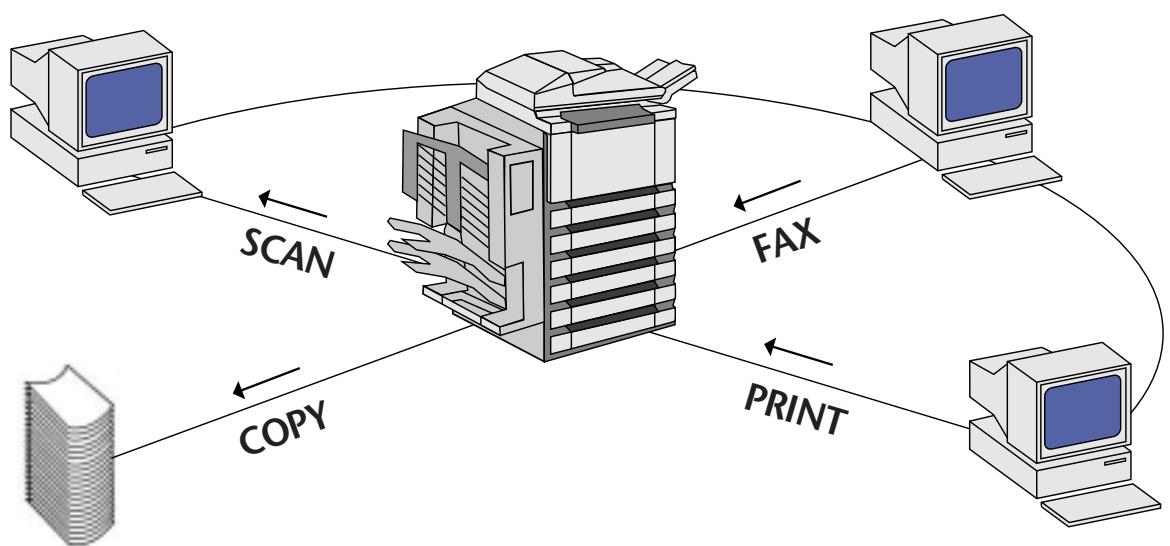
Your GP 285, 335 or 405 is the perfect system for complete document management, on the network. With easy and seamless connection and desktop control, for fast, flexible printing. Plus high speed, high quality faxing. All in one unit.

Your high-speed Super G3 Fax
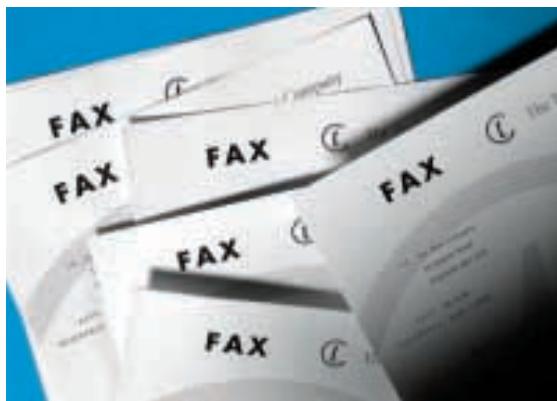
Use your GP system as a fast, flexible, plain paper fax without equal. Super G3 drastically reduces sending time, not just per page but between pages and at the start and end of transmission - to slash communications costs. With A3 stream-feed versatility and sending from books. Other advantages include duplexing for sending and receiving, productive dual access operation, a fax directory with 200 addresses and a PC/Fax capacity for sending direct from your computer.
Outstanding fax quality at all times
Send crisp, clear faxes with a 400 dpi resolution and receive perfect fax print outs at a high, interpolated 600 dpi resolution. Also, with new JBIG compression support, sending complex graphics or photographs is no longer a problem. Transmit high quality image data at high speeds - to improve quality, while saving time and money. Canon technology also automatically ensures clearer transmission and reception for all text and images - with sharp, jagged edges smoothed out.
Complete multifunctional convenience
What if you want to copy material while the GP is faxing or printing? Thanks to the machine's versatility, it's possible to carry out multiple tasks at the same time. A priority service lets you determine which are the most urgent jobs, while dedicated trays allow you to sort output by function - without any mix ups. The end result is productivity taken to perfection.
Scan in images instantly
Add photographs and images to your work, to bring it to life. Scanning is easily available via the SCSI port, with the GP system. For that special, creative touch. Canon has long been an industry leader in high quality copying, printing, faxing and scanning technologies. Now you can benefit from all this expertise, in one high-performance digital system - that's far more economical and efficient than stand-alone units.
- Fast printing at 40 (GP 405) or 33 (GP 335) or 28 (GP 285) pages per minute
- Easy network connectivity
- Complete desktop control
Supports all copier finishing functions also when printing
Super G3 Fax communication
JBIG image compression - Practical scanner option
- Multifunctional convenience
Fast printing and faxing direct from your desktop
Turn your digital GP 285, 335 or 405 copier into a highly productive printing and faxing system ... and see productivity go right through the roof! Enjoy easy and smooth connectivity, with seamless network printing. Control and manage all jobs direct from your PC screen. Fax data-heavy documents, fast and efficiently. With one compact, high performance, multifunctional machine.
Type: Desktop type
Copying system: Laser dry electrostatic transfer system
Platen: Fixed
Acceptable originals: Sheets, books and three dimensional objects up to 2kg maximum original size: A3
Copy sizes: Cassette: A5 to A3
Manual: A6 (postcard) to A3
Resolution: 600 × 600 dpi, 256 tones, 1,200 × 600 dpi interpolated resolution
Zoom: 25% - 800% in 1% increments
First copy time: Less than 6 seconds
Warm-up time: Less than 81 seconds
Multiple copies: 1-999
Dimensions (W x D x H): 602 mm x 720 mm x 539 mm
Weight: Approx. 83.4kg
Power consumption: 1.5kW or less
Fixing system: Heat Roller System
Paper: Cassette: 80g / m^2
Stack bypass: 128g / m^2
Input Paper capacity: Dual cassettes (500 sheets each)
Stack bypass (50 sheets)
Duplex: Standard (stackless)
Image Memory: 32 MB (96 MB maximum)
Speed: GP 285
28 ppm/A4, 20 ppm/A3, 28 ppm/A5
GP335
33 ppm/A4, 20 ppm/A3, 33 ppm/A5
GP 405
40 ppm/A4, 20 ppm/A3, 40 ppm/A5
OPTIONS:
DADF-A1 (50 sheets/A4) · DADF-B1 (30 sheets/A4)
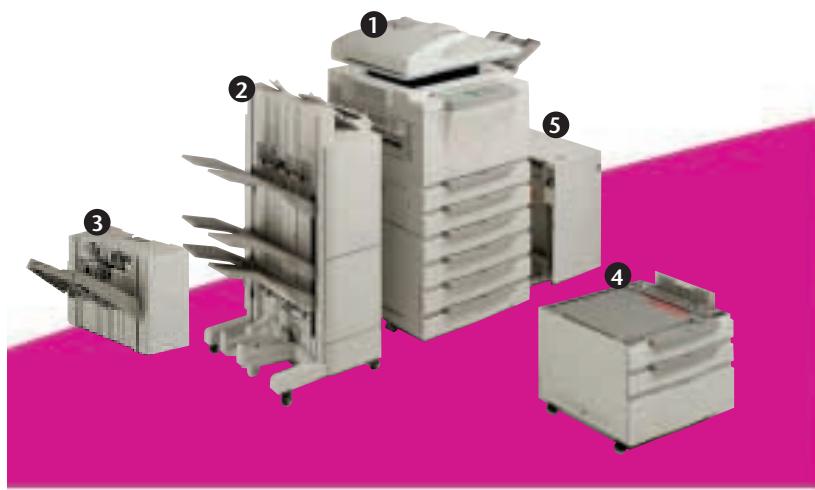
- Finisher-C1 (1,500 sheets A4) ② Saddle Finisher-C2 (1,500 sheets A4 + Saddle Stitch Unit) ③ Finisher-E1 (1,000 sheets A4)
- Multi Output Tray 3-D1 (300 sheets A4) · Pedestal ④ Cassette Feeding Unit-S1 (2 x 500 sheets) · Cassette Feeding Unit-R1 (4 x 500 sheets) ⑤ Paper Deck-B1 (3,500 sheets/A4) · Control Card V
FAX FEATURES:
- Group 3 (support for Super G3) - Modem speed: 33,600 bps
- JBIG image compression - Resolution: up to 400 dpi (256 grey levels) - Image mode: Standard, Fine, Super Fine, Ultra Fine
- Memory: 32 MB up to 96 MB (shared memory) - Paper size: A5 to A3 - Duplex: yes, both sending and receiving - Memory features: Delayed Transaction (5 Time settings/216 destinations), Batch sending, Polling, Relay Broadcast, Confidential Mailbox (70 mailboxes), Memory Lock - Dialling Features: Regular dialing (120 digits per number), Re-dialing (1-15 times), One touch speed dialing (60 one touch buttons), Coded speed dialing (140 destinations), Group dialing (199 different groups)
PRINTER FEATURES:
- CPU: MIPS R5000, 200 MHz • RAM: 32 MB DIMM (maximum 64 MB) • Hard Disk: 2.1 GB • Resolution: 600 dpi (1,200 x 600 dpi with smoothing), 256 Grey levels • Speed: 28/33/40 ppm • Duplex printing: yes • Paper size: up to A3 • PDL: PCL® 5e, optional Adobe® PostScript® 3^TM • Printer Interfaces: Bi-Centronics Parallel
- Network Interfaces: 10Base-T, 100Base-T, 10Base-5 (10Base-2 and Token Ring - optional) • Supported Protocols: TCP/IP, IPX/SPX, EtherTalk • Printer Drivers: Windows® 95/98, Windows® NT 4.0, Macintosh
SCANNER FEATURES:
- Interface: SCSI - Resolution: 150 dpi-2,400 dpi, 256 Grey levels
- RAM: 10 MB • Scanning area: up to A3 • Drivers: TWAIN, ISIS
^TM All company and/or product names are trademarks and/or registered trademarks of their respective manufacturers in their markets and/or countries.
Canon reserves the right to change specifications without notice.
Canon

Conservation Partner
Canon Europa NV is a Corporate Sponsor of WWF
© 1986, WWF-World Wide Fund For Nature (formerly World Wildlife Fund)
Canon Inc.
30-2, Shimomaruiko 3-Chome, Ohta-ku,
Tokyo 146-8501, Japan
Europe, Africa and Middle East
Canon Europa N.V.
P.O.Box 2262,1180 EG Amstelveen,
the Netherlands
www.canon-europa.com
- Easy and complete connectivity at a touch
- Effortless control and management
- Increasing overall speed and quality
- Full finishing from your desktop
- Benefit from complete network control
- Your high-speed Super G3 Fax
- Outstanding fax quality at all times
- Complete multifunctional convenience
- Scan in images instantly
- Fast printing and faxing direct from your desktop
- OPTIONS:
- FAX FEATURES:
- PRINTER FEATURES:
- SCANNER FEATURES:
Brand : CANON
Model : GP 405
Category : Laser MFP