
COLORPASS ZIMAGERUNNER ADVANCE 6055I - Laser MFP CANON - Free user manual and instructions
Find the device manual for free COLORPASS ZIMAGERUNNER ADVANCE 6055I CANON in PDF.


| Product type | Color laser multifunction printer |
| Brand | Canon |
| Model | ColorPASS Z ImageRUNNER ADVANCE 6055I |
| Main functions | Print, copy, scan, fax |
| Print speed | Up to 55 pages per minute (A4) |
| Print resolution | 1200 x 1200 dpi |
| Supported paper sizes | A4, A3, SRA3, envelopes, labels |
| Standard paper capacity | 3,300 sheets (main tray + multipurpose tray) |
| Connectivity | Ethernet 10/100/1000 Base-T, USB 2.0, optional Wi-Fi |
| Touchscreen | 10.1-inch color screen |
| Dimensions (W x D x H) | 670 x 710 x 930 mm |
| Weight | Approximately 150 kg |
| Power supply | 220-240 V, 50/60 Hz |
| Maximum power consumption | Approximately 1,800 W |
| Power consumption in standby | Approximately 100 W |
| Noise level (printing) | Approximately 58 dB(A) |
| Maintenance and cleaning | Clean the scanner glass and rollers regularly with a soft, dry cloth. Use only Canon-recommended consumables. |
| Security | Programmable auto-off, administrator settings lock |
| Spare parts and repairability | Toner cartridges, drums, fuser unit, maintenance kits available. Repairability index: 7/10 (estimated) |
| General information | Manual available for free download in PDF format. Languages: French, English, and others upon request. |
Frequently Asked Questions - COLORPASS ZIMAGERUNNER ADVANCE 6055I CANON
User questions about COLORPASS ZIMAGERUNNER ADVANCE 6055I CANON
0 question about this device. Answer the ones you know or ask your own.
Ask a new question about this device
Download the instructions for your Laser MFP in PDF format for free! Find your manual COLORPASS ZIMAGERUNNER ADVANCE 6055I - CANON and take your electronic device back in hand. On this page are published all the documents necessary for the use of your device. COLORPASS ZIMAGERUNNER ADVANCE 6055I by CANON.
USER MANUAL COLORPASS ZIMAGERUNNER ADVANCE 6055I CANON
natural_image
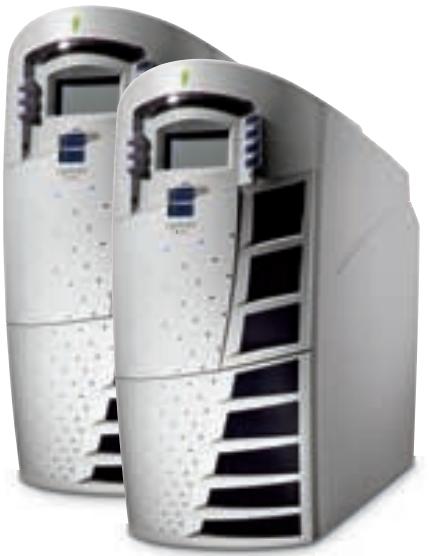
Front view of a white server rack with ventilation grilles and control panel (no visible text or symbols)The high performance ColorPASS colour servers are designed to offer professional colour quality together with productivity enhancing tools and seamless network connectivity.
natural_image
Two white serverless equipment units with ventilation grilles and control panels, no visible text or symbols.COLORPASS Z6000
For outstanding performance and exceptional colour quality in a variety of on-demand print environments, count on Canon's ColorPASS Z6000. From corporate departments and print service providers, to graphic arts studios, the ColorPASS Z6000 has the power to perform. The ColorPASS Z6000 is compatible with the CLC4000 only.
COLORPASS Z7000
High-volume on-demand production environments need the quality and performance of the ColorPASS Z7000 to achieve maximum throughput. For design firms, corporate reprographics departments (CRD's) and commercial printers, the ColorPASS Z7000 delivers the power to perform the most demanding colour print jobs with speed, ease and precision. The ColorPASS Z7000 is compatible with the CLC4000 and CLC5100.
FIERY SYSTEM 5.5 SOFTWARE
Fiery System 5.5 software is suitable for a variety of on-demand printing environments. It gives mid-range print environments the flexibility to expand by including variable data printing capabilities. Intensive production print environments require software in which they operate — Fiery System 5.5 meets their requirements with workflow enhancement and management tools, such as full imposition capability, document editing and assembly. It includes powerful applications for colour management, networking, scanning and remote job management. Fiery System 5.5 makes it even easier to create, print, scan and manage your print jobs.
System Features
COMMAND WORKSTATION™ 4
For expert level print workflow control, EFI offers Command WorkStation 4. Designed to centralise print job management, Command WorkStation 4 makes managing the most hectic workflows easy. It automatically identifies Fiery servers on your network and offers new customisation options so you can choose the most efficient way to display information about connected Fiery servers. The Command WorkStation 4 sets the standard for efficiently managing and manipulating digital print jobs.
COMMAND WORKSTATION™ 4 LE FOR MACINTOSH OS
The Canon ColorPASS Z6000 and Z7000 now offer greater job management flexibility with Command WorkStation 4 LE for Macintosh environments. This new application gives Macintosh design firms and print shops access to a variety of Command WorkStation functions and can be downloaded and installed using Fiery WebTools™ or the Fiery User Software CD.
COLORWISE®
ColorWise ^® colour management software adds flexibility and features to help achieve the highest quality colour possible on output devices and accurately simulate the output of other colour devices. Designed for extensibility, ColorWise allows you to add custom and future colour profiles.
VARIABLE DATA PRINTING SUPPORT
The Canon ColorPASS Z6000 and Z7000 provide the industry-leading platform for fast variable data printing. Choose any authoring tool and create static and variable elements with flexible and open, end-to-end variable data solution. This solution is compatible with the most comprehensive array of VDP languages, including Fiery FreeForm, PPML and a host of proprietary languages. In addition, we offer the VDP Resource Manager, a utility for Windows and Macintosh computers that enables you to manage global objects stored in the Fiery servers.
\*FIERY DOCBUILDER™ PRO™
The Fiery DocBuilder Pro application is the industry's first server-based imposition application based on Adobe System's Portable Document Format (PDF). With DocBuilder Pro, you can edit and assemble entire documents before RIPping the files. The improvements in DocBuilder Pro include increased page layout accuracy and support for mixed page sizes, late editing and enhanced templates. *Included with ColorPASS Z7000 only. Is available as an option with ColorPASS Z6000
System Utilities
FIERY SCAN™
Fiery Scan incorporates the Fiery controller as a key element of network and distribution scanning. Scans can be initiated remotely or at the Fiery and stored on a local hard drive. You can then distribute the scans via FTP, Internet fax, or email to any email account around the world, download the file directly to the Fiery Hold queue to build documents and save the scanned file directly to a PC. Scans can also be retrieved via the Fiery WebTools™ utility, local Fiery interface or TWAIN plug-in.
FIERY WEBTOOLS
Administer the Fiery server and print jobs conveniently through any Java-enabled browser, such as Microsoft Internet Explorer or Netscape Communicator. With Fiery WebTools, you can view the current status of jobs and among other activities, install print drivers and utilities from workstations.
FIERY NETWISE™
Accelerate setup and connect seamlessly on all popular network environments with Fiery NetWise. To the standard Ethernet connection, Fiery NetWise adds Web connectivity for printing via the Internet. NetWise also offers the ability to perform many administrative tasks through email, such as submitting jobs to different Fiery servers, canceling them, and sending scanned images to remote locations.
MIXED MEDIA SUPPORT
Assemble documents with different paper media in a single print job. Canon's mixed media support allows you to specify different media types which can be applied to an individual page or range of pages. This enables you to define media type and paper source for defined paper ranges.
System Options
VELOCITY™
Velocity Workflow Solutions are flexible, scalable and integrate seamlessly with the printing process while managing up to 12 printers. Velocity provides building blocks that let you add functionality when and where you need it. Start with the essentials – manage multiple engines and balance jobs across them, or split black-and-white pages from colour within the same document. Velocity workflow software is flexible; additional printers can be supported as business needs grow. A selection of Velocity modules allows you to enhance functionality with software for document building, colour and black-and-white production scanning, and job cost estimation.
PRINTSHOP MAIL
Graphics professionals can still utilise their favourite applications and platforms when creating VDP masters and use a powerful application such as PrintShop Mail to integrate design and database functionality by simply dragging and dropping database fields. With full integration of PrintShop Mail and Fiery FreeForm technology, which offers a unique and unprecedented option with this package.
FIERY GRAPHIC ARTS PACKAGE
Developed to address the specific requirements of graphic arts professionals, the Fiery Graphic Arts Package is a comprehensive set of tools to achieve consistently accurate colour and print quality. It lets you adhere to industry standards and simulate the characteristics of other output processes, while providing conveniences to enhance workflow.
natural_image
Interior view of a modern glass building with exposed ceiling and overhead lighting (no visible text or symbols)Specifications
ColorPASS Z6000
CLC's Supported: CLC4000
Hardware
| ·Intel Single Pentium IV @ 2.0Ghz |
| ·512 MB (PC133) |
| ·60 GB Hard Drive |
| ·400 MHz system bus(Front Side Bus) |
| ·512k L2 cache |
| ·CD-Rom Drive |
Additional Hardware /Software
| ·Graphic Arts Software Kit* |
| ·DocBuilder Pro* |
| ·FACI Kit* |
| ·Printshop Mail* |
| ·VelocityTM* |
| * Available as an option only |
ColorPASS Z7000
CLC's Supported: CLC4000 and CLC5100
Hardware
| ·Intel Dual Pentium IV @ 2.4Ghz |
| ·512 MB (PC133) |
| ·120 GB Hard Drive |
| ·533 MHz system bus(Front Side Bus) |
| ·512k L2 cache |
| ·CD-Rom Drive |
Additional Hardware /Software
| ·Graphic Arts Software Kit* |
| ·DocBuilder Pro |
| ·FACI Kit* |
| ·PrintShop Mail* |
| ·VelocityTM* |
| * Available as an option only |
Other Specifications:
Document Printing Features
| • RIP-While-Print® |
| • Continuous PrintTM |
| • Electronic Collation |
| • Reverse Order Printing |
| • Thumbnail and Full Screen Preview |
| • Job Merging/Editing |
| • Slip Sheeting |
| • Mixed Media |
| • Duplexing |
| • Sorting |
| • Stapling |
| • Nagel Finishing Support |
| • DocBuilder ProTM v.2.2 with PitStop** |
Networking Features
| NetWise Version 3 |
| Windows Support |
| Mac OSX & 9 Support |
| Auto-switching protocols: |
| EtherTalk® II |
| TCP/IP |
| Novell® IPX |
| Autosensing Ports |
| RJ45 for on-board10/100/1000 Base-Tand 10/100 Base-T |
| Peer-to-Peer Windows® Printing |
| Automatic IP Configuration |
| IPP Support |
| Port 9100 Support |
| Netware 6 Compliant (NDPS, PnP, Gateway) |
Mac Compatible
Colour Management Features
| ·ColorWise Version 3 |
| ·AutoCal Version 2 |
| ·ColorCal |
| ·ColorWise Pro Tools: |
| ·Calibrator/ES-1000 /X-Rite DTP 32/41 - easier calibration |
| ·Colour Editor -customizing curves |
| ·Profile Manager -supporting ICC profiles |
| ·Colour Setup -default colour settings |
| ·AutoGray |
| ·Post RIP Calibration |
| ·Independent RGB, PANTONE and CMYK controls |
| ·ICC Profile Support |
| ·RGB Level 1 File Conversion to Level 2 |
| ·RGB Separation |
| ·Quick Press Simulation |
| ·Full Press Simulation |
| ·PANTONE Spot Colour Management |
| ·Automatic Black Overprinting |
| ·Pure Black Text & Graphics |
| ·Colour Charts& Reference Pages |
| ·Grey Component Replacement Control |
| ·Colour Rendering Dictionarie |
| ·Photo |
| ·Presentation |
| ·Absolute Colourimetric |
| ·Relative Colourimetric |
Workflow Management Features
| • Command WorkStation 4 |
| • Fiery FreeForm |
| • Fiery FreeForm 2 |
| • PPML Enabled |
| • Power Form Driver Selection |
| • VDP Resource Manager |
| • Archiving – ColorPASS (int. HDD/Network) |
| • Load Balancing |
| • Fiery Web Tools |
| • Fiery Spooler |
| • Fiery Downloader |
| • Fiery Scan |
| • Scan to Mailbox |
| • Scan multiple pages with ADF |
| • Scan to hold queue |
| • Scan to email |
| • Job Log |
| • Fiery Driver 2 |
| • Member Printing |
| • Tray alignment |
| • Custom Page Sizes |
| • Tag Bit Support |
| • Velocity Compliant |
Page Descriptions & Language/Fonts
| • Adobe® PostScript® 3TM |
| • PDF 1.5 |
| • PPML |
| • VPS |
| • TIFF |
| • 136 Standard Fonts |
Memory Management
| • ECT Compression |
| Power Supply & Consumption | · Autoswitching 90-135/180-265Vac, · 47-63Hz 6A @ 115Vac; 3A @ 230Vac |
Dimensions
** Included with ColorPASS Z7000 only. Is available as an option with ColorPASS Z6000.
Electronics For Imaging, EFI, the EFI logo, Fiery, the Fiery logo, Fiery Driven, the Fiery Driven logo, ColorWise and RIP-While-Print are registered trademarks with the U.S. patent and Trademark Office, and certain other foreign jurisdictions. Fiery Prints, Fiery Z4, Fiery X4, Fiery ZX, Fiery LX, Fiery SI, Fiery XJ, Fiery XJE, Fiery XJ-W, BookletMaker, Fiery Downloader, Fiery Scan, Fiery Spooler, Fiery Link, Fiery Driver, RIPChips, WebTools, WebSpooler, WebInstaller, WebStatus Command WorkStation, Continuous Print, DocBuilder, EFICOLOR, EICOLOR Works, FreeForm, Memory Multiplier, NetWise, STARR Compression, PowerWise and Welcome to the Revolution are trademarks of Electronics For Imaging, Inc.
All other terms and product names may be trademarks or registered trademarks of their respective owners and are hereby acknowledged.
^™ All company and/or product names are trademarks and/or registered trademarks of their respective manufacturers in their markets and/or countries.
Canon reserves the right to change specifications without notice.
J152.08.03_UK
you can
Canon

Canon Europa NV Conservation Partner

Canon Inc.
30-2, Shimomaruko 3-Chome, Ohta-ku
Tokyo 146-8501, Japan
www.canon.com
Europe, Africa and Middle East
Canon Europa N.V.
P.O. Box 2262, 1180 EG Amstelveen,
the Netherlands
www.canon-europe.com
English Edition
© Canon Europa N.V., 2004 (0504)
- COLORPASS Z6000
- COLORPASS Z7000
- FIERY SYSTEM 5.5 SOFTWARE
- System Features
- COMMAND WORKSTATION™ 4
- COMMAND WORKSTATION™ 4 LE FOR MACINTOSH OS
- COLORWISE®
- VARIABLE DATA PRINTING SUPPORT
- \*FIERY DOCBUILDER™ PRO™
- System Utilities
- FIERY SCAN™
- FIERY WEBTOOLS
- FIERY NETWISE™
- MIXED MEDIA SUPPORT
- System Options
- VELOCITY™
- PRINTSHOP MAIL
- FIERY GRAPHIC ARTS PACKAGE
- Specifications
- Other Specifications:
- Canon Inc.
- Canon Europa N.V.
Brand : CANON
Model : COLORPASS ZIMAGERUNNER ADVANCE 6055I
Category : Laser MFP