VidBeam - Projector Videotel Digital - Free user manual and instructions
Find the device manual for free VidBeam Videotel Digital in PDF.


| Product Type | Directional Parametric Speaker |
| Brand | Videotel Digital |
| Model | VidBeam (Black/White) |
| Dimensions | 170 × 70 × 40 mm |
| Weight | 350 g |
| Power Requirements | 12V DC, 2A (adapter input 100-240V AC 50/60Hz) |
| Audio Inputs | 3.5 mm AUX, Bluetooth (name: Audfly-XXXXXX) |
| Max SPL | 78 ± 3 dB @ 1m / 2kHz |
| Directivity | < 15° (-20 dB) |
| Frequency Range | 2402-2480 MHz (Bluetooth) |
| Input Sensitivity | 1 Vrms |
| Max Input | 2.8 Vpp |
| Operating Temperature | -15°C to 45°C |
| Operating Humidity | 0-90% |
| Indicator LED | Green (power on); Blinking (overheat) |
| Accessories Included | Tripod, 3.5 mm audio cable (1.5 m), power adapter |
| Sound Technology | Patented DSP processing with ultrasonic beam |
| Bluetooth Range | Up to 5 meters |
| Recommended Listening Distance | At least 1 meter |
| Warranty | 1 year against defects in materials and workmanship |
| Safety Notes | Do not remove protective sleeve; avoid water; use only supplied adapter; professional installation recommended |
| Spare Parts & Repairability | No user-serviceable parts; contact Videotel Digital (619-670-4412) for service |
| FCC Compliance | Part 15 Class B; minimum 20 cm distance from body |
Frequently Asked Questions - VidBeam Videotel Digital
User questions about VidBeam Videotel Digital
0 question about this device. Answer the ones you know or ask your own.
Ask a new question about this device
Download the instructions for your Projector in PDF format for free! Find your manual VidBeam - Videotel Digital and take your electronic device back in hand. On this page are published all the documents necessary for the use of your device. VidBeam by Videotel Digital.
USER MANUAL VidBeam Videotel Digital
4.1 Operation of VidBeam 4
4.2 Play Audio and Volume Adjustment 5
4.3 Audio Playback Distance 5
4.4 Application Solutions 5
5.Trouble Shooting 7
5.1 The Indicator Led and Fault Investigation 7
5.2 Small Voice or even No Sound 7
6.Warranty Clause 8
6.1 Warranty Scope 8
6.2 Access to Warranty Services 8
6.3 Disclaimer 9
- Contact Information 11
1. Important Safety Notes
- Please read the manual before operating the equipment.
- Please comply with the instruction.
- Please keep the instruction manual carefully reserved.
- Switch off the power before connecting the device.
- Be sure to use the power supply socket that meets the power requirements.
● Make sure use the assigned amplifier and power adapter. - Please unplug the plug when the weather is bad or you don't use it for a long time.
- Please keep the air vents unobstructed.
- Avoid over-heat or humid working condition.
● The equipment is only used in room at room temperature. - Don't trample or knead the power cord, especially the plug and the connection between the power line and the equipment.
- Please don't remove the protective sleeve to prevent electric shock.
- Any user can't repair the parts inside the equipment.
- Note: Do not operate the equipment when the front grille of the sound panel is lost.
● The front grille of the sound panel should be kept free of foreign body. - Don't spill water or other liquid onto the device.
- The installation of the equipment should be operated by the professional.
NOTE: Without the permission of the manufacturer or quality inspector, any modification or disassembly of the equipment is strictly forbidden.
2. Product Description
- What is a VidBeam Directional Speaker? A speaker that people only hear when standing directly in front of it. Used for marketing or instructional purposes when someone walks by, parametric speakers use ultrasonic frequencies, which are extremely directional but are beyond human hearing. Whereas a typical speaker pushes air, parametric speakers generate an audible signal by modulating the air outside of the speaker cabinet, which confines itself to the narrow geography of the ultrasonic beam. The higher the ultrasonic frequencies used, the narrower the beam.
- VidBeam directional speaker adopts the patented DSP processing technology, acting like a flashlight, it delivers the sound precisely pointed to the target listeners but not affecting others. It is perfect solution to create audio zone and effective in the high noise ambient environments. The following table shows highlights and business value of Videotel Digital products.
| Technical Highlights | Business Value |
| Minimal sized | Suited for various applications.Easy installation with different support frames. |
| Super directional | Sound delivery in a specific zone.Noninterference to neighboring circumstance.Lower acoustic attenuation, longer delivery distance.Reduced acoustic pollution. |
| High reflection | Virtual sound source effect. |
| Dual channels | Stereo sound effect. |
| Patented DSP Tech | High fidelity and bandwidth for various applications. |
- Technical Specifications
| Product Model | VidBeam - Black VidBeam - White | |
| Max SPL | 78±3dB@1m/2KHz | 78±3dB@1m/2KHz |
| Directivity | <15° (-20dB) | <15° (-20dB) |
| Input sensitivity | 1Vrms | 1Vrms |
| Max input | 2.8Vpp | 2.8Vpp |
| Frequency range | 2402-2480MHz | 2402-2480MHz |
| Audio inputs | 3.5mm AUX/Bluetooth | 3.5mm AUX/Bluetooth |
| Control | LINE IN | LINE IN |
| Indicator | Power status | Power status |
| Power requirement | 12V DC/2A | 12V DC/2A |
| Temperature range | -15° -45°C | -15° -45°C |
| Operation humidity | 0-90% | 0-90% |
| Size | 170x70x40mm | 170x70x40mm |
| Weight | 350g | 350g |
| Accessories | Tripod | Tripod |
| Color | Black | Black |
| Amplifier | / | / |
| Adapter | (input)100-240Vac 50/60Hz(output)12V DC/2A | (input)100-240Vac 50/60Hz(output)12V DC/2A |
| Audio cable | 3.5mm Dual channel audio cable(1.5m) | 3.5mm Dual channel audio cable(1.5m) |
| Wireframe |  |  |
4. Operation
4.1 Operation of VidBeam
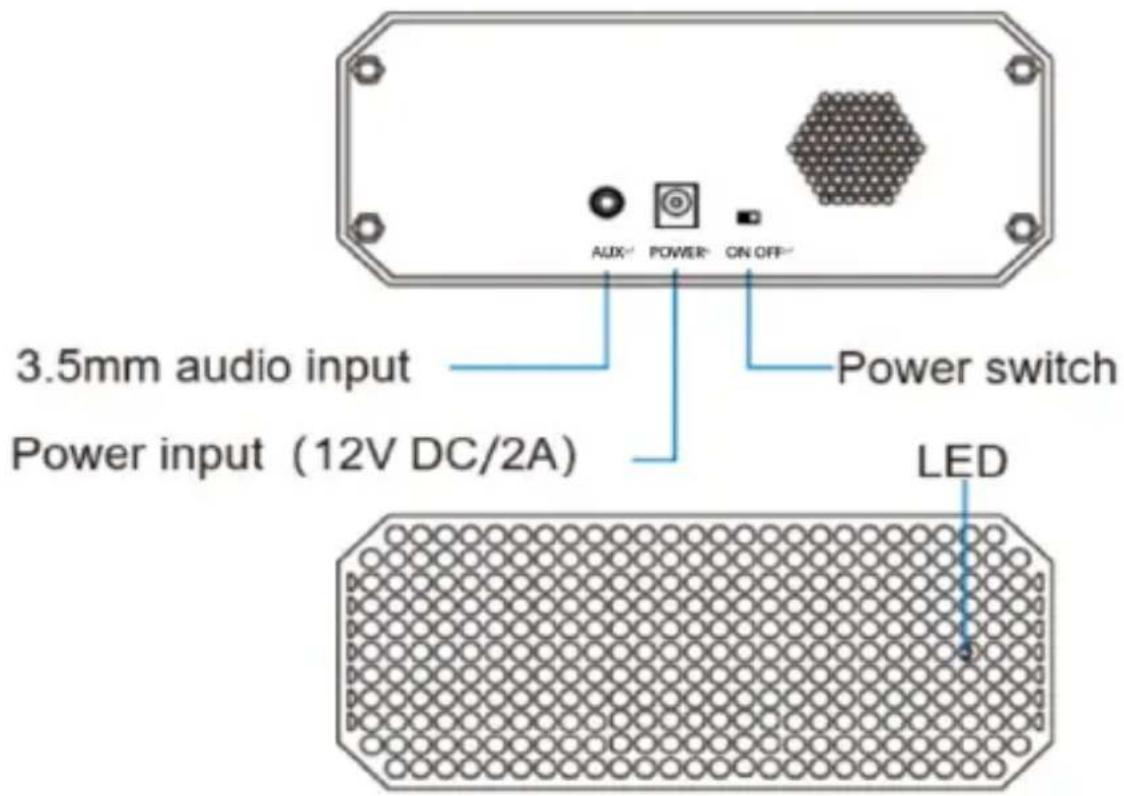
As shown in above pictures:
① Preparation: Make sure the power switch is in OFF status before you connect the power source. As shown in the above picture, "ON" means to open the power supply, and "OFF" means to disconnect the power.
② Powe supply: First connect the 12V/2A DC power source to the speaker, then connect the power adapter to a 120V AC socket.
③ Audio cable connection: Connect one end of the 3.5mm audio cable to the audio input socket of the speaker, and connect the other end to an audio player, such as a mobile phone, PC, MP3 or TV, etc.
NOTE: This product has bluetooth function, so it can be connected to the audio player through bluetooth, the name of the bluetooth is Audfly-XXXXXX, the effective connection distance is 5 meters.
④Turn on the power switch: After the power switch is switched on, the LED
power indicator is always on and the color of the indicator light is green.
NOTE: The amplifier needs 3 seconds for startup before normal working.
4.2 Play Audio and Volume Adjustment
Volume can be controlled by the audio source device, such as the mobile phone, computer, MP3 or TV.
4.3 Audio Playback Distance
Videotel Digital parametric speakers having high directivity can achieve precise source location, and the sound source can be reflected through the surface of the object. To achieve the best sound quality, we suggest you to keep at least 1 meter from the speaker when playing and setting up the volume.
Note: Please keep at least 1 meter from the speaker to achieve the best hearing effect.
4.4 Application Solutions
Videotel Digital can leverage reflective surfaces to act like a virtual audio source as shown in the following picture, if the listener is not in the area of sound beam, it feels like the hard surface is producing the sound. This is especially obvious when the sound is delivered to a glass or a wall.
You can use this to make a virtual audio source or a surrounded sound experience. Sometimes you need absorptive materials to avoid unwanted sound reflections.
VidBeam sound source
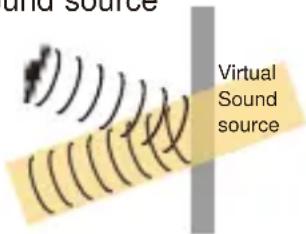
Schematic diagram of reflected virtual sound
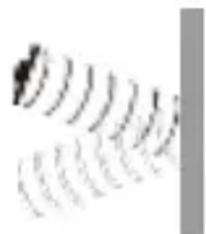
natural_image
Abstract pattern of repeating wave-like lines with no text or symbolsSchematic diagram of sound absorbing material inhibiting reflection
VidBeam can control the sound within a certain range of transmission and do not disturb other people. The position and angle of speakers can be adjusted according to the actual needs of users.
Due to the high directivity, an VidBeam parametric speaker has a much narrower sound beam than traditional speakers, by which we can provide an effective solution to reduce noise pollution. Following are practical application solutions:
- Sound isolation, play in the specified area, the audio can be controlled, the sound source are not influenced by each other.
- Clear sound and loud enough to hear comfortably in a long distance. Immersive listening experience.
- Commercial projects like museum, art gallery, library, trade show, meeting room, digital signage, media advertising, retailer store, etc.
- Consumer usage for automobile,home.
NOTE: The customer is responsible for selecting the correct installation location and installation hardware to ensure that The VidBeam is properly installed and safe. Equipment installation and suspension must be operated by the professional. Unstable installation may cause serious damage and damage to the equipment.
5. Trouble Shooting
5.1 The Indicator Led and Fault Investigation
- Indication led is not on, make sure the power adapter properly connected and working on.
- The led twinkles every two seconds, and then off for one second, it shows the amplifier is with high temperature, please turn down the volume or turn off it for a break.
5.2 Small voice or even no sound
- Make sure the signal source is correctly connected.
- Make sure the speaker pointed to the target area.
- Make sure the power adapter is plugged in and the LED glows green.
- Check the amplifier, make sure it is properly connected and turned on.
- Make sure the audio cables are in good condition.
- Try to change a position or angel for speaker to get best sound effect.
6. Warranty Clause
6.1 Warranty Scope
The warranty liability of Videotel Digital, is limited to the terms listed below:
Videotel Digital provides a one-year guarantee for the defects of the hardware products in the material and work quality from the original purchase date.
If there is a defect, Videotel Digital will provide quality assurance services based on the actual situation:
① Use the new or refurbished replacement parts to repair the product for free ;
② Replace original products with new equivalent functional products.
Replacement or repaired products continue the remaining warranty period of the original product. When the products or parts are replaced, any replacement will become your property, and the replaced object becomes the property of Videotel Digital.
6.2 Access to Warranty Services
Please call customer service department (619) 670-4412. If the product is not purchased directly from our company, please contact the authorized agent, authorized dealer or authorized installation company at the time of purchase. When the product is returned to the warranty, the secondary damage occurred in the transportation process is assumed by the customer, and the customer claims to the carrier company by himself.
Videotel Digitalwill choose a reasonable way to return the repaired products to you, the resulting freight is borne by Videotel Digital. If the product is not purchased directly from our company, please contact the authorized agent, authorized dealer, authorized installation company to understand the corresponding transportation and service terms.
When the product needs to be repaired, please provide: name, company name, address, work phone, product model, mailbox, date of purchase, as well as detailed description of the product defects
6.3 Disclaimer
The quality assurance of Videotel Digital does not apply to the loss or damage caused by the following actions:
- Improper installation or not strictly installing according to the instructions of Videotel Digital.
- Operation not in accordance with the product maintenance instructions or website instructions of Videotel Digital.
- The product usage exceeds its rated capacity or parameter setting.
- Modifying or maintaining products without authorization by Videotel Digital, authorized agent, authorized dealer and authorized installation company.
- Force majeure, including but not limited to: riots, wars, acts of public enemies, terrorist activities, floods, fires, earthquakes, intentional destruction and other natural disasters.
- Any law or regulation shall be applicable to the product, unless the laws and regulations come into force after the delivery of the product.
- Abuse of products, misuse of products, improper operation, improper maintenance, arbitrary modification or accidents.
- Improper use of voltage.
- Installation of fittings, replacement parts, accessories or other equipment without authorization by Videotel Digital, authorized agent, authorized dealer and authorized installation company.
- The products are not purchased directly from Videotel Digital, authorized agents, authorized distributors and authorized installation companies.
- The customer does not follow the standard operating procedures or instructions of Videotel Digital and does not provide suitable use environment.
- Users must comply with the relevant laws and policies of the state, safeguard the interests of the state, the protection of national security, shall not use the Focusound directional speaker to the publication, dissemination and storage in violation of national laws and endanger national security, national unity and social stability in the content, or insult, slander, pornography, violence, any violation of national laws and regulations the contents of the policy or engage in any such event. All the responsibilities caused by the user's violation of the laws, regulations and policies of the State shall be fully taken by the users, and have nothing to do with Focusound directional speaker and Videotel Digital. Leading to losses to the Focusound directional speaker and Videotel Digital, Videotel Digital has the right to claim compensation from the user, and has the right to immediately stop providing services and retain relevant records, in order to cooperate with the judicial organs of the right to pursue legal liability.
7. Contact Information
Videotel Digital
681 Anita Street Suite #104
Chula Vista, CA 91911
619-670-4412
www.videoteldigital.com
FCC Statement
Any Changes or modifications not expressly approved by the party responsible for compliance could void the user's authority to operate the equipment.
This device complies with part 15 of the FCC Rules. Operation is subject to the following two conditions:
(1) This device may not cause harmful interference, and
(2)This device must accept any interference received, including interference that may cause undesired operation.
FCC Radiation Exposure Statement:
This equipment complies with FCC radiation exposure limits set forth for an uncontrolled environment. This equipment should be installed and operated with minimum distance 20cm between the radiator& your body.
Note : This equipment has been tested and found to comply with the limits for a Class B digital device, pursuant to part 15 of the FCC Rules. These limits are designed to provide reasonable protection against harmful interference in a residential installation. This equipment generates, uses and can radiate radio frequency energy and, if not installed and used in accordance with the instructions, may cause harmful interference to radio communications. However, there is no guarantee that interference will not occur in a particular installation. If this equipment does cause harmful interference to radio or television reception, which can be determined by turning the equipment off and on, the user is encouraged to try to correct the interference by one or more of the following measures:
—Reorient or relocate the receiving antenna.
—Increase the separation between the equipment and receiver.
—Connect the equipment into an outlet on a circuit different from that to which the receiver is connected.
—Consult the dealer or an experienced radio/TV technician for help.
- Important Safety Notes
- Product Description
- Operation
- Operation of VidBeam
- Play Audio and Volume Adjustment
- Audio Playback Distance
- Application Solutions
- Trouble Shooting
- The Indicator Led and Fault Investigation
- Small voice or even no sound
- Warranty Clause
- Warranty Scope
- Access to Warranty Services
- Disclaimer
- Contact Information
- FCC Statement
- FCC Radiation Exposure Statement:
Brand : Videotel Digital
Model : VidBeam
Category : Projector