
RF Push - Remote control Videotel Digital - Free user manual and instructions
Find the device manual for free RF Push Videotel Digital in PDF.


| Product Type | RF Remote Control System for Interactive Players |
| Model | RF Push |
| Brand | Videotel Digital |
| Box Contents | 1 IPM+, 1 RF Remote Control, 1 Foot Black Control Cable |
| Compatible Players | VP71, VP71XD, VP71XD 4K, VP90, HD2700D, HD2700M |
| Connection | I/O port via included control cable |
| Power Supply | 5VDC jack (required only for LED harnesses drawing >1A) |
| Operation Mode | Instant or Delayed (configurable on player) |
| Programming | RF LINK Program button; press and hold to enter programming mode |
| Remote Buttons | Each button corresponds to a track number (e.g., button 1 plays 001) |
| Standby Video | Must be named 000 and loop; placed on SD/USB |
| Multiple Remotes | Yes, duplicate videos with different track numbers |
| Media Source | SD card or USB drive |
| Video Formats | Compatible with player formats (not specified) |
| Indicators | LEDs show programming status (001, 002, etc.) |
| Instant Mode Behavior | New video immediately interrupts current playback |
| Delayed Mode Behavior | Ignores triggers until current video finishes, then loops standby |
| Reprogramming | Press and hold RF LINK until LED flashes, then assign remotes |
| File Naming | Videos must be named 000.mov, 001.mov, 002.mov, etc. |
| Dimensions | Not specified; compact size typical for RF modules |
| Weight | Not specified; lightweight |
| Manufacturer Contact | 681 Anita Street Suite 104, Chula Vista, CA 91911; (800) 878-4056 |
| Manual Languages | English (PDF available) |
| Warranty | Not specified; contact manufacturer |
Frequently Asked Questions - RF Push Videotel Digital
User questions about RF Push Videotel Digital
0 question about this device. Answer the ones you know or ask your own.
Ask a new question about this device
Download the instructions for your Remote control in PDF format for free! Find your manual RF Push - Videotel Digital and take your electronic device back in hand. On this page are published all the documents necessary for the use of your device. RF Push by Videotel Digital.
USER MANUAL RF Push Videotel Digital
What is in the box
1 -IPM+
1 - RF Remote Control
1 - 1 Foot Black Control Cable
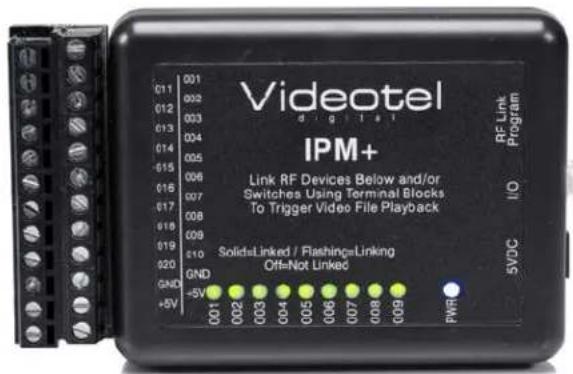
(6)
Connections
The IPM+ can connect to the I/O port of any of our interactive players (VP71, VP71XD, VP71XD 4K (1), VP90, HD2700D and HD2700M). The included remote has been pre programmed and linked to the IPM+.
Each button represents a "track" number. Pressing button 1 (2) will play the video or photo that begins with 001 (3). Button 3 will play video 003. When loading files on your SD or USB (4) make sure you have a looping "Standby" video that starts with 000. This can be a black video, logo or some type of attract screen.
| (4) Any SD / USB | ||||
| Name | ^ | Date Modified | Size | Kind |
| 000.mov | Dec 30, 2013 at 5:10 PM | 242.2 MB | QT movie | |
| 001.mov (3) | May 21, 2014 at 2:58 PM | 76 MB | QT movie | |
| 002.mov | May 21, 2014 at 3:08 PM | 83.6 MB | QT movie | |
| 003.mov | May 21, 2014 at 3:18 PM | 80 MB | QT movie | |
Simply connect the IPM+ to the I/O port (5) of your interactive player using the included cable. Next, connect the player to your TV, insert your SD / USB and power on the player. Note: The IPM+ has a 5VDC jack but is only required when connecting a harness with LEDs requiring more than 1 AMP of current.
The player can be set to interactive "Instant" and "Delayed"... Instant is recommended for the IPM+.
- Instant mode will trigger a different video even if the first video has not finished playing. For example: If button 2 is pressed, video 002.mov will begin playing. If button 3 is pressed, then video 002.mov will stop and video 003.mov will instantly play.
- Delayed mode will ignore any additional button triggers until the 1st video is finished playing. For example: If button 2 is pressed, video 002.mov will begin playing, play once and then loop the 000.mov video again. If button 3 is pressed during video 002.mov, the request will be ignored
To reprogram the IPM+, simply press and hold the "RF LINK Program" button (6) on the side of the IPM+. Once the 001 LED flashes you can release the button. The 1st button you press on the remote will be assigned to video 001. The 001 LED will then stop flashing and 002 will flash. Once you have programmed all of the buttons you plan to use (do not program the buttons not assigned to a video) then press and hold the "RF LINK Program" button again until the LED stops flashing.
You can use multiple remotes on the same IPM+. Lets say you want 2 remotes to both trigger videos 001 to 004. You would duplicate your 001, 002, 003 and 004 on your computer and rename them 005, 006, 007 and 008. Then load all 9 videos (000-008) on the SD/USB. Use the above programming instructions but after you program the 1st 4 buttons of the 1st remote, program the first 4 buttons of the second remote. Even though remote #2 will trigger video 005 when button 1 is pressed... you will still get the same video, since 001 and 005 are the same videos.

681 Anita Street Suite 104 - Chula Vista, CA 91911
(800) 878-4056 - (619) 670-4412
www.videoteldigital.com - sales@videoteldigital.com
Brand : Videotel Digital
Model : RF Push
Category : Remote control