HD2600 - Uncategorized Videotel Digital - Free user manual and instructions
Find the device manual for free HD2600 Videotel Digital in PDF.


| Product Type | Industrial DVD Player |
| Model | HD2600XD |
| Brand | Videotel Digital |
| Power Supply | 12VDC Wall Plug (external) |
| Video Outputs | Composite (RCA), Component (RCA), HDMI |
| Audio Outputs | Stereo RCA Left/Right, Digital Audio Out |
| Playback Modes | Title Mode (auto play largest title), All Mode (auto play all titles), Manual Mode |
| Repeat Options | Chapter, Title, All, Off |
| Remote Control | IR Remote with full function buttons |
| Front Panel Controls | Power, Eject, Mode select |
| LED Indicators | Green (power on), Red (standby) |
| Disc Loading | Front slot-load DVD drive |
| Warranty | 2 years from invoice date |
| Firmware Update | Via USB port (behind back panel) |
| External Control | Compatible with IPM control board for dry contact switches |
| Safety Features | Polarized plug, grounding lug, do not expose to rain or moisture |
| Cleaning | Dry cloth only; damp cloth with water if needed |
| Operating Modes | Continuous 24/7/365 play with auto repeat |
| Accessories Included | Power supply, IR remote, video/audio cables (composite, HDMI, component, digital audio) |
Frequently Asked Questions - HD2600 Videotel Digital
User questions about HD2600 Videotel Digital
0 question about this device. Answer the ones you know or ask your own.
Ask a new question about this device
Download the instructions for your Uncategorized in PDF format for free! Find your manual HD2600 - Videotel Digital and take your electronic device back in hand. On this page are published all the documents necessary for the use of your device. HD2600 by Videotel Digital.
USER MANUAL HD2600 Videotel Digital
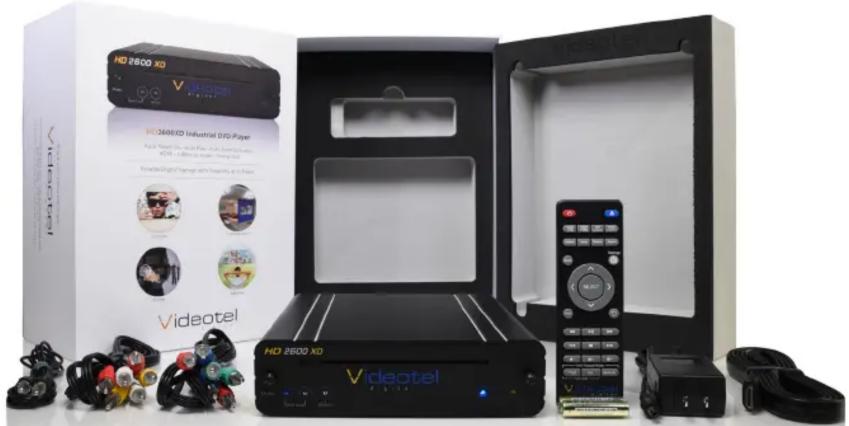
1 - HD2600XD Industrial DVD Player
1 - Power Supply (12VDC Wall Plug)
1 - HD2600XD IR Remote
1 - 5' Video/Audio Cable
1 - 5' HDMI Cable
1 - 5' Component Video Cable
1 - 5' Digital Audio Cable
natural_image
Product display of a Videotel 2600 XO HD 2600 XO industrial DVD player with accessories and control panels (no visible text or symbols on main components)IMPORTANT SAFETY INSTRUCTIONS - HD2600XD SERIES INDUSTRIAL DVD PLAYER
Please thoroughly read these operating instructions listed below. After you have finished reading, store these instructions in a safe place for future reference.
- Read these instructions.
- Keep these instructions.
- Heed all warnings.
- Follow all instructions.
- Do not use this apparatus near water.
- Clean only with a dry cloth. A cloth damped with water may be used if needed.
- Do not block any ventilation openings. Install in accordance with the manufacturer's instructions.
- Do not install near any heat sources such as radiators, heat registers, stoves, or other apparatus (including amplifiers) that produce heat.
-
Do not defeat the safety purpose of the polarized or grounding-type plug. A polarized plug has two blades with one wider than the other. A grounding type plug has two blades and a third grounding prong. The wide blade or the third prong is provided for your safety. If the provided plug does not fit into your outlet, consult an electrician for replacement of the obsolete outlet.
-
Protect the power cord from being walked on or pinched particularly at plugs, convenience receptacles, and the point where they exit from the apparatus.
-
Only use attachments/accessories specified by the manufacturer.
-
Unplug this apparatus during lightning storms or when unused for long periods of time.
-
"WARNING: To reduce the risk of fire or electric shock, do not expose this apparatus to rain or moisture." "This apparatus shall not be exposed to dripping or splashing and or objects filled with liquids, such as vases shall not be placed on the apparatus"
-
Refer all servicing to qualified service personnel. Servicing is required when the apparatus has been damaged in any way, such as power-supply cord or plug is damaged, liquid has been spilled or objects have fallen into the apparatus, the apparatus has been exposed to rain or moisture, does not operate normally, or has been dropped.
Player is not intended to be in direct contact with patient.
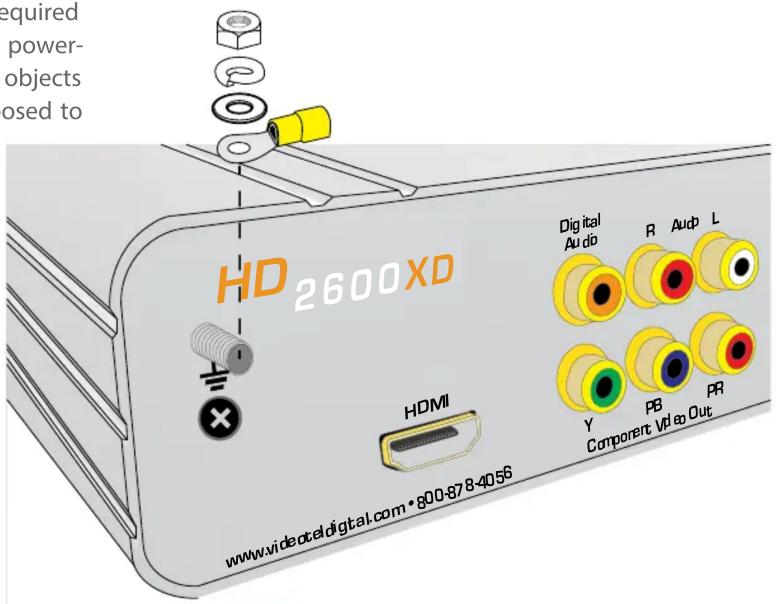
When grounding of the accessible metal parts is required, a separate grounding lead is to be used.
To ground the HD2600XD use a crimp type ring terminal and secure it to the grounding lug located on the back left side of the player. Secure the terminal with the included washer, lock washer and nut.
Additional information is provided on the bottom of the unit
Quick Guide: Plug & Play Operation
The HD2600XD connects to any screen/TV monitor and is pre-programmed to operate for rugged continuous play. "Title" mode (6) provides the functionality to auto start, auto play, and auto repeat the DVD's largest title. Simply load DVD/disc in front drive slot (7). Once the DVD/Disc is loaded in the slot drive, allow just 15 seconds to load, play and display DVD/content. The HD2600XD is immediately operable for continuous 24/7/365 play and auto repeat. The HD2600XD offers 2 additional modes. Select mode by pressing the Mode button on either the front side of player (8) or from the HD2600XD IR remote buttons labeled "Title" (31), "All" (32) or "Manual" (33). Once a mode button is pressed the player it restart the DVD from the beginning.
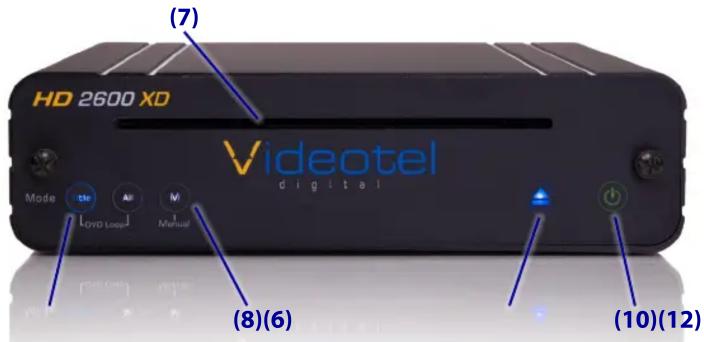
- Title Mode (31) - Auto start, Auto Play, Auto repeats largest title of the DVD/disc
- All Mode (32) - Auto start, Auto Play, Auto repeat all titles of the DVD/disc
- Manual Mode (33) - Standard (Manual DVD off the shelf operation)
Power and DVD/disc indicator lights
By pressing Power button (9) on the HD2600XD IR remote, the HD2600XD will power off and illuminate a solid red light. Pressing the Power button again (9) on the HD2600XD IR Remote will power up the HD2600XD and illuminate a solid green light (10).
Using the power button (10) on the front of the HD2600XD will toggle the status from "ON" (green light) (10) to "OFF" (red light).
IR Remote Control
The HD2600XD IR Remote is utilized for initial set up and basic operation.
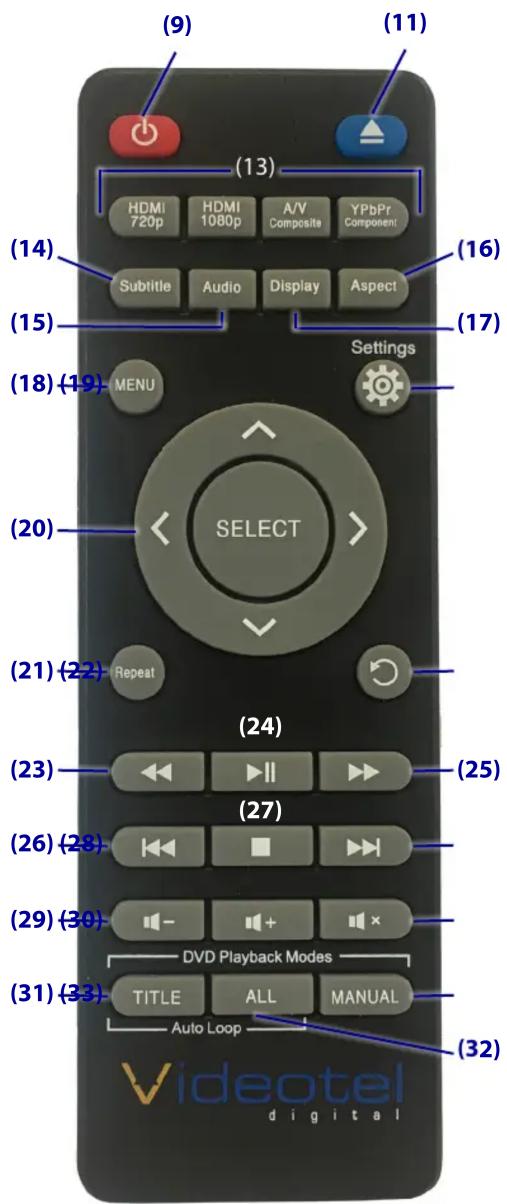
(11) Eject - Use the remote or the button on the player (12) to eject the DVD
(13) Video Output Buttons - Since the HD2600XD outputs all video sources at the same time these buttons are disabled
(14) Subtitle - Press to scroll through available subtitle languages (if applicable)
(15) Audio - Press to scroll through available audio language options (if applicable)
(16) Display - Displays the current title time elapsed and title remaining time
(17) Aspect - Rotates through various zoom in/out options
(18) Menu - Launches root menu of DVD.
(19) Settings - Access HD2600XD menu options and operation. SEE PAGE 2
(20) Arrows / Enter - Control HD2600XD settings menu and DVD/disc menu options
(21) Repeat - Allows for various types of repeat options. Each button press scrolls through either Chapter repeat / Title repeat / All (entire disc repeat) / Off
(22) Return - Returns to the previous menu option
(23) Rewind - Each button press increases the rewind speed as follows 2x / 4x / 8x / 16x / 32x / then back to play.
(24) Play/Pause - Plays and pauses DVD/disc with each button press
(25) Fast Forward - Each button press increases fast forward speed as follows 2x / 4x / 8x / 16x / 32x / and then back to play.
(26) Chapter Back - Advance backwards through chapters (current title only) at last chapter, play will stop or start again at chapter 1, (depending on disc format)
(27) Stop - Stops DVD/disc and launches default splash screen
(28) Chapter Forward - Advances forward through chapters (current DVD/disc title only). At last chapter play will stop or start at 1 again (dependent on DVD/disc format)
(29) Volume Up/Down - Adjusts output volume of the player. Note: Ejecting DVD/disc sets player back into stand by mode. Volume defaults to 20 (1/2 way).
(30) Mute - Mutes all the audio from the HD2600XD
Connections:
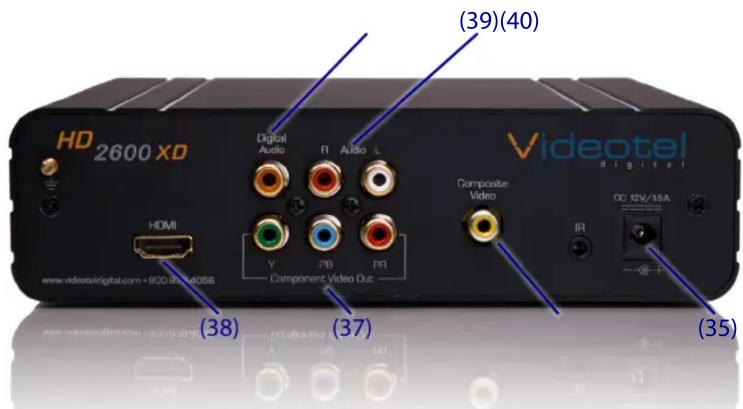
The HD2600XD external power supply significantly reduces any heat inside the player. Simply connect the enclosed power supply to the 12V jack (35) on the back of the player and twist it slightly to lock it in place.
Connect the DVD player to your TV or monitor. The HD2600XD includes 3 available video output options. Composite video (36) - single yellow RCA jack, Component Video (37) - 3 RCA jacks (red/green/blue) located in the middle rear of the player and an HDMI jack (38). All 3 connections can be utilized at the same time for installations that require connection to 3 TV's concurrently without an external splitter.
The HD2600XD includes 3 audio outputs. Right and Left stereo audio out (39) and digital audio out (40).
Menu Setup
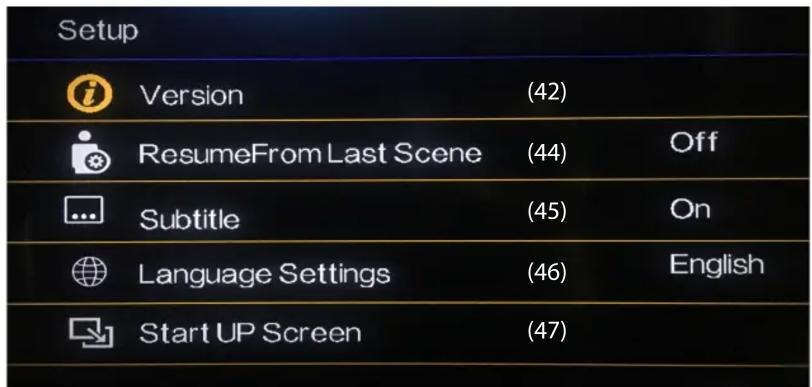
The HD2600XD is designed as a reliable auto play industrial DVD player with little to no programming or set up required. The Settings menu offers a few changeable options. Simply press the "Settings" button (19) on the remote to access the options.
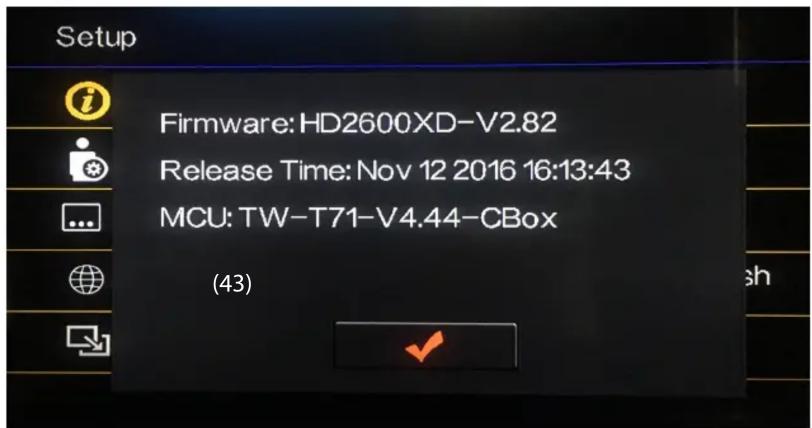
(42) Version - Displays the current firmware version of the HD2600XD. By pressing "SELECT" (20) the loaded firmware and release date will appear (43). Press the return button (22) to go back to the main menu.
(44) Resume From Last Scene - When "Off", the DVD will begin playback from the beginning of the disc. When "On" the DVD will begin playback from the last scene playing before power loss or disc ejection.
(45) Subtitle - When "On", subtitles (closed caption) will appear on the screen during playback. By default subtitle language 1 is selected. To select a different language use the "Subtitle" button (14) on the remote. When "Off", subtitles will not appear during playback.
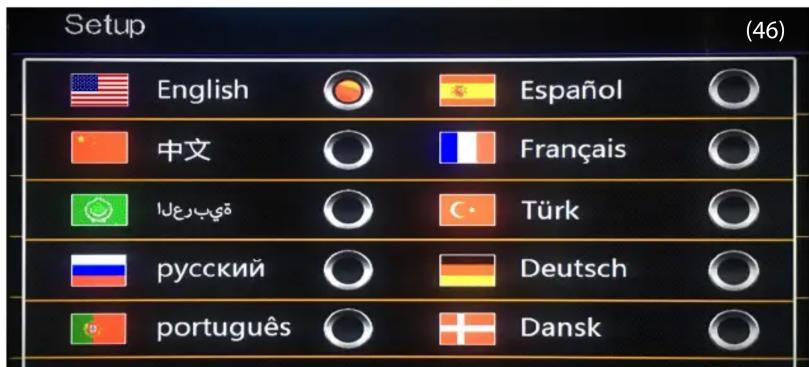
(46) Language Settings - This option allows the user to change the language of the "Setup" menu.
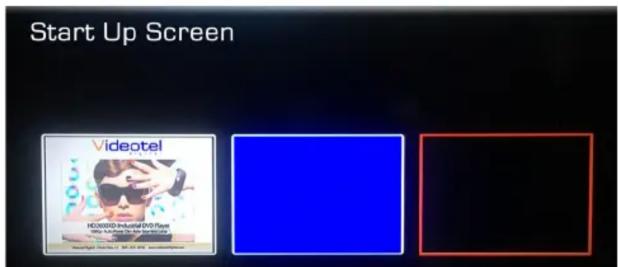
(47) Start Up Screen - This option allows the user to change start up screen. The start up screen displays when no disc is inserted and for a few seconds after power loss before DVD playback begins. Available options are: The default Videotel screen, solid blue screen and solid black screen.
Troubleshooting
Question: I have the HD2600XD in Title mode but its only playing a menu or looping a preview/behind the scenes video.
Answer: Each DVD is authored according to the studios unique specifications. No 2 DVDs are alike and each offers distinct formatting and programming. The HD2600XD will auto start and auto loop the main title in 97% of all DVDs. In the rare instance that the player does not auto start or auto loop, All or Manual mode will need to be used.
Question: I have the HD2600XD in All mode but its playing the previews and behind the scenes videos first and then the main feature.
Answer: The HD2600XD uses unique algorithms to determine the main feature of each DVD. Unfortunately some studios implemented steps to force playback of previews before the main title. If you wish to play all the videos on the DVD but you want the main feature to play first please use Manual mode.
Question: I am using Manual mode, how do I set auto repeat?
Answer: Simply navigate the main menu to begin playback of the desired portion of the DVD (main title, behind the scenes or alternate chapters). Once the video has begun playing we suggest waiting approximately 1 minute before pressing the Repeat button (21) on the remote. The repeat button will cycle through 4 repeat options...
T - Title repeat (The main title of the DVD will play and loop)
All - Repeat All (all the video files on the DVD play and loop)
1 - Chapter repeat (The current chapter being played will loop)
Off - No repeat (The DVD will continue to play and function as the author intended. The movie may loop by itself or it may return to the main menu.)
Question: Can I control the HD2600XD using mechanical buttons or a motion sensor?
Answer: Yes - by connecting our IPM control board you can trigger common remote functions with any standard dry contact switch. Functions include: Rewind, Play / Pause, Fast Forward, Off / On, Chapter Back, Stop, Chapter Forward, Repeat and Eject.
Question: If there a way to update the firmware of the HD2600XD in the field?
Answer: Yes - There is a USB port behind the back panel which is used for updating the players Firmware. Simply e-mail us at sales@videoteldigital.com with your players serial number and firmware version number. If an update is available we will e-mail you the update along with updating instructions.
Premium 2 Year Warranty
Videotel warrants our DVD players known as Series HD2600XD to be free from defect in material and workmanship. Warranty shall be limited to a period of 2 years from invoice date. Warranty shall not cover products that are found to be defective due to customers improper operation, accident, misuse, mishandling or damage occurring during transportation. All Series HD2600XD players that are sent in for repair or exchanged, must be properly packaged and insured for current list price shown as indicated on line at www.videoteldigital.com
Should the HD2600XD series player be found to be defective within 90 days of the original invoice date, customer is responsible for contacting Videotel or the approved Authorized Re-seller of which original purchase was made. Videotel has the right to determine if the HD2600XD Series player is defective. If defective, Videotel will provide a replacement unit.
If the HD2600XD Series player is found to be defective after 90 days of original purchase and before 2 years from the original invoice date and Videotel has confirmed that all appropriate troubleshooting efforts have been exhausted, Videotel will repair the unit at no charge and ship back to customer at customer's expense. Customer is responsible for any shipment fees for the return of the defective unit for repair.
If the HD2600XD Series player is found to be defective after 2 years from the original invoice date, customer has the option to purchase and "self" install a replacement loader. Customer is responsible for shipping costs.
Brand : Videotel Digital
Model : HD2600
Category : Uncategorized