
WMS 87148 WSD3 - Washing machine LERAN - Free user manual and instructions
Find the device manual for free WMS 87148 WSD3 LERAN in PDF.


Pick your language and provide your email: we'll send you a specifically translated version.
| Product Type | Freestanding Washing Machine |
| Brand | LERAN |
| Model | WMS 87148 WSD3 |
| Capacity | 8 kg |
| Maximum Spin Speed | 1400 rpm |
| Energy Class | A+++ |
| Dimensions (H x W x D) | 85 x 60 x 60 cm |
| Net Weight | 62 kg |
| Power Supply | 230 V, 50 Hz, 10 A |
| Rated Power | 2000 W |
| Water Consumption per Cycle | 48 L |
| Noise Level (Wash/Spin) | 52 dB / 74 dB |
| Number of Programs | 15 |
| Special Functions | Quick Wash, Eco, Delicate, Anti-Allergy, Drum Clean |
| Control Type | Electronic with LED Display |
| Door Type | Porthole with 180° opening |
| Drum Material | Stainless Steel |
| Child Lock | Yes |
| Delay Start | Up to 24 hours |
| Self-Cleaning | Drum Clean program |
| Filter Cleaning Reminder | Yes |
| Spare Parts Availability | 7 years guaranteed |
| Warranty | 2 years |
Frequently Asked Questions - WMS 87148 WSD3 LERAN
How to install the washing machine?
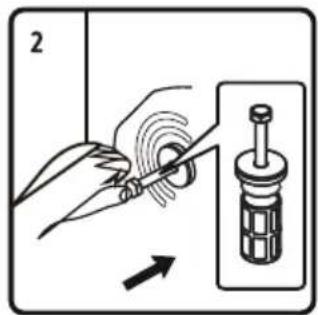
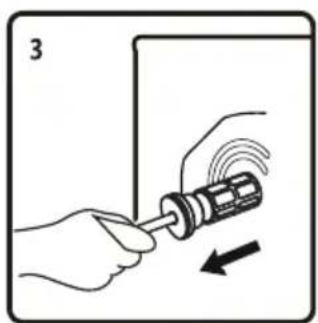
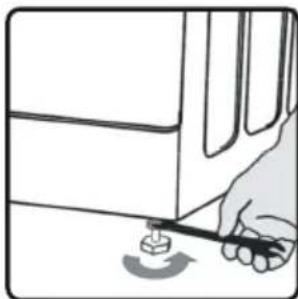
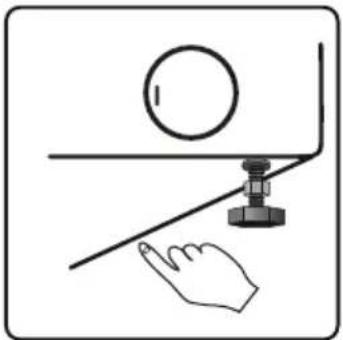
Ensure the machine is on a level surface. Remove transport bolts. Connect water inlet hose to tap and drain hose to standpipe or sink. Plug into a grounded outlet.
What does the 'Start/Pause' button do?
Press to start a selected program or pause an ongoing cycle. Press again to resume.
How to clean the detergent drawer?
Pull out the drawer, remove the insert, rinse under warm water, and brush out any residue. Wipe dry and reinsert.
Why is the machine not spinning?
Check for unbalanced load, drain hose kink, or filter blockage. If error persists, restart the machine or call service.
How to activate child lock?
Press and hold the Child Lock button for 3 seconds until the indicator lights up. To deactivate, repeat.
What is the maximum spin speed?
The maximum spin speed is 1400 rpm. You can select lower speeds depending on the program.
How to clean the pump filter?
Open the lower cover, unscrew the filter cap, pull out the filter, clean under running water, replace and close.
What does error code E30 mean?
E30 indicates a door lock problem. Ensure the door is fully closed and check for obstructions. If persists, contact service.
Can I use liquid detergent?
Yes, but use the correct compartment. For liquid detergent, insert the provided siphon plug into the main wash compartment.
How to reduce noise during spinning?
Ensure the machine is level and not in contact with walls. Avoid overloading and use smaller loads for heavy items.
User questions about WMS 87148 WSD3 LERAN
0 question about this device. Answer the ones you know or ask your own.
Ask a new question about this device
No questions yet. Be the first to ask one.
Download the instructions for your Washing machine in PDF format for free! Find your manual WMS 87148 WSD3 - LERAN and take your electronic device back in hand. On this page are published all the documents necessary for the use of your device. WMS 87148 WSD3 by LERAN.
USER MANUAL WMS 87148 WSD3 LERAN
natural_image
Line drawing of two hands holding a large container with liquid, no text or symbols presentnatural_image
Four identical gray circular objects with radial slots, arranged in a 2x2 grid (no text or symbols)natural_image
Technical line drawing of a curved mechanical component (no text or symbols)natural_image
3D rendering of a rectangular electronic component with mounting holes (no text or symbols visible)natural_image
Pure diagram of a U-shaped pipe with connectors, no text or symbols presentnatural_image
Top-down technical line drawing of a mechanical component with no visible text or symbols
natural_image
Illustration of hands using a screwdriver to interact with a device, showing motion direction (no text or symbols)
natural_image
Illustration of a hand holding a ball with an arrow indicating motion (no text or symbols)natural_image
Diagram of a computer monitor with a wrench inserted, showing mechanical assembly (no text or symbols)
natural_image
Illustration of a hand using a tool to press or install a component on a surface (no text or symbols visible)
natural_image
Illustration of a hand pressing down on a textured surface within a rectangular frame (no text or symbols)B

D
natural_image
Simple line drawing of a hand touching a circular object on a horizontal surface with a ruler and base (no text or symbols)natural_image
Diagram of a device interior with labeled components and an arrow indicating direction (no text or symbols present)A

natural_image
Illustration of a hand holding a flexible hose with threaded end (no text or symbols)B

natural_image
Technical line drawing of a three-tiered industrial storage unit with no visible text or symbolsnatural_image
Diagram of a hand inserting a device into a container with arrows indicating direction (no text or symbols)
natural_image
Cross-sectional diagram of a multi-level industrial or storage unit with internal compartments and no visible text or symbolsфильтр
natural_image
Simple line drawing of a hand pressing down on a curved surface with an arrow indicating direction (no text or symbols)
natural_image
Diagram showing a mechanical or electrical component with arrows indicating motion (no text or symbols)
natural_image
Simple line drawing of a door handle with an arrow pointing to the left side (no text or symbols)
natural_image
Illustration of a hand pressing a ball on a curved surface with an arrow indicating motion (no text or symbols)natural_image
Illustration of a mechanical component being inserted into a housing, showing fluid flow direction (no text or symbols)
natural_image
Illustration of a tool using scissors to press a small cylindrical object on a base (no text or symbols)
natural_image
Illustration of two hands holding a spoon, no text or symbols present
natural_image
Illustration of a hand pressing down on a mechanical component with a magnified inset showing a threaded bolt (no text or symbols)
natural_image
Illustration of a hand pouring white material into a bolted nut (no text or symbols)natural_image
Symbol of a trash bin crossed with no text or numbers, representing waste sorting or disposal (no text present)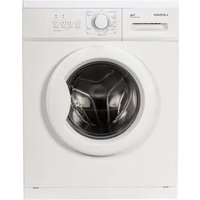


Table of contents
Click a title to access it
Manual assistant
Powered by Anthropic
Waiting for your message
Product information
Brand : LERAN
Model : WMS 87148 WSD3
Category : Washing machine