
WMS 77127 WD2 - Washing machine LERAN - Free user manual and instructions
Find the device manual for free WMS 77127 WD2 LERAN in PDF.


Pick your language and provide your email: we'll send you a specifically translated version.
| Product type | Front-loading washing machine |
| Capacity | 7 kg |
| Maximum spin speed | 1200 rpm |
| Energy class | A+++ |
| Dimensions (H x W x D) | 85 x 60 x 60 cm |
| Weight | 70 kg |
| Power supply | 220-240 V, 50 Hz, 2000 W |
| Water consumption per cycle | 50 L |
| Noise level (wash/spin) | 56 dB / 76 dB |
| Number of programs | 15 |
| Key programs | Cotton, Synthetics, Delicates, Quick 15, Wool, Rinse & Spin, Drum Clean |
| Special functions | Delay start (up to 24h), Child lock, Pre-wash, Extra rinse, Eco mode |
| Detergent compartment | Three compartments: main wash, pre-wash, fabric softener |
| Drum type | Stainless steel, honeycomb pattern |
| Display | LED digital display with program status and remaining time |
| Installation type | Freestanding |
| Recommended detergent | High-efficiency (HE) detergent |
| Maintenance tasks | Clean filter every 30 cycles, descale annually, wipe door seal |
| Safety features | Child lock, overflow protection, unbalanced load detection, foam control |
| Spare parts availability | Drum, belt, pump, door seal, control board, filter, hoses |
| Reparability index | 7.5/10 |
| Warranty | 2 years |
| Color | White |
Frequently Asked Questions - WMS 77127 WD2 LERAN
How to unlock the child lock on my LERAN WMS 77127 WD2?
Press and hold the Child Lock button for 3 seconds until the lock icon disappears from the display.
What should I do if the washing machine does not drain?
Check and clean the drain filter at the bottom front of the machine. Also ensure the drain hose is not kinked or blocked.
How do I clean the detergent drawer?
Remove the drawer by pressing the release lever. Wash it with warm water and a soft brush, then dry and reinsert.
Why is my machine vibrating excessively during spin?
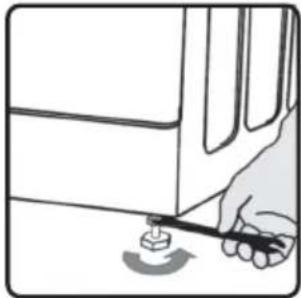
Ensure the transport bolts are removed, the machine is level, and the load is balanced. Avoid overloading.
How to cancel a running cycle?
Turn the program selector knob to Off or press Start/Pause for 3 seconds to cancel the cycle.
What does the error code 'E01' mean?
Error E01 indicates a door lock issue. Check that the door is fully closed and latched properly.
How often should I run a drum clean cycle?
Run the Drum Clean program every 2 months or after 30 washes to prevent mold and odors.
Can I use liquid detergent in the machine?
Yes, but use the liquid detergent cup inside the main wash compartment to prevent overdosing.
How to adjust the spin speed?
Press the Spin Speed button repeatedly to cycle through available speeds. Select the desired speed before starting the program.
What is the maximum load capacity for the Quick 15 program?
For the Quick 15 program, the maximum load is 2 kg for optimal cleaning results.
User questions about WMS 77127 WD2 LERAN
0 question about this device. Answer the ones you know or ask your own.
Ask a new question about this device
No questions yet. Be the first to ask one.
Download the instructions for your Washing machine in PDF format for free! Find your manual WMS 77127 WD2 - LERAN and take your electronic device back in hand. On this page are published all the documents necessary for the use of your device. WMS 77127 WD2 by LERAN.
USER MANUAL WMS 77127 WD2 LERAN
natural_image
Line drawing of two hands holding a transparent container with liquid, no text or symbols presentnatural_image
Four identical gray circular objects with radial slots, arranged in a 2x2 grid (no text or symbols)natural_image
Technical line drawing of a curved mechanical component (no text or symbols)natural_image
Pure diagram of a U-shaped pipe with connectors, no text or symbols presentnatural_image
Technical line drawing of a mechanical component with no visible text or symbols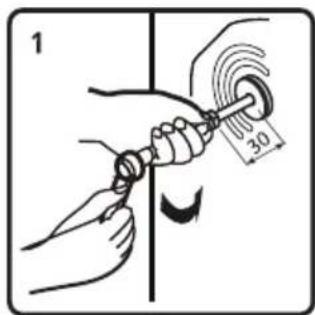

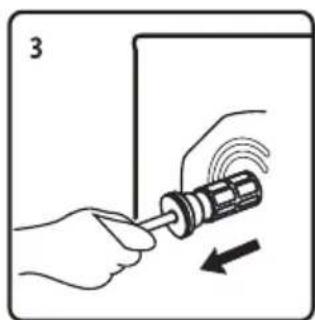
natural_image
Illustration of hands using a screwdriver to adjust a mechanical component with motion arrows (no text or symbols)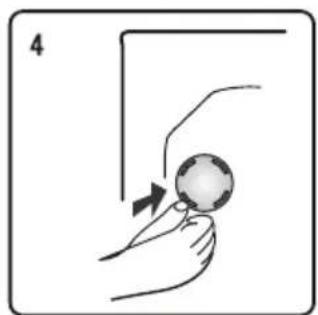
natural_image
Illustration of a hand holding a ball with an arrow indicating motion (no text or symbols)natural_image
Diagram of a computer monitor connected to a wrench, with an arrow indicating rotation (no text or symbols present)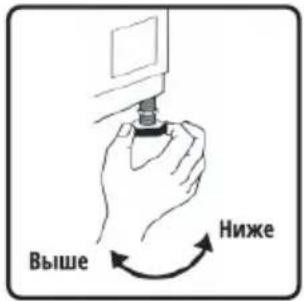
natural_image
Illustration of a hand using a pen to mark a small object on a surface (no text or symbols)
natural_image
Technical line drawing of a mechanical component with no visible text or symbolsA

natural_image
Illustration of a hand holding a curved mechanical component (no text or symbols visible)B

C
natural_image
3D technical illustration of a mechanical device with internal components and mounting brackets (no text or symbols)natural_image
3D mechanical assembly diagram showing internal components with no visible text or symbols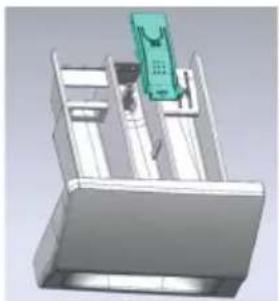
natural_image
3D mechanical assembly diagram showing a green component mounted on a base (no text or symbols visible)Шланг подачи воды
natural_image
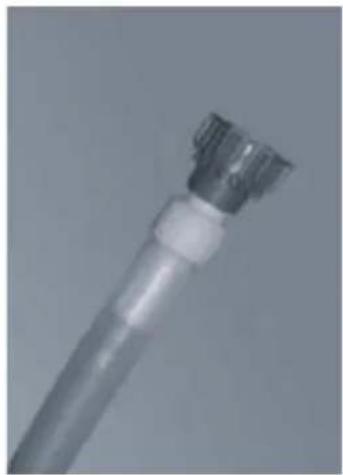
Close-up of a metallic mechanical component with a cylindrical top and flange (no visible text or symbols)B

natural_image
Close-up of a metallic electrical plug with a screw and connector (no visible text or symbols)C
natural_image
Close-up of a metallic cylindrical connector or tool tip (no visible text or symbols)natural_image
Symbol of a trash bin crossed with a diagonal line, no text or numbers present


Table of contents
Click a title to access it
Manual assistant
Powered by Anthropic
Waiting for your message
Product information
Brand : LERAN
Model : WMS 77127 WD2
Category : Washing machine