
WMS 73106 AWD2 - Washing machine LERAN - Free user manual and instructions
Find the device manual for free WMS 73106 AWD2 LERAN in PDF.


Pick your language and provide your email: we'll send you a specifically translated version.
| Product Type | Washing machine |
| Brand | LERAN |
| Model | WMS 73106 AWD2 |
| Capacity (kg) | 7 |
| Spin Speed (rpm) | 1000 |
| Dimensions (H x W x D) cm | 85 x 60 x 55 |
| Weight (kg) | 70 |
| Power Supply (V/Hz) | 220-240 / 50 |
| Energy Consumption (kWh/cycle) | 0.95 |
| Water Consumption (L/cycle) | 50 |
| Noise Level - Wash (dB) | 78 |
| Noise Level - Spin (dB) | 82 |
| Programs | Cotton, Synthetics, Delicates, Quick Wash, Eco, Wool, Rinse & Spin |
| Features | Delay Start, Child Lock, Overflow Protection, Drum Clean |
| Safety | Overheat Protection, Unbalanced Load Detection, Door Lock |
| Maintenance | Clean filter monthly, descale every 3 months, check hose for leaks |
| Spare Parts | Available: door seal, belt, pump, filter, control board |
| Repairability | User-replaceable parts (filter, hose), professional repair for electronics |
| Energy Class | A+++ |
| Installation Type | Freestanding |
Frequently Asked Questions - WMS 73106 AWD2 LERAN
How do I clean the filter on the LERAN WMS 73106 AWD2?
To clean the filter, first unplug the machine. Locate the filter cover at the bottom front, open it, and unscrew the filter. Remove any lint or debris, rinse under water, and reinstall tightly.
What type of detergent should I use?
Use a high-efficiency (HE) detergent designed for automatic washers. For wool or delicates, use a specific gentle detergent. Avoid using too much soap to prevent residue.
How can I resolve an error code E10?
Error code E10 usually indicates a water supply issue. Check that the water taps are fully open, the hoses are kinked, and the inlet filter is clean. If problem persists, contact service.
Can I wash wool items in this machine?
Yes, the LERAN WMS 73106 AWD2 has a dedicated Wool program. Use a wool detergent and set the temperature to cold or 30°C. Do not spin too long.
How do I use the delay start function?
Select your desired program, then press the Delay Start button repeatedly to set the delay time (1-24 hours). Close the door and press Start. The machine will begin after the set delay.
What does the Drum Clean program do?
The Drum Clean program uses hot water and high spin to remove dirt and bacteria from the drum. Run it once a month with an empty machine and a descaling agent.
My washing machine is vibrating excessively. What should I do?
Ensure the machine is level by adjusting the feet. Remove any transport bolts. Avoid overloading and distribute laundry evenly inside the drum. Check for unbalanced loads.
How do I activate the child lock?
Press and hold the Child Lock button (usually marked with a padlock icon) for 3-5 seconds until the indicator lights up. To deactivate, repeat the same action.
Is it normal to see water in the detergent drawer?
A small amount of water may remain after a cycle. However, if there is standing water, clean the drawer and check the siphon cap. Ensure the drawer is fully pushed in.
Where can I buy spare parts for the LERAN WMS 73106 AWD2?
Spare parts are available from authorized LERAN service centers or online retailers. Common parts include door seals, belts, pumps, and filters. Use the model number for accuracy.
User questions about WMS 73106 AWD2 LERAN
0 question about this device. Answer the ones you know or ask your own.
Ask a new question about this device
No questions yet. Be the first to ask one.
Download the instructions for your Washing machine in PDF format for free! Find your manual WMS 73106 AWD2 - LERAN and take your electronic device back in hand. On this page are published all the documents necessary for the use of your device. WMS 73106 AWD2 by LERAN.
USER MANUAL WMS 73106 AWD2 LERAN


A

B


Таблица неполадок
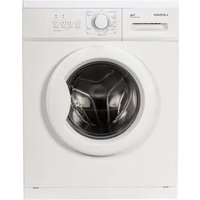


Table of contents
Click a title to access it
Manual assistant
Powered by Anthropic
Waiting for your message
Product information
Brand : LERAN
Model : WMS 73106 AWD2
Category : Washing machine