
GM27-FQS - Monitor COOLER MASTER - Free user manual and instructions
Find the device manual for free GM27-FQS COOLER MASTER in PDF.


| Product Type | Gaming Monitor |
| Model | GM27-FQS |
| Brand | Cooler Master |
| Screen Size | 27 inches |
| Resolution | 1920 x 1080 (Full HD) |
| Panel Type | IPS |
| Refresh Rate | 165 Hz |
| Response Time | 1 ms (MPRT) |
| Adaptive Sync | FreeSync Premium / G-Sync Compatible |
| Brightness | 400 cd/m² |
| Contrast Ratio | 1000:1 |
| Color Gamut | sRGB 99% |
| Viewing Angle | 178° / 178° |
| Connectivity | HDMI 2.0 x2, DisplayPort 1.4, USB-C (DP Alt Mode), USB 3.0 Hub |
| Audio | Headphone Jack |
| VESA Mount | 100 x 100 mm |
| Adjustability | Tilt, Swivel, Pivot, Height Adjustment |
| Power Consumption | Typical 35W, Standby <0.5W |
| Dimensions (with stand) | 613 x 410 x 230 mm |
| Weight (with stand) | 6.5 kg |
| Package Contents | Monitor, Stand Base, Stand Neck, Power Cord, HDMI Cable, DP Cable, USB Cable, Quick Guide |
Frequently Asked Questions - GM27-FQS COOLER MASTER
User questions about GM27-FQS COOLER MASTER
0 question about this device. Answer the ones you know or ask your own.
Ask a new question about this device
Download the instructions for your Monitor in PDF format for free! Find your manual GM27-FQS - COOLER MASTER and take your electronic device back in hand. On this page are published all the documents necessary for the use of your device. GM27-FQS by COOLER MASTER.
USER MANUAL GM27-FQS COOLER MASTER
Cooler Master 23 Gaming Monitor
User Manual

natural_image
Line drawing of a modern flat-screen monitor with a blank screen and stand (no text or symbols)Table of Contents
Important Safety Instructions ....1
Package Contents 2
Connect the monitor to the base 3
Adjusting the monitor 4
Wall Mount Installation Instructions .....6.
External Control Buttons 7
OSD Function Introductions 9
Main Menu 11
Specifications
Supported DP & HDMI & USB C Resolution.... 18
Video Timing 19
Declaration of Restricted Substances 20
Product Outline Dimensions 21
Requirements and Safety Notice
FCC Safety Notice
This product has been tested and determined to be meeting the limits for a Class B digital device and in compliance with Part 15 of the FCC Regulations. These requirements are set to reasonably protect the home installation environment from hazardous interference. This product will generate, use and emit radio frequency energy. Failure to install and use it as instructed may cause hazardous interference to radio communication.
However, we cannot guarantee zero interference for certain installation methods. If this product has caused hazardous interference to radio or TV reception (turn on or turn off this product to for confirmation), the user may try to make adjustment with the following methods:
• Re-adjust the angle and position of the reception antenna.
- Increase the distance between the device and receiver.
- Do not use the power sockets of the device and receiver together.
• If assistance is needed, contact the distributor or a professional radio/TV technician.
CE Compliance Statement
Cooler Master Technology Inc. hereby declares that the monitor conforms to the following key standards and other related provisions:
EMC Directive 2014/30/EU, Low Voltage Directive 2014/35/EU, RoHS Directive 2011/65/EU and Directive 2009/125/EC establishing a framework for the setting of eco-design requirements for energy-related products.
Note:
To prevent damage of the monitor, do not lift the monitor from the support base.
Note: Shielded cable
To comply with the EMC requirements, a shielded cable must be used for connection between this product and any other computer device.
Note:
The monitor is exclusively used in the video and image display of information acquired from electronic devices.
Note: Peripherals
Only a peripheral device (I/O device, terminal, printer, etc.) that has been certified and met the Class B limits can be sold together with this product. If this product is used together with any other uncertified peripheral device, it may cause interference to radio and TV reception.
Warning
Any change or modification not approved by the original manufacturer may lead to the user losing the right to operate this product. Such authorization is given by the Federal Communications Commission.
Requirements for Use
This product meets the limits under Part 15 of the FCC Regulations. When operating this product, please meet the following two requirements: (1) This product may not generate hazardous interference; and (2) This product must accept any interference signal received, including interference that is likely to lead to unexpected operation.
Disposal of Waste Equipment by Home Users in EU

If this symbol appears on a product and its package, it indicates that the product cannot be disposed of together with other household waste. You have to deliver the waste equipment to a designated recycling center for recycling of waste electrical and electronic equipment. Proper sorting and recycling of resources during the disposal of waste equipment is helpful for protecting natural resources and ensuring that resource recycling can protect human health and environment. For detailed information about recycling centers where waste equipment is disposed of, contact the local municipal office, cleaning service or the store where the purchased product is found.
Canadian Department of Communications Statement
This digital apparatus does not exceed the Class Blimits for radio noise emissions from digital apparatus set out in the Radio interference Regulations of the Canadian Department of Communications.
This class B digital apparatus complies with Canadian ICES-003.
This ClassBdigital apparatus meets all requirements of the Canadian Interference Causing Equipment Regulations.
Important Safety Instructions
Please read the following instructions carefully.
- To clean the LCD monitor screen: Turn off the LCD monitor and unplug the power cord.
Spray a non-solvent cleaning solution onto a rag and clean the screen gently.
-
Do not place the LCD monitor near a window. Exposing the monitor to rain, moisture or sunlight can severely damage it.
-
Do not apply pressure to the LCD screen. Excessive pressure may cause permanent damage to the display.
-
Do not remove the cover or attempt to service this unit yourself. An authorized technician should perform servicing of any nature
-
Store the LCD monitor in a room with a temperature of -20^ to 60^ C ( -4^ to 140^ F). Storing the LCD monitor outside this range may result in permanent damage.
-
Immediately unplug your monitor and call an authorized technician if any of the following circumstances occur:
-
Monitor -to -PC signal cable is frayed or damaged.
- Liquid spills onto the LCD monitor or the monitor is exposed to rain.
- The LCD monitor or case is damaged.
Package Contents
A
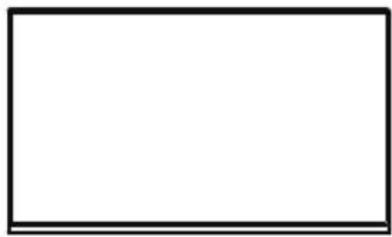
natural_image
Empty white rectangle with black border (no text or symbols)B

C

natural_image
Simple line drawing of a rectangular frame with a small circular top (no text or symbols)Monitor x 1 Support stand x 1
Support base x 1
D
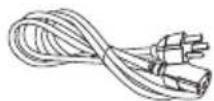
Power cord x 1
E
natural_image
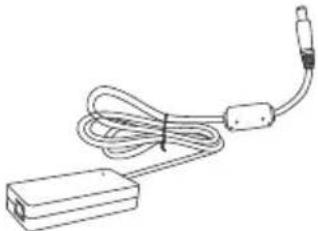
Line drawing of a cable and plug assembly (no text or symbols)Power adapter x 1
F

HDMI cable x 1
G
DP cable x 1
H
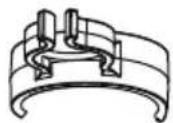
Cable clip x 1 (Used for cable fixed in the back of the support stand)
|
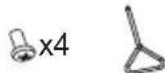
Screws x 4 Screwdriver x 1 ed for installation of the x cover and support stand)
J

K

(optional)
L

(optional)
Base screw x 1 (Used for installation of the support base and support stand)
Micro USB to U USB cable x1 (Used to light up ARGB stand)
USB Type A to B cable x 1 (PC and Monitor data transmission)
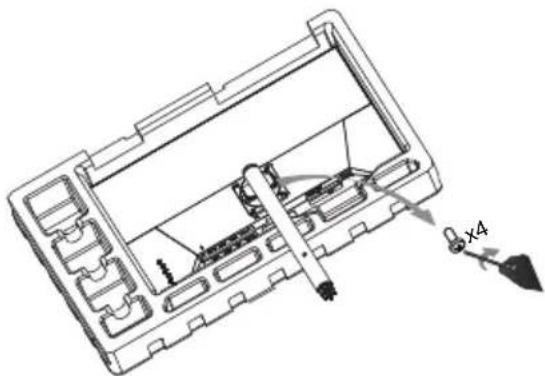
Connect the monitor to the base
1

2

3
natural_image
Technical line drawing of a device casing with internal components and a labeled dimension 'x4' (no text or symbols beyond the label)4

natural_image
Technical line drawing of a device interior with a magnified view showing internal components and a close-up of the lens (no text or symbols present)5

natural_image
Technical line drawing of a mechanical device casing with internal compartments and a handle (no text or symbols)6
natural_image
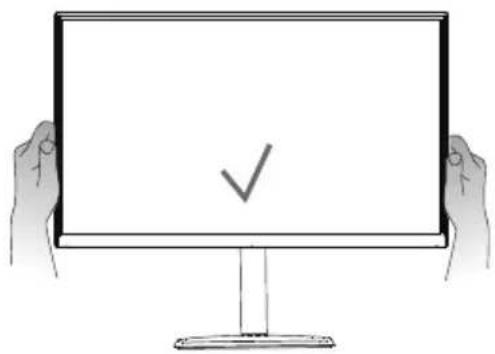
Illustration of two hands holding a blank computer monitor with a checkmark symbol (no text or labels)
Adjusting the monitor
- For the best results, it is recommended to look directly at the front of the monitor and make any adjusts as necessary.
- Ensure that the monitor is mounted upright on the stand base.
- When adjusting the monitor viewing angles, avoid touching the screen and hold the stand in order to prevent it from falling over.

Tilt:-5°\~+20°Height Adjustme
Note: It is normal that the monitor slightly shakes while you adjust the viewing angle.
7

8

Note :
- Type-Coutput voltage/current: 5V/3A
2.USB(x2)outputvoltage/current:5V/0.9A
Wall Mount Installation Instructions
1
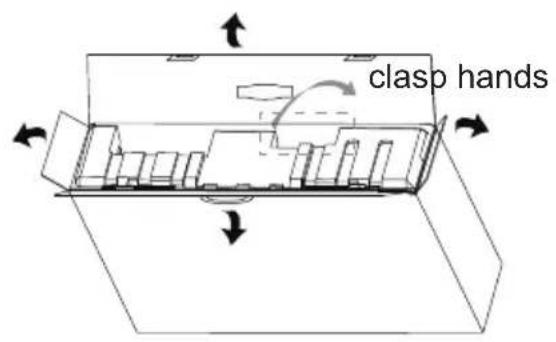
2

3

natural_image
Technical line drawing of a mechanical housing or enclosure with internal compartments and mounting points (no text or symbols)4

5

natural_image
Pure mechanical assembly diagram showing a vertical plate connected to a cylindrical component (no text or symbols)NOTE:
VESASIZE:XMM;
Screwspecification(backcoveronly):M4X12mm
External Control Buttons
Navigation buttons<①>: Press the navigation button to enter menu.
<
Power button<②>: Turn on/off the monitor.
NOTE: Power light;
Blue = ON;
Orange = Power Saving.
Shortcut :
a. Crosshair: When the screen display normal, gently press the button < 3> to toggle the Crosshair function on/off.
b. Picture Mode: Change and toggle through picture modes
c. Contrast/Brightness: Adjust contrast/brightness.
d. Input Select: Select and change to different inputs.

The OSD Menu and OSD Quick-Menu Symbol explanations and their functional uses are stated below.

Menu: Displays the full OSD menu.

Select: Enters the highlighted submenu or edits the selected menu entry.

Exit: Closes the OSD menu. Turns off the on-screen button labels.

Back: Goes back to the previous menu or exits editing an entry.

Up: Moves the highlight up.

Down: Moves the highlight down.

Left/Decrease: Moves the highlight to the left or decreases the displayed value when editing an entry.

Right/increase: Moves the highlight to the right or increases the displayed value when editing an entry.

OSD Function Introductions
| Level1 Level2 Level3 | Default Value | ||
| Input Select | DisPlayport | ||
| HDMI1 | |||
| HDMI2 | |||
| TypeC | |||
| Audio Adjust | Volume 0~100 50 | ||
| Mute | On | Off | |
| Off | |||
| Picture Mode | Standard | Black Stabilization | 50 |
| Advanced DCR | 0 | ||
| Blue Light Filter | 0 | ||
| Recall | |||
| Game | GAMER1 | GAMER1 | |
| GAMER2 | |||
| FPS1 | |||
| FPS2 | |||
| RTS | |||
| MOBA | |||
| Movie | Standard | ||
| Web | |||
| Text | |||
| MAC | |||
| SRGB | |||
| Color Weakness | Red Filter | 10 | |
| Green Filter | 10 | ||
| Color Adjust | Contrast/Brightness | Contrast 70 | |
| Brightness 1 | 00 | ||
| 6-axis Color* | Hue | Red | |
| Green | |||
| Blue | |||
| Cyan | |||
| Magenta | |||
| Yellow | |||
| Saturaton | Red | ||
| Green | |||
| Blue | |||
| Cyan | |||
| Magenta | |||
| Yellow | |||
| Color Temperature | Bluish | Native | |
| Cool | |||
| Native | |||
| Warm | |||
| User Color | |||
| Gamma | 1.8/2.0/2.2/2.4/2.6 2.2 | ||
| Color Domain | Auto | Auto | |
| RGB Mode | |||
| YUV Mode | |||
| Color Space | Auto | Auto | |
| BT.709 | |||
| DCI-P3 | |||
| BT.2020 | |||
| Color Range | Auto | Auto | |
| Full Range | |||
| Limited Range | |||
| HDR | |||
OSD Function Introductions
| Manual Image Adjust | Sharpness 50 0~100 | |||
| Aspect Ratio | Full Aspect Ratio | Full Screen | ||
| Full Screen | ||||
| Overscan | On | Off | ||
| Off | ||||
| Setup Menu | Language Select | English | English | |
| Français | ||||
| Deutsch | ||||
| Español | ||||
| Italiano | ||||
| Suomi | ||||
| РУССКИЙ | ||||
| 日本語 | ||||
| 한국의 | ||||
| 繁體中文 | ||||
| 简体中文 | ||||
| Tiế ng Vi è t | ||||
| Adaptive-Sync | On | Off | ||
| Off | ||||
| Over Drive | Off | |||
| Normal | ||||
| Advanced | ||||
| Ultra Fast | ||||
| Dynamic | ||||
| Motion clearness | On | Off | ||
| Off | ||||
| Crosshair* | H/V.Position | H.Position | 50 | |
| V.Position | 50 | |||
| Pixel Color | R (100) | |||
| G (0) | ||||
| B (0) | ||||
| Style | Mode 1 | Mode 1 | ||
| Mode 2 | ||||
| Mode 3 | ||||
| Mode 4 | ||||
| Mode 5 | ||||
| Frame Rate Notice | On | Off | ||
| Off | ||||
| Information | Resolution: xxH.Frequency: xxV.Frequency: xxPixel Clock: xx | |||
| OSD Timeout | 0~60 | 15 | ||
| OSD Background | On | On | ||
| Off | ||||
| Power Indicator | On | On | ||
| Off | ||||
| Auto Power off | On | Off | ||
| Off | ||||
| Sleep | 30 Minutes | Off | ||
| 45 Minutes | ||||
| 60 Minutes | ||||
| 120 Minutes | ||||
| Off | ||||
| ECO Mode | Standard | Standard | ||
| Optimize | ||||
| Conserve | ||||
| DDC/CI | ON | ON | ||
| Off | ||||
| Memory Recall | ||||
* When the screen display normal, gently press the button <③> to toggle the Crosshair function on/off
Main Menu
Input Select

Enter the input menu to switch the input signal.
1.DP : Adaptive Sync supported under 2560x1440
2.HDMI : Adaptive Sync supported under 2560x1440
Audio Adjust
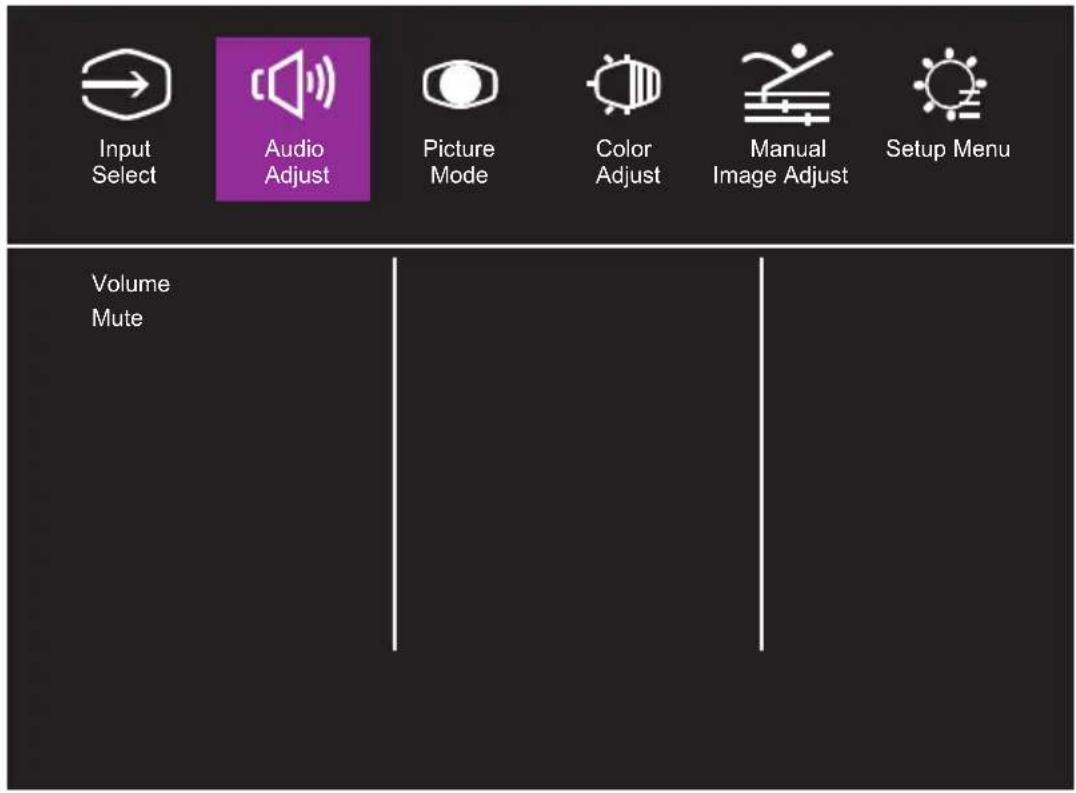
Enter the Audio menu to adjust functions including Mute function, Volume, and Audio Source etc.
- Mute: Enables or disables the mute function.
- Volume: Adjust the volume value between 0 and 100.
Audio Source: Select the audio source input port.
Picture Mode

Note: Pictureallkindsofchoicemodel
Color Adjust

Image color adjustment
Manual Image Adjust

Setup Menu

Input Select

Audio Adjust

Picture Mode

Color Adjust

Manual Image Adjust

Setup Menu
Language Select
Adaptive-Sync motion clearness
Crosshair Resolution Notice Information
OSD Timeout OSD Background
Power Indicator Auto Power Off Sleep
ECO Mode
Specifications
| LCD panel | Size | 27" | |
| Pixel pitch | 0.2331(H) x 0.2331(V) | ||
| Brightness | 300nits(Typ.) | ||
| Contrast | 1000:1(Typ.) | ||
| Viewing angle | 178(Horizontal)/178(Vertical) | ||
| Response time | 1ms (MPRT) | ||
| Display colors 16.7 million colors | |||
| Max. display frequency (Resolution H*V/Fv) | 2560*1440@144Hz(HDMI)2560*1440@165Hz(DP) | ||
| Power consumption | Power On | 30W** Typical | |
| ≤0.5WStandby | |||
| Power Off | ≤0.3W | ||
| Input/output connector | DP x 1, HDMI x 2, USB type C x1;Earphone jack x 1;Downstream(USB3.0) x 2;Upstream(USB3.0) x 1 | ||
| Input video signal | DP signal (only for DP input model);HDMI signal (only for HDMI input model);Type C signal (only for Type C input model) | ||
| Audio effect Audio output (only for audio output model) | |||
| Adapter | DC12---7A | ||
| Environmental conditions | Operating temperature:0°C~40°C;Storage temperature:-20°C~60°C;Operating humidity:10~85%RH | ||
| Machine size(L x Wx H) | 614X43X357mm(Without stand/Base) | ||
| 614X274X610mm(Contains Support stand/Base) | |||
| Box Dimension(WxHxD) | 830X126X500mm | ||
| Gross Weight(Esti.) | 7.5kg/Unit | ||
| Weight (Net) | 3.65 kg/Unit (Without stand/Base);5.1 kg/Unit (Contains Support stand/Base) | ||
| Machine specifications | Height Adjustment: 0~110 mmSwivel : -15°~+15°Pivot: Horizontal / VerticalTilt: -5°~+20° | ||
Compliance

R38755



SDoC

HIGH-DEFINITION MULTIMEDIA INTERFACE
The terms HDMI and HDMI High-Definition Mul media Interface, and the HDMI Logo are trademarks or registered trademarks of HDMI Licensing Administrator, Inc. in the United States and other countries.
If you have any question regarding use of the monitor, please visit:
https://www.coolermaster.com/warranty
*Specifications are subject to change without notice.
**Measure a screen brightness of 200 nits without audio/USB/Card reader connection.
Supported Timing
| Mode | Resolution | Horizontal Frequency (KHz) | Vertical Frequency (Hz) | Nominal Pixel Clock (MHz) | Port | |
| HDMI IN DP/Type C IN | ||||||
| VGA | 640x480@60Hz 31. | 469 59.940 2 | 5.175 O O | |||
| 640x480@72Hz 37. | 861 72.809 3 | 1.500 O O | ||||
| 640x480@75Hz 37. | 500 75.000 3 | 1.500 O O | ||||
| MAC 640x480@66.66Hz 35.000 0 66.667 30.240 O O | ||||||
| VESA 720x400@70Hz 31.469 70.087 28.322 O O | ||||||
| SVGA | 800x600@56Hz 35. | 156 56.250 3 | 6.000 O O | |||
| 800x600@60Hz 37. | 879 60.317 4 | 0.000 O O | ||||
| 800x600@72Hz 48. | 077 72.188 5 | 0.000 O O | ||||
| 800x600@75Hz 46. | 875 75.000 4 | 9.500 O O | ||||
| MAC 832x624@74.55Hz 49.722 74.550 57.280 O O | ||||||
| XGA | 1024x768@60Hz 48. | 363 60.004 | 65.000 O O | |||
| 1024x768@70Hz 56. | 476 70.069 | 75.000 O O | ||||
| 1024x768@75Hz 60. | 023 75.029 | 78.750 O O | ||||
| VESA | 1152x864@75Hz 67. | 500 75.000 | 108.000 O O | |||
| 1280x960@60Hz 60. | 000 60.000 | 108.000 O O | ||||
| SXGA | 1280x1024@60Hz 63. | 981 60.020 | 108.000 | O O | ||
| 1280x1024@75Hz 79. | 976 75.025 | 135.000 | O O | |||
| VESA | 1280x720@60Hz 45. | 000 60.000 | 74.250 | O | O | |
| WXGA+ | 1366x768@60Hz 47. | 712 59.790 | 85.500 | O | O | |
| WXGA+ 1440x900@60Hz 55.935 59.887 106.500 O O | ||||||
| WSXGA+ | 1680x1050@60Hz | 65.290 59. | 954 146.250 O O | |||
| FHD | 1920x1080@60Hz | 67.500 60. | 000 148.500 O O | |||
| 1920x1080@120Hz | 135 .000 | 120.000 29 | 7.000 O O | |||
| 1920x1080@165Hz | 183.000 16 | 5.000 38 | 0.950 O O | |||
| QHD | 2560x1440@60Hz | 88.787 59. | 951 241.500 O O | |||
| 2560x1440@120Hz | 177.000 12 | 0.000 483.430 | O O | |||
| 2560x1440@144Hz | 213.000 14 | 4.000 580.000 | O O | |||
| 2560x1440@165Hz | 244.000 16 | 5.000 644.700 | O | |||
Video Timing
| CEA Vdeo Timing | ||||||
| Resolution | Field Rate (Hz) | Horizontal (kHz) | Vertical (Hz) | Pixel Clock (MHz) | Port | |
| HDMI IN D | P/Type C IN | |||||
| 640x480p 60 | 31.500 60.00 | 25.200 O O | ||||
| 720x480p 60 | 31.500 60.00 | 27.027 O O | ||||
| 720x480p 60 | 31.500 60.00 | 27.027 O O | ||||
| 1280x720p 60 | 45.000 60.00 | 74.250 O O | ||||
| 1920x1080i 60 | 33.750 60.00 | 74.250 O O | ||||
| 1920x1080p 60 | 67.500 60.00 | 148.500 O O | ||||
| 720x576p 50 | 31.250 50.00 | 27.000 O O | ||||
| 720x576p 50 | 31.250 50.00 | 27.000 O O | ||||
| 1280x720p 50 | 37.500 50.00 | 74.250 O O | ||||
| 1920x1080i 50 | 28.125 50.00 | 74.250 O O | ||||
| 1920x1080p 50 | 56.250 50.00 | 148.500 O O | ||||
| 1920x1080p 24 | 27.000 24.74.250 O O | |||||
| 1920x1080p 25 | 28.125 25.00 | 74.250 O O | ||||
| 1920x1080p | 30 33.750 30 74.250 O O | |||||
| 3840x2160p 60 | 135.000 60.00 | 594.00 O O | ||||
| 3840x2160p 60 | 135.000 60.00 | 594.00 O | ||||
Declaration of Restricted Substances
| Equipment name : LCD Monitor : GM27-FQS ARGB designation (Type) | ||||||
| Unit | Restricted substances and its chemical symbols | |||||
| Lead(Pb) | Mercury(Hg) | Cadmium(Cd) | Hexavalent chromium( Cr^+6 ) | Polybrominated biphenyls(PBB) | Polybrominated diphenyl ethers(PBDE) | |
| Internal and external cases(External case, case, support...) | ○ | ○ | ○ | ○ | ○ | ○ |
| Main Board | - | ○ | ○ | ○ | ○ | ○ |
| Other Circuit Boards | - | ○ | ○ | ○ | ○ | ○ |
| LCD Display Panel | ○ | ○ | ○ | ○ | ○ | ○ |
| Speakers | ○ | ○ | ○ | ○ | ○ | ○ |
| Base | ○ | ○ | ○ | ○ | ○ | ○ |
| Power Supply(Switching adapter) | - | ○ | ○ | ○ | ○ | ○ |
| Accessories(Power cable, HDMI signal cable...) | ○ | ○ | ○ | ○ | ○ | ○ |
| Other fixed components(Screws, clamps, latches) | ○ | ○ | ○ | ○ | ○ | ○ |
| Note 1: “Exceeding 0.1 wt %” and “exceeding 0.01 wt %” indicate that the percentage content of the restricted substance exceeds the reference percentage value of presence condition.Note 2: “○” indicates that the percentage content of the restricted substance does not exceed the percentage of reference value of presence.Note 3: The “-” indicates that the restricted substance corresponds to the exemption. | ||||||
Product Outline Dimensions


- Cooler Master 23 Gaming Monitor
- User Manual
- Table of Contents
- Requirements and Safety Notice
- FCC Safety Notice
- Important Safety Instructions
- Package Contents
- Connect the monitor to the base
- Adjusting the monitor
- Note :
- Wall Mount Installation Instructions
- External Control Buttons
- Shortcut :
- Main Menu
- Input Select
- Audio Adjust
- Color Adjust
- Manual Image Adjust
- Setup Menu
- Specifications
- Declaration of Restricted Substances
Brand : COOLER MASTER
Model : GM27-FQS
Category : Monitor