
SWRHK-65S - Car audio accessory CRUX - Free user manual and instructions
Find the device manual for free SWRHK-65S CRUX in PDF.


| Product Type | Aftermarket Radio Retention Module |
| Brand | CRUX |
| Model | SWRHK-65S |
| Compatible Makes | Hyundai, Kia (2007-2014) |
| Key Function | Retains factory steering wheel controls, auxiliary input, and antenna connectivity |
| Included Components | Module, Harness, Antenna Adapter, SWC Cable |
| Programming | Pre-programmed for SWC; adjustable via DIP switches |
| DIP Switch Settings | Supports multiple aftermarket radio brands (Pioneer, Alpine, Kenwood, etc.) |
| Antenna Adapter | Included Hyundai/Kia antenna adapter |
| SWC Connection Type | 3.5mm jack or Blue/Yellow wire (Kenwood & JVC) |
| Power Requirement | 12V DC (from factory harness) |
| Dimensions (approx.) | 4.0 x 2.0 x 1.0 inches |
| Weight (approx.) | 0.2 lbs |
| LED Indicator | For troubleshooting (blue off = no power, red flash when pressing SWC) |
| Vehicle Applications | See manual: 2007-2014 Hyundai and Kia models (Accent, Elantra, Santa Fe, etc.) |
| Installation Difficulty | Moderate (plug-and-play with wire connections) |
| Wiring Color Code | EIA color coded for easy installation |
| Note | Output signals may not cover all year/models; check compatibility |
Frequently Asked Questions - SWRHK-65S CRUX
User questions about SWRHK-65S CRUX
0 question about this device. Answer the ones you know or ask your own.
Ask a new question about this device
Download the instructions for your Car audio accessory in PDF format for free! Find your manual SWRHK-65S - CRUX and take your electronic device back in hand. On this page are published all the documents necessary for the use of your device. SWRHK-65S by CRUX.
USER MANUAL SWRHK-65S CRUX
- Retains factory features in select Hyundai and Kia vehicles while functioning with an aftermarket radio.
- Retains factory 3.5mm Aux Input Jack (if equipped).
- Pre-programmed to retain factory Steering Wheel Controls.
- Includes Hyundai/Kia antenna adapter.
- EIA color coded wiring for easy installation.
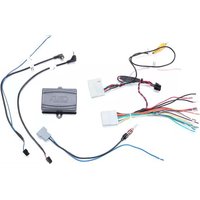
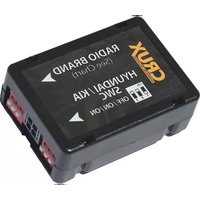
PARTS INCLUDED:


natural_image
Coiled electrical cable with various colored connectors and terminal blocks (no visible text or symbols)
natural_image
Close-up of a black cable with two gray connector pins, one emitting red light (no text or symbols visible)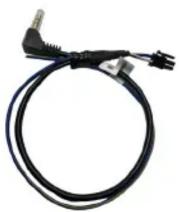
SWRHK-65S MODULE SWRHK-65S HARNESS ANTENNA ADAPTER SWC CABLE
INSTALLATION DIAGRAM:
LED TROUBLESHOOTING ON MODULE
| LED LIGHT | LED MODULE FEEDBACK | |
| BLUE LED OFF | NO POWER | CHECK VOLTAGE |
| RED LED FLASHES | WHEN PRESSING SWC BUTTONS | |

flowchart
graph TD
    A["TO FACTORY HARNESS"] --> B["12-Pin Black Connector"]
    B --> C["SWC MODULE"]
    C --> D["3.5MM SWC CABLE"]
    D --> E["HYUNDAI/KIA ANTENNA ADAPTOR (Included)"]
    D --> F["4-Pin Connector"]
    F --> G["Blue/Yellow (Kenwood & JVC)"]
    F --> H["Insulate with tape if not used"]
    C --> I["ON RADIO VEHICLE"]
    I --> J["HYUNDAI / KIA TYPE SWC SETTING (OFF OFF ON ON)"]
    C --> K["AFTERMARKET RADIO SELECTOR (See Chart)"]
    K --> L["HYUNDAI/KIA ANTENNA ADAPTOR (Included)"]
Note:
Output signal(s) stated above may not cover all Year/Model.

1 of 2
rev. 081022
DIP SWITCH SETTINGS:
AFTERMARKET RADIO DIP SWITCH SETTINGS:
| RADIO BRAND: | DIP: | 1 | 2 | 3 | 4 |
| Atoto, Dual, Farenheit, Jensen, Pioneer Power Acoustik, Soundstream Blaupunkt, Most off-brand Radios Alpine Clarion Kenwood JVC Boss, Old Sony New Sony | OFF | OFF | ON | ON | |
| OFF | OFF | ON | ON | ||
| OFF | OFF | ON | ON | ||
| OFF | OFF | OFF | OFF | ||
| OFF | ON | ON | OFF | ||
| OFF | ON | ON | ON | ||
| OFF | ON | OFF | ON | ||
| OFF | ON | OFF | OFF | ||
| OFF | OFF | ON | OFF |

NOTE: For Atoto, Blaupunkt, Dual, Farenheit, Power Acoustik, Soundstream, and most off-brand radios, check the aftermarket radio's manual to see if the SWC buttons need to be programmed.
HYUNDAI / KIA STEERING WHEEL CONTROL DIP SWITCH SETTING:
| DIP: | 5 | 6 | 7 | 8 | |
| Hyundai | OFF | OFF | ON | ON |

3.5MM to 4 Pin SWC CABLE
Plug in the SWC cable to the SWRHK-65S module and the 3.5mm plug to the aftermarket radio SWC port or use rhe Blue/Yellow wire for Kenwood and JVC radios.
NOTE: Insulate the Blue/Yellow wire or 3.5mm plug if not being used.
For aftermarket radios that have wires for SWC connections, cut off the 3.5mm plug on the Crux SWC Cable and connect the SWC wires as follows:

natural_image
Pure electrical circuit lines without any symbolsRED to SWC Key 1 WHITE to SWC Key 2 SHIELD to SWC Ground
Note that there are some radios that only have SWC1 and SWC2, in this case “shield” does not need to be connected.
VEHICLE APPLICATIONS:
| Hyundai | Kia | ||
| 2010 - 2013 | Accent | 2009 - 2009 | Amanti |
| 2007 - 2010 | Azera (with Base Radio OR non-NAV radio + AMPs) | 2009 - 2010 | Borrego |
| 2010 - 2013 | Forte | ||
| 2007 - 2010 | Elantra | 2009 - early 2011 | Optima |
| 2009 - 2010 | Entourage | 2009 - early 2011 | Rio |
| 2011 - 2013 | Genesis Sedan | 2009 - 2012 | Rondo |
| 2010 - 2014 | Genesis Coupe | 2009 - 2014 | Sedona |
| 2009 - 2014 | Santa Fe | 2009 – 2014 | Sorento |
| 2009 - 2013 | Veracruz* | 2010 - 2014 | Soul |
*2008-2010 Veracruz with Nav Radio + AMPs use P/N SWRHK-65P.


Brand : CRUX
Model : SWRHK-65S
Category : Car audio accessory