
KB-G9500 - Keyboard Sven - Free user manual and instructions
Find the device manual for free KB-G9500 Sven in PDF.


| Product Type | Wired Keyboard |
| Model | KB-G9500 |
| Brand | Sven |
| Interface | USB 2.0 |
| Layout | Full-size (104 keys) |
| Key Type | Membrane |
| Dimensions (L x W x H) | 440 x 130 x 30 mm |
| Weight | 600 g |
| Power Supply | USB bus-powered |
| Cable Length | 1.5 m |
| Multimedia Keys | Yes (play/pause, volume, mute) |
| Compatibility | Windows, macOS, Linux |
| Key Life | 10 million keystrokes |
| Plug and Play | Yes |
| Operating Temperature | 0°C to 40°C |
| Cleaning | Wipe with a soft, damp cloth |
| Safety | Do not expose to liquids or extreme heat |
| Spare Parts | Not available; non-user-serviceable |
| Repairability | Low; recommended to replace if faulty |
| Package Contents | Keyboard, user manual |
Frequently Asked Questions - KB-G9500 Sven
User questions about KB-G9500 Sven
0 question about this device. Answer the ones you know or ask your own.
Ask a new question about this device
Download the instructions for your Keyboard in PDF format for free! Find your manual KB-G9500 - Sven and take your electronic device back in hand. On this page are published all the documents necessary for the use of your device. KB-G9500 by Sven.
USER MANUAL KB-G9500 Sven
Рис. 1.
Рис. 2.
Рис. 3.
Рис. 4.
Рис. 5.
Рис. 6.
Рис. 7.
Рис. 8.
Создание макроса
Рис. 9.
Удаление макроса
Рис. 11.
Мал. 1.
Мал. 3.
Мал. 4.
Мал. 5.
Мал. 6.
Мал. 7.
Мал. 8.
Створення макросу
Мал. 9.
Видалення макросу
Мал. 11.
KB-G9500
www.sven.fi
Congratulations on the purchase of Sven keyboard!
Please read this User's Manual before using the unit and retain this User's Manual in safe place for future reference.
COPYRIGHT
© SVEN PTE. LTD. Version 1.0 (V 1.0).
This Manual and information contained in it are copyrighted. All rights reserved.
TRADEMARKS
All trademarks are the property of their legal holders.
NOTICE OF RESPONSIBILITY RESTRICTION
Despite the exerted efforts to make this Manual more exact, some discrepancies may occur. The information of this Manual is given on “as is” terms. The author and the publisher do not bear any liability to a person or an organization for loss or damages which have arisen from the information contained in the given Manual.
UNPACKING
- Unpack the device carefully. Make sure there are no accessories left in the box. Check up the device for damage; if the product was damaged during transportation, address the firm which carried out the delivery; if the product functions incorrectly, address the dealer at once.
- Shipping and transportation equipment is permitted only in the original container.
- Does not require special conditions for realization.
- Dispose of in accordance with regulations for the disposal of household and computer equipment.
APPLICATION
KB-G9500 keyboard is an input device. It is designed to enter information into the computer, as well as controll the operation of the computer.
PACKAGE CONTENTS
- Keyboard - 1 pc
- Stand — 1 pc
- User Manual – 1 pc
- Warranty card – 1 pc
SPECIAL FEATURES
- Software for keys programming and backlighting management
- Lock Win key
- Keyboard brightness backlighting adjustment
- Removable wrist rest
• Durable braided cable
SYSTEM REQUIREMENTS
- OC Windows.
- Free USB port.
INSTALLATION
- Connect the keyboard to an available USB port of your PC.
- Installation of keyboard is automatic after its connection to USB port of PC.
INSTALLATION OF THE SOFTWARE
Keyboard software is available on the o☐cial SVEN website. After downloading and installation, the software provides setting of backlight operation modes, assignment of function keys and macro programming.
Customize keyboard modes in the Main Keyboard menu
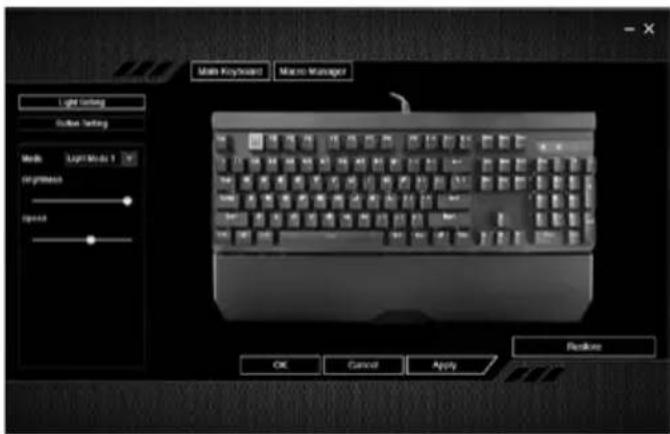
Fig. 1.
From this menu, you can select and configure the Light Setting backlight modes and directly adjust the Button Setting keyboard keys. All parameters are reset by pressing Restore, pressing Apply saves the user-created key configuration. Exit the save program is done by clicking OK, without saving the settings – Cancel.
Setting the Light Setting backlight modes
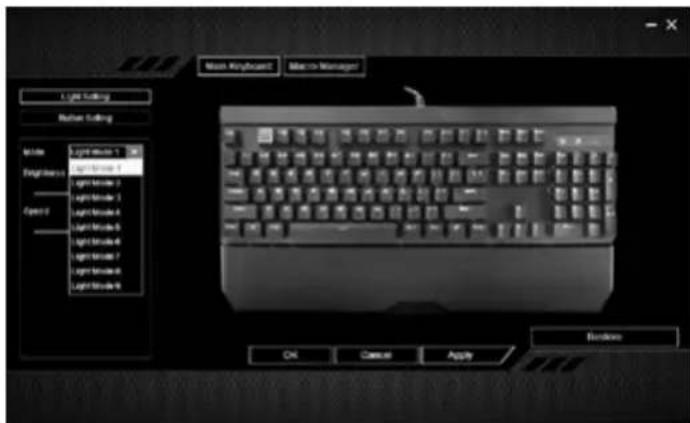
Fig. 2.
In Mode menu, nine Light Mode 1 – Light Mode 9, modes are selected, in which the brightness of the backlight mode is set to Brightness, and the speed (frequency) of the backlight flicker to Speed.
| Light Mode 1 | Keyboard backlight without flicker. Brightness control available. |
| Light Mode 2 | Backlit keyboard with shimmer. Adjusts the brightness and frequency (time) of illumination of the keyboard keys. |
| Light Mode 3 | Sequential multi-directional illumination of a certain number of keyboard keys (snake effect). Adjusts the brightness and speed of the keypad backlight. |
| Light Mode 4 | Keyboard key illumination. Adjusts the brightness and time of illumination of this button. |
| Light Mode 5 | Multiple directional illumination of a keystroke of a certain number of keystrokes in which the keypad key is pressed (wave effect on a line). Adjusts the brightness and speed of the keypad backlight. |
| Light Mode 6 | Multiple directional illumination from a keystroke of a certain number of keyboard keys (wave effect on the keyboard). Adjusts the brightness and speed of the keypad backlight. |
| Light Mode 7 | Turn off the backlight by pressing a keyboard key. Adjusts the brightness and dimming time of this button. |
| Light Mode 8 | Multiple directional illumination from a keystroke of a certain number of keyboard keys (the effect of a traveling wave on the keyboard). Adjusts the brightness and speed of the keypad backlight. |
| Light Mode 9 | Multi-directional illumination from the key pressed on 3-5 keys in 5 lines of the keyboard (the effect of a light spot on the keyboard). Adjusts the brightness and speed of the keypad backlight. |
Button Setting keyboard shortcuts
In Button Setting menu window, the following modes with Function are provided for setting the keyboard keys:
- Default mode to restore the original keyboard key functions;
- Key mode for reassigning certain keyboard keys;
- Multimedia mode for assigning keyboard keys to multimedia functions from the list of possible;
- Macro mode for assigning keyboard keys to user macros.
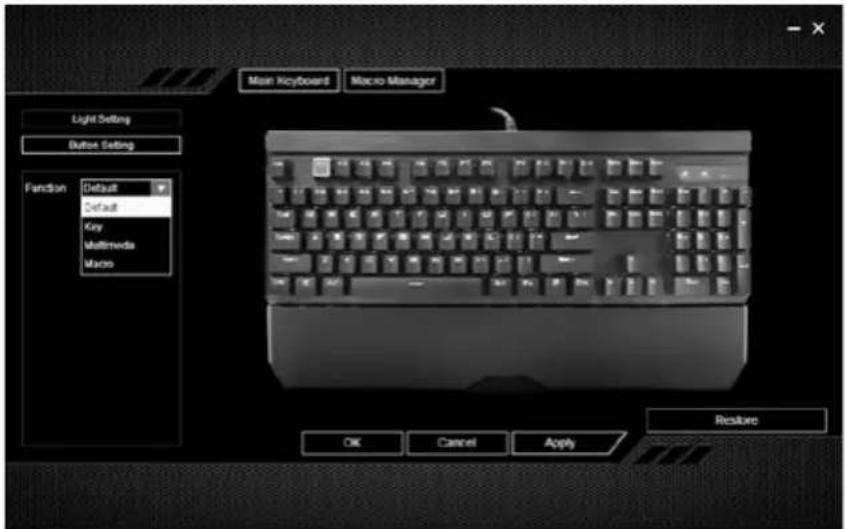
Fig. 3.
Restore the default keyboard shortcuts in Default mode
To reset the configuration settings of a given key, it is selected on the electronic keyboard of the interface. The color of the edit key will change from yellow to orange. Function menu field selects Default mode and is confirmed by clicking OK. After completion, the color illumination is goes out. Pressing Apply saves the user-created key configuration.
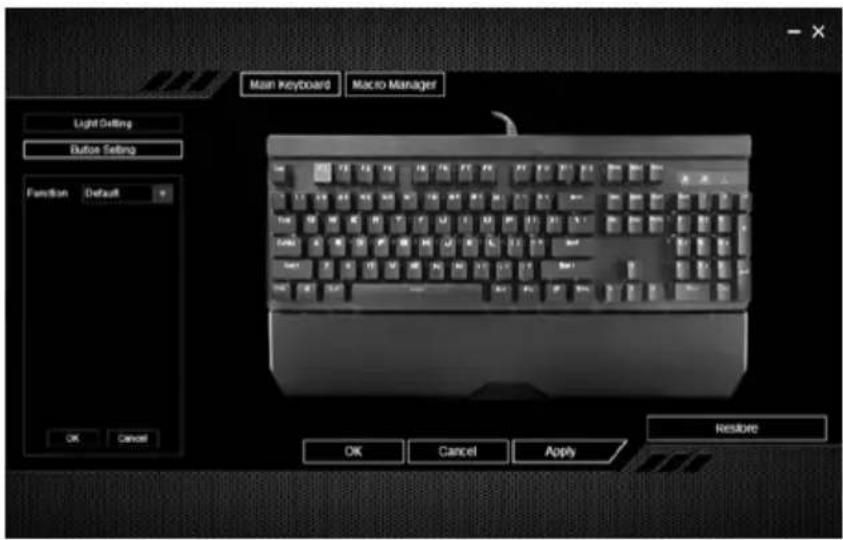
Fig. 4.
To reassign keyboard keys to Key mode
To reassign a key, it is selected on the electronic keyboard of the interface. The color of the edit key will turn orange. In Function menu field, the Key mode is selected and in Input A Key a new key value is entered from the keyboard and confirmed by pressing OK.
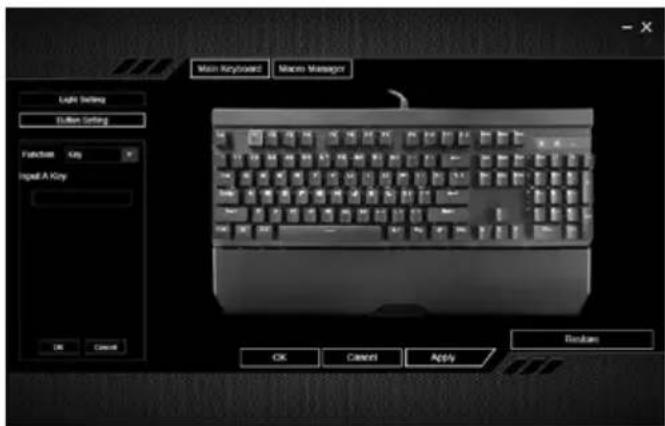
Fig. 5.
When done, the highlight color of the edit key changes to yellow. Pressing Apply saves the user-created key configuration.
Assign multimedia features in Multimedia mode
To assign a key to a multimedia function, it is selected on the electronic keyboard of the interface. The color of the edit key will turn orange. Multimedia mode is selected in the Function menu field and Input A Mode Function field specifies a multimedia function from among the possible and is confirmed by clicking OK.
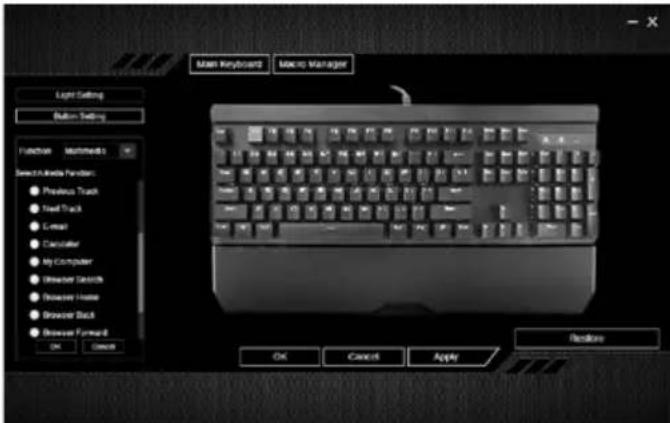
Fig. 6.
When done, the highlight color of the edit key changes to yellow. Pressing Apply saves the user-created key configuration.
Assign macro keys to Macro mode
To assign a macro to a key, it is selected on an electronic keyboard interface. The color of the edit key will turn orange. Macro mode is selected in Function menu box and in Please Select Please Select A Macro field a macro is selected from the previously recorded one and is confirmed by clicking OK.
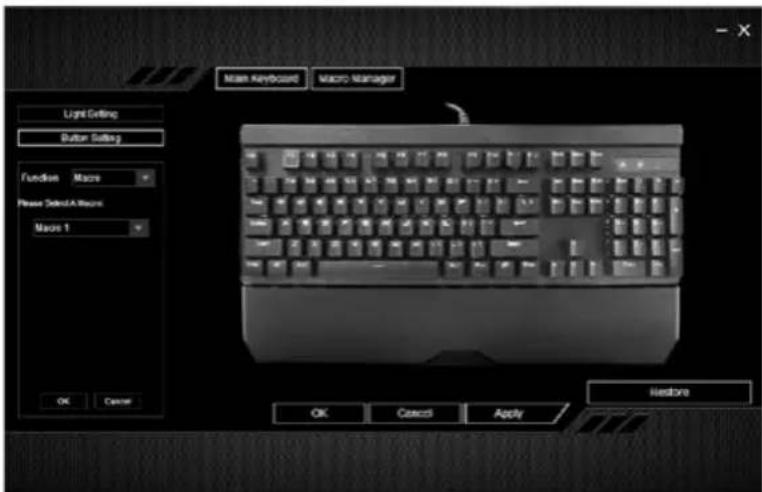
Fig. 7.
When done, the highlight color of the edit key changes to yellow. Pressing Apply saves the user-created key configuration.
Settings keyboard modes in the Main Keyboard menu
This menu records, edits, and deletes macros, as well as exporting and importing macros.
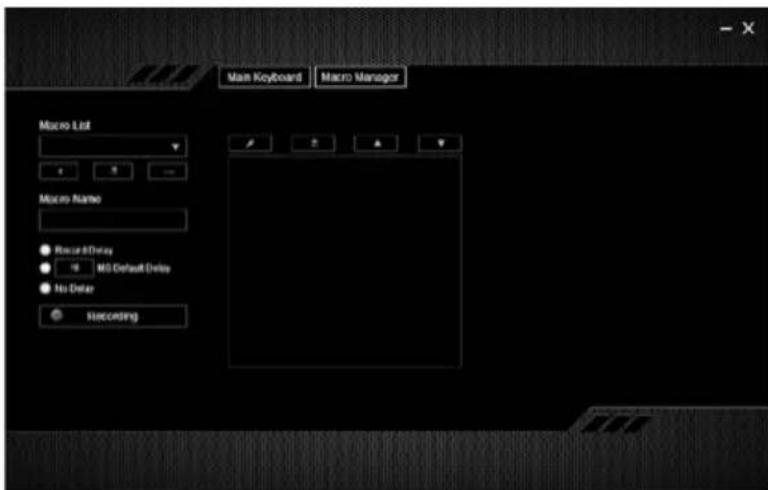
Fig. 8.
Creating macro
To create a macro in the panel, click the menu button . Program automatically creates its own macro named
«Macro 1» and writes it to Macro List macro sheet. In Macro Name macro editor, you can change the suggested name to any.
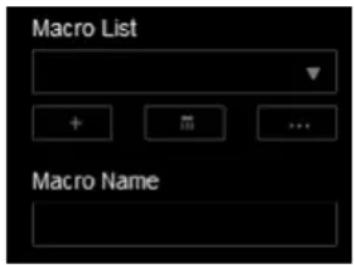
Fig. 9.
Deleting macro
In Macro List menu, select the macro that you want to delete, and then menu button Macro deleted.

Save and load macro
To save panel press menu button , which prompts you to save the (Import) macro configuration file. Configuration file «File.macro» is stored in the Config folder of the software. The configuration file is downloaded by the Export command, specifying the path to the configuration file.

Fig. 10.
Macro recording
Before recording macro, you must set a temporary keystroke delay.
- The actual time delay will be in Record Delay mode;
- Fixed time delay will be in Default Delay mode with the ability to set the delay time in milliseconds;
- There will be no temporary delay in No Delay mode.
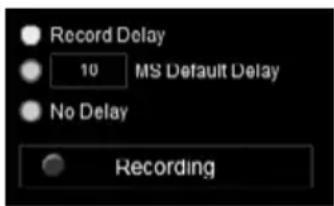
Fig. 11.
Recording command will record the macro. Completing the macro record will execute the Stop command Stop
Macro editing
Macro editor lets you do the following:
- edit macro rows.
- delete macro rows.
- move the cursor up.
- move the cursor down.
Macro string containing the key value is edited by clicking command ☐.
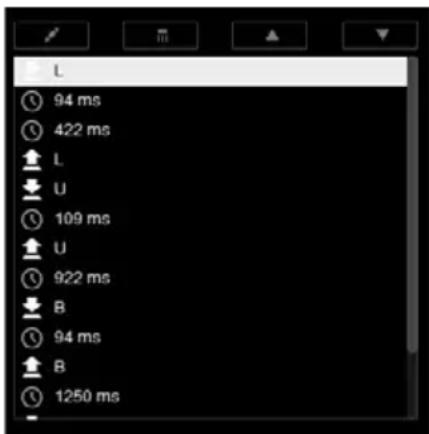
Fig. 12.
New value is entered in Input A Key of Edit Macro window. The completion of editing is confirmed by clicking OK.
Macro string containing the time interval value is edited by clicking the command ☐.
New value is entered in Input Delay box of Edit Macro. The completion of editing is confirmed by clicking OK.
Keyboard indication
- Num Lock – when you press the Num Lock key;
- Caps Lock – when you press the Caps Lock key;
- Gaming – when you press Fn + WIN (keypad lock on the WIN key).
TROUBLESHOOTING
| Problem Solution | |
| Keyboard is not working. 1. Disconnect keyboard from PC and check connector pins for possible damage. If there is no external damage found and connector pins are OK, connect keyboard to PC again.2. We recommend to address the nearest authorized service center. | |
TECHNICAL SPECIFICATIONS
| Parameter, measurement unit Value | |
| Q-ty of keyboard keys, pcs 104 | |
| Keyboard layout Eng/Rus/Ukr | |
| OS compatibility Windows | |
| Interface USB | |
| Length of cable, m 1.8 | |
| Extrapolated mean life | more than 20,000,000 strokes |
| Dimensions keyboard, mm 440 x 153 x 38 (48) | |
| Dimensions stand, mm | 440 x 69 x 18 |
| Keyboard weight, g | 952 |
Notes:
- Technical specifications given in this table are supplemental information and can not give occasion to claims.
- Technical specifications are subject to change without notice due to improvement of SVEN production.
Модель: KB-G9500
Manufacturer: SVEN PTE. LTD, 176 Joo Chiat Road, N° 02-02, Singapore, 427447. Produced under the control of Oy Sven Scandinavia Ltd. 15, Kotolahdentie, Kotka, Finland, 48310. Made in China.
® Registered Trademark of Oy SVEN Scandinavia Ltd. Finland.

EACCE
- Создание макроса
- Удаление макроса
- Створення макросу
- Видалення макросу
- Congratulations on the purchase of Sven keyboard!
- COPYRIGHT
- TRADEMARKS
- NOTICE OF RESPONSIBILITY RESTRICTION
- UNPACKING
- APPLICATION
- PACKAGE CONTENTS
- SPECIAL FEATURES
- SYSTEM REQUIREMENTS
- INSTALLATION
- INSTALLATION OF THE SOFTWARE
- Customize keyboard modes in the Main Keyboard menu
- Setting the Light Setting backlight modes
- Button Setting keyboard shortcuts
- Restore the default keyboard shortcuts in Default mode
- To reassign keyboard keys to Key mode
- Assign multimedia features in Multimedia mode
- Assign macro keys to Macro mode
- Settings keyboard modes in the Main Keyboard menu
- Creating macro
- Deleting macro
- Save and load macro
- Macro recording
- Macro editing
- Keyboard indication
- Notes:
- Модель: KB-G9500
Brand : Sven
Model : KB-G9500
Category : Keyboard