
Altos R360 F3 - Server ACER - Free user manual and instructions
Find the device manual for free Altos R360 F3 ACER in PDF.


| Product Type | Rack Server |
| Brand | Acer |
| Model | Altos R360 F3 |
| Form Factor | 1U Rackmount |
| Processor | Intel Xeon E5-2600 v2 Series |
| Chipset | Intel C602 |
| Memory | 8 DDR3 ECC Registered DIMM Slots, Up to 256GB |
| Storage | Up to 8 x 2.5" SATA/SAS Hot-Swap Bays |
| RAID Support | Hardware RAID 0, 1, 10, 5 (Optional) |
| Network | Dual Gigabit Ethernet Ports |
| Power Supply | 2 x 550W Redundant (Typical) |
| Dimensions (W x D x H) | 43.5 cm x 43 cm x 4.4 cm |
| Weight | Approximately 15 kg |
| Operating System Support | Windows Server, Linux distributions |
| Cooling | Redundant Hot-Swap Fans |
| Management | IPMI 2.0 with KVM over IP |
| Expansion Slots | 1 x PCIe 3.0 x16, 1 x PCIe 3.0 x8 |
| Cleaning Instructions | Use compressed air; avoid liquids. Disconnect power before cleaning. |
| Safety Precautions | Follow ESD procedures; ensure proper grounding. |
| Spare Parts & Repairability | Contact Acer support or authorized resellers for replacement parts. |
Frequently Asked Questions - Altos R360 F3 ACER
User questions about Altos R360 F3 ACER
0 question about this device. Answer the ones you know or ask your own.
Ask a new question about this device
Download the instructions for your Server in PDF format for free! Find your manual Altos R360 F3 - ACER and take your electronic device back in hand. On this page are published all the documents necessary for the use of your device. Altos R360 F3 by ACER.
USER MANUAL Altos R360 F3 ACER
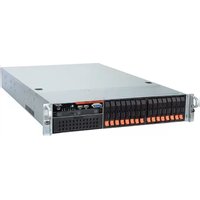
The Altos R360 F3 is a robust two-socket 1U system that is ideal for almost any application. This dynamic system can function as a head node or be used for virtualization purposes in your HPC (High-Performance Computing) and technical computing environments. Extremely powerful and highly efficient, this system serves as the core for your most demanding data-center needs.
Extremely powerful
The R360 F3 supports up to two Intel® Xeon® E5-2600 v3 product family processors, and high-performance DDR4 memory occupying twenty-four DIMM slots. Storage options include up to four 3.5" or eight 2.5" front-accessible, hot-swap hard drives. Hard drives can be configured in 12Gb/s SAS RAID and SAS HBA for increased performance and data availability. In its 1U form factor, it packs the same computing power in half the space when compared to a 2U system.
Highly efficient
As with all Acer rack servers, the R360 F3 uses only 80 PLUS-certified power supplies. This server can be equipped with up to two 750 W 80 PLUS Platinum-level power supplies. Combine this with Load Reduced DIMM memory modules and the latest power-saving chipset technologies, and this system delivers maximum performance with minimum power draw. Six dual-rotor system fans keep the system running cool at all times.
Flexible and robust I/O
Qualified to work in any environment, this system has dual 10 Gigabit or Gigabit Ethernet connectors onboard. It also has up to 2 PCIe 3.0 slots. In addition, dedicated I/O module and SAS module slots save customers valuable PCIe expansion. Users can rest assured the R360 F3 will keep up in any high-performance scenario.

Product views
Internal view

- 2 x Intel® Xeon® E5-2600 v3 family processors
- 24 x DDR4 ECC Registered/Load Reduced DIMMs
- 2 x 750 W Platinum-level AC or 2 x 750 W Gold-level DC power supplies (1+0/1+1 redundant, hot-swappable)
- Onboard SATA RAID connections
- 2 x PCIe 3.0 slots across two risers
- System fans
- Hot-swappable drive bays
- 1 x I/O module
- 1 x SAS RAID module
Front Views
Front I/O (4 x 3.5")

- Power button, LED indicators: power, HDD activity, LAN, system ID
- Front VGA and 2 x USB 3.0
- Up to 4 x 3.5" SATA / SAS HDDs or 2.5" SSDs
- Optional slimline optical drive
Front I/O (8 x 2.5")

- Power button, LED indicators: power, HDD activity, LAN, system ID
- Front VGA and 2 x USB 3.0 or optional slimline optical drive
- Up to 8 x 2.5" SATA / SAS HDDs and SSDs (with an option to replace four hard drives with four PCIe SFF/NVMe SSDs)
Rear View
Rear I/O

- 2 x 750 W 80 PLUS Platinum-level AC or 2 x 750 W 80 PLUS Gold-level DC power supplies (1+0/1+1 redundant, hot-swappable)
- Management port (RJ-45)
- 3 x USB 3.0 ports
- Video port
- 2 x Gigabit or 10Gigabit LAN ports (RJ-45)
- PCIe expansion via riser cards
- Serial Port B (RJ-45)
Product Specifications
What's New
- New Intel Xeon E5-2600 v3 processors
- DDR4 memory
- USB 3.0 ports • Dual-port 10 Gigabit Ethernet on board • Supports four PCIe SFF/NVMe SSDs
- Smart Server Manager with improved management functionality
Processors and Chipset
- Up to two Intel Xeon E5-2600 v3 family processors
- Chipset: Intel C612
Memory
• 24 x DDR4 Registered / Load Reduced DIMMs
Network Controllers
• Dual-port Ethernet controller - Intel X540 (Dual-port 10GbE) or Intel I350 (Dual-port 1GbE)
Storage
- Hard disk form factor: 3.5" or 2.5"
- Type: SAS / SATA / SSD with hot-plug capability
- Up to 4 x 3.5" or 8 x 2.5" hard drives or SSDs (with an option to replace four hard drives with four PCIe SFF/NVMe SSDs)
- Slimline optical drive (optional)
Storage Controllers
- Intel C612 chipset with 10 x 6 Gb/s SATA ports
- 2 x single port SATA connectors
- 2 x 4-port mini SAS HD connectors
- 1 x eUSB 2x5 pin connector for 2mm low profile eUSB SSDs
• Intel RSTe 4.1 embedded software SATA RAID
- Intel Embedded Server RAID Technology 2 (ESRT2) 1.41 with optional RAID 5 key support
- Optional Hardware SAS RAID with RAID 0, 1, 5, 6, 10, 50, 60 support
Expansion slots
- Two riser cards provide 1 x PCIe 3.0 x 16 (CPU 1) and 1 x PCIe 3.0 x 16 (CPU2)
- 1 x I/O module expansion slot • 1 x SAS RAID module expansion slot
Management
- Acer Smart Server Manager
- Embedded BMC controller with IPMI 2.0 compatibility
- System ID LED buttons, System Health LED • Smart Console remote monitoring and optional KVM over IP management to OS level
- Optional Local Control Panel
BIOS
- UEFI BIOS
- SMBIOS 2.0
Deployment/Serviceability
- BIOS Update Tool
- IPMI Firmware Update Tool
Operating Systems
• Windows Server 2012 R2 • Red Hat Enterprise Linux 6.5 • SUSE Linux Enterprise Server 11 SP3 - VMware ESXi 5.5
Graphics
- Integrated 2D video controller • 16 MB DDR3 memory
Chassis/Form Factor
- 1U rack-optimized
Power Supply
- 1+0/1+1 redundant, hot-swappable power supply units. Two power supply options:
- 750 W 80 PLUS Platinum-certified AC power supply
- 750 W 80 PLUS Gold-certified DC power supply
Security
- Administrator/user password
- Power-on password
- Setup password • Device boot control
- Secure command line interface (SSH)
- Secure browser interface (Secure socket layer - SSL support)
- Secure IPMI LAN interface (Authentication, Integrity, and Confidentiality algorithm)
Regulatory Compliant Standards
EMC
- FCC (Class A)
- CE (Class A)
- BSMI (Class A)
- CCC
Safety
• MET CB
Environmental Specifications
| Dimensions | 750 W SKU | 439 (W) x 769 (D) x 43.2 (H) mm (17.25 x 30.25 x 1.7 inches) |
| System inlet temperature | Operating | 10° - 35° C (50° - 95° F) |
| Non-operating | -40° - 70° C (-40° - 158° F) | |
| Relative humidity | Non-operating | 50 - 90 % |
| Acoustics | Idle | |
| LWAd | < 7.0 BA | |
| Operating | ||
| LWAd | < 7.0 BA | |
| Power | Rated Steady –state power | 750 W |
Technical specifications
PCIe® specifications
The primary I/O bus for the main board is PCIe Gen3. The following table lists the characteristics of the PCI-E bus segments. Details about each bus segment follow the table.
NOTE: The signaling bit rate of PCI Express is 8.0 Gbit/s one direction per lane for Gen 3.
| Riser card | Expansion slot | # | CPU 1 | Type | Bus width 2 | Voltage | Connector | Location 3 | Length |
| 1-slot | PCIe ×16 | 1 | 1 | PCIe Gen3 | ×16 | 3.3 V | ×16 | Riser 1 | Full width, half length |
| 1-slot | PCIe ×16 | 1 | 2 | PCIe Gen3 | ×16 | 3.3 V | ×16 | Riser 2 | Full width, half length |
NOTE:
- CPU 2 indicates that a second CPU is required to access that specific PCIe ® slot.
- Indicates the number of physical electrical lanes running to a PCIe ® connector.
- If only one CPU is used, riser slot 2 cannot be used.
Each riser card is mounted on a bracket assembly which is then inserted into the riser car slot. Riser slot 1
Onboard storage specifications
| Item | Description |
| Controller | Intel® C612 Platform Controller Hub |
| Simultaneous drive transfer channels | 10 onboard SATA portsAHCI SATA controller: 4 x SATA ports from the Mini SAS HD connector and 2 x SATA ports on the server boardAHCI sSATA controller: 4 x SATA ports from the Mini SAS HD connector on the server board. |
| Max throughput per channel | 6 Gb/s |
| Data transfer method | Non-RAID modeRAID mode |
| Drive type supported | Serial ATA |
| RAID levels support | Default: Intel ESRT2 SATA RAID 0, 1, 5, 10 (RAID 5 requires key) or Intel RSTe software SATA RAID 0, 1, 5, 10 (Windows OS support only) |
| RAID function support | Supports multiple logical volumesSetup through ROM based Array Configuration Utility Installation scripting support |
| RAID OS support | Windows Server 2012 R2Red Hat Enterprise Linux 6.5SuSE Linux Enterprise Server 11 |
| Additional features | NCQ (Native Command Queuing)AHCI (Advanced Host Controller Interface) |
| Onboard LAN specifications | |
| Item | Description |
| Controller | Dual-port Intel® I350 Ethernet Controller (1GbE) or Dual-port Intel X540 Ethernet Controller (10GbE) |
| Network interface | 10Base-T / 100Base-TX / 1000Base-T / 10GBase-T |
| Compatibility standards | IEEE 802.3 Ethernet interface for 10BASE-TIEEE 802.3ab Ethernet interface for 1000BASE-TIEEE 802.3u Ethernet interface for 100BASE-TXIEEE 802.3an Ethernet interface for 10GBASE-T |
| Manageability | NC-SI, SMBusPXE, iSCSI boot |
| Virtualization acceleration | Virtual Machine Device Queues (VMDq)PCI-SIG SR-IOV implementation |
| Connector | RJ-45 |
| Supported cable type | X540 (10GbE): CAT-6/CAT-6AI350 (1GbE): CAT-5/CAT-5e |
| Memory specifications and population | |
| Item | Description |
| Supported memory types | Registered DDR4 1600 / 1866 / 2133 MHzLoad Reduced DDR4 1600 / 2133 MHzECC-enabledIntegrated on-die thermal sensors (TROD)NOTE:Acer does not qualify mixed memory configurations of memory type, capacity or make. |
Item
Population
Description
- Farthest fill first rule on any channel (populate blue slot / Slot 1 first) • Install DIMMs in order (CPU-1: Channels A, B, C and D; CPU-2: Channels E, F, G and H)
- Only remove DIMM blanks when populating memory in that slot. Maximum of 8 ranks can be installed on any one channel.
- Do not mix DIMM types (RDIMM or LRDIMM) and frequencies or latencies within or across CPUs.
Population per CPU by DIMM type is listed below.
NOTE: Support for 16 / 32 / 64 GB DIMMs may vary by regional availability.
A CPU must be populated for memory to be read.
Memory support and population![graph LR A["Processor"] --> B["Fill First"] B --> C["Fill Second"] C --> D["Fill Third"] D --> E["Memory Channel x"] style A fill:#f9f,stroke:#333 style B fill:#bbf,stroke:#333 style C fill:#bfb,stroke:#333 style D fill:#ffb,stroke:#333 style E fill:#fff,stroke:#333](/content/2026/05/993248/images/018721950d64295f77a07abee7be46c5bb0a6ec13ad1356b60baa947f6acfbac.jpg)
| Processor Socket 1 | Processor Socket 2 | ||||||||||||||||||||||
| (0)Channel A | (1)Channel B | (2)Channel C | (3)Channel D | (0)Channel E | (1)Channel F | (2)Channel G | (3)Channel H | ||||||||||||||||
| A1 | A2 | A3 | B1 | B2 | B3 | C1 | C2 | C3 | D1 | D2 | D3 | E1 | E2 | E3 | F1 | F2 | F3 | G1 | G2 | G3 | H1 | H2 | H3 |

| Type | Ranks Per DIMM and Data Width | DIMM Capacity (GB) | Speed (MT/s); Voltage (V); Slot per Channel (SPC) and DIMM per Channel (DPC) | |||
| 3 Slots per Channel | ||||||
| 1 DPC | 2 DPC | 3 DPC | ||||
| 4 Gb | 8 Gb | 1.2V | 1.2V | 1.2V | ||
| RDIMM | SRx4 | 8GB | 16GB | 2133 | 1866 | 1600 |
| RDIMM | SRx8 | 4GB | 8GB | 2133 | 1866 | 1600 |
| RDIMM | DRx8 | 8GB | 16GB | 2133 | 1866 | 1600 |
| RDIMM | DRx4 | 16GB | 32GB | 2133 | 1866 | 1600 |
| LRDIMM | QRx4 | 32GB | 64GB | 2133 | 2133 | 1600 |
Independent mode:
Also known as performance mode, each DDR channel is addressed individually via burst lengths of 8 bytes. All CPUs support SECDED ECC with x8 DRAMs. All CPUs support SDDC with x4 DRAMs.
Lockstep mode:
Also known as RAS mode, each pair of channels shares a Write Push Logic unit to enable lockstep. Channels are paired together as a domain. For CPU1, channels A and B, and channels C and D. For CPU2, channels E and F, and channels G and H. All CPUs support SDDC with x4 or x8 DRAMs.
Memory RAS mode:
RAS mode that requires matching populations. Same slot position across channels must hold the same DIMM type (ranks, banks, rows and column).
Intra-Socket Memory Mirroring mode:
- For mirroring mode, the memory image in channel A is maintained the same as channel C and channel B is maintained the same as channel D. Therefore, the effective size of memory is reduced by one-half.
- The DIMM configuration in mirrored channels must be identical. Channel A & channel C with identical DIMMs and also channel B & channel D with identical DIMMs. The DIMM type, size, manufacturer should be the same.
Rank Sparing mode:
- An unused spare rank is reserved on each channel. The spare rank is used to copy the contents of a failing rank on the channel to keep a system working when a rank starts to fail. The reserved rank is not able to be used before the other rank fails.
Memory Identification
Generally, there are some memory information printed on the label of DIMM, but different vendors may have different formats. For example:
4 GB 2R×4 PC4-14900R xx xx xxx
1. Density
■ 1 GB, 2 GB, 4 GB, 8 GB, 16 GB, 32 GB
2. Rank
■ 1R = Single Rank ■ 2R = Dual Rank ■ 4R = Quad Rank
3. Bit Organization
■ This platform supports ×4 and ×8. Note: It's not recommended to mix DIMMs with different bit organizations in one system.
4. Speed
PC4-12800 => DDR4-1600, PC4-14900 => DDR4-1866, ■ PC4-17000 => DDR4-2133
Graphics Specifications
Emulex Pilot-III Server Management Controller
Memory: 16 MB dedicated
Main Features
- Integrated Graphics Core with 2D Hardware accelerator • DDR-3 memory interface with 16MB memory • Supports all display resolutions up to 1600 x 1200 16bpp @ 60 Hz • High speed Integrated 24-bit RAMDAC
- Single lane PCIe host interface running at Gen1 speed
Supported video modes
| 2D Mode | 2D Video Mode Support | |||
| 8bpp | 16 bpp | 24bpp | 32 bpp | |
| 640x480 | X | X | X | X |
| 800x600 | X | X | X | X |
| 1024x768 | X | X | X | X |
| 1152x864 | X | X | X | X |
| 1280x1024 | X | X | X | X |
| 1600x1200** | X | X | ||
Power specifications
750 W AC Platinum-certified power supply
Efficiency
| Loading | 100% | 50% | 20% | 10% |
| Minimum efficiency | 91% | 94% | 90% | 82% |
| Power factor | ||||
| Output power | 10% load | 20% load | 50% load | 100% load |
| Power factor | >0.65 | >0.80 | >0.90 | >0.95 |
AC input voltage range
| Parameter | Min | rated | Max | Start up Vac | Power off Vac |
| 110 Vac | 90 Vrms | 100-127 Vrms | 140 Vrms | 85 Vac ± 4 Vac | 75 Vac ± 5 Vac |
| 220 Vac | 180 Vrms | 200-240 Vrms | 264 Vrms | ||
| Frequency | 47 Hz | 50/60 Hz | 63 Hz |
750 W AC Platinum-certified power supply (continued)
AC line holdup time
| Loading70% | Holdup time12 msec |
AC Line Inrush
Shall not exceed 55 A peak
750 W DC Gold-certified power supply
Efficiency
| Loading | 100% | 50% | 20% | 10% |
| Minimum efficiency | 88% | 92% | 88% | 80% |
DC input voltage
| Parameter | Min | Rated | VMax |
| DC voltage | -40.5 Vdc | -48 Vdc / -60 Vdc | -75 Vdc |
| Input current | 24A | 12.5A |
DC holdup time
| Loading | Holdup time |
| 70% | 0.2 msec |
Acer server software utilities
Smart Console with optional iKVM management
Web-based management utility to simplify system management with embedded BMC, system monitoring and alerting, event handling, remote power control and KVM-over-IP. Smart Console is OS independent and offers virtual media through floppy, ODD, and removable disk.
Note:
- The integrated BMC has support for basic and advanced server management features. Basic management features are available by default. Advanced management features are enabled with the addition of an optionally installed RMM (Remote Management Module) module.
- Two concurrent web sessions from up to two different users is supported.
Smart Server Manager
Offers 24-7 monitoring for system health and performance.
- Delivers proactive event management features including system event logging, event handling from e-mail and SNMP Trap (PET) alerting • Monitors onboard hardware, operating systems and virtual machines
- Allows remote control from KVM and Power control • Satisfies management in web-based UI, role-based administration, and automated management scripts
- Remote firmware deployment and scheduled updates
- Customizable BIOS settings and deployment to networked nodes
Available options
Processors (up to 2)
Intel® Xeon® processor (Fourteen Core)
• E5-2697 v3 (35 MB L3 cache, 2.6 GHz, DDR4 2133/1866/1600 MHz, 145 W) • E5-2695 v3 (35 MB L3 cache, 2.3 GHz, DDR4 2133/1866/1600 MHz, 120 W)
Intel® Xeon® processor (Twelve Core)
• E5-2690 v3 (30 MB L3 cache, 2.6 GHz, DDR4 2133/1866/1600 MHz, 135 W) • E5-2680 v3 (30 MB L3 cache, 2.5 GHz, DDR4 2133/1866/1600 MHz, 120 W) • E5-2670 v3 (30 MB L3 cache, 2.3 GHz, DDR4 2133/1866/1600 MHz, 120 W) • E5-2650L v3 (30 MB L3 cache, 1.8 GHz, DDR4 2133/1866/1600 MHz, 65 W)
Intel® Xeon® processor (Ten Core)
• E5-2660 v3 (25 MB L3 cache, 2.6 GHz, DDR4 2133/1866/1600 MHz, 105 W) • E5-2650 v3 (25 MB L3 cache, 2.3 GHz, DDR4 2133/1866/1600 MHz, 105 W)
Intel® Xeon® processor (Eight Core)
• E5-2640 v3 (20 MB L3 cache, 2.6 GHz, DDR4 1866/1600 MHz, 90 W) • E5-2630 v3 (20 MB L3 cache, 2.4 GHz, DDR4 1866/1600 MHz, 85 W) • E5-2630L v3 (20 MB L3 cache, 2.0 GHz, DDR4 1866/1600 MHz, 55 W)
Intel® Xeon® processor (Six Core)
• E5-2643 v3 (20 MB L3 cache, 3.4 GHz, DDR4 2133/1866/1600 MHz, 135 W) • E5-2620 v3 (15 MB L3 cache, 2.4 GHz, DDR4 1866/1600 MHz, 85 W) • E5-2609 v3 (15 MB L3 cache, 2.9 GHz, DDR4 1600 MHz, 85 W) • E5-2603 v3 (15 MB L3 cache, 1.6 GHz, DDR4 1600 MHz, 85 W)
Intel® Xeon® processor (Quad Core)
• E5-2637 v3 (15 MB L3 cache, 3.5 GHz, DDR4 2133/1866/1600 MHz, 135 W)
Memory
| Memory type | Registered / Load Reduced DDR4 ECC memory |
| Capacities | 8 / 16 GB DIMMs Registered32 GB DIMMs Load Reduced |
| DIMM number | 24 |
| Max memory | 768GB (LRDIMM) or 384 GB (RDIMM) |
Note: 32GB LRDIMM availability may vary by region.
Hard drives
| Type | Interface, bandwidth | Capacities (RPM) |
| Enterprise SATA 3.5” | 6 Gb/s | 500 GB (7.2K) |
| 1 TB (7.2K) | ||
| 2 TB (7.2K) | ||
| 3 TB (7.2K) | ||
| 4 TB (7.2K) | ||
| 6 TB(7.2K) | ||
| Enterprise SAS 3.5” | 6 Gb/s | 1 TB (7.2K) |
| 2 TB (7.2K) | ||
| 3 TB (7.2K) | ||
| 4 TB (7.2K) | ||
| 6 TB (7.2K) | ||
| Enterprise SAS, 2.5” | 6 Gb/s | 300 GB (15K) |
| 300 GB (10K) | ||
| 450 GB (15K) | ||
| 450 GB (10K) | ||
| 600 GB (15K) | ||
| 600 GB (10K) | ||
| 900 GB (10K) | ||
| 1.2 TB (10K) | ||
| 1.8 TB (10K) |
Optical drive
| Type | Slimline Super-Multi |
RAID support upgrades
| Model | Port number | RAID support |
| ESRT2 SW SATA RAID 5 Activation Key | 0, 1, 5, 10 | |
| Intel® RAID SSD Cache with Fast Path I/O | ||
| 8-port 12Gb SAS RAID Module (LSI 3108 ROC, 1GB DDR3, supports Super-capacitor Module) | 8 internal ports | 0, 1, 5, 6, 10, 50, 60 |
| 4-port 12Gb SAS RAID Module (LSI 3108 ROC, 1GB DDR3, supports Super-capacitor Module) | 4 internal ports | 0, 1, 5, 6, 10, 50, 60 |
| 8-port 12Gb SAS Entry Level RAID Module (LSI 3008) | 8 internal ports | 0, 1, 1E, 10, JBOD mode |
| 8-port (external) 12Gb SAS RAID Card (LSI 3108 ROC, 1GB DDR3, supports Super-capacitor Module) | 8 external ports | 0, 1, 5, 6, 10, 50, 60 |
| 4-port (internal)/4-port (external) 12Gb SAS RAID Card (LIS 3108 ROC, 1GB DDR3, supports Super-capacitor Module) | 4 internal ports + 4 external ports | 0, 1, 5, 6, 10, 50, 60 |
| 8-port 12Gb SAS RAID Card (LSI 3108 ROC, 1GB DDR3, supports Super-capacitor Module) | 8 internal ports | 0, 1, 5, 6, 10, 50, 60 |
| 4-port 12Gb SAS RAID Card (LSI 3108 ROC, 1GB DDR3, supports Super-capacitor Module) | 4 internal ports | 0, 1, 5, 6, 10, 50, 60 |
Ethernet network cards and I/O modules
| Model | Port number | Bandwidth |
| Intel® Ethernet Server Adapter I350-T2 | 2 (RJ-45) | 1 Gb/s |
| Intel® Ethernet Converged Network Adapter X540-T1 | 1 (RJ-45) | 10 Gb/s |
| Intel® Ethernet Converged Network Adapter X540-T2 | 2 (RJ-45) | 10 Gb/s |
| Intel® Ethernet Converged Network | 2 (SFP+) | 10 Gb/s |
| Adapter X520-DA2* | ||
| Intel® Ethernet Converged Network Adapter X520-SR1 * | 1 | 10 Gb/s |
| Intel® Ethernet Converged Network Adapter X520-SR2* | 2 | 10 Gb/s |
| Intel® Ethernet Converged Network Adapter X520-LR1 * | 1 | 10 Gb/s |
| Ethernet I/O Module Intel® I350-AE4 GbE | 4 (RJ-45) | 1 Gb/s |
| Ethernet I/O Module Intel® X540-BT2 10GbE | 2 (RJ-45) | 10 Gb/s |
| Intel® 82599EB Ethernet I/O Module | 2 (SFP+) | 10 Gb/s |
| Intel® XL710-QDA1 Ethernet I/O Module* | 1 (QSFP+) | 40 Gb/s |
| Intel® XL710-QDA2 Ethernet I/O Module* | 2 (QSFP+) | 40 Gb/s |
*Note: Intel's 10GbE and 40GbE cards vary in terms of their connector type. Note: All cards marked (I/O module) indicate the card is inserted in the I/O module connector on the node. It does not use the standard PCIe slot.
InfiniBand
| Model | Port number | Bandwidth |
| FDR InfiniBand* ConnectX-3* I/O Module (Single Port) | 1 (FDR) | 56 Gb/s |
| FDR InfiniBand* ConnectX-3* I/O Module (Dual Port) | 2 (FDR) | 56 Gb/s |
Note: All cards marked (I/O module) indicate the card is inserted in the I/O module connector on the node. It does not use the standard PCIe slot.
Management module
| Model | Function |
| Remote Management Module Activation Key | Enables remote iKVM |
| Local Control Panel | Enhances the manageability |
Service and support
Acer Servers offer a comprehensive service suite to take care of daily IT needs. Users can select the 3-year standard warranty or choose extended warranties and services.
In a continuing effort to improve the quality of our products, information in this document is subject to change without notice. Images shown are only representations of some of the configurations available for this model. Availability may vary depending on region.
© 2015. All rights reserved.
Microsoft and Windows are registered trademarks of Microsoft Corporation. Intel, the Intel logo, Xeon and Xeon Inside are trademarks of Intel Corporation.
NOTE: Extension warranty services may vary by country. Please contact Acer authorized resellers for more information.


- EXTREMELY POWERFUL
- HIGHLY EFFICIENT
- FLEXIBLE AND ROBUST I/O
- PRODUCT VIEWS
- INTERNAL VIEW
- FRONT VIEWS
- PRODUCT SPECIFICATIONS
- WHAT'S NEW
- PROCESSORS AND CHIPSET
- MEMORY
- NETWORK CONTROLLERS
- STORAGE
- STORAGE CONTROLLERS
- EXPANSION SLOTS
- MANAGEMENT
- BIOS
- DEPLOYMENT/SERVICEABILITY
- OPERATING SYSTEMS
- GRAPHICS
- CHASSIS/FORM FACTOR
- POWER SUPPLY
- SECURITY
- REGULATORY COMPLIANT STANDARDS
- EMC
- SAFETY
- TECHNICAL SPECIFICATIONS
- PCIE® SPECIFICATIONS
- ITEM
- POPULATION
- DESCRIPTION
- INDEPENDENT MODE
- LOCKSTEP MODE
- MEMORY RAS MODE
- INTRA-SOCKET MEMORY MIRRORING MODE
- RANK SPARING MODE
- MEMORY IDENTIFICATION
- DENSITY
- RANK
- BIT ORGANIZATION
- SPEED
- GRAPHICS SPECIFICATIONS
- EMULEX PILOT-III SERVER MANAGEMENT CONTROLLER
- MAIN FEATURES
- SUPPORTED VIDEO MODES
- POWER SPECIFICATIONS
- W AC PLATINUM-CERTIFIED POWER SUPPLY
- W AC PLATINUM-CERTIFIED POWER SUPPLY (CONTINUED)
- W DC GOLD-CERTIFIED POWER SUPPLY
- ACER SERVER SOFTWARE UTILITIES
- SMART CONSOLE WITH OPTIONAL IKVM MANAGEMENT
- NOTE
- SMART SERVER MANAGER
- AVAILABLE OPTIONS
- PROCESSORS (UP TO 2)
- INTEL® XEON® PROCESSOR (FOURTEEN CORE)
- INTEL® XEON® PROCESSOR (TWELVE CORE)
- INTEL® XEON® PROCESSOR (TEN CORE)
- INTEL® XEON® PROCESSOR (EIGHT CORE)
- INTEL® XEON® PROCESSOR (SIX CORE)
- INTEL® XEON® PROCESSOR (QUAD CORE)
- SERVICE AND SUPPORT
Brand : ACER
Model : Altos R360 F3
Category : Server