
IAN 114333 - Wristwatch AURIOL - Free user manual and instructions
Find the device manual for free IAN 114333 AURIOL in PDF.


| Type of product | Wristwatch |
| Water resistance | 3 bar (suitable for everyday use, splash resistant) |
| Battery type | CR2025 |
| Time display | 12-hour or 24-hour format, with date and day of week |
| Alarm | Yes, with snooze function (5 minutes) |
| Hourly chime | Yes |
| Stopwatch | Yes, with lap time function |
| Backlight | Yes, activated by pressing RESET/LIGHT |
| Band type | Metal strap with removable links |
| Band shortening | By removing links using included tool |
| Cleaning instructions | Wipe with a soft, dry, lint-free cloth (e.g., glasses cloth) |
| Safety notes | Keep batteries away from children; do not immerse beyond 3 bar; not for commercial use |
| Warranty | 3 years from digi-tech gmbh (requires proof of purchase) |
| Disposal | Watch and batteries must be disposed of separately at recycling facilities |
Frequently Asked Questions - IAN 114333 AURIOL
User questions about IAN 114333 AURIOL
0 question about this device. Answer the ones you know or ask your own.
Ask a new question about this device
Download the instructions for your Wristwatch in PDF format for free! Find your manual IAN 114333 - AURIOL and take your electronic device back in hand. On this page are published all the documents necessary for the use of your device. IAN 114333 by AURIOL.
USER MANUAL IAN 114333 AURIOL
Usage and safety instructions
DE AT CH
ARMBANDUHR
GB Usage and safety instructions....- 25 -
| 3 BAR | √ | × | × | × |
| 5 BAR | √ | √ | × | × |
| 10 BAR | √ | √ | √ | × |
| 20 BAR | √ | √ | √ | √ |
Batterij vervangen CR2025
| 3 BAR | √ | × | × | × |
| 5 BAR | √ | √ | × | × |
| 10 BAR | √ | √ | √ | × |
| 20 BAR | √ | √ | √ | √ |
| 3 BAR | √ | × | × | × |
| 5 BAR | √ | √ | × | × |
| 10 BAR | √ | √ | √ | × |
| 20 BAR | √ | √ | √ | √ |
GB Usage and safety instructions
Table of contents
Table of contents....-25 -
Introduction....-26-
Intended use....-26-
Scope of delivery....-26-
Important safety information....-26-
User....-26-
Batteries....-26-
Features....-27-
Light....-27-
Quick setting....-27-
Time setting....-27-
24H/12H time display....- 27 -
Alarm setting -27-
Alarm/hourly chime activation....-28-
Snooze....-28-
Stop watch - 28 -
Band shortening instruction for metal straps..... - 28 -
Replacement of battery CR2025....- 29 -
Cleaning instructions....-29-
Water resistance....-29-
Disposal of the watch....-29-
Disposal of the batteries....-29-
digi-tech gmbh warranty - 29 -
Warranty conditions....- 30 -
Warranty period and defects liability....- 30 -
Scope of the warranty....- 30 -
Warranty claim procedure....- 30 -
Service....-31-
Supplier - 31 -
WRISTWATCH
Introduction
Congratulations on the purchase of your new wristwatch. You have chosen a high quality product. The instruction manual is part of the product- it contains important information about safety, use and disposal. Read the manual with all usage and safety notes before using the watch. Only use the watch in the intended way and for the intended applications. If the watch is given to someone else, include all documentation with the watch.
Intended use
This watch is intended for time display and the described additional features. Any other use or modification of the electronic appliance does not comply with the intended uses. The manufacturer is not liable for damages caused by improper use or misuse. The device is not intended for commercial use.
Scope of delivery
Please note: Check the scope of delivery after purchase. Please ensure that all parts are included and undamaged.
• wristwatch incl. battery
- two removable links
• band changing tool
• instruction manual

Important safety information
User
This device may be used by persons (including children over 8 years of age) with reduced physical, sensory or mental abilities or lack of experience and knowledge, if they are supervised or instructed regarding the safe use of the device and understand the dangers that may arise. Children may not play with the device. Cleaning and user maintenance of the device may not be performed by children without supervision. Keep packaging films out of the hands of children. There is a danger of suffocation.
Batteries
Keep batteries out of reach of small children. If a battery is swallowed, you must seek medical attention immediately. Batteries/rechargeable batteries must always be inserted in the correct polarity. If necessary, clean the battery and device contacts. Never attempt to recharge non-rechargeable batteries. Never short-circuit or attempt to open batteries. Never throw batteries into fire as they may explode. If the device will not be used for an extended time period, remove the battery and store the device in
a dry and dust-free area. Improper use of the battery can lead to explosion or leakage. If the battery leaks, avoid contact with skin, eyes and mucous membranes. Use gloves. If you are exposed to battery acid, rinse the affected areas with plenty of clean water and immediately seek medical attention. Remove discharged batteries from the device as they present an increased risk of leakage.
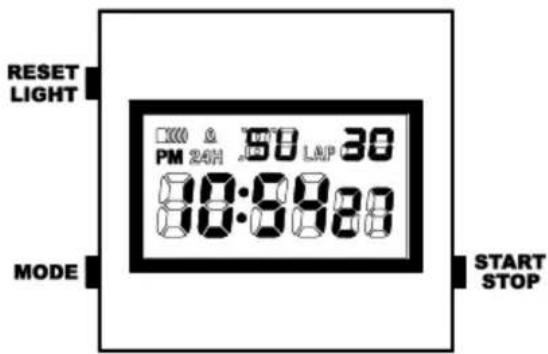
Features
- Time
• Date and day of the week - Stop watch
- Alarm with snooze
- Hourly chime
• 12/24 time display - Backlight
Light
Press RESET/LIGHT to briefly activate the light.
Quick setting
Press and hold START/STOP when setting numerical values to use the quick setting feature.
Time setting
Press MODE 3x to go from normal time display mode to time setting mode. The seconds will blink on the display and can be reset (00) by pressing START/STOP. Press RESET/LIGHT to confirm the setting. The hours will blink on the display. Press START/STOP to set the hours. Confirm the setting by pressing RESET/LIGHT. Set the minutes, the month, the date and the day of the week in the same way.
Press MODE to exit time setting mode.
24H/12H time display
To change the time format 24H - 12H /PM, press START/STOP during normal time setting.
Alarm setting
Press MODE 1x to go from normal time display mode to alarm setting mode. Press RESET/LIGHT, the hours will blink on the display and can be set by pressing START/STOP. Press RESET/LIGHT to confirm the setting.
The minutes will blink on the display. Press START/STOP to set the minutes. Press RESET/LIGHT to confirm the setting.
Press MODE to exit time setting mode.
Alarm/hourly chime activation
Press MODE 1x to go from the normal time display to the alarm setting. Press START/STOP repeatedly to select the Alarm 🐎, the hourly chime 🔒 or both 🐎 🔒.
Press START/STOP or RESET/LIGHT to stop the alarm.
Press MODE to exit time setting mode.
Snooze
When the alarm sounds, press MODE to activate the snooze feature. The alarm symbol 🐘Will blink. The alarm will sound again after 5 minutes. Press START/STOP or RESET/LIGHT to stop the alarm.
Stop watch
Press MODE 2x to go from normal time display mode to the stop watch. Press START/STOP to start or stop the stop watch. Press RESET/LIGHT while the stop watch is running to read the lap time. The stop watch will continue running internally. Press RESET/LIGHT again, to return to the running time. Press RESET/LIGHT while the stop watch is stopped to reset the stop watch.
Press MODE to return to normal time display mode.
Band shortening instruction for metal straps

Band shortening can be accomplished by removing links. Open the band clasp safety and open the clasp. The band is held to the clasp by a spring bar.
Image 1. Compress and remove the spring bar by using a pointed tool. Now place the watch face down on a soft surface. Image 2. The links that can be removed are marked with an arrow.
Image 3. Place the band in the band changing tool in such a way that the pointed end of the tool points directly at the metal rod. Turn the screw in the direction of the arrow until the metal rod is pushed out a small distance. The rod can now be pulled out (using pliers if necessary). The strap can now be taken disassembled. Remove as many links as necessary using this method. Reinsert the rod in the
opposite direction of the arrow and push it back into the band. The strap and clasp can now be reassembled.
An instructional video is available for online viewing at the following URL:
http://www.lidl.com/nou9nohN
...or simply scan the following QR code:

Replacement of battery CR2025
Battery replacements must be performed by an expert to avoid damaging the case or gaskets.
Cleaning instructions
Clean the wristwatch with a soft, dry and lint-free cloth. A glasses cleaning cloth is ideal.
Water resistance
Water resistant up to 3 bar. The bar value specifies the atmospheric overpressure which is applied during testing (DIN 8310).
| 3 BAR | √ | × | × | × |
| 5 BAR | √ | √ | × | × |
| 10 BAR | √ | √ | √ | × |
| 20 BAR | √ | √ | √ | √ |
Disposal of the watch
This wristwatch may not be disposed of with normal household waste. Dispose of the wristwatch at an approved disposal
facility or at your local recycling centre. Please observe the current rules and regulations when disposing of the watch. Contact the disposal system if in doubt.
Disposal of the batteries
Please dispose of your batteries properly in containers especially set up at retailers. Batteries do not belong in household waste. Dispose of the batteries at an approved disposal facility or at your local recycling centre. Contact the disposal system if in doubt.

digi-tech gmbh warranty
This wristwatch includes a 3 year warranty starting on the day of purchase. In case of defects of this wristwatch you have, by law, certain rights regarding the vendor of the watch. These rights are not changed by the warranty which is described in the following paragraphs.
Warranty conditions
The warranty duration starts on the date of purchase. Please keep the original receipt in a safe place. The receipt is needed as a proof of purchase. If a defect occurs in the wristwatch within 3 years, the wristwatch will be repaired or replaced (according to our choice) free of charge. This warranty requires that, within the 3 year warranty period, the wristwatch and the receipt can be made available to us along with a short written description of the defect and when it occurred. If the defect is covered by the warranty, you will receive the repaired wristwatch or a new watch. Repair or replacement does not cause the warranty period to restart.
Warranty period and defects liability
The warranty period is not increased by the defect liability. This also applies to repaired or replaced parts. If defects are noticed at the time of purchase they must be reported immediately upon unpacking the item. Paid repair may be available after the end of the warranty period.
Scope of the warranty
The wristwatch was manufactured according to strict quality guidelines and was carefully inspected before delivery. The warranty does not include parts that experience normal wear and tear and can thus be seen as wear parts or fragile parts that are damaged. Examples include Switches, Batteries or parts made of glass.
This warranty becomes void if the wristwatch is damaged, is not used in the recommended way or is improperly repaired.
For proper use of the wristwatch all instructions in this manual must be adhered to exactly. Use of the wristwatch in a way that is discouraged in the manual must be avoided.
The wristwatch is not intended for commercial use. Abusive or improper use, excessive force and changes that are made by non-authorized repair centers will void the warranty.
Warranty claim procedure
To ensure that your call is processed in a fast and efficient manner please note the following directions:
- Have your receipt (as proof of purchase) and the article number (114333) handy.
- The article number can be found on the type label, an engraving, the front page of the manual (bottom left) or a sticker on the back side or bottom side of the case.
- In case defects occur, please first contact the service center (see below) by phone or email.

Visit www.lidl-service.com to download this and many other manuals, product videos and software.
Service
Please note that the following address is not a service address.
Please first contact the service address (see above).
Name: digi-tech gmbh
Street: Valterweg 27A
Town: Eppstein 65817
Country: Germany
digi-tech gmbh
Valterweg 27A
D-65817 Eppstein
Version des informations · Laatste informatie ·


- ARMBANDUHR
- Batterij vervangen CR2025
- GB Usage and safety instructions
- Table of contents
- WRISTWATCH
- Introduction
- Intended use
- Scope of delivery
- Important safety information
- User
- Batteries
- Features
- Light
- Quick setting
- Time setting
- 24H/12H time display
- Alarm setting
- Alarm/hourly chime activation
- Snooze
- Stop watch
- Band shortening instruction for metal straps
- Replacement of battery CR2025
- Cleaning instructions
- Water resistance
- Disposal of the watch
- Disposal of the batteries
- digi-tech gmbh warranty
- Warranty conditions
- Warranty period and defects liability
- Scope of the warranty
- Warranty claim procedure
- Service
- digi-tech gmbh
Brand : AURIOL
Model : IAN 114333
Category : Wristwatch