
DA-E651 - Bluetooth speaker SAMSUNG - Free user manual and instructions
Find the device manual for free DA-E651 SAMSUNG in PDF.


| Product Type | Bluetooth Speaker with Docking Station |
| Brand | Samsung |
| Model | DA-E651 |
| Connectivity | Bluetooth 3.0, SoundShare (wireless TV connection) |
| Output Power | 30 W |
| Dimensions (W x H x D) | 290 x 110 x 140 mm |
| Weight | 1.2 kg |
| Power Supply | AC adapter 100-240 V |
| Main Functions | Bluetooth audio streaming, wireless TV connection (SoundShare), docking station for Samsung mobile devices |
| Care and Cleaning | Clean with a soft, dry cloth. Do not use chemical products. Avoid moisture. |
| Safety | Do not expose to water. Disconnect during storms. Do not open the device. |
| Spare Parts and Repairability | Spare parts are not available separately. Contact a Samsung authorized service center for any repairs. |
| Package Contents | Speaker, AC adapter, audio cable, quick start guide |
| TV Compatibility | Samsung 2012 TVs series 6100/6200/6500 and higher (LED), series 550 and higher (PDP) |
Frequently Asked Questions - DA-E651 SAMSUNG
User questions about DA-E651 SAMSUNG
0 question about this device. Answer the ones you know or ask your own.
Ask a new question about this device
Download the instructions for your Bluetooth speaker in PDF format for free! Find your manual DA-E651 - SAMSUNG and take your electronic device back in hand. On this page are published all the documents necessary for the use of your device. DA-E651 by SAMSUNG.
USER MANUAL DA-E651 SAMSUNG
TV & Wireless Audio with Dock Pairing Guide
(SoundShare)
TV model list supporting SoundShare(2012 model)
| Product | Area | Support Model Series |
| LED TV | USA/Canada | above 6500 series |
| Korea | above 6350 series | |
| Europe, CIS, China, Hong Kong, Taiwan | above 6100 series | |
| Middle East, Africa, Southwest Asia, South-East Asia, Australia/ New zealand/ Singapore | above 6200 series | |
| PDP TV | W/W Areas | above 550 series |
※The TV model list which supports SoundShare will be updated consistently.
※The firmware registration for TV upgrade will be gradually started on Samsung website in May. (The registration schedule of firmware may differ depending on the region.)
Upgrade guide for TV firmware
There are two methods of upgrading TV firmware, OTN(Over the network) method and USB method. If your TV is connected to the internet, it is convenient to upgrade firmware through OTN.
1. OTN Upgrade
※Your TV must be connected to internet if you want to upgrade through OTN(Over the Network).
[1] Turn on the TV.
[2] Select Menu button on the TV remote control.
[3] Select 'Support' in the menu.
[4] Select 'Software update' in the 'Support' menu.
[5] Select 'Online' in the 'Software update' menu.
※If it is impossible to upgrade your TV through OTN, we recommend you the USB method.
2. USB Upgrade
Step1. Method to download TV Firmware
Samsung Homepage(http://www.samsung.com)
"SUPPORT"
Enter the model number or name of your TV in the search bar named "Enter TV Model Number or Name"
Select "Firmware" in "Manuals & Downloads"
Download the applicable TV model Firmware to USB Drive
Unzip the downloaded file. (You should unzip the file in the USB where you downloaded the file and not change the folder name created at this time.)
Step2. How to upgrade the firmware
[1] Turn the TV on.
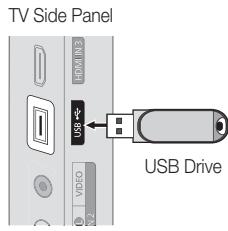
[2] Insert the USB Memory Drive containing the Software into the USB port on the side (or rear) of the TV.
[3] Press the MENU button to display the menu. Press the or button to select "Support", then press the ENTER button.
[4] Press the or button to select "Software Upgrade", then press the ENTER button.
[5] The message "Scanning for USB... It may take more than 1 minute." is displayed.
| Software Upgrade |
| Scanning for USB... It may take more than 1 minute. |
[6] Then, the message "Upgrade Version XXXX to version XXXX? The system will be reset after upgrade." is displayed.
Select "Yes", then press the ENTER button.
And then software is upgraded automatically.
| Software Upgrade | |
| Upgrading now. Please do not disconnect USB before upgrade is completed. | |
| 50% | |
[7] When the Software upgrade is complete; the TV will turn off and then back on by itself.
| Software Upgrade |
| Upgrade is completed. Power will be off 3 seconds from now and turned on automatically. |
3. How to Connect TV and Wireless Audio with Dock
[1] Turn on the TV and Wireless Audio with Dock.
[2] TV menu System Device manager SoundShare Settings Add New Device Switch the option to 'On' from 'Off'
[3] Switch the Function of Wireless Audio with Dock to TV mode.
[4] The message asking whether to proceed the Bluetooth connection is displayed. Then, Select “YES” on the screen.
Brand : SAMSUNG
Model : DA-E651
Category : Bluetooth speaker