20PMIS - Microwaves IFB - Free user manual and instructions
Find the device manual for free 20PMIS IFB in PDF.


| Product Type | Solo Microwave |
| Brand | IFB |
| Model | 20PMIS |
| Capacity | 20 Liters |
| Power Output | 800 Watts |
| Power Consumption | 1200 Watts |
| Control Type | Manual Dial and Timer |
| Display | Mechanical Timer |
| Door Opening | Side Hinged, Push Button Release |
| Interior Light | Yes |
| Turntable | Glass Turntable, 245 mm Diameter |
| Number of Power Levels | 5 |
| Timer | 35 Minute Timer with Bell |
| Cooking Functions | Defrost, Quick Cook, Multi-Stage Cooking |
| Dimensions (W x D x H) | 440 x 350 x 258 mm |
| Cavity Dimensions (W x D x H) | 306 x 306 x 214 mm |
| Weight | 10.5 kg |
| Voltage / Frequency | 230 V / 50 Hz |
| Color | White |
| Child Lock | No |
| Cleaning | Wipe with damp cloth; mild detergent; avoid abrasives |
| Safety Features | Door Interlock System, Automatic Shut-off |
| Spare Parts Availability | Turntable, Fuse, Door Switch available from service centers |
| Repair Index (France) | 7.2 / 10 |
Frequently Asked Questions - 20PMIS IFB
User questions about 20PMIS IFB
0 question about this device. Answer the ones you know or ask your own.
Ask a new question about this device
Download the instructions for your Microwaves in PDF format for free! Find your manual 20PMIS - IFB and take your electronic device back in hand. On this page are published all the documents necessary for the use of your device. 20PMIS by IFB.
USER MANUAL 20PMIS IFB
PLEASE READ THESE OWNER'S
MANUAL INSTRUCTIONS
Please record the details of your microwave oven below for future reference
SERIAL NUMBER:
PURCHASE DATE:
WELCOME AND CONGRATULATIONS
Congratulations on your purchase of a new IFB microwave oven! At IFB Industries Ltd, we are very proud of our product and are completely committed to providing you with the best service possible.
Your satisfaction is our number one priority.
CONTENTS
SPECIFICATIONS 3
PRECAUTIONS TO AVOID POSSIBLE EXPOSURE TO EXCESSIVE MICROWAVE ENERGY 3
PART NAMES 4
INSTALLATION INSTRUCTIONS 4
GROUNDING INSTRUCTIONS 5
RADIO INTERFERENCE 6
SAFETY INSTRUCTIONS ABOUT YOUR MICROWAVE OVEN 6
SAFETY INSTRUCTIONS ABOUT FOOD 7
MICROWAVE COOKING PRINCIPLES 8
FOOD DONENESS SIGN 10
DEFROSTING TIPS 10
COOKWARE SELECTION GUIDE 10
CONTROL PANEL GUID 11
OPERTING INSTRUCTIONS 12
CLEANING AND CARE 17
SERVICE CALL CHECK 18
SPECIFICATIONS\*
| Power Consumption: | 230V~50Hz, 1200W(Microwave) |
| Output: | 800W |
| Operation Frequency: | 2450MHz |
| Outside Dimensions: | 262mm(H)×452mm(W)×365mm(D) |
| Oven Cavity Dimensions: | 210mm(H)×315mm(W)×329mm(D) |
| Oven Capacity: | 20Litres |
| Cooking Uniformity: | Turntable System |
| Net Weight: | Approx.12 kg |
*All data subject to change, and verification by the user with data available on the nameplate of the oven. Complaint of error suffers oblivion.
PRECAUTIONS TO AVOID POSSIBLE EXPOSURE TO EXCESSIVE MICROWAVE
ENERGY
- Do not attempt to operate this oven with the door open since open door operation can result in harmful exposure to microwave energy. It is important not to defeat or tamper with the safety interlocks.
- Do not place any object between the oven front face and the door or allow soil or cleaner residue to accumulate on sealing surfaces.
- Do not operate the oven if it is damaged. It is particularly important that the oven door close properly and that there is no damage to the
a. Door (bent),
b. Hinges and latches (broken or loosened),
c. Door seals and sealing surfaces.
The oven should not be adjusted or repaired by anyone except properly qualified service personnel.
PART NAMES
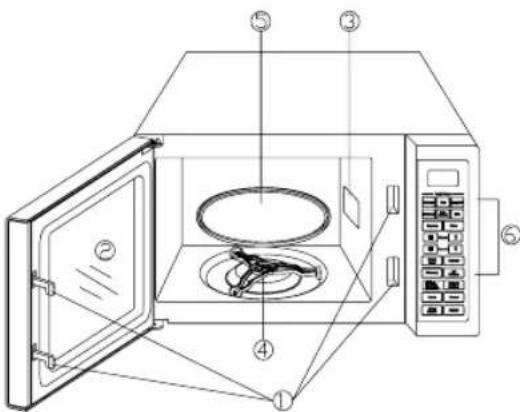
- Door Safety Lock System
- Oven Window
- Wave Guide
- Turntable Roller
- Glass Tray
- Control Panel
| STEPS | INSTRUCTIONS | |
| 1 | This microwave oven must be placed on a flat surface to hold its weight and the heaviest food likely to be cooked in the oven. | 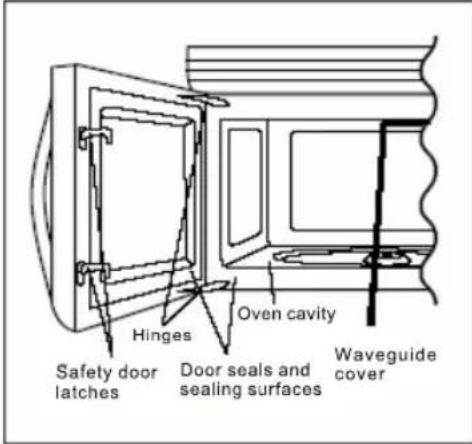 ......figure 1 ......figure 1 |
| 2 | Do not place the oven where heat, moisture or high humidity are generated or near combustable materials. | |
| 3 | Remove all the packaging material from the microwave oven. | |
| 4 | WARNING:Check the oven for any damages, such as misaligned or bent door, damaged door seals and sealing surface, broken or loose door hinges and latches and dents inside the cavity or on the door. If there is any damage, do not operate the oven and contact qualified personnel.Refer figure 1 | |
| 5 | Install turntable roller and glass turntable in their proper position.Refer figure 2 | 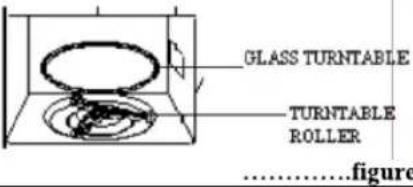 ......figure 2 ......figure 2 |
| 6 | Plug power cord into a dedicated 15 Amps Electrical outlet. | 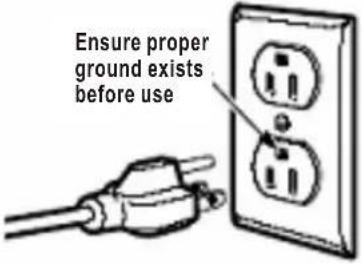 ......figure 3 ......figure 3 |
| 7 | Make sure that the power supply cord is undamaged and does not run under the oven or over any hot or sharp surface. | 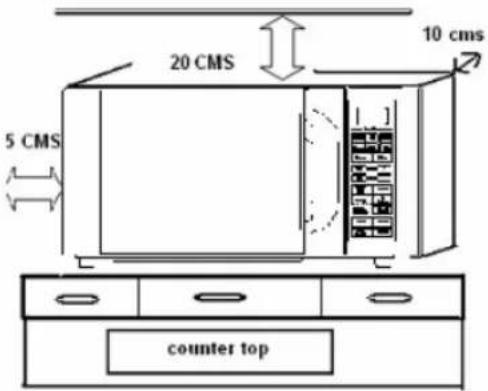 ......figure 4 ......figure 4 |
| 8 | The socket must be easily accessible so that it can be easily unplugged in an emergency. | |
| 9 | For correct operation oven must have sufficient airflow. Allow 20cm of space above the oven, 10cm at back and 5cm at both sides (figure 4).Do not cover or block any openings on the appliance.Do not remove feet. | |
| 10 | Do not use the oven outdoors. |
GROUNDING INSTRUCTIONS
This appliance must be grounded. This oven is equipped with a cord having a grounding wire with a grounding plug. It must be plugged into a wall receptacle that is properly installed and grounded. In the event of an electrical short circuit, grounding reduces risk of electric shock by providing an escape wire for the electric current. It is recommended that a separate circuit serving only the oven be provided. Using a high voltage is dangerous and may result in a fire or other accident causing oven damage.
WARNING Improper use of the grounding plug can result in a risk of electric shock.
NOTE:
If you have any questions about the grounding or electrical instructions, consult a qualified electrician or service person.
Neither the manufacturer nor the dealer can accept any liability for damage to the oven or personal
injury resulting from failure to observe the electrical connection procedures. The wires in this cable main are colored in accordance with the following code:
Green and Yellow = EARTH
Blue = NEUTRAL
Brown = LIVE
RADIO INTERFERENCE
Operation of the microwave oven can cause interference to your radio, TV, or similar equipment.
When there is interference, it may be reduced or eliminated by taking the following measures:
1) Clean door and sealing surface of the oven.
2) Reorient the receiving antenna of radio or television.
3) Relocate the microwave oven with respect to the receiver.
4) Move the microwave oven away from the receiver.
5) Plug the microwave oven into a different outlet so that microwave oven and receiver are on different branch circuits.
SAFETY INSTRUCTIONS ABOUT YOUR MICROWAVE OVEN
When using electrical appliance basic safety precautions should be followed to reduce the risk of burns, electric shock, and fire, injury to persons or exposure to excessive microwave
1) Read all instructions before using the appliance.
2) Use this appliance only for its intended use as described in this manual. Do not use corrosive chemicals or vapors in this appliance. This type of oven is specifically designed to heat, cook or dry food. It is not designed for industrial or laboratory use.
3) Do not operate the oven when empty.
4) Do not rinse the turntable by placing it in water just after cooking.
5) Do not operate this appliance if it has a damaged cord or plug, if it is not working properly or if it has been damaged or dropped. If the supply cord is damaged, it must be replaced by the manufacturer or its service agent or a similarly qualified person in order to avoid a hazard.
6) Do not use the cavity for storage purposes. Do not leave paper products, cooking utensils or food in the cavity when not in use.
7) When using the microwave oven at power levels below 100%, you may hear the magnetron cycling on and off.
8) SAFETY PRECAUTIONS TO REDUCE THE RISK OF FIRE IN MICROWAVE OVEN
a. When heating food in plastic or paper container, keep an eye on the oven due to the possibility of ignition;
b. Remove wire twist-ties from paper or plastic bags before placing bag in oven.
c. If smoke is observed, switch off or unplug the appliance and keep the door closed in order to stifle any flames.
ARCING
If you see arcing, press Stop/Clear pad and correct the problem. Arcing is the microwave term for sparks in the oven.
Arcing is caused by :
a) Metal or foil touching the side of the oven.
b) Foil not molded to food (upturned edges act like antennas).
c) Metal such as twist-ties, poultry pins, or gold rimmed dishes in the microwave.
d) Recycled paper towels containing small metal pieces being used in the microwave.
WARNING
9) Only allow children to use the oven without supervision when adequate instructions have been given so that the child is able to use the oven in a safe way and understands the hazards of improper use.
10) When the appliance is operated in the combination mode, children should only use the oven under adult supervision due to the temperatures generated.
11) It is hazardous for anyone other than a trained person to carry out any service or repair operation which involves the removal of any cover which gives protection against exposure to microwave energy.
12) This appliance is not intended for use by the person (including children) with reduced physical, sensory or mental capabilities, or lack of experience and knowledge, unless they have been given supervision or instruction concerning use of the appliance by a person responsible for their safety.
13) Children should be supervised to ensure that they
SAFETY INSTRUCTIONS ABOUT FOOD
It is normal for the exterior of the microwave oven to be warm to touch when
Cooking or reheating.
Condensation is a normal part of microwave cooking. Room Humidity and the moisture in food will influence the amount of moisture that condenses in the microwave oven.
Generally, covered food will not cause as much condensation as uncovered ones.
Ventilation openings must not be blocked.
LIQUIDS
1) Liquid or other food must not be heated in sealed containers since they are liable to explode.
2) Microwave heating of beverage can result in delayed eruptive boiling, therefore care has to be taken when handling the container.
To reduce the risk of injury to persons:
• Do not overheat the liquid.
• Stir the liquid both before and halfway through heating it.
- Do not use straight-sided containers with narrow necks. Use a wide-mouthed container.
- After heating, allow the container to stand in the microwave oven at least for 20 seconds before removing the container.
- Use extreme care when inserting a spoon or other utensil into the container.
FATS AND OIL
3) Do not deep fry food in the oven. Hot oil can damage oven parts and utensils and even result in skin burns.
EGGS
4) Eggs in their shell and whole hard-boiled eggs should not be heated in microwave ovens since they may explode even after microwave heating has ended.
BABY FOODS
5) The contents of feeding bottles and baby jars should be stirred or shaken and the temperature should be checked before serving in order to avoid burns.
COOKWARES
6) Cooking utensils may become hot because of heat transferred from the heated food. Potholders may be needed to handle the utensil.
7) Utensils should be checked to ensure that they are suitable for use in microwave oven.
POPCORN
Do not pop popcorn in your microwave oven unless in a special
Microwave popcorn accessory or unless you use popcorn labeled for use in microwave ovens.
8) This product is a Group 2 Class B ISM equipment. The definition of Group 2 which contains all ISM (Industrial, Scientific and Medical) equipment in which radio-frequency energy is intentionally generated and/or used in the form of electromagnetic radiation for the treatment of material, and spark erosion equipment. For Class B equipment is equipment suitable for use in domestic establishments and in establishments directly connected to a low voltage power supply network which supplies buildings used for domestic purpose.
MICROWAVE COOKING PRINCIPLES
• More volume = more cooking time
• Colder temperature = more cooking time
• More moisture in food = more cooking time
• More dense foods= more cooking time
• More sugar, fat = less cooking time
• Higher wattage microwave = less cooking time
| INSTRUCTIONS WHILE MICROWAVE COOKING | |
| Because a microwave works like this .... | ....Do this while cooking in a microwave |
| 1.Microwave causes molecules in food to vibrate.This creates heat that cooks the food.Heat from the food warms the container that the food is in | Use potholders to avoid burns. |
| 2. Microwaves cannot pass through metal, but they do pass through glass, ceramic, plastic, or paper. | Hence do not use metal cookwares in microwave mode of cooking. |
| 3. Energy in a microwave oven can be uneven.Some parts of the oven may have more energy and will cook faster than other parts. | Rearrange food while they are cooking. Turn dishes several times during the cooking period. |
| 4. Microwave penetrate food only 3⁄4 to 1 1⁄2 inches. Food cook from the outside of the dish toward the center. | Stir food while cooking. Bring food in the center toward the edge and food at the edge toward the center. |
| 5. Microwave bounce off the sides of the oven. | Arrange food so the thickest parts are toward the side of the oven. |
| 6. A microwave oven has no heating element .This allows you to use paper and plastic products safely in a microwave oven. | Plastic wrap, paper towels,and wax paper can be used to cover food and help reduce spatters. |
| 7. Heat is inside the food,so food does not stop cooking when you turn off the oven. | Remove food from the oven before it is totally cooked .Allow food some standing time to finish cooking. |
| 8. The more food you are cooking ,the less energy there is for each item to absorb. | Larger amounts of food will need a longer time to cook |
| 9. Steam can build up inside confined areas and cause food to explode. | Pierce food with skin (such as egg yolks, potatoes, or sausage) to let steam escape. |
| 10. Many ovens can operate at several different power levels.At lower than 100 percent power levels,the oven turns on and off,allowing times for the heat level to equalize. | The high fat content of cheese attracts microwave .When heating large quantities of cheese, use less than 100 percent power so that outside edges will not get too hot before the inside is heated. |
| 11. Food cooks quickly, and most do not have time to brown. | Use sauces,herbs ,or toppings to make pale food look better. |
MICROWAVE COOKING TECHNIQUES
Stirring
Stir food such as casseroles and vegetables while cooking to distribute heat evenly.
Arrangement
Arrange unevenly shaped foods, such as chicken pieces or chops, with the thicker, meatier parts toward the outside of the turntable where they receive more microwave energy.
Shielding
Shield food with narrow strips of aluminum foil to prevent overcooking (poultry wing-tips, the ends of poultry legs, and corners of square baking dishes). Use only small amount of aluminum foil. Larger amounts can damage your oven.
Turning
Turn food over midway through cooking to expose all parts to microwave energy. This is especially important with large items such as roasts.
Standing
Food cooked in the microwave build up internal heat and continue to cook for a few minutes after the oven stops. Let food stand to complete cooking, especially food such as roasts and whole vegetables. Roasts need this time to complete cooking in the center without overcooking the outer areas.
All liquids, such as soup or hot chocolate, should be shaken or stirred when cooking is Complete. Let liquids stand a moment before serving.
FOOD DONENESS SIGNS INCLUDE:
o Food steams throughout, not just at edge.
- Center bottom of dish is very hot to touch.
o Poultry thigh joints move easily.
o Meat and poultry show no pinkness.
o Fish is opaque and flakes easily with a fork.
DEFROSTING TIPS
Defrosting in a microwave is speedy and hygienic. It prevents the growth of bacteria & retains the natural texture & flavor of the food, offers quick and complete defrosting.
o Foods must be weighed correctly.
o Remove food to be defrosted from the packaging material.
○ Allow the food to stand for few minutes to thaw food completely.
○ Spacing of the food to be thawed should be in circular pattern.
- Place though or bigger pieces on the outer edge of the dish.
- When defrosting stir or turn halfway for even defrosting.
- Separate the pieces as they thaw.
o Remove the small pieces which have been thawed to prevent them from cooking
COOKWARE SELECTION GUIDE
The ideal material for a microwave utensil is transparent to microwave, it allows energy to pass through the container and heat the food.
- Do not use recycled paper products when microwave cooking, as they may contain small metal fragments which may cause sparks and/or fires.
- Round /oval dishes rather than square/oblong ones are recommend, as food in corners tends to overcook.
- Narrow strips of aluminum foil may be used to prevent overcooking of exposed areas. But be careful don't use too much and keep a distance of 1 inch (2.54cm) between foil and cavity.
The list below is a general guide to help you select the correct utensils.
| COOKWARE | MICROWAVE |
| Heat-Resistant Glass | Yes |
| Non Heat-Resistant Glass | No |
| Heat-Resistant Ceramics | Yes |
| Microwave-Safe Plastic Dish | Yes |
| Kitchen Paper | Yes |
| Metal Tray | No |
| Metal Rack | No |
| Aluminum Foil & Foil Containers | No |
CONTROL PANEL
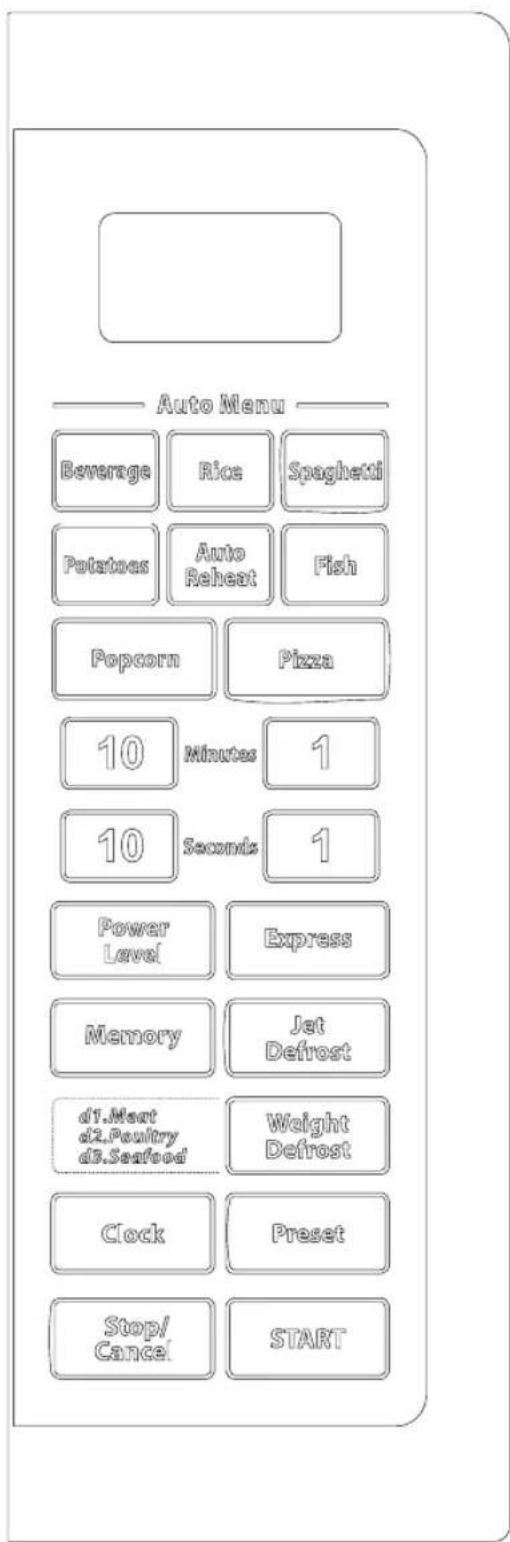
(Also see following pages for more detail.)
DISPLAY
Cooking time, power, indicators and present time are displayed.
QUICK COOK BUTTONS
Instant settings to cook popular foods.
NUMBER PADS
Touch to set times or weights.
POWER LEVEL
Use to set power level. To check power level during time cooking, touch POWER LEVEL pad.
EXPRESS
Touch to start the oven quickly at HIGH power.
MEMORY
When programming the oven to cook by time, use the MEMORY pad when setting both the 1st and the 2nd cooking stage. The respective lights will come on to indicate which stage the oven is operating in.
JET DEFROST
Touch to set defrosting time; the oven automatically divides the defrosting time into periods of alternating defrost and stand times by cycling on and off.
WEIGHT DEFROST
Use to defrost frozen meat, poultry and seafood by weight. The defrosting time and power level are automatically set once the food category and the weight are programmed.
CLOCK
Use to set the time of day or recall the time of day. PRESET
Use to set the oven to start-up at a later time. STOP/CANCEL
Touch to clear the selected power level, cook or defrost times that previously programmed. But the time of day clock cannot be cancelled.
START
Touch to start the cooking or defrosting programs. The cooking indicator light and the oven light will turn on and the cooling fan will operate.
HOW TO SET THE OVEN CONTROLS
Each time a button is touched, a beep will sound to acknowledge the touch.
SETTING THE CLOCK
- Touch CLOCK pad repeatedly to set the clock in 12- or 24-hour cycle.
- Use the number pads to enter the correct time.
- Touch CLOCK pad again.
NOTE:
This is a 12- or 24-hour clock. When the oven was plugged in, "1:01" should have appeared in the display. To reset the time of day, repeat the steps given above. You can check the clock time while cooking is in progress by touching the CLOCK pad.
MICROWAVE COOKING
- Touch POWER LEVEL pad repeatedly to select cooking power.
- Use the number pads to set a cooking time. You can set a cooking time from one second to 99 minutes and 99 seconds.
- Touch START to start cooking
Select power level by pressing the POWER LEVEL. button.
| Press button | MICRO. Cooking power | Applications |
| once | 100% | HIGHBoil water, Boil milk, Cook cereals & cereal products (rice, idlis ,poha etc),Cook vegetables,Roast groundnuts, Roast papads, Prepare soups, curries etc. |
| twice | 80% | MEDIUM HIGHReheat food, Cook food containing cheese or eggs, Cook shell fish /mushrooms etc. |
| 3 times | 60% | MEDIUMBake cakes, Cook custard etc. |
| 4 times | 40% | MED.LOWMelt butter, Melt chocolate etc |
| 5 times | 20% | LOWSoften butter /cheese, Soften ice cream etc |
| 6 times | 0 |
NOTE:
- The respective lights will come on to indicate which stage the oven is operating in. After a cooking or defrosting program has completed, the oven will automatically continue to sound beeps every 2 minutes until the door is opened or the STOP/CANCEL pad is touched.
PRESET
Suppose you want to set the oven to start-up at 2 o'clock.
- Set a cooking program.
- Touch PRESET pad.
- Touch number pads to enter cooking time.
- Touch START pad.
NOTE:
Be sure the time of day clock is set at the correct time before programming PRESET.
You can check the preset time by pressing PRESET; touch STOP/CANCEL to cancel the feature.
EXPRESS
Use this feature to program the oven to microwave food at 100% power conveniently.
Press EXPRESS in quick succession to set the cooking time, the oven will start automatically. The longest cooking time is 99 minutes. After time has elapsed beeps will sound and END is displayed.
JET DEFROST
The longest defrosting time is 99 minutes and 99 seconds.
- Touch JET DEFROST pad.
- Touch the number pads to enter desired defrosting time.
- Touch START pad.
NOTE: During defrosting process, the system will pause to remind user to turn food over, after that, press START to resume.
WEIGHT DEFROST
Suppose you want to defrost 600g shrimp.
- Touch WEIGHT DEFROST. pad 3 times. "d3" will appear in the display.
- Touch number pads to enter food weight.
- Touch START pad.
NOTE: The maximum allowable weight for each category is shown below.
| FOOD CATEGORY | MAXIMUM WEIGHT | DISPLAY |
| Meat | 2300g | d1 |
| Poultry | 4000g | d2 |
| Seafood | 900g | d3 |
During defrosting process, the system will pause to remind user to turn food over, after that, press START to resume.
MULTISTAGE COOKING
The oven has the ability to be programmed to do several consecutive functions.
Suppose you want to set the following cooking program:
① JET DEFROST;
② 1st stage: Cook for 5 minutes at 100%;
③ 2nd stage: Cook for 10 minutes at 60%.
Steps:
- Touch STOP/CANCEL pad.
- Input Jet Defrost program.
- Touch MEMORY pad.
- Input time (5 minutes) and power level (100%) cooking program.
- Touch MEMORY pad.
- Input time (10 minutes) and power level (60%) cooking program.
- Touch START pad.
NOTE: JET DEFROST can only be selected before the cooking stage in a program. It can not be selected between or after stage 1 or stage 2.
CHILD LOCK
Use to prevent unsupervised operation of the oven by little children. The CHILD LOCK indicator will show up on display screen, and the oven can not be operated while the CHILD LOCK is set.
- To set the CHILD LOCK: Press and hold the STOP/CANCEL button for 3 seconds, a beep sounds and lock indicator lights.
- To cancel the CHILD LOCK: Press and hold the STOP/CANCEL button for 3 seconds until lock indicator on display goes off.
AUTO COOK
For food or the following cooking mode, it is not necessary to program the duration and the cooking power. It is sufficient to indicate the type of food that you wish to cook as well as the weight of this food. You may need to turn food over at the middle of cooking time to obtain uniform cooking.
For example, to cook 400g of fish.
- Press the FISH pad repeatedly to select food weight.
- Press START.
| Food | Note |
| Beverage | 1. For beverage and potatoes, parameters on display are not weight but number of servings.2. For spaghetti, add boiling water before cooking.3. The result of auto cook depends on factors such as the shape and size of food, your personal preference as to the doneness of certain foods and even how well you happen to place food in the oven. If you find the result at any rate not quite satisfactory, please adjust the cooking time a little bit accordingly. |
| Rice(g) | |
| Spaghetti (g) | |
| Potatoes | |
| Auto Reheat(g) | |
| Fish(g) | |
| Popcorn(99g) | |
| Pizza(g) |
QUICK RECIPES FOR THE BEGINERS
INSTRUCTIONS BEFORE COOKING RECIPE FROM A RECIPE BOOK
- Read the recipe carefully before cooking.
- Note down the mode of cooking
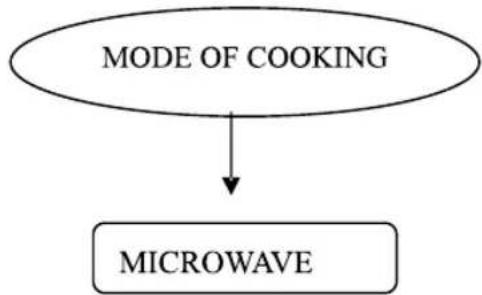
flowchart
graph TD
    A["MODE OF COOKING"] --> B["MICROWAVE"]
- Check the power level, temperature or type of combination in the required mode of cooking.
- Select the container to be used based on the mode of cooking.
- Check the cooking time.
- Then set the cooking programme.
| Example -1 MICROWAVE RECIPE | GUIDELINES FOR MICROWAVE COOKING |
| RECIPE :Tomato SoupIngredients:2 grated carrots,1 kg tomatoes,2 finely chopped onions,a pinch of sugar, 14 teaspoon oftulsi,1 tbsp fresh cream,1 celery stick,salt and pepper totaste.METHOD OF PREPARATION:In the microwave, cook the tomatoes in a bowl for 5minutes and then place in cold water.Remove the skin, puree it and drain the seeds.In another bowl take butter, carrots, onion and celeryand cook for 3 minutes in the microwave.Puree the carrot mixture and mix with the tomato pureeand the seasoning.Continue to cook for 6 minutes.Stirr both the liquid mixtures, cook well in themicrowave for 4 minutes and serve with croutons andcream swirled on top.Serves : 2-3 | PRECOOKING INSTRUCTIONSKeep all the ingredients required for the recipe in a tray as instructed.COOKING INSTRUCTIONSSTAGE 1-In the microwave, cook the tomatoes in abowl for 5 minutes and then place in cold water.1.MODE OF COOKING is MICROWAVE2. POWER LEVEL –not given in the recipe hence you need to selectHIGH POWER LEVEL.3.COOKWARE-Microwave safe plastic or borosil since the mode ofcooking is microwave.4.COOKING TIME-5minutesSTAGE 2-In another bowl take butter, carrots, onionand celery and cook for 3 minutes in the microwave.1.MODE OF COOKING is MICROWAVE2. POWER LEVEL –not given in the recipe hence you need to selectHIGH POWER LEVEL.3.COOKWARE-Microwave safe plastic or borosil since the mode ofcooking is microwave.4.COOKING TIME-3minutesSTAGE 3-Continue to cook for 6 minutes.Cook at high power for 6 minutesStirr both the liquid mixtures, cook well in themicrowave for 4 minutesCook at high power for 4 minutes. |
CLEANING AND CARE
| Disconnect the power cord before cleaning or leave the door open to inactivate the oven during cleaning. | ||
| Cleaning surface | INSTRUCTIONS | |
| EXTERIOR | Clean the outside with mild soap and water; rinse and dry with a soft cloth.Do not use any type of household or abrasive cleaner. | 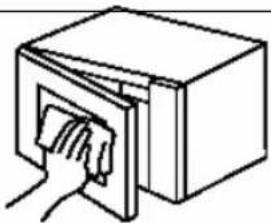 EXTERIOR EXTERIOR |
| DOOR | Wipe the window on both sides with a damp cloth to remove any spills or spatters. Metal parts will be easier to maintain if wiped frequently with a damp cloth. Avoid the use of spray and other harsh cleaners as they may stain, streak or dull the door surface. | |
| TOUCHCONTROLPANEL | Care should be taken in cleaning the touch control panel. If the control panel becomes soiled, open the microwave oven door before cleaning. Wipe the panel with a cloth dampened slightly with water only. Dry with a soft cloth. Do not scrub or use any sort of chemical cleaners. | 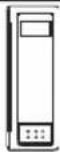 |
| INTERIOR | Cleaning is easy because little heat is generated to the interior surfaces; therefore, there is no baking and setting of spills or spattering. To clean the interior surfaces, wipe with a soft cloth and warm water.DO NOT USE ABRASIVE OR HARSH CLEANERSOR SCOURING PADS. For heavier soil, use baking soda or a mild soap; rinse thoroughly with hot water. The rack can be cleaned with hot soapy water, rinsed and dried. | 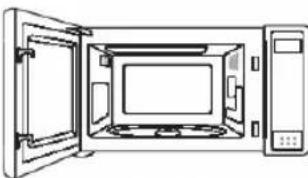 INTERIORWAVE GUIDE INTERIORWAVE GUIDE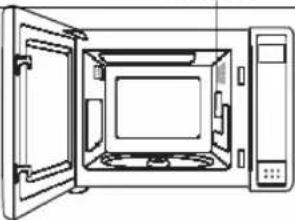 |
| WAVEGUIDECOVER | The waveguide cover is located on the ceiling in the microwave oven cavity. It is made from mica so requires special care. Keep the waveguide cover clean to assure good microwave oven performance. Carefully wipe with a damp cloth any food spatters from the surface of the cover immediately after they occur. Built-up splashes may overheat and cause smoke or possibly catch fire.DO NOT REMOVE THE WAVEGUIDE COVER. | |
| ODORREMOVAL | Occasionally, a cooking odor may remain in the microwave oven.To remove, combine 1 cup water, grated peel and juice of 1 lemon and several whole cloves in a 2-cup glass measuring cup. Boil for several minutes using 100% power. Allow to set in microwave oven until cool. Wipe interior with a soft cloth. |  |
| TURNTABLE/TURNTABLESUPPORT | The turntable and turntable support can be removed for easy cleaning. Wash them in mild, sudsy water; for stubborn stains use a mild cleanser and non-abrasive scouring sponge. They are also dishwasher-proof. Use upper rack of dishwasher. The turntable motor shaft is not sealed, so excess water or spills should be wiped up immediately. | 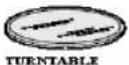 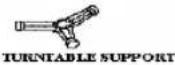 |
SERVICE CALL CHECK
Please check the following before calling for service:
Check that the power cord is securely plugged in.
Check that the door is firmly closed.
Check that the cooking time is set.
Check for a blown circuit fuse or tripped main circuit breaker in your house.
Place one cup of water in a glass measuring cup in the microwave oven and close the door securely.
Operate the microwave oven for one minute at HIGH 100%.
1) Does the microwave oven light come on? YES NO
2) Does the cooling fan work? (Put your hand on the louver above the Interactive Display.) YES ____ NO ____
3) Does the turntable rotate? (It is normal for the turntable to turn in either direction.)
YES ____ NO ____
4) Is the water in the microwave oven warm? YES NO
If "NO" is the answer to any of the above questions and electrical outlet, fuse and/or circuit breaker are functioning properly, then
CONTACT IFB SERVICE CENTER.
DO NOT ATTEMPT TO SERVICE THE OVEN YOURSELF!
WARRANTY
IFB Industries Limited. (“The Company”) warrants to the original domestic purchase of this Microwave Oven. (“Appliances”) that it is free from defects in workmanship & materials. During 12 months from the date of purchase of the new Microwave Oven, all the parts of the Microwave Oven which prove to be defective in workmanship and/or materials shall be replaced or repaired free of charge subject to Limitations of Warranty.
LIMITATIONS OF WARRANTY
- This warranty is not valid in case of the following events.
a) If the warranty card is not fully and properly filled in and signed at the time of purchase / installation by the company's authorised dealer / service engineer.
b) If the completed warranty card is not presented to the authorised personnel at the time of service / repair.
c) If the appliance is not used in accordance with manufacturer's instructions given in the Operating Manual.
d) If the appliance has been serviced, repaired, opened or tampered by any unauthorized personnel.
e) If defects arise / caused by accidents, alteration, misuse, neglect, abuse, substitution of original components with spurious / non-genuine components, attack by household pests / rodents, fire, flood, earth-quake, lighting and / or any other acts of God / natural calamities.
f) If damages occur by improper electrical, circuit outside the appliance or by any defective electrical supply thereof.
g) If the machine serial number on the appliance is defaced, missing or altered.
h) If the appliance is taken out of India. - This warranty does not cover any type of painting, plating including rusting etc or defects thereof.
- This warranty does not cover normal wear and tear of parts.
- Liability for consequential damages is neither accepted nor implied.
- Parts replaced or repaired under this warranty are warranted throughout the remaining of the original warranty period.
- The company is not liable for any delay in the servicing due to reasons beyond the control of the company or any of its authorised service center.
- The company is not applicable, if the Microwave Oven is used for commercial purpose of at places like Institutions, Hotels, Hostels, Hospitals, Community Halls and other similar applications.
- This warranty is issued subject to the jurisdiction of Kolkata courts.
- This is the ONLY WARRANTY covering the appliance given by the Company.
Note: For all types of repairs / maintenance under warranty, the appliance shall be brought to the nearest Company service centre or its authorised service agent.
NOTES:
The Ground Truth image displays a single, solid horizontal line. According to Rule 2 (UNDERSCORE & LINE RULES), if the GT contains lines used for stylistic emphasis or as background elements (like ruled paper), the OCR result must ignore them. The line in the GT is clearly a stylistic/background line, not a placeholder for text. Therefore, the OCR should not have output any underscores. Outputting `____` constitutes an error under Rule 2, as it hallucinates placeholder symbols where none are semantically intended. Hence, the OCR result is inconsistent with the Ground Truth.
The Ground Truth image displays a single, solid horizontal line. According to Rule 2 (UNDERSCORE & LINE RULES), this is a stylistic or background line, not a placeholder underscore. Therefore, the OCR result must ignore it. The provided OCR content is "____", which consists of four underscores. This is an incorrect interpretation of the line as a placeholder, violating the rule that stylistic lines must be ignored. The OCR has hallucinated underscores where none should exist based on the GT's visual context. Hence, the OCR result is inconsistent with the Ground Truth.
[EMPTY]
[EMPTY]
[Non-Text]
[EMPTY]
The Ground Truth image displays a single, solid horizontal line. According to Rule 2 (UNDERSCORE & LINE RULES), this is a stylistic or background line, not a placeholder underscore. Therefore, the OCR result must ignore it and output nothing or only meaningful text. The provided OCR content is "____", which consists of four underscores. This is an incorrect interpretation of the line as a placeholder, violating the rule that stylistic lines must be ignored. The OCR has hallucinated underscores where none should exist in the GT. Therefore, the OCR result is inconsistent with the Ground Truth.
The Ground Truth image displays a single, solid horizontal line. According to Rule 2 (UNDERSCORE & LINE RULES), this is a stylistic or background line, not a placeholder underscore. Therefore, the OCR result must ignore it and output nothing or only meaningful text. The provided OCR content is "____", which consists of four underscores. This is an incorrect interpretation of the line as a placeholder, violating the rule that stylistic lines must be ignored. The OCR has hallucinated placeholder underscores where none exist in the GT. Hence, the OCR result is inconsistent with the Ground Truth.
(一)本次股东大会的召集和召开程序
[EMPTY]
[Non-Text]
[EMPTY]
[EMPTY]
The Ground Truth image displays a single, solid horizontal line. According to Rule 2 (UNDERSCORE & LINE RULES), this is a stylistic or background line, not a placeholder underscore. Therefore, the OCR result must ignore it and output nothing or only meaningful text. The provided OCR content is "____", which consists of four underscores. This is an incorrect interpretation of the line as a placeholder, violating the rule that stylistic lines must be ignored. The OCR has hallucinated placeholder underscores where none should exist in the GT. Hence, the OCR result is inconsistent with the Ground Truth.
The Ground Truth image displays a single, solid horizontal line. According to Rule 2 (UNDERSCORE & LINE RULES), this is a stylistic or background line, not a placeholder underscore. Therefore, the OCR result must ignore it. The provided OCR content is "____", which consists of four underscores. This is an incorrect interpretation of the line as a placeholder, violating the rule that stylistic lines must be ignored. The OCR has hallucinated underscores where none should exist based on the GT's visual context. Hence, the OCR result is inconsistent with the Ground Truth.
[EMPTY]
[Non-Text]
[EMPTY]
[EMPTY]
The Ground Truth image displays a single, solid horizontal line. According to Rule 2 (UNDERSCORE & LINE RULES), this is a stylistic or background line, not a placeholder underscore. Therefore, the OCR result must ignore it and output nothing or only meaningful text. The provided OCR content is "____", which consists of four underscores. This is an incorrect interpretation of the line as a placeholder, violating the rule that stylistic lines must be ignored. The OCR has hallucinated placeholder underscores where none should exist in the GT. Hence, the OCR result is inconsistent with the Ground Truth.
Service Station Copy
Mr./Mrs./Ms
First Name
Middle Name
Last Name
Address:
Pin Code:
Telephone No.: (R)
(0)
E-mail Address:
Model Name:
Serial No.:
Date of Purchase:
Cash Memo No.:
Products Owned by the customer:(Please tick in the appropriate box.)
[NO TEXT]
Washing Machine
Refrigerator
Color TV
100% Clothes Dryer
□Dishwasher
□
Music System
□Oven Toaster Grill
2 Wheeler
Car
Air Conditioner
IFB Industrial Limited Regd.off.: 14 Taratolla Road Kolkata - 700088
- WELCOME AND CONGRATULATIONS
- Your satisfaction is our number one priority.
- CONTENTS
- SPECIFICATIONS\*
- PRECAUTIONS TO AVOID POSSIBLE EXPOSURE TO EXCESSIVE MICROWAVE
- ENERGY
- PART NAMES
- GROUNDING INSTRUCTIONS
- NOTE:
- RADIO INTERFERENCE
- SAFETY INSTRUCTIONS ABOUT YOUR MICROWAVE OVEN
- ARCING
- WARNING
- SAFETY INSTRUCTIONS ABOUT FOOD
- LIQUIDS
- FATS AND OIL
- EGGS
- BABY FOODS
- COOKWARES
- POPCORN
- MICROWAVE COOKING PRINCIPLES
- MICROWAVE COOKING TECHNIQUES
- Stirring
- Arrangement
- Shielding
- Turning
- Standing
- FOOD DONENESS SIGNS INCLUDE:
- DEFROSTING TIPS
- COOKWARE SELECTION GUIDE
- CONTROL PANEL
- DISPLAY
- QUICK COOK BUTTONS
- NUMBER PADS
- POWER LEVEL
- EXPRESS
- MEMORY
- JET DEFROST
- WEIGHT DEFROST
- CLOCK
- START
- HOW TO SET THE OVEN CONTROLS
- SETTING THE CLOCK
- MICROWAVE COOKING
- PRESET
- MULTISTAGE COOKING
- CHILD LOCK
- AUTO COOK
- QUICK RECIPES FOR THE BEGINERS
- INSTRUCTIONS BEFORE COOKING RECIPE FROM A RECIPE BOOK
- CLEANING AND CARE
- SERVICE CALL CHECK
- WARRANTY
- LIMITATIONS OF WARRANTY
- NOTES:
- Service Station Copy
Brand : IFB
Model : 20PMIS
Category : Microwaves