
PWMA60UB - Telephone Pyle - Free user manual and instructions
Find the device manual for free PWMA60UB Pyle in PDF.


| Product Type | Cordless Phone |
| Brand | Pyle |
| Model | PWMA60UB |
| Dimensions (approx.) | 200 x 180 x 90 mm (handset base) |
| Weight (approx.) | 0.5 kg (handset base) |
| Power Supply | AC adapter 5V DC, 600 mA |
| Battery | Rechargeable Ni-MH 2.4V, 400 mAh |
| Display | LCD backlit display with caller ID |
| Keypad | Backlit keypad with volume control |
| Speakerphone | Built-in handsfree speaker |
| Ringer | Adjustable ringer volume and melody |
| Call Features | Caller ID, call waiting, redial, mute |
| Phonebook | Up to 50 contacts |
| Intercom | Multi-handset intercom and call transfer |
| Range | Up to 300 meters outdoors |
| Additional Handsets | Expandable up to 5 handsets |
| Maintenance | Wipe with a soft, dry cloth; do not use liquids |
| Safety | Keep away from water, heat sources, and direct sunlight |
| Spare Parts / Repairability | Replacement battery and charging base available |
| General Information | Designed for home and office use; FCC compliant |
Frequently Asked Questions - PWMA60UB Pyle
User questions about PWMA60UB Pyle
0 question about this device. Answer the ones you know or ask your own.
Ask a new question about this device
Download the instructions for your Telephone in PDF format for free! Find your manual PWMA60UB - Pyle and take your electronic device back in hand. On this page are published all the documents necessary for the use of your device. PWMA60UB by Pyle.
USER MANUAL PWMA60UB Pyle
natural_image
Black PYLE audio amplifier with earbuds and microphone, no visible text or symbols on device body☆☆☆☆☆☆☆
□○□★!☆□▼○○★▲○○■☆星□★★★□▲○
Voice Amplifier & Microphone Headset with Built-in Rechargeable Battery & MP3/USB Playback
User Manual
INTRODUCTION
Before operating, please read this instruction manual carefully and thoroughly in order to understand the correct operating procedures to achieve the best results. Keep this manual in a safe place for quick reference in the event that a question arises. We try our best to make it accurate and integrated, errors may still exist in this manual, so please tell us your suggestions. The contents of this manual are subject to change without prior notice as a result of continuing improvements to the instrument's performance and functionality.
FEATURES
- Compact, Portable & Powerful
• PA Speaker Amplifier Projects Your Voice - Includes Headset Microphone
• USB Flash Drive Memory Reader
• MP3 Digital Audio File Playback Compatibility
• Used for Karaoke, Crowd Control, Presentations
• Built-in Rechargeable Battery, Up to 8+ Hour Life
• Aux (3.5mm) Input & Microphone Jack - Connect & Stream Audio from External Devices
- Rotary Volume Control
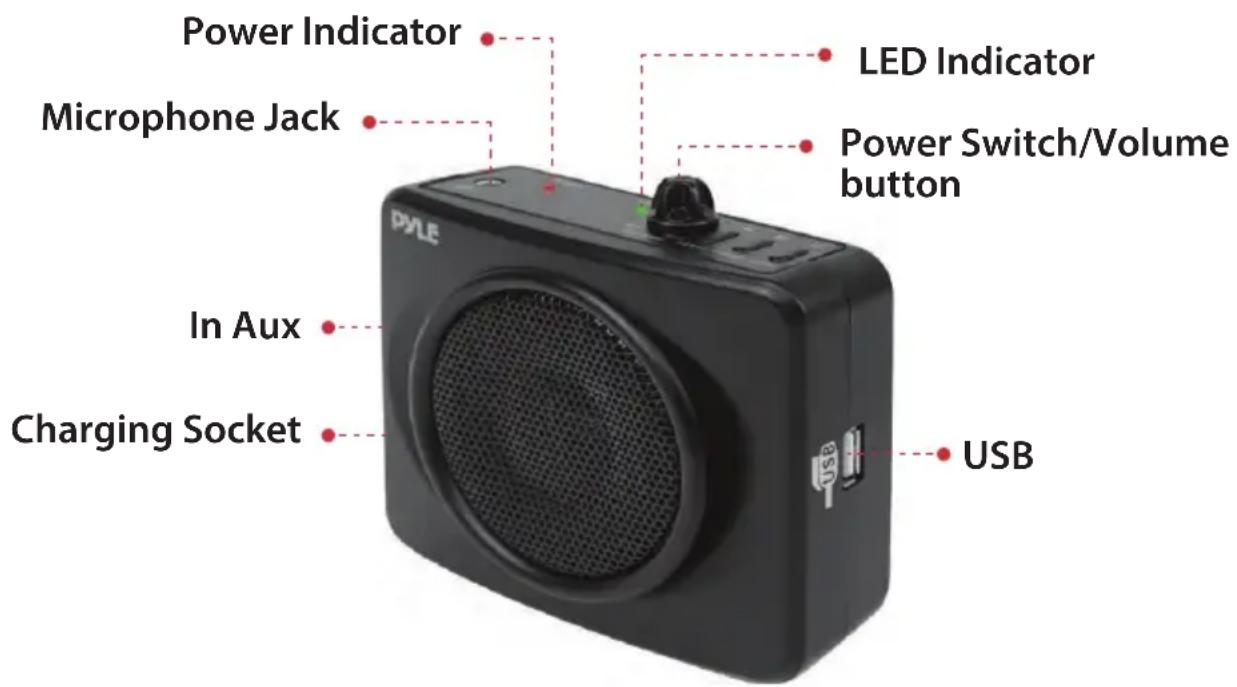
BATTERY CHARGING PROCEDURES
- Please charge the battery if the LED light is dim or off.
- Turn off the voice amplifier, and then insert the plug of the power adapter into charging socket of the voice amplifier, plug the power adapter to 220V power source.
- When charging process is complete, the red LED turns to green.
- To extend the battery life, please charge after the battery is used out.
WEARING YOUR VOICE AMPLIFIER
With the attached waistband, you can fix the voice amplifier to your waist in front or back of your body. You can adjust the length of the waistband.
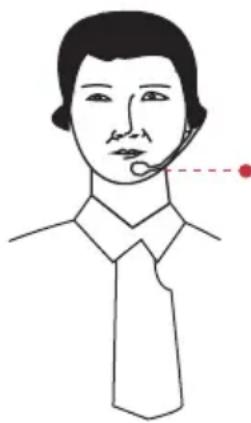
Wear microphone as the image shown. The two hole inside the sponge must aim at your mouth. The suitable distance between the microphone and the mouth is 20-30 millimeter. Insert the plug of the microphone into the right hole of the voice amplifier.
natural_image
Line drawing of a person wearing a shirt and tie, with a dotted line indicating a measurement or location point (no text or symbols present)Roughly 2-3 cm
Attentions before wearing the Ear-hanging microphone:
Before wearing, please don't turn ON the power and volume.

There is a white line on the end of microphone, please position against your mouth.
To achieve a maximum effect, please use the provided microphone. Cutting in and pulling out the plug often may cause bad connection between microphone and amplifier.
HOW TO USE
- Fix the voice amplifier to your body as image shown.
- Wear the microphone to your head and insert the microphone plug into the voice amplifier. Turn the power switch clockwise, then LED light is lightened, that means the amplifier is working. Turn the volume button clockwise or counter-clockwise to increase or decrease the volume. Decrease the volume to avoid noise.
BATTERY CHANGE
- Don't change the battery by yourself if under warranty
- The battery provided can work for long period of time and also to avoid the damaging the voice amplifier
- Be sure that the polarity is correct when you change the battery
FAQ
Question: Why the voice amplifier produce so much noises?
Answer: Wear the microphone and adjust. Decreasing volume can avoid the noise effectively.
Question: How long does it take to charge the battery?
Answer: Generally about 3-4 hours is needed for battery charge, temperature and other factors may change the time.
Question: How long is the life of the battery, can I change the battery one year later.
Answer: The battery life is about 2-4 years, and it is changeable, please get in touch with us or our dealers.
Question: Why my voice amplifier doesn't work?
Answer: Please check if:
- Your microphone is inserted properly
- Batteries are low
- The voice amplifier is not turned ON
Please get in touch with us or our dealers if you still can't solve it by yourself.
WHAT'S IN THE BOX:
- Compact PA Speaker Amplifier
- Headset Microphone
- Power Adapter
- Waist-Band Strap
- Belt Clip
TECHNICAL SPECS:
• MAX Power Output: 50 Watt
- S/N Ratio: 53dB
• Built-in Rechargeable Battery: 7.4V Lithium, 1600mAh
- Headset Microphone Cable Length: 3.3' ft.
- Power: 110/240V
- Dimensions (L x W x H): 3.9" x 1.8" x 3.6"

natural_image
Black PYLE audio amplifier device with earbuds and microphone, no visible text or symbols on bodyPYLE
PyleUSA.com

natural_image
Illustration of a laptop with a red checkmark on screen (no text or symbols)VISIT US ONLINE:
Have a question?
Need service or repair?
Want to leave a comment?
PyleUSA.com/ContactUs
PYLE
Questions? Issues?
We are here to help!
Phone: (1) 718-535-1800
Email: support@pyleusa.com

Brand : Pyle
Model : PWMA60UB
Category : Telephone