
792 - Television ORION - Free user manual and instructions
Find the device manual for free 792 ORION in PDF.


Pick your language and provide your email: we'll send you a specifically translated version.
| Product Type | CRT Television |
| Brand | Orion |
| Model | 792 |
| Screen Size | Approximately 20 inches (51 cm) |
| Display Technology | Cathode Ray Tube (CRT) |
| Resolution | 576i (PAL) / 480i (NTSC) |
| Dimensions (W x H x D) | Approx. 500 x 420 x 450 mm |
| Weight | Approximately 15 kg |
| Power Supply | AC 220-240V, 50Hz |
| Power Consumption | Approximately 80 W |
| Audio/Video Inputs | SCART (RGB/AV), Composite (RCA), RF Antenna |
| Audio Output | Built-in speaker, headphone jack |
| Tuner | Analog (PAL/SECAM/NTSC) with 99 channel presets |
| Remote Control | Infrared remote with numeric keypad |
| On-Screen Display | Multilingual menu (including English, German, etc.) |
| Teletext | Yes, with up to 100 pages |
| Child Lock | Yes, via menu or keys |
| Safety Features | Automatic shut-off, anti-tip bracket provision |
| Maintenance | Clean with soft dry cloth; avoid liquids |
| Spare Parts Availability | Remote control, SCART cables, power cord (generic) |
| Documentation | User manual (54 pages) available in PDF |
Frequently Asked Questions - 792 ORION
How do I connect external devices like a DVD player or game console?
Use the SCART or RCA composite inputs on the back of the TV. Select the corresponding input source using the Source or AV button on the remote control.
What should I do if the remote control is not working?
First, check if the batteries are installed correctly and have power. Try pointing the remote directly at the TV’s infrared sensor. If still not working, replace the batteries or use the buttons on the TV itself.
How can I improve the picture quality?
Adjust the brightness, contrast, and color settings from the on-screen menu. Ensure the antenna or input source signal is strong. For a better image, use a SCART connection instead of RF.
Why is there no sound?
Check if the volume is muted or turned down. Verify that the audio cables are properly connected. If using external speakers, ensure they are powered on. Try a different source to isolate the issue.
How do I program channels?
Press the Menu button, go to Tuning or Channel Setup, and select Auto Search to scan for available channels. You can also manually add or delete channels using the numeric keys (0-9 for single-digit, 10-99 for two-digit).
Can I use this TV in a different country with a different voltage?
This TV is designed for AC 220-240V only. Using it with a different voltage without a suitable voltage converter may damage the TV. Check the label on the back for exact specifications.
How do I clean the TV screen?
Use a soft, lint-free cloth slightly dampened with water. Do not spray liquids directly on the screen. Avoid using abrasive cleaners or paper towels as they may scratch the surface.
What is the function of the SUB button?
The SUB button (Subtitle) toggles teletext subtitles or extra information. It may also be used for secondary functions depending on the menu context.
My TV turns off randomly. What could be the cause?
This could be due to the Sleep Timer or Auto Off feature. Check the timer settings in the menu. If it continues, the issue may be internal; consult a qualified technician.
Where can I find the user manual?
The user manual is available for free download in PDF format on notice-facile.com. You can also request a translated version via email.
User questions about 792 ORION
0 question about this device. Answer the ones you know or ask your own.
Ask a new question about this device
No questions yet. Be the first to ask one.
Download the instructions for your Television in PDF format for free! Find your manual 792 - ORION and take your electronic device back in hand. On this page are published all the documents necessary for the use of your device. 792 by ORION.
USER MANUAL 792 ORION
Audio/Video Anschlüsse....49
natural_image
Illustration of a vintage computer setup with a power outlet, paper sheet, and wiring (no text or symbols)natural_image
Illustration of a computer monitor with X marks on top and a stack of books with X marks on the right side (no text or symbols)natural_image
Illustration of a computer monitor with a cup on top emitting a lamp, connected to an electrical plug (no text or symbols present)natural_image
Illustration of a hand using a screwdriver to test a computer monitor on a power outlet (no text or symbols)natural_image
Illustration of hands holding a handheld device with buttons and wires (no text or symbols visible)natural_image
Illustration of a satellite connected to an electrical device with lightning bolts and power plug (no text or symbols)natural_image
Diagram of a computer monitor connected to an electrical outlet via cable (no text or symbols)Rückseite

natural_image
Simple line drawing of a three chasing recycling symbol (no text or labels)natural_image
Illustration of a hand using a power plug to test electrical components, with a magnified view showing a switch and resistor (no text or symbols present)natural_image
Illustration of a person using a device to interact with an antenna and a vintage computer (no text or symbols present)natural_image
Illustration of hands holding a handheld device with buttons and a clip (no text or symbols visible)natural_image
Illustration of a hand interacting with a vertical grid pattern, no text or symbols present
natural_image
Two soccer players in action, one kicking the ball while the other assists (no text or symbols visible)natural_image
Illustration showing a hand interacting with a touchscreen device and a textured surface with a starburst symbol (no text or symbols present)natural_image
Illustration of a hand interacting with a keyboard (no text or symbols visible)
Programm 0-9
natural_image
Illustration of a hand pressing down on a film strip (no text or symbols visible)
Programm 10-99
Am Gerät:
natural_image
Illustration of a hand pointing at a vertical grid pattern (no text or symbols)
natural_image
Two soccer players in action, one kicking the ball while the other pushes the ball (no text or symbols visible)natural_image
Hand pointing at a control panel with buttons (no text or symbols visible)


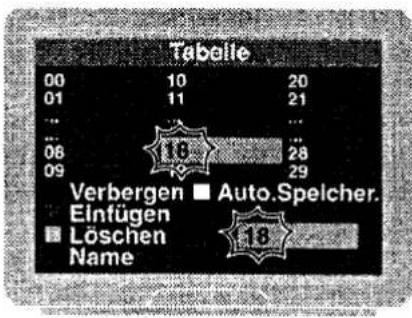

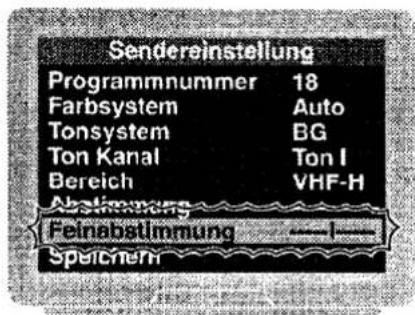


Am Gerät:
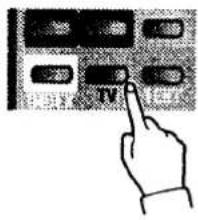
1 - SUB-Taste drücken.
natural_image
Illustration of a hand pointing at a vertical grid of rectangular blocks (no text or symbols)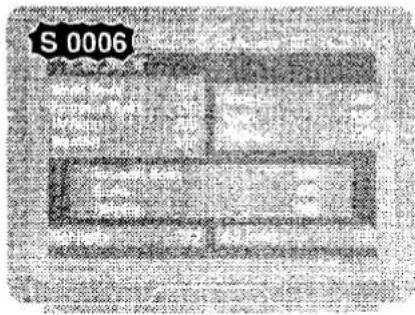
Audio/Video Anschlüsse
D
382.004

natural_image
Two soccer players in action, one blocking the ball while the other assists (no text or symbols visible)

Table of contents
Click a title to access it
Manual assistant
Powered by Anthropic
Waiting for your message
Product information
Brand : ORION
Model : 792
Category : Television