
ZM-K600S - Keyboard ZALMAN - Free user manual and instructions
Find the device manual for free ZM-K600S ZALMAN in PDF.


| Product Type | Keyboard |
| Brand | Zalman |
| Model | ZM-K600S |
| Interface | USB Wired |
| Keyboard Layout | Full-size (104 keys) |
| Key Type | Membrane |
| Backlight | Single color (blue or red) |
| Dimensions (W x D x H) | 445 x 130 x 35 mm |
| Weight | 950 g |
| Cable Length | 1.8 m |
| Operating System Support | Windows, macOS, Linux |
| Power Source | USB (5 V) |
| Polling Rate | 1000 Hz |
| Anti-ghosting | Yes (26 keys) |
| Multimedia Keys | Yes (via FN) |
| Water Resistance | Spill-resistant design |
| Keycap Material | ABS |
| Cleaning | Disconnect and use compressed air or soft cloth |
| Safety | CE, FCC, RoHS certified |
| Spare Parts & Repairability | Keycaps and cable available; limited internal repairability |
Frequently Asked Questions - ZM-K600S ZALMAN
User questions about ZM-K600S ZALMAN
0 question about this device. Answer the ones you know or ask your own.
Ask a new question about this device
Download the instructions for your Keyboard in PDF format for free! Find your manual ZM-K600S - ZALMAN and take your electronic device back in hand. On this page are published all the documents necessary for the use of your device. ZM-K600S by ZALMAN.
USER MANUAL ZM-K600S ZALMAN
World fastest Gaming Keyboard!
ZIM-X600S
[ ZM-K600S - Main Features ]
- World first dual mode (Game & Desktop) support!
- World first membrane keyboard supporting unlimited multi-key input (n-Key rollover)
- Both PS/2 and USB support the unlimited multi-key input (n-Key rollover)
- Ultra Polling! Real 1,000 Hz polling rate support
- World fastest Repeat speed support
- 10 steps Repeat Speed Control
- Volume Control (Volume +/-, Mute)
- Human-engineering comfortable palm-rest
- Red color extra key caps (8EA) and Key cap Remover
[ How to change the repeat speed ]
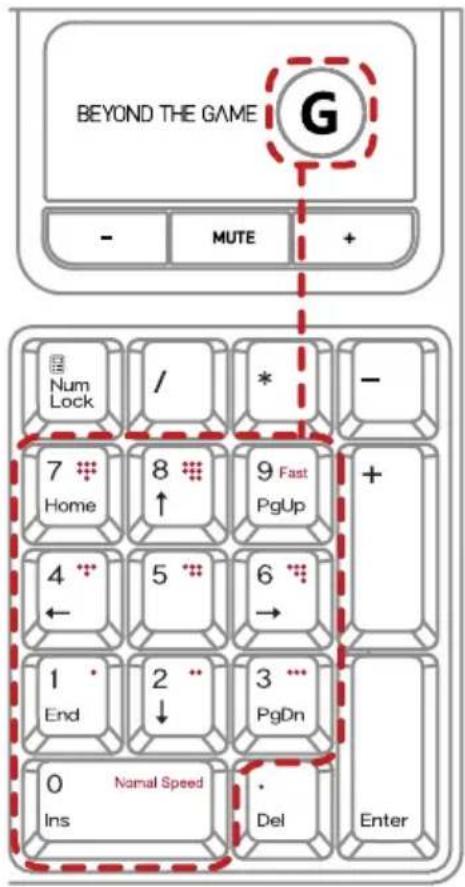
- Standard
Keep pressing 'G' key, and then press '0' key on the Num-pad.
- Fast
Keep pressing 'G' key, and then press '1\~8' key on Num-pad step by step.
- Fastest
Keep pressing 'G' key, and then press '9' key on Num-Pad.
Caution
* Repeat Speed Control and fastest speed work only under the game mode.
* It can cause malfunction in some games due to the fast speed. In that case, please low the speed or set Standard.
World fastest Gaming Keyboard!
ZM-X600S
[ZM-K600S - 主な機能]
World fastest Gaming Keyboard!
ZIM-X600S
Brand : ZALMAN
Model : ZM-K600S
Category : Keyboard